Category: Action Bar Mods
Addon Information
Works with 3.2
Download Latest Version.
To add favorites please register for a free account. If you already have one you need to login. How do I install this? (FAQ)
Author:
Version:
30200.1
Date:
08-06-2009 12:11 AM
Size:
9.05 Kb
Downloads:
22,486
Favorites:
220
MD5:
Pictures
Click to enlarge
Geist
Geist Button Guide
13 Button Geist Layout
Geist   Popular! (More than 5000 hits)
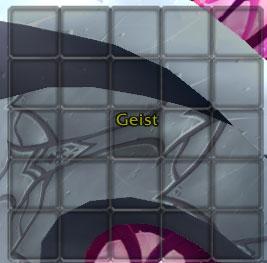
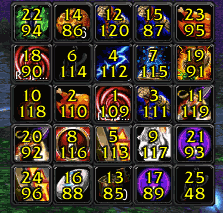
Geist provides a twenty-five button action bar that displays under the mouse cursor at a keypress for quick and convenient access.

How to use: Bind a key to Geist using the keybinding interface in the menu. Geist will display whenever that key is pressed with the mouse over the center button.

ButtonFacade support can be enabled with an optional addon.
  Change Log - Geist
! - Feature Addition
* - Feature or Code Change
^ - Bug Fix
% - Known Bug

Version 30200.1 - 2009-08-05
! - Toggle mode. Enabling this allows you to leave Geist open. (Thanks Tepel!)
* - ToC bump.
* - No longer requires UI reload for the guide.
* - Miscellaneous internal code changes. This sucker needs a rewrite.
% - The German translation is out of date.
% - Disabling toggle mode while Geist is open will cause the open/close behaviour to reverse.

Version 30100.3 - 2009-06-10
! - Added WoWI MMOUI Minion tag to ToC.
^ - Finally, finally fixed the scale bug on new installs. Srsly. Defaults to 1 instead of user scale.
* - ButtonFacade support removed for the time being, pending rewrite. If anyone wants to write it in, feel free.

Version 30100.2 2009-04-23
^ - Finally fixed the scale bug on new installs.
  Optional Files - Geist
File Name
Version
Size
Author
Date
Type
30200.1
21kB
08-06-2009 12:20 AM
Addon
  Archived Versions - Geist
File Name
Version
Size
Author
Date
30100.3
9kB
Cidrei
06-10-2009 03:31 PM
30100.2
9kB
Cidrei
04-23-2009 07:01 PM
30100.1
9kB
Cidrei
04-23-2009 04:04 PM
30000.4
9kB
Cidrei
11-17-2008 06:16 PM
  Comments - Geist
Post A Reply Comment Options
Old 11-23-2009, 06:48 PM  
Cidrei
Premium Member
Premium Member
Interface Author - Click to view interfaces

Forum posts: 5
File comments: 55
Uploads: 11
Quote:
Originally posted by twistdshade
Having the same overlap issue on my druid with dominos.

I noticed the addon uses random action bar buttons.. it's not just buttons from the last couple of bars, so there's no way to completely avoid it by not using certain bars.

Anyways.. I'm using OPie.. Similar addon but it doesn't use existing buttons.
Geist's default buttons are based on what buttons the default UI uses. The default IDs used for druids and (especially) warriors are a compromise because of the default form and stance bars. You can change the IDs Geist uses, although I'll readily admit it's not the easiest thing to do with the commands.
Cidrei is offline Report comment to moderator   Edit/Delete Message Reply With Quote
Old 11-23-2009, 06:43 AM  
twistdshade
A Murloc Raider

Forum posts: 5
File comments: 47
Uploads: 0
Quote:
Originally posted by Cidrei
There are known overlap problems with Geist and default action buttons for several classes. This is unfortunate but unavoidable while still using action ids. To the best of my knowledge, the current setup avoids using buttons already in use by the Blizzard UI. Are you using a different action bar mod?
Having the same overlap issue on my druid with dominos.

I noticed the addon uses random action bar buttons.. it's not just buttons from the last couple of bars, so there's no way to completely avoid it by not using certain bars.

Anyways.. I'm using OPie.. Similar addon but it doesn't use existing buttons.

Last edited by twistdshade : 11-23-2009 at 06:43 AM.
twistdshade is offline Report comment to moderator   Edit/Delete Message Reply With Quote
Old 10-21-2009, 02:59 PM  
Cidrei
Premium Member
Premium Member
Interface Author - Click to view interfaces

Forum posts: 5
File comments: 55
Uploads: 11
Quote:
Originally posted by nightcracker
Hmm, I have problems with buttons on the actionbars being linked to geist with druid and warrior. Maybe you should take a loot at GeistButtons.lua?
There are known overlap problems with Geist and default action buttons for several classes. This is unfortunate but unavoidable while still using action ids. To the best of my knowledge, the current setup avoids using buttons already in use by the Blizzard UI. Are you using a different action bar mod?
Cidrei is offline Report comment to moderator   Edit/Delete Message Reply With Quote
Old 10-21-2009, 04:51 AM  
nightcracker
A Chromatic Dragonspawn
 
nightcracker's Avatar
Interface Author - Click to view interfaces

Forum posts: 160
File comments: 63
Uploads: 11
Hmm, I have problems with buttons on the actionbars being linked to geist with druid and warrior. Maybe you should take a loot at GeistButtons.lua?
nightcracker is online now Report comment to moderator   Edit/Delete Message Reply With Quote
Old 09-15-2009, 01:55 AM  
Cidrei
Premium Member
Premium Member
Interface Author - Click to view interfaces

Forum posts: 5
File comments: 55
Uploads: 11
Which functionality was lost? The old method had the problem of not working with modifiers keys and was only implemented as a stopgap while a secure keybind method was unavailable.
Cidrei is offline Report comment to moderator   Edit/Delete Message Reply With Quote
Old 09-13-2009, 07:24 PM  
Spahut
A Flamescale Wyrmkin

Forum posts: 137
File comments: 111
Uploads: 0
Quote:
Originally posted by Cidrei
It it makes you feel better there was at one time a keybinding interface directly in Geist that was later removed in favor of the Blizzard one.
Doesn't make me feel better, we lost a lot of functionality with that.
Spahut is offline Report comment to moderator   Edit/Delete Message Reply With Quote
Old 08-21-2009, 04:14 PM  
Cidrei
Premium Member
Premium Member
Interface Author - Click to view interfaces

Forum posts: 5
File comments: 55
Uploads: 11
It it makes you feel better there was at one time a keybinding interface directly in Geist that was later removed in favor of the Blizzard one.

Last edited by Cidrei : 09-05-2009 at 07:29 PM.
Cidrei is offline Report comment to moderator   Edit/Delete Message Reply With Quote
Old 08-19-2009, 07:42 PM  
Zaru
A Kobold Labourer

Forum posts: 0
File comments: 14
Uploads: 0
I cannot get this addon to work or do anything.

I have tried every function and it just keeps giving me the commands list.
I type /geist assignX and it gives me the commands list, I type /geist assignX Y and it gives me the commands list. I type the scale reset it says that it's reset but won't let me do anything at all.

I was using Bartender then switched to Dominos and same thing. I tried it with the stock Blizz bars and it's the same.

I searched the posts here and @Curse and found nothing that has helped.

Your instructions on how to key bind are not very clear at all and sound more like a riddle then an explanation...imo.

Quote:
How to use: Bind a key to Geist using the key binding interface in the menu. Geist will display whenever that key is pressed with the mouse over the center button.
I don't see the keybinding interface nor do I see a menu other than the one that keeps coming up in the chat box window. Since I cannot get the window to come up the second part is baffling to me.

I see no GUI at all, no boxes, nothing. any ideas on how to get this working?

EDIT - Never mind, I am an idiot apparently. I hadn't realized that I needed to set the key bind through the Blizzard Key binding menu accessed by pressing Escape...doh!

I thought I had to set the key bind through Geist...of course the simplest solution is correct...I am thoroughly embarrassed....sorry.

I'll leave this post in case anyone else has the same problem...

Last edited by Zaru : 08-19-2009 at 08:27 PM.
Zaru is offline Report comment to moderator   Edit/Delete Message Reply With Quote
Old 07-02-2009, 06:56 AM  
bizzy100
A Kobold Labourer

Forum posts: 0
File comments: 12
Uploads: 0
Quote:
Originally posted by Cidrei
How do you mean? The buttons follow the Blizzard option in that regard. If you have the buttons locked in the interface, they should be locked in Geist as well.

@Tepel: Thanks a lot! I'll stick that in the next version. Need to do some 3.2 testing anyway.
Thank you, I use Bartender and I totally forgot about the Blizzard option.

Great addon!
bizzy100 is offline Report comment to moderator   Edit/Delete Message Reply With Quote
Old 07-01-2009, 05:27 PM  
Cidrei
Premium Member
Premium Member
Interface Author - Click to view interfaces

Forum posts: 5
File comments: 55
Uploads: 11
Quote:
Originally posted by bizzy100
Can anybody tell me how to lock the buttons, please?

Thank you in advance.
How do you mean? The buttons follow the Blizzard option in that regard. If you have the buttons locked in the interface, they should be locked in Geist as well.

@Tepel: Thanks a lot! I'll stick that in the next version. Need to do some 3.2 testing anyway.

Last edited by Cidrei : 07-01-2009 at 05:28 PM.
Cidrei is offline Report comment to moderator   Edit/Delete Message Reply With Quote
Old 07-01-2009, 04:23 AM  
bizzy100
A Kobold Labourer

Forum posts: 0
File comments: 12
Uploads: 0
Can anybody tell me how to lock the buttons, please?

Thank you in advance.
bizzy100 is offline Report comment to moderator   Edit/Delete Message Reply With Quote
Old 06-15-2009, 02:08 PM  
Tepel
A Kobold Labourer

Forum posts: 1
File comments: 2
Uploads: 0
Quote:
Originally posted by Cidrei
When you say one of the mouse buttons, do you mean middle-click for example? I've never actually tested it with one of the mouse buttons.

Go ahead and submit a patch if you'd like. I know other people would like the toggle behavior as well, and then I can roll it in whenever the next version comes out (3.2 maybe).
I actually use one of the buttons on the side of my mouse. Anyway, I didn't know where to post the patch so I put it up on nopaste, hope you don't mind.

http://nopaste.com/p/aR6V5thzk/txt

Oh, and I didn't do the german translations because, well, my german is bad

Last edited by Tepel : 06-15-2009 at 02:10 PM.
Tepel is offline Report comment to moderator   Edit/Delete Message Reply With Quote
Old 06-14-2009, 10:42 PM  
Cidrei
Premium Member
Premium Member
Interface Author - Click to view interfaces

Forum posts: 5
File comments: 55
Uploads: 11
Quote:
Originally posted by Tepel
I've been using Geist for a while now and I love it. There's one thing that keeps bugging me though. When I bind the Geist button to one of my mouse buttons I can't click any of the buttons on the Geist frame.
To get around this issue I usually edit GeistFrame.lua and remove one of the two events (AnyUp, AnyDown). This gives me toggle behaviour and solves the issue with the mouse. Maybe you could incorporate this in your build of Geist (so I don't have to do it everytime I update )
If necessary I can supply you with a patch, but it's only 10 lines if you include the modifications to the command line.
When you say one of the mouse buttons, do you mean middle-click for example? I've never actually tested it with one of the mouse buttons.

Go ahead and submit a patch if you'd like. I know other people would like the toggle behavior as well, and then I can roll it in whenever the next version comes out (3.2 maybe).
Cidrei is offline Report comment to moderator   Edit/Delete Message Reply With Quote
Old 06-14-2009, 11:59 AM  
Tepel
A Kobold Labourer

Forum posts: 1
File comments: 2
Uploads: 0
I've been using Geist for a while now and I love it. There's one thing that keeps bugging me though. When I bind the Geist button to one of my mouse buttons I can't click any of the buttons on the Geist frame.
To get around this issue I usually edit GeistFrame.lua and remove one of the two events (AnyUp, AnyDown). This gives me toggle behaviour and solves the issue with the mouse. Maybe you could incorporate this in your build of Geist (so I don't have to do it everytime I update )
If necessary I can supply you with a patch, but it's only 10 lines if you include the modifications to the command line.
Tepel is offline Report comment to moderator   Edit/Delete Message Reply With Quote
Old 06-11-2009, 03:27 PM  
Cidrei
Premium Member
Premium Member
Interface Author - Click to view interfaces

Forum posts: 5
File comments: 55
Uploads: 11
Quote:
Originally posted by Devtech
ya now its not even on the list ... it was on the list last night.

Edit:nvm just saw why.
I'm working on getting it working again. For some reason I can get the buttons to skin, but I can't get it to stick.
Cidrei is offline Report comment to moderator   Edit/Delete Message Reply With Quote
Post A Reply


Category Jump:


The Network:
EQInterface | EQ2Interface | LoTROInterface | MMOInterface | War.MMOUI | WoWInterface | VGInterface | Allakhazam | Thottbot | Wowhead | Zam


©2009 MMOUI / ZAM Network
vBulletin - Copyright ©2000 - 2009, Jelsoft Enterprises Ltd.


