Fizzle showing inverted percentage. 0% = no damage taken.
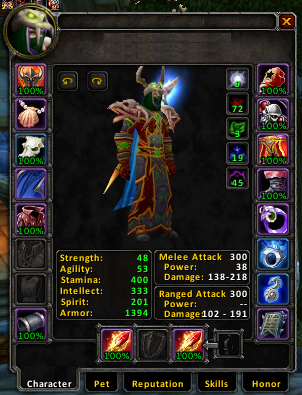
Fizzle showing Durability as a percentage.
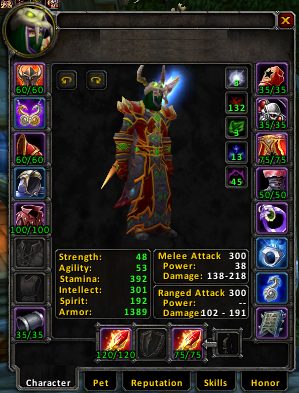
Fizzle showing regular durability numbers.
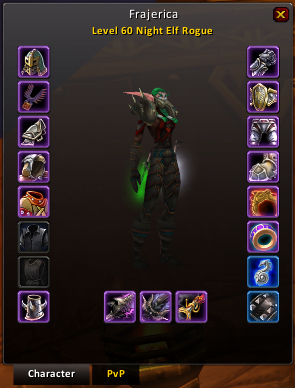
Quality borders on a random rogue I was inspecting.
Fizzle
Fizzle
Description
Fizzle is an addon that will show you an items durability values above the item in your character frame.
It can show you either the raw values, or a percentage value.
Why Fizzle? Well, I suck at coming up with names is why.
Slash Commands /fizzle or /fizz
percent - Toggle between raw and percentage display.
border - Toggles the quality colours on the border of items.
invert - Changes how the durability is shown. Eg. 0% = Max durability, 100% = No durability.
hidetext - Hides the durability text, incase you just want the item quality colouring.
showfull - Toggles showing durability when full. If enabled, durability text is always shown, if disabled, durability text is only shown if durability is less than 100%
inspect - Toggles the inspection module.
Change Log - Fizzle
2009-05-22: v1.3.2
Fix for broken inspection since 3.1
Fix options not taking effect until closing/reopening the character frame.
2009-04-15: v1.3.1
TOC bump for 3.1
2009-03-23: v1.3
Make use of UPDATE_INVENTORY_DURABILITY
Remove LibCrayon-3.0 from TOC fields too.
Properly update durability if CharacterFrame is open when repairing.
Get rid of dependency on LibCrayon-3.0
Change some code to fix breakage thanks to Blizzard on 3.1
18/11/2008: v1.2.1
Updated TOC for 3.0.2
07/05/2008: r71767
Inspect borders should no longer get hidden if you lose your current target and have an addon that keeps the inspect window open under those circumstances.
Upgraded to Ace3.
Other small fixes.
Note: For the moment, the regular slash commands are disabled and executing '/fizzle' will bring up the graphical config frame. Regular slash commands should be back soon.
13/01/2008: r58224
Optimised memory usage a little by removing a lot of tables, and made a few functions local.
Fixed the issue where Tabards were not having their quality borders applied in the Inspect module.
Added zhCN and zhTW translations by cwdg.
02/01/2008: r56213
Updated the TOC to 20300 for WoW 2.3
Colour the border of Tabards, since they can also have a quality.
Use new GetInventoryItemDurability() function instead of scanning the tooltips.
24/05/2007: r36599
Updated TOC for WoW 2.1
Some optimisations.
31/12/2006: r22509
New: Inspect module. This will colour the borders of the targets items according to quality when you inspect them. Can be toggled with /fizzle inspect. Note: This is not, and will never be some kind of replacement for SuperInspect, etc. It's only purpose is to colour the item borders in the default Blizzard InspectFrame.
Removed some old code that's no longer necessary.
Tidied up border creation function to prevent duplication of code.
Korean Inspect module translations by sayclub.
08/12/2006: r19585
Small update just to provide new versions of embedded libs and update the addon to say that it works with WoW 2.0.
Upcoming feature: Showing repair cost in a small tooltip when you open the Character Frame (toggleable of course).
12/11/2006: 4.0.16787
Dropped the 4.0 from the filename because I'm bored of renaming them before each update on WoWI
Removed some code that some how reappeared on the SVN. This would have lead to errors whenever the CharacterFrame was opened.
12/11/2006: 4.0.16779
Font that it used is now based on NumberFontNormal, with the size reduced to 12. This change should make it so that people without ClearFont also get a nice looking font. I didn't realise what Fizzle looked like without ClearFont until testing it in beta and seeing an ugly near invisible font. This means Fizzle will now look like it does in the screenshots for everybody.
Font size can be controlled from the 'fontSize' local at the top of Core.lua. Default is 12.
koKR locale was updated.
09/11/2006: 4.0.16482
Updated to use :SecureHook()
Removed a function that was no longer needed due to the secure hooking.
Removed pointless :UpdateItems() call from :OnEnable(). It wasn't doing anything when called from there due to changes in a previous version.
05/11/2006: 4.0.16051
Previous zip file didn't contain externals.
05/11/2006: 4.0.15993
Added Chinese and Simplified Chinese locales. Thanks to mcc and cwdg.
25/10/2006: 4.0.15181
A few more changes to the code, resulting in lower memory usage. Check the changelog if you require details.
25/10/2006: 4.0.15159
Fizzle is now localized! Only an enUS localization is included so far, if other people submit localizations, they will be added.
Updated to AceLocale-2.2 and AceHook-2.1. Ace2 moves forward some more, these libs are more efficient than their older versions.
27/08/2006: 4.0.9348
Durability is now only updated if the CharacterFrame is open. No point in updating it when we're not looking at it.
Other misc changes, I forgot what. Check the included changelog if you're curious.
23/07/2006: 4.0.5449
Addon rewritten to use Ace2.
Added 'invert' option.
Made a small change to ensure that the text is always shown above the quality border.
No, it's not as nice as having it here on Wowinterface.com so we can use it with MMOUI Minion, but it's better than supporting Curse.com. (read statement below)
Later Edit: Please forgive me as I've been informed that wowace.com is now owned by Curse. I will leave the above links as they contain no or at least less advertisements to support Curse. Again, my apologies for the misinformation.
I suggest that anyone interested in this addon do indeed visit the link above if for no other reason than to request the author update here on WoWi.
__________________
<~~~Support your addon authors today!~~~>
Last edited by Archangel_Mike : 01-24-2010 at 08:54 PM.
I was wondering if its possible to add suport for qualitycolor and durability display for the "quick change" foldout meny generated by Outfitter?
Would for starters make it a lot easier to tell "Bangle of Endless Blessings" and "Ashtongue Talisman of Acumen" apart without having to force the tooltips to show (yes i have all tooltips hidden untill alt is held down).
Would atleast for me also be a handy extra info if i could see the durabilityinfo in that panel aswell.
Fizzel does not work for me since WoW 2.0.3. Initially, WoW complained that it did not have permission to change ownership of things. I disabled the exact code that WoW was complaining about, and now it colors the character pane objects based on their rarity, but there is no report on the durability status.
I have been hoping that someone would fix this. However, as it does not appear anyone else has complained about this, I'm wondering if I'm the only one with this issue.
Bug: Settings are stored per character.
You are using AceDB, which allows storing per profile/character/class/etc, but by using SavedVariablesPerCharacter you have disabled that functionality. Please switch to SavedVariables so us users can decide where to save our settings.
That isn't a bug. That's both addons Working as Intended (to quote some games company), but unfortunatly, the colours blend and you end up with a bit of a mess.
I plan to patch ClosetGnome at sometime to fix this, but haven't been bothered yet. Since I only needed to setup ClosetGnome once, and it's easy to tell which are enabled and disabled even with the blending
When creating item sets in ClosetGnome, i mark items to add them to set. Marked items get green borders (look there - http://img241.imageshack.us/img241/516/cgaddsetkv8.png )
But when fizzle is enabled, i cant see items that are selected for set, because colors of borders are are mixing.
Is that fixable?
PS: plz dont add borders in inventory! That will flood my RAM... Guys, just use OneBag, Bagnon etc...
Originally posted by Horlin
Include the Inventory would be very great!
A few of us (mainly Kergoth and I) tried adding this into Fizzle and although it worked, the results were kind of unpredictable.
For example, items at vendors were ending up with Durability values, and it would occasionally stop working for no reason (mainly after visiting a mailbox, but also some other times).
I might try working on it again in the future, but who knows when that will be
You have just downloaded by the author . If you like this AddOn why not consider supporting the author? This author has set up a donation account. Donations ensure that authors can continue to develop useful tools for everyone.
*Clicking the donate button above will take you to PayPal.com
*Clicking the donate button above will take you to Pledgie.com