Addon Information
Works with 3.2
Download Latest Version.
To add favorites please register for a free account. If you already have one you need to login. How do I install this? (FAQ)
Author:
Version:
2.8.7
Date:
08-16-2009 11:34 AM
Size:
8.73 Kb
Downloads:
32,397
Favorites:
458
MD5:
Pictures
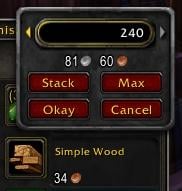
Stack size is 20
Click to enlarge
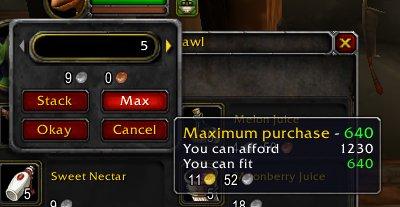
Tooltip Example
BuyEmAll   Popular! (More than 5000 hits)
Know of something you feel would improve this addon? Feel free to leave a comment detailing it the best you can and I'll see what I can do.

BuyEmAll

Created and maintained by Cogwheel to v2.8.4. Now maintained by Shinisuryu.


BuyEmAll enhances the shift-click interface at vendors.

Features

Type in the amount you want to buy


This is actually part of the default UI. Enough people don’t know about it due to the fact that there is no cursor and clicking in the box gives no feedback, that I decided to list it here.

Buy more than the stack size of the item at once

For instance, if you want to buy 80 pieces of Silk Thread, you currently have to shift-click the thread, enter 20, hit Okay, shift-click the thread, enter 20, hit Okay, shift-click the thread, enter 20, hit Okay, shift-click the thread, enter 20, and hit Okay.

With BuyEmAll, you shift-click the thread, enter 80, hit Okay, and confirm that you want to buy more than a stack. This confirmation appears so you don’t accidentally buy 1000 of something when you meant to buy 100.

Shift-click items that come in preset stacks

The default UI doesn’t allow you to shift-click items like Refreshing Spring Water which come in preset stacks. If you want to buy 50 of them, you have to right-click the item 10 times. BuyEmAll allows you to shift-click the item and enter the amount you want. See Notes for more information on preset stacks.

Know how much you will be spending

Below the box where you enter the amount is a money display. This updates as you change the amount you are going to buy, showing you exactly how much your purchase will cost.

Quickly fill stacks or buy as much as you can

The BuyEmAll window has Stack and Max buttons which allow you to enter a full stack or as much as you can afford/fit. Hovering over the buttons shows a tooltip with the number of items you will be buying and how much it will cost. See Notes for information on the maximum you can buy.

If you already have some of an item, the first click of the Stack button will enter the amount you need to fill that stack. Subsequent clicks will add full stacks to your pruchase.

Quickly refill your ammo pouch

If you are buying ammo and have free spots in your ammo pouch/quiver, the amount that appears when you first shift-click the ammo will be however many stacks it takes to refill your bag. Just hit Enter/Return, and you bag will be filled.

Notes

Maximum Purchase

The amount you can enter is limited by:
  • The amount of free space in your bags. Partial stacks are included in this calculation, as are specialty bags (e.g. free slots in enchanting bags will be only be counted towards your free space if you are buying an essence, dust, or shard).
  • The amount you can afford.
  • The amount available from the vendor (for limited stock items).
A breakdown of these numbers is included in the Max button’s tooltip.

If you can only buy one item for any of these reasons, shift-click behaves just like a left click, picking up one of the item onto your cursor. If you can’t buy any, then shift-click does nothing.

Preset Stacks

When you are choosing the amount for items that come prestacked, the amount you enter is the total amount you want to buy, not the number of stacks you want to buy. If you use the arrow buttons, this number will increase or decrease to multiples of the preset stack size.

The confirmation window will only show up if you buy more than the maximum stack size in your inventory, not the stack size that you can buy at once.

Example

Refreshing Spring Water — Stack Size: 20, Preset Stack: 5

If you enter 18 and hit Okay, it will automatically buy 20 with no confirmation. If you enter 23, a confirmation will pop up asking, “Are you sure you want to buy 25 of this item?”

Currently, the Stack button is overzealous about items that come in preset stacks. If you have 3 Refreshing Spring Waters in your inventory, clicking the Stack button will enter 17 as the amount, and you will end up purchasing 20. Future versions will handle those situations more gracefully.

Bugs

None to my knowledge. If you find any, please report them!
  Change Log - BuyEmAll
v2.8.7
  • No reported issues, TOC bump.

v2.8.6
  • Replaced the rewritten code with an edited version of Cog's original space calculation code, works as it did in 2.8.4, with better support for profession bags/items.

v2.8.5
  • Rewrote bag space calculation.

v2.8.4
  • Fixed bug with confirmation dialog.

v2.8.3
  • Added more localizations for zhCN and zhTW, thanks to q09q09

v2.8.2
  • Updated for 3.0.2.

v2.8.1
  • Updated for WotLK Beta.

v2.8
  • Cost of Stack or Max purchase now shown in the button’s tooltip instead of changing the money display.
  • No longer displays “loaded” message.
  • Separated localization files for more flexibility.
  Archived Versions - BuyEmAll
File Name
Version
Size
Author
Date
2.8.6
9kB
Shinisuryu
07-29-2009 05:25 AM
2.8.5
9kB
Shinisuryu
06-23-2009 12:42 PM
2.8.4
15kB
Shinisuryu
10-25-2008 11:39 PM
  Comments - BuyEmAll
Post A Reply Comment Options
Old 10-07-2009, 01:11 PM  
ForeverTheGM
A Kobold Labourer

Forum posts: 0
File comments: 51
Uploads: 0
Quote:
Originally posted by Maxen
Nice addon!

But I was unable to do shift+left-click link in chat from the tier 9 vendors. BuyEmAll would show instead of pasting link like it does when you shift+right click other items.
Hold down CTRL and SHIFT when clicking.
ForeverTheGM is offline Report comment to moderator   Edit/Delete Message Reply With Quote
Old 10-07-2009, 01:03 PM  
Maxen
A Kobold Labourer

Forum posts: 0
File comments: 1
Uploads: 0
Nice addon!

But I was unable to do shift+left-click link in chat from the tier 9 vendors. BuyEmAll would show instead of pasting link like it does when you shift+right click other items.
Maxen is offline Report comment to moderator   Edit/Delete Message Reply With Quote
Old 08-31-2009, 10:27 PM  
Cogwheel
Sans Poisson
 
Cogwheel's Avatar
Premium Member
Interface Author - Click to view interfaces

Forum posts: 212
File comments: 132
Uploads: 22
Quote:
Originally posted by Shinisuryu
Yay, good to hear.
Ditto
Cogwheel is offline Report comment to moderator   Edit/Delete Message Reply With Quote
Old 08-31-2009, 10:25 PM  
Shinisuryu
A Kobold Labourer
Interface Author - Click to view interfaces

Forum posts: 1
File comments: 14
Uploads: 0
Quote:
Originally posted by sevvie
Awesome Never considered an addon like this... but I certainly know I hate buying 100 different stacks of arrows. So I think me and this addon will be close friends
Yay, good to hear.
Shinisuryu is offline Report comment to moderator   Edit/Delete Message Reply With Quote
Old 08-31-2009, 02:37 PM  
sevvie
A Kobold Labourer

Forum posts: 0
File comments: 2
Uploads: 0
Awesome Never considered an addon like this... but I certainly know I hate buying 100 different stacks of arrows. So I think me and this addon will be close friends
sevvie is offline Report comment to moderator   Edit/Delete Message Reply With Quote
Old 08-30-2009, 09:01 PM  
Shinisuryu
A Kobold Labourer
Interface Author - Click to view interfaces

Forum posts: 1
File comments: 14
Uploads: 0
Quote:
Originally posted by ForeverTheGM
Maybe you could add a check to see if GnomishVendorShrinker is loaded and if it is, replace its stack-split window with BuyEmAll's?
Well, unless there's something I don't know, which is very possible, but unless I can somehow replace a function in GVS, I don't think I can make BuyEmAll work. I'm still looking for other ways however.
Shinisuryu is offline Report comment to moderator   Edit/Delete Message Reply With Quote
Old 08-30-2009, 06:05 PM  
ForeverTheGM
A Kobold Labourer

Forum posts: 0
File comments: 51
Uploads: 0
Quote:
Originally posted by Shinisuryu
Ok, I see. BuyEmAll won't show, hmmmm. I'll have to do some investigating to figure that out.
Maybe you could add a check to see if GnomishVendorShrinker is loaded and if it is, replace its stack-split window with BuyEmAll's?
ForeverTheGM is offline Report comment to moderator   Edit/Delete Message Reply With Quote
Old 08-24-2009, 07:54 PM  
Shinisuryu
A Kobold Labourer
Interface Author - Click to view interfaces

Forum posts: 1
File comments: 14
Uploads: 0
Quote:
Originally posted by ForeverTheGM
Is there anything you can do to make this compatible with GnomishVendorShrinker? I would appreciate it greatly!
Ok, I see. BuyEmAll won't show, hmmmm. I'll have to do some investigating to figure that out.

Last edited by Shinisuryu : 08-24-2009 at 08:47 PM.
Shinisuryu is offline Report comment to moderator   Edit/Delete Message Reply With Quote
Old 08-23-2009, 06:33 AM  
ForeverTheGM
A Kobold Labourer

Forum posts: 0
File comments: 51
Uploads: 0
Is there anything you can do to make this compatible with GnomishVendorShrinker? I would appreciate it greatly!
ForeverTheGM is offline Report comment to moderator   Edit/Delete Message Reply With Quote
Old 08-17-2009, 07:24 PM  
Shinisuryu
A Kobold Labourer
Interface Author - Click to view interfaces

Forum posts: 1
File comments: 14
Uploads: 0
Quote:
Originally posted by monya
Yep, smart stacking works again... <3
Shinisuryu is offline Report comment to moderator   Edit/Delete Message Reply With Quote
Old 08-17-2009, 11:46 AM  
monya
A Kobold Labourer
 
monya's Avatar

Forum posts: 0
File comments: 12
Uploads: 0
Yep, smart stacking works again... <3
monya is offline Report comment to moderator   Edit/Delete Message Reply With Quote
Old 07-29-2009, 05:31 AM  
Shinisuryu
A Kobold Labourer
Interface Author - Click to view interfaces

Forum posts: 1
File comments: 14
Uploads: 0
Yay! New version uploaded.
Shinisuryu is offline Report comment to moderator   Edit/Delete Message Reply With Quote
Old 07-27-2009, 01:20 AM  
Shinisuryu
A Kobold Labourer
Interface Author - Click to view interfaces

Forum posts: 1
File comments: 14
Uploads: 0
Scratch that, a few more problems popped up, hope to get it done by tomorrow.
Shinisuryu is offline Report comment to moderator   Edit/Delete Message Reply With Quote
Old 07-26-2009, 12:37 PM  
Shinisuryu
A Kobold Labourer
Interface Author - Click to view interfaces

Forum posts: 1
File comments: 14
Uploads: 0
Alright, I *think* I got it working like it did before, I totally forgot that I didn't take into account partial stacks. Sorry for taking so long, should have the new version up later today, once I've gotten some sleep and done a few more tests.
Shinisuryu is offline Report comment to moderator   Edit/Delete Message Reply With Quote
Old 06-23-2009, 02:26 PM  
Cogwheel
Sans Poisson
 
Cogwheel's Avatar
Premium Member
Interface Author - Click to view interfaces

Forum posts: 212
File comments: 132
Uploads: 22
Quote:
Originally posted by Axlash54
The name is a refrence to a Metallica album I guess?
It wasn't, but now that you mention it we can pretend it was!
Cogwheel is offline Report comment to moderator   Edit/Delete Message Reply With Quote
Post A Reply


Category Jump:


The Network:
EQInterface | EQ2Interface | LoTROInterface | MMOInterface | War.MMOUI | WoWInterface | VGInterface | Allakhazam | Thottbot | Wowhead | Zam


©2009 MMOUI / ZAM Network
vBulletin - Copyright ©2000 - 2009, Jelsoft Enterprises Ltd.


