| Go to Page... |

| Updated: | 12-28-10 01:33 AM |
| Created: | unknown |
| Downloads: | 471,030 |
| Favorites: | 1,204 |
| MD5: |
DoTimer 

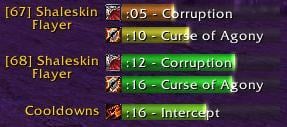
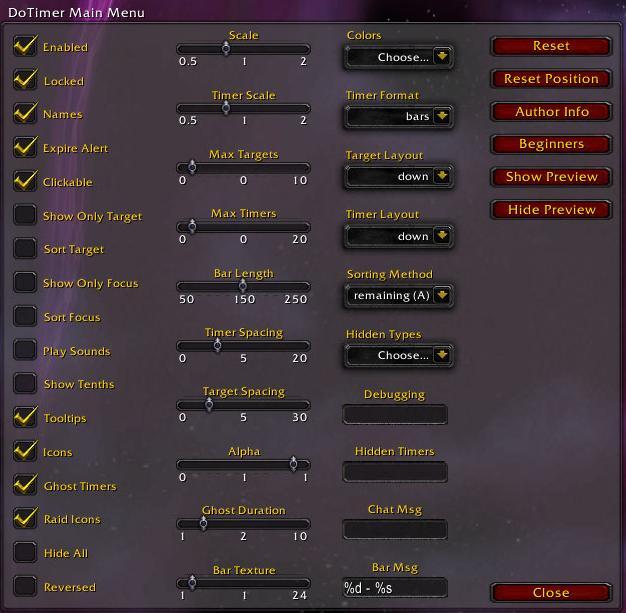
DoTimer is a comprehensive suite for managing various things that need timing.
These include:
- your DoTs / HoTs
- your Cooldowns
- buffs / debuffs on you
It accomplishes the task by breaking into sub-addons: DoTimer, Cooldowns, and PlayerAuras, respectively. A fourth sub-addon, Notifications, is also included. All four can be enabled/disabled and customized separately. The reason for including all of these together in one addon is for interoperability. You can customize the timers to an extreme extent.
DoTimer starts off in simple mode, with a lot of functionality hidden. You don't see PlayerAuras or Notifications, and a lot of the customizability is hidden. This is for users who have no need of all the complex settings.
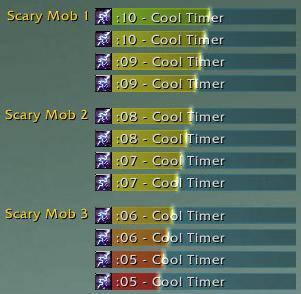
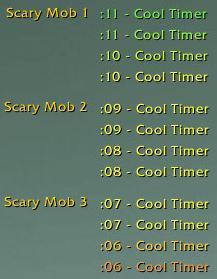
The basic philosophy behind the addon is that timers are put into a specific anchor location on screen. These anchors can be customized independently of each other, as can the individual timers. You can control where certain timers from the sub-addons go, so that the timers are placed as logically onscreen as possible.
Fragmentation:
DoTimer's timers fit into three categories: standard, No Target, and Party Buffs. Standard timers are timers on specific mobs. No Target timers are timers that can affect multiple mobs at once (or none at all), like Howl of Terror. Party Buffs are buffs cast on the party; you can set it up so that they get combined into a single timer so that tracking them is much easier (and less spammy onscreen).
Cooldowns's timers fit into two categories: Yours and communicated.
PlayerAura's timers fit into four categories: Buffs/debuffs with/without a duration. If you want, you can flag timers that have a duration to display with no duration.
You can customize the anchor location for each of these categories, as well as anchors for specific timers or specific DoTimer targets. You can also apply timer settings globally, to specific categories, to specific anchors, or to specific timers. You can make as many anchors and timer settings as you want.
Notifications lets you create notifications for various events, such as casting a spell, an enemy gaining a buff, losing aggro, losing health, or a cooldown being up. You can make the screen flash various colors, play a sound, send a chat msg / do an emote, or other various things in response. The system is quite customizable as to how the notifications are sent; I suggest playing around with it.
DoTimer v. 4.5.1
-------------------
Bug Fixes:
- Fixed a bug that could cause an error when InterfaceOptions_OpenToCategory is called.
- I've disabled clicking-to-remove buffs, due to strange errors it creates. I'll hopefully re-enable this in a future version.
-------------------
DoTimer v. 4.5
-------------------
Bug Fixes:
- Fixed the duration of Snake Trap
- fixed an issue causing timers to display in crazy fashions sometimes
- fixed the cooldown for priest Holy Words
-------------------
DoTimer v. 4.4.9.1
-------------------
Bug Fixes:
- Fixed a Lua error that could sometimes happen
-------------------
DoTimer v. 4.4.9
-------------------
Bug Fixes:
- In rare cases, right-clicking a non-PlayerAuras timer could cancel a real buff. This issue has been fixed.
- Added some more checks in an effort to suppress "You are not in a [raid,party]" messages.
- Fixed a nasty bug with the GUI that could cause most of your key bindings to become unresponsive until you manually open and close the Game Menu.
-------------------
DoTimer v. 4.4.8
-------------------
Bug Fixes:
- Fixed more issues involving dragging PlayerAuras timers.
- Unflagged Living Bomb as being only castable on one target.
- Cooldowns should be a bit better at figuring out the last spell you cast (especially if you have multiple spells with the same name).
-------------------
DoTimer v. 4.4.7
-------------------
Bug Fixes:
- Stopped the game menu from popping up sometimes when you're using DoTimer's menu.
-------------------
DoTimer v. 4.4.6
-------------------
Bug Fixes:
- DoTimer shouldn't trigger "you are not in a raid group" spam in battlegrounds anymore.
Changes:
- Brought back the "Blizz Buffs" setting by popular demand.
-------------------
DoTimer v. 4.4.5
-------------------
Bug Fixes:
- More bugs introduced with 4.0.1!
Changes:
- Removed PlayerAuras' "Blizz Buffs" setting. Blizzard buffs will automatically be disabled if PlayerAuras is enabled; if it is not, then the Blizzard Buff frames will be ignored. Note that this means you will need to reload your UI if you enabled PlayerAuras and then disable it if you want to see Blizzard buffs.
-------------------
DoTimer v. 4.4.4
-------------------
Bug Fixes:
- The default sound should now work with sound notifications.
- Fixed some buffs not showing up for Notifications' "Buff Gain" event.
- Fixed a Lua error involving "\DoTimer\Core\TimerLib\frames\timer.lua:890: attempt to index field 'group' (a nil value)"
- Fixed some cooldowns not appearing.
-------------------
DoTimer v. 4.4.3
-------------------
Bug Fixes:
- fixed more issues related to 4.0.1
- note that, in PlayerAuras, buff-canceling only works out of combat right now
-------------------
DoTimer v. 4.4.2
-------------------
Updated to 4.0.1
-------------------
DoTimer v. 4.4.1
-------------------
Bug Fixes:
- Updated the TOC to 3.3, sigh...
-------------------
DoTimer v. 4.4
-------------------
Bug Fixes:
- Totems should always display all 4 timers, even if they have the same duration / start time.
- No Target timers now only allow unique timer names (e.g., only one Thunderclap timer will ever be in the group).
- Various things I can't remember! But they're fixed now.
New Features:
- You can manage the positioning of anchors to a much higher degree now, including anchoring to other anchors.
- The "centering" option for anchors has been reduced in functionality. The above-mentioned anchoring system should be used instead.
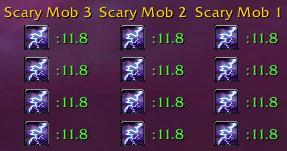
- Added ButtonFacade support in Icons format.
-------------------
DoTimer v. 4.3.6
-------------------
Bug Fixes:
- The version check should be much less spammy in raids.
- Should now work in 3.2.
- Other things? It's been a while; I can't recall.
-------------------
DoTimer v. 4.3.5
-------------------
Bug Fixes:
- Fixed a bug that could occur when creating a new profile.
- Fixed a couple minor bugs where timers could have the wrong group data after you change settings.
- Cases where you use an the last of an item that has a cooldown (like using your healthstone or soulstone) should now properly keep the timer running its full duration.
New Features:
- If you set the group data of Cooldowns or PlayerAuras timers to '*target*' (via either the Display Name or Standard Name settings), the timers will behave as if they were on your current target.
-------------------
DoTimer v. 4.3.4
-------------------
Bug Fixes:
- Fixed an issue that couple potentially cause a stack overflow error if your settings were set *just* so.
- Fixed an issue with PlayerAuras and Cooldowns not assigning the correct group name to their timers in rare cases.
-------------------
DoTimer v. 4.3.3
-------------------
Bug Fixes:
- Fixed a minor bug with timers switching from no duration to having a duration.
- Color fading shouldn't be weird in some strange cases anymore.
- Edit boxes where you type in times like "5m" or "1s" will now understand fractions of a second.
New Features:
- Timers are now much less CPU intensive!
- The way you customize bar text is now much simpler and will work just as well for like 99% of people (the old way was a CPU drag!).
- Got rid of 'Only Last Cast'. The implemention was flawed and I couldn't see a good way of fixing it.
- Attempted to suppress death knight rune cooldowns.
- PlayerAuras can now work for your target or focus, should you so desire.
- The 'White List' option for PlayerAuras is now settable on a per-unit basis, as well as per-aura-type (buff or debuff).
- Changed the behavior of Cooldowns timers a bit to be less... weird sometimes.
- Added more customization options to Notifications' 'SCT' and 'Flash' output types.
- You can now customize the font of timers and groups if you have addons with the Ace Shared Media library.
-------------------
DoTimer v. 4.3.2
-------------------
Bug Fixes:
- Fixed an issue causing groups to be hidden incorrectly in certain circumstances.
New Features:
- You can now select any color you want for the flash in Notifications.
-------------------
DoTimer v. 4.3.1
-------------------
Bug Fixes:
- The tooltip for tracking abilities should now update properly when switching to another tracking.
- Death Knight presences should now only show one timer.
- Removed the No Target timer for Dancing Rune Weapon (since PlayerAuras makes a timer for it).
- Fixed some issues with cooldowns.
- Notifications should now see your old character-specific notifications (and delete any new ones you've made since 4.3, sorry).
- DoTimer's handling of pets has been changed: friendly pets are ignored (unless they're your own); enemy pet timers go away when you leave combat.
- Correctly updated the TOC number to flag DoTimer as up-to-date in your addons list.
- The "Max Num Groups" setting for anchors should now properly ignore hidden groups.
- Fixed a slight issue with Notifications' Duplicate feature.
- Fixed an issue with Notifications' GUI scrolling forever.
New Features:
- Added "White List" to DoTimer and Cooldowns.
- Added a new option to Cooldowns to make it only track cooldowns of spells/items you had just cast/used.
- Timers are now clamped to the screen, removing the potential issue of timers positioned in an inaccessible location.
- The "Aggro Gain" and "Aggro Loss" events for Notifications are now based on actual threat levels, not your target's target.
- Added new event to Notifications: Target Health. Can be customized just like the current Health and Mana events.
- You can now use unit tokens for Notifications' chat whisper output.
- The edit boxes in Notifications now pay attention to you typing, preventing some cases of not properly noticing stuff you type in them (such as if you click 'Create!' while an editbox still has focus).
- Added some new filters into Notifications: spec 1, spec 2, and not while resting.
- PlayerAuras will now tell you who cast that buff or debuff on you! (if it can figure it out...)
-------------------
DoTimer v. 4.3
-------------------
Bug Fixes:
- The stack number for both icon and bar formats should properly adjust with the Font Height setting now.
- The "* Begin Casting" events in Notifications should now work.
- Removed a leftover print() statement not properly deleted after debugging.
- The stack number in bars format should now properly ignore the timer's alpha setting.
- Fixed some bugs with the GUI, especially for PlayerAuras-pet.
- Pet timers should now properly disappear if your pet goes away.
New Features:
- The group names (including raid icon) can now be scaled.
- You can now adjust how far group names are spaced from the group's timers.
- You can now edit a notification to disable it temporarily, instead of being forced to delete it.
- Others' Timers has been changed in functionality a bit to integrate with Party Buffs when appropriate.
- Timer positions and sizes will now ignore the "Use UI Scale" checkbox and "UI Scale" sliders in the video options.
- Notifications' options for timer setting, group name, and anchor are all now settable on a per-notification basis.
- You can now be a lot more specific in the anchor customization regarding preserving target data and moving targets for below timers.
- Improved pet detection so timers on pets aren't all weird.
- The anchor centering feature has been redesigned. It now also affects the anchoring of groups in the anchor, and the axis for centering is now changeable by moving the anchor around.
- Anchors will no longer use the position of Default Anchor as their default position; instead, they will use the middle of the screen.
- The 'duplicate' feature in Notifications now duplicates all the notification's settings, rather than just a select few.
- Changed the default value of 'sending' for Cooldowns' communication part to off, and set it to off regardless of your current setting. You can turn it back on if you want. Honestly, I don't think the feature is used enough to justify the addon messages sent. It may simply be removed in the future.
- As of 3.1, pet and vehicle timers will be much better supported.
- PlayerAuras now has a white list option, so you can make it only track timers you specify.
- Modified the UI! This is an understatement.
-------------------
DoTimer v. 4.2.5
-------------------
Bug Fixes:
- Pet timers for PlayerAuras will now correctly default to its own anchor. Unfortunately this change is not retroactive; existing users will have to manually move them (easy!).
- A couple check boxes in the Notification GUI will now properly reset when you finish editing or creating a notification.
- DoTimer should now properly display all totem tooltips.
- Ghost timers will now reset the stack number on timers.
- Fixed a case with weapon buffs where a slight error could occur when the timer finished.
- Fixed a bug where hidden timers could potentially not get properly deleted.
New Features:
- DoTimer will now warn the user if it detects the old DoTimer's presence (Ash_Core, etc., DoTimer_Package). These folders should be deleted!
- DoTimer will no longer automatically block channeled spells that make a debuff on the mob like Drain Life/Soul. You can still manually block them though.
- Timers will no longer play a sound when they turn to ghost timers in any case.
- Anchors can now be made non-interactable. It's another way of disabling mouse clicks on timers.
- "Engulf in Flames" on Phase 3 of Malygos (and the daily!) will now generate a timer. Because I had to manually program it in, it won't be perfect, but as long as you refresh it with a couple seconds remaining (to account for travel time) you should be fine.
-------------------
DoTimer v. 4.2.4
-------------------
Bug Fixes:
- Stance and tracking buff timers should now properly update their tooltip in all cases.
- There is now an option to change communicated Cooldowns' key bindings.
- The cooldown clock in icons format now correctly renders underneath the duration/stack text.
New Features:
- In icons mode, you can now set it so that the icon border color is constant (and changeable by you) instead of changing with the duration.
-------------------
DoTimer v. 4.2.3
-------------------
Bug Fixes:
- Mages' Living Bomb is now correctly flagged as only allowed on one target at a time.
New Features:
- When you have timers in icons mode with the duration displayed inside the icon, changed the duration to be a static font size and made it so that you can still see the stack number.
- When viewing textures from SharedMedia for your timer, the dropdown is broken down into groups of 10 in case you have a lot of them.
-------------------
DoTimer v. 4.2.2
-------------------
Bug Fixes:
- Another error has been fixed with those pesky stance timers, and this time I wrangled up a DK for some real testing. The timer should work fine now.
Default Settings Changes:
- PlayerAuras has pet timers disabled by default instead of enabled. If you want them, you can manually reenable them.
New Features:
- In Notifications, you can now control which anchor created timers are sent to, and what the name of their group is.
-------------------
DoTimer v. 4.2.1
-------------------
Bug Fixes:
- Fixed a bug with the new stance timer in PlayerAuras that was causing a Lua error. I don't have a DK or warr to test on, sadly.
-------------------
DoTimer v. 4.2
-------------------
Bug Fixes:
- You can now preview sounds when creating a new Notifications event.
- Mouseover timers now obey the 'blocked' setting in all situations.
- Fixed cancelling tracking buffs by right-clicking.
- Fixed an issue where a timer could potentially be in the wrong anchor.
- Fixed tracking buffs not always updating when changing tracking type.
- Weapon buffs should finally be fixed, thank god.
- Fixed an issue where the DoTimer anchor customization check button 'For Below Timers' wasn't working correctly.
- Fixed an issue where Notifications' "Time Remaining" events and playing a sound at the red point for a timer stopped functioning if the timer got refreshed.
- Fixed changing bar textures when Shared Media is not available.
- Fixed being unable to cancel buffs if the buff was refreshed by a higher rank than the original.
- Added a workaround to a Blizzard bug causing some cooldowns to act quite strangely. They still act strangely due to the improper data being fed to them, but not as strangely.
- Fixed an issue with weapon buffs that resulted in weird timers if refreshing a weapon buff that you logged in with.
- Ghost timers should not longer become stuck in certain cases when ghost duration is set to zero.
- Customizing key bindings for PlayerAuras will no longer customize them for Cooldowns instead.
- Notifications should no longer disable Blizzard Floating Combat Text on login.
- Changed the minimum duration of DoTimer timers to 0.5 seconds so that channeled spells don't show up as ghost timers as much.
- Fixed some notifications that were firing twice in a row in some situations.
New Features:
- You can now view some more info info of Notifications events when managing them.
- If you click on the 'Defaults' button when viewing the top level GUI (author info, etc), then all settings for your current profile will be reset.
- DoTimer will now pick up debuffs on friendlies (and buffs on enemies, do those exist?) cast by you, like Weakened Soul.
- The cooldown clock for icons format will now have a spark drawn on it.
- Added a No Target timer for Death Knight's Dancing Rune Weapon.
- The 'Red Point' setting for timers has been changed to an edit box so that a larger range of numbers can be accepted.
- Changed the appearance of the spell textures in both bars and icons mode to look a bit prettier.
- Added setting in Notifications: 'Character Specific Settings' (checkbutton). If checked, Notifications will save settings per character instead of globally.
- For profiles, removed the ability to only import the settings of certain modules. It was only really useful to avoid importing Notifications, and the above change addresses that issue more nicely.
- In DoTimer, made "move this timer to this anchor for this target" be weighted higher than "move this target to this anchor".
- The options menu should load much faster now. For the curious, it does incremental loading now, on an as-accessed basis.
- Added in the option of choosing vertical textures in case you orient your bars vertically.
- The Notifications event "Buff Missing" now accepts fragments instead of full buff names, and now also checks your tracking/weapon buffs/stances.
- Setting the 'Timer Justification' to 'right' now also flips the position of the group name to the right side, if it were previously on the left.
- PlayerAuras will now display a no-duration timer for Death Knights' presences and Warriors' stances.
- If sorting timers based on their time data, timers with no duration will be sorted ascending alphabetically always instead of respecting the user-set direction of sorting.
- PlayerAuras will now also create timers for buffs and debuffs on your pet. As always, this can be disabled if desired.
- You can now set up events in Notifications to only send based on you being alive, in/out of combat, or solo/grouped. These flags can be changed by editing, so you can apply them to existing notifications rather easily.
- You can now more easily create multiple Notifications for the same trigger, by selecting 'Duplicate' when managing already created notifications.
- Added in the Notifications GUI a description of the event you're currently editing instead of just displaying its name.
-------------------
DoTimer v. 4.1
-------------------
Bug Fixes:
- Fixed disabling ghost timers when ghost length is set to 0.
- Changed [-1] to correctly display as [??].
- Fixed the duration of Thunder Clap.
- Made Mana Tide Totem generate a timer.
- Fixed unchecking 'Preserve Target Data' in DoTimer's anchor customization.
- Fixed unchecking 'Move No Target Here' in DoTimer's anchor customization.
- Fixed the chat selector dropdown in Notifications.
- Fixed a bug that could occur when switching totems of the same element.
- Fixed some issues with managing created notifications. You *may* need to re-make your notifications if you've tried to edit them.
- Made it so that you can select the color of your SCT message in Notifications.
- Improved the detection of casting spells on your mouseover unit.
- Fixed (yet again!) events like Buff Gain and Spell Active. Tested them quite thoroughly too. They should work.
- Fixed a couple minor bugs related to profiles.
- Party Buffs on your pet will no longer duplicate themselves when your pet disappears and reappears.
- Fixed a bug regarding delaying notifications.
- Fixed the 'Item Cooldown Up' event in Notifications.
Default Settings Changes:
- Changed the default of 'Filter Ungrouped' to false.
- Changed the default of 'Filter Nonplayers' to false.
New Features:
- Reorganized the UI panels to be a bit more organized (on the left; the actual options weren't changed).
- Added setting in timer settings: 'Tooltips' (checkbutton). It toggles the showing of tooltips on timers.
- Added setting in anchor settings: 'Hide All' (checkbutton). If checked, the anchor and all its timers will be hidden.
- Changed the time display in digital form to be '0:##' instead of ':##' when less than one minute remains.
- Changed timers with no duration to be treated as having an infinite duration, rather than as a special case, when sorting: They will now be at the top in descending order and at the bottom in ascending order.
- Made the overall interface options frame be movable by dragging its title area (so you can move it out of the way!).
- Added support for SharedMedia-3.0 in the selection of bar textures.
- Removing (default right-clicking) a totem timer in DoTimer's No Target section will now also delete the corresponding totem.
- Added settings in DoTimer's anchor customization: 'Move Harmful Here' and 'Move Helpful Here' (checkbuttons). Party Buffs are helpful; No Target is harmful. The 'Move Party Buffs Here' and 'Move No Target Here' take greater precedence, however.
- Added setting in DoTimer: 'Apply Always' (checkbutton). It makes the 'Show Only Target/Focus' settings apply always, not just when you HAVE a target/focus.
- Added setting in DoTimer: 'No Target' (checkbutton). It enables/disables the making of the 'No Target' group.
- Added the '%t' replacement for timers' bar text: It maps to the name of the group the timer's in (like the name of the mob or 'No Target', etc.).
- Improved the 'Preview' button in Notifications' GUI to be much more reflective of the current settings.
- Added setting in anchor settings: 'Name Font Height' (slider). It adjusts the height of the font for the group's name.
- Added setting in timer settings: 'Icon Font Height' (slider). It adjusts the height of the font outside the icon in icons format.
- Adjusted the maximum value of 'Overflow Point' to 20 from 10.
- Changed 'Overflow Direction' to affect the justification of timers even when 'Overflow Point' is at 0.
- Made Notifications automatically enable itself when you create a Notification.
- Applied the 'Blocked' setting to timers created on mouseover.
- Enabled customization of the 'DoTimer Mouseover' and 'Notifications Anchor' anchors.
- You can now choose a timer setting for specific debuff types in PlayerAuras.
- You can now import specific modules from other profiles, in addition to all of them.
- Added setting in anchor settings: 'Justification' (dropdown). Lets you change the justification (alignment) of the timers/groups.
- Added setting in anchor settings: 'Centering' (dropdown). Lets you center the anchor onscreen either vertically or horizontally (instead of originating from a fixed point).
- Totem timers will now be deleted when zoning.
- Updated totems in general, really. DoTimer should detect their duration/presence much more nicely now.
- Made some changes to Party Buffs: when a timer that would be classified as a Party Buff is only present on you, DoTimer does not treat it as a party buff, instead like a regular buff - meaning that Filter Self and blocking apply to it. However, when you have it on yourself AND others, it treats the one on you like a Party Buff, causing it to be grouped with the other timers as normal. This means that you generally won't see party buff timers while soloing (unless you cast the spells both on you and your pet!).
- Made the 3 default anchors have 3 timer settings to go with them, so it'd be simpler to immediately start changing the looks of just one of the three. Note that this will only apply if you restore your settings or make a new profile, sorry. You can still edit the default timer settings to change all three at once.
- Changed Notifications' 'auto' chat functionality to default to 'say' instead of nothing if you're not in a group.
- Changed how Cooldowns detects that a cooldown finished before its scheduled duration in order to handle some rare cases.
- You can now prefix a Party Buff match with a '^' for it to work as an anti-filter: if the timer matches it, it will never be made a party buff timer.
- Your current tracking will now appear in PlayerAuras' Buffs.
-------------------
DoTimer v. 4.0.2
-------------------
Bug Fixes:
- Made tooltips be a child of UIParent (making them smaller in most cases).
- Fixed a bug with Notifications causing events such as Buff Gain and Spell Active not to fire in certain circumstances.
- Fixed an issue with the group name text sometimes being improperly truncated.
- Fixed an issue where timers may not be updated as frequently as they should be onscreen.
- Fixed a bug with the sizing of groups in certain circumstances.
- Fixed a bug that resulted in not being able to disable ghost timers.
- Fixed a bug that caused PlayerAuras not to pick up on multiple auras of the same name.
- Attempted to fix a bug with PlayerAuras and weapon buffs (it seems to be working on my end now, at least).
- Fixed a bug that caused you not to be able to move Party Buffs / No Target to another anchor.
- Made timer sort method 'Percent Remaining (D)' work correctly.
- Made it so that overwriting a weapon buff with a different one correctly updates the name of the timer.
Default Settings Changes:
- Changed the default of 'Filter Self' to true.
- Changed the default of 'Icon Flip Text' to false.
- Changed the default bar texture to Aluminium. The old one is still available; it's called 'Runes'.
New Features:
- Changed the dropdowns of Notifications' 'Manage' dropdown to be less complicated.
- All other requested new features will be added in a future release: this one is primarily bug fixing.
-------------------
DoTimer v. 4.0.1
-------------------
- quick fix on a reported issue
-------------------
DoTimer v. 4.0
-------------------
- complete rewrite from ground up of DoTimer v.3.4.6
- old settings are completely incompatible with new design
- please manually delete any old versions of this addon
in your AddOns folder. auto-updaters won't work properly.
 |
Comment Options |
 10-18-19, 06:20 PM
|
|
|
A Kobold Labourer
Forum posts: 0
File comments: 2
Uploads: 0
|
Hey guys! Can anyone pick this addon up and update for classic (and retail)? Best multi-target dot tracker ever!!!
|

|

|
| Arxtrix |
| View Public Profile |
| Send a private message to Arxtrix |
| Find More Posts by Arxtrix |
| Add Arxtrix to Your Buddy List |
|
05-29-19, 08:31 AM
|
|
|
A Kobold Labourer
 Forum posts: 0
File comments: 3
Uploads: 1
|
Any plans on updating this wonderful mod for wow classic?
|
|
|
|
| christophrus |
| View Public Profile |
| Send a private message to christophrus |
| Find More Posts by christophrus |
| Add christophrus to Your Buddy List |
|
10-17-12, 10:17 AM
|
|
|
A Kobold Labourer
Forum posts: 0
File comments: 14
Uploads: 0
|
Seems It only crashes when i run wow-64.exe. It works in 32 bit client
|
|
|
|
| enduriel |
| View Public Profile |
| Send a private message to enduriel |
| Find More Posts by enduriel |
| Add enduriel to Your Buddy List |
|
10-17-12, 07:07 AM
|
|
|
A Kobold Labourer
Forum posts: 0
File comments: 14
Uploads: 0
|
my wow crashes when I target someone with dotimers 5.04 installed.
removed my settings lua files but same issue. tried with it as the only addon but still the same. |
|
|
|
| enduriel |
| View Public Profile |
| Send a private message to enduriel |
| Find More Posts by enduriel |
| Add enduriel to Your Buddy List |
|
09-13-12, 03:29 AM
|
||
|
A Fallenroot Satyr
Forum posts: 23
File comments: 187
Uploads: 0
|
Over at Curse, the user tomsakks posted an update he made. Here's his info:
__________________
Just remember... if the world didn't suck, we'd all fall off. |
|
|
|
|
| Maelynn |
| View Public Profile |
| Send a private message to Maelynn |
| Find More Posts by Maelynn |
| Add Maelynn to Your Buddy List |
|
07-11-12, 03:06 AM
|
||
|
A Kobold Labourer
Forum posts: 0
File comments: 21
Uploads: 0
|
|
|
|
|
|
| Althor |
| View Public Profile |
| Send a private message to Althor |
| Find More Posts by Althor |
| Add Althor to Your Buddy List |
|
07-09-12, 01:20 AM
|
|
|
A Defias Bandit
Forum posts: 2
File comments: 1
Uploads: 0
|
I've managed to get it to work on Beta (only minor API changes required anyway). Used my live config so not exactly sure the configuration options work as intended. Will wait and see if this will get fixed (by author) before I try and get it up someplace.
|
|
|
|
| dakalro |
| View Public Profile |
| Send a private message to dakalro |
| Find More Posts by dakalro |
| Add dakalro to Your Buddy List |
|
03-04-12, 12:30 PM
|
|
|
A Frostmaul Preserver
Forum posts: 288
File comments: 204
Uploads: 0
|
Take it this is no longer being updated?
|
|
|
|
| kasca |
| View Public Profile |
| Send a private message to kasca |
| Find More Posts by kasca |
| Add kasca to Your Buddy List |
|
01-09-12, 12:09 PM
|
||
|
A Kobold Labourer
Forum posts: 0
File comments: 2
Uploads: 0
|
|
|
|
|
|
| Sects |
| View Public Profile |
| Send a private message to Sects |
| Find More Posts by Sects |
| Add Sects to Your Buddy List |
|
01-09-12, 12:16 AM
|
|
|
A Kobold Labourer
Forum posts: 0
File comments: 2
Uploads: 0
|
Amazing Addon.
Back in WOTLK I was able to create a timer that consisted of immolate (DoT on target), corruption (DoT on target), and conflagrate CD. I was going to recreate this an include improved soul fire. I moved ISF (player auras) and conflagrate (CD) into the Dotimer timer through anchor customization, however, the timers count down independently of each other. By this I mean, Immolate and corruption are there own separate timer, conflagrate is it's own separate timer, and ISF is it's own separate timer, In the same anchor. How can I combine them so they are together? This is what I have Target Immolate 6 seconds Corruption 3 seconds Conflagrate 5 secs ISF 19 secs This is what I want, 1 timer instead of them together in the timer ISF 19 secs Immolate 6 seconds Conflagrate 5 seconds Corruption 3 seconds I hope this makes sense. I know I've accomplished this before, i'm trying to read through the posts to find the answer. |
|
|
|
| Sects |
| View Public Profile |
| Send a private message to Sects |
| Find More Posts by Sects |
| Add Sects to Your Buddy List |
|
01-02-12, 01:48 PM
|
|
|
An Aku'mai Servant
Forum posts: 36
File comments: 4
Uploads: 0
|
Hello,
Thanks for this AddOn again. It unfortunately does not seem to work with the other addons I use. I've got an error (below) when I copy one profile to another when the others are loaded. This log error shows the problem and the list of the AddOns I use: ----- START LOG ---------------------------------------------------- Date: 2012-01-02 19:40:21 ID: 1 Error occured in: Global Count: 1 Message: ..\AddOns\DoTimer\Core\AsheylaLib.lua line 63: attempt to index local 'workspace' (a boolean value) Debug: [C]: ? DoTimer\Core\AsheylaLib.lua:63: CopyFromProfile() DoTimer_Options\dotimer.lua:1274: func() ..\FrameXML\UIDropDownMenu.lua:706: ..\FrameXML\UIDropDownMenu.lua:671 [C]: UIDropDownMenuButton_OnClick() [string "*:OnClick"]:1: [string "*:OnClick"]:1 AddOns: Swatter, v3.2.4 (<%codename%>) Babylonian, v5.1.DEV.312(/embedded) Configator, v5.1.DEV.312(/embedded) DebugLib, v5.1.DEV.312(/embedded) DoTimer, v4.5.1 DoTimerOptions, v Enchantrix, v5.12.5198 (QuirkyKiwi) EnchantrixBarker, v5.12.5198 (QuirkyKiwi) Gatherer, v3.2.4 GathererHUD, v3.2.4 GathererDBWowhead, v1.0.2011-11-03 Informant, v5.12.5198 (QuirkyKiwi) LibExtraTip, v5.12.DEV.311(/embedded) Skada, v1.3-9 SkadaAbsorbs, v1.0 SkadaCC, v1.0 SkadaDamage, v1.0 SkadaDamageTaken, v1.0 SkadaDeaths, v1.0 SkadaDebuffs, v1.0 SkadaDispels, v1.0 SkadaEnemies, v1.0 SkadaHealing, v1.0 SkadaPower, v1.0 SkadaThreat, v1.0 SlideBar, v3.2.4 (<%codename%>) Stubby, v5.12.5198 (QuirkyKiwi) TipHelper, v5.12.DEV.310(/embedded) BlizRuntimeLib_enUS v4.3.0.40300 <eu> (ck=327) ----- END LOG ------------------------------------------------------ Thanks EDIT: Additionally, I have got problem with function "Copy settings". How does it work? I would expect this function to copy settings from different profile to existing one. Essentially, if I have active profile Char2 and another profile Char1 already set up, it's supposed to copy settings from Char1 to Char2. Does this function work the way I have explained? EDIT2: I saved settings and I tested a few times this function "Copy settings". It does not work as expected. It reset all my previously set and defined timers to its default state. Please, bear in mind, I have tested this addon without the others. Only DoTimer was present. I hope this helps to fix the bug.
Last edited by ZikO : 01-02-12 at 02:11 PM.
|
|
|
|
| ZikO |
| View Public Profile |
| Send a private message to ZikO |
| Find More Posts by ZikO |
| Add ZikO to Your Buddy List |
|
08-10-11, 02:57 PM
|
|
|
A Defias Bandit
Forum posts: 2
File comments: 4
Uploads: 0
|
any chance of an update i cant get dotimer to run it just says out of date even when i type "/dotimer" (without quotes) i get the message type /help for a few commands or is there a fix until it updated
thnx in advance i did take screen shots but i can seem to add the links |
|
|
|
| raven1970 |
| View Public Profile |
| Send a private message to raven1970 |
| Find More Posts by raven1970 |
| Add raven1970 to Your Buddy List |
|
07-11-11, 07:22 AM
|
||
|
A Wyrmkin Dreamwalker
Forum posts: 51
File comments: 74
Uploads: 1
|
__________________

|
|
|
|
|
| DanielCoffey |
| View Public Profile |
| Send a private message to DanielCoffey |
| Find More Posts by DanielCoffey |
| Add DanielCoffey to Your Buddy List |
|
07-08-11, 01:55 PM
|
||
|
A Kobold Labourer
Forum posts: 1
File comments: 5
Uploads: 0
|
|
|
|
|
|
| ssiard |
| View Public Profile |
| Send a private message to ssiard |
| Find More Posts by ssiard |
| Add ssiard to Your Buddy List |
|
07-08-11, 10:30 AM
|
|
|
A Wyrmkin Dreamwalker
Forum posts: 51
File comments: 74
Uploads: 1
|
Out of interest, how many of you are still running with v4.5 rather than 4.5.1 so you can click off buffs out of combat?
__________________
|
|
|
|
| DanielCoffey |
| View Public Profile |
| Send a private message to DanielCoffey |
| Find More Posts by DanielCoffey |
| Add DanielCoffey to Your Buddy List |
|
