| Go to Page... |

| Updated: | 02-27-11 05:08 AM |
| Created: | unknown |
| Downloads: | 149,784 |
| Favorites: | 1,021 |
| MD5: |
Auditor 

PLEASE NOTE: Auditor is now made for LibDataBroker (LDB). A list of LDB Display Addons and other addons using LDB can be found here.
If you use FuBar, then just grab Broker2FuBar, and Auditor will merrily show up as it always has done for you, once you have enabled it in the Broker2FuBar options.
Author: Alarisha - alarisha [.at.] gmail [.dot.] com
Description:
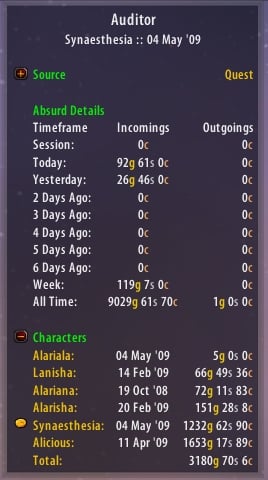
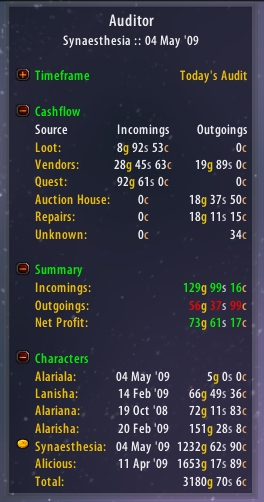
Auditor is a nifty addon that tracks your incoming and outgoing money from a variety of sources, and provides an easy to use Data Broker interface to choose whose data you would like to look at, and for what time period. It is, essentially, MoneyFu for those who have obsessive information disorder. Like me. Yes, I *must* know how much I spent on training last week. Why? I dunno. But I must.
Features:
- LDB at last! Yes, your eyes don't deceive you. Probably.
- Money tracking, and lots of it.
- Data separated by realm.
- Character totals.
- Combined totals.
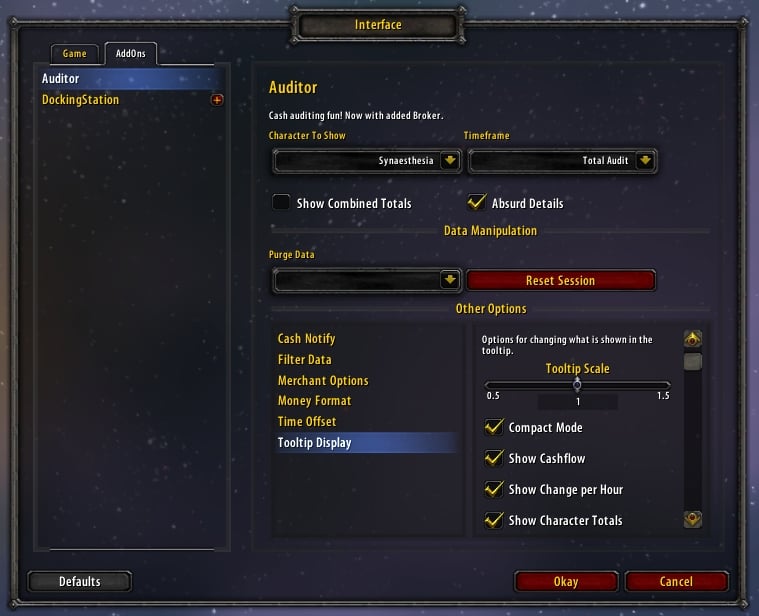
- Clickable tooltip to customise what you can and can't see.
- Ability to look at all your characters' specific data from any of your other characters on that realm.
- Accounts can be viewed per session, day, last seven days, or in their full, all-time glory.
- Cash notification options.
- Optional auto-repairs (per-character preference).
- Optional auto-sell for grey items (per-realm preference).
- Time offsets, so you can set Auditor to reset when dailies reset!
- Many things. Just get it and see!
What does Auditor track?
- Loot money! Whether you are solo, in a party or in a raid.
- Vendor money! Stuff you buy from or sell to vendors.
- Quest money! Money you gain from quests, and money you spend on quests (e.g. the Scholomance Key quest).
- Trade money! Doing enchants or transmutes? Yep, it catches money exchanged in trade.
- Mail money! Sending money to/from your alts or friends? Tracked.
- AH money! At last, both outgoing AND incoming Auction House money is tracked.
- Training money! How much did you spend on training and respecs? Do you care? Well, you'll know anyway.
- Flight money! Spent a day flying about Azeroth? See how much you should claim back on your tax expenses.
- Repairs money! See how much money you really spent on repairing your kit after those instances.
- Unknown money! Money gained/lost, but for whatever reason, Auditor can't work out where it's from. Better than nothing, anyway.
- Reconciliation money! That's money for when you just installed Auditor, and it has to account for the cash you have right now, or for when you crashed, or were logged on at a friend's house. It's all good.
- Guild Bank money! Money you deposit or withdraw from your Guild Bank. Exciting, I know.
- LFG reward money! Guild contributions money! Reforging money!
When does it track it for?
Auditor tracks your money on a per session, per day, per last-seven-days and all-time basis.
Known Bugs:
None.
* Fix for tiny bug causing incorrect Contributions for guilds over level 15.
Version 4.4.2
* Fix for bad category upgrading (which assumed that all toons in the database already had historical data).
* Thanks to Zidomo from WoWi for the accurate bug report.
Version 4.4.1
* Added new category for LFG reward money.
* Completed Contributions category.
Version 4.4.0
* Bumped .toc for 4.0.
* Library updates.
* Added new category for Reforging.
* Added beginnings for Contributions category for Guild contributions based on looted cash.
Version 4.3.3
* Bumped .toc for 3.3.
* Library updates.
Version 4.3.2
* Rejigged event code in the data engine. This fixes the issue with Scrap, as well as being slightly neater.
Version 4.3.1
* Updated for newfangled LQT.
* Removed LQTC.
* Bumped .toc.
* Added .toc line for WoWi Minion. Woot!
Version 4.3.0
* Omg, so much awesome new clicky stuff.
* Right-click now cycles backwards.
* You can now click-through to Absurd and back again. It's pretty awesome. Try clicking a category and see what happens!
* Fix for tooltip not showing with NinjaPanel. Thanks, Torhal! <3
Version 4.2.0
* Buh, I suck.
* Fixed stupid error.
* Thanks to CodeRedLin from WoWi for pointing out my tardiness.
Version 4.1.9
* Reverted to 4.1.6 while I fix some stupid mistakes I made.
Version 4.1.8
* Reordered a function to hopefully fix nil error some people are getting.
Version 4.1.7
* LQTC-1.1.
* Efficient efficiencies. Efficiently.
Version 4.1.6
* Auditor now remembers which timeframe you were looking at.
Version 4.1.5
Auditor now respects bar money style once again.
Version 4.1.4
* Fixed combined audits.
* Filtered character setting is now respected by the combined audit.
Version 4.1.3
* Plays more happily with other LQT addons.
* General efficiency improvements.
* Fix to possible bug with tooltip cash counting.
Version 4.1.2
* Temporary fix for annoying column clipping problem.
* Fix for misleading repair notification.
Version 4.1.1
* Filtered characters no longer contribute to realm total display.
* Added toggle for character total on broker display.
* Bugfix related to setting time offsets.
* Bugfix related to cashflow minimisation.
* A ton of code optimisations.
* Better implementation of graphical broker display.
* Some .toc changes.
Version 4.1.0
* Added toggleable net profit to broker display.
* Added graphical display for broker display (coins). Bear in mind that graphical mode prevents realm and net profit totals from showing.
Version 4.0.5
* Fix for Time Offset error.
Version 4.0.4
* Added in Profile management.
* Fix for icon setting not saving when using Broker2FuBar.
Version 4.0.3
* Added adjustable tooltip scale.
* Removed a couple of random commented out bits I forgot to take out earlier.
Version 4.0.1
* Oops. Bad me. Bad!
Version 4.0.0
* Ell dee bee (LDB).
* Spicy meatballs.
* An icon I quite liked. Spot it if you can!
Version 3.2.1a
* Reuploaded for some people who are having issues with being unable to download the latest version for some reason!
Version 3.2.1
* Fixed stupid error caused by removal of certain globals in patch 2.4.2. Undocumented Blizz rando-changes ftw!
Version 3.2.0
* Finally fixed timezone issues, which was seriously complicated!
* New option: Time Offset - you can use this to make Auditor reset at a time other than midnight, local time. Useful for dailies etc.
* Reworked date storage system: A random side-effect of this is that if you play in a non-English locale, the month should bizarrely be localised for your language!
* Combined totals: You can now access this option by clicking on 'Total' at the bottom of the tooltip. It is a toggleable, per-realm option, and will override the 'Character to show...' option while active.
* PLEASE NOTE: Your seven day audit will be cleared out upon installing this update. Your Total audit will not be affected. Essentially, it will just appear like you haven't logged on for a week. No data is lost!
Version 3.1.0
* Added in optional use of guild bank for auto-repairs. This function also keeps a running total of the amount of guild money you have used so far for repairs, per toon, displayed in chat (like the Cash Notify stuff).
* Reworked Auto-Repair function to work properly with faction reductions. This does, however, mean that Auto-Sell Grey Items mods will screw up the categorisation of repairs. So...
* Added Auto-Sell Grey Items function. This is accessible in the options menu under Merchant Options --> Auto-Sell. If you want to use Auto-Repair and Auto-Sell mods with Auditor, feel free - but the functions now included in Auditor are the only ones 99% likely to work properly. It is defaulted to off, and is a per-realm option.
* Changed menu options and options storage layout. These will be clarified below:
Merchant Options --> Auto-Repair (per-character option), Guild Repair (per-character option) and Auto-Sell (per-realm option).
Cash Notify --> AH, Mailbox, Vendor, Trainer, Guild Bank (per-realm options)
And various other cleanups of tooltip options into better organised categories.
* P.S. Using other Auto-Repair and Auto-Sell mods is cool, like I said, nothing will break - but your Repair and Vendor categories will not maintain accuracy.
* .toc bump for 2.4.
Version 3.0.4
* Fixed some library issues for those running without FuBar.
Version 3.0.3
* Added option to allow display of Realm Total on FuBar, e.g. 101.7g/5342.6g.
Version 3.0.2
* Nil check added for when AuditorFu has been disabled, or hasn't finished loading.
Version 3.0.1
* Added in Guild Bank category.
Version 3.0.0
* Complete rewrite. Crossed fingers, everyone. Hehehehe.
 |
Comment Options |
 11-21-22, 04:32 PM
|
|
|
A Kobold Labourer
Forum posts: 0
File comments: 31
Uploads: 0
|
Re: 10.0 fan update
error in patch 10.0.2
Code:
Message: Interface/AddOns/Auditor2/Core.lua:137: attempt to call global 'GetContainerNumSlots' (a nil value) Time: Tue Nov 22 00:30:02 2022 Count: 2 Stack: Interface/AddOns/Auditor2/Core.lua:137: attempt to call global 'GetContainerNumSlots' (a nil value) [string "@Interface/AddOns/Auditor2/Libs/Dongle.lua"]:248: in function <Interface/AddOns/Auditor2/Libs/Dongle.lua:245> [string "@Interface/AddOns/Auditor2/Libs/Dongle.lua"]:539: in function <Interface/AddOns/Auditor2/Libs/Dongle.lua:527> Locals: <none> |

|

|
| Daeveren |
| View Public Profile |
| Send a private message to Daeveren |
| Find More Posts by Daeveren |
| Add Daeveren to Your Buddy List |
|
10-29-22, 01:01 AM
|
||
|
A Kobold Labourer
Forum posts: 0
File comments: 31
Uploads: 0
|
Re: 10.0 fan update
Also for those using Broker Auditor, just comment out line 652 and it should work again. |
|
|
|
|
| Daeveren |
| View Public Profile |
| Send a private message to Daeveren |
| Find More Posts by Daeveren |
| Add Daeveren to Your Buddy List |
|
10-28-22, 08:23 PM
|
|
|
A Kobold Labourer
Forum posts: 1
File comments: 56
Uploads: 0
|
10.0 fan update
Cross-referenced the changes I'd made with what various other folks had posted over on Curseforge and so far seems to be functional. YMMV, caveat user, etc and so forth. If I trip over any more issues (or see them mentioned in Curseforge comments) I will endeavor to update the linked file below but I might not remember to post here.
Delete line 652 in Broker_Auditor\Core.lua (this line ↓) Code:
auditorHeaderFont:SetFont(auditorHeaderFont:GetFont(), 15) (In case you're curious about details, MAIL_CLOSED and VOID_STORAGE_CLOSE events got removed so they've been replaced with PLAYER_INTERACTION_MANAGER_FRAME_HIDE . Linked file also includes various prior fixes from previous patch breakage but I'm too lazy to dredge up all those details, go rummage around in Curseforge comments for details if you're that curious.  ) ) |
|
|
|
| Veyska |
| View Public Profile |
| Send a private message to Veyska |
| Find More Posts by Veyska |
| Add Veyska to Your Buddy List |
|
10-27-22, 02:24 AM
|
|
|
A Kobold Labourer
Forum posts: 0
File comments: 31
Uploads: 0
|
Does anyone have a fix for patch 10.0?
Code:
9x Interface/AddOns/Auditor2/Core.lua:80: attempt to call method 'UpgradeCategories' (a nil value)
[string "@Interface/AddOns/Auditor2/Libs/Dongle.lua"]:1331: in function <Interface/AddOns/Auditor2/Libs/Dongle.lua:1325>
[string "=[C]"]: in function `pcall'
[string "@Interface/AddOns/Auditor2/Libs/Dongle.lua"]:246: in function <Interface/AddOns/Auditor2/Libs/Dongle.lua:245>
[string "@Interface/AddOns/Auditor2/Libs/Dongle.lua"]:336: in function <Interface/AddOns/Auditor2/Libs/Dongle.lua:327>
Code:
9x Frame:RegisterEvent(): Frame:RegisterEvent(): Attempt to register unknown event "VOID_STORAGE_CLOSE"
[string "=[C]"]: in function `RegisterEvent'
[string "@Interface/AddOns/Auditor2/Core.lua"]:321: in main chunk

Locals:
(*temporary) = Frame {
 0 = <userdata>
}
(*temporary) = "VOID_STORAGE_CLOSE"
Last edited by Daeveren : 10-27-22 at 02:29 AM.
|
|
|
|
| Daeveren |
| View Public Profile |
| Send a private message to Daeveren |
| Find More Posts by Daeveren |
| Add Daeveren to Your Buddy List |
|
10-15-20, 04:30 PM
|
|
|
A Kobold Labourer
Forum posts: 0
File comments: 31
Uploads: 0
|
Does anyone know a fix for the error in patch 9.0? Thanks in advance
Code:
Message: Interface\AddOns\Auditor2\Core.lua:139: attempt to call global 'ShowMerchantSellCursor' (a nil value) |
|
|
|
| Daeveren |
| View Public Profile |
| Send a private message to Daeveren |
| Find More Posts by Daeveren |
| Add Daeveren to Your Buddy List |
|
08-02-18, 12:13 AM
|
|
|
A Kobold Labourer
Forum posts: 1
File comments: 56
Uploads: 0
|
There's actually a second instance of TRADE_CLOSE that needs to be TRADE_CLOSED , I (and quite possibly others who were just treating immediate symptoms) only caught the one that occurs without deliberate user action. The other instance is (I believe, referencing the comment over on Curseforge I used to fix the second instance, don't actually have the file open atm) on line 398. Same schtick/fix.
Or if you want to just "update" rather than muck about with file contents, I've got a patched copy for downloading, because why not or something. :-P I'll leave it up there for the foreseeable future or until someone takes over here (or until Dropbox yells at me for whatever reason). Is just the most recent version updated to work, even did a fresh reinstall and re-edited in fixes to make sure I hadn't mucked with anything and forgotten about it. ***** Edit - Dropboxed copy has a fix posted over on Curseforge to get auto-vendoring of greys behaving again edited in. If you're doing your own edits, included comment below... Quote from Xianghar >> In reply to Veyska: It happens when the option to auto sell greys is turned on. Deleting line 139 of Core.lua ("ShowMerchantSellCursor(1)") fixes it.
Last edited by Veyska : 08-12-18 at 06:53 PM.
|
|
|
|
| Veyska |
| View Public Profile |
| Send a private message to Veyska |
| Find More Posts by Veyska |
| Add Veyska to Your Buddy List |
|
07-22-18, 08:13 AM
|
|||
|
A Kobold Labourer
Forum posts: 0
File comments: 23
Uploads: 0
|
Re: Re: 8.0 Update please
Auditor2/Core.lua
line 309 f:RegisterEvent("TRADE_CLOSED") instead of f:RegisterEvent("TRADE_CLOSE")
|
||
|
|
|
| next96 |
| View Public Profile |
| Send a private message to next96 |
| Find More Posts by next96 |
| Add next96 to Your Buddy List |
|
07-19-18, 09:25 AM
|
||
|
A Kobold Labourer
Forum posts: 0
File comments: 31
Uploads: 0
|
Re: 8.0 Update please
 |
|
|
|
|
| Daeveren |
| View Public Profile |
| Send a private message to Daeveren |
| Find More Posts by Daeveren |
| Add Daeveren to Your Buddy List |
|
07-19-18, 08:22 AM
|
|
|
A Kobold Labourer
Forum posts: 0
File comments: 23
Uploads: 0
|
8.0 Update please
8.0 battle for azerloth update please T_T;;;
|
|
|
|
| next96 |
| View Public Profile |
| Send a private message to next96 |
| Find More Posts by next96 |
| Add next96 to Your Buddy List |
|
07-27-15, 07:37 AM
|
|
|
A Kobold Labourer
Forum posts: 0
File comments: 1
Uploads: 0
|
Indeed i have.
Have not yet looked at the new code, Been making alarishas neater and easier to maintain/run in the long run. I do not/Have never use/d WoW interface sadly. Wether or not updates will be added here in the long term is unknown. Cheers jf |
|
|
|
| j311yf1sh |
| View Public Profile |
| Send a private message to j311yf1sh |
| Find More Posts by j311yf1sh |
| Add j311yf1sh to Your Buddy List |
|
07-25-15, 11:25 AM
|
|
|
A Pyroguard Emberseer
 Forum posts: 2988
File comments: 334
Uploads: 10
|
This addon has been picked back up by j311yf1sh!! He's one of the authors of TradeSkillMaster and Tricks Of The Trader, so I'm sure he will take very good care of this beloved addon.
http://www.curse.com/addons/wow/auditor#c163
__________________
♪~ ( ̄。 ̄ ) I ♥ My Sonos! AddOn Authors: If your addon spams the chat box with "Addon v8.3.4.5.3 now loaded!", please add an option to disable it! |
|
|
|
| Petrah |
| View Public Profile |
| Send a private message to Petrah |
| Visit Petrah's homepage! |
| Find More Posts by Petrah |
| Add Petrah to Your Buddy List |
|
04-28-15, 04:31 AM
|
|
|
Premium Member
 Forum posts: 4
File comments: 101
Uploads: 0
|
 gone from curse, not working as it used to.
so this now appears to be completely gone from curse (where a newer one than wow interface was) thanks for updating this, i really haven't found something that does what this used to do so well
 i'm surprised that more people wouldn't love to have an addon to see where all their incomings and outgoings are from. i have found it so helpful over the years, just to see what i'm spending my money on, etc. ... but now, for some reason, the time of day seems to be off... or maybe it's the jewelcrafting issue. lately my balances have been odd. if anyone has an interest in keeping this going, it would be very much appreciated. in the time being, does anyone know of something similar that you have found to be sufficient? thanks everyone! |
|
|
|
| menace97 |
| View Public Profile |
| Send a private message to menace97 |
| Visit menace97's homepage! |
| Find More Posts by menace97 |
| Add menace97 to Your Buddy List |
|
04-19-15, 12:24 PM
|
|
|
A Kobold Labourer
Forum posts: 1
File comments: 56
Uploads: 0
|
I piled up two weeks' worth of JC quest reward bags on my main and liberally sprinkled debug print statements all over the main file for Auditor and started poking around and I've figured out why it's doubly registering the amount looted, resulting in strange "expenditures" to vendors or the mail (or reconciliation). Turns out it's actually happening to looted coins as well (at least it did when I tested it last night), but the quantities are so small compared to the JC quest I'm not surprised nobody's noticed, including myself.
If you want a quick and dirty fix, do a search in Core.lua for "ShareMoneyScan(arg1)" and add a "--" (minus the quotes) in front of it. This may well cause (minor, I suspect) issues elsewhere - presumably the ability to parse gold looted from a chat message independently of the game telling addons how much coinage you just got was important at some point but I don't know if it still is. I'm currently testing a more complicated modification that *hopefully* allows for the possibility of that fringe case without doubling loot amounts; if in a reasonable while it hasn't imploded on me or proven unsatisfactory I'll post another comment here with an updated file. |
|
|
|
| Veyska |
| View Public Profile |
| Send a private message to Veyska |
| Visit Veyska's homepage! |
| Find More Posts by Veyska |
| Add Veyska to Your Buddy List |
|
04-17-15, 01:58 PM
|
||
|
A Kobold Labourer
Forum posts: 0
File comments: 3
Uploads: 1
|
Re: JC Daily Issue
You don't need to be JC to do these dailies. All you need is JC building in garrison and follower working there. Follower will offer the daily. |
|
|
|
|
| Laume |
| View Public Profile |
| Send a private message to Laume |
| Visit Laume's homepage! |
| Find More Posts by Laume |
| Add Laume to Your Buddy List |
|
02-28-15, 10:04 AM
|
||
|
A Murloc Raider
Forum posts: 5
File comments: 25
Uploads: 0
|
Re: JC Daily Issue
Also, incoming money categorized by the addon as "loot" is specifically prevented from being logged as outgoing. Based on my understanding of the code, I can't come up with any scenarios where this problem should happen, especially not limited to one specific source of gold income. I'm not saying this isn't issue isn't happening, and I believe that it is, but it's something that I would have to replicate to make any sense out of it. It could be a bug on Blizzard's end. But I don't have a jewelcrafter to test this on. I'd like to officially maintain this addon, but my attempts to do so have failed. Until that ever happens, I'm willing to share any work I do here, but I can't justify putting very much time into this project. |
|
|
|
|
| Eincrou |
| View Public Profile |
| Send a private message to Eincrou |
| Visit Eincrou's homepage! |
| Find More Posts by Eincrou |
| Add Eincrou to Your Buddy List |
|
