| Go to Page... |

| Updated: | 08-08-09 10:16 AM |
| Created: | unknown |
| Downloads: | 232,162 |
| Favorites: | 398 |
| MD5: |
MapNotes 

v5.16.30200
Sorry peeps, but I'm effectively retired.
I have removed the PayPal buttons from WoWInterface, which makes it easy to do - and I am TRYING to remove them from Curse & WoWUI also, which seems to be a lot trickier.
I may come back to WoW some time next year - but probably not...
If anyone wants to take over development then you can e-mail me at the contact e-mail below, and I will cooperate as needed.
Sorry, and thanks for all your support over the years.
Signing Off
[email protected]
Original code: Sir.Bender <Meog on WoW Forums>
Contributors:
ciphersimian
... and MANY others whose names didn't appear in the code anywhere
***********
Description
***********
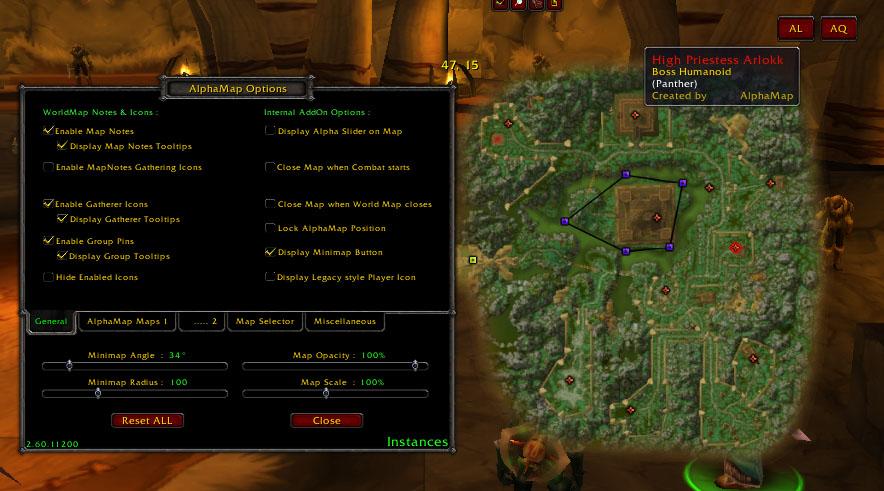
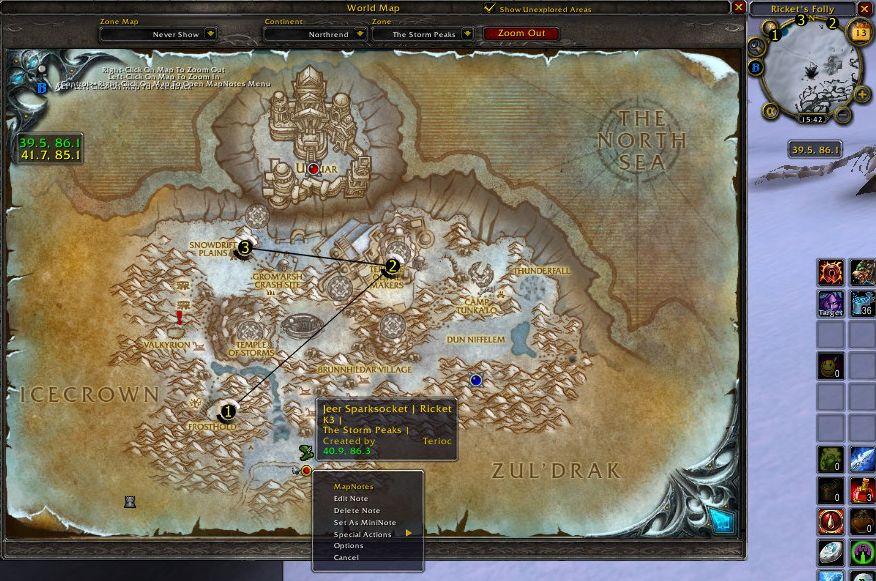
Adds a note system to the WorldMap helping you keep track of interesting locations.
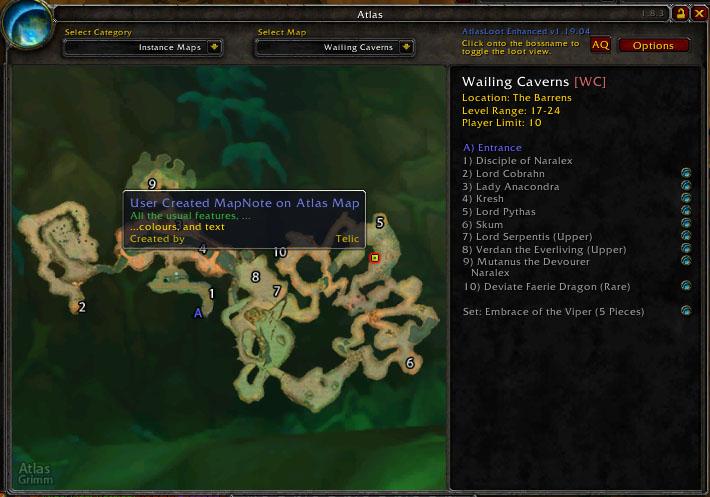
MapNotes(Fan's Update) also provides a Plugin interface for other AddOns to take advantage of the note making ability. AlphaMap(Fans Update) uses this interface to allow Note creation on AlphaMap Maps of Instances, BattleGrounds, and World Boss Maps. This version of MapNotes comes with in-built support for creation of notes on Atlas maps, also using this Plugin interface.
For these purpose MapNotes offers the following main functions:
1. Marking notes on the WorldMap
2. Showing one of these notes on the MiniMap (see MiniNote)
3. Allows any other AddOn to use MapNotes note creation ability to mark notes on frames within their own AddOn :
- Marking notes on AlphaMap (Fan's Update) Instance maps
- Marking notes on Atlas maps
"/tloc" can be used to toggle this AddOns minimap coordinates instead of Thottbott's minimap coordinates.
NOTE : PLEASE still use "/mn -tloc xx,yy" to place a Thottbott marker on the map. "/tloc" ONLY toggles Minimap Coordinates.
Should be compatible with both Cartographer, although you may no longer be able to create notes on the map with the in-built functionality provided by that AddOn - only with the functionality provided by MapNotes (Fan's Update).
********
Features
********
[Slash Commands] - NOTE : See separate file "LegacySlashCommands.txt" for old style commands
================
/mapnote OR /mapnotes OR /mn
Use without any other parameters to see which version of MapNotes is installed, and access the list of available Slash Commands.
Otherwise can be used to insert a Map Note by a slash command (which you can create in the Send Menu), for example, to put a note at the Entrance of Stormwind City on the map Elwynn Forest:
"/mapnote k<WM Elwynn> x<0.320701> y<0.491480> t<Stormwind> i1<Entrance> i2<> cr<ciphersimian> i<0> tf<0> i1f<0> i2f<0>"
NOTE: The above would all be on one line Description of the identifiers:
k<#> - Key based on the map name from GetMapInfo() prefixed by "WM " (English name on all clients - never localised) Varies for other AddOns using the Plugin functionality
x<#> - X coordinate, based on the GetPlayerMapPosition() function
y<#> - Y coordinate, based on the GetPlayerMapPosition() function
t<text> - Title for the MapNote
i1<text> - first line of text displayed under the Title in the MapNote (Info 1)
i2<text> - second line of text displayed under the Title in the MapNote (Info 2)
cr<text> - Creator of the MapNote
i<#> - icon to use for the MapNote, AddOns/MapNotes/POIIcons/Icon#.tga
tf<#> - color of the Title, AddOns/MapNotes/POIIcons/Color#.tga
i1f<#> - color of the Info 1 line (colors as above)
i1f<#> - color of the Info 2 line (colors as above)
mn<1> - (optional) If included, then a value of 1 will set the note as a mininote also. Any other value and the note will NOT be set as a mininote.
/mn -allow OR /mn -a
Allows you to receive the next note, even if you have disabled receiving in the options. If invoked with no parameters, it will toggle the current state.
/mn -automini
Shows the next note created (using any method) as a MiniNote and also puts it on the WorldMap. If invoked with no parameters, it will toggle the current state.
/mn -allmini
Toggle all MapNotes off/on as Mininotes
(Keybinding also available)
/mn -nextmini
Shows the next note created (using any method) as a MiniNote and also puts it on the WorldMap. If invoked with no parameters, it will toggle the current state.
/mn -minionly
Like the previous command, but doesn't put the note on the WorldMap.
/mn -minioff
Turns the MiniNote off.
/mn -tloc tbX,tbY
Sets a "Thottbot location" on the map. Use it with no arguments to toggle it off.
See the Section on Formatting of X,Y Coordinates
/mn -q [icon] [name]
Adds a note at your current location, icon and name are optional (icon any number from 0 to 9, AddOns/MapNotes/POIIcons/Icon#.tga)
If no [name] is passed, then the Note will be named based on the MiniMap Text, and the second/third lines will be populated with more zone information and/or the default QuickNote text.
/mn -qtloc xx,yy [icon] [name]
See the Section on Formatting of X,Y Coordinates
Adds a note on the map you are currently on at the given thottbot location, icon and name are optional (icon any number from 0 to 9, AddOns/MapNotes/POIIcons/Icon#.tga)
NEW SLASH COMMANDS IN MapNotes(Fan's Update)
/mn -s [search text]
If you want to search for a note, to see if one exists, or where it is, then you can use this command, and MapNotes will print out a report in the chat window, displaying the names of all maps which have a note containing that text
/mn -hl [note name]
If you have lots of notes and want to clearly identify a single one on a map, or if you want a certain note to remain highlighted, then use this command and they will be displayed with a green circle around them.
If there are several notes with that name or containing that text, then they will ALL be highlighted.
The note name does not have to be case sensitive, and doesn't have to be an exact match - all notes containing the [note name] text will be highlighted.
If the EXACT NAME is specified (not case-sensitive), the note will also be marked as a MiniNote on the Minimap
/mn -mapc
Toggle the display of Player and Cursor Coordinates on the World Map
Control-Left-Click and drag the coordinates to move them to a different position on the World Map if you are not happy with the default.
/mn -minic
Toggle the display of Player coordinates below the Minimap.
/mn -t [icon] [name]
Creates a quicknote at the Player's current location if the Player has no target.
If the Player does have a target, then it will create a note for that target at the Player's current location, icon and name are optional (icon any number from 0 to 9, AddOns/MapNotes/POIIcons/Icon#.tga)
/mn -m
Creates a note for the Player's target at the Player's current location.
OR Merges the details for the Player's current target in to a Map Note that has already been created at the Player's current location.
MUST have targetted a Player/NPC/Mob for this to work.
/mn -scale [0.5 - 1.5]
The size of MapNotes Menus and Frames are now fixed no matter what the scale of the World Map or other AddOn Map being used.
This command can be used to change the default size of MapNotes Menus and Frames if the user finds it too small or large.
The default value is 0.7
Therefore "/mn -scale 1.0" will make the Menus and Frames appear larger than they do by default.
/mn -undelete
Will undelete the last deleted MapNote.
IMPORTANT NOTE ON THE IMPORT FUNCTIONS BELOW
All of the functions below are mainly designed for people who have just installed MapNotes (Fan's Update). If you have been using this version of MapNotes for some time already, and have your own notes, then these functions may overwrite your existing notes. YOU HAVE BEEN WARNED.
/script MapNotes_ImportCarto()
NOTE: only works with English localisation currently
If you want to move from Cartographer 2 to MapNotes, then log in to the game with both AddOns enabled, ust the above command, after which you will receive notification in the chat window on how many notes have been imported.
/MapNotes_Import_MetaMap
If you want to move from MetaMapNotes to MapNotes, then log in to the game with both AddOns enabled, use the above command, after which you will receive notification in the chat window on how many notes have been imported.
/MapNotes_Import_AlphaMap
If you have AlphaMap installed, and want to convert the in-built Instance and World Boss notes in to MapNotes notes, then use the above command, and you will see a message in the chat window informing you of how many notes have been imported in to MapNotes.
This does NOT import Battleground notes by default, as AlphaMap's in built Battleground functionality works best without MapNotes overlaying the BG Objectives.
NOTE: You don't have to import notes from AlphaMap, to make MapNotes on AlphaMap Instance/Battleground/WorldBoss maps. You can create any notes you like manually.
/MapNotes_Import_AlphaMapBG
As mentioned above, the basic "/MapNotes_Import_AlphaMap" command does not import Battleground notes by default. If you do want to import AlphaMap Battlegournd map notes, then use this command to do so.
/MapNotes_Import_CTMapMod
If you want to move from using CTMapMod to MapNotes (Fan's Update), then log in to the game with both AddOns enabled, use the above command, after which you will receive notification in the chat window on how many notes have been imported; Then log out, and disable CTMapMod.
[Key Bindings]
==============
QuickNote/TargetNote
--------------------
Creates a quicknote at the Player's current location if the Player has no target.
If the Player does have a target, then it will create a note for that target at the Player's current location.
-OR CLICK MINIMAP COORDINATES-
If you are NOT targetting anything, then ALT-Left-Click on the Minimap Coordinates to create a QuickNote.
If you are targetting something, then ALT-Left-Click to create a Target note with details about the current target at the PLAYER'S current location - you will be warned if you are too near to an existing note to create a new note.
(Slash Command "/mn -t" also available)
TargetNote/MergeNote
--------------------
Creates a note for the Player's target at the Player's current location.
OR Merges the details for the Player's current target in to a Map Note that has already been created at the Player's current location.
MUST have targetted a Player/NPC/Mob for this to work.
-OR CLICK MINIMAP COORDINATES-
If you are targetting something, then you may also ALT-Right-Click on the Minimap Coordinates if you wish to create a note for your Target at the PLAYER'S current location. However, if a MapNote already exists at Player's location, then the details will be merged with the existing note.
(Slash Command "/mn -m" also available)
[Fast Note Creation/Editing/Deleting]
=====================================
- <Control>+<Alt>+Right-click on a MAP/FRAME to create a Quicknote at that point
- <Control>+<Alt>+Right-click on a NOTE to quickly go to the note Editing Frame
- <Control>+<Alt>+Left-clicking to drag NOTES to new positions
- <Alt>+Right-click on a NOTE to toggle it as a Minimap note
- <Alt>+<Shift>+DOUBLE Right-click on a note to quickly delete it.
- <Control>+<Shift>+Right-click will create a temporary blue Group note on a map
If created on a World map, then it will also be displayed in the Minimap for you to track
If in a Raid group, then the note will be shared with other Raid members who have MapNotes installed
Otherwise, if in a Party, then the note will be shared with the Party members who have MapNotes installed
Otherwise, its just your own quick temporary marker 
Changes in v5.16.30200 from v5.16.30100
=======================================
- toc update for WoW Patch 3.2
 |
Comment Options |
 12-12-10, 03:47 AM
|
|
|
A Murloc Raider
Forum posts: 6
File comments: 394
Uploads: 0
|
Updated version here: http://wow.curse.com/downloads/wow-a...ns-update.aspx
|

|

|
| Aisenfaire |
| View Public Profile |
| Send a private message to Aisenfaire |
| Find More Posts by Aisenfaire |
| Add Aisenfaire to Your Buddy List |
|
10-29-10, 12:22 AM
|
|
|
A Kobold Labourer
Forum posts: 0
File comments: 10
Uploads: 0
|
Is this going to be updated? It worked very well until patch 4.0.1 but has some minor issues at the moment. It's a great addon an I haven't found anything like it to replace it with.
|
|
|
|
| dav777 |
| View Public Profile |
| Send a private message to dav777 |
| Find More Posts by dav777 |
| Add dav777 to Your Buddy List |
|
04-13-10, 03:54 AM
|
|
|
A Kobold Labourer
Forum posts: 0
File comments: 61
Uploads: 0
|
MapNotes Hack to remove floating text and icon in small world map
EDIT: It will remove it from the large world map too but that's fine too
 I found a way to remove the text you see floating on the minimized world map, and the magnifying glass icon too. Removing the text was easy enough for me to figure out but that damn magnifying glass icon was difficult for me to remove. After about an hour or so I came up with a way to do it. Wasn't pretty and I am not sure what errors or anything it may throw at ya. I have errors turned off so I don't know if there is any and I don't know if my method broke anything in the long run but after playing around with mapnotes in game for an hour after my "hack" everything appears to be working just fine; for me anyhow. I can make notes, edit notes and use the note browser just fine. Everything appears to be functional so maybe I did okay /shrug. Again, my hack may throw out some lua errors, or maybe not but everything appears to be fine for me. I had to edit two files to remove the floating text and magnifying glass icon. I have them zipped up and am willing to send via email if anyone wants a copy. I know that floating text and icon is quite annoying when you have the world map minimized since it floats out of the map window. Send me an email at mak (dot) arizona (at) hotmail (dot) com and let me know in the subject line of email that you are after my Mapnotes hack.
Last edited by AZMAK : 04-13-10 at 03:55 AM.
|
|
|
|
| AZMAK |
| View Public Profile |
| Send a private message to AZMAK |
| Find More Posts by AZMAK |
| Add AZMAK to Your Buddy List |
|
01-16-10, 04:22 PM
|
|
|
An Aku'mai Servant
 Forum posts: 32
File comments: 642
Uploads: 4
|
Map Notes is being maintained by another author on Curse. Just thought I'd let people know.
__________________
There is absolutely no evidence to support the theory that life is serious. |
|
|
|
| xtoq |
| View Public Profile |
| Send a private message to xtoq |
| Find More Posts by xtoq |
| Add xtoq to Your Buddy List |
|
12-11-09, 02:19 AM
|
||
|
A Kobold Labourer
Forum posts: 1
File comments: 37
Uploads: 0
|
Re: Goodbye Telic
|
|
|
|
|
| coldsun |
| View Public Profile |
| Send a private message to coldsun |
| Find More Posts by coldsun |
| Add coldsun to Your Buddy List |
|
12-08-09, 11:24 AM
|
|
|
A Kobold Labourer
Forum posts: 0
File comments: 61
Uploads: 0
|
 Goodbye Telic
Telic,
You've made some great addons and you will be sorely missed by all who use them. You were one of a handful of addon authors who were really good about updating your addons and responding to our replies about them. Thanks so much and best wishes to you. Happy Holidays and Merry Christmas. |
|
|
|
| AZMAK |
| View Public Profile |
| Send a private message to AZMAK |
| Find More Posts by AZMAK |
| Add AZMAK to Your Buddy List |
|
11-28-09, 05:20 AM
|
|
|
A Defias Bandit
Forum posts: 3
File comments: 431
Uploads: 8
|
Orphaned
Sorry peeps, but I'm effectively retired.
I have removed the PayPal buttons from WoWInterface, which makes it easy to do - and I am TRYING to remove them from Curse & WoWUI also, which seems to be a lot trickier. I may come back to WoW some time next year - but probably not... If anyone wants to take over development then you can e-mail me at the contact e-mail below, and I will cooperate as needed. Sorry, and thanks for all your support over the years. Signing Off [email protected] |
|
|
|
| Telic |
| View Public Profile |
| Send a private message to Telic |
| Find More Posts by Telic |
| Add Telic to Your Buddy List |
|
09-05-09, 08:34 PM
|
|
|
A Kobold Labourer
Forum posts: 0
File comments: 6
Uploads: 0
|
 Conflict between BadBoy and Map Notes?
I started getting the following error randomly and repeatedly after installing BadBoy and BadBoy Levels. I was also missing whispers from legitimate people, and had to disable it today when LFM for heroics.. It was like I wouldn't receive their first whisper, but I'd get everything after that.
Looks like BadBoy and Map Notes are conflicting? Date: 2009-09-04 10:56:18 ID: -1 Error occured in: Global Count: 1 Message: ..\AddOns\MapNotes\MapNotes.lua line 1196: bad argument #1 to 'strsub' (string expected, got nil) Debug: (tail call): ? [C]: ? [C]: strsub() MapNotes\MapNotes.lua:1196: MapNotes\MapNotes.lua:1195 Badapples\Badapples.lua:917: ChatFrame_MessageEventHandler() ..\FrameXML\ChatFrame.lua:2288: ChatFrame_OnEvent() [string "*:OnEvent"]:1: [string "*:OnEvent"]:1 BadBoy_Levels\BadBoy_Levels.lua:85: BadBoy_Levels\BadBoy_Levels.lua:36 |
|
|
|
| kimmisc |
| View Public Profile |
| Send a private message to kimmisc |
| Find More Posts by kimmisc |
| Add kimmisc to Your Buddy List |
|
08-08-09, 10:14 AM
|
|
|
A Defias Bandit
Forum posts: 3
File comments: 431
Uploads: 8
|
Changes in v5.16.30200 from v5.16.30100
- toc update for WoW Patch 3.2
I have also tried something in this fix to help with Carto compatibility - but I have NOT been able to test it's efficacy. |
|
|
|
| Telic |
| View Public Profile |
| Send a private message to Telic |
| Find More Posts by Telic |
| Add Telic to Your Buddy List |
|
08-07-09, 08:09 PM
|
||
|
A Kobold Labourer
Forum posts: 0
File comments: 61
Uploads: 0
|
Re: ...
He may be referring to this one, I have been getting this one since patch day. I came here a couple times since and saw no updates so I didn't bother to post (figured it was only me or some other problem). Date: 2009-08-07 19:04:51 ID: 2 Error occured in: Global Count: 1 Message: [string "MapNotesPOI1:OnShow"] line 1: attempt to index a nil value Debug: [C]: ? [string "*:OnShow"]:1: [string "*:OnShow"]:1 [C]: SetParent() ...nterface\AddOns\Cartographer_LookNFeel\LookNFeel.lua:687: ...nterface\AddOns\Cartographer_LookNFeel\LookNFeel.lua:574 [C]: ? ...AddOns\Cartographer\libs\LibRock-1.0\LibRock-1.0.lua:2461: ...AddOns\Cartographer\libs\LibRock-1.0\LibRock-1.0.lua:2436 ...AddOns\Cartographer\libs\LibRock-1.0\LibRock-1.0.lua:2510: ...AddOns\Cartographer\libs\LibRock-1.0\LibRock-1.0.lua:2503 ...AddOns\Cartographer\libs\LibRock-1.0\LibRock-1.0.lua:2569: ...AddOns\Cartographer\libs\LibRock-1.0\LibRock-1.0.lua:2546 ...AddOns\Cartographer\libs\LibRock-1.0\LibRock-1.0.lua:2694: ...AddOns\Cartographer\libs\LibRock-1.0\LibRock-1.0.lua:2689 [C]: ? [C]: pcall() Cartographer\Cartographer.lua:928: LoadLoadOnDemandModules() Cartographer\Cartographer.lua:522: Cartographer\Cartographer.lua:370 [C]: ? ...AddOns\Cartographer\libs\LibRock-1.0\LibRock-1.0.lua:2461: ...AddOns\Cartographer\libs\LibRock-1.0\LibRock-1.0.lua:2436 ...AddOns\Cartographer\libs\LibRock-1.0\LibRock-1.0.lua:2510: ...AddOns\Cartographer\libs\LibRock-1.0\LibRock-1.0.lua:2503 ...AddOns\Cartographer\libs\LibRock-1.0\LibRock-1.0.lua:2583: ...AddOns\Cartographer\libs\LibRock-1.0\LibRock-1.0.lua:2546 ...AddOns\Cartographer\libs\LibRock-1.0\LibRock-1.0.lua:2694: ...AddOns\Cartographer\libs\LibRock-1.0\LibRock-1.0.lua:2689 [C]: LoadAddOn() ..\FrameXML\UIParent.lua:229: UIParentLoadAddOn() ..\FrameXML\UIParent.lua:252: CombatLog_LoadUI() ..\FrameXML\UIParent.lua:499: ..\FrameXML\UIParent.lua:471 As you can see there is a mention of Cartographer and also LibRock. I checked Curse to find updates for Cartographer but there wasn't any. I did however download the LibRock_Config update that CKKnight did for 3.2 but that didn't fix this error either. |
|
|
|
|
| AZMAK |
| View Public Profile |
| Send a private message to AZMAK |
| Find More Posts by AZMAK |
| Add AZMAK to Your Buddy List |
|
08-07-09, 04:09 PM
|
||
|
A Defias Bandit
Forum posts: 3
File comments: 431
Uploads: 8
|
...
|
|
|
|
|
| Telic |
| View Public Profile |
| Send a private message to Telic |
| Find More Posts by Telic |
| Add Telic to Your Buddy List |
|
08-07-09, 01:09 PM
|
|
|
A Kobold Labourer
Forum posts: 0
File comments: 68
Uploads: 0
|
Any word on if this addon will be updated for 3.2? Right now it is casuing errors (Not at gaming machine or I would post them). Has anyone else had a problem (May be soem other addon just reporting that its MN).
|
|
|
|
| Enigma_TL |
| View Public Profile |
| Send a private message to Enigma_TL |
| Find More Posts by Enigma_TL |
| Add Enigma_TL to Your Buddy List |
|
07-02-09, 02:38 PM
|
||
|
A Kobold Labourer
Forum posts: 0
File comments: 36
Uploads: 0
|
Re: Re: Re: Re: Note icon issue
Ah! Don't remember doing that before but I do it from now on. Thanks again. One of my favorite addons.
Nancy
__________________
~Magic happens to those who expect it.~ |
|
|
|
|
| nanrector |
| View Public Profile |
| Send a private message to nanrector |
| Find More Posts by nanrector |
| Add nanrector to Your Buddy List |
|
07-01-09, 03:28 AM
|
||
|
A Defias Bandit
Forum posts: 3
File comments: 431
Uploads: 8
|
Re: Re: Re: Note icon issue
Hi,
by default MapNotes creates a temporary marker for Lightheaded coords. i.e. there is only one temporary marker. You can either right click on the temporary MapNote and choose to convert it to a Permanent note from the menu, OR... Hold down the <Ctrl> key while clicking on the Lightheaded coords in the first place, and it should add a permanent note. Telic,
Last edited by Telic : 07-01-09 at 03:30 AM.
|
|
|
|
|
| Telic |
| View Public Profile |
| Send a private message to Telic |
| Find More Posts by Telic |
| Add Telic to Your Buddy List |
|
06-29-09, 06:09 PM
|
||
|
A Kobold Labourer
Forum posts: 0
File comments: 36
Uploads: 0
|
Re: Re: Note icon issue
Appreciate the info Telic. My LH was up to date and I removed TomTom and it still did it. But I finally figured it out. MapNotes has an icon options but its a bit buried and hard to find. But I found it and reset the default icon and it seems to be working fine now other than it only wants to let me put one icon on the map at a time. When I put another it removes the first one. I'll check settings more to see if I can correct that. But I'm glad to get that boot off!
Nancy
__________________
~Magic happens to those who expect it.~
Last edited by nanrector : 06-29-09 at 06:32 PM.
|
|
|
|
|
| nanrector |
| View Public Profile |
| Send a private message to nanrector |
| Find More Posts by nanrector |
| Add nanrector to Your Buddy List |
|
