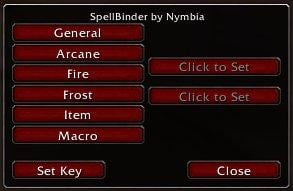
SpellBinder is a simple, ugly Ace2 mod that creates a GUI for the new SetBindingItem, SetBindingSpell, and SetBindingMacro functions. Simply put, it allows you to bind stuff to keys without taking up an actionbar slot.
To summon the window, use /spellbind, or set a key binding in the bindings menu.
* Click on a button on the left, then select or enter something to bind a key to.
* Click on the "Click to Set" button, then enter a key combination
* Check that the spell, item or macro name is correct, check that the key combination is correct, then click "Set Key". That's it!
Optional Files - SpellBinder
Sorry, there are currently no optional files available.
I love this addon as it is but what would be really neat is if the binds were "automatically" shown on the bars.
So if I bound my "earthbind totem" to Shift-E and I dragged it to somewhere on my bar there'd be a nice "S-E" label on it. Normal binds would more or less be history
This addon does work for 2.4 at its current version..just need to enable outdated..
However I've noticed an issue I've never seen before..perhaps it was because I don't think I set "Keybindings per character" in the Blizzard options before messing with Spellbinder..but if not..I see my warlock's keybindings on my mage..& if I go to change anything it says the key is bound to a warlock function.
Just hoping to confirm thats the case before I go nuking all my keybindings to do it over again with the option enabled..
*Edit* To tell the truth..I know nothing about the author nor his gaming habits..but it looks to me this addon is dead..no responses from the author since over a year ago..I'm trying BindPad..no hard feelings..wish this addon well..used it since I knew it existed..but if there's no active participation by the author I'm moving on. Good Luck Keybinders..
so as of 2.3.0 I've noticed a feature broken..the "list" of all spells items & macro's no longer appears..when selected it only shows an empty box..however the addon itself & the keybindings set work jus fine :-)
Absolutely adore the addon btw..swore by it ever since I first saw it ;-)
I'm having trouble with modifier keys since the patch, that I see in a few mods (also when binding keys in ItemRack for example).
The modifier keys are acting as keypresses in and of themselves... for example, if I try to bind to alt-1, it binds to ALT-LALT before i even have a chance to press 1. Any likelyhood of a fix? For now ive just been manually editing the keybindings when necessary, but I'd love to have the mod for it again.
Blizzard's Special Action Buttons (bindings) and the like.
Hello,
Hoping that I can be understood clearly, please let me describe my situation:
On my paladin, auras are control by the Blizzard binding set of 'Special Action Button #' (where # is a number from 1 through 10). On my hunter, pet skills are controlled by the Blizzard binding set of 'Secondary Action Button #.' (just an example) -- I wonder if I could used the same bindings of my paladin auras (Special Action Button) for my hunter's Tracking skills.
When I used SpellBinder, and binded every single tracking skill in my hunter to the bindings I already set for Blizzard's Special Action Buttons, I realized that I lose the 'Special Action Buttons' bindings. Additionally I cannot use them unless I re-bind them on my other character (ie: Paladin's aura). This undoes the bindings on my hunter because they're the same key combinations; shortening so my overall bindings since the bindings already set for 'Special Action Buttons' can't be use on the hunter without affecting my paladin's bindings.
I wonder if there could be an option to select 'Special Action Button 1' or 'Special Action Button #' rather than a key combination to assign a binding to a spell. This way I can still use up the 'Special Action Button #' binding on my Hunter without having an inconsistent binding conflict with my many characters and the general binding scope between all characters is kept (rather than using the 'Character Only' bindings which will isolate a character from general binding updates and modifications).
Please, I'm sure many minimalist players would like to save up bindings this way and still keep consistency between their character's bindings. Hoping I didn't complicate the simple concept I'm trying to convey. I would just like to assign an already set binding to a spell, namely the 'Special Action Button #' set.
Just wanted to say Good mod here. I had been trying to find a way to effectively put in keybindings for my mod XBar, but I guess if you have this, there's no need to reinvent the wheel. I'll be recommending it to my users.
Originally posted by Ektyr Could we get some support for a Mage's Water Elemental please? I'm unable to connect to WoW in order to test a more updated version at the moment, but this support hasn't been added according to the changelog.
I must say that I really love this addon, it's simple and does exactly what I want (minus above feature ).
Unfortunately, a water element's spells don't behave in the same way as a hunter or warlock's pet, can't get info for 'em. You should be able to bind a macro to '/cast Freeze' for the same effect.
Could we get some support for a Mage's Water Elemental please? I'm unable to connect to WoW in order to test a more updated version at the moment, but this support hasn't been added according to the changelog.
I must say that I really love this addon, it's simple and does exactly what I want (minus above feature ).
Originally posted by Garland Just a quick drive-by compliment and maybe some advice (if it pans out).
First I'll say that I love SpellBinder, a combination of it and UnitActionBars to maximise my potential over keyboard and mouse have been making me very happy. As a person who's no stranger to FPS games, I rely on my reflexes between both hardware implements a lot. Binding macros to keys, in play, whenever I need to (no less) is a thing of great value.
I did find out one thing though which might be the answer to speak's question. If something has a binding which is a modifier-key binding but not a key binding, it overrides the modifier part of SpellBinder's binding. Example; if I have SpellBinder set to use V and I have a macro with a [modifier:alt] on it, Alt+V doesn't actually use that but instead it toggles friendly nameplates.
The solution I found was to head into the bindings (making them character specific is important now if you haven't already) and track down the alt/control/shift+key binding that's overriding your macro, then unbind it. That should solve that problem, at least if it's the same problem I was having. Baffled me for a little bit, that did until I actually saw the keybind do something.
Yeah, that's a common problem, thanks for illustrating it so well. Another one (and possibly related to speak's problem) is what's been termed, 'bindings eat modifiers'. For instance, if I have a macro like this:
And that macro is bound to Control-4, the detect magic will never ever cast. That's because the binding eats the modifier -- since control is used to determine if this macro is the one that's cast, it disappears before the macro is evaluated. So ctrl-4 will cast Fireball and ctrl-alt-4 will cast polymorph, both contrary to the macro logic.
This behavior, and the one pointed out by Garland, are both inherent in the Blizzard code, I can't do anything about them, as the bindings are in blizzard's court as soon as you close the spellbinder frame. (they'll also persist after disabling spellbinder, by the way)
Just a quick drive-by compliment and maybe some advice (if it pans out).
First I'll say that I love SpellBinder, a combination of it and UnitActionBars to maximise my potential over keyboard and mouse have been making me very happy. As a person who's no stranger to FPS games, I rely on my reflexes between both hardware implements a lot. Binding macros to keys, in play, whenever I need to (no less) is a thing of great value.
I did find out one thing though which might be the answer to speak's question. If something has a binding which is a modifier-key binding but not a key binding, it overrides the modifier part of SpellBinder's binding. Example; if I have SpellBinder set to use V and I have a macro with a [modifier:alt] on it, Alt+V doesn't actually use that but instead it toggles friendly nameplates.
The solution I found was to head into the bindings (making them character specific is important now if you haven't already) and track down the alt/control/shift+key binding that's overriding your macro, then unbind it. That should solve that problem, at least if it's the same problem I was having. Baffled me for a little bit, that did until I actually saw the keybind do something.
Originally posted by doktorstick Spellbinder gives me a warning when I mistakenly bind a key to an action and then rebind it to a different action... warning that it may cause problems. The problem is, I must have missed how to clear out old bindings.
Am I misinterpreting what the error message is telling me? What can I do about it? Much thanks.


