| Go to Page... |

Pictures
File Info
| Updated: | 10-13-12 07:11 AM |
| Created: | unknown |
| Downloads: | 27,033 |
| Favorites: | 193 |
| MD5: | |
| Categories: | Raid Mods, Bags, Bank, Inventory, Miscellaneous |
PassLoot 

What this mod does
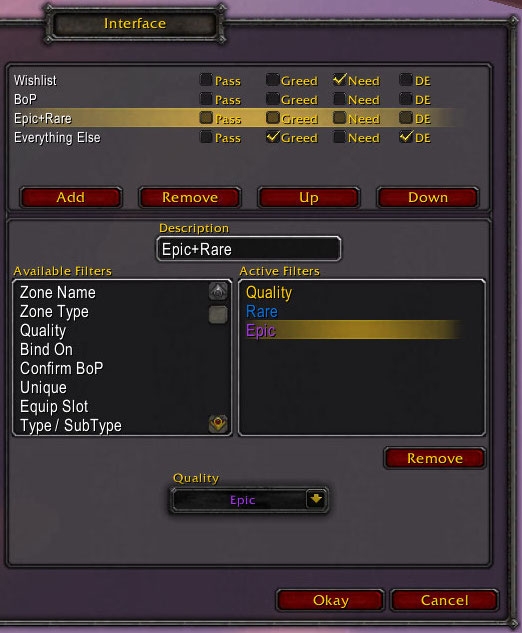
This mod will allow you to automatically roll greed, need, pass, or if the setting is disabled, let you manually roll on loot based on customized loot rules.
By adding customized rules, you can do things like roll greed on all Bind on Equip items, except in Karazhan. You could also let it ignore all Bind on Pickup items, to let you manually roll on them.
Features
Automatic loot settings for each category:
- Need - This will roll need on the loot in this rule.
- DE - If an enchanter is present this will roll disenchant.
- Greed - This will roll greed on the loot in this rule.
- Pass - This will automatically pass on the loot in this rule.
- If no loot method is selected, you will have to manually roll on the items.
- You may select multiple methods.
Loot rules can filter loot based on the following:
- Bind on status
- Can I Roll filter - Checks if you can roll differently
- Class / Spec
- Equip slot
- Group/Raid
- Guild Group - When the group has a percentage of guild mates.
- Inventory - Do you already own an item
- Item Level (or formula based on current equipped level)
- Item Name (partial or exact)
- Item Price
- Item Type and SubType
- Learned Item (recipes/mounts)
- Loot Won Counter/Comparison - How often you have won an item with the rule
- Player Name
- Quality
- Required Level (or formula based on current level)
- Uniqueness
- Usable Items (things that you can equip/use)
- Zone
- Zone Type
- Confirm BoP filter to accept BoP item popups
- Confirm DE filter to accept DE item popups (use care with this one)
Logic
- Rules are checked for a match in the order they appear.
- You may have more than one of the same type of filter.
- Each filter type must have at least one match.
- Items may not match any exception.
- If ( matched rule ) then ( roll ) else ( skip rule )
- Rolling is attempted in the following order: Need > DE > Greed > Pass. (Depending on what is selected)
Logic Example 1
- Quality -> Rare
- Quality -> Epic
- Binds on -> None
- Binds on -> Equip
- Binds on -> Use
Logic Example 2
- Item Type -> Armor
- Item Type -> Weapon
- Item Type -> Plate Armor (exception)
- Item Type -> 2hd Maces (exception))
Logic Example 3
- Quality -> Rare
- Quality -> Epic
- Binds on -> Pickup
- Usable -> Unsuable
- Zone Name -> Halls of Reflection (exception)
- Zone Name -> Pit of Saron (exception)
Roll Logic Examples
- -Need +DE +Greed -Pass = DE > Greed
- +Need -DE +Greed -Pass = Need > Greed
- +Need -DE -Greed +Pass = Need > Pass
- -Need +DE -Greed -Pass = DE > Manual roll
Basic Usage
- To open the configuration menu, type /passloot
- Use Add button to create a new rule (Rules are processed in the order they are listed)
- To remove a rule, select the rule and click the remove button
- To move a rule up and down in the list, select the rule and click the up/down buttons
- Once a rule has been selected, you can edit the description or change it's filters.
- To add a filter to the selected rule, select the filter you wish to add and click add.
- To remove a filter, select the filter in the Active Filters window and click remove. (You can also shift-right click the filter)
- To edit an active filter, select the filter in the Active Filters window and change it's properties. (You may have multiple filters of the same type to match)
- To test an item to see how PassLoot would roll, type /passloot test <shift-click an item>
Example 1
If you want to roll greed on all BoE items, except when on a raid in Karazhan, you can do the following:
- Rule 1:
- Zone -> Karazhan (Exception)
- Binds on -> Equip
Example 2
The only way to have it roll Need if condition X is met, and Greed if condition Y is met is to have 2 separate rules.
You wish to manually roll on all epic items, roll greed on all rare non-bop items items, and roll Disenchant on anything else (and greed if no disenchant option is available)
- Rule 1: (nothing checked)
- Quality -> Epic
- Rule 2: (Greed)
- Binds on -> Pickup (exception)
- Quality -> Rare
- Rule3: (Greed + Disenchant)
- (no filters added)
Notes
- Default settings
- Mod: On (If this setting is off, it won't do automatic pass/greed/need on anything)
- Quiet: disabled (If this setting is enabled, you won't see what it rolls on)
- All loot categories are disabled by default to let you manually roll on them.
- When rolling greed or need on BoP items, WoW will still ask you if you are sure you want to roll since it will bind on pickup. If you want to auto click yes on the BoP confirmations, add a Confirm BoP filter to the rule.
- The Loot Won Counters are only incremented when you win loot. It will remember what rule was matched and will increment that counter accordingly.
Translation
- Translation is done through the localization system at www.wowace.com/projects/pass-loot/localization/
- r139 -
ClassSpec - Add Guardian spec
ConfirmDE - Add preferredIndex in popup
- r138 -
Update Equipable - Monk, and a few other class updates.
- r137 -
Fixed some variables that were not defined local.
Changed some StaticPopupDialogs to use a preferred index.
Added Monk to ClassSpec.
Fixed typo in TypeSubType.
- r136 -
Updated for 5.0
- r135 -
Updated libraries and localization
- r134 -
Add LDB to open menu and show last 10 looted items
- r133 -
Locale update - frFR - thanks Blia
- r131 -
Add option to copy/export rules (right click on rule)
Add ptBR and esMX locale files.
- r131 -
toc update
- r130 -
toc update
- r129 -
toc update
- r128 -
More localization updates. Thanks BMSSMB (zhTW) and Shadow11 (deDE)
- r127 -
repackage for updated localization
- r126 -
toc update
- r125 -
Fix Guild Group module.
- r124 -
Type / SubType: Add Trade Goods-Tackle Box, Trade Goods-Item Enchantment, Recipe-Inscription, Gem-Hydraulic, Gem-Cogwheel
Type / SubType: Remove Trade Goods-Armor Enchantment, Trade Goods-Weapon Enchantment
- r123 -
Added Armor - Relic in Type / SubType
- r122 -
Equipable filter: added 2hd axes to dk and paladins
- r121 -
Hopefully fix Equipable module.
- r120 -
Fixed updating which rules get skipped if you remove unknown filters manually.
- r119 -
Added option to display unknown filter variables.
Unknown filter variables show up as gray in the active filters list.
Unknown filter variables can be removed by either the 'Clean Rules' in the options, or 'Remove' on each one in the active filter list. (Unknown filter variables will cause passloot to skip the rule if skip rules is enabled)
Skip rules option now default to off
Changed some text descriptions to be a bit more clear.
- r118 -
Added defaults for SkipRules and SkipRulesWarning
Fix for Can I Roll module
Added option for RegEx matches for Item Name filter (option in modules menu)
Locale updates (zhTW - alpha2009)
- r117 -
Fixed error when it can't figure out what is being rolled on if it is told something is being rolled on.
Modules changes: Will not save empty tables if they were not added to a rule.
Options for skipping rules if a rule has a setting from a module that is disabled or obsolete.
Option to clean disabled / obsolete module settings from rules in profile.
Bug Fix: removes variables from default template when a module is disabled.
deDE - Thanks CuDiLLA
zhTW - Thanks alpha2009
- r116 -
toc update
- r115 -
Add equipable filter - Will match on class based armor and weapons.
zhTW update - thanks alpha2009
- r114 -
Added GuildGroup module - Matches when the group has a percentage of guild mates.
- r113 -
Bug fix for ItemLevel module.
- r112 -
ItemLevel can now use formulas and allows the keyword 'current' for your currently equipped item level.
- r111 -
toc fix
- r110 -
Add options to change the loot rolling text.
Added requested "Can I Roll" filter. (If you can roll need, you might want to look at it before rolling)
Updated toc: ## X-Compatibile-With: 40000
- r109 -
Fix error if some addon removes CONFIRM_LOOT_ROLL from StaticPopups.
Fix display bug with edit box not hiding if you don't press enter/escape in a few dropdowns
Don't load a few modules if a couple libraries are not available.
- r108 -
Repackaged with LibSink-2.0 r70 (custom channels)
- r107 -
Update ZoneType for dynamic instances.
- r106 -
filter regex characters in ItemName match.
- r105 -
Multiple Loot rolling methods can be selected. Order is tried Need > DE > Greed > Pass > Manual Roll (depending on what is selected)
Move modules ui to ace config options menu
Rework Confirm BoP / DE .. no more hooking.
Add Player Name filter.
Add Class/Spec filter.
esES update (yllelder)
zhCN update (pauleldwan)
- r99 -
Added inventory filter to check for items that you already have (checks bank/bags/equipped). It checks for the base items.
- r98 -
Update Bind, Unique filters to scan more lines (heroic items or colorblind mode adds extra lines)
Add an option to let multiple confirm loot popups show. (Blizzard only allows one confirm popup at a time)
- r97 -
Add /passloot test <itemlink> to see how passloot would roll on an item.
- r96 -
localization fix
- r95 -
Change RequiredLevel to allow for logic based rules.
- r94 -
Change dropdown menus with edit boxes to hide better.
- r93 -
Sigh.. add the Usable filter to the toc file.
- r92 -
New filter: Usable - checks for items that are usable (Using tooltip scanning for the red color.. so if anyone knows a better way, let me know)
Sort the filter list.
- r91 -
deDE update (Thanks Slicerdice)
- r90 -
Added ability for filters to become exceptions to a rule. Not all filters can become an exception.
Fix edit boxes in the DropDown menu boxes of some filters to hide properly.
LearnedItem filter: Scan more lines for the 'Already known' text.
Confirm BoP/DE: Allow user to manually roll on an item and will confirm the message.
deDE localization updates (thanks T-Base)
- r89 -
prevent hooking the static popup functions more than once.
fix Confirm BoP and Confirm DE item matching in the popup windows (regex special cases)
- r88 -
Added a confirmation box when you attempt to add the Confirm DE filter. (Endure the confirmation box here so you don't have to endure them later.)
Added a Learned Item filter. Good for Recipes, Mounts, Pets, etc.
- r87 -
Add ConfirmBoP to toc (sigh)
Fix status message if you have DE as an option and ignore as fallback.
Added a Confirm DE filter module. Be careful with this one.
- r86 -
Add the ConfirmBoP module since I said I would.
ruRU update (thanks StingerSoft)
- r85 -
toc update
Adjust the UI a little (make name font smaller to fit better and other small changes)
Added the Confirm BoP module. (We can trade items so I don't see the need for this to be separate addon anymore)
Add DE options for each rule. Rules with DE marked will try to roll for disenchant first, greed/need/pass second.
- r84 -
Shrunk the UI a tiny bit so it could fit in the Blizzard Interface Panels. UI is now displayed there.
ZoneType dropdown expanded a little.
- r83 -
Workaround libsink deforming item links.
- r82 -
Moving from UI from xml to lua coded.
- r81 -
Refresh Active/Available filter lists after disabling a module.
- r80 -
Fixed the tooltip frame that was supposed to be passed to modules.
Removed the settings and profiles tabs, and moving them to Ace config menu.
Renamed some localization keys.
ItemPrice: 3.2 does not need LibItemPrice any longer I believe.
ZoneType: 3.2 changes for 10/25 man normal/heroic modes.
Renamed Zone.lua to ZoneName.lua
Removed PassLoot.xml and Modules.xml
Updated .toc for 3.2
- r79 -
Translation repackage - Russian update (Thanks StingerSoft and lacostes)
- r78 -
toc update (Adding X-WoWI-ID for Minion updater support)
- r77 -
Changed ItemPrice to use a money input frame, and display money with some icons.
- r76 -
Repackaged with updated libraries.
- r75 -
correct toc version
- r74 -
Support for Raid Normal/Heroic in ZoneType filter.
toc update
- r71 -
Added RollMethod to PassLoot_OnRoll message.
- r70 -
Moved the PassLoot_OnRoll event to before the actual rolling occurs, and added the RollID to it's arguments.
- r69 -
Removed embeds.xml, updated .toc
- r68 -
WotLK compatibility.
Binds: Added Bind on Account
TypeSubType: Added Sigils, Inscription Bag, Glyphs, Armor and Weapon Enchantments,
OptionFrameBoxTemplate replacement.
Description change
Added a Settings tab, moved Quiet/Enable mod checkboxes there
Added option to change output to different chat frames using LibSink
Added ItemLevel and RequiredLevel filters
Changed ShowTooltip()
Added ItemPrice filter. Must have a item price library/mod that gives GetSellValue(), or have ItemPrice-1.1 library.
Removed a few remaining arg1 and this's
Small code change to look more uniform.
Added some more data validation checks.
- r79132 -
Redesigned the UI a bit
You may now have multiple filters of the same type (Must have at least 1 match from each filter type)
- r77429 -
PassLoot is now modular. Each filter is it's own module, allowing people to create their own modules.
Changed the layout a little bit.
- r76645 -
Added Group/Raid selection to check if you are in a group or raid.
Added Zone Type to check what type of zone you were in (outside, normal group, heroic group, or raid instance)
Added a Loot Won Comparison and Loot Won Counter. The counter for each rule is incremented only when you win loot based on that rule.
- r65855 -
Updated toc for 2.4
- r64541 -
Updated toc
Changed a few formatting strings
zhTW and zhCN translations from a few people
libbabble-inventory-3.0 seems to have been updated to support more languages as well
- r63489 -
Added a locales.xml
Fixed externals issue.
- r63478 -
Updated .toc to allow embeded files to be loaded separately
Changed versioning to reflect the svn #s instead.
- 3.0.0 -
Changed EquipSlot to a 2-tier dropdown menu style. Dividing up the slots into armor/weapon/misc slots
Merged ItemType and ItemSubType dropdowns into a single dropdown. Also using the 2-tier style.
Removed the command line functions of menu, quiet, enable. (it goes directly to the config window)
Rewrote a few functions (localization, db, event handling) using Ace.
- 2.8.1 -
Fixed error message. (Unique setting wasn't being set on upgrade)
- 2.8.0 -
Added tooltip scanning back in to check for binding and uniqueness
Binding now has the following options: Any, None, Equip, Pickup, Use, Quest
Added a unique check with the following options: Any, Unique, Not (unique)
- 2.7.0 -
Added a button to create a copy of the current profile.
Fixed highlighting text bug.
Added small bits of german localization (item types, subtypes, and equip locations) Untested.
- 2.6.0 -
Updated for 2.3.0
Added the new categories for items in Consumable and Trade Goods, and Containers.
- 2.5.1 -
Updated toc
- 2.5 -
Displays what rule was matched when it rolls on an item.
Combined the ranged weapons for equip slots (guns were showing up under wands).
Combined the chest location to include robes.
Updated a few tooltip descriptions
- 2.4 -
Changed item names to be case-insensitive.
Added a checkbox to turn on/off the mod from the menu.
Added profiles. You can now create your own, or use the default. The default profile can not be deleted. (although individual rules can)
Added a tab menu to switch between rules and profiles.
Changed the way Equip slot works. It is now an equip type.
Removed Armor and Weapon types.
Added Type, and SubTypes. You can now select armor, weapon, recipes, gems, etc from the Type dropdown. SubType will be individual types.
Note: the Miscellaneous Type covers pretty much everything that isn't covered by the other types. (Just the way Blizzard defines items)
It should convert armor / weapon / equip slots to the new format, but double check to make sure it was converted correctly.
- 2.3 -
Fixed quality of loot checking.
Changed zone check to be case-insensitive.
- 2.2 -
It wasn't checking rules sequentially, now it should.
Should no longer keep checking rules if it finds a rule that matches and that rule lets you manually roll on it.
- 2.1 -
Added Equipment slot match.
Added Weapon type match.
Added Armor type match.
Removed poor and common quality (you can't set loot threshold that low anyway)
Added color to the quality match.
Changed how Quality and Bind variables are saved.
Wrote a function to upgrade older rules. (hopefully it will keep all your BOE/BOP/Quality settings for each rule)
- v2.0 -
Rewrite to allow dynamic loot rules.
ClassSpec - Add Guardian spec
ConfirmDE - Add preferredIndex in popup
- r138 -
Update Equipable - Monk, and a few other class updates.
- r137 -
Fixed some variables that were not defined local.
Changed some StaticPopupDialogs to use a preferred index.
Added Monk to ClassSpec.
Fixed typo in TypeSubType.
- r136 -
Updated for 5.0
- r135 -
Updated libraries and localization
- r134 -
Add LDB to open menu and show last 10 looted items
- r133 -
Locale update - frFR - thanks Blia
- r131 -
Add option to copy/export rules (right click on rule)
Add ptBR and esMX locale files.
- r131 -
toc update
- r130 -
toc update
- r129 -
toc update
- r128 -
More localization updates. Thanks BMSSMB (zhTW) and Shadow11 (deDE)
- r127 -
repackage for updated localization
- r126 -
toc update
- r125 -
Fix Guild Group module.
- r124 -
Type / SubType: Add Trade Goods-Tackle Box, Trade Goods-Item Enchantment, Recipe-Inscription, Gem-Hydraulic, Gem-Cogwheel
Type / SubType: Remove Trade Goods-Armor Enchantment, Trade Goods-Weapon Enchantment
- r123 -
Added Armor - Relic in Type / SubType
- r122 -
Equipable filter: added 2hd axes to dk and paladins
- r121 -
Hopefully fix Equipable module.
- r120 -
Fixed updating which rules get skipped if you remove unknown filters manually.
- r119 -
Added option to display unknown filter variables.
Unknown filter variables show up as gray in the active filters list.
Unknown filter variables can be removed by either the 'Clean Rules' in the options, or 'Remove' on each one in the active filter list. (Unknown filter variables will cause passloot to skip the rule if skip rules is enabled)
Skip rules option now default to off
Changed some text descriptions to be a bit more clear.
- r118 -
Added defaults for SkipRules and SkipRulesWarning
Fix for Can I Roll module
Added option for RegEx matches for Item Name filter (option in modules menu)
Locale updates (zhTW - alpha2009)
- r117 -
Fixed error when it can't figure out what is being rolled on if it is told something is being rolled on.
Modules changes: Will not save empty tables if they were not added to a rule.
Options for skipping rules if a rule has a setting from a module that is disabled or obsolete.
Option to clean disabled / obsolete module settings from rules in profile.
Bug Fix: removes variables from default template when a module is disabled.
deDE - Thanks CuDiLLA
zhTW - Thanks alpha2009
- r116 -
toc update
- r115 -
Add equipable filter - Will match on class based armor and weapons.
zhTW update - thanks alpha2009
- r114 -
Added GuildGroup module - Matches when the group has a percentage of guild mates.
- r113 -
Bug fix for ItemLevel module.
- r112 -
ItemLevel can now use formulas and allows the keyword 'current' for your currently equipped item level.
- r111 -
toc fix
- r110 -
Add options to change the loot rolling text.
Added requested "Can I Roll" filter. (If you can roll need, you might want to look at it before rolling)
Updated toc: ## X-Compatibile-With: 40000
- r109 -
Fix error if some addon removes CONFIRM_LOOT_ROLL from StaticPopups.
Fix display bug with edit box not hiding if you don't press enter/escape in a few dropdowns
Don't load a few modules if a couple libraries are not available.
- r108 -
Repackaged with LibSink-2.0 r70 (custom channels)
- r107 -
Update ZoneType for dynamic instances.
- r106 -
filter regex characters in ItemName match.
- r105 -
Multiple Loot rolling methods can be selected. Order is tried Need > DE > Greed > Pass > Manual Roll (depending on what is selected)
Move modules ui to ace config options menu
Rework Confirm BoP / DE .. no more hooking.
Add Player Name filter.
Add Class/Spec filter.
esES update (yllelder)
zhCN update (pauleldwan)
- r99 -
Added inventory filter to check for items that you already have (checks bank/bags/equipped). It checks for the base items.
- r98 -
Update Bind, Unique filters to scan more lines (heroic items or colorblind mode adds extra lines)
Add an option to let multiple confirm loot popups show. (Blizzard only allows one confirm popup at a time)
- r97 -
Add /passloot test <itemlink> to see how passloot would roll on an item.
- r96 -
localization fix
- r95 -
Change RequiredLevel to allow for logic based rules.
- r94 -
Change dropdown menus with edit boxes to hide better.
- r93 -
Sigh.. add the Usable filter to the toc file.
- r92 -
New filter: Usable - checks for items that are usable (Using tooltip scanning for the red color.. so if anyone knows a better way, let me know)
Sort the filter list.
- r91 -
deDE update (Thanks Slicerdice)
- r90 -
Added ability for filters to become exceptions to a rule. Not all filters can become an exception.
Fix edit boxes in the DropDown menu boxes of some filters to hide properly.
LearnedItem filter: Scan more lines for the 'Already known' text.
Confirm BoP/DE: Allow user to manually roll on an item and will confirm the message.
deDE localization updates (thanks T-Base)
- r89 -
prevent hooking the static popup functions more than once.
fix Confirm BoP and Confirm DE item matching in the popup windows (regex special cases)
- r88 -
Added a confirmation box when you attempt to add the Confirm DE filter. (Endure the confirmation box here so you don't have to endure them later.)
Added a Learned Item filter. Good for Recipes, Mounts, Pets, etc.
- r87 -
Add ConfirmBoP to toc (sigh)
Fix status message if you have DE as an option and ignore as fallback.
Added a Confirm DE filter module. Be careful with this one.
- r86 -
Add the ConfirmBoP module since I said I would.
ruRU update (thanks StingerSoft)
- r85 -
toc update
Adjust the UI a little (make name font smaller to fit better and other small changes)
Added the Confirm BoP module. (We can trade items so I don't see the need for this to be separate addon anymore)
Add DE options for each rule. Rules with DE marked will try to roll for disenchant first, greed/need/pass second.
- r84 -
Shrunk the UI a tiny bit so it could fit in the Blizzard Interface Panels. UI is now displayed there.
ZoneType dropdown expanded a little.
- r83 -
Workaround libsink deforming item links.
- r82 -
Moving from UI from xml to lua coded.
- r81 -
Refresh Active/Available filter lists after disabling a module.
- r80 -
Fixed the tooltip frame that was supposed to be passed to modules.
Removed the settings and profiles tabs, and moving them to Ace config menu.
Renamed some localization keys.
ItemPrice: 3.2 does not need LibItemPrice any longer I believe.
ZoneType: 3.2 changes for 10/25 man normal/heroic modes.
Renamed Zone.lua to ZoneName.lua
Removed PassLoot.xml and Modules.xml
Updated .toc for 3.2
- r79 -
Translation repackage - Russian update (Thanks StingerSoft and lacostes)
- r78 -
toc update (Adding X-WoWI-ID for Minion updater support)
- r77 -
Changed ItemPrice to use a money input frame, and display money with some icons.
- r76 -
Repackaged with updated libraries.
- r75 -
correct toc version
- r74 -
Support for Raid Normal/Heroic in ZoneType filter.
toc update
- r71 -
Added RollMethod to PassLoot_OnRoll message.
- r70 -
Moved the PassLoot_OnRoll event to before the actual rolling occurs, and added the RollID to it's arguments.
- r69 -
Removed embeds.xml, updated .toc
- r68 -
WotLK compatibility.
Binds: Added Bind on Account
TypeSubType: Added Sigils, Inscription Bag, Glyphs, Armor and Weapon Enchantments,
OptionFrameBoxTemplate replacement.
Description change
Added a Settings tab, moved Quiet/Enable mod checkboxes there
Added option to change output to different chat frames using LibSink
Added ItemLevel and RequiredLevel filters
Changed ShowTooltip()
Added ItemPrice filter. Must have a item price library/mod that gives GetSellValue(), or have ItemPrice-1.1 library.
Removed a few remaining arg1 and this's
Small code change to look more uniform.
Added some more data validation checks.
- r79132 -
Redesigned the UI a bit
You may now have multiple filters of the same type (Must have at least 1 match from each filter type)
- r77429 -
PassLoot is now modular. Each filter is it's own module, allowing people to create their own modules.
Changed the layout a little bit.
- r76645 -
Added Group/Raid selection to check if you are in a group or raid.
Added Zone Type to check what type of zone you were in (outside, normal group, heroic group, or raid instance)
Added a Loot Won Comparison and Loot Won Counter. The counter for each rule is incremented only when you win loot based on that rule.
- r65855 -
Updated toc for 2.4
- r64541 -
Updated toc
Changed a few formatting strings
zhTW and zhCN translations from a few people
libbabble-inventory-3.0 seems to have been updated to support more languages as well
- r63489 -
Added a locales.xml
Fixed externals issue.
- r63478 -
Updated .toc to allow embeded files to be loaded separately
Changed versioning to reflect the svn #s instead.
- 3.0.0 -
Changed EquipSlot to a 2-tier dropdown menu style. Dividing up the slots into armor/weapon/misc slots
Merged ItemType and ItemSubType dropdowns into a single dropdown. Also using the 2-tier style.
Removed the command line functions of menu, quiet, enable. (it goes directly to the config window)
Rewrote a few functions (localization, db, event handling) using Ace.
- 2.8.1 -
Fixed error message. (Unique setting wasn't being set on upgrade)
- 2.8.0 -
Added tooltip scanning back in to check for binding and uniqueness
Binding now has the following options: Any, None, Equip, Pickup, Use, Quest
Added a unique check with the following options: Any, Unique, Not (unique)
- 2.7.0 -
Added a button to create a copy of the current profile.
Fixed highlighting text bug.
Added small bits of german localization (item types, subtypes, and equip locations) Untested.
- 2.6.0 -
Updated for 2.3.0
Added the new categories for items in Consumable and Trade Goods, and Containers.
- 2.5.1 -
Updated toc
- 2.5 -
Displays what rule was matched when it rolls on an item.
Combined the ranged weapons for equip slots (guns were showing up under wands).
Combined the chest location to include robes.
Updated a few tooltip descriptions
- 2.4 -
Changed item names to be case-insensitive.
Added a checkbox to turn on/off the mod from the menu.
Added profiles. You can now create your own, or use the default. The default profile can not be deleted. (although individual rules can)
Added a tab menu to switch between rules and profiles.
Changed the way Equip slot works. It is now an equip type.
Removed Armor and Weapon types.
Added Type, and SubTypes. You can now select armor, weapon, recipes, gems, etc from the Type dropdown. SubType will be individual types.
Note: the Miscellaneous Type covers pretty much everything that isn't covered by the other types. (Just the way Blizzard defines items)
It should convert armor / weapon / equip slots to the new format, but double check to make sure it was converted correctly.
- 2.3 -
Fixed quality of loot checking.
Changed zone check to be case-insensitive.
- 2.2 -
It wasn't checking rules sequentially, now it should.
Should no longer keep checking rules if it finds a rule that matches and that rule lets you manually roll on it.
- 2.1 -
Added Equipment slot match.
Added Weapon type match.
Added Armor type match.
Removed poor and common quality (you can't set loot threshold that low anyway)
Added color to the quality match.
Changed how Quality and Bind variables are saved.
Wrote a function to upgrade older rules. (hopefully it will keep all your BOE/BOP/Quality settings for each rule)
- v2.0 -
Rewrite to allow dynamic loot rules.
 |
Comment Options |
 12-30-13, 03:11 PM
|
|
|
A Chromatic Dragonspawn
 Forum posts: 156
File comments: 2231
Uploads: 5
|
Just a complimentary TOC bump. Not much of an update.
|

|

|
| AnrDaemon |
| View Public Profile |
| Send a private message to AnrDaemon |
| Find More Posts by AnrDaemon |
| Add AnrDaemon to Your Buddy List |
|
12-29-13, 05:46 AM
|
|
|
A Murloc Raider
Forum posts: 6
File comments: 394
Uploads: 0
|
Looks like there's an update here: http://www.wowace.com/addons/pass-loot/
|
|
|
|
| Aisenfaire |
| View Public Profile |
| Send a private message to Aisenfaire |
| Find More Posts by Aisenfaire |
| Add Aisenfaire to Your Buddy List |
|
05-24-13, 09:52 AM
|
|
|
A Deviate Faerie Dragon
Forum posts: 18
File comments: 213
Uploads: 0
|
5.3 Update? It doesn't seem to do much since the patch.
|
|
|
|
| tordenflesk |
| View Public Profile |
| Send a private message to tordenflesk |
| Find More Posts by tordenflesk |
| Add tordenflesk to Your Buddy List |
|
10-17-12, 06:57 AM
|
||
|
A Chromatic Dragonspawn
Forum posts: 156
File comments: 2231
Uploads: 5
|
|
|
|
|
|
| AnrDaemon |
| View Public Profile |
| Send a private message to AnrDaemon |
| Find More Posts by AnrDaemon |
| Add AnrDaemon to Your Buddy List |
|
10-14-12, 08:27 AM
|
|
|
A Murloc Raider
Forum posts: 7
File comments: 9
Uploads: 2
|
First of all really great Addon! My main use for it is to roll greed/DE on all greens ... simplifies gaming especially in dungeons. What I miss while leveling alts is that I can manually roll on green items which have a higher ilvl than the one I have currently equipped in that specific slot ... it that somehow possible?
Last edited by kip : 10-14-12 at 11:46 AM.
|
|
|
|
| kip |
| View Public Profile |
| Send a private message to kip |
| Find More Posts by kip |
| Add kip to Your Buddy List |
|
09-12-12, 02:30 PM
|
||
|
A Kobold Labourer
Forum posts: 0
File comments: 67
Uploads: 5
|
Looked into how elvui handles rolls.. it unregisters events from wow's main ui stuff and registers it's own to handle rolls so that it can show it's own frames, etc. When elvui receives a message to start a loot roll, it creates a frame to show all the roll info - name, buttons to roll etc. The frame also registers the event to check if a roll was canceled / already rolled on. What I think is happening (havn't done full testing of this): PassLoot receives the start_loot_roll event before elvui. PassLoot rolls WoW fires the event that says roll was cancelled / already rolled on. ElvUI receives the start_loot_roll ElvUI creates it's own frame and STARTS to listen for the cancelled / already rolled on event ElvUI never receives the cancelled / already rolled on event so leaves the very first frame open waiting in limbo. Elvui just needs to listen to the cancel / already rolled on event before it creates frames for loot rolls. quick fix (havn't tested this code at all - i dont use elvui) Open up Interface\Addons\ElvUI\modules\misc\loot_roll.lua Find: self:RegisterEvent("START_LOOT_ROLL") Add the following line: self:RegisterEvent("CANCEL_LOOT_ROLL") At bottom of file add the following: function M:CANCEL_LOOT_ROLL(event, rollID) cancelled_rolls[rollID] = true end
Last edited by Odlaw : 09-12-12 at 02:31 PM.
|
|
|
|
|
| Odlaw |
| View Public Profile |
| Send a private message to Odlaw |
| Find More Posts by Odlaw |
| Add Odlaw to Your Buddy List |
|
04-12-12, 07:37 AM
|
||
|
A Chromatic Dragonspawn
Forum posts: 156
File comments: 2231
Uploads: 5
|
|
|
|
|
|
| AnrDaemon |
| View Public Profile |
| Send a private message to AnrDaemon |
| Find More Posts by AnrDaemon |
| Add AnrDaemon to Your Buddy List |
|
04-11-12, 07:40 PM
|
|
|
A Murloc Raider
Forum posts: 6
File comments: 20
Uploads: 0
|
There seems to be an issue with ElvUI if you Have Auto DE/Greed on for greens and looting a mob who has one in groups, the loot roll thingy comes up with me instantly DE'ing so the Roll thingy just stays there stuck until I reload UI.
Does not happen when I'm not the first one to loot the body. Can this be looked into.. Perhaps a delay option would fix it? |
|
|
|
| manu9 |
| View Public Profile |
| Send a private message to manu9 |
| Find More Posts by manu9 |
| Add manu9 to Your Buddy List |
|
03-25-12, 06:20 PM
|
|
|
A Chromatic Dragonspawn
Forum posts: 156
File comments: 2231
Uploads: 5
|
Aww, I just discovered a regexps option for ItemName module... Bad Odlaw, bad... Hid the option so deep...
|
|
|
|
| AnrDaemon |
| View Public Profile |
| Send a private message to AnrDaemon |
| Find More Posts by AnrDaemon |
| Add AnrDaemon to Your Buddy List |
|
03-20-12, 02:02 PM
|
|||
|
A Chromatic Dragonspawn
Forum posts: 156
File comments: 2231
Uploads: 5
|
|
||
|
|
|
| AnrDaemon |
| View Public Profile |
| Send a private message to AnrDaemon |
| Find More Posts by AnrDaemon |
| Add AnrDaemon to Your Buddy List |
|
03-20-12, 01:40 PM
|
|||
|
A Kobold Labourer
Forum posts: 0
File comments: 67
Uploads: 5
|
Sorry, been busy with work and such - don't play this game as often as I used to.
|
||
|
|
|
| Odlaw |
| View Public Profile |
| Send a private message to Odlaw |
| Find More Posts by Odlaw |
| Add Odlaw to Your Buddy List |
|
02-20-12, 07:44 PM
|
||
|
A Chromatic Dragonspawn
Forum posts: 156
File comments: 2231
Uploads: 5
|
Re: Re: Re: A new kind of SubType
But you seems to want it the hard way. Why? |
|
|
|
|
| AnrDaemon |
| View Public Profile |
| Send a private message to AnrDaemon |
| Find More Posts by AnrDaemon |
| Add AnrDaemon to Your Buddy List |
|
01-20-12, 11:41 AM
|
|
|
A Fallenroot Satyr
Forum posts: 28
File comments: 34
Uploads: 1
|
Hello.
Just another suggestion.  Could it be possible, just above the PassLoot frame, to add the name of the current active profile ? Something like that (mockup image) :  Thanks ! |
|
|
|
| Blia |
| View Public Profile |
| Send a private message to Blia |
| Find More Posts by Blia |
| Add Blia to Your Buddy List |
|
01-10-12, 03:52 PM
|
|||
|
A Fallenroot Satyr
Forum posts: 28
File comments: 34
Uploads: 1
|
Re: Re: A new kind of SubType
I already use "PassLoot AtlasLoot" but it's not exactly the same as creating PassLoot filters for my specialization. What I just want is not rolling "Need" for items that has agility or Stamina (since I am a healer). I don't want to be a ninja. At the moment, (without PassLoot AtlassLoot), my filters make PassLoot roll "need" for things I can use/wear. But they also do it for items containing agility or stamina. I haven't found the way (yet) to avoid this, without PassLoot AtlasLoot. With such a subtype (that I suggested), it would be possible to avoid items that are not meant for me. I could take exactly what I want (what is best for my current spec). And I think other players would consider I have a good behaviour. On the contrary, it would also be possible to only roll "need" for any kind of item (even the ones that are not for me). But it's already possible now with AtlasLoot and its filters if they are set badly or on purpose. I would rather easily get kicked if I take items that are not for my current specialization. On my server, it's a bad habbit to take things for the 2nd specialization or for another character...
Last edited by Blia : 01-10-12 at 04:11 PM.
|
||
|
|
|
| Blia |
| View Public Profile |
| Send a private message to Blia |
| Find More Posts by Blia |
| Add Blia to Your Buddy List |
|
01-10-12, 11:19 AM
|
||
|
A Chromatic Dragonspawn
Forum posts: 156
File comments: 2231
Uploads: 5
|
Re: A new kind of SubType
If you need specific item - fine, go ahead. But if you gonna just sweep everything because you see one stat that is useful to you... you will get kicked from any party that care about loot. If you want to solve your issue the straightforward way - PassLoot_AtlasLoot addon is what you want.
Last edited by AnrDaemon : 01-10-12 at 11:22 AM.
|
|
|
|
|
| AnrDaemon |
| View Public Profile |
| Send a private message to AnrDaemon |
| Find More Posts by AnrDaemon |
| Add AnrDaemon to Your Buddy List |
|
Support AddOn Development!
You have just downloaded by the author . If you like this AddOn why not consider supporting the author? This author has set up a donation account. Donations ensure that authors can continue to develop useful tools for everyone.
*Clicking the donate button above will take you to PayPal.com

*Clicking the donate button above will take you to Pledgie.com
