I'm not actively developing XLoot.
Check out addons like Butsu or teksloot.
If you're having trouble with XLoot, or I haven't updated it here, odds are it will be updated at http://files.wowace.com/XLoot/
XLoot - A complete replacement for the default loot frame.
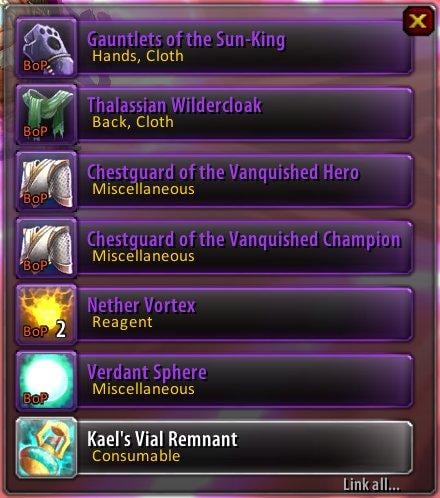
XLoot completely replaces the blizzard loot frame. XLoot is draggable, scaleable, colorable, configurable, and all other fun buzzwords.
In addition to replacing the loot frame, plugins have been developed alongside XLoot and are listed in the plug-in list above: Monitor - Captures "Xxxx recieves [Xxxx]" and displays them, with icon and amount, in rows. Group - Replaces the default Group Loot item rolling interface. Master - Replaces the default Master Looter dropdown with something much more configurable.
Monitor, Group, and Master are not included with XLoot, they are listed in the plugins section just above the description. Since XLoot contains the shared functions, it is required to use any of the plugins.
-Options
All options menus are available through various methods, in addition to /xloot (command line) or /xloot options (GUI).
You can right click on the border of the loot frame for quick access to the options menu, or on any anchor for it's menu.
Master Looter's priority menu is accessible through "Options Menu" in the dropdown itself. All menu items have detailed tooltips explaining what each option is.
The border/background colors for all the frames can be changed, in addition to the default of letting them pick up the quality color of whatever loot they contain. (See Monitor in the screenshot) All color related settings are in /xloot appearance, or the Appearance heading in /xloot options.
All modules (Monitor, Group, Master) require XLoot, but it does not require them.
If XLoot conflicts with another addon, or you wish to integrate something with it, please send me a private message and I'll be glad to talk with you about it.
The latest builds of XLoot and it's plugins can be updated via the WoWAce SVN or the files distributions:
http://wowace.com/files/XLoot/XLoot.zip
http://wowace.com/files/XLootMonitor/XLootMonitor.zip
http://wowace.com/files/XLootGroup/XLootGroup.zip
http://wowace.com/files/XLootMaster/XLootMaster.zip
These are beta files, and should be considered as such, and may often have bugs
XLoot employs Ace2 Embedded libraries. It can run with them dis-embedded, with a few performance advantages should you be running more than one ace mod, by following the guides located on the WoWAce website, http://www.wowace.com/wiki/How_To_Update_Beta_Addons and http://www.wowace.com/wiki/WowAceUpdater
This is my problem: Every time I start a new game and pickup money it is not shown in the xloot window I must then open the xloot test options for money after that it appears, can someone help me?
Originally posted by shin.orochimaru Ahh the current one supplied here is not working, I used WOW Ace Updater, and grabbed the lastest one, not it is all good
I had the same problem. I think I ended up grabbing the latest versions from wowace as well and that seems okay.
There's nothing that even comes close to replacing this wonderful mod. Really sad to see it go. Maybe XLoot's passing is a reason to learn to write my own mods.
dark666105: Fair enough. If I pick up development again I may make a fubar module for Monitor.
AlphaWolf: Don't just say it's broken, go to The XLoot Thread and read the discussion, posting your issue if it's new or any new information if it isn't. I said I wasn't developing it anymore, I didn't say I was abandoning it. The development versions linked in the description contain fixes I will push to WoWI when complete.
Witblitz: I believe I linked to one directly in XLoot's description, Butsu. TeksLoot is a replacement for the roll frames.
Originally posted by Xuerian Kappe: Give me a good reason XLoot could actually use a fubar plugin (If you like options on fubar, then get any one of the numerous AceOptions fubar plugins. All XLoot mods are fully compatible with them.)
well for one it could work for the loot history and or loot monitor, thats one thing i think would be nice so you dont always have to have it there you just mouseover the fubar plugin and bam there is the history.
Is there a way to disable how the Options window pops up when you right-click on the border of XLoot? I'm the kind of person that clicks all of the loot into their backpack (that's what 7 years of EverQuest will do) and I usually open up the Options menu at least once every other body. Shift-Clicking is a waste of time since it doesn't even loot the items half the time, so I prefer just clicking all the junk into my backpack.
Originally posted by shin.orochimaru I too have the same problem, and can't get the loot frame to show, only the old blizzard one, the loot monitor looks right though... if anyone has any thoughts about this please speak up.
Ahh the current one supplied here is not working, I used WOW Ace Updater, and grabbed the lastest one, not it is all good
Originally posted by draught1 i have the same problem.. Anyone knows the deal?
I too have the same problem, and can't get the loot frame to show, only the old blizzard one, the loot monitor looks right though... if anyone has any thoughts about this please speak up.
Originally posted by nwkegan I have the same problem as Classic, the frame won't show, though blizzard's default will. I have all of the necessary files (XLoot) and I also use monitor, master, and group.
I have the same problem as Classic, the frame won't show, though blizzard's default will. I have all of the necessary files (XLoot) and I also use monitor, master, and group.
[2007/12/10 11:50:48-967-x1]: XLoot-0.9.39822\XLoot.lua:90: AceHook-2.1: Attempt to hook a non-existant function "LootButton_OnModifiedClick"
AceAddon-2.0-46764 (Ace2):927: in function <Interface\AddOns\Ace2\AceAddon-2.0\AceAddon-2.0.lua:920>
<in C code>: ?
AceEvent-2.0-56171 (Ace2):263: in function `TriggerEvent'
AceEvent-2.0-56171 (Ace2):914: in function <Interface\AddOns\Ace2\AceEvent-2.0\AceEvent-2.0.lua:907>
Originally posted by habor Are you going to update this for 2.2????????
I had the same problem as a potential user commented below but I forgot all about 2.2. A patch enabled version would be wonderful. I don't know if it didn't work because the old version isn't compatible or for the same reasons the earlier poster's version didn't work.
Added later in the day:
As quoted above in the add on description, these files were updated after the 2.2 patch. Whether they work or not, given that they're beta, is yet to be seen.
The latest builds of XLoot and it's plugins can be updated via the WoWAce SVN or the files distributions:
http://wowace.com/files/XLoot/XLoot.zip
http://wowace.com/files/XLootMonitor/XLootMonitor.zip
http://wowace.com/files/XLootGroup/XLootGroup.zip
http://wowace.com/files/XLootMaster/XLootMaster.zip
These are beta files, and should be considered as such, and may often have bugs
Last edited by PlainJane : 10-08-2007 at 03:07 PM.





