Pally Power is an add-on that provides an interactive and easy to use interface that allows you to control assignments of blessings for yourself and, if you are a party leader or an assistant, for other paladins in your group or raid. Pally Power supports six greater blessings: Greater Blessing of Might, Wisdom, Salvation, Light, Kings and Sanctuary. Lesser blessings support is limited to mid-cycle temporary re-buffs. You don’t need to be a paladin to control raid/party blessings.
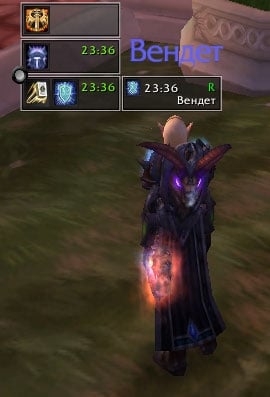
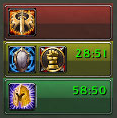
Normally PallyPower displays a cast window that shows you how many people require blessings and timers for remaining time of your blessings. The cast window displays one button per each class you were assigned to buff, including hunter and warlock pets as a separate ‘pet’ class. Each class button displays an icon with an assigned blessing, a class icon, a remaining buff timer and a number of unbuffed and/or dead players. Each class button allows you to cast both greater (left mouse click) and lesser blessings (right mouse click).
Left mouse click provides an automatic buff and target selection: Pally Power checks the party or the raid roster to find a nearby person of a specific class, verifies that the person is in range and casts the blessing. After each cast the name of the person and the buff is stored until the next cast to allow re-cast of the same buff in combat.
Right mouse click works the same way as left mouse click, but in addition the automatic target selection ensures that the target is not buffed already. This is useful when you want to temporary rebuff only one to two persons until the greater blessing expires on all class members. Typically a mid-cycle rebuff on trash pulls. You’ll need to do a right click once for each person you want to rebuff.
Class buttons change color depending on the buff situation. They are transparent if every class member is buffed, red if all class members require a buff and yellow if there is at least one unbuffed person.
In combat the automated target selection turns off and class buttons become grayed-out to indicate that they are not reliable and use previously stored target and buff name. If someone reassigns your blessings while you’re in combat, the assignments will not apply until you leave the combat.
An automated buff and target selection does not work in combat due to protected interface functionality implemented in WoW Patch 2.0.
In order to bypass the protected interface limitation Pally Power 2.0 introduced new player buttons that do not use any automated functionality, but allow you to select specific target for a blessing.
Pally Power displays player buttons when you move your mouse cursor over or nearby a class button. Player buttons are displayed for each class member and show the player name, a buff icon if the player if buffed, range flag and dead/alive flag. Each player button allows you to cast both greater and lesser blessings (same as class button), but you have to make the decision. Flags on player buttons are updated every other second and are pretty reliable.
Right after installation, Pally Power by default displays a red anchor button in the middle of the screen. You can click on the button to make it moveable or to access the assignments window (see the tool tip).
Alternatively you can type “/pp config” to access the assignments screen.
The assignments screen displays a grid with paladin names and classes. For each paladin it displays an icon for each available blessing, a rank of the blessing and a number of talent points spent to improve the blessing. It also shows the number of Symbols of Kings that are in paladins inventory.
By default the grid with assignments is empty. You can use left mouse click or mouse wheel to cycle thru available blessings (wisdom->might->salvation->light->kings->sanctuary->nothing->wisdom). Right mouse click clears an assignment. This method does not allow you to assign blessings assigned to other paladins and this method uses ‘smart buffs’ option that prevents you from assigning blessings that do not make any sense (wisdom on rogues, might on casters, etc.). This method is useful when you want to fine-tune assignments.
There’s a method to assign same blessing to all classes. Press Shift key and use a mouse wheel to scroll thru available blessings. This option ignores buffs assigned to other paladins and ‘smart buffs’. It is possible to assign duplicate buffs and pointless buffs using this method, so beware.
The Clear button on assignment screen clears all assignments if you’re a raid leader or an assistant or clears only your own blessings otherwise.
The Refresh button sends every paladin in your raid/party a command to report their available blessings, number of symbols of kings and assignments. By default Pally Power broadcasts your own information once you join the raid and broadcasts the number of Symbols of Kings in your inventory every minute.
The Option buttons opens up an options menu that allows you to configure PP layout, scale, direction and alignment of class and player buttons, etc.
What Pally Power does not and will not do:
- limited blessings like Blessing of Sacrifice, Freedom and Protection
- seals and judgements
- cast greater blessings on all pets using a single click(that a limitation of greater blessings)
- hide class or player buttons off the screen
- make coffee
- win WoW
What Pally Power will do:
- make your paladin leader’s job easier
- make your blessings manageable
Change Log - PallyPower
Looking for translators to finalize esES, esMX, zhCN localizations.
minor fixes:
Replaced global function calls with local copies.
Added alphabetic sorting to the assignment screen.
Added several improvements to the auto-assign logic.
Is there a way to have pallypower hide? I will take any option (hide unless mouse over, hide in combat, hide while solo), anything that will hide it unless i need it.
Try the class button auto-hide option. In this mode it takes almost no space.
Is there a way to have pallypower hide? I will take any option (hide unless mouse over, hide in combat, hide while solo), anything that will hide it unless i need it.
Message: Interface\AddOns\PallyPower\PallyPower.lua:2662: attempt to index field '?' (a nil value)
Time: 10/29/09 23:43:30
Count: 1
Stack: [string "Interface\FrameXML\BasicControls.xml:<Scrip..."]:18: in function <[string "Interface\FrameXML\BasicControls.xml:<Scrip..."]:4>
[C]: ?
Interface\AddOns\PallyPower\PallyPower.lua:2662: in function `BuffSelections'
Interface\AddOns\PallyPower\PallyPower.lua:2607: in function `SelectBuffsByClass'
Interface\AddOns\PallyPower\PallyPower.lua:2580: in function `AutoAssignBlessings'
Interface\AddOns\PallyPower\PallyPower.lua:2520: in function `AutoAssign'
[string "*:OnClick"]:1: in function <[string "*:OnClick"]:1>
Locals: self = <table> {
CanControl = <function> defined @Interface\AddOns\PallyPower\PallyPower.lua:956
Skins = <table> {
}
InventoryScan = <function> defined @Interface\AddOns\PallyPower\PallyPower.lua:808
ParseMessage = <function> defined @Interface\AddOns\PallyPower\PallyPower.lua:1012
GetSpellID = <function> defined @Interface\AddOns\PallyPower\PallyPower.lua:2118
layout = <function> defined @Interface\AddOns\PallyPower\PallyPowerOptions.lua:315
AutoAssignAuras = <function> defined @Interface\AddOns\PallyPower\PallyPower.lua:2834
player = "Kadosh"
auraButton = PallyPowerAura {
}
IsAuraActive = <function> defined @Interface\AddOns\PallyPower\PallyPower.lua:2760
AssignPlayerAsClass = <function> defined @Interface\AddOns\PallyPower\PallyPower.lua:619
ToggleAuras = <function> defined @Interface\AddOns\PallyPower\PallyPowerOptions.lua:409
AutoBuffClear = <function> defined @Interface\AddOns\PallyPower\PallyPower.lua:2357
displayColumns = <function> defined @Interface\AddOns\PallyPower\PallyPowerOptions.lua:329
displayAlignClassButtons = <function> defined @Interface\AddOns\PallyPower\PallyPowerOptions.lua:341
PerformAuraCycleBackwards = <function> defined @Interface\AddOns\PallyPower\PallyPower.lua:2741
AuraIcons = <table> {
}
ToggleFA = <function> defined @Interface\AddOns\PallyPower\PallyPowerOptions.lua:364
UpdateRoster = <function> defined @Interface\AddOns\PallyPower\PallyPower.lua:1233
GetBuffExpiration = <function> defined @Interface\AddOns\PallyPower\PallyPower.lua:1857
ToggleWaitPeople = <function> defined @Interface\AddOns\PallyPower\PallyPowerOptions.lua:404
BuffBarTitle = "Pally Buffs (%d)"
ScanInventory = <function> defined @Interface\AddOns\PallyPower\PallyPower.lua:799
OnEnable = <function> defined @Interface\AddOns\PallyPower\PallyPower.lua:53
DewClick = <function> defined @Interface\AddOns\PallyPower\PallyPower.lua:2206
BuffScale = <function> defined @Interface\AddOns\PallyPower\PallyPowerOptions.lua:295
NormalBlessingIcons = <table> {
}
GetRFExpiration = <function> defined @Interface\AddOns\PallyPower\PallyPower.lua:1887
OnInitialize = <function> defined @Interface\AddOns\PallyPower\PallyPower.lua:29
SealAssign = <function> defined @Interface\AddOns\PallyPower\PallyPower.lua:2504
displayAlignPlayerButtons = <function> defined @Interface\AddOns\PallyPower\PallyPowerOptions.lua:347
PerformAuraCycle = <function> defined @Interface\AddOns\PallyPower\PallyPower.lua:2714
GetUnitAndSpellSmart = <function> defined @Interface\AddOns\PallyPower\PallyPower.lua:2140
Spells = <table> {
}
PerformCycle = <function> defined @Interface\AddOns\PallyPower\PallyPower.lua:521
name = "PallyPower"
AutoAssignBlessings = <function> defined @Interface\AddOns\PallyPower\PallyPower.lua:2553
UpdateRoster_test = <function> defined @Interface\AddOns\PallyPower\PallyPower.lua:1170
category = "Paladin"
GetNumUnits = <function> defined @Interface\AddOns\PallyPower\PallyPower.lua:1160
playerButtons = <table> {
}
Report = <function> defined @Interface\AddOns\PallyPower\PallyPower.lua:473
notes = "Raid/Party Paladin buffs"
ClassToID = <table> {
}
CountClasses = <function> defined @Interface\AddOns\PallyPower\PallyPower.lua:1405
ScanSpells = <function> defined @Interface\AddOns\PallyPower\PallyPower.lua:729
HLSpell = "Holy Light"
ClassIcons = <
Originally posted by Ketua It seems to me since the last update with your "made improvements to auto assign logic" That the logic broke. I've tested it several times with diferent palis and it always seem the that who ever DOESN'T have improved blessings, does those blessings.
Like continuously I'll be grouped with a tank pali, (I'm holy). I have improved Wisdom and Might, and They have Sanc with no improved blessings, but EVERYTIME the addon will assign THEM the mights and wis, while I get kings.
It is still work in progress.
Right now Sanct blessing > Any Improved blessing.
It seems to me since the last update with your "made improvements to auto assign logic" That the logic broke. I've tested it several times with diferent palis and it always seem the that who ever DOESN'T have improved blessings, does those blessings.
Like continuously I'll be grouped with a tank pali, (I'm holy). I have improved Wisdom and Might, and They have Sanc with no improved blessings, but EVERYTIME the addon will assign THEM the mights and wis, while I get kings.
It is properly detecting who has what level of blessing though, just seems to be dishing out assignments exactly opposite what they should be.
Originally posted by brontes Major bloat that isn't needed. MST and Battle Shout are the only things that possibly overwrite. Managing that is ridiculously easy ("don't battle shout" "use healing stream".) Pick one mage/druid/priest for buffs.
The rest of raid buffing are not that complicated.
If it's not that complicated, why do you call it "major bloat"?
I know it's not that complex. Everyone gets by right now without it. I'm just saying that it would be even easier if Pally Power could do it. Honestly, Pally Power isn't even really needed. But, it makes it easier to handle Pally buffs.
Originally posted by YJMark Maybe even start with baby steps - like buffs that overwrite Paladin blessings (Mana Spring Totem and Blessing of Wisdom, and stuff like that).
Major bloat that isn't needed. MST and Battle Shout are the only things that possibly overwrite. Managing that is ridiculously easy ("don't battle shout" "use healing stream".) Pick one mage/druid/priest for buffs.
The rest of raid buffing are not that complicated.
I know this is a huge request, but would you ever consider expanding Pally Power to incorporate all classes and buffs? It is so useful for coordinating Paladins. If we could coordinate everyone's buff in a raid, this would be phenomenal for Raid Leading.
Maybe even start with baby steps - like buffs that overwrite Paladin blessings (Mana Spring Totem and Blessing of Wisdom, and stuff like that).
Originally posted by iixii I'm having problems with Pally Power. I've never used it before but the instructions seemed simple.
After I go to the options screen and assign my greater blessings to classes, I hit the refresh button but nothing happens. The class list doesn't update and not even the greater blessing I assigned on myself show up.
Originally posted by Aznamir 2) Sometimes you can't see options menu if the assignment screen is too big. Try moving it to the right or change its scale using a command
/pp configscale 0.5
3) The all you need to make sure you get the addon from a ligitimate source (www.curse.com, not wow matrix or somesuch) and that you had it unzipped correctly with all folders.
Originally posted by throgar
[b]pallypower version 3.2.7 isnt working for me.
the problems are:
1. the addon is permanent visible, its not fading away
2. if i click options, nothing happens
3. disabling all other addons doesnt change a thing
i already deleted my cache folder, deleted the pallypower.lua in wtf/savedvariables and completly removed, reinstalled it
2) Sometimes you can't see options menu if the assignment screen is too big. Try moving it to the right or change its scale using a command
/pp configscale 0.5
3) The all you need to make sure you get the addon from a ligitimate source (www.curse.com, not wow matrix or somesuch) and that you had it unzipped correctly with all folders.
You have just downloaded by the author . If you like this AddOn why not consider supporting the author? This author has set up a donation account. Donations ensure that authors can continue to develop useful tools for everyone.
*Clicking the donate button above will take you to PayPal.com
*Clicking the donate button above will take you to Pledgie.com