| Go to Page... |

| Compatibility: | Battle for Azeroth (8.0.1) Shadows of Argus (7.3.0) Tomb of Sargeras (7.2.0) Return to Karazhan (7.1.5) Legion (7.0.3) |
| Updated: | 08-25-18 01:08 AM |
| Created: | unknown |
| Downloads: | 154,314 |
| Favorites: | 640 |
| MD5: | |
| Categories: | Graphic UI Mods, Action Bar Mods |
BindPad - GUI to set keybindings for spell/item/macro 

BindPad -- Created by Tageshi
-------------------------------------------------------------------------
1. WHAT IS "BindPad"?
-------------------------------------------------------------------------
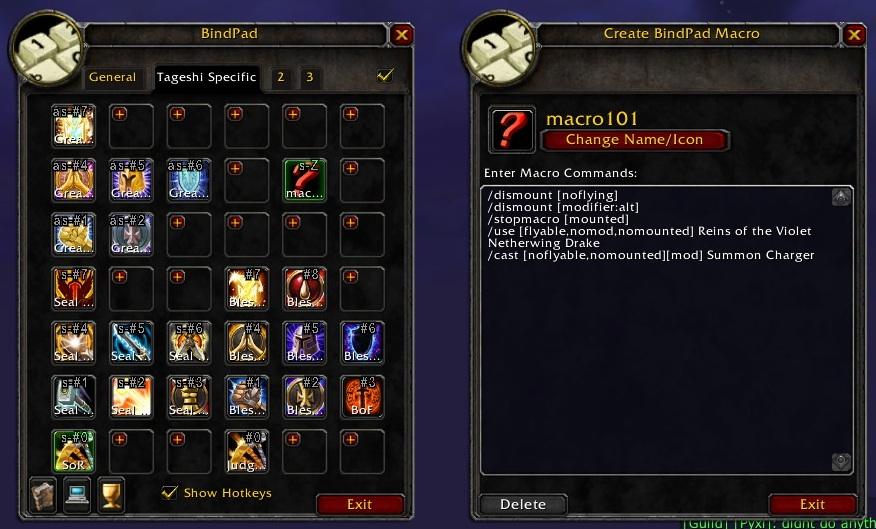
BindPad is an addon to make KeyBindings for spells, items, and macros.
You no longer need actionbar slots just to make Key bindings for your macores etc.
BindPad addon provides many icon slots in its frame. You can drag and drop
anything into one of these slots, and click the slot to set KeyBindings.
-------------------------------------------------------------------------
2. HOW TO USE "BindPad"?
-------------------------------------------------------------------------
(1) Type /bindpad or /bp to display BindPad frame.
(Also you can find "Toggle BindPad" Keybinding command in standard
KeyBindings frame of Blizzard-UI.)
(2) Open spellbook frame (p), you bag (b), or Macro Panel (/macro).
(Also you can use three mini-icons on BindPad frame to open these windows.)
(3) Drag an spell icon, item icon, or macro icon using left button drag and
drop it onto the BindPad window.
(Maybe you need shift key + left button drag if action bars are locked.)
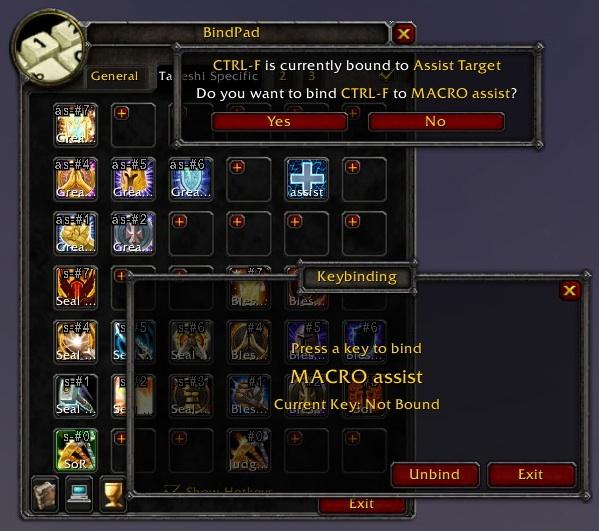
(4) Now you see the icon placed on BindPad frame. Click it,
and a dialog window "Press a key to bind" will appear.
(5) Type a key to bind. And click 'Close' button.
(6) When you want to remove icons from BindPad frame, simply drag away the icon
and press right click to delete it.
Note that KeyBinding itself will not be unbinded when you delete the icon.
To unbind it, click the icon and click Unbind button on the dialog window.
Also you can simply override Keybindings.
-------------------------------------------------------------------------
3. HOW TO USE TABS
-------------------------------------------------------------------------
3.1. SLOTS TABS
There are four tabs called Slots Tab on the top of BindPad frame
(like Blizzard's Macro frame).
[General Slots] is for common icons used for every characters and every specs.
[<Character> Specific Slots] is for icons specific to current character
and current spec.
[2] and [3] (aka. 2nd and 3rd <Character> specific slots) will act
in the same way as [<Character> Specific Slots].
Note that you can use [<Character> Specific Slots] tab only after you click
'Character Specific Key Bindings' check box at standard KeyBindings frame of Blizzard-UI.
From BindPad version 1.5, you can see this checkbox on BindPad window itself too.
(Also BindPad will inform you about 'Character Specific Key Bindings' and automatically
activate it for you when you click [<Character> Specific Slots] tab.)
3.2. PROFILE TABS
There are another three tabs called Profile Tab on the side of BindPad frame.
(like Blizzard's Talent frame)
Different Profile can hold different contents in [<Character> Specific Slots].
You can click a Profile tab to switch current Profile, and your choice of
Profile is saved for each Talent specs and automatically reverted to former
profile when you change talent spec. If you choose same Profile for both
talent specs this automatic change will not happen.
Note that [General Slots] tab is not effected by Profile change, as all
contents of [General Slots] tab is common for all characters AND all specs.
If you change Profile while [General Slots] tab is shown,
BindPad will automatically shows [<Character> Specific Slots] tab of
specified Profile.
3.3. CAN I SWITCH PROFILE IN COMBAT? ON STANCE CHANGE?
No, you cannot.
If you need different skills binded for different stances/forms,
simply use the stance condition to decide on what skill to use.
Example: /cast [stance:1/2] Berserker Stance; [stance:3] Intercept
Where [Stance:1/2] is conditioning the macro for you to be in battle stance
or defensive stance and [stance:3] is conditioning you to be in berserker stance.
This works for all classes with stances (Including rogues for stealth [stance:1]
and shadow dance [stance:2] or none of the previous [stance:0]).
Druid example: /cast [stance:1] Bash; [nostance:1] Healing Touch
[nostance] = Caster, [stance:1] = Bear, [stance:2] = Aquatic, [stance:3] = Cat,
[stance:4] = Travel, [stance:5] = Tree/Moonkin if available else Flight,
[stance:6] = Flight if Tree/Moonkin is not available.
-------------------------------------------------------------------------
4. "You want to convert this icon into a BINDPAD MACRO?"... What?
-------------------------------------------------------------------------
"BindPad Macro" is a new feature from BindPad version 1.8.0 ;
which allow you to make almost unlimited number of virtual macro icons.
Older versions of BindPad just let you save your limited action bar slots.
This new BindPad will let you save your limited macro slots on the standard
"Create Macro" panel.
Usage:
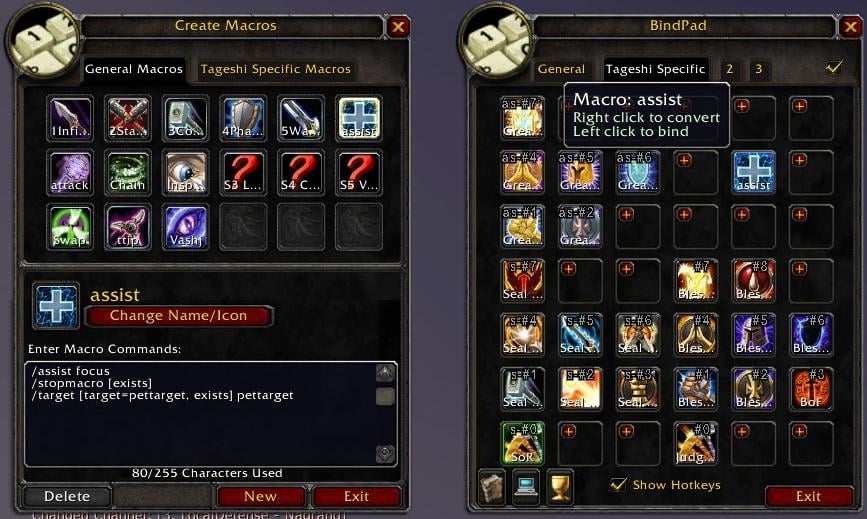
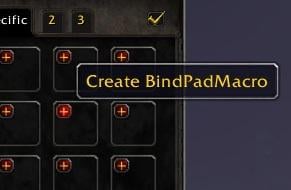
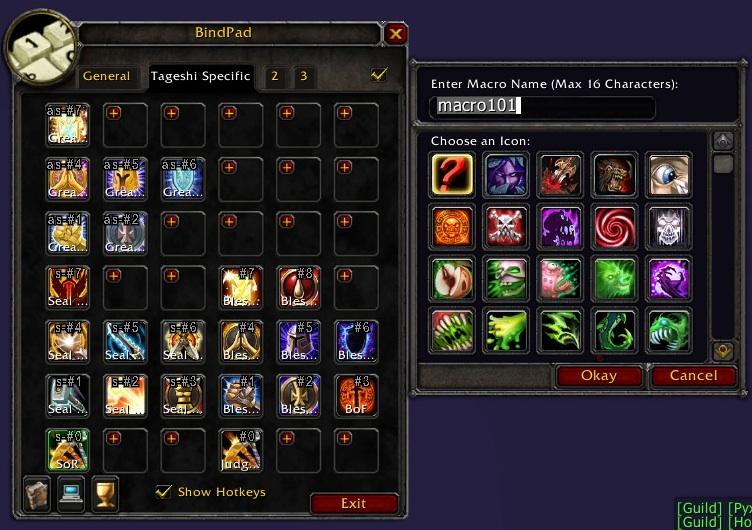
- Click the small red "+" icon to create an empty BindPad Macro.
- Right-click an existing spell/item/macro icon on BindPad to convert it into a BindPad Macro.
- Right-click the "BindPad Macro" to edit macro-text.
- ...and you can use left-click to set keybindings as usual.
Note that BindPad Macro will only exist within the BindPad frame;
You can drag-and-drop them within BindPad, but you cannot drop them outside.
-------------------------------------------------------------------------
5. DETAILS AND MORE INFORMATIONS
-------------------------------------------------------------------------
BindPad addon utilizes new functions added from WoW API 2.0 .
You can use these functions (and many others) in any addons or macros.
GetBindingKey("command")
SetBinding("KEY", "command")
SetBindingSpell("KEY", "Spell Name")
SetBindingItem("KEY", "itemname")
SetBindingMacro("KEY", "macroname"|macroid)
Just don't forget to save changes by
SaveBindings(GetCurrentBindingSet());
There are some other similar addons by other authors.
Try them and choose what you like.
SpellBinder
http://www.wowinterface.com/downloads/info5614-SpellBinder.html
qUserKey
http://wow.curse.com/downloads/wow-addons/details/q-user-key-bind-a-key-to-any-spe.aspx
mBindings
http://www.wowinterface.com/downloads/info11614-2.html
ncBindings
http://www.wowinterface.com/downloads/fileinfo.php?id=15270
ProKeybinds
http://www.wowinterface.com/downloads/fileinfo.php?id=18841
Visit these links for more informations about keybindings and macros.
WoWWiki
http://www.wowwiki.com/Making_a_macro
-------------------------------------------------------------------------
6. WHERE CAN I GET LATEST VERSION?
-------------------------------------------------------------------------
You can get latest version of BindPad from www.wowinterface.com:
http://www.wowinterface.com/downloads/fileinfo.php?id=6385
Or from Curse:
http://www.curse.com/addons/wow/bind-pad
- Fixed bug: Changing name for a BindPad Macro broke the keybind.
(Thanks to xalcon for reporting this!)
Version 2.8.6
- Fixed bug: Couldn't drag and drop itons.
(Thank you Stanzilla!)
Version 2.8.5
- Update TOC for Patch 8.0
(Thank you Stanzilla!)
Version 2.8.4
- Stanzilla's quick fix.
Update TOC for Patch 7.3
update soundkit usage for 7.3
Version 2.8.3
- Fixed Lua Error: attempt to index local 'profile' (a nil value)
Version 2.8.2
- Fixed Lua Error: attempted to call a protected function (SaveBindings()) during combat lockdown.
Version 2.8.1
- Fixed Lua Error: attempt to call field 'GetMountInfo' (a nil value)
Version 2.8.0
- Updated for Legion.
- Profile Tabs are now assigned to Specializations.
- Added 4th Profile Tab for Druids.
Known issue:
- BindPadMacro icons are sometimes not displayed correctly while drag & drop.
(SetCursor() function doesn't accept numbers as texture.)
Version 2.7.13
- ToC update for Patch 6.2.
- Fixed a bug introduced at 2.7.11 which makes keybindings of a Profile
to be lost when LoadBindings() is called after switching Profiles.
(Cancel button in Blizzard's KeyBindings frame calls LoadBindings().
Thus it destroys BindPad's keybindings.)
Version 2.7.12
- Fixed a bug which spills over new keybindings to another profiles.
(Ex. If you put PvP Medallion in Profile1 and there was no PvP Medallion
icon in Profile2, keybindings for PvP Medallion sometimes mistakenly
copied over to Profile2.)
Version 2.7.11
- Removed SaveBindings() as a fix to random frequent crash at /reload.
(It never happened before WoD, so something is changed Blizard side.)
- Fixed old bug which caused BindPadMacro disabled when very same icon
is placed on a BindPadMacro icon.
(It happened when you drop same Mount or pet action twice on a same slot.)
Version 2.7.10
- Fixed bug which breaks keybinds when players login in combat.
Version 2.7.9
- Tried to fix ShowHotkeys option for active telents on Russian client.
- Fixed a rare bug which may cause BindPadMacro to stop working.
- Added workaround to avoid canceling Priest's Shadowform when
keybind of "Summon Random Favorite Mount" is used.
Version 2.7.8
- Fixed bug of "Summon Random Favorite Mount" again.
Version 2.7.7
- Keybind for "Summon Random Favorite Mount" can be used while in shapeshift form.
Version 2.7.6
- Fixed bug of SaveAllKeys option
by updating for API change of GetBinding function.
Version 2.7.5
- Added support for Shift-Clicking of any hyperlink in chatframe;
which was previously only supported for spellLinks and itemLinks.
Now we can insert tradeskill links and enchant links into BindPadMacro.
- Added support for "Summon Random Favorite Mount" icon on Pet Journal.
Version 2.7.4
- Changed 1023 letters limit to 1024 bytes limit for BindPad Macro text.
(There are mysterious 1024 bytes limit on Blizzard's side,
and longer texts will be ignored when running a macro.)
- Changed behavior of "For All Characters" to fix bug;
which caused some keybindings to be removed.
Version 2.7.3
- Added new option "For All Characters" on keybinding frame;
which makes a keybind to carry over to all other characters.
- Fixed bug which made option checkboxes not working.
- Fixed mount support for WoD beta.
- Removed the workaround as build 18663 fixed Serializer.
Version 2.7.2
- Added workaround for WoD beta bug of Serializer for SavedVariables.
Version 2.7.1
- Updated for Revision 18645.
Version 2.7.0
- Updated for Warlords of Draenor
Version 2.6.7
- Fixed a Lua error introduced on 2.6.6. when player class has flyout spells.
Version 2.6.6
- Fixed Show Hotkey option for morhping spells such as Eternal Flame.
Version 2.6.5
- ToC update for patch 5.4
Version 2.6.4
- ToC update for patch 5.2
- Attempted to fix possible issue caused by invalid return value from GetCurrentBindingSet().
Version 2.6.3
- Fixed battlepet support which was broken since 5.1 .
Version 2.6.2
- TOC update for 5.1
- Introduced letter limit of 1023 for BindPad macro as a workaround of a bug
where letters over 1023 was simply ignored when using BindPadMacro.
(It seems it's limitation of Blizzard's API.)
Version 2.6.1
- Added optional support for AdvancedIconSelector (or LibAdvancedIconSelector-1.0)
when choosing an icon for BindPadMacro.
(You can get AdvancedIconSelector from:
http://www.curse.com/addons/wow/advancediconselector)
- Re-adjusted hotkey size and position.
- Replaced text font for BindPad Macro editbox
from GameFontHighlightSmall to ChatFontNormal.
Version 2.6.0
- Added "Show more slots" button, "Show less slots" button and a scroll bar
on both General tab and each character specific tabs.
Now BindPad can hold unlimited number of icons.
(as long as you have enough memory to hold.)
- Fixed bug related to savefile conversion:
If you had enabled "Show Keys in Tooltip" option with 2.5.6,
you couldn't disable "Show Hotkeys" option (it keeped re-enabling itself at login).
- Corrected behavier of scrollbar when editting long BindPad Macro text.
Version 2.5.8
- Fixed potensial lua error "attempt to call method 'GetAction' (a nil value)"
which happened with Lunarsphere and ButtonForge.
(Still, Show Hotkeys won't support them, but Show-Keys-in-Tooltip works.)
Version 2.5.7
- Added 0.1 second delay when updating hotkey display to avoid race condition
and to improve efficiency.
- Fixed lua error which occures on riding or leaving vehicle while using Bartendar4.
- Fixed lua error related with tooltip of a deleted macro.
- Fixed bug which makes redundant keybinding display on a talent tooltip.
- Adjusted position and size of hotkey text so that a few more characters are visible.
Version 2.5.6
- Show Hotkeys option is back and now more efficient.
- Show Hotkeys now supports every actionbar addons as far as I know.
- "Show Keys in Tooltip" is included in Show HotKeys option for now.
Version 2.5.5
- Fixed a display bug: "Show Keys in Tooltip" toggle option was
going to be unchecked at login.
Version 2.5.4
- Fixed Lua error related to AddSpellByID at Mastery tooltip.
- Internal change: replaced StaticPopup_Show with BindPad's own function.
Version 2.5.3
- Added new feature: Show Keys in Tooltip option;
which adds a text to describe keybindings in tooltip
for spells, items, and macros on ActionBar and Spellbook.
(to compensate removal of Show HotKey option.)
Version 2.5.2
- Added new feature: SaveAllKeys option;
which automatically saves all keys of Blizzard's Key Bindings Interface
for current BindPad Profile and restore them when switching Profiles.
- Reduced memory consumption by removing empty tables.
Version 2.5.1
- Fixed "script run too long" error.
- Removed broken Show-Hotkeys option which was pertially broken from long before.
- Added support for "Assist" pet skill.
- Added support for battlepet icon.
- Fixed bug: Was unable to pick up class spells from BindPad slot.
- Fixed bug: shift-clicking an icon no longer insert itemlink to BindPad Macro frame
when you meant to insert the itemlink into an active Chat Frame instead.
Version 2.5.0
- Updated for Mist of Pandaria beta 15799.
Version 2.4.1
- Updated for patch 4.3 .
Version 2.4.0
- Fixed bug: Tooltip for Fishing and First Aid was not correctly shown.
- Added new slash sub-commands to manage profiles.
/bindpad list : List profiles in saved variables.
/bindpad delete REALMNAME_CHARACTERNAME : Delete a profile for REALMNAME_CHARACTERNAME.
/bindpad copyfrom REALMNAME_CHARACTERNAME : Copy a profile from REALMNAME_CHARACTERNAME.
Version 2.3.9
- Updated for 4.1 .
- Added more detailed tooltip text for Profile tabs and Slots tabs.
- BindPad will automatically shows [<Character> Specific Slots] tab
of specified Profile when you click Profile Tab.
(To reduce unnecessary confusion, because contents of
the General Slots tab are common for every Profiles anyway.)
- Trigger on Keydown checkbox is now hidden.
(It now follows Blizzard's "Cast action keybinds on key down"
in Combat option.)
- Added support for "Move To" pet skill.
- Added more description about tabs in readme.txt
Version 2.3.8
- Updated for 4.0.6, and fixed huge tab bug.
Version 2.3.7
- Added more error check to repair corrupted variables.
Version 2.3.6
- Added error check for when your pet is dismissed while dragging a pet skill icon.
- Fixed error produced by corrupted variables made by the above error.
Version 2.3.5
- Added support for Pet skills (except Move To).
Version 2.3.4
- Removed (now useless) Fast Trigger option.
(WoW client patch 4.0.1 introduced "ability queue" system,
that's why we no longer need Fast Trigger.)
- Fixed a tooltip for zhTW and zhCN localization.
Version 2.3.3
- Actually fixed problem for Feral Charge (Cat Form), Mangle (Cat Form) now.
Version 2.3.1
- Fixed problem for Feral Charge (Cat Form), Mangle (Cat Form) (it's lie!)
- Fixed "Show Hotkeys" for standard ActionBar.
(May not work for other action bar addons.)
Version 2.3.0
- Now support Cataclysm Beta Build 12857.
Version 2.2.4
- Added a workaround for a strange bug of GetCurrentBindingSet() API function.
Version 2.2.3 (beta)
- 2.2.3 is an experimental version.
Version 2.2.2
- Fixed a bug which breaks keybindings for Downranking spells.
Version 2.2.1
- Fixed a SavedVariable conversion bug introduced in 2.2.0
which breaks existing keybindings.
Version 2.2.0
- Now all keybindings made by BindPad is triggered on key-down instead of key-up.
(You can disable this future by a toggle button.)
- Added "Fast Trigger" option toggle button on the Keybinding frame;
keybindings with this option enabled will be triggered on
both pressing and releasing a key.
- Fixed a bug which prevent a BindPadMacro to work after converting
from spell/item/macro icon.
- Fixed a bug which made some broken action string when using
control+drag to duplicate a BindPadMacro.
Version 2.1.7
- Fixed bug introduced in 2.1.6 which prevented Escape key to close the frame.
Version 2.1.6
- Added support for maximum 31 mouse buttons.
(for World of Warcraft Gaming Mouse)
Version 2.1.5
- Switching profile is now much faster when both profiles have same keybindings.
- Now allows bindings to left/right mouse button with modifiers.
(Control+LeftButton etc.)
Version 2.1.4
- Fixed bug: Couldn't use Bronze Drake because its mount name
is "Bronze Drake Mount" instead of the spell name "Bronze Drake".
- Fixed bug: When you drop two same mount/pet icon on BindPad,
the second one used wrong name and didn't work.
Version 2.1.3
- Fixed bug: When you bind different keys to same spell/item/macro for
different profiles, unused keys were not correctly unbinded when
switching profile; which also caused display problem of tooltip.
Version 2.1.2
- You can duplicate any icon on BindPad by shift-click & drag now.
So that you can copy icons from a profile tab to another profile tab.
- Fixed bug: BindPadMacro was not updated correctly on switching profile
when you have BindPadMacro icons with same name on each profile tab.
Version 2.1.1
- Changed behavior of profile tabs; BindPad now remembers which
profile tab was used for each talent spec.
Three profile tabs are now equal each other.
- BindPadMacro edit frame now accepts shift-click on spell or items
to insert as a macro text. (Same as standard macro frame.)
Version 2.1.0
- Added three profile tabs; switching profile will
save & load whole character specific icons and their keybindings.
- First two of the three profile tabs are linked to Dual Spec of
WotLK 3.1.0, and will be automatically switched when you swtich spec.
- The third profile tab is just an extra.
- All character specific icons and keybindings are duplicated at the
first time you use a profile.
Version 2.0.2b
- Fixed: Modifier keys couldn't be used for keybinding of BindPadMacro.
Version 2.0.1
- Correctly support spells which have a pair of bracket in its name;
For example, "Faerie Fire (Feral)", "Swipe (Cat)"
Version 2.0.0
- Updated for WotLK 3.1.0
- You can drag&drop companion icons and use it as a BindPadMacro. (WotLK 3.1.0 only)
- You can drag&drop new equipmentset icons from Equiment Manager too. (WotLK 3.1.0 only)
- Changed keybinding name of BindPadMacro; now it sees like "BindPadMacro:<name>" instead of "BindPadMacro101:" etc.
- Now you can use "/click BindPadMacro <name>" slash command to run the BindPadMacro from within a macro.
- Added various error checks to avoid calling protected functions in combat.
- Fixed: BindPadMacro text was sometimes overwritten by different icon's macro text.
Version 1.9.1
- Release for 3.0.2
Version 1.9.0
- Updated for WotLK beta
Version 1.8.6
- Fixed a drawing order problem of "Show Hotkeys"
for Bartendar4 and probably for Bartendar3.
- Added locatization for zhCN and zhTW. (Thanks xinsonic)
Version 1.8.5
"Show Hotkeys" now supports Bartendar4.
Version 1.8.4
Added a workaround for error message "GetSpellName(): Invalid spell slot".
Version 1.8.3
- (Really) fixed the display issue of "Show Hotkeys" on compatibility with Bongos3.
- Added "Test" button on the BindPad Macro frame to test the macro while editing.
- Improved the keybinding confirmation window when the key is already
bound to a BindPad Macro.
Version 1.8.2
Fixed a bug which sometimes prevented BindPad to detect correct spell
rank after respeccing talent or training new spells.
Version 1.8.1
Fixed display issue of "Show Hotkeys" function introduced in 1.7.1; Compatibility with Bongos3 fixed.
(EDIT: Actually it was not yet fixed.)
Version 1.8.0
"BindPad Macro" : New feature to make almost unlimited number of virtual macro icons.
BindPad Macro is made for you to save limited macro slots on the standard Blizzard UI.
BindPad Macro will only exist within the BindPad frame, and allow you to make keybindings on them.
- Click the small red "+" icon to create an empty BindPad Macro.
- Right-click an existing spell/item/macro icon on BindPad frame to convert it into a BindPad Macro.
- Right-click the "BindPad Macro" to edit macro-text.
- ...and you can use left-click to set keybindings as usual.
Version 1.7.1
Added an option checkbox "Show Hotkeys".
The hotkey function now supports all ActionBar AddOns in addition to Blizard UI.
(Only tested for Bartendar3 addon.)
Version 1.7.0
Added an ability to automatically display binded hotkeys on ActionBar buttons.
(Suggested by Pheon)
Version 1.6.1
Updated for WoW client 2.3.0 .
Fixed a bug causing macro icons sometimes not working.
Version 1.6
Added two extra tabs for heavy users.
Version 1.5.1
TOC update.
Version 1.5
TOC update.
Added the 'Character Specific Key Bindings' check box at upper right corner of BindPad frame.
Added some functions to inform about 'Character Specific Key Bindings'.
Version 1.4
TOC update.
Added three mini-icons to open Spellbook, Macros Panel, and All bags.
Now uses new GetCursorInfo() API. (Slouken have kindly added it for me.)
You can now drag&drop icons from Action Bars too.
You can now use mouse wheel up/down as a keybind.
Version 1.3 (Now really updated version):
Added slash command /bindpad and /bp
Version 1.2 (not uploaded!):
More bug fixes.
Savefile format was changed and not compatible to 1.0 and 1.1.
(Old save data will be deleted when you use version 1.2; that don't unbind but you need to drag icons again.)
Version 1.1 (not uploaded!):
Fixed some tainting bug.
Version 1.0
Initial release.
File Name |
Version |
Size |
Author |
Date |
Type |
1.1 |
13kB |
09-01-12 01:05 AM |
Patch |
 |
Comment Options |
 11-09-20, 05:40 AM
|
|
|
A Kobold Labourer
Forum posts: 0
File comments: 1
Uploads: 0
|
Spec option gone
Hello ive got bindpad since 1 year now and its really good addon but today I dont have my spec option anymore (I am resto druid but i also play other specs) my other spec option are gone can anyone help me plz?
|

|

|
| Kajiun |
| View Public Profile |
| Send a private message to Kajiun |
| Find More Posts by Kajiun |
| Add Kajiun to Your Buddy List |
|
08-11-18, 04:59 AM
|
|
|
A Deviate Faerie Dragon
 Forum posts: 16
File comments: 224
Uploads: 3
|
update on curse available
|
|
|
|
| Aur0r4 |
| View Public Profile |
| Send a private message to Aur0r4 |
| Find More Posts by Aur0r4 |
| Add Aur0r4 to Your Buddy List |
|
02-21-18, 06:00 AM
|
|
|
A Murloc Raider
Forum posts: 4
File comments: 23
Uploads: 0
|
Bindpad shows all green icons when I use another addon that enhances the window size and adds search capabilities, such as Better Icon Selector/Advanced Icon Selector/LargerMacroIconSelection.
Has anyone got any of these addons to work together? |
|
|
|
| Machinelf |
| View Public Profile |
| Send a private message to Machinelf |
| Find More Posts by Machinelf |
| Add Machinelf to Your Buddy List |
|
08-29-17, 10:33 AM
|
|
|
An Aku'mai Servant
 Forum posts: 34
File comments: 146
Uploads: 6
|
did some quick fixes to address the sound changes in 7.3, in case the original author does not come back you can get it here: https://github.com/Stanzilla/BindPad
|
|
|
|
| Stanzilla |
| View Public Profile |
| Send a private message to Stanzilla |
| Find More Posts by Stanzilla |
| Add Stanzilla to Your Buddy List |
|
02-21-17, 12:59 PM
|
|
|
A Kobold Labourer
Forum posts: 0
File comments: 24
Uploads: 0
|
I've made a personal change to BP that makes it very easy to share configurations between characters. This change saves individual character configurations as their own lua files that are easy to copy to other characters (Account/x/server/character/SavedVariables/BindPad.lua)
I've been using it a couple of days and it has made my life very easy in setting up new characters (my wife and I are serial-alt-o-holics). It works for me, but I don't plan on ongoing support so if that makes you squeamish, wait for Tageshi to adopt (or reject) the change. Remember to back up your Account/x/SavedVariables/BindPad.lua first! (Seriously, imagine the pain of losing all of your configuration - back up takes 3 seconds and will save you hours.) Code:
diff --git a/BindPad/BindPad.lua b/BindPad/BindPad.lua
index d057add..fd611bf 100755
--- a/BindPad/BindPad.lua
+++ b/BindPad/BindPad.lua
@@ -57,7 +57,11 @@ BindPadVars = {
    version = BINDPAD_SAVEFILE_VERSION,
    GeneralKeyBindings = {};
 };
-
+BindPadVarsCharacter = {
+   tab = BINDPAD_GENERAL_TAB,
+   version = BINDPAD_SAVEFILE_VERSION,
+   GeneralKeyBindings = {};
+};
 -- Initialize BindPad core object.
 BindPadCore = {
    drag = {};
@@ -1092,10 +1096,10 @@ function BindPadCore.GetProfileForSpec(specIndex)
    if nil == character then
       return nil;
    end
-   if nil == BindPadVars[character].profileForTalentGroup[specIndex] then
-      BindPadVars[character].profileForTalentGroup[specIndex] = specIndex;
+   if nil == BindPadVarsCharacter.profileForTalentGroup[specIndex] then
+      BindPadVarsCharacter.profileForTalentGroup[specIndex] = specIndex;
    end
-   return BindPadVars[character].profileForTalentGroup[specIndex];
+   return BindPadVarsCharacter.profileForTalentGroup[specIndex];
 end

 function BindPadCore.GetSpecsForProfile(profileNum)
@@ -1105,11 +1109,11 @@ function BindPadCore.GetSpecsForProfile(profileNum)
       return nil;
    end
    local specIndex = GetSpecialization();
-   if BindPadVars[character].profileForTalentGroup[specIndex] == profileNum then
+   if BindPadVarsCharacter.profileForTalentGroup[specIndex] == profileNum then
       spec1 = specIndex;
    end

-   for k,v in pairs(BindPadVars[character].profileForTalentGroup) do
+   for k,v in pairs(BindPadVarsCharacter.profileForTalentGroup) do
       if v == profileNum and k ~= specIndex then
          if spec1 == nil then
             spec1 = k;
@@ -1131,7 +1135,7 @@ function BindPadCore.GetProfileData()
       return nil;
    end
    local profileNum = BindPadCore.GetCurrentProfileNum();
-   local profile = BindPadVars[character][profileNum];
+   local profile = BindPadVarsCharacter[profileNum];

    return profile;
 end
@@ -1142,24 +1146,24 @@ function BindPadCore.ConvertOldSlotInfo()

    local profileNum = BindPadCore.GetCurrentProfileNum();

-   BindPadVars[character] = {};
-   BindPadVars[character][profileNum] = {};
+   BindPadVarsCharacter = {};
+   BindPadVarsCharacter[profileNum] = {};

    if nil ~= BindPadVars[oldCharacter] then
       for i = 1, BINDPAD_MAXSLOTS_DEFAULT do
-         BindPadVars[character][profileNum][i] = BindPadVars[oldCharacter][i];
+         BindPadVarsCharacter[profileNum][i] = BindPadVars[oldCharacter][i];
       end
       BindPadVars[oldCharacter] = nil;
    end
    if nil ~= BindPadVars[oldCharacter.."_3"] then
       for i = 1, BINDPAD_MAXSLOTS_DEFAULT do
-         BindPadVars[character][profileNum][i+BINDPAD_MAXSLOTS_DEFAULT] = BindPadVars[oldCharacter.."_3"][i];
+         BindPadVarsCharacter[profileNum][i+BINDPAD_MAXSLOTS_DEFAULT] = BindPadVars[oldCharacter.."_3"][i];
       end
       BindPadVars[oldCharacter.."_3"] = nil;
    end
    if nil ~= BindPadVars[oldCharacter.."_4"] then
       for i = 1, BINDPAD_MAXSLOTS_DEFAULT do
-         BindPadVars[character][profileNum][i+2*BINDPAD_MAXSLOTS_DEFAULT] = BindPadVars[oldCharacter.."_4"][i];
+         BindPadVarsCharacter[profileNum][i+2*BINDPAD_MAXSLOTS_DEFAULT] = BindPadVars[oldCharacter.."_4"][i];
       end
       BindPadVars[oldCharacter.."_4"] = nil;
    end
@@ -1187,11 +1191,11 @@ function BindPadCore.SwitchProfile(newProfileNum, force)
    BindPadCore.profileNum = newProfileNum;

    local specIndex = GetSpecialization();
-   BindPadVars[character].profileForTalentGroup[specIndex] = newProfileNum;
+   BindPadVarsCharacter.profileForTalentGroup[specIndex] = newProfileNum;

    -- Create new profile if not available
-   if nil == BindPadVars[character][newProfileNum] then
-      BindPadVars[character][newProfileNum] = {};
+   if nil == BindPadVarsCharacter[newProfileNum] then
+      BindPadVarsCharacter[newProfileNum] = {};

       BindPadCore.DoSaveAllKeys();
       BindPadFrame_OutputText(BINDPAD_TEXT_CREATE_PROFILETAB);
@@ -1275,7 +1279,7 @@ function BindPadCore.CarryOverKeybinding(key, action)
    local character = BindPadCore.character;
    local idx;
    for profileNum = 1, 5 do
-      local profile = BindPadVars[character][profileNum];
+      local profile = BindPadVarsCharacter[profileNum];
       if profile ~= nil then
          if (profile.version or 0) >= BINDPAD_PROFILE_VERSION252 then
             profile.AllKeyBindings[key] = action;
@@ -1476,12 +1480,17 @@ function BindPadCore.InitProfile()
       BindPadFrame_OutputText("BindPadVars.version = "..(BindPadVars.version or "nil"));
       BindPadFrame_OutputText(BINDPAD_TEXT_OBSOLATED);
    end
+
+    if nil ~= BindPadVars[character] then
+        BindPadVarsCharacter = BindPadVars[character];
+        BindPadVars[character] = nil;
+    end

-   if nil == BindPadVars[character] then
+   if nil == BindPadVarsCharacter then
       BindPadCore.ConvertOldSlotInfo();
    end
-   if nil == BindPadVars[character].profileForTalentGroup then
-      BindPadVars[character].profileForTalentGroup = {};
+   if nil == BindPadVarsCharacter.profileForTalentGroup then
+      BindPadVarsCharacter.profileForTalentGroup = {};
    end

    local newActiveTalentGroup = GetSpecialization();
@@ -2289,10 +2298,10 @@ function BindPadCore.GetTabInfo(tab)
    else
       local character = BindPadCore.character;
       local profileNum = BindPadCore.GetCurrentProfileNum();
-      if nil == BindPadVars[character][profileNum] then
-         BindPadVars[character][profileNum] = {};
+      if nil == BindPadVarsCharacter[profileNum] then
+         BindPadVarsCharacter[profileNum] = {};
       end
-      local profile = BindPadVars[character][profileNum];
+      local profile = BindPadVarsCharacter[profileNum];

       local tabname = "CharacterSpecificTab"..(tab - BINDPAD_GENERAL_TAB);
       if nil == profile[tabname] then
diff --git a/BindPad/BindPad.toc b/BindPad/BindPad.toc
index 387a638..5089614 100755
--- a/BindPad/BindPad.toc
+++ b/BindPad/BindPad.toc
@@ -4,4 +4,5 @@
 ## Author: Tageshi
 ## Notes: BindPad - Keybinding UI for Items, Spells and Macroes. Drag anything into BindPad's slot and click it to bind a key.
 ## SavedVariables: BindPadVars
+## SavedVariablesPerCharacter: BindPadVarsCharacter
 BindPad.xml
If you want to reverse the process you will either have to manually copy your data back into the common BindPad.lua or tweak the InitProfile to put it back... You are on your own there, so buyer beware  ---- Follow-up; its been a month and I leveled 8 characters (recruit a friend); I haven't found any bugs with the change. I did find a really nice side-effect of the change - I copied one of my characters data file and made it a template with all of my common (but character specific bindings) set up. (I use the numberpad on the right side of the keyboard - #3 is follow focus & main castsequence, #+ is mount, stuff like that). Having a template file made it really easy to do all the tedious create button/assign keypress work - so I could focus on the contents of the buttons.)
Last edited by elaundar : 03-29-17 at 10:56 AM.
|
|
|
|
| elaundar |
| View Public Profile |
| Send a private message to elaundar |
| Find More Posts by elaundar |
| Add elaundar to Your Buddy List |
|
12-24-16, 12:43 PM
|
|
|
A Murloc Raider
Forum posts: 7
File comments: 14
Uploads: 0
|
What is the easiest way to backup my binds before resetting my UI? Every time I try out a new UI, such as off this website, I lose my binds and it takes a lot of work redoing the binds for every character and class.
After resetting my UI, even if I keep the bindpad saved variables file, I still have to drag my spells from the spellbook for bindpad to remember what the bind for the spell was, meaning the grids are blank. EDIT: OK I just tested it and I just have to remember to save the .lua file in saved variables and not delete the bindpad folder in addons folder.
Last edited by metarra : 12-24-16 at 01:30 PM.
|
|
|
|
| metarra |
| View Public Profile |
| Send a private message to metarra |
| Find More Posts by metarra |
| Add metarra to Your Buddy List |
|
07-31-16, 08:05 PM
|
||
|
A Murloc Raider
Forum posts: 7
File comments: 249
Uploads: 4
|
Yes.
Code:
/bp copyfrom Code:
/bp help
|
|
|
|
|
| Tageshi |
| View Public Profile |
| Send a private message to Tageshi |
| Find More Posts by Tageshi |
| Add Tageshi to Your Buddy List |
|
07-31-16, 07:59 PM
|
|
|
A Murloc Raider
Forum posts: 6
File comments: 81
Uploads: 1
|
Really great addon. I want to ask what the easiest way is of sharing profile between different characters of the same class. Is there an easy way without rebinding everything?
|
|
|
|
| Bizerk |
| View Public Profile |
| Send a private message to Bizerk |
| Find More Posts by Bizerk |
| Add Bizerk to Your Buddy List |
|
07-29-16, 10:27 AM
|
|
|
A Murloc Raider
Forum posts: 7
File comments: 249
Uploads: 4
|
BindPad 2.8.2
Version 2.8.2
- Fixed Lua Error: attempted to call a protected function (SaveBindings()) during combat lockdown. |
|
|
|
| Tageshi |
| View Public Profile |
| Send a private message to Tageshi |
| Find More Posts by Tageshi |
| Add Tageshi to Your Buddy List |
|
07-26-16, 09:40 AM
|
|
|
A Murloc Raider
Forum posts: 7
File comments: 249
Uploads: 4
|
BindPad 2.8.1
Version 2.8.1
- Fixed Lua Error: attempt to call field 'GetMountInfo' (a nil value) |
|
|
|
| Tageshi |
| View Public Profile |
| Send a private message to Tageshi |
| Find More Posts by Tageshi |
| Add Tageshi to Your Buddy List |
|
07-23-16, 08:28 PM
|
||
|
A Kobold Labourer
Forum posts: 0
File comments: 4
Uploads: 1
|
Re: BindPad 2.8.0
|
|
|
|
|
| baldursgate |
| View Public Profile |
| Send a private message to baldursgate |
| Find More Posts by baldursgate |
| Add baldursgate to Your Buddy List |
|
07-23-16, 04:47 PM
|
|
|
A Kobold Labourer

Forum posts: 0
File comments: 1
Uploads: 0
|
Legendary Ring bind
[EDIT] Nevermind, I was stuck in combat >.<
Hey, anyone else having issue binding the Legendary Ring? I tried to drag it to the bindpad window, didn't "grab" it. I tried making a macro that would use the slotID, and it still wouldn't "grab" it to configure. Am I the only one with this issue?
__________________

Last edited by Phweak : 07-23-16 at 04:52 PM.
|
|
|
|
| Phweak |
| View Public Profile |
| Send a private message to Phweak |
| Find More Posts by Phweak |
| Add Phweak to Your Buddy List |
|
07-23-16, 08:35 AM
|
|
|
A Deviate Faerie Dragon
Forum posts: 16
File comments: 224
Uploads: 3
|
Thank you so much for updating this!
|
|
|
|
| Aur0r4 |
| View Public Profile |
| Send a private message to Aur0r4 |
| Find More Posts by Aur0r4 |
| Add Aur0r4 to Your Buddy List |
|
07-23-16, 03:10 AM
|
|
|
A Deviate Faerie Dragon
Forum posts: 17
File comments: 54
Uploads: 0
|
 Re: BindPad 2.8.0
Thank you!
|
|
|
|
| Julchen |
| View Public Profile |
| Send a private message to Julchen |
| Find More Posts by Julchen |
| Add Julchen to Your Buddy List |
|
07-22-16, 11:43 PM
|
|
|
A Murloc Raider
Forum posts: 7
File comments: 249
Uploads: 4
|
BindPad 2.8.0
Version 2.8.0
- Updated for Legion. - Profile Tabs are now assigned to Specializations. - Added 4th Profile Tab for Druids. Known issue: - BindPadMacro icons are sometimes not displayed correctly while drag & drop. (SetCursor() function doesn't accept numbers as texture.) |
|
|
|
| Tageshi |
| View Public Profile |
| Send a private message to Tageshi |
| Find More Posts by Tageshi |
| Add Tageshi to Your Buddy List |
|
