Addon Info.
Change Log
Optional Files (0)
Archived (14)
Comments (73)
  Category: Unit Mods
Addon Information
Works with Patch 2.4
Download Latest Version.
To add favorites please register for a free account. If you already have one you need to login. How do I install this? (FAQ)
Author:
Version:
2.3.6
Date:
03-26-2008 08:16 PM
Size:
11.61 Kb
Downloads:
53,819
Views:
248,409
Favorites:
169
MD5:
Pictures
Click to enlarge
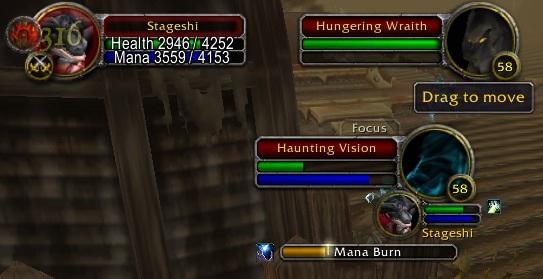
You can move the frame by dragging "Focus" tab.
FocusFrame   Popular!
Rate: 5 out of 5 with 10 votes  
FocusFrame -- Created by Tageshi


---------------------------------------------------------------
1. WHAT IS "FocusFrame"?
---------------------------------------------------------------

FocusFrame is very simple addon to show your focus.

The frame looks almost exactly same as Blizzard's TargetFrame;
It provide following features.
- Click to target your focus or your focus's target.
- Shows your focus's health and mana.
- Shows your focus's target.
- Shows cast bar of your focus.
- Supports Click-Casting such as Clique addon by utilizing ClickCastFrames.
- Movable by dragging the title tab.
- Supports MobHealth.


---------------------------------------------------------------
2. WHAT IS "focus"?
---------------------------------------------------------------


The "focus" is a new feature of WoW API 2.0.
Basically you can use "focus" as a second target.
It works in similar way as your real Target
and allows you to use DOUBLE targets at the same time. (essentially)

From API 2.0 Changes:
> * There is a new unit "focus" which behaves like target,
> the "PLAYER_FOCUS_CHANGED" event is fired when it is changed,
> and you receive unit events for this unit.

> * Spell casting and targetting (including focus) are only allowed
> using secure templates or special slash commands (not /script).


---------------------------------------------------------------
3. HOW TO USE "focus"?
---------------------------------------------------------------


You can set "focus" by using new standard Keybinding "Focus Target" or
by using new macro command "/focus" with target name or target id.
Another new standard keybindings "Target Focus" will change your target
to your focus. For example, you don't need to remember which mob is
your "sheep" to poly again.

Also you can use a keyword "focus" as a target id like "player",
"target", "party2", etc.

Example1: You can assist your focus by this macro.

/assist focus

You may want to focus your main tank/main assist if you will do DPS.
Or focus raid boss and 'assist' it if you are healing.


Example2: You can cast your Earth Shock on your focus by this macro.

/cast [target=focus] Earth Shock

You can watch spell casting bar on FocusFrame.


---------------------------------------------------------------
4. COMMANDS
---------------------------------------------------------------

FocusFrame has a few slash commands;

/focusframe scale <num> (Changes size of FocusFrame window.)
/focusframe reset (Reset window position.)
/focusframe lock (Prevent dragging the frame by accident.)
/focusframe unlock (Allows to move again.)

If your screen space is limited, try smaller window size:
/focusframe scale 0.7

When you accidently lost FocusFrame from your sight, reset it's
position and FocusFrame will appear again at the center of screen.


---------------------------------------------------------------
5. CHANGES
---------------------------------------------------------------

Version 2.3.6
TOC updated for WoW 2.4 .

Version 2.3.5
Fixed slash command "/focusframe hidewhendead" so that it respects Saved Variables.
Restored dependency on the standard Interface option "Show Enemy Cast Bar".
(which I removed hastily on version 2.3.4 .)

Version 2.3.4
Added slash command "/focusframe hidewhendead" to toggle the new function introduced on 2.3.3 .
Suports WoW patch 2.4 PTR.

Version 2.3.3
Added additional condition so that FocusFrame will be hidden only when focused target is dead AND is enemey.

Version 2.3.2
FocusFrame will be hide when focused target is dead.(Finally!)
Added warning message for when too big scale argument is passed for /focusframe scale command.
Added warning message for when user tried to change frame scale in combat.

Version 2.3.1
Fixed broken MobHealth support.

Version 2.3.0 (<- Skipped 2.2.0 to avoid confusion)
Updated for WoW client version 2.3 .

Version 2.2.1 (<- oops, this is typo. This version is actuallly 2.1.1)
Fixed a potential nil error.

Version 2.1.0
Updated for WoW client version 2.2.0 .
Added slash commands /focusframe lock and /focusframe unlock.

Version 2.0.2
Fixed a bug; tooltip of buff/debuff icons were not correctly updated. (Thanks to Alestane)

Version 2.0.1
Fixed a nil concatenate error at line 852. (Thanks to JMHammer)

Version 2.0
Mimics new Target frame of WoW client 2.1 ;
Displays maximum 32 buff icons.
Displays buff/debuff timer.
Mobhealth support added.

Version 1.3
Added slash command /focusframe reset -- which reset window position to center of screen.
Supported silver dragon decoration for rare-elite mobs.

Version 1.2
Added slash command /focusframe scale <num> -- which changes size of FocusFrame.

Version 1.1
Fixed broken initialization. FocusFrame window is now really displayed.

Version 1.0
First release. But initialization was broken.
  Change Log - FocusFrame
Version 2.3.6
TOC updated for WoW 2.4 .

Version 2.3.5
Fixed slash command "/focusframe hidewhendead" so that it respects Saved Variables.
Restored dependency on the standard Interface option "Show Enemy Cast Bar".
(which I removed hastily on version 2.3.4 .)

Version 2.3.4
Added slash command "/focusframe hidewhendead" to toggle the new function introduced on 2.3.3 .
Suports WoW patch 2.4 PTR.

Version 2.3.3
Added additional condition so that FocusFrame will be hidden only when focused target is dead AND is enemey.

Version 2.3.2
FocusFrame will be hide when focused target is dead.(Finally!)
Added warning message for when too big scale argument is passed for /focusframe scale command.
Added warning message for when user tried to change frame scale in combat.

Version 2.3.1
Fixed broken MobHealth support.

Version 2.3.0 (<- Skipped 2.2.0 to avoid confusion)
Updated for WoW client version 2.3 .

Version 2.2.1 (<- oops, this is typo. This version is actuallly 2.1.1)
Fixed a potential nil error.

Version 2.1.0
Updated for WoW client version 2.2.0 .
Added slash commands /focusframe lock and /focusframe unlock.

Version 2.0.2
Fixed a bug; tooltip of buff/debuff icons were not correctly updated. (Thanks to Alestane)

Version 2.0.1
Fixed a nil concatenate error at line 852. (Thanks to JMHammer)

Version 2.0
Mimics new Target frame of WoW client 2.1 ;
Displays maximum 32 buff icons.
Displays buff/debuff timer.
Mobhealth support added.

Version 1.3
Added slash command /focusframe reset -- which reset window position to center of screen.
Supported silver dragon decoration for rare-elite mobs.

Version 1.2
Added slash command /focusframe scale <num> -- which changes size of FocusFrame.

Version 1.1
Fixed broken initialization. FocusFrame window is now really displayed.

Version 1.0
First release. But initialization was broken.
  Optional Files - FocusFrame
Sorry, there are currently no optional files available.
  Archived Versions - FocusFrame
File Name
Version
Size
Author
Date
2.3.5
11.60 Kb
Tageshi
03-22-2008 03:03 AM
2.3.4
11.36 Kb
Tageshi
02-18-2008 11:31 AM
2.3.2
11.23 Kb
Tageshi
01-24-2008 10:43 AM
2.3.1
10.99 Kb
Tageshi
11-24-2007 02:39 AM
2.3.0b
11.10 Kb
Tageshi
11-13-2007 08:36 AM
2.1.1
11.92 Kb
Tageshi
10-01-2007 07:45 AM
2.1.0
11.10 Kb
Tageshi
09-25-2007 10:01 AM
2.0.2b
10.90 Kb
Tageshi
06-19-2007 08:33 AM
2.0.1
11.02 Kb
Tageshi
06-04-2007 08:39 AM
2.0
10.87 Kb
Tageshi
06-03-2007 10:05 AM
1.3
8.74 Kb
Tageshi
05-14-2007 12:12 PM
1.2
8.68 Kb
Tageshi
12-31-2006 05:49 AM
1.1
8.43 Kb
Tageshi
12-12-2006 06:14 AM
1.0
8.68 Kb
Tageshi
12-09-2006 08:05 PM
  Comments - FocusFrame
Post A Reply
Author Comments Comment Options
Old 07-09-2008, 09:35 AM  
Nihlo
A Kobold Labourer

Forum posts: 0
File comments: 21
Uploads: 0
a "close" button in the right-click menu to close the focus would be cool
Nihlo is offline Report comment to moderator   Edit/Delete Message Reply With Quote
Old 06-29-2008, 01:25 PM  
Darthgnomer
A Kobold Labourer
Interface Author - Click to view interfaces

Forum posts: 1
File comments: 13
Uploads: 1
I love this addon

I love this addon. Good work. Thanks for an effective addon. Don't change a thing.
Darthgnomer is offline Report comment to moderator   Edit/Delete Message Reply With Quote
Old 05-16-2008, 07:47 AM  
Tageshi
A Kobold Labourer
Interface Author - Click to view interfaces

Forum posts: 0
File comments: 75
Uploads: 9
Quote:
Originally posted by STFX
I will integrate party cast bars to Extended Unit Frames.

eUF would fit that better imo coz thats focus frame + target of party frame + status texts + party cast bars (soon) in bliz default UI style.

greetings
stfx
That's a good news.

I was pondering how to arrange the party cast frame into a confortable form.
The idea of FocusFrame was a complement to the blizzard UI and it is to be usuful for everyone including PvP, 5man pve, raid PvE everything, and I was very comfortable with this idea.

On the contraly, idea of party cast frame is only for PvP and 5man pve, and I was pondering whether I should extend it to raid frame or make it super specific to 5man group.
eUF seems to be suitable for the latter idea from very fast.
Tageshi is offline Report comment to moderator   Edit/Delete Message Reply With Quote
Old 05-15-2008, 01:56 PM  
STFX
A Defias Bandit
Interface Author - Click to view interfaces

Forum posts: 2
File comments: 42
Uploads: 3
I will integrate party cast bars to Extended Unit Frames.

eUF would fit that better imo coz thats focus frame + target of party frame + status texts + party cast bars (soon) in bliz default UI style.

greetings
stfx

Last edited by STFX : 05-15-2008 at 01:59 PM.
STFX is offline Report comment to moderator   Edit/Delete Message Reply With Quote
Old 04-18-2008, 10:43 AM  
Tageshi
A Kobold Labourer
Interface Author - Click to view interfaces

Forum posts: 0
File comments: 75
Uploads: 9
Quote:
Originally posted by Ajuga
I think we're misunderstanding each other. Here's my first post:


I was first suggesting that you could work on some "Party Cast Bars" if you wanted to. After no replies from you I assumed that you weren't interested. Today I received a pm asking me where to get "Party Cast Bars". So I thought it might get you interested in the project if you knew that others were interested.

About X-Perl: I think it would be unwise to install a full scale UF addon with the sole purpose of showing 4 cast bars. Also - eventhough I haven't tried - I don't think I'd be satisfied with the result.
Ok.
Pondering.
Tageshi is offline Report comment to moderator   Edit/Delete Message Reply With Quote
Old 04-16-2008, 07:41 PM  
sunstone
A Kobold Labourer

Forum posts: 0
File comments: 2
Uploads: 0
Exactly that's what missing - partycastbars and THAT in the focusframe-style. I know 6 persons that would love to have that.

I don't want a fullfledged ui overhaul like with Pitbull (which is excellent but complex and BIG) or xperls.

Tageshi- my regards and 10$ for such a project.
sunstone is offline Report comment to moderator   Edit/Delete Message Reply With Quote
Old 04-15-2008, 02:31 PM  
Ajuga
A Kobold Labourer

Forum posts: 1
File comments: 19
Uploads: 0
I think we're misunderstanding each other. Here's my first post:

Quote:
Originally posted by Ajuga
I like FocusFrame because it feels like something that should've been in the default UI - not only because it uses the default Blizzard layout, but also because it's necessary for many classes. Enough with the praising - I hereby present you with an addon idea that should've been in the default UI; Party Cast Bars! Also Party Targets could be a hit (I'm thinking similar style as Player vs. Target, just smaller of course).

After 2 hours of fiddling with the focusspellbar part of FocusFrame I had to admit that my lua knowledge was far from sufficient. So I hope you'll give my suggestions a shot
I was first suggesting that you could work on some "Party Cast Bars" if you wanted to. After no replies from you I assumed that you weren't interested. Today I received a pm asking me where to get "Party Cast Bars". So I thought it might get you interested in the project if you knew that others were interested.

About X-Perl: I think it would be unwise to install a full scale UF addon with the sole purpose of showing 4 cast bars. Also - eventhough I haven't tried - I don't think I'd be satisfied with the result.
Ajuga is offline Report comment to moderator   Edit/Delete Message Reply With Quote
Old 04-15-2008, 12:45 PM  
Tageshi
A Kobold Labourer
Interface Author - Click to view interfaces

Forum posts: 0
File comments: 75
Uploads: 9
Quote:
Originally posted by Ajuga
Can you make cast bars that only shows when party# is casting (with XPerl)? And with a style similar to the target cast bar?
Yes. But I won't do without reasonable needs.
Tageshi is offline Report comment to moderator   Edit/Delete Message Reply With Quote
Old 04-15-2008, 07:34 AM  
Ajuga
A Kobold Labourer

Forum posts: 1
File comments: 19
Uploads: 0
Quote:
Originally posted by Tageshi
Did you try X-Perl?
http://www.wowinterface.com/download...nitFrames.html
Can you make cast bars that only shows when party# is casting (with XPerl)? And with a style similar to the target cast bar?
Ajuga is offline Report comment to moderator   Edit/Delete Message Reply With Quote
Old 04-15-2008, 07:21 AM  
Tageshi
A Kobold Labourer
Interface Author - Click to view interfaces

Forum posts: 0
File comments: 75
Uploads: 9
Quote:
Originally posted by Ajuga
I just got a pm asking where to get "PartyCastBars"

Please make it!
Did you try X-Perl?
http://www.wowinterface.com/download...nitFrames.html
Tageshi is offline Report comment to moderator   Edit/Delete Message Reply With Quote
Old 04-15-2008, 06:53 AM  
Ajuga
A Kobold Labourer

Forum posts: 1
File comments: 19
Uploads: 0
I just got a pm asking where to get "PartyCastBars"

Please make it!
Ajuga is offline Report comment to moderator   Edit/Delete Message Reply With Quote
Old 03-30-2008, 03:12 PM  
Ajuga
A Kobold Labourer

Forum posts: 1
File comments: 19
Uploads: 0
I like FocusFrame because it feels like something that should've been in the default UI - not only because it uses the default Blizzard layout, but also because it's necessary for many classes. Enough with the praising - I hereby present you with an addon idea that should've been in the default UI; Party Cast Bars! Also Party Targets could be a hit (I'm thinking similar style as Player vs. Target, just smaller of course).

After 2 hours of fiddling with the focusspellbar part of FocusFrame I had to admit that my lua knowledge was far from sufficient. So I hope you'll give my suggestions a shot

Last edited by Ajuga : 03-30-2008 at 03:13 PM.
Ajuga is offline Report comment to moderator   Edit/Delete Message Reply With Quote
Old 03-22-2008, 03:06 AM  
Tageshi
A Kobold Labourer
Interface Author - Click to view interfaces

Forum posts: 0
File comments: 75
Uploads: 9
FocusFrame Version 2.3.5

Version 2.3.5
Fixed slash command "/focusframe hidewhendead" so that it respects Saved Variables.
Restored dependency on the standard Interface option "Show Enemy Cast Bar".
(which I removed hastily on version 2.3.4 .)
Tageshi is offline Report comment to moderator   Edit/Delete Message Reply With Quote
Old 03-22-2008, 03:05 AM  
Tageshi
A Kobold Labourer
Interface Author - Click to view interfaces

Forum posts: 0
File comments: 75
Uploads: 9
Quote:
Originally posted by STFX
hi, love this addon
only one request: could you hide "Focus" label (above the health bar) when locking FocusFrame?
Pondering about this possibility, nothing decided.
Nothing changed until more good reason to change come out.
Tageshi is offline Report comment to moderator   Edit/Delete Message Reply With Quote
Old 02-20-2008, 09:01 AM  
STFX
A Defias Bandit
Interface Author - Click to view interfaces

Forum posts: 2
File comments: 42
Uploads: 3
hi, love this addon
only one request: could you hide "Focus" label (above the health bar) when locking FocusFrame?
STFX is offline Report comment to moderator   Edit/Delete Message Reply With Quote
Post A Reply


Category Jump:


The Network:
EQInterface | EQ2Interface | LoTROInterface | MMOInterface | WoWInterface | VGInterface | Allakhazam | Thottbot | Wowhead | Zam


MMOInterface.com Copyright ©2008
World of Warcraft is a registered Trademark of Blizzard Entertainment.
vBulletin - Copyright ©2000 - 2008, Jelsoft Enterprises Ltd.


