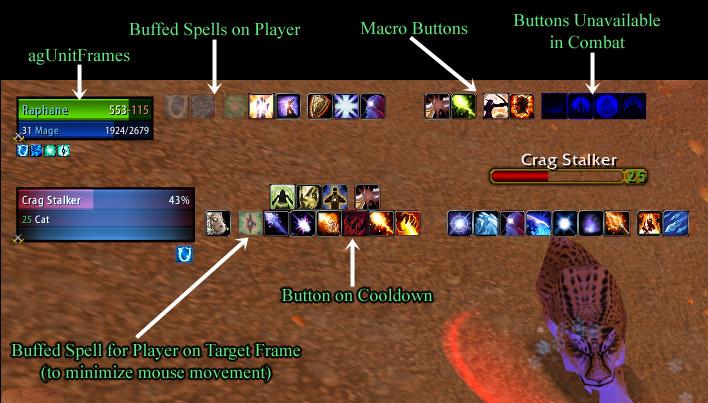
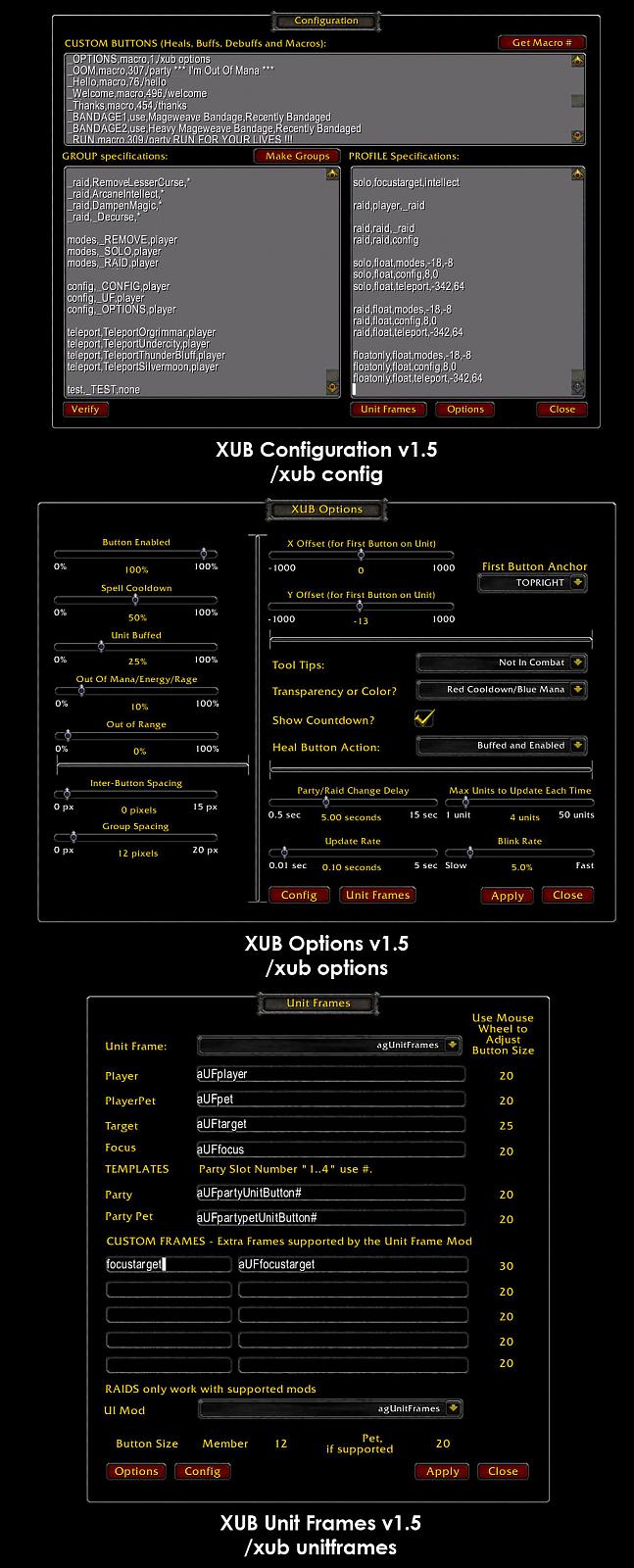
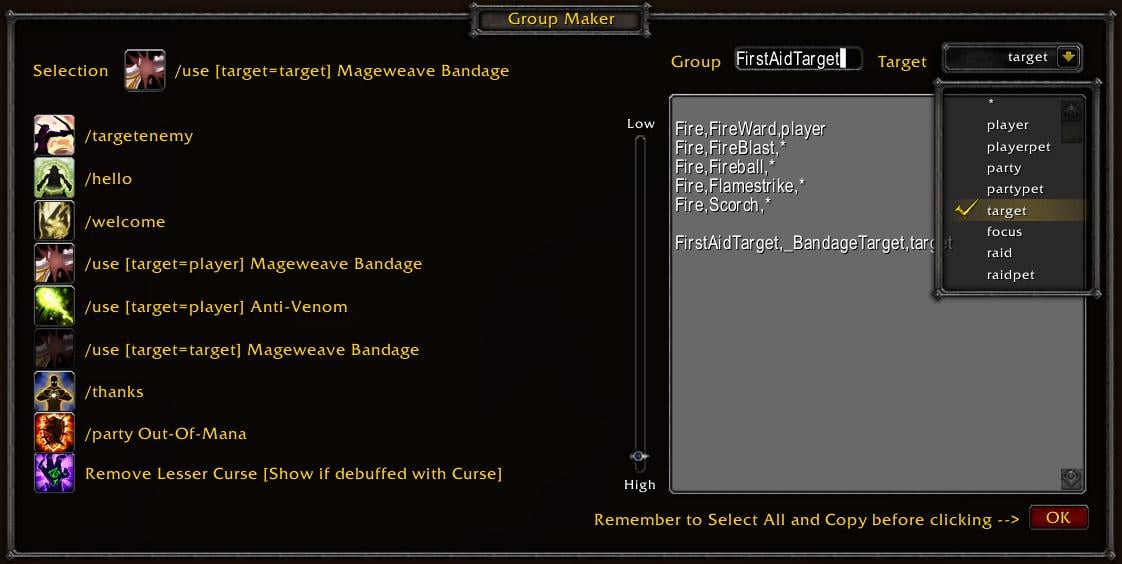
This highly configurable mod allows players to associate buttons to unit frames. It is meant as a replacement to GroupButtons which stopped functioning with the 2.0 patch in December 2006. The mod extends the capabilities of GroupButtons by providing these additional features:
an unlimited number of buttons per unit frame
Buttons which turn on/off depending on the amount of damage a unit has
Buttons which are dimmed if a unit as that buff or a related buff applied.
Buttons which appear when a debuff is applied to a unit.
Buttons which allow you to have any type of "/" slash or macro command on a button
A variety of a modes for different activities in the game. For example, a set of buttons
for soloing, buttons for instances, buttons for raids, buttons for specific bosses (such as Baron Geddon in MC (to all priests to debuff), buttons for PvP, etc.
Assign buttons to unit frames that when clicked cast spells on different units. This feature allows, for example, buffs and heals for the player unit to appear within the target buttons to minimize the amount of mouse movement between buttons.
Works for any kind of non-casting classes; specifically warriors and rogues.
Version 1.8.2 (July 26, 2008) (by Palidindrome )
Changelog:
Code:
CHANGED: TOC for 2.4
NOTE This is a incremental releasefor the toc
CHANGED: TOC for 2.3
CHANGED: Tainting issue fix. Copied Tayedaen's combat update code
ADDED: Copied in Cosmic Cleric's UI code for additional settings
ADDED: User Guide back to release package
NOTE - other 1.9 changes are NOT copied in. This is a incremental releasefor the toc/ bug and UI
ADDED: PerfectRaid support
ADDED: Pitbull Raid Frames Raid frames appear to work - Party frames do not work well.
ADDED: Countdown for cooldowns with remaining time < 10 secs can now be displayed with decimals
To enable decimals use '/XUB showdecimals'
ADDED: BUFFx: BUFF/BUFFBLINK buttons can now blink if a buff is about to expire
By defining a BUFFx, the button will blink if the buff is x seconds away
from expiring. Examples: BUFFBLINK15, BUFF10
ADDED: Global Dim
This dims all buttons in state STATE_ENABLED while player is casting a spell
To enable GlobalDim use '/XUB useglobaldim'
(Macro buttons are not dimmed because of the possibility of /stopcast macros)
If you use 'Color coded' instead of 'Transparency' then the dimmed buttons
are colored with c_globaldim (mint at the moment).
Please note that Global Dim has quite a cost in terms of performace, since
it has to dim all ENABLED buttons if you start a cast, and undim them after.
ADDED: new Tooltip option "Show Cooldown even in Combat"
ADDED: Global cooldowns no longer start a countdown timer by default
To enable a countdown timer for global cooldowns use '/XUB showglobalcooldown'
ADDED: Garbage collection after applying a profile
CHANGED: raid/group changes are handled better (does not work while in combat !!)
CHANGED: debuff handling
Some debuffs have no debuff type. Now for these debuffs the name of
the debuff is added to the debuff list instead of the debuff type.
This allows to check for a specific debuff if necessary.
CHANGED: Display of all buttons after a party/raid change (request by Torwauki)
The duration of the display of the buttons after a raid/party change is
now 0 secs per default, the duration after a manual change is still 3 seconds.
Eventually these times will be adjustable in the future, for now they can only be changed in code.
Search in 'eXtremeUnitButtons.lua' for:
XUB_DelayTime_after_automaticProfileChange = 0;
XUB_DelayTime_after_manualProfileChange = 3;
and change the values to your liking.
CHANGED: Improved pitbull support (thx paladindrome)
CHANGED: "Hide and Disable" --> "Show as Hidden"
CHANGED: "Enable and buffed" --> "Show as Buffed"
CHANGED: "Red Cooldown/Blue Mana" --> "Color Coded"
CHANGED: "Heal Button action" --> "Heal/Buff button action"
CHANGED: Button behaviour regarding buffs
After long development discussion we agreed to implement it this way:
A button in buffed state is shown either as BUFFED or INVALID (hidden).
This is adjustable with the modified Healbutton option in the option window (see 'Heal Button action')
CHANGED: Color system
New: Red=Range,Ochre=Buffed,Purple=Cooldown,Cobalt=Mana
There are also some changes to make implementing a color selector easier later
CHANGED: OutOfRange buttons have now a separate alpha from Invalid buttons
The alpha for invalid is set to '0'.
This can be changed to 'x' with '/script XUB_INVALID_ALPHA=x (0 <= x <= 1)
CHANGED: behaviour of unusable buttons
They are no longer higlightened if mouseovered, indicating that ou can't use the button at the moment
FIXED: Spells defined as BUFFS can be debuffs on target units (fixed in hotfix1)
FIXED: fix for "XUB_UF_Apply( "PlayerPet" , "PlayerFramePetFrame" )"
FIXED: workaround for API call 'UnitClass' sometimes returning NIL
Known addon bugs:
none
Known blizzard bugs:
------------------------
'isUsableSpell' is broken, there is nothing I can do to change that.
That means: Some spells are reported 'not usable' if you target a hostile target or NPC (like 'PowerWord: Shield' for example).
NOTES:
Code:
NOTE 1: !!!! Limited Pitbull support is enabled but does not work well
- consider it experimental and unsupported!!!!
NOTE 2: The colors for 'Color coded':
STATE_OUTOFRANGE = c_range = red
STATE_COOLDOWN = c_cooldown = purple
STATE_BUFFED = c_buffed = ochre
STATE_OUTOFMANA = c_outofmana = cobalt
Dimmed button = c_globaldim = mint
These colors can be changed in eXtremUnitButtons.lua.
To do this, open the file and search for 'XUB COLOR DEFINITION BLOCK'
NOTE 3:
The correct spelling for the 4 existing debuff types are :
Magic
Poison
Curse
Disease
Please note that the first character is uppercased.
NOTE 4: The historical changes have been removed from the online
display - they are availible in the embedded Changelog_complete.txt file.
Originally posted by Cosmic Cleric I don't use x-perl, so not sure why, or if its supported.
If you post your script here, I'll take a look at it and see if anything obvious xub script-wise is missing/wrong.
hijacking reply here. I'm using plain old blizzard frames so far as I know.... only time I see my buttons is at the top of the screen right after I do 'save' after a verify. My buttons are all target buttons for now. Not sure what to look at next.
edit: nevermind.... apparently, it helps to test the target bar on an actual 'you should be trying to kill this thing' npc and not some green villager. whodathunk?
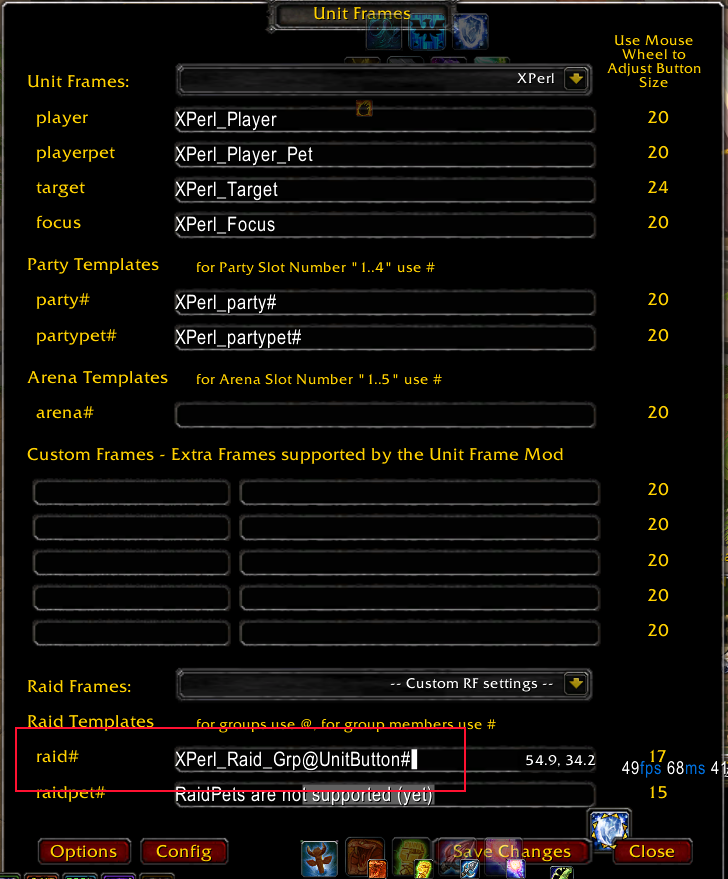
Originally posted by samhain_whitefox oki, so, i fixed the no text issue, but i still can't get it to put buttons up? why? i use x-perl but that is supported no? i dunno, any help?
I don't use x-perl, so not sure why, or if its supported.
If you post your script here, I'll take a look at it and see if anything obvious xub script-wise is missing/wrong.
umm, hi? sorry to bother, but, i can't seem to get this thingy to work right? i use xperl unit frames, and i think it's supposed to work with that, but dunno. and also, whenever i try to config, or do anything, there is no text on the buttons? like, the close button is what i assume on is, is absolutely blank, i can't do anything with xub at all, and i don't understand. i really want to use this mod, but i dunno what i'm doing wrong? anyone help? thank you.
EDIT:: oops, sorry, i fixed it ^^ just needed to install the beta version and that fixed it ^^ sorry bout that ^^
__________________
a heart alone
a heart of stone.
a shattered love
a battered child.
innocence lost
at rending cost.
Last edited by samhain_whitefox : 10-11-2009 at 05:57 PM.
I know this is still a work in progress, so I tryied to figuree it out on my own first.
But, for me I can't seem to get the health, buff, buffblink, ect. functions to work. from my understanding of the PDF file and these posts, all of the following should hide or blink the corresponding button, correct?
Originally posted by BlackWidow Thanks Cleric, will give it a try.
No problem, glad to help. I was in the same boat, but for me, I discovered the problem DURING a run, when I wanted to change the size of the partypet buttons! :/ Luckily, I mapped the most vital buttons on WoW toolbar #2, so I got by.
Yeah, I had a hard time getting the ag_UnitFrames frame names too, the add-on you suggested (which I downloaded and used) wouldn't work when mousing over the aguf frames. However, when I moused over the buffs under the frames, the 'parent frame' information showed the party bar frame names (luckily!).
Originally posted by tayedaen What version of aUF are you using ?
You could download and install the addon FrameInfo from here, then move your mouse over the partyframes and tell me the name of the frame.
It seems aUF again changed its frame naming system.
cu
tay
They renamed them Tay.
For everybody, until a new version of XUB comes out, do this to fix the problem.
1. At the WoW chat window, type '/XUB UF' (without the single quotes).
2. Make sure the "Unit Frame:" dropdown has 'agUnitFrames' selected.
3. Change the "Unit Frame:" dropdown to '-- Custom Settings --' (from 'agUnitFrames').
4. Change the "Party" entry to 'aUFpartyUnitButton#' (again, without the single quotes).
5. Change the "PartyPet" entry to 'aUFpartypetUnitButton#'
6. Press the 'Save Changes' button.
If you want, instead of doing the above steps, you can instead manually edit the XUBUnitFrames.lua file, lines 11 and 12, to the same values that I listed above in steps 4 and 5 (aUFpartyUnitButton#/aUFpartypetUnitButton#). Either way works.
What is it with ag_UnitFrames (http://www.wowace.com/addons/ag_unitframes/), they keep changing the name of those two frames!? They added 'UnitButton' to the party and partypet frame names.
Last edited by Cosmic Cleric : 08-19-2009 at 05:30 AM.
Using Frameinfo, this is the info that I got " aUFpartyUnitButton 1 "
Had a bit of difficulty getting the frame info while mousing over the party frame, but I think that is correct.
Thanks again for your help.
Quote:
Originally posted by tayedaen What version of aUF are you using ?
You could download and install the addon FrameInfo from here, then move your mouse over the partyframes and tell me the name of the frame.
It seems aUF again changed its frame naming system.
cu
tay
Last edited by BlackWidow : 08-12-2009 at 05:57 PM.
Have been away from the game for a long time and can not figure out how to fix this. I can't get any buttons to show on my party frames. Using Ag Unit Frames. Hoping that someone can help please.
Error: Unable to find 'aUFparty#1' No buttons could be attached to this frame. This is the profile setting normal,party,healing and this is an example of my group spec healing,FlashHealRank4,*
This is making me crazy.
Thanks
What version of aUF are you using ?
You could download and install the addon FrameInfo from here, then move your mouse over the partyframes and tell me the name of the frame.
It seems aUF again changed its frame naming system.
Have been away from the game for a long time and can not figure out how to fix this. I can't get any buttons to show on my party frames. Using Ag Unit Frames. Hoping that someone can help please.
Error: Unable to find 'aUFparty#1' No buttons could be attached to this frame. This is the profile setting normal,party,healing and this is an example of my group spec healing,FlashHealRank4,*