| Go to Page... |

| Updated: | 08-15-09 10:30 AM |
| Created: | unknown |
| Downloads: | 34,287 |
| Favorites: | 217 |
| MD5: |
TradeJunkie 

ADDON IS DISCONTINUED
TradeJunkie is now powered by WoWHead. Due to this, I will only update TJ here on WoWInterface.com. You will see TJ updated to 5.0 <BETA> on the other sites but that will be the final update there.
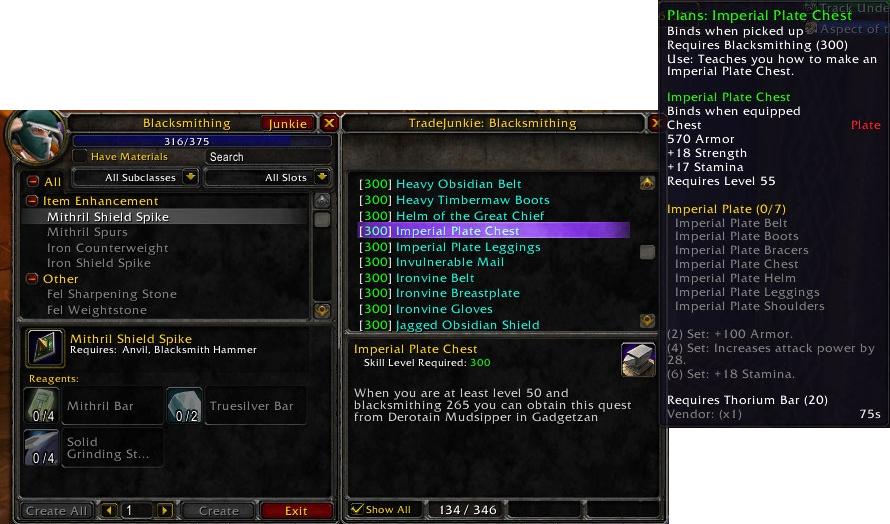
TradeJunkie shows you what tradeskills you are missing.
Tradeskills marked in green are currently learnable while red means you need to level your skill more until you can learn it.
The Show All check box in the window will toggle between showing only the recipes that you can learn vs. all the recipes in the database.
NOTES:
------
If you drop and get a new tradeskill and it errors out, just type "/console reloadui" without quotes to get the database to work. Specialization may not work.
Cooking got lost in a database restructure.
Command: /tj open will toggle between having TradeJunkie automatically open when you open a tradeskill window.)
Compatible with:
-- Jobber
Special Thanks:
My wife, Ittsy for naming this Addon
Rowaa for rewriting the script into a smaller memory stamp and other core re-writes
All of you that enjoy the use of TJ.
------------
Kaden - Doomhammer
- Corrected an issue with the TJ button showing under the tradeskill window. Also added support for Jobber
v5.0 <BETA>
- Added Inscription ... lost cooking. THe database is a little different now. With the Beta the only info in is recipes and profession levels ... no help on where to get the recipes yet. Please read the main info.
v4.01
- Added the beginning of Inscription (no recipes yet.) When a tradeskill is linked TJ will keep the TJ button and window from appearing.
v4.0
- New core re-write. TJ Now takes even less memory then before. It will only load the tradeskills you know. See notes in Description. Removed Ace2 and changed the way recipes are loaded not needing localization.
v3.3.1
- Fixed a database issue with Reputation standings. If you have an error with Powerful Anti-Venom in First Aid, get this update.
v3.3
- Beast Training should no longer give an error.
v3.2.4
- Updated the database with all item/recipe links. If a recipe has a wearable product then you can Control-click the item for dressing room.
- Fixed Bracing Earthstorm Diamond .. it now properly states that it can be purchased in Karazan.
v3.2.3b
- Fixed an error in the code that broke TJ.
v3.2.3
- Began implementing recipeID data for all tradeskills. (check first aid)
- Basic database work
- Removed TJ from Beast Training (will add in the future)
v3.1.2b
- Fixed Heavy Netherweave Bandages
v3.1.2
- *hopefully* fixed mining for non-english clients.
- Began working on getting item links into the system.
- Updated ACE2 Libraries and some of the database information.
v3.0.1
- Updated Cooking and Alchemy with some fixes.
v3.0.0
- Begin localization (needs testing .. see Description)
- Added icon for the item link system, also added control click for dressing room.
v2.16.2
- Completed testing on the /tj command, works with Skillet and ATSW. NOTICE: AddOn in WoW may still report as 2.15.2 but it really is 2.16.2!
v2.15.2
- fixed First Aid errors
v2.14.2
- updated tailoring, see comments below.
v2.14.1
- Added a slash command /tj to add an auto open feature
- Added savedvariables to remember the auto open and Show all settings (per account not character)
v2.13.1
- Added a highlight bar
- Started new version number system
v2.12
- Updated code to recognize Specialization.
v2.11
- Updated some recipe data.
- For the fans of ArmorCraft addon, its buttons are now detected and TJ button is anchored accordingly in standart tradeskill window to prevent buttons from covering each other.
 |
Comment Options |
 11-15-11, 07:08 AM
|
|
|
An Aku'mai Servant
 Forum posts: 32
File comments: 70
Uploads: 5
|
Due to the ever expanding size of the tradeskill database and the fact that there is another addon out there that does exactly what I wanted, I have discontinued this addon. Sorry to everyone that wanted to use this.
|

|

|
| dragonflyy |
| View Public Profile |
| Send a private message to dragonflyy |
| Visit dragonflyy's homepage! |
| Find More Posts by dragonflyy |
| Add dragonflyy to Your Buddy List |
|
11-08-10, 09:07 PM
|
|
|
An Aku'mai Servant
Forum posts: 32
File comments: 70
Uploads: 5
|
Believe it or not I have been working on this. My processor just died recently, so I upgraded and had to reformat. I was unaware the MySQL had started storing DB files in the Users folder on Windows 7 so the DB went with it. I use MySQL and PHP for my database because it's easier to build in then export to LUA. I have gotten the structure of the DB back and will begin entering information in again. Hopefully by the time Cata comes out I can have a back bone on my addon again. I hope people haven't given up on me yet.
|
|
|
|
| dragonflyy |
| View Public Profile |
| Send a private message to dragonflyy |
| Visit dragonflyy's homepage! |
| Find More Posts by dragonflyy |
| Add dragonflyy to Your Buddy List |
|
01-11-10, 07:55 PM
|
||
|
An Aku'mai Servant
Forum posts: 32
File comments: 70
Uploads: 5
|
|
|
|
|
|
| dragonflyy |
| View Public Profile |
| Send a private message to dragonflyy |
| Visit dragonflyy's homepage! |
| Find More Posts by dragonflyy |
| Add dragonflyy to Your Buddy List |
|
11-18-09, 10:33 PM
|
|
|
A Kobold Labourer
Forum posts: 0
File comments: 8
Uploads: 0
|
besides lack of descriptions (which I can help with somewhat, if you like) I noticed for Enchanting it says I need [1]Disenchanting
 Also does not list any enchants from Ulduar. And I just noticed, this mod says it's compatible with Advanced trade Skill Window, yet with both mods active, the "Junkie" button is nowhere to be seen  the instructions for fixing it work, but I'm curious why it's not been fixed by the author yet? the instructions for fixing it work, but I'm curious why it's not been fixed by the author yet?
Last edited by ElrickEnonimis : 11-19-09 at 01:11 PM.
|
|
|
|
| ElrickEnonimis |
| View Public Profile |
| Send a private message to ElrickEnonimis |
| Visit ElrickEnonimis's homepage! |
| Find More Posts by ElrickEnonimis |
| Add ElrickEnonimis to Your Buddy List |
|
10-18-09, 12:58 PM
|
|
|
A Defias Bandit
Forum posts: 2
File comments: 83
Uploads: 7
|
This is a great idea and I think it could become a great addon. Nevertheless, I tested it with Engineering and found out that many recipes have no description as to how to get them. Sadly, most of the ones that already do have a desciption, say "learned from trainer". Anyway, this is a great start. I know there's lots and lots of recipes to list so... good luck!
 |
|
|
|
| miros |
| View Public Profile |
| Send a private message to miros |
| Visit miros's homepage! |
| Find More Posts by miros |
| Add miros to Your Buddy List |
|
09-20-09, 06:32 PM
|
||
|
An Aku'mai Servant
Forum posts: 32
File comments: 70
Uploads: 5
|
|
|
|
|
|
| dragonflyy |
| View Public Profile |
| Send a private message to dragonflyy |
| Visit dragonflyy's homepage! |
| Find More Posts by dragonflyy |
| Add dragonflyy to Your Buddy List |
|
09-17-09, 04:27 AM
|
|
|
A Kobold Labourer
Forum posts: 0
File comments: 42
Uploads: 0
|
Got this after opening the window; not using ATSW or Ackis currently:
[2009/09/17 06:19:03-2488-x2]: TradeJunkie-5.0B2\TradeJunkie.lua:350: bad argument #1 to 'pairs' (table expected, got nil) TradeJunkie-5.0B2\TradeJunkie.lua:350: in function <Interface\AddOns\TradeJunkie\TradeJunkie.lua:339> TradeJunkie-5.0B2\TradeJunkie.lua:367: in function <Interface\AddOns\TradeJunkie\TradeJunkie.lua:366> TradeJunkie-5.0B2\TradeJunkie.lua:430: in function `ShowTradeJunkie' TradeJunkie-5.0B2\TradeJunkie.lua:329: in function `TradeJunkie_Attach' TradeJunkie-5.0B2\TradeJunkie.lua:240: in function <Interface\AddOns\TradeJunkie\TradeJunkie.lua:240> |
|
|
|
| Jimmerz28 |
| View Public Profile |
| Send a private message to Jimmerz28 |
| Visit Jimmerz28's homepage! |
| Find More Posts by Jimmerz28 |
| Add Jimmerz28 to Your Buddy List |
|
08-28-09, 02:08 AM
|
|
|
An Aku'mai Servant
Forum posts: 32
File comments: 70
Uploads: 5
|
Due to a recent change in Blizzards code ... I had to create the button in the LUA anyway. I can upload the changes if you want to see them. It'll make resizing easier.
|
|
|
|
| dragonflyy |
| View Public Profile |
| Send a private message to dragonflyy |
| Visit dragonflyy's homepage! |
| Find More Posts by dragonflyy |
| Add dragonflyy to Your Buddy List |
|
08-19-09, 06:47 AM
|
|
|
A Murloc Raider
Forum posts: 6
File comments: 14
Uploads: 1
|
Updated enhancement for TradeJunkie v5.0 Beta 2
You are welcome. I'm having fun tinkering with all this code.
I have updated my forum post with a tweak to the xml anchor points in order to better support dynamic button resizing.  Also, I'm still in the "thinking about it" phase while I conceptualize an "all-Lua" solution to creating a "Junkie" button and dynamically resizing/relocating it based on other addons installed. It will likely be a simple fix to implement, maybe even easier than this one. The "xml & Lua" solution simply "materialized" quicker for me than the "all-Lua" approach.  |
|
|
|
| Thrashfinger |
| View Public Profile |
| Send a private message to Thrashfinger |
| Visit Thrashfinger's homepage! |
| Find More Posts by Thrashfinger |
| Add Thrashfinger to Your Buddy List |
|
08-17-09, 06:42 PM
|
|
|
An Aku'mai Servant
Forum posts: 32
File comments: 70
Uploads: 5
|
Thank you Thrashfinger for helping to get that in there. I had to remove ATSW and Skillet support due to a problem I had with the button not showing on the normal TS window. I will incorporate a fix on the next update (hopefully with the database complete.)
@warzer: Cooking was lost in an attempt to create a better database. I have some of it back in the master DB that I am working on now and will be in soon. First Aid works on my end, but I will research your error a bit more. |
|
|
|
| dragonflyy |
| View Public Profile |
| Send a private message to dragonflyy |
| Visit dragonflyy's homepage! |
| Find More Posts by dragonflyy |
| Add dragonflyy to Your Buddy List |
|
08-17-09, 12:53 PM
|
|
|
A Murloc Raider
Forum posts: 6
File comments: 14
Uploads: 1
|
TradeJunkie v5.0 Beta 2 & AdvancedTradeSkillWindow v0.7.7
TradeJunkie v5.0 Beta 2 + AckisRecipeList + AdvancedTradeSkillWindow
-------------------------------------------------------------- If you want to add a TradeJunkie "Junkie" button to the latest AdvancedTradeSkillWindow v0.7.7, you can update TradeJunkie v5.0 Beta 2 with the code modifications listed below. -------------------------------------------------------------- -=-=-=-=-=-=-=-=-=-=-=-=-=-=-=-=-=-=-=-=-=-=-=-=-=-=-=-=-=-=-=- VERSIONS: These code changes work specifically for TradeJunkie v5.0 Beta 2 in conjunction with AdvancedTradeSkillWindow v0.7.7, but can be adapted for other addons. -=-=-=-=-=-=-=-=-=-=-=-=-=-=-=-=-=-=-=-=-=-=-=-=-=-=-=-=-=-=-=- -=-=-=-=-=-=-=-=-=-=-=-=-=-=-=-=-=-=-=-=-=-=-=-=-=-=-=-=-=-=-=- NOTE: This is a quick and dirty code update to add TradeJunkie support to AdvancedTradeSkillWindow. This method isn't pretty and I am sure there are better ways to do it, but I know this method works with WoW v3.2.0. I am also working on a cleaner solution that will adjust dynamically based on the presence of other addons and buttons, including AckisRecipeList's "Scan" button. -=-=-=-=-=-=-=-=-=-=-=-=-=-=-=-=-=-=-=-=-=-=-=-=-=-=-=-=-=-=-=- -=-=-=-=-=-=-=-=-=-=-=-=-=-=-=-=-=-=-=-=-=-=-=-=-=-=-=-=-=-=-=- LOCATION: If you are using WindowsXP and the default installation location, then this files can (most likely) be found at: C:\Program Files\World of Warcraft\Interface\AddOns\TradeJunkie\ -=-=-=-=-=-=-=-=-=-=-=-=-=-=-=-=-=-=-=-=-=-=-=-=-=-=-=-=-=-=-=- • Open TradeJunkie.lua • Change lines 208-212: _______________________________________________________________ Code:
if(IsAddOnLoaded('Jobber')) then
	TradeJunkie_Attach("JobberFrame")
else
	TradeJunkie_Attach("TradeSkillFrame")
end
Code:
if (IsAddOnLoaded('Jobber')) then
	TradeJunkie_Attach("JobberFrame");
elseif (IsAddOnLoaded('AdvancedTradeSkillWindow')) then
	TradeJunkie_Attach("ATSWFrame");
	TradeJunkieMain:Hide();
else
	TradeJunkie_Attach("TradeSkillFrame");
end
• Open TradeJunkie.xml • Insert code at line 10 above "<Frame name="TradeJunkieScripts" hidden="true">" _______________________________________________________________ Code:
<Button name="TJ_OpenButtonATSW" inherits="UIPanelButtonTemplate" text="Junkie" parent="ATSWFrame" enableMouse="true" hidden="false">
	<NormalFont style="GameFontNormal"/>
	<HighlightFont style="GameFontHighlight"/>
	<Size>
		<AbsDimension x="90" y="22"/>
	</Size>
	<Anchors>
		<Anchor point="RIGHT" relativeTo="ATSWOptionsButton" relativePoint="LEFT">
			<Offset>
				<AbsDimension x="0" y="0"/>
			</Offset>
		</Anchor>
	</Anchors>
	<Scripts>
		<OnClick>
			TradeJunkie_Attach("ATSWFrame")
		</OnClick>
	</Scripts>
</Button>
-=-=-=-=-=-=-=-=-=-=-=-=-=-=-=-=-=-=-=-=-=-=-=-=-=-=-=-=-=-=-=- KNOWN ISSUE: If you use TradeJunkie AND AckisRecipeList at the same time you will see that ARL's "Scan" button has the same footprint as TJ's "Junkie" button after using this modification. I have posted a code modification for AckisRecipeList v3.2 to dynamically compensate for scenarios where the player has several option and quick launch buttons embedded on the AdvancedTradeSkillWindow interface for AckisRecipeList and TradeJunkie, or other crafting addons. -=-=-=-=-=-=-=-=-=-=-=-=-=-=-=-=-=-=-=-=-=-=-=-=-=-=-=-=-=-=-=- -=-=-=-=-=-=-=-=-=-=-=-=-=-=-=-=-=-=-=-=-=-=-=-=-=-=-=-=-=-=-=- WORKAROUND: We will need to resize and move the "Junkie" button to use the available space near the middle/top of the ATSW interface. Modify the following lines in the code block you added to the TradeJunkie.xml file. These changes will move the "Junkie" button up and to the left in order to show both addon buttons. This new location may not be ideal, but at least the "Junkie" button will be visible in the AdvancedTradeSkillWindow interface. -=-=-=-=-=-=-=-=-=-=-=-=-=-=-=-=-=-=-=-=-=-=-=-=-=-=-=-=-=-=-=- • Open TradeJunkie.xml _______________________________________________________________ • Change (line 11): <NormalFont style="GameFontNormal"/> - To: <NormalFont style="GameFontNormalSmall"/> • Change (line 12): <HighlightFont style="GameFontHighlight"/> - To: <HighlightFont style="GameFontHighlightSmall"/> • Change (line 14): <AbsDimension x="90" y="22"/> - To: <AbsDimension x="80" y="18"/> • Change (line 19): <AbsDimension x="0" y="0"/> - To: <AbsDimension x="-200" y="16"/> _______________________________________________________________ Save and Close the files. Run the game. Your mileage may vary, but probably won't. -EDIT: fixed a typo and adjusted formatting -EDIT2: updated font styles (sizes) in "Known Issue" code changes -EDIT3: updated text in "Known Issue" and "Workaround" sections -EDIT4: clarified the muddy description to be much thicker, and more robust! -EDIT5: updated anchor points to better support dynamic button resizing -
Last edited by Thrashfinger : 08-19-09 at 06:33 AM.
|
|
|
|
| Thrashfinger |
| View Public Profile |
| Send a private message to Thrashfinger |
| Visit Thrashfinger's homepage! |
| Find More Posts by Thrashfinger |
| Add Thrashfinger to Your Buddy List |
|
08-17-09, 03:58 AM
|
||
|
A Kobold Labourer
Forum posts: 0
File comments: 3
Uploads: 0
|
Re: Advanced Trade Skill Window
i updated today and now have the same issue. beta 1 worked fine. cooking doesn't apear to work at all empty window. first aid gives a script error in tradejunkie.lua line 350 bad argument #1 to 'pairs' (table expected, got nil) tailoring and enchanting seem to work great.
Last edited by warzer : 08-17-09 at 04:08 AM.
|
|
|
|
|
| warzer |
| View Public Profile |
| Send a private message to warzer |
| Visit warzer's homepage! |
| Find More Posts by warzer |
| Add warzer to Your Buddy List |
|
08-15-09, 05:19 PM
|
|
|
A Kobold Labourer
Forum posts: 0
File comments: 4
Uploads: 0
|
Advanced Trade Skill Window
Can you make this compatible with ATSW? It used to work with it, but now there is no button. I toggled TJ off/on and reloaded the UI but still wouldn't work.
Also, I don't get any error messages unless I open the First Aid window: Date: 2009-08-15 19:19:41 ID: 1 Error occured in: Global Count: 1 Message: ..\AddOns\TradeJunkie\TradeJunkie.lua line 350: bad argument #1 to 'pairs' (table expected, got nil) Debug: (tail call): ? [C]: ? [C]: pairs() TradeJunkie\TradeJunkie.lua:350: TradeJunkie\TradeJunkie.lua:339 TradeJunkie\TradeJunkie.lua:367: TradeJunkie\TradeJunkie.lua:366 TradeJunkie\TradeJunkie.lua:430: ShowTradeJunkie() TradeJunkie\TradeJunkie.lua:329: TradeJunkie_Attach() TradeJunkie\TradeJunkie.lua:211: TradeJunkie_OnEvent() [string "*:OnEvent"]:1: [string "*:OnEvent"]:1 [C]: UseAction() ..\FrameXML\SecureTemplates.lua:277: handler() ..\FrameXML\SecureTemplates.lua:487: ..\FrameXML\SecureTemplates.lua:445 Edited to fix typos and clarify the error message.
Last edited by Wadus : 08-15-09 at 05:23 PM.
|
|
|
|
| Wadus |
| View Public Profile |
| Send a private message to Wadus |
| Visit Wadus's homepage! |
| Find More Posts by Wadus |
| Add Wadus to Your Buddy List |
|
07-17-09, 08:53 PM
|
||
|
An Aku'mai Servant
Forum posts: 32
File comments: 70
Uploads: 5
|
 |
|
|
|
|
| dragonflyy |
| View Public Profile |
| Send a private message to dragonflyy |
| Visit dragonflyy's homepage! |
| Find More Posts by dragonflyy |
| Add dragonflyy to Your Buddy List |
|
07-14-09, 08:48 PM
|
|
|
A Cyclonian

Forum posts: 47
File comments: 16
Uploads: 1
|
I'm glad you will be keeping TJ here as WI is my prefered site, mainly due to the people at WI actually caring about the gaming community and trying their best at making the site, and the client, as good as it is.
I hope more authors join this band wagon. |
|
|
|
| DonCorneo |
| View Public Profile |
| Send a private message to DonCorneo |
| Visit DonCorneo's homepage! |
| Find More Posts by DonCorneo |
| Add DonCorneo to Your Buddy List |
|
