| Go to Page... |

Pictures
File Info
| Updated: | 08-16-09 06:21 PM |
| Created: | unknown |
| Downloads: | 10,826 |
| Favorites: | 69 |
| MD5: |
Cirk's Mousetip 

What is Mousetip?
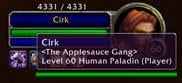
Mousetip is another show-the-tooltip-at-your-mouse-cursor type of addon (like TipBuddy, Tinytip, etc.) but written to have the features I particularly wanted from a tooltip addon:
- It is a minimally intrusive as possible, and is written to work with the 2.0 (and now 3.0) clients from the ground up.
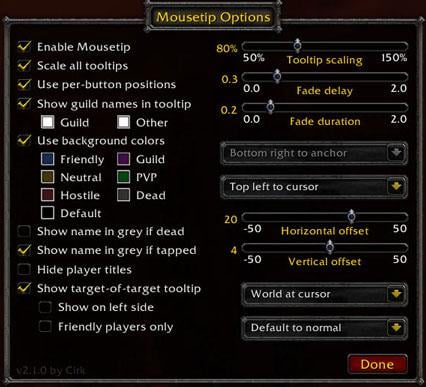
- It introduces the concept of per-button tooltip positions, so that as you move your cursor over certain frames or buttons, Mousetip will actually place the tooltip in a settable location for that button, rather than keeping it on the cursor all the time (which is annoying when it gets in the way of what you are actually trying to look at!).
- Allows you to set the position of the tooltip either at the mouse cursor, or at a user placed anchor point.
- Allows you to set an offset (horizontal and vertical) relative to the mouse
- Allows you to change the scaling of the default game tooltips (and optionally of other tooltips that Mousetip knows about).
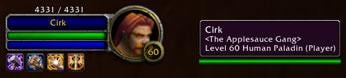
- Allows showing a player's guild name in the tooltip (underneath the player name), and selecting the color that the guild names are shown in. (Also allows you to disable the showing of the guild name entirely if you don't like that feature of the default client).
- Provides some simple tooltip coloring options for friendly, neutral, hostile, etc. targets. (I loved that feature in TipBuddy, so here it is again
 )
) - Allows setting the fade time for the tooltip.
- Provides a simple target-of-target secondary tooltip that shows the appropriate target's name.
- Allows you to show your standing (Neutral, Honored, etc.) with a faction next to their faction name
Per-button tooltip positions
For the per-button tooltip positioning, I've included only a few initial positions in Mousetip for the default WoW client's player, target, and party frames, and for the action buttons. However it is very easy to configure this for your own UI and tastes! For example, suppose you want to set Mousetip to show the tooltip to the right of your custom target frame. All you need to do for that is:
- Move the mouse cursor over the target frame.
- Do /mousetip set right.
Note that Mousetip will try and intelligently apply the per-button rules you give it, so that if you tell it (for example) that tooltips for the first party frame should be at the top-right of that frame, then Mousetip will apply that same position to all party frames (or at least all those that follow the usual naming rules).
Mousetip can also currently only set the tooltip position for a button or frame that would normally show the tooltip in the default bottom-right of your screen - it can't do anything about buttons or frames that set the tooltip location themselves (or that use their own custom tooltips).
Also, if you want to reset a particular button to use the cursor or use the default tooltip location (in the bottom right) just put the mouse over the button you want to change, and do /mousetip set cursor or /mousetip set default respectively. The default for frames that Mousetip doesn't know about is to use whatever you have set the default to in the options window (usually the normal bottom-right position of the default UI).
About the anchor point and alignment
Note that the anchor point and anchor alignment options will only be visible and changeable if either of the World tooltip position or the Default tooltip position are set to use the anchor. The anchor itself will also only be visible in this case, and only while the Mousetip options window is open.
The default location for the anchor is the bottom-right of your screen, near where the normal Blizzard default tooltip would appear. Look for a little red cross symbol.
Mousetip's slash commands
Mousetip supports the following slash commands:
/mousetip help shows this list of slash commands.
/mousetip shows and hides the Mousetip options window.
/mousetip on enables Mousetip.
/mousetip off disables Mousetip.
/mousetip set <position> sets where the tooltip will show for the frame or button that the mouse is currently hovering over.
/mousetip set as <frame> indicates that tooltips for the frame or button that the mouse is currently hovering over should instead appear as if they were tooltips for the named frame.
/mousetip set <frame> <position> sets where the tooltip will show for the named frame.
/mousetip set <frame1> as <frame2> indicates that tooltips for the named frame1 should instead appear as if they were tooltips for the named frame2.
/mousetip setparent indicates that tooltips for the frame or button that the mouse is currently hovering over should instead appear as if they were tooltips for the frame's parent.
/mousetip id tells you the name of the frame or button the mouse cursor is currently hovering over, and the name of its parent frame as well.
/mousetip id <frame> tells you the correctly capitalized name of the given frame, and the name of its parent frame as well.
/mousetip reset tooltip resets the world and default tooltip position, alignment, anchor, and scaling.
/mousetip reset colors resets the colors that Mousetip uses.
/mousetip reset anchors resets the per-button tooltip anchors that you have entered.
/mousetip reset all resets all of the tooltip, colors, and anchors.
/mousetip list lists all the buttons and frames that Mousetip has been told to keep per-button settings for.
/mousetip status shows the current status of Mousetip.
Enjoy!
-- Cirk
3.2.1
3.2.0
3.1.0
3.0.2
3.0.1
3.0.0
2.3.0
2.2.0
2.1.0
- Made code more robust to attempted use on tooltip enabled frames without names, such as Elkano's BuffBars (thanks Vilkku)
- Additional robustness changes for bad calling parameters and minor debug code cleanup
- Fixed minor bug in order of names reported when using /mousetip set <frame1> as <frame2> option
- Changed version string to 3.2.1.
3.2.0
- Fixed a minor bug in the confirmation message shown when setting a frame to use another frame as its anchor.
- Changed version string to 3.2.0.
3.1.0
- Fixed a bug where /mousetip id would error if the hovered-over frame had no name.
- Added an entry for Blizzard's interface options screen that shows a list of the slash commands, tidied up the help text, removed the normal addon "loaded" announcement in chat.
- Changed version string to 3.1.0.
3.0.2
- Greatly improved unit identification and handling - no more stuck tooltips!
- Show tapped status before dead status (i.e., for on corpses)
- Improved code efficiency for coloring unit names
- Fixed bug where mouseover target's target's health wasn't being updated
- Improved recognition of when the tooltip is no longer still valid
- Fixed unexpected fadeout problem
- Added a workaround for the problem of not recognizing frames that pretend to be the world frame but aren't (e.g., minimap zoom buttons)
- Changed version string to 3.0.2
- Reduced background color update delays to 0.2 second
- Removed checking for UPDATE_MOUSEOVER_UNIT (this is now implicit with unit updates).
3.0.1
- Fix issue that arises when logging in on a newly created character or after reinstalling WoW due to client messages arriving in unexpected order.
- Changed version string to v3.0.1.
3.0.0
- Added the option to show your characters standing next to each recognized faction in the tooltip.
- Added default location for the FocusFrame
- Added a scaling control suppression feature (needed by Targetz)
- Bug fix for some tooltip alignment cases that weren't being handled correctly
- Various changes for version 3.0 compatibility
- Changed version string to v3.0.0.
2.3.0
- Mousetip will save the itemref tooltip location on a per character basis to replace Blizzard's new mechanism for this (which is a bit broken).
- Added hooking of the ValidateFramePosition function so we can restore scaling while it calculates frame positions (since it doesn't do this itself)
- Save border color as well as background color when Mousetip changes those parameters for a tooltip.
- Added use of an anchorTime field to the tooltip to allow Mousetip to identify when a tooltip is shown long after it is anchored and compensate for the normal lack of fading in this case (e.g., corpses).
- Made Mousetip a little more robust to bad data passed to tooltip handlers from other addons.
- Provide a Mousetip.SetTooltipColorForUnit function to allow other addons to have their tooltip colors updated based on a specific unit the same way that Mousetip normally does itself (now used by Targetz for example).
- The /mousetip list command now shows all its entries in alphabetical order of the button names.
- Miscellaneous code cleanups and rearranging (all functions contained in the Mousetip global now).
2.2.0
- Modified logout code to only update settings if the player had actually logged in properly (fixes a bug in losing user settings)
- Avoid calling scaling code in other (known) addons when they haven't fully initialized yet.
2.1.0
- First release on Wowinterface.com
 |
Comment Options |
 05-24-11, 07:37 AM
|
|
|
A Kobold Labourer
Forum posts: 0
File comments: 25
Uploads: 0
|
Strange, I have been using Mousetip for as long as I can remember and it is working fine today in 4.1 - The addon has given me no Lua errors or drop in performance ... ever!
You must have some other addons clashing with it o: |

|

|
| catbeef |
| View Public Profile |
| Send a private message to catbeef |
| Find More Posts by catbeef |
| Add catbeef to Your Buddy List |
|
11-27-10, 11:22 AM
|
|
|
An Aku'mai Servant
 Forum posts: 32
File comments: 642
Uploads: 4
|
Fan Update
I have uploaded a fan update (pending approval) here: http://www.wowinterface.com/download...FanUpdate.html
This seems to have fixed the error that everyone is reporting (and made it compatible with Cata), but since I don't use this mod regularly, please inform me if there's anything else that is acting strangely or outright not working. I'm an amateur with a full-time job, part-time school, and a toddler, so be patient!
__________________
There is absolutely no evidence to support the theory that life is serious. |
|
|
|
| xtoq |
| View Public Profile |
| Send a private message to xtoq |
| Find More Posts by xtoq |
| Add xtoq to Your Buddy List |
|
11-15-10, 10:34 AM
|
|
|
A Kobold Labourer
Forum posts: 0
File comments: 1
Uploads: 0
|
 Update plz
best tooltip ever
really need update for 4.0.1 |
|
|
|
| wauhaus |
| View Public Profile |
| Send a private message to wauhaus |
| Find More Posts by wauhaus |
| Add wauhaus to Your Buddy List |
|
10-19-10, 02:01 AM
|
|
|
A Murloc Raider
Forum posts: 4
File comments: 121
Uploads: 0
|
There are more errors in 4.0.1 :|
I'd love to see Cirk come back and update his addons.. can't live without Mousetip and Lootcounter |
|
|
|
| Sintacks |
| View Public Profile |
| Send a private message to Sintacks |
| Find More Posts by Sintacks |
| Add Sintacks to Your Buddy List |
|
05-05-10, 05:08 PM
|
|
|
A Kobold Labourer
Forum posts: 0
File comments: 9
Uploads: 0
|
Hmm, not sure where to report this, but I'm getting an error everytime I log into my character. It doesn't really effect anything in-game, but I'll post it here anyways... (okay, so the pop-up is annoying xD)
Well, so, here's my little "bug report" - not that I know what it means, mind you... edit: oh, it looks like others have reported the same thing (just now read the post above this one... aha....) ----------------------------------------------- Date: 2010-05-05 16:04:26 ID: 1 Error occured in: Global Count: 1 Message: ..\AddOns\Mousetip\Mousetip.lua line 3202: attempt to call method 'SetMultilineIndent' (a nil value) Debug: [C]: SetMultilineIndent() Mousetip\Mousetip.lua:3202: RegisterOptions() Mousetip\Mousetip.lua:2230: OnLoad() [string "*:OnLoad"]:1: [string "*:OnLoad"]:1 AddOns: Swatter, v5.8.4723 (CreepyKangaroo) AddonLoader, v2.0 AucAdvanced, v5.8.4723 (CreepyKangaroo) AucStatHistogram, v5.8.4723 (CreepyKangaroo) AucStatiLevel, v5.8.4723 (CreepyKangaroo) AucStatStdDev, v5.8.4723 (CreepyKangaroo) AucUtilScanProgress, v5.8.4723.2530 AucUtilSimpleAuction, v5.8.4723.4546 Baggins, v417 BagginsLibFilter, v2009-03-27 BagginsProfessions, v2009-03-27 BagginsSectionColor, v0.1 Bartender4, v4.4.2 BasicChatMods, v3.51 BeanCounter, v5.7.4568 (KillerKoala) Bejeweled, v1.1b Bookworm, v Broker2FuBar, v1.0 BrokerEquipment, v30300.9-Release BrokerEverything, v0.0.18 BrokerRefills, vv1.4.5 ChocolateBar, vv2.0.1 Configator, v5.1.DEV.130 Cosplay, vv1.3 DrDamage, v1.7.8_release ElkBuffBars, v2.2.5-150 FireExit, v30300.08 flagRSP, v1.0.10 FluidFrames, v2.3 fontain, v gLib, v1.11 gMedia, v1.12 gMerchant, v1.051 GoGoMount, v0003030600 HandyNotes, v1.1.5 HandyNotesCharon, v0.8.1 HandyNotesCityGuide, v1.0.10 HandyNotesDirections, v1 HandyNotesFlightMasters, v1.0.3 HandyNotesMailboxes, v1 HandyNotesTrainers, v1.2.13 HandyNotesVendors, v1.2.4 Jobber, v30300.1 MBB, v MikScrollingBattleText, v5.4.78 Mousetip, v Portfolio, v1.21 SharedMedia, v3.0.1-177 Stubby, v5.8.4723 (CreepyKangaroo) BlizRuntimeLib_enUS v3.3.3.30300 <us> (ck=53c)
Last edited by RainbowSheltie : 05-05-10 at 05:10 PM.
|
|
|
|
| RainbowSheltie |
| View Public Profile |
| Send a private message to RainbowSheltie |
| Find More Posts by RainbowSheltie |
| Add RainbowSheltie to Your Buddy List |
|
02-20-10, 03:19 PM
|
||
|
A Kobold Labourer
Forum posts: 0
File comments: 51
Uploads: 0
|
|
|
|
|
|
| thetakerfan |
| View Public Profile |
| Send a private message to thetakerfan |
| Find More Posts by thetakerfan |
| Add thetakerfan to Your Buddy List |
|
12-08-09, 06:22 PM
|
|
|
A Kobold Labourer
Forum posts: 0
File comments: 77
Uploads: 0
|
Error with 3.3:
Message: ..\AddOns\Mousetip\Mousetip.lua line 3202: attempt to call method 'SetMultilineIndent' (a nil value) Debug: [C]: SetMultilineIndent() Mousetip\Mousetip.lua:3202: RegisterOptions() Mousetip\Mousetip.lua:2230: OnLoad() [string "*:OnLoad"]:1: [string "*:OnLoad"]:1 |
|
|
|
| Oxides |
| View Public Profile |
| Send a private message to Oxides |
| Find More Posts by Oxides |
| Add Oxides to Your Buddy List |
|
10-24-09, 04:42 AM
|
|
|
A Kobold Labourer
Forum posts: 1
File comments: 14
Uploads: 0
|
incompatibility between Mousetip and Dailies Quest Tracker
I'm not sure where the issue lies so I'm giving you both a heads up, but there is an incompatibility between Cirk's Mousetip and Dailies Quest Tracker.
When using Mousetip's scaling function it pretty much destroys DQT's tooltip, even if in Mousetip the scale all tooltips option is turned off. It looks like it tries to put the bottom of the tooltip above the top, making it completely unreadable. No other LDB addons I have seem to have any issues with it, though most aren't scaled by Mousetip either. Only DQT's tooltip has this weird behavior. |
|
|
|
| Yukashii |
| View Public Profile |
| Send a private message to Yukashii |
| Find More Posts by Yukashii |
| Add Yukashii to Your Buddy List |
|
08-17-09, 01:24 AM
|
||
|
An Aku'mai Servant
Forum posts: 35
File comments: 77
Uploads: 4
|
|
|
|
|
|
| Vilkku |
| View Public Profile |
| Send a private message to Vilkku |
| Visit Vilkku's homepage! |
| Find More Posts by Vilkku |
| Add Vilkku to Your Buddy List |
|
08-16-09, 06:27 PM
|
|
|
A Cobalt Mageweaver

Forum posts: 226
File comments: 97
Uploads: 11
|
Updated Mousetip to v3.2.1 - changes are mostly to deal with the sort of scenario that Vilkku was encountering: trying to use Mousetip with tooltip enabled frames that have no name (such as the buff frames in Elkano's BuffBars).
Vilkku, if you still want to move the location of the tooltip for BuffBars, there is an option in BuffBars itself to do this, and that might do the job for you. (Otherwise you'll need to poke Elkano to give names to those tooltip frames  ) )Cheers -- Cirk
__________________
Cirk's Addons |
|
|
|
| Cirk |
| View Public Profile |
| Send a private message to Cirk |
| Visit Cirk's homepage! |
| Find More Posts by Cirk |
| Add Cirk to Your Buddy List |
|
08-16-09, 07:21 AM
|
|
|
A Cobalt Mageweaver
Forum posts: 226
File comments: 97
Uploads: 11
|
Dang, sorry Vilkku, I completely forgot about this one!
Basically I -think- the problem here is that the BuffBar buttons aren't being created with a name, and so the code in Mousetip for parsing the button name (to determine the pattern matching rule) throws an error. I'll have a proper look at it tonight, see if I can figure out a work-around/solution for it, or at least modify it so it doesn't fall over with that error.
__________________
Cirk's Addons |
|
|
|
| Cirk |
| View Public Profile |
| Send a private message to Cirk |
| Visit Cirk's homepage! |
| Find More Posts by Cirk |
| Add Cirk to Your Buddy List |
|
08-16-09, 02:59 AM
|
||
|
An Aku'mai Servant
Forum posts: 35
File comments: 77
Uploads: 4
|
This has been sitting in the bug report thingie for some time now. Is there noting you can do to fix it or did you simply miss it?
|
|
|
|
|
| Vilkku |
| View Public Profile |
| Send a private message to Vilkku |
| Visit Vilkku's homepage! |
| Find More Posts by Vilkku |
| Add Vilkku to Your Buddy List |
|
08-15-09, 08:29 PM
|
|
|
A Cobalt Mageweaver
Forum posts: 226
File comments: 97
Uploads: 11
|
Updated for 3.2

__________________
Cirk's Addons |
|
|
|
| Cirk |
| View Public Profile |
| Send a private message to Cirk |
| Visit Cirk's homepage! |
| Find More Posts by Cirk |
| Add Cirk to Your Buddy List |
|
08-07-09, 04:56 PM
|
|
|
A Kobold Labourer
Forum posts: 0
File comments: 3
Uploads: 0
|
Addon not broken in 3.2, but still waiting for an update.
|
|
|
|
| Pnr |
| View Public Profile |
| Send a private message to Pnr |
| Visit Pnr's homepage! |
| Find More Posts by Pnr |
| Add Pnr to Your Buddy List |
|
04-21-09, 07:57 AM
|
|
|
A Cobalt Mageweaver
Forum posts: 226
File comments: 97
Uploads: 11
|
Mousetip 3.1.0
Updated Mousetip to 3.1.0. Only one minor bug fix (for the /mousetip id command), added an entry for Mousetip to the Blizzard interface addons page, updated the help text a bit, and removed the "loaded" announcement.
__________________
Cirk's Addons |
|
|
|
| Cirk |
| View Public Profile |
| Send a private message to Cirk |
| Visit Cirk's homepage! |
| Find More Posts by Cirk |
| Add Cirk to Your Buddy List |
|
