| Go to Page... |

| Compatibility: | Warlords of Draenor (6.0.3) Warlords of Draenor Pre-Patch (6.0.2) |
| Updated: | 01-03-15 03:06 PM |
| Created: | unknown |
| Downloads: | 163,220 |
| Favorites: | 329 |
| MD5: |
TBag-Shefki 

This is the long awaited update to TBag that fixes a number of bugs.
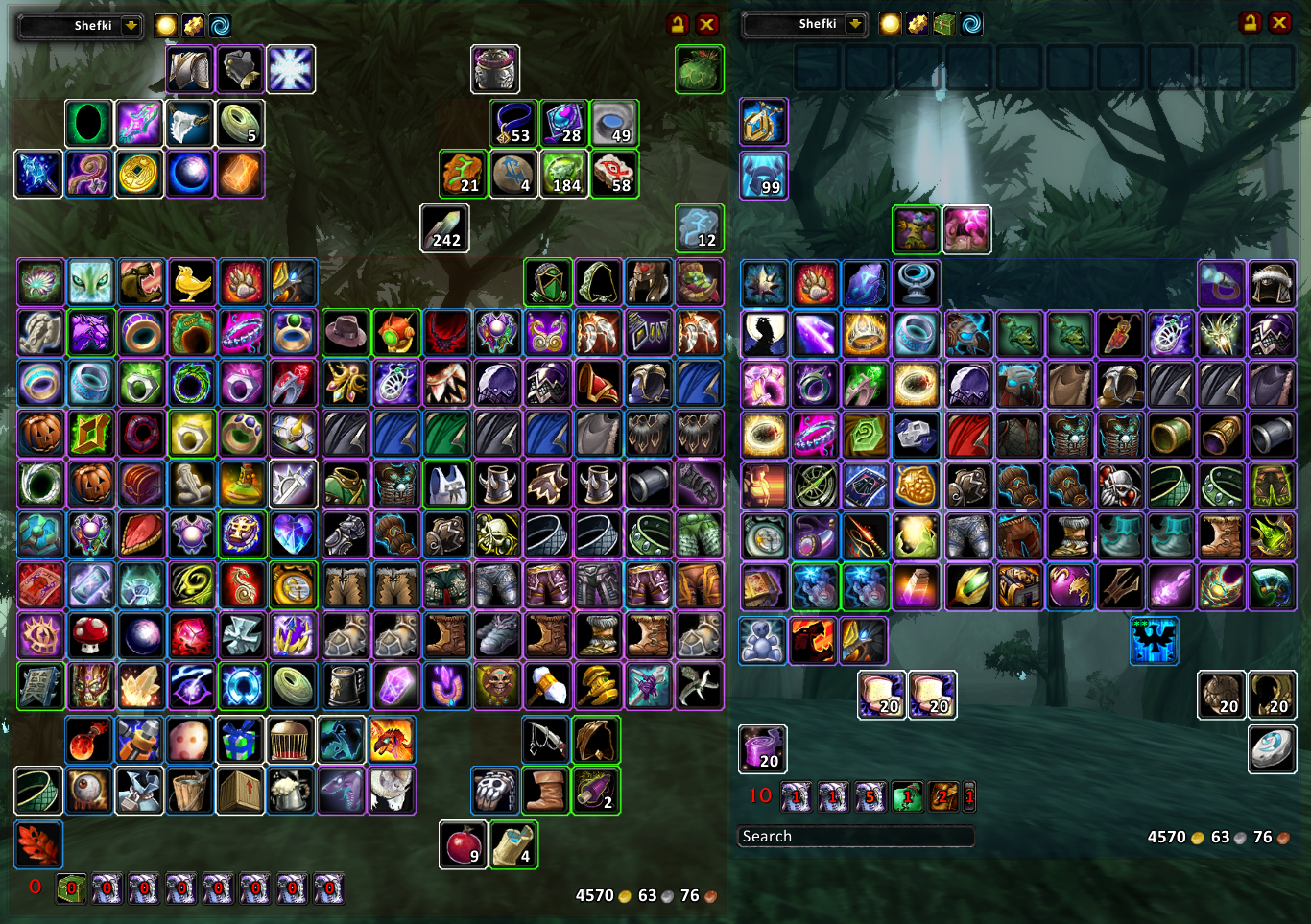
TBag is a WoW Addon that provides an alternative bag and bank interface. It was built by modifying Engbags an addon who has essnetially the same functionality is missing some of the features of TBag.
Talos the original author of Tbag his this to say about it when he released it:
"In addition to the auto-sorting you've come to know and love, I've added many new features, including searching for items (in mail, etc.) You can also see and use the original default UI bags, which have slots free overlaid on top of them. There are also many convenience features, like highlighting new items, colored spotlighting, and purchase bank bags without having to unload the addon. A visual edit mode allows you to rearrange categories to your taste, and an advanced customization window enables you to completely configure every aspect of TBag."
This is a modification of his 070123 release for WoW 2.0.3. The modifications were done by Shefki. See the Changelog file for details of the changes I made. The ToDo.txt file consists of ToDo items that were found in the original TBag release. Some of them are not terribly relevent to my my intentions, some I'm unclear on what he meant and others seem to have already been fixed. See my Todo List below.
Getting Started
TBag can only "see" something you've seen, so for every character:
1) Open your bags 2) Go to the bank 3) Check your mail 4) View your body 5) Open all your trade windows
This allows you to view the bag and bank contents of your characters at any time (sorted according to their trade skills) by clicking the name dropdown in the upper right. It also enables you to do a full item search from the search textbox just to the left of the name dropdown.
Note: This version contains a number of sorting changes the following
commands are advised after backing up any modified sorting rules you have.
/tinv resetsorts
/tbnk resetsorts
- Fix bag highlights.
- Fix tracked currencies being show for a character that has no currencies in
in some circumstances due to a Blizzard bug.
- Add Reagent Bank support (resorting the bank will move items into the
reagent bank if they can be placed there).
- Fix quality of items not showing correctly for items that have a chance to
roll at a higher quality.
- Remove class specific REAGENT and TOOLS categories
- Fix potions, foods and drinks not sorting into the correct categories, due
to Blizzard adding commas to the health/mana numbers.
- Properly categorize channeled mana options as MANA_RESTORE.
- Fix some old temporary weapon enchants not sorting into BUFF category.
- Items that when learned go into the toy box are not included in the TOYS
category. This means some items that were in COMBATPETS, COSTUMES and
FIREWORKS are in TOYS now.
- Fix categorization of Crimson Steer Energy drink due to bugged tooltip in
game.
- Fix sorting of engineering portal device and add the WoD one.
- Add Aviana's Feather to the MOUNT category.
- Include the fish specific baints for WoD in FISHING.
- Remove the ARGENT_DAWN category.
- Remove the CENARION_CIRCLE category.
- Remove the THORIUM_BROTHER category.
- Remove the ZUL_GURUB category.
- Remove the SHA'TAR category.
- Remove categorization rule for Coilfang Armaments.
- Remove categorization rule for Salt Shacker.
- Remove categorization rules for obsolete inks and parchments.
- Remove RELIC category.
- Update DARKMOON_CATEGORY for the new faire.
- Gray items that a vendor will pay for now display a gold icon in the upper
left corner when at a vendor.
- Remove all Soul Shard support.
- Remove a bunch of compataiblity with old versions of WoW.
- Remove all ammo, quivers and projectile supports including the various
categories.
- Put the reagents for talent/glyph changes in CLASS_REAGENT category.
- Add Moroes' Famous Polish to the TOYS category.
- Add the Day of the Dead costumes to the COSTUMES category.
- Add CRAFTINGREAGENT keyword which will match all items that have the
light blue "Crafting Reagent" text in the tooltip.
- Remove support for the keyring.
- Add Spirit of Shinri to the MOUNT category.
- Add a BLUEPRINTS category for Garrison Blueprints to go in.
- Add an ARCHAEOLOGY category.
- Remove the POISONS category.
- Add salvage bags/crates to the ACT_OPEN category.
- Add items that create equipmenet (e.g. items from Timeless Isle and
Garrison Missions) to the ACT_OPEN category.
- Add a number of pet items to MINIPET category.
- Move "Windfeather Plume" from BUFF to MOUNT category.
- Add a FOLLOWERS category.
* 20141014-r444-Shefki
- Bump TOC for 6.0
- Fix the blue hue over the buttons in 6.0
* 20130910-r439-Shefki
- Bump TOC for 5.4
- Fix the blue hue over the buttons in 5.4
* 20130521-r435-Shefki
- Bump TOC for 5.3
* 20120929-r432-Shefki
- Resolve problems with caged pets.
* 20120913-r429-Shefki
- Fix the problem with the Fishing spell causing errors in 5.0.5 for German
and Russian clients.
* 20120902-r426-Shefki
- Fix an error for Herbalists using German or Russian clients.
* 20120902-r423-Shefki
- Resolves an error when opening the Inscription frame.
* 20120830-r419-Shefki
- Resolve errors when opening tradeskill windows.
* 20120828-r416-Shefki
- Workaround a bug on Blizzard's side resulting in TBag tainting the GlyphUI in 5.x
- Add translation keys for MONK.
* 20120819-r412-Shefki
- 5.0 compatability. Ranged slot was removed from the game.
This release is backwards compatible with 4.x as well.
* 20110626-r405-Shefki
- 4.2 compatability. Keyring was removed from the game.
This release is backwards compatable with 4.1 as well.
* 20110626-r401-Shefki
- Fix the bug with toggling the inventory window with the default game
keybinds.
* 20110210-r398-Shefki
Note: This version contains a number of sorting changes the following
commands are advised after backing up any modified sorting rules you have.
/tinv resetsorts
/tbnk resetsorts
- Fix problem with tackle boxes.
- Support for reforged items. Must log into each character at least
once for the items of that character to have reforging info.
- Sorting fixes and updated item info for 4.0.6.
* 20101017-r385-Shefki
- Update TOC
- Fix an error that prevented adjusting order of sorts for Inventory window.
* 20101006-r381-Shefki
Note: This version contains a number of sorting changes the following
commands are advised after backing up any modified sorting rules you have.
/tinv resetsorts
/tbnk resetsorts
- More Cataclysm fixes.
- Add support for quest overlays added to default UI in 3.3.3.
- Remove an unnecessary and extra cooldown frame.
- Fix a bug in player level up detection.
- Sorting addition for the Gnomeregan Pride costume.
- Flag addon as Cataclysm compatabile.
* 20100905-r372-Shefki
- Changes to allow TBag to work without errors on Cataclysm beta.
- ruRU update.
* 20100304-r366-Shefki
Note: This version contains a number of sorting changes the following
commands are advised after backing up any modified sorting rules you have.
/tinv resetsorts
/tbnk resetsorts
- Workaround for a Blizzard bug that causes tbag windows to be
non-interactive for some people.
- Workaround for a Blizzard bug that causes some menu items to be
non-interactive for some people.
- Some tiny tweaks for 3.3.3 sorting.
- ruRU added as a translation (99% complete).
 |
Comment Options |
 03-14-19, 07:20 PM
|
|
|
A Murloc Raider
Forum posts: 4
File comments: 20
Uploads: 0
|
 T-bags not working! Patch 8.1.5, March 11 2019
Our T-Bags stopped working when Patch 8.1.5, went live March 11 2019
Won't open when clicking on any of the bag or when you are getting repaired. Had to uncheck in addons. Any help would be great! |

|

|
| Rhazzledazle |
| View Public Profile |
| Send a private message to Rhazzledazle |
| Find More Posts by Rhazzledazle |
| Add Rhazzledazle to Your Buddy List |
|
08-30-17, 02:57 AM
|
|
|
A Kobold Labourer
Forum posts: 0
File comments: 2
Uploads: 0
|
We need a 7.3 update please!
|
|
|
|
| daemon9 |
| View Public Profile |
| Send a private message to daemon9 |
| Find More Posts by daemon9 |
| Add daemon9 to Your Buddy List |
|
12-20-16, 12:19 PM
|
|
|
A Kobold Labourer
Forum posts: 0
File comments: 1
Uploads: 0
|
https://wow.curseforge.com/projects/...i/files/955677
the latest update, stay strong friends. And may your bags be forever organized. |
|
|
|
| gurrensama |
| View Public Profile |
| Send a private message to gurrensama |
| Find More Posts by gurrensama |
| Add gurrensama to Your Buddy List |
|
08-18-16, 02:41 PM
|
|
|
A Chromatic Dragonspawn
Forum posts: 155
File comments: 120
Uploads: 0
|
missing items
I posted over on curse but have gotten no reply so far, wondering if i will get one here.
ok i have a slight problem where things like the blackfang claws are not showing in my bag but ARE showing in the bank. This is due to the characters bag not having "misc" and "unknown" set to any of the categories by default that i can see. HOW do i assign a category by hand as hitting edit mode and then right clicking a category doesnt give me a list like it does in the bank bag!
__________________
When the light in your heart shines, The rest of the world will pale in comparison  
|
|
|
|
| Mechrior |
| View Public Profile |
| Send a private message to Mechrior |
| Find More Posts by Mechrior |
| Add Mechrior to Your Buddy List |
|
07-28-16, 06:34 PM
|
||
|
A Kobold Labourer
Forum posts: 0
File comments: 1
Uploads: 0
|
Last edited by Tap_Root : 07-28-16 at 06:44 PM.
|
|
|
|
|
| Tap_Root |
| View Public Profile |
| Send a private message to Tap_Root |
| Find More Posts by Tap_Root |
| Add Tap_Root to Your Buddy List |
|
07-24-16, 10:59 AM
|
|
|
A Kobold Labourer
Forum posts: 0
File comments: 3
Uploads: 0
|
as much as i hate to say it: you will have to use the alpha version from curseforge for now (r513 or higher preferred) i will make a release version in a few days but *then* i still need to figure out how to get upload permissions here...

Last edited by Dessa : 07-24-16 at 03:39 PM.
|
|
|
|
| Dessa |
| View Public Profile |
| Send a private message to Dessa |
| Find More Posts by Dessa |
| Add Dessa to Your Buddy List |
|
07-20-16, 04:17 PM
|
||
|
A Murloc Raider
Forum posts: 5
File comments: 1
Uploads: 0
|
need and would love an update on the only sane functional bag addon
I fully agree with Mechrior, since the other bag addon that this is based from isn't up kept anymore this is just the same better, I cannot feel the same with other addons that are close, or do other things. this addon allows me to have one window for all my bags, but seperates them nicely for me so I don't have to shuffle for hours finding what I need, and wows bag option to set a bag to equipment, consumables, and whatnot is too limited, and you still have to look and separate per bag. so please update. you have a lot of people who download and show support, and show your love of the addon. |
|
|
|
|
| nexusguard |
| View Public Profile |
| Send a private message to nexusguard |
| Find More Posts by nexusguard |
| Add nexusguard to Your Buddy List |
|
07-20-16, 01:45 PM
|
|
|
A Chromatic Dragonspawn
Forum posts: 155
File comments: 120
Uploads: 0
|
please dont say this addon is dead, its the only decent autosort onebag addon i have ever found that does EXACTLY what i wanted, it was working before the pre-patch now it s dead!

__________________
When the light in your heart shines, The rest of the world will pale in comparison
|
|
|
|
| Mechrior |
| View Public Profile |
| Send a private message to Mechrior |
| Find More Posts by Mechrior |
| Add Mechrior to Your Buddy List |
|
02-03-15, 10:12 AM
|
|
|
A Kobold Labourer
Forum posts: 0
File comments: 1
Uploads: 0
|
Disable auto-sort?
Is there a way to disable auto-sort when bags are opened or closed, or a vendor is accessed? I've looked in advanced configuration but can't seem to find an option that will do this. I love the sorting, I just would like the option to have it only sort when I click Reload and Sort.
It would just make it easier when using the salvage yard, for example, to not have gear shuffling itself in with other gear I actually want to keep before I can sell it off. Even if I don't close my bags, clicking on the vendor guy right there initiates the auto-sort and then I've got to hunt for that item which might be mixed in with items from earlier salvage boxes that I actually want to keep. |
|
|
|
| Jacko411 |
| View Public Profile |
| Send a private message to Jacko411 |
| Find More Posts by Jacko411 |
| Add Jacko411 to Your Buddy List |
|
01-03-15, 03:08 PM
|
|
|
An Aku'mai Servant
 Forum posts: 31
File comments: 175
Uploads: 10
|
TBag in WoD
A new release version has been posted. It includes Reagent Bank support.
Significant work has been done on the categorization rules. If you want to get access to this work you need to reset your sort configuration. You can do this by doing /tinv resetsorts and /tbnk resetsorts. If you have any custom rules or have reassigned items to different categories manually these will be wiped out so you may want to save the rules and re-enter them. This will not wipe out assignments of categories to bars. By default the Reagent Bank is not shown, click on the bag icon for it to show it on demand. You can change this default under the Advanced Configuration. There are two ways to deposit items in the Reagent Bank at current, use the Deposit All Reagents button at the top of the bank window (or the menu item) or drop an item on the Reagent Bank bag icon. If you have room in your bank you can also just deposit them and then hit resort. Buying the reagent bank and bags has changed, you just click on the unavailable bag slot to get a prompt to buy the reagent bank//bag slot. I have more work to do but wanted to get this in everyones hands since it should alleviate the worst pain of trying to use TBag in WoD. Enjoy and Happy New Year! |
|
|
|
| Shefki |
| View Public Profile |
| Send a private message to Shefki |
| Find More Posts by Shefki |
| Add Shefki to Your Buddy List |
|
01-03-15, 03:07 PM
|
||
|
An Aku'mai Servant
Forum posts: 31
File comments: 175
Uploads: 10
|
Re: Reagent tab?
|
|
|
|
|
| Shefki |
| View Public Profile |
| Send a private message to Shefki |
| Find More Posts by Shefki |
| Add Shefki to Your Buddy List |
|
01-03-15, 03:06 PM
|
||
|
An Aku'mai Servant
Forum posts: 31
File comments: 175
Uploads: 10
|
|
|
|
|
|
| Shefki |
| View Public Profile |
| Send a private message to Shefki |
| Find More Posts by Shefki |
| Add Shefki to Your Buddy List |
|
11-15-14, 11:15 AM
|
|
|
A Kobold Labourer
Forum posts: 0
File comments: 7
Uploads: 0
|
THere is some "automatic" way to import all the category in other languages?
 If i set the game from english in italian, all object are in the unknow category |
|
|
|
| seaquake |
| View Public Profile |
| Send a private message to seaquake |
| Find More Posts by seaquake |
| Add seaquake to Your Buddy List |
|
11-12-14, 05:35 PM
|
|
|
A Kobold Labourer
Forum posts: 0
File comments: 1
Uploads: 0
|
Reagent tab?
Am I missing something, or does Tbag not support the new reagent tab? I can't seem to either access or purchase reagent tabs with the addon enabled.
I love this bag addon to death, I feel like I can hardly play the game without it any more, thanks so much for continuing to update! |
|
|
|
| MouetteSherdidan |
| View Public Profile |
| Send a private message to MouetteSherdidan |
| Find More Posts by MouetteSherdidan |
| Add MouetteSherdidan to Your Buddy List |
|
08-18-14, 11:02 AM
|
|
|
A Kobold Labourer
Forum posts: 1
File comments: 6
Uploads: 0
|
Bank padding error
I changed the padding to its lowest setting for the bank inventory and the following error resulted. Unfortunately, this totally prevents the bank from opening at all. I'm going to have to dig into the bank bag lua and fix it manually. No bank inventory, no ability to edit inside WoW. Wince.
Date: 2014-08-18 09:58:57 ID: 1 Error occured in: Global Count: 1 Message: ..\AddOns\TBag\TBag.lua line 3140: attempt to index local 'tmpframe' (a nil value) Debug: TBag\TBag.lua:3140: LayoutWindow() TBag\TBnk.lua:213: init() TBag\Events.lua:7: ?() TBag\Events.lua:148: TBag\Events.lua:145 Locals: self = TBag { 0 = <userdata> CreateItm = <function> defined @Interface\AddOns\TBag\TBag.lua:2350 PAD_BOTTOM_SPACER = 5 MakeSlider = <function> defined @Interface\AddOns\TBag\TBagOpt.lua:117 IsStacking = <function> defined @Interface\AddOns\TBag\TBag.lua:3260 UpdateItmCache = <function> defined @Interface\AddOns\TBag\TBag.lua:2364 COLORS = "colors" AssignItemSearchUpper = <function> defined @Interface\AddOns\TBag\TBagOpt.lua:150 I_BAGTYPE = "bt" SplitContainerItem = <function> defined @Interface\AddOns\TBag\TBag.lua:3442 PutItemInBag = <function> defined @Interface\AddOns\TBag\TBag.lua:608 PLAYERID = "Moema|Earthen Ring" RefreshReagents = <function> defined @Interface\AddOns\TBag\TBagItemInfo.lua:16 I_QUEST_ITEM = "qi" UpdateButtonHighlights = <function> defined @Interface\AddOns\TBag\TBag.lua:2037 I_CAT = "c" GetCatBar = <function> defined @Interface\AddOns\TBag\TBag.lua:1440 MakeToolTipStr = <function> defined @Interface\AddOns\TBag\TBag.lua:2228 V_NEWPLUS = "newP" I_WATCH = "wa" EnableLine = <function> defined @Interface\AddOns\TBag\TBagOpt.lua:290 LOCALES = <table> { } C_CAT = "ffcc55ee" MakeCheck = <function> defined @Interface\AddOns\TBag\TBagOpt.lua:86 SetInventoryItem = <function> defined @Interface\AddOns\TBag\TBag.lua:2185 SetCatBar = <function> defined @Interface\AddOns\TBag\TBag.lua:1427 ResetBarColors = <function> defined @Interface\AddOns\TBag\TBag.lua:2011 N_FONT_MAX = 20 COOLDOWN_SCALE = 0.8 BuildBarClassList = <function> defined @Interface\AddOns\TBag\TBag.lua:1474 I_RARITY = "ir" BagButton = <table> { } SetCfgUpdate = <function> defined @Interface\AddOns\TBag\TBagOpt.lua:72 CreateFrame = <function> defined @Interface\AddOns\TBag\TBag.lua:483 I_SUBTYPE = "is" MakeHeader = <function> defined @Interface\AddOns\TBag\TBagOpt.lua:78 G_BAR_HIDE = "bar_hide" SORTBY_MAX = 2 AssignButtonsToFrame = <function> defined @Interface\AddOns\TBag\TBag.lua:2976 BAG_UPDATE_COOLDOWN = <function> defined @Interface\AddOns\TBag\Events.lua:58 GetMoney = <function> defined @Interface\AddOns\TBag\TBag.lua:1859 Print = <function> defined @Interface\AddOns\TBag\TBag.lua:313 MakeColorMenu = <function> defined @Interface\AddOns\TBag\TBag.lua:2092 I_CHARGES = "ch" S_RARITY = "R_" Init = <function> defined @Interface\AddOns\TBag\TBag.lua:218 CONTAINERS = "containers" I_ITEMLINK = "il" GetItemInfo = <function> defined @Interface\AddOns\TBag\TBag.lua:512 Inv = <table> { } DBC = <table> { } JustifyStr = <function> defined @Interface\AddOns\TBag\TBag.lua:707 SORTBY_MIN = 0 PrintCachedCharacters = <function> defined @Interface\AddOns\TBag\TBag.lua:1372 S_BANKSLOTS = "bankS" cata_400 = true SplitStr = <function> defined @Interface\AddOns\TBag\TBag.lua:425 GetBagPosName = <function> defined @Interface\AddOns\TBag\TBag.lua:1519 MakeHyperlink = <function> defined @Interface\AddOns\TBag\TBag.lua:1729 MainFrame = <table> { } PlacePrep = <function> defined @Interface\AddOns\TBag\TBag.lua:643 SORTBY_NONE = 0 I_BAG = "b" MakeColorPickerInfo = <function> defined @Interface\AddOns\TBag\TBag.lua:1990 SetBarFromClass = <function> defined @Interface\AddOns\TBag\TBag.lua:2652 GetInvSlotID = <function> defined @Interface\AddOns\TBag\TBag.lua:2141 COMP_ITEM = "i" ColorFont = <function> defined @Interface\AddOns\TBag\TBag.lua:1964 I_QUEST_ACTIVE = "qa" InitPlayerInfo = <function> defined @Interface\AddOns\TBag\TBag.lua:368 SetStackSkip = <function> defined @Interface\AddOns\TBag\TBag.lua:3411 COMP_EMPTY = "e" ResetNew = <function> defined @Interface\AddOns\TBag\TBag.lua:505 ClearSearch = <function> defined @Interface\AddOns\TBag\TBag.lua:791 I_BAGSIZE = "bz" I_REFORGE = "rf" NUMCOL_MAX = 20 ColorArr = <function> defined @Interface\AddOns\TBag\TBag.lua:1911 STACKSKIP = <table> { } InsertItemInCompArr = <function> defined @Interface\AddOns\TBag\TBag.lua:2309 CreateCfgOpt = <function> defined @Interface\AddOns\TBag\TBagOpt.lua:200 SplitColor = <function> defined @Interface\AddOns\TBag\TBag.lua:1920 FORCED_SHOW = <table> { } PAD_BOTTOM_EDIT = 30 I_ICON = "io" SetPlayerB AddOns: Swatter, v5.20.5464 (RidiculousRockrat) Cursor, v5.4.8.4 NPCScan, v5.4.8.3 NPCScanOverlay, v5.4.8.3 AckisRecipeList, v3.0.5 AckisRecipeListQuickScan, v5.4.0.-1.0.8 Armory, vv11.2.0 ArmoryGuildBank, vv11.2.0 ArmoryQuickLink, v2.22a AskMrRobot, v1.2.16.0 AucAdvanced, v5.20.5464 (RidiculousRockrat) AucFilterBasic, v5.20.5464 (RidiculousRockrat) AucFilterOutlier, v5.20.5464.5459(5.20/embedded) AucMatchUndercut, v5.20.5464.5364(5.20/embedded) AucStatHistogram, v5.20.5464 (RidiculousRockrat) AucStatiLevel, v5.20.5464 (RidiculousRockrat) AucStatPurchased, v5.20.5464 (RidiculousRockrat) AucStatSales, v5.20.5464.5376(5.20/embedded) AucStatSimple, v5.20.5464 (RidiculousRockrat) AucStatStdDev, v5.20.5464 (RidiculousRockrat) AucStatWOWEcon, v5.20.5464.5323(5.20/embedded) AucUtilAHWindowControl, v5.20.5464.5347(5.20/embedded) AucUtilAppraiser, v5.20.5464.5462(5.20/embedded) AucUtilAskPrice, v5.20.5464.5447(5.20/embedded) AucUtilAutoMagic, v5.20.5464.5443(5.20/embedded) AucUtilCompactUI, v5.20.5464.5444(5.20/embedded) AucUtilEasyBuyout, v5.20.5464.5458(5.20/embedded) AucUtilFixAH, v5.20.5464 (RidiculousRockrat) AucUtilItemSuggest, v5.20.5464.5417(5.20/embedded) AucUtilPriceLevel, v5.20.5464.5458(5.20/embedded) AucUtilScanButton, v5.20.5464.5403(5.20/embedded) AucUtilScanFinish, v5.20.5464.5347(5.20/embedded) AucUtilScanProgress, v5.20.5464.4979(5.20/embedded) AucUtilScanStart, v5.20.5464.5347(5.20/embedded) AucUtilSearchUI, v5.20.5464.5452(5.20/embedded) AucUtilSimpleAuction, v5.20.5464.5452(5.20/embedded) AucUtilVendMarkup, v5.20.5464.4828(5.20/embedded) Auctionator, v3.1.5 AuctionatorMiniFeatures, v5.1v3release Babylonian, v5.1.DEV.332(/embedded) Bartender4, v4.5.13.2 Bartender4Powershifter, v1.0.0 BeanCounter, v5.20.5464 (RidiculousRockrat) BittensSpellFlashKeyBindings, v50400.1.1 BittensSpellFlashLibrary, v50400.4.2 BittensUtils, v50400.1.1 CompactRaid, v3.83 Configator, v5.1.DEV.359(/embedded) DBMCore, v DBMDefaultSkin, v DBMStatusBarTimers, v DebugLib, v5.1.DEV.337(/embedded) Enchantrix, v5.20.5464 (RidiculousRockrat) EnchantrixBarker, v5.20.5464 (RidiculousRockrat) GatherMate2, v1.27 GearingGuide, v1.3.43 Geary, v5.4.21-release GTFO, v4.32 HandyNotes, v1.2.0 HandyNotesTimelessIsleRareElites, v2.31 HandyNotesTimelessIsleChests, v1.10 HandynotesTimelessTreasures, v1.0-beta HideInCombat, v0.0.5 IceHUD, v1.8.18.1 (Revision: 961) ItemID, v1.10.1 LibExtraTip, v5.12.DEV.363(/embedded) LostTreasures, v3.06 MacroBank, v1.11 MageDPS, v1.4.0 MikScrollingBattleText, v5.7.131 MogIt, v3.3.2 MoveAnything, v14.0.4 MySales, v1.3.0 OmniCC, v5.4.3 Postal, v3.5.1 RangeDisplay, vv4.2.4 RareCoordinator, v RecipeKnown, v0.28 Recount, v RemoveRaidFrameManager, v1.0.0 SexyMap, v2.4.15 SlideBar, v5.20.5464 (RidiculousRockrat) SpellFlash, v6.10 SpellFlashCore, v2.0.4 stAddonManager, v1.2.5 Stubby, v5.20.5464 (RidiculousRockrat) TBag, v TellMeWhen, v7.0.2 TidyPlates, v6.13.4 TidyPlatesGraphite, v TidyPlatesGrey, v TidyPlatesNeon, v TidyPlatesQuatre, v TidyPlatesThreatPlates, v6.008 TidyPlatesHub, v TidyPlatesWidgets, v TiffysJunkSeller, v1.0.3 TimelessAnswers, vv1.2.2 TipHelper, v5.12.DEV.351(/embedded) Titan, v5.2.3.50400 TitanBag, v5.2.3.50400 TitanClock, v5.2.3.50400 TitanCurrency, v5.9 TitanGold, v5.2.3.50400 TitanLocation, v5.2.3.50400 TitanLootType, v5.2.3.50400 TitanPerformance, v5.2.3.50400 TitanRepair, v5.2.3.50400 TitanValorPoints, v4.0.001 TitanVolume, v5.2.3.50400 TitanXP, v5.2.3.50400 TomTom, vv50400-1.0.0 WIM, v3.6.18 ZygorGuidesViewer, v4.0 BlizRuntimeLib_enUS v5.4.8.50400 <us> (ck=ea9) |
|
|
|
| Siofral |
| View Public Profile |
| Send a private message to Siofral |
| Find More Posts by Siofral |
| Add Siofral to Your Buddy List |
|
