Addon Information
Works with 3.3
Download Latest Version.
To add favorites please register for a free account. If you already have one you need to login. How do I install this? (FAQ)
Author:
Version:
1.2.5
Date:
09-21-2009 01:15 AM
Size:
219.25 Kb
Downloads:
129,547
Favorites:
859
MD5:
Pictures
Click to enlarge
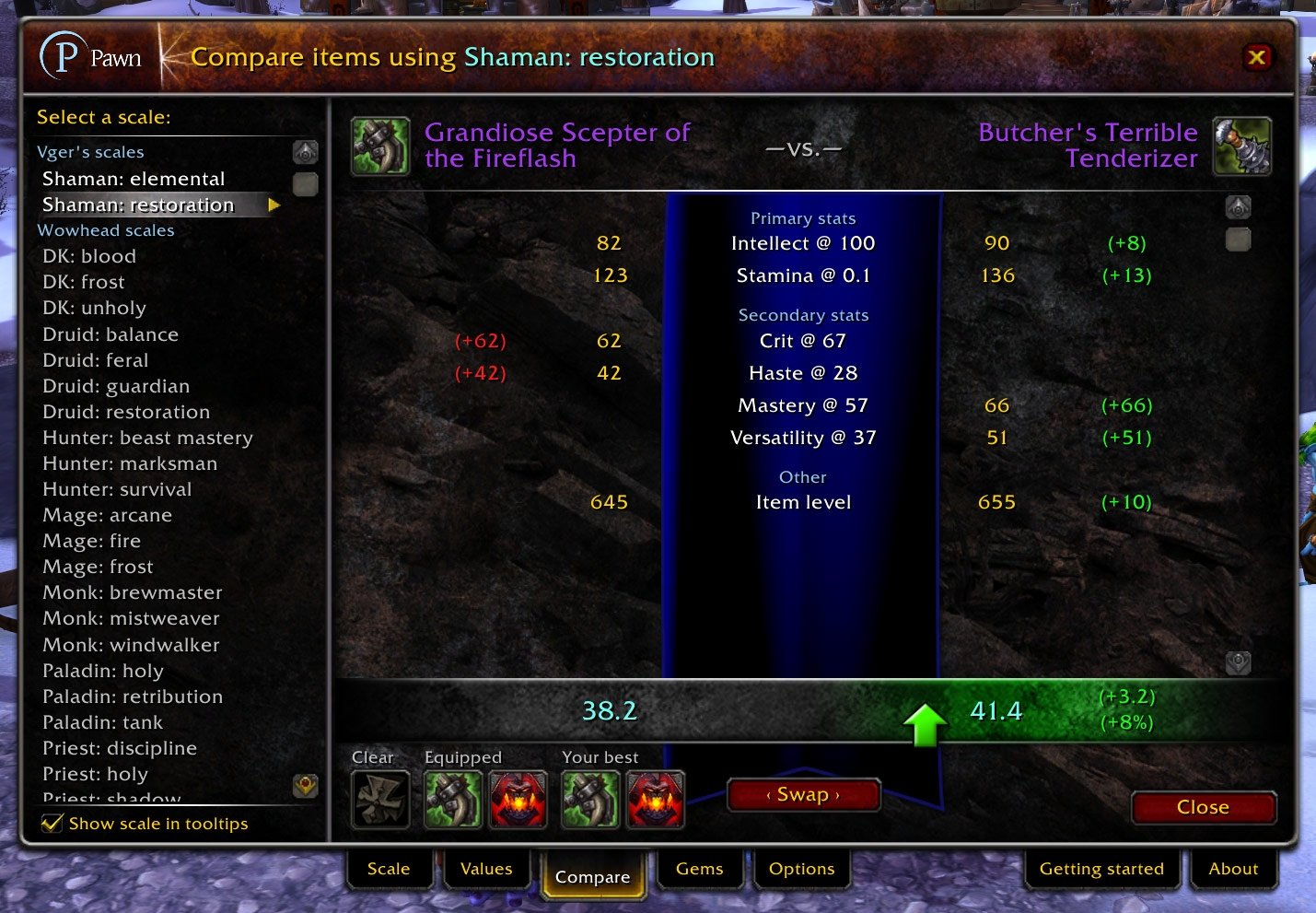
Pawn Compare tab
Click to enlarge
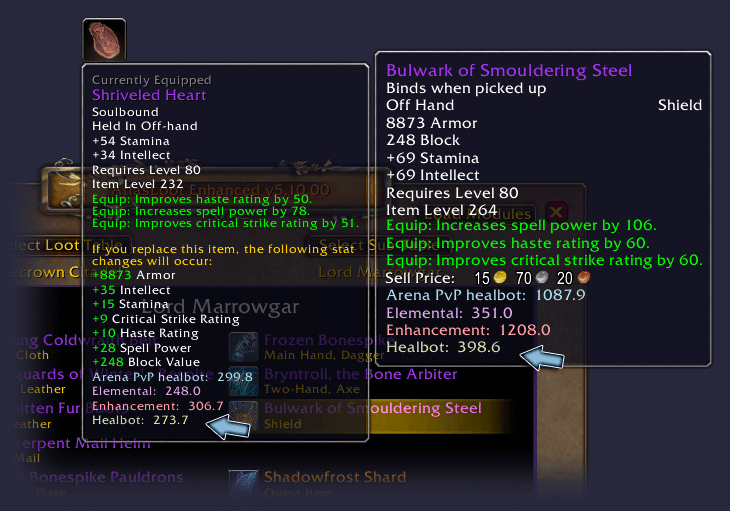
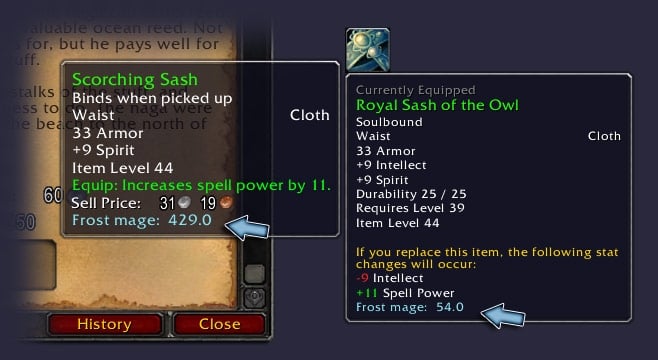
Pawn tooltips
Click to enlarge
Pawn Scales tab
Click to enlarge
Pawn Options tab
Click to enlarge
Pawn in the Auction House
Pawn   Popular! (More than 5000 hits)
Pawn assesses the value of items for you to make it easy to decide which items are better than others. It's similar in purpose to mods such as Tank Points, but completely customizable, and applicable to any class and situation. You can use it to help create multiple gear sets, or decide whether to take that weapon with higher DPS or the one with more crit rating, or decide between a necklace with MP5 and one with bonus healing.

Pawn is a mod for hardcore World of Warcraft players—you may not like it if you're not the sort of person who agonizes over stats and itemization. You can use premade Pawn "scale tags" that other people make and post on forums to set up Pawn for your spec without any extra effort. And, if you're the kind of person who goes through Wowhead and Lootzor looking for exactly the items you want for your gear sets, builds Excel spreadsheets, installs TheoryCraft, reads Elitist Jerks... well, Pawn might just be right up your alley.

See the Pawn readme file included with the mod for more information on getting the most out of Pawn.

This version of Pawn is for English only. Community translations for other languages are available, but are not always up-to-date.

Pawn plugins for FuBar and Titan Panel are available on Curse.

For fastest assistance with Pawn, check the official thread at IncGamers, Curse, or comment here.
  Change Log - Pawn
Version 1.2.5

* What used to be called the enchanted value of an item is now the current value, and what used to be called the unenchanted value is now the base value. The word "base" now also appears on tooltips. (No functionality has changed; this is just a terminology change.)
* Fixed the error that occurred when hovering over Brewfest steins.

Version 1.2.4

* Fixed an error that occurred when hovering over profession recipes.

Version 1.2.3

* You can now select what quality of gems to use for each of your scales on the Gems tab: uncommon, rare, or epic. Each scale can have a different quality level, so your main spec scale can use epic gems, and your offspec scale can use rare gems.
* By popular request, enchanted values of items now no longer include any points for sockets on the item, since the enchanted value is meant to reflect the current state of the item. This means that before you put gems in an item, the enchanted value of an item will be lower than the unenchanted value.
* Fixed a bug where occasionally items that weren't enchanted would show two equal values, such as "123.4 (123.4)". (This was only a display issue; the values were being calculated properly.)

Version 1.2.2

* Pawn will now calculate correct socket values if you have the "normalize values (like Wowhead)" option enabled.

Version 1.2.1

* Fixed the "attempt to perform arithmetic on field '?' (a nil value)" error that some users were experiencing in Pawn 1.2.

Version 1.2

* Note: Upon installation, this version of Pawn will automatically make adjustments to each of your scales' socket values. To avoid this, you can turn off the option for each scale to always correctly match gem colors.
* By default, Pawn will automatically choose the best rare-quality level 80 gem of each color and use the value of that gem when calculating item values. Most people will no longer ever need to manually set values for red, yellow, or blue sockets.
* There's now a new Gems tab in the Pawn UI. This tab shows you the best rare-quality level 80 gems that are available for any of your scales. Never again will you wonder which gems to have cut for that new boss drop.
o The Gems tab also displays suggested meta gems, but take these with a grain of salt; Pawn ignores the special effects on the gem.
o The Gems tab only considers rare-quality level 80 gems. I'll add support for epic gems very soon in an upcoming Pawn update.
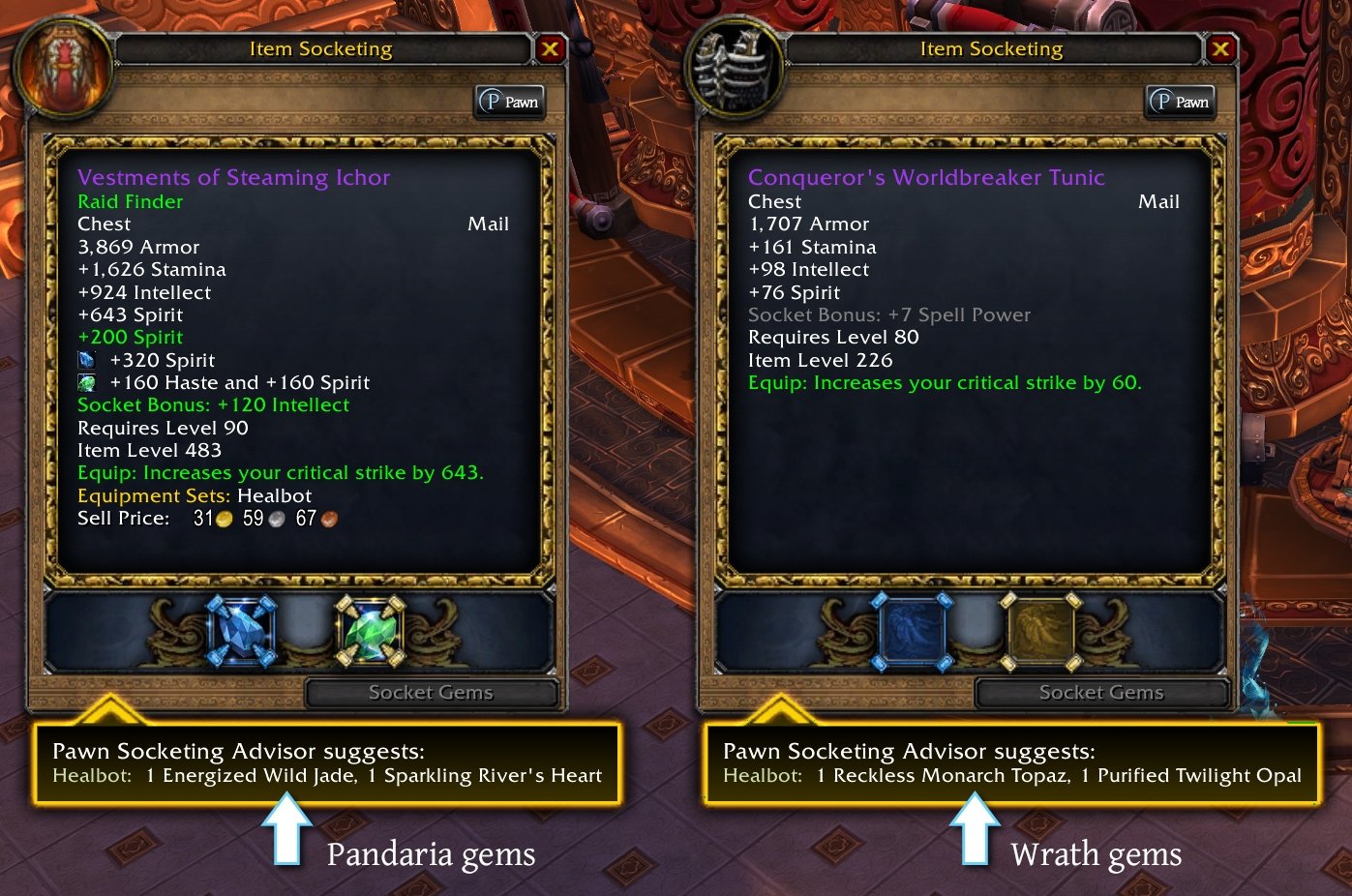
* Pawn will now add a tooltip to the item socketing window displaying the suggested gems to use when socketing that item for each of your scales. In addition, the window now has a Pawn button that takes you directly to the Gems tab for more details.
* Meta sockets are now covered by two values instead of one: the old "Meta socket" value is now "Meta: stats" and covers the normal stat bonuses from meta gems. The new value is "Meta: effect" and covers the bonus effects from meta gems. Helms with an empty meta socket will get the values from both added to their totals. Helms with a filled meta socket will get the values of Meta: effect and the actual stats on the gem added to their totals. This reflects the fact that stat-for-stat, helms with meta sockets are clearly better than helms without them because of the added effects that meta gems bring.
* Adjusted the value of MP5 in the default scale to correspond with current itemization.
* Removed the Pawn feature to show item levels, as it is now built into the game.
* Fixed the "Could not parse the item link" error that appeared when clicking the links that items such as the Titanium Seal of Dalaran and Worn Troll Dice add to chat.
* Corrected the display of socket bonuses on weapons in the Compare tab.
* (English) Enchant Boots: Greater Vitality now works again.
  Archived Versions - Pawn
File Name
Version
Size
Author
Date
1.2.4
219kB
VgerAN
08-23-2009 11:55 PM
  Comments - Pawn
Post A Reply Comment Options
Old 01-03-2010, 06:05 PM  
Niightblade
A Deviate Faerie Dragon
Interface Author - Click to view interfaces

Forum posts: 15
File comments: 31
Uploads: 1
Quote:
Originally posted by VgerAN
Figured out right after I posted that's probably what you meant. Probably not, but thanks for the suggestion.
Seriously? Why not a simple yes/no dialog?

Last edited by Niightblade : 01-04-2010 at 10:40 AM.
Niightblade is offline Report comment to moderator   Edit/Delete Message Reply With Quote
Old 01-03-2010, 03:56 PM  
VgerAN
An Aku'mai Servant
 
VgerAN's Avatar
Interface Author - Click to view interfaces

Forum posts: 32
File comments: 105
Uploads: 7
Figured out right after I posted that's probably what you meant. Probably not, but thanks for the suggestion.
VgerAN is offline Report comment to moderator   Edit/Delete Message Reply With Quote
Old 01-03-2010, 06:45 AM  
Niightblade
A Deviate Faerie Dragon
Interface Author - Click to view interfaces

Forum posts: 15
File comments: 31
Uploads: 1
Quote:
Originally posted by VgerAN
Confirmation dialog?
Yeah the "type DELETE here" dialogue.
Niightblade is offline Report comment to moderator   Edit/Delete Message Reply With Quote
Old 01-03-2010, 06:30 AM  
VgerAN
An Aku'mai Servant
 
VgerAN's Avatar
Interface Author - Click to view interfaces

Forum posts: 32
File comments: 105
Uploads: 7
Confirmation dialog?
VgerAN is offline Report comment to moderator   Edit/Delete Message Reply With Quote
Old 01-01-2010, 02:22 AM  
Niightblade
A Deviate Faerie Dragon
Interface Author - Click to view interfaces

Forum posts: 15
File comments: 31
Uploads: 1
Feature request: Option to ignore enchants only.

(Atm you can only request Pawn to ignore both enchants + gems.)


Edit: Oh, and wtb option to remove that silly confirmation dialog :P

Last edited by Niightblade : 01-01-2010 at 02:27 AM.
Niightblade is offline Report comment to moderator   Edit/Delete Message Reply With Quote
Old 12-23-2009, 12:45 PM  
VgerAN
An Aku'mai Servant
 
VgerAN's Avatar
Interface Author - Click to view interfaces

Forum posts: 32
File comments: 105
Uploads: 7
Personally, I cut hit down to about half when I hit cap, but my shaman and DK can stand to be a little above cap so additional hit isn't wasted, and on my feral druid I don't even worry about making the cap. So, my experience may be a little skewed.
VgerAN is offline Report comment to moderator   Edit/Delete Message Reply With Quote
Old 12-22-2009, 02:05 PM  
bentalbot
A Kobold Labourer

Forum posts: 0
File comments: 4
Uploads: 0
Quote:
Originally posted by VgerAN
Right now, it doesn't—or rather, it handles them like every other stat. To maximize your character, you're expected to change your values to reflect how much a stat means to you over time, and that includes reducing the value of hit and expertise once you get to the caps. Pawn doesn't do that automatically for you. (It's something that I'd like to improve upon someday in the future, though.)
Is there any preferred method for decreasing the value of hit so that you stay at hit-cap? Is it better to scale the value down some, or completely remove hit from priority once above the cap and just monitor it manually?
bentalbot is offline Report comment to moderator   Edit/Delete Message Reply With Quote
Old 12-09-2009, 07:14 PM  
VgerAN
An Aku'mai Servant
 
VgerAN's Avatar
Interface Author - Click to view interfaces

Forum posts: 32
File comments: 105
Uploads: 7
Right now, it doesn't—or rather, it handles them like every other stat. To maximize your character, you're expected to change your values to reflect how much a stat means to you over time, and that includes reducing the value of hit and expertise once you get to the caps. Pawn doesn't do that automatically for you. (It's something that I'd like to improve upon someday in the future, though.)
VgerAN is offline Report comment to moderator   Edit/Delete Message Reply With Quote
Old 12-08-2009, 02:20 PM  
tardmrr
Lua Ninja
Featured Addon Author

Forum posts: 117
File comments: 124
Uploads: 15
How does Pawn handle stats with caps like hit and expertise?
tardmrr is offline Report comment to moderator   Edit/Delete Message Reply With Quote
Old 11-21-2009, 03:25 PM  
VgerAN
An Aku'mai Servant
 
VgerAN's Avatar
Interface Author - Click to view interfaces

Forum posts: 32
File comments: 105
Uploads: 7
Re: Green, blue, purple

The color of the text of the item shouldn't matter; the only thing that Pawn uses it for is to calculate an average gear level when hovering over the Pawn button on your or someone else's character sheet.

In general, a blue level 200 item is not going to be as good as a purple 200 item. There aren't any 200 greens, but if there were, they wouldn't be as good as 200 blues. But while the item level is a good guide, it's not the only thing that matters. Pawn lets you customize stat values so that the item that's better for you has the higher score, regardless of its item level. When set up the way you like, the values that Pawn puts on your item tooltips should be more useful than the raw item level.
VgerAN is offline Report comment to moderator   Edit/Delete Message Reply With Quote
Old 11-21-2009, 05:50 AM  
Ninani
A Kobold Labourer
 
Ninani's Avatar

Forum posts: 0
File comments: 1
Uploads: 0
Green, blue, purple

Does Pawn take into account green, blue and purple items? I'd like to compare blue items with purples, blue with greens and so on. If the item lvl of the blue item is the same as the green item, which one of them is the best?

I'm a lvl 73 balance druid who go for int, spir and spell power (and some stam).
__________________
/ Nia
Ninani is offline Report comment to moderator   Edit/Delete Message Reply With Quote
Old 11-16-2009, 04:12 PM  
VgerAN
An Aku'mai Servant
 
VgerAN's Avatar
Interface Author - Click to view interfaces

Forum posts: 32
File comments: 105
Uploads: 7
Yes, compare your items' base values. They're perfect for gear comparison.

The only time I recommend you do anything else is if you just won an item and you're wondering "should I equip it now or should I wait until it's enchanted and gemmed?" In that case, compare the current values of your two items, and if the new item's current value is still better, make the upgrade right on the spot and gem and enchant it later. (The really "special" enchantments like DK weapon runes and Lifestealing and the like don't get any Pawn points, so of course take that exception with a grain of salt. Luckily, you don't have to worry about that stuff when comparing base values.)
VgerAN is offline Report comment to moderator   Edit/Delete Message Reply With Quote
Old 11-15-2009, 05:50 PM  
Codex
A Murloc Raider
Interface Author - Click to view interfaces

Forum posts: 9
File comments: 166
Uploads: 16
So when comparing gear, should I be comparing the base values then?
Codex is offline Report comment to moderator   Edit/Delete Message Reply With Quote
Old 11-12-2009, 03:20 PM  
VgerAN
An Aku'mai Servant
 
VgerAN's Avatar
Interface Author - Click to view interfaces

Forum posts: 32
File comments: 105
Uploads: 7
Quote:
Originally posted by Codex
I have been having a super weird error where occasionally the base worth of an item is MORE than its enchanted worth, and I have no idea why
This is by design. The base value assumes that the item is socketed with the gems that will maximize the item's value, and gets points accordingly. The current/enchanted value for the item gets 0 points for its empty sockets. So, armor with empty sockets will have a higher base value than current value. If you socket inferior gems (such as green-quality gems when your scale is based on epic gems), even when gemmed, the current value is less than the base value.
VgerAN is offline Report comment to moderator   Edit/Delete Message Reply With Quote
Old 11-12-2009, 02:31 PM  
Codex
A Murloc Raider
Interface Author - Click to view interfaces

Forum posts: 9
File comments: 166
Uploads: 16
Re: Re: Re: Re: Re: Ignoring socket color and bonus

I have been having a super weird error where occasionally the base worth of an item is MORE than its enchanted worth, and I have no idea why
Codex is offline Report comment to moderator   Edit/Delete Message Reply With Quote
Post A Reply


Category Jump:


The Network:
EQInterface | EQ2Interface | LoTROInterface | MMOInterface | War.MMOUI | WoWInterface | VGInterface | Allakhazam | Thottbot | Wowhead | Zam


©2009 MMOUI / ZAM Network
vBulletin - Copyright ©2000 - 2010, Jelsoft Enterprises Ltd.



