Category: Developer Utilities
Addon Information
Works with 3.2
Download Latest Version.
To add favorites please register for a free account. If you already have one you need to login. How do I install this? (FAQ)
Cladhaire's Portal Bug Reports Feature Requests
Author:
Version:
r32
Date:
09-07-2009 05:27 AM
Size:
168.86 Kb
Downloads:
17,796
Favorites:
264
MD5:
Pictures
Click to enlarge
WowLua   Popular! (More than 5000 hits)
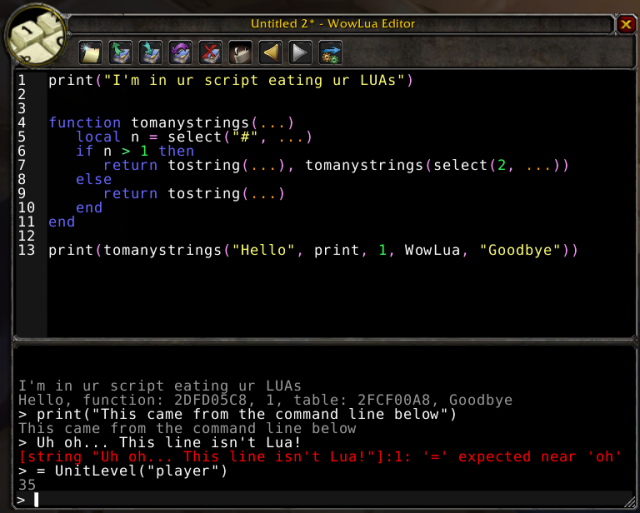
WowLua is an in-game Lua scripting environment that includes an interactive Lua interpreter as well as a multi-page script editor. Other features include:

* Syntax coloring, courtesy of krka's spectacular For All Indents and Purposes library
* Sleek buttons, courtesy of Mikk
* When WowLua is running code, it defines a global function print() which directs output to the WowLua window, for convenience. This global is removed when not running from WowLua
* Can open WowLua using /wowlua or /lua. Both of these slash commands will take a lua expression and run it, if provided:

/lua print(14) will open WowLua and print the number 14 to the output window.

Please feel free to post any comments or questions here, you'll find I'm relatively responsible. This addon has been written primarily as a companion tool for World of Warcraft Programming: A Guide and Reference for Creating WoW Addons.
  Change Log - WowLua
------------------------------------------------------------------------
r32 | Cladhaire-15704 | 2009-09-07 10:26:38 +0100 (Mon, 07 Sep 2009) | 1 line

Clicking on the output frame sets the focus to to the commandline edit box, courtesy of Sarog
------------------------------------------------------------------------
r31 | Cladhaire-15704 | 2009-08-05 10:23:50 +0100 (Wed, 05 Aug 2009) | 1 line

Interface version update

------------------------------------------------------------------------
r30 | Cladhaire-15704 | 2009-06-02 20:44:40 +0100 (Tue, 02 Jun 2009) | 3 lines

* Updated interface number
* Fixed an issue with slash commands when not using AddonLoader

------------------------------------------------------------------------
r29 | Cladhaire-15704 | 2008-11-24 09:28:45 +0000 (Mon, 24 Nov 2008) | 2 lines

Added the keybindings file, and the redo icon

------------------------------------------------------------------------
r28 | Cladhaire-15704 | 2008-11-23 18:49:29 +0000 (Sun, 23 Nov 2008) | 3 lines

* Added a primative undo/redo system for WowLua that should make the editor a bit more functional.
Please play with this feature before deciding to rely on it.

------------------------------------------------------------------------
r27 | Cladhaire-15704 | 2008-11-11 16:56:43 +0000 (Tue, 11 Nov 2008) | 2 lines

Added keybindings to RUN, SAVE, and SHOW/HIDE the window

------------------------------------------------------------------------
r26 | Cladhaire-15704 | 2008-11-11 16:46:01 +0000 (Tue, 11 Nov 2008) | 3 lines

* Fixed a mis-spelling in the .toc file that lead to AddonLoader support not working
* Fixed an issue where loading the addon via AddOnLoader would cause the main edit box to be too small

------------------------------------------------------------------------
r25 | Cladhaire-15704 | 2008-11-10 11:50:05 +0000 (Mon, 10 Nov 2008) | 2 lines

Updated .toc version and added AddonLoader support for /wowlua and /lua

------------------------------------------------------------------------
r24 | Cladhaire-15704 | 2008-10-17 09:06:18 +0100 (Fri, 17 Oct 2008) | 2 lines

* Removed wrath compatability checks

------------------------------------------------------------------------
r23 | Cladhaire-15704 | 2008-08-10 19:38:57 +0100 (Sun, 10 Aug 2008) | 2 lines

Added code to check whether we're running on a wrath client or not

------------------------------------------------------------------------
r22 | Cladhaire-15704 | 2008-08-10 17:51:27 +0100 (Sun, 10 Aug 2008) | 2 lines

Fixing a call into UIPanelTemplates

------------------------------------------------------------------------
r21 | Cogwheel-17646 | 2008-05-09 15:14:31 -0700 (Fri, 09 May 2008) | 1 line

Fixed delete on an unsaved page
------------------------------------------------------------------------
r20 | Cladhaire-15704 | 2008-05-08 23:56:28 -0700 (Thu, 08 May 2008) | 2 lines

Added history back into the interpreter line

------------------------------------------------------------------------
r19 | Cladhaire-15704 | 2008-05-01 15:20:33 -0700 (Thu, 01 May 2008) | 2 lines

Revert the change that requires untitled pages to be renamed

------------------------------------------------------------------------
r18 | Cladhaire-15704 | 2008-04-30 05:15:32 -0700 (Wed, 30 Apr 2008) | 2 lines

Added dirname property so zips are generated correctly

------------------------------------------------------------------------
r17 | Cogwheel-17646 | 2008-04-29 20:16:23 -0700 (Tue, 29 Apr 2008) | 2 lines

Close button now shows unsaved dialog
No longer auto-saves on run (should we add an auto save check box?)
------------------------------------------------------------------------
r16 | Cogwheel-17646 | 2008-04-29 19:23:59 -0700 (Tue, 29 Apr 2008) | 1 line

... Finished reorganizing imagages ><
------------------------------------------------------------------------
r15 | Cogwheel-17646 | 2008-04-29 19:19:11 -0700 (Tue, 29 Apr 2008) | 1 line

Reorganized images
------------------------------------------------------------------------
r14 | Cogwheel-17646 | 2008-04-29 15:58:35 -0700 (Tue, 29 Apr 2008) | 1 line

Added localization support
------------------------------------------------------------------------
r13 | Cogwheel-17646 | 2008-04-29 15:23:41 -0700 (Tue, 29 Apr 2008) | 4 lines

Delete button works again
Added basic Open functionality (sorry cladhaire... selecting names from a dropdown is still > typing from memory)
Saving a new script asks for a name
Creating a new page shows the unsaved page dialog
------------------------------------------------------------------------
r12 | Cogwheel-17646 | 2008-04-29 13:29:23 -0700 (Tue, 29 Apr 2008) | 4 lines

Run button works
Line numbers are no longer editable
Lock/unlock buttons work
Lock button now shows the lock icon based on the current state (tooltip reflects this)
------------------------------------------------------------------------
r11 | Cladhaire-15704 | 2008-04-29 06:07:26 -0700 (Tue, 29 Apr 2008) | 7 lines

Massive changes

* New button implemented
* Undo button implemented
* Prev/Next buttons implemented, including warnings
* Save (and rename) implemented

------------------------------------------------------------------------
r10 | Cladhaire-15704 | 2008-04-29 02:33:15 -0700 (Tue, 29 Apr 2008) | 2 lines

Change the resizing so the code pane will grow instead of the interpreter output

------------------------------------------------------------------------
r9 | Cogwheel-17646 | 2008-04-29 00:05:54 -0700 (Tue, 29 Apr 2008) | 3 lines

Refactored click handler
Delete button creates a new page if you delete the only remaining one
Window title displays name of current page
------------------------------------------------------------------------
r8 | Cogwheel-17646 | 2008-04-28 18:21:25 -0700 (Mon, 28 Apr 2008) | 1 line

Next button correctly removes desaturation from the Previous button
------------------------------------------------------------------------
r7 | Cladhaire-15704 | 2008-04-28 15:41:23 -0700 (Mon, 28 Apr 2008) | 2 lines

Remove debug messages

------------------------------------------------------------------------
r6 | Cladhaire-15704 | 2008-04-28 15:40:22 -0700 (Mon, 28 Apr 2008) | 2 lines

Ensure that lines are highlighted when they contain an error

------------------------------------------------------------------------
r5 | Cladhaire-15704 | 2008-04-28 15:34:10 -0700 (Mon, 28 Apr 2008) | 2 lines

Fixed issues with line numbering

------------------------------------------------------------------------
r4 | Cladhaire-15704 | 2008-04-28 13:46:52 -0700 (Mon, 28 Apr 2008) | 2 lines

Adding resize texture

------------------------------------------------------------------------
r3 | Cladhaire-15704 | 2008-04-28 13:32:10 -0700 (Mon, 28 Apr 2008) | 2 lines

Added the topleft texture

------------------------------------------------------------------------
r2 | Cladhaire-15704 | 2008-04-28 13:23:20 -0700 (Mon, 28 Apr 2008) | 2 lines

Initial import

------------------------------------------------------------------------
r1 | Cladhaire-15704 | 2008-04-28 13:21:43 -0700 (Mon, 28 Apr 2008) | 2 lines

Initial directory setup

------------------------------------------------------------------------
  Beta Files - WowLua
File Name
Version
Hits
Size
Author
Date
r8
252
161kB
Cogwheel
04-29-2008 11:25 PM
  Archived Versions - WowLua
File Name
Version
Size
Author
Date
r31
169kB
Cladhaire
08-05-2009 10:35 AM
r30
169kB
Cladhaire
06-02-2009 03:45 PM
r29
169kB
Cladhaire
11-24-2008 04:30 AM
  Comments - WowLua
Post A Reply Comment Options
Old 10-21-2009, 02:03 PM  
DNBRMG
A Kobold Labourer

Forum posts: 0
File comments: 5
Uploads: 0
Re: Re: Output to the Windows Clipboard

Quote:
Originally posted by Cladhaire
I could possibly add a button that turns the messages in the output window into a box that could be selected, but I can't say its high on my list of priorities.

You can write an incredibly simple addon that then saves the information out to the SavedVariable file, so you can parse and do anything you want with it offline. Is there a reason that doesn't work for you?
Thanks for the quick reply. I figured that there had to be a reason why the text in the output window was not selectable. It would be a nice feature for a future release whenever you can fit it in.

As much as I hate to admit it my programing/scripting skills have gone a little soft, okay alot soft. The Lua script I was given essentially parses the information in an existing saved variables file for the Possessions addon. So I suppose it would not be too hard to write my own addon that collects just the information I am really interested in, each item's name, then saves that off to a saved variables file. Time to dust of the cobwebs and break out the WD-40 to get the old gears moving again.

Thanks again.
DNBRMG is offline Report comment to moderator   Edit/Delete Message Reply With Quote
Old 10-21-2009, 01:36 PM  
Cladhaire
Salad!
 
Cladhaire's Avatar
WoWInterface Super Moderator
Interface Author - Click to view interfaces

Forum posts: 1472
File comments: 3153
Uploads: 15
Re: Output to the Windows Clipboard

Quote:
Originally posted by DNBRMG
Is there a way to copy the contents of the output frame to the windows clipboard?

I was given a lua script to help me generate a list of bag and bank items by item name so that I can do some offline research as to whether or not I need to continue to keep the item or can safely destroy it to free up dwindling inventory space. A link to the official WoW forum post is included below for any one interested in the actual script itself. I know you can't write the information directly to a file due to the sandbox restrictions of WoW. I also know that WoW can interact with the windows clipboard as I have used the windows copy/paste functions to paste text form a web page into a macro and vice versa. So I though that if there was a way to copy the WoWLua output to the windows clipboard buffer I could use it to extract the data in game otherwise I would need an offline Lua interpreter as has been suggested the thread copied below.

http://forums.worldofwarcraft.com/th...66019453&sid=1
I could possibly add a button that turns the messages in the output window into a box that could be selected, but I can't say its high on my list of priorities.

You can write an incredibly simple addon that then saves the information out to the SavedVariable file, so you can parse and do anything you want with it offline. Is there a reason that doesn't work for you?
__________________
"There's only one thing that I know how to do well and I've often been told that you only can do what you know how to do well, and that's be you-- be what you're like-- be like yourself. And so I'm having a wonderful time, but I'd rather be whistling in the dark..."

http://cladhaire.wowinterface.com
Cladhaire is offline Report comment to moderator   Edit/Delete Message Reply With Quote
Old 10-21-2009, 01:21 PM  
DNBRMG
A Kobold Labourer

Forum posts: 0
File comments: 5
Uploads: 0
Output to the Windows Clipboard

Is there a way to copy the contents of the output frame to the windows clipboard?

I was given a lua script to help me generate a list of bag and bank items by item name so that I can do some offline research as to whether or not I need to continue to keep the item or can safely destroy it to free up dwindling inventory space. A link to the official WoW forum post is included below for any one interested in the actual script itself. I know you can't write the information directly to a file due to the sandbox restrictions of WoW. I also know that WoW can interact with the windows clipboard as I have used the windows copy/paste functions to paste text form a web page into a macro and vice versa. So I though that if there was a way to copy the WoWLua output to the windows clipboard buffer I could use it to extract the data in game otherwise I would need an offline Lua interpreter as has been suggested the thread copied below.

http://forums.worldofwarcraft.com/th...66019453&sid=1
DNBRMG is offline Report comment to moderator   Edit/Delete Message Reply With Quote
Old 10-15-2009, 05:29 AM  
Trebot
A Kobold Labourer

Forum posts: 0
File comments: 2
Uploads: 0
Re: Re: WowLua install

Quote:
Originally posted by Cladhaire
Did you ensure the file was unzipped properly? There should be a font file included in the addon (ends in .TTF) and if that's not there, you might get an error like this.
That was it. Don't know how but first download didn't have font or image folder. Must have been corrupted or incomplete or ??? working fine now. Appreciate quick response.
Trebot is offline Report comment to moderator   Edit/Delete Message Reply With Quote
Old 10-15-2009, 04:23 AM  
Cladhaire
Salad!
 
Cladhaire's Avatar
WoWInterface Super Moderator
Interface Author - Click to view interfaces

Forum posts: 1472
File comments: 3153
Uploads: 15
Re: WowLua install

Quote:
Originally posted by Trebot
Just installed WowLua. In game when I type /lua, I get this error message:

Message: Interface\AddOns\WowLua\WowLua.lua:843: WowLuaFrameEditBoxLineTest:SetText(): Font not set
Time: 10/14/09 18:31:17
Count: 1
Stack: [string "Interface\FrameXML\BasicControls.xml:<Scrip..."]:18: in function <[string "Interface\FrameXML\BasicControls.xml:<Scrip..."]:4>
(tail call): ?
[C]: ?
[C]: in function `SetText'
Interface\AddOns\WowLua\WowLua.lua:843: in function `UpdateLineNums'
[string "*:OnCursorChanged"]:4: in function <[string "*:OnCursorChanged"]:1>

Locals:

The wowlua window opens, but all buttons are green textures. Any help appreciated thx.
Did you ensure the file was unzipped properly? There should be a font file included in the addon (ends in .TTF) and if that's not there, you might get an error like this.
__________________
"There's only one thing that I know how to do well and I've often been told that you only can do what you know how to do well, and that's be you-- be what you're like-- be like yourself. And so I'm having a wonderful time, but I'd rather be whistling in the dark..."

http://cladhaire.wowinterface.com
Cladhaire is offline Report comment to moderator   Edit/Delete Message Reply With Quote
Old 10-14-2009, 09:34 PM  
Trebot
A Kobold Labourer

Forum posts: 0
File comments: 2
Uploads: 0
Question WowLua install

Just installed WowLua. In game when I type /lua, I get this error message:

Message: Interface\AddOns\WowLua\WowLua.lua:843: WowLuaFrameEditBoxLineTest:SetText(): Font not set
Time: 10/14/09 18:31:17
Count: 1
Stack: [string "Interface\FrameXML\BasicControls.xml:<Scrip..."]:18: in function <[string "Interface\FrameXML\BasicControls.xml:<Scrip..."]:4>
(tail call): ?
[C]: ?
[C]: in function `SetText'
Interface\AddOns\WowLua\WowLua.lua:843: in function `UpdateLineNums'
[string "*:OnCursorChanged"]:4: in function <[string "*:OnCursorChanged"]:1>

Locals:

The wowlua window opens, but all buttons are green textures. Any help appreciated thx.
Trebot is offline Report comment to moderator   Edit/Delete Message Reply With Quote
Old 09-30-2009, 10:54 AM  
Cladhaire
Salad!
 
Cladhaire's Avatar
WoWInterface Super Moderator
Interface Author - Click to view interfaces

Forum posts: 1472
File comments: 3153
Uploads: 15
Re: Re: Re: Trouble with Spell names in non English locales

Quote:
Originally posted by AnrDaemon
I think it's not an issue with WowLua, rather - with WoW itself.
WoW UI is not unicode-friendly
While printing in chat is done in unicode, writing unicode messages is not possible... this is the issue with spell names when you are to enter them in Lua editor window. They plainly not work. The only possibility is to use spell ID's, but i'm not sure about notation.
You can most certainly include input, it just must be encoded in UTF-8 (or am I missing something). You should always be using spell ids rather than spell names (however) if you want your addon to work on more than one locale. Doing that is trivial.

I'm not not quite sure what you'd like me to fix (or how I can help you).
__________________
"There's only one thing that I know how to do well and I've often been told that you only can do what you know how to do well, and that's be you-- be what you're like-- be like yourself. And so I'm having a wonderful time, but I'd rather be whistling in the dark..."

http://cladhaire.wowinterface.com
Cladhaire is offline Report comment to moderator   Edit/Delete Message Reply With Quote
Old 09-30-2009, 10:42 AM  
AnrDaemon
A Cyclonian
Interface Author - Click to view interfaces

Forum posts: 41
File comments: 1003
Uploads: 1
Re: Re: Trouble with Spell names in non English locales

Quote:
Originally posted by Cladhaire
I'm not terribly sure why this is an issue with WowLua. What are you actually trying to do?
I think it's not an issue with WowLua, rather - with WoW itself.
WoW UI is not unicode-friendly
While printing in chat is done in unicode, writing unicode messages is not possible... this is the issue with spell names when you are to enter them in Lua editor window. They plainly not work. The only possibility is to use spell ID's, but i'm not sure about notation.
AnrDaemon is offline Report comment to moderator   Edit/Delete Message Reply With Quote
Old 09-29-2009, 04:33 AM  
Cladhaire
Salad!
 
Cladhaire's Avatar
WoWInterface Super Moderator
Interface Author - Click to view interfaces

Forum posts: 1472
File comments: 3153
Uploads: 15
Re: Trouble with Spell names in non English locales

Quote:
Originally posted by ZillahGiovanni
I'm have ruRU client and can't use english spell names, but localised names not work 8(
I'm not terribly sure why this is an issue with WowLua. What are you actually trying to do?
__________________
"There's only one thing that I know how to do well and I've often been told that you only can do what you know how to do well, and that's be you-- be what you're like-- be like yourself. And so I'm having a wonderful time, but I'd rather be whistling in the dark..."

http://cladhaire.wowinterface.com
Cladhaire is offline Report comment to moderator   Edit/Delete Message Reply With Quote
Old 09-29-2009, 12:30 AM  
ZillahGiovanni
A Kobold Labourer

Forum posts: 0
File comments: 3
Uploads: 0
Trouble with Spell names in non English locales

I'm have ruRU client and can't use english spell names, but localised names not work 8(

Last edited by ZillahGiovanni : 09-29-2009 at 01:42 AM.
ZillahGiovanni is offline Report comment to moderator   Edit/Delete Message Reply With Quote
Old 09-17-2009, 03:37 PM  
Nandini
A Deviate Faerie Dragon

Forum posts: 0
File comments: 12
Uploads: 0
Quote:
Originally posted by Cladhaire
It actually _used_ to, but Blizzard changed one of their templates that stopped it from working. I haven't had a chance to figure it out yet =/.
That makes perfect sense, I hadn't used WowLua for a while, but I didn't remember seeing this curious behavior before. It's a fairly minor inconvenience, especially since I can undo things easily.

Thanks again for such a great tool!
Nandini is offline Report comment to moderator   Edit/Delete Message Reply With Quote
Old 09-17-2009, 03:16 PM  
Cladhaire
Salad!
 
Cladhaire's Avatar
WoWInterface Super Moderator
Interface Author - Click to view interfaces

Forum posts: 1472
File comments: 3153
Uploads: 15
It actually _used_ to, but Blizzard changed one of their templates that stopped it from working. I haven't had a chance to figure it out yet =/.
__________________
"There's only one thing that I know how to do well and I've often been told that you only can do what you know how to do well, and that's be you-- be what you're like-- be like yourself. And so I'm having a wonderful time, but I'd rather be whistling in the dark..."

http://cladhaire.wowinterface.com
Cladhaire is offline Report comment to moderator   Edit/Delete Message Reply With Quote
Old 09-17-2009, 03:05 PM  
Nandini
A Deviate Faerie Dragon

Forum posts: 0
File comments: 12
Uploads: 0
If I'm at the end of the visible space in the editor window and continue typing on new lines, it would be helpful if the editor scrolled down to those new lines. (I often find myself typing off the bottom of the screen.)

Basically, any time the editor pane has focus and a key is pressed, it would be good to scroll to the caret.
Nandini is offline Report comment to moderator   Edit/Delete Message Reply With Quote
Old 09-13-2009, 08:15 PM  
Sarog
A Kobold Labourer
 
Sarog's Avatar

Forum posts: 0
File comments: 5
Uploads: 0
Mousewheel scrolling

I have a request. Can you make the editor window scroll just a few lines at a time on mousewheel scrolling or tell me how I can make it do that? If I have a lot of code in the window and I make the window big, when I mousewheel it moves about 20 lines at a time. I can't seem to figure out how this is handled. Thanks.
Sarog is offline Report comment to moderator   Edit/Delete Message Reply With Quote
Old 09-07-2009, 12:41 PM  
Cladhaire
Salad!
 
Cladhaire's Avatar
WoWInterface Super Moderator
Interface Author - Click to view interfaces

Forum posts: 1472
File comments: 3153
Uploads: 15
No, it's a text editor and Lua interpreter for writing code.
__________________
"There's only one thing that I know how to do well and I've often been told that you only can do what you know how to do well, and that's be you-- be what you're like-- be like yourself. And so I'm having a wonderful time, but I'd rather be whistling in the dark..."

http://cladhaire.wowinterface.com
Cladhaire is offline Report comment to moderator   Edit/Delete Message Reply With Quote
Post A Reply


Category Jump:


The Network:
EQInterface | EQ2Interface | LoTROInterface | MMOInterface | War.MMOUI | WoWInterface | VGInterface | Allakhazam | Thottbot | Wowhead | Zam


©2009 MMOUI / ZAM Network
vBulletin - Copyright ©2000 - 2009, Jelsoft Enterprises Ltd.




