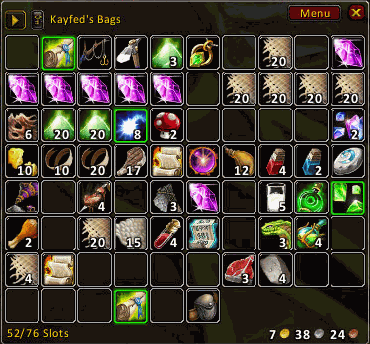
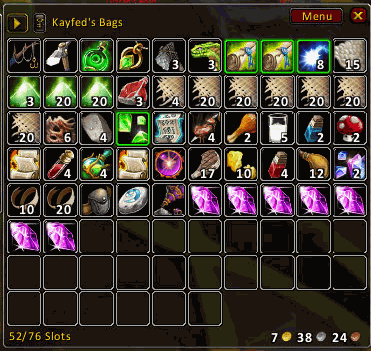
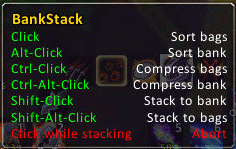
BankStack is the leading cause of things moving in your bags and bank.
It:
sorts your inventory, bank, or guild bank
fills incomplete stacks in your bank with items from your inventory
compresses your bags by filling incomplete stacks within them
puts a chicken in every pot, and pot in every chicken
Code:
/sort -- rearrange your bags
/sort bank -- rearrange your bank
/stack -- fills stacks in your bank from your bags
/stack bank bags -- fills stacks in your bags from your bank
/stack {group1} {group2} -- fills stacks in group2 from group1
/compress -- merges stacks in your bags
/compress bank -- merges stacks in your bank
/compress {group} -- merges stacks in group
/fill -- fill empty slots in your bank from your bags
/fill {group1} {group2} -- fill empty slots in group2 from group1
/bankstack -- show configuration
In the /bankstack configuration you'll find sections for "ignore" and "groups". Here's a bit of elaboration on the syntax for those parts.
You need, regrettably, to hear about bag ids first. Each bag has a number which addons use to interact with it.
Your bags are: 0, 1, 2, 3, 4
Your bank is: -1, 5, 6, 7, 8, 9, 10, 11
To ignore slot 1 of bag 0, the first slot in your backpack, go to the "ignore" panel and put "0 1" into the textfield and click "okay".
Groups are similar. Let's say that you're a herbalist, and only want to do some things to your herb bags.
You could put this into the "groups" textbox: herbs 3,4
Or this: bankherbs 10,11
You now have two custom groups -- herbs and bankherbs. Presumably you keep massive herb bags in slots 3 and 4, and are making lots of money from this because you have the two most expensive bank slots as well (10 and 11).
Having created these groups you could:
Code:
/stack herbs bankherbs
Which would fill up stacks in your bank herb bags from stacks in your personal herb bags.
Predefined groups are: bank, bags, guild, all, and a few more. Click the "list" button in the groups config to see these.
Planned Features:
Suggest something?
Change Log - BankStack
14:
Bump ye-olde-TOC
LibDBIcon included so that people without a broker display will have a minimap icon
13:
Bump ye-olde-TOC
12 (r126):
Make the default DB profile not be per-char.
Add ruRU, zhCN, deDE, koKR localizations.
11 (r119):
It's been six months... bump that TOC!
Switch it to a LDB dataobject instead of a FuBar plugin. (Use Broker2FuBar if you want to get it into FuBar.)
Fix some bugs with ignoring and groups.
10 (r79704):
Option to move soulbound items to the front.
Broke out the FuBar plugin into its own addon. (And actually embed all the FuBar libs, which means it'll reliably show up on FuBar.)
"Tiny adjustment which stops the sorter from crashing when comparing two 'unknown typed' items." --grum
Use AceDB-3.0. It's nice.
9 (r57701): Click actions on the fubar plugin are now configurable. Guild bank tabs are allowed in custom groups.
8 (r55972): Sorting junk to the back was broken by a typo; fixed.
7 (r55665): Sorting now fills stacks in profession bags if possible. General optimization.
6 (r55583):
Sorting now matches the Auction House categories.
Guild bank support is much more permissive (it's your own job to make sure you have enough withdrawals)
"Reverse sort" option
Add default groups for each guild bank tab (guild1 ... guild6)
Sorting conjured items to the back is massively sped up
FuBar plugin now works if you don't have Rock (also, icon)
Rewrote the config system, let it work with a right-click on the FuBar plugin
5 (r54956): Guild bank support, /fill, conjured items to the back.
4 (r54574): Update the TOC for 2.3.
3 (r54306): Ignores, custom groups, optimized moves.
2 (r53814): Sorting now compresses the bags first, and will sort specialty bags separately.
1: Initial
Optional Files - BankStack
Sorry, there are currently no optional files available.
Is it possible to change the order in which the addon sorts bags? It puts my quest items at the end, which I don't like. I've searched the config and can't find it either. Is it in the LUA?
Great addon. I'm just wondering if it's possible to somehow bind the crafting queue to a key so that when I push it, the item on top of the list is processed?
Would be of great help. Thanks
Like I said, that's what it does. It knows the current state of the bags, and from that a new state is created. It then works out a list of moves that need to be made, and finally executes those moves.
The problem is just that it needs to be smarter about building the list of moves.
Quote:
Originally posted by brontes The idea is to have a current and a endstate before making any physical moves. Once you've got those, step through each slot and don't move current[slot] if current[slot] == endstate[slot].
If you know what your final end state looks like, could you not just skip any swap that would move an item that is already where endstate says it should be?
The idea being that you do the ugly stuff (moving the one space around a bunch of times to put it at the end) in memory, then just make sure the actual movement is not displacing an item already in its proper slot.
Briefly looking over the code you pointed out, you're doing multiple passes on what I'm guessing is actual movement of items. (I'm not certain of this.) I'm suggesting internalizing all this and then doing the physical movement. If you've got two tables, one unsorted and one sorted, you'll only need one pass of actual in-game item movement (the "expensive" part of the function) to put each item into its correct slot.
Its 1am and I'm probably rambling and/or vastly confused. Apologies.
Originally posted by Kemayo Every move that's made results in at least one stack being filled with the correct item
The idea is to have a current and a endstate before making any physical moves. Once you've got those, step through each slot and don't move current[slot] if current[slot] == endstate[slot].
If you know what your final end state looks like, could you not just skip any swap that would move an item that is already where endstate says it should be?
The idea being that you do the ugly stuff (moving the one space around a bunch of times to put it at the end) in memory, then just make sure the actual movement is not displacing an item already in its proper slot.
Briefly looking over the code you pointed out, you're doing multiple passes on what I'm guessing is actual movement of items. (I'm not certain of this.) I'm suggesting internalizing all this and then doing the physical movement. If you've got two tables, one unsorted and one sorted, you'll only need one pass of actual in-game item movement (the "expensive" part of the function) to put each item into its correct slot.
Its 1am and I'm probably rambling and/or vastly confused. Apologies.
It's worth mentioning that this is (close) to what it's doing. Every move that's made results in at least one stack being filled with the correct item -- there's no in-place bubble-sort, or anything like that.
The main problem with the algorithm is that it doesn't handle the fairly common case of having to move an empty space to the end. So, if you've used up one soul shard, it will make 20 moves of one soul shard at a time, to fill up that space, and then the space left by the other shard, and so forth.
Unless I'm misunderstanding your suggestion, I don't think it'd help with that case.
EDIT: If you're interested in what's going on, take a look at sort.lua. Lines 194-247 are the moving logic. default_sorter on line 107 does the work of determining the correct order. There's a pseudo-decent amount of comments on why things are being done, and there's not *too* much weird lua-specific metatable meddling happening.
Quote:
Originally posted by brontes Oh how I wish I knew more lua. If it was perl I'd have having a field day.
Suggestion for reworking the sort algorithm:
Stack up partial stacks.
Save inventory state in a table/associative array/even just a plain array. (eg: slot0 = item1, slot1 = item2, etc.), structure Foo.
Do whatever sorting you're doing now, but instead of actually moving the items, save the end-state of the sort in a similar-to-above data structure, Bar.
Step through each item slot, lookup Bar value, step through Foo until there is a == match, [edit: check to make sure that Foo[slot] != Bar[slot] to insure you're not moving an "already sorted" item, ] then make the physical move, clear Foo entry for that slot.
This would be a dirty fix to the issue of making 80+ moves when hand sorting could do it in three.
Oh how I wish I knew more lua. If it was perl I'd have having a field day.
Suggestion for reworking the sort algorithm:
Stack up partial stacks.
Save inventory state in a table/associative array/even just a plain array. (eg: slot0 = item1, slot1 = item2, etc.), structure Foo.
Do whatever sorting you're doing now, but instead of actually moving the items, save the end-state of the sort in a similar-to-above data structure, Bar.
Step through each item slot, lookup Bar value, step through Foo until there is a == match, [edit: check to make sure that Foo[slot] != Bar[slot] to insure you're not moving an "already sorted" item, ] then make the physical move, clear Foo entry for that slot.
This would be a dirty fix to the issue of making 80+ moves when hand sorting could do it in three.
Hi there, is there a way to only sort the current Guild Bank Tab you're on? I had all my items from the last Officer-Only tab throwing items into the Open-Access tab we have. I had to manually move it all back when done, lol.
I think I've fixed the issue (at least for me) with Bank Stack ignoring profession bags.
You want to edit the "IsSpecialtyBag" function in core.lua to look like the following.
Code:
function core.IsSpecialtyBag(bagid)
if safe[bagid] or is_guild_bank_bag(bagid) then return false end
local invslot = ContainerIDToInventoryID(bagid)
if not invslot then return false end
local bag = GetInventoryItemLink("player", invslot)
if not bag then return false end
-- local item_type, item_subtype = select(6, GetItemInfo(bag))
-- if item_type == L.CONTAINER and item_subtype == L.BAG then
-- return false
-- end
-- return item_subtype
end
The lined which are commented out with the -- markers are meant to identify non-normal bags. However, Bank Stack appears to only be able to handle ammo and shard bags but not profession bags. I commented out the code and am able to use my glyph bags just fine when moving large amounts of glyphs between bank and bags and vice versa.
I too am having problems with BankStack working with inscription bags. If I try to fill my inscription bags from the bank, it will only fill the backpack slot and then stops. The inscription bags are untouched.
Note: I am only trying to move glyphs into these bags. It's not an item-bag conflict.
I've poked around the Bank Stack lua but I can't figure out where it stores information about specialty bags. Does this problem exist with other special bags or just inscription bags?
Also, I can't move anything out of glyph bags either.
Since the last maintence, i've been getting this error and not being able to stack the bank via the LDB launcher:
Quote:
[2009/09/02 15:32:15-521-x1]: BankStack-v14\stack.lua:39: attempt to perform arithmetic on field '?' (a nil value)
BankStack-v14\stack.lua:93: in function `Stack'
BankStack-v14\sort.lua:32: in function `SortBags'
BankStack-v14\ldb.lua:7: in function `?'
BankStack-v14\ldb.lua:68: in function `OnClick'
Fortress-1.12 \Core.lua:248: in function <Interface\AddOns\Fortress\Core.lua:233>
I can't get the group filling and sorting to work, so I assume that I di something wrong =/
Here's what I did: I created a group called Backpack, with the text "backpack 0", then I added another group with "glyphbags 1,2,3,4". The I tried "/fill backpack glyphbags", and sometimes it moves one or two items, but rarely, and never all the items.
I'm using this for my glyph char, and he's using 4 max size glyph bags, but he also sells a few random drops from my other chars every now and then, and that's why I need to clear some Backpack space.
Oh, and thanks for this insanely awesome addon! I'm now a clickaholic on the sorting button
You have just downloaded by the author . If you like this AddOn why not consider supporting the author? This author has set up a donation account. Donations ensure that authors can continue to develop useful tools for everyone.
*Clicking the donate button above will take you to PayPal.com
*Clicking the donate button above will take you to Pledgie.com



