Addon Info.
Change Log
Optional Files (0)
Archived (7)
Comments (166)
Addon Information
Works with WoTLK
Download Latest Version.
To add favorites please register for a free account. If you already have one you need to login. How do I install this? (FAQ)
Tuller's Portal Bug Reports Feature Requests
Author:
Version:
2.0.4
Date:
10-28-2008 07:28 PM
Size:
57.37 Kb
Downloads:
36,997
Favorites:
606
MD5:
Pictures
Click to enlarge
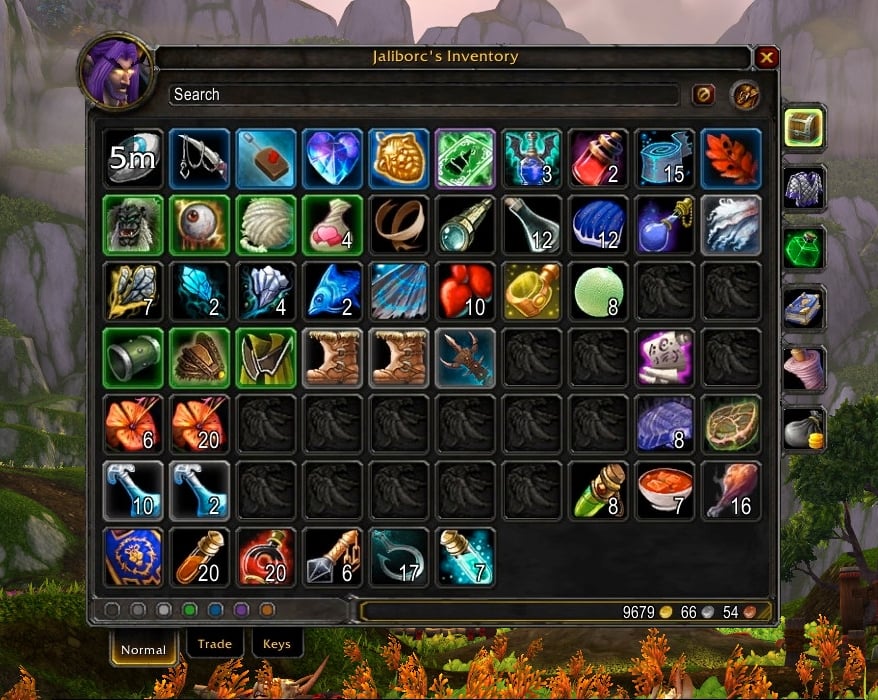
Inventory Frame
Combuctor   Popular!
I accept donations here

Combuctor is a bag replacement addon designed to help the player find things in his or her's inventory as quickly and as easily as possible.

Included Addons
  • Combuctor - The main addon. Provides a replacement for both the bank and bag frames
  • Combuctor_Config - A load on demand configuration window
  • Combuctor_Sets - A default set of categories
  • Bagnon_Forever - Optional, stores inventory data about your characters so that you can view it later
  • Bagnon_Tooltips - Optional, adds ownership date to item tooltips


Using Combuctor

Filtering
  • The side filters should be fairly self explanatory. Click to filter to items that match the named category. When you click on a side filter, the bottom tabs will change to allow even finer control
  • Near the bottom left of the screen are filters for quality. Click the color of quality you want to show
  • Text searching: The filtering matches by name ("healing potion"), type ("axe"), and equip location ("chest")

Showing the bank and bag frames
  • The bank and bag frames are integrated into the interface by default. You can also set a keybinding for both of them in the keybindings menu.
  • /cbt bank toggles the bank, and /cbt bags will toggle the inventory window

Viewing the data of other characters
  • Character viewing requires that you have Bagnon_Forever installed (included in the download) and that you have logged onto a character with Bagnon_Forever installed.
  • To view the items of another character, simply click on your portrait and select the character you want to view from the dropdown
  Change Log - Combuctor
2.0.4
* Updated Chinese translation
* Turns out I was using my old wrath branch for Bagnon_Forever + Bagnon_Tooltips

2.0.3-Repackage
* Made Bagnon_Forever not LOD

2.0.3
* Fixed a bug caused by missing localization files.

2.0.2
* Fixed a bug with version updating

2.0.1
* Fixed a bug with Bagnon_Forever

2.0.0
* A wrath compatible rewrite.
* Added the ability to resize the frame via dragging the bottom right corner
* Added the ability to customize which categories are displayed on the frames (/combuctor)
* Added the ability for developers to add in more sets and subsets to Combuctor
* Combuctor is still very much a beta at this point in time: The new features are very much a first draft.
  Optional Files - Combuctor
Sorry, there are currently no optional files available.
  Archived Versions - Combuctor
File Name
Version
Size
Author
Date
2.0.3-Repackage
56kB
Tuller
10-27-2008 07:46 PM
2.0.3
56kB
Tuller
10-16-2008 05:28 PM
2.0.2
57kB
Tuller
10-14-2008 08:05 PM
2.0.0
57kB
Tuller
10-13-2008 10:58 PM
Beta.1.2b
45kB
Tuller
03-26-2008 10:43 PM
Beta.1.2
44kB
Tuller
03-24-2008 10:46 PM
Beta 1.1
44kB
Tuller
01-16-2008 06:23 PM
  Comments - Combuctor
Post A Reply
Author Comments Comment Options
Old Today, 09:40 PM  
Geta-Ve
A Kobold Labourer

Forum posts: 0
File comments: 1
Uploads: 0
Scale?

This doesn't seem to have been brought up but the icons in my bag are huge, at least twice the size of the regular bag icons. Is this normal? Is there any kind of scale option?

I adore the sorting options but until some kind of scaling options become available (or until I find them) I will be using bagnon (which is also your own mod so win win I guess.. lol)
Geta-Ve is online now Report comment to moderator   Edit/Delete Message Reply With Quote
Old Today, 05:00 AM  
Horlin
A Kobold Labourer
 
Horlin's Avatar

Forum posts: 0
File comments: 12
Uploads: 0
Quote:
Originally posted by Arkive
I don't see anything about this in the comments here, so it's probably one of the addons I'm using in my UI. Periodically the bank frame will be blank when you open it, but if you click on one of the other tabs and then back to the All tab, the bag spaces show. It's too unreliable to reproduce atm (though I will sit down and test it more thoroughly later). Has anyone else seen this behavior? I know FreeRefills has had a finger pointed at it (which I'm using), and I've also resized the frames using FluidFrames. If only I could find a way to make it do it every time.
Sounds familia. When i open the Bank i see everything but i cant click something. Only when i use another tab and switch bat it works correct.
Horlin is offline Report comment to moderator   Edit/Delete Message Reply With Quote
Old 11-17-2008, 05:15 PM  
Jeania
A Fallenroot Satyr

Forum posts: 24
File comments: 54
Uploads: 0
Quote:
Originally posted by Arkive
I don't see anything about this in the comments here, so it's probably one of the addons I'm using in my UI. Periodically the bank frame will be blank when you open it, but if you click on one of the other tabs and then back to the All tab, the bag spaces show. It's too unreliable to reproduce atm (though I will sit down and test it more thoroughly later). Has anyone else seen this behavior? I know FreeRefills has had a finger pointed at it (which I'm using), and I've also resized the frames using FluidFrames. If only I could find a way to make it do it every time.
Free Refills gave me a looot of problems, to the point where I had to disable it. I liked it a lot too, but after the wotlk updated addons, yeah, wasn't fun lol.

I agree also with the below:


Quote:
Originally posted by Moonshine Fox
I love the program, but is there a way to keep it from automaticly opening when I open my profesion windows?

Moonshine Fox

Quote:
Originally posted by Thetakerfan
I second that idea, I'd love an option to disable auto-open for certain windows (vendor, auction house, professions, etc)
Jeania is offline Report comment to moderator   Edit/Delete Message Reply With Quote
Old 11-17-2008, 11:49 AM  
Arkive
A Cobalt Mageweaver
Interface Author - Click to view interfaces

Forum posts: 237
File comments: 328
Uploads: 2
I don't see anything about this in the comments here, so it's probably one of the addons I'm using in my UI. Periodically the bank frame will be blank when you open it, but if you click on one of the other tabs and then back to the All tab, the bag spaces show. It's too unreliable to reproduce atm (though I will sit down and test it more thoroughly later). Has anyone else seen this behavior? I know FreeRefills has had a finger pointed at it (which I'm using), and I've also resized the frames using FluidFrames. If only I could find a way to make it do it every time.
Arkive is offline Report comment to moderator   Edit/Delete Message Reply With Quote
Old 11-16-2008, 08:52 AM  
thetakerfan
A Kobold Labourer

Forum posts: 0
File comments: 8
Uploads: 0
Quote:
Originally posted by Moonshine Fox
I love the program, but is there a way to keep it from automaticly opening when I open my profesion windows?

Moonshine Fox
I second that idea, I'd love an option to disable auto-open for certain windows (vendor, auction house, professions, etc)

That's really the only issue I've had with this addon thus far.
thetakerfan is offline Report comment to moderator   Edit/Delete Message Reply With Quote
Old 11-14-2008, 12:51 PM  
Tuller
A Wyrmkin Dreamwalker
 
Tuller's Avatar
Interface Author - Click to view interfaces

Forum posts: 54
File comments: 701
Uploads: 22
Quote:
Originally posted by Moonshine Fox
I love the program, but is there a way to keep it from automaticly opening when I open my profesion windows?

Moonshine Fox
Not at this time, no.
Tuller is offline Report comment to moderator   Edit/Delete Message Reply With Quote
Old 11-13-2008, 11:41 PM  
Moonshine Fox
A Kobold Labourer

Forum posts: 1
File comments: 1
Uploads: 0
I love the program, but is there a way to keep it from automaticly opening when I open my profesion windows?

Moonshine Fox
Moonshine Fox is offline Report comment to moderator   Edit/Delete Message Reply With Quote
Old 11-10-2008, 05:10 PM  
Jeania
A Fallenroot Satyr

Forum posts: 24
File comments: 54
Uploads: 0
Quote:
Originally posted by cM2003
I think thats right. I disabled Free Refills and now it works
Thank you :P

Now I can search for a replacement for Free Refills and I hope then all works
try automaton (curse.com..not sure if there's a version here)

I'd been using free refills too, so I gotta check to see if my automaton does it as well (had free refills, got automaton for it's other awesome features, never disabled this one lol).

Now i'm having trouble getting this and Piggybank (curse.com) to work together >.<
Jeania is offline Report comment to moderator   Edit/Delete Message Reply With Quote
Old 11-09-2008, 06:56 PM  
cM2003
A Kobold Labourer

Forum posts: 0
File comments: 10
Uploads: 0
Quote:
Originally posted by Overkill34
I am having the same problem - It seems that it is a conflict with the addon "Free Refills". Can anybody confirm this?

Also, the problem is that the user is unable to access items in the bank without first applying a filter...wasn't clearly explained by this poster^^
I think thats right. I disabled Free Refills and now it works
Thank you :P

Now I can search for a replacement for Free Refills and I hope then all works
cM2003 is offline Report comment to moderator   Edit/Delete Message Reply With Quote
Old 11-09-2008, 04:58 PM  
veleda
A Murloc Raider

Forum posts: 5
File comments: 44
Uploads: 0
Quote:
Originally posted by Overkill34
I am having the same problem - It seems that it is a conflict with the addon "Free Refills". Can anybody confirm this?

Also, the problem is that the user is unable to access items in the bank without first applying a filter...wasn't clearly explained by this poster^^
I actually had this issue also, I have free refills, I also have bankstack installed for sorting. Once I realised I couldn't remove items I just did a sort with bankstack and then I was able to.

Last edited by veleda : 11-09-2008 at 05:00 PM.
veleda is offline Report comment to moderator   Edit/Delete Message Reply With Quote
Old 11-09-2008, 11:56 AM  
thetakerfan
A Kobold Labourer

Forum posts: 0
File comments: 8
Uploads: 0
Quote:
Originally posted by veleda
get bankstack for sorting, works crazy fast for both the bank and bag. you could try using skillet instead of atsw, I'm not sure if that'll change anything tho.
Thanks for the tip, just tried BankStack, pretty nifty
thetakerfan is offline Report comment to moderator   Edit/Delete Message Reply With Quote
Old 11-09-2008, 06:08 AM  
Overkill34
A Kobold Labourer

Forum posts: 0
File comments: 2
Uploads: 0
Quote:
Originally posted by cM2003
Iīve got a problem with the actual version.
I canīt get anything out of my bank. There is no errormessage or something else.
I am having the same problem - It seems that it is a conflict with the addon "Free Refills". Can anybody confirm this?

Also, the problem is that the user is unable to access items in the bank without first applying a filter...wasn't clearly explained by this poster^^

Last edited by Overkill34 : 11-09-2008 at 06:57 AM.
Overkill34 is offline Report comment to moderator   Edit/Delete Message Reply With Quote
Old 11-08-2008, 08:11 PM  
Dalicia
A Kobold Labourer

Forum posts: 0
File comments: 1
Uploads: 0
/combuctor bank

First, thank you very much for all of your hard and continuous work on addons for all of us "lazy" players. I know for myself, you've given me something which I would have never been able to create in such a fashion--on top of that, you've made several aspects of the game run more smoother and less stressful for me.


I am not sure if this is a feature no longer continued from bagnon to combuctor, but I am unable to preview/scroll over items and view their tool tips--when trying to view bank items while not using a bank teller. Also, most of the time when I do use the command "/combuctor bank" the bank window will pop up but I cannot view any items within--it's completely blank with the normal box window (bank tabs, etc.). The only time the later does not occur, is if I have recently visited the bank. EDIT: After continue to research the issue, I found that the needed addons borrowed from bagnon were not selected to be loaded (doh). Problem solved.

Another issue (more cosmetic than troublesome) that I have not been able to recreate on other characters is this: somehow I've lost the option in displaying keys in a separate window--they're "stuck" at the top of the window, as if they were in my "backpack" bag. I've tried several things, including a full deletion and reinstall, including any save info in "wtf" folder to no avail.

Any help would be greatly appreciated!
Dali

Last edited by Dalicia : 11-08-2008 at 08:38 PM.
Dalicia is offline Report comment to moderator   Edit/Delete Message Reply With Quote
Old 11-08-2008, 01:35 PM  
veleda
A Murloc Raider

Forum posts: 5
File comments: 44
Uploads: 0
get bankstack for sorting, works crazy fast for both the bank and bag. you could try using skillet instead of atsw, I'm not sure if that'll change anything tho.
veleda is offline Report comment to moderator   Edit/Delete Message Reply With Quote
Old 11-08-2008, 10:50 AM  
thetakerfan
A Kobold Labourer

Forum posts: 0
File comments: 8
Uploads: 0
Trade Goods - more specific?

Would it be possible to add extra tabs to the bottom row when in the Trade Goods section, of specific trades?

For example, to only shows the items for Tailoring (cloths, etc), or Enchanting (essences, dusts, etc), like how you cna list Gems only?

edit: Also, couple more questions. Is there a way to stop the bag windows from always being on top? I use the Advanced Tradeskill Window mod for example, and that always ends up hidden behind the bag windows, so I have to constantly close/reopen just to see what I'm doing. And, is there any way to sort the items in the bag?

Sorry for all the questions.

Last edited by thetakerfan : 11-08-2008 at 11:16 AM.
thetakerfan is offline Report comment to moderator   Edit/Delete Message Reply With Quote
Post A Reply


Category Jump:


The Network:
EQInterface | EQ2Interface | LoTROInterface | MMOUI | War.MMOUI | WoWInterface | VGInterface | Allakhazam | Thottbot | Wowhead | Zam


MMOInterface.com Copyright ©2008
World of Warcraft is a registered Trademark of Blizzard Entertainment.
vBulletin - Copyright ©2000 - 2008, Jelsoft Enterprises Ltd.