Category: Beta-version AddOns
Addon Information
Works with 3.2
Download Latest Version.
To add favorites please register for a free account. If you already have one you need to login. How do I install this? (FAQ)
jaliborc's Portal Bug Reports Feature Requests
Author:
Version:
Beta 5.1
Date:
08-14-2009 06:42 AM
Size:
283.69 Kb
Downloads:
7,253
Favorites:
195
MD5:
Pictures
Click to enlarge
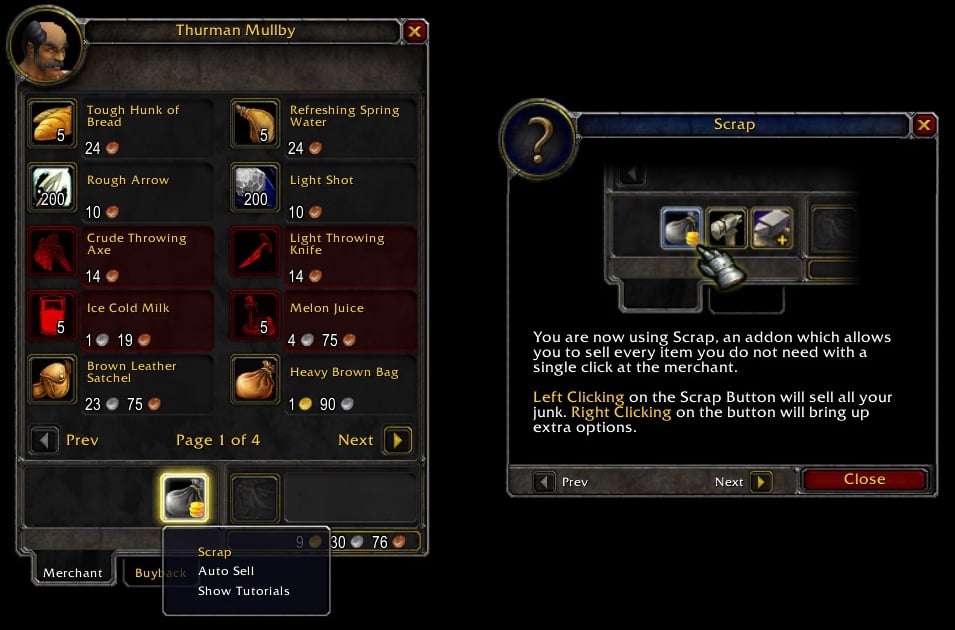
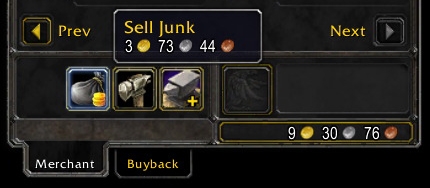
Merchant Window
Click to enlarge
Help Tooltip
Click to enlarge
Options Dropdown
Scrap   Popular! (More than 5000 hits)
Have you ever felt tired of selling, over and over, all that items you don't need at the merchant? There are several addons that lets you create a "junk list" and sell all the junk in your bags with a single-click, but they are always hard to use and doing the simplest tasks, like changing their filters, can be a real pain.

Scrap tries to fill this hole: it is designed to be an easy to use and intuitive addon, but lightweight at the same time. If you are tired of slash commands and hard configuration, then this is the addon for you!

Features:
  • Easy to use
  • Load on demand options
  • Option to auto sell junk when you visit a merchant
  • Profiles

How to Use:
  • To sell all the junk, click in the Scrap button. Alternately, you can enable the option to automatically sell all junk when the merchant is visited
  • To add or remove an item from the "junk list", drag it from your bags to the Scrap button
  • To open the options dropdown (Scrap_Options must to be enabled), right click in the Scrap button

How to Help:
  • Report bugs you find
  • Share your ideas for new features
  • Share your addons with your friends
  • And, if you which, consider donating. Anything is appreciated!

Click here to lend your support!
  Change Log - Scrap
Beta 5.1
  • Fixed several bugs causing add/remove item functionalities not to work properly

Beta 5
  • Updated for 3.2
  • Scrap is going trough a "transitional phase": there are many upcoming changes, which will make Scrap profiles from previous versions incompatible with the new version. An additional addon, Scrap BetaUpdater, has been included, which will make the transition of enUS profiles a smooth process, but users with other clients may find transitioning their junk lists a difficult process. Our apologies, but this will be better for the users on a long term.
  • Added a new module: Scrap Merchant, which will make the Scrap merchant button load on demand. What does this means? Faster loading and less use of memory and cpu on startup.
  • Now Scrap does not allows items which can't be sold to the merchant to be added to the junk lists.
  • Chat messages now behave depending of your chat settings
  • Removed the profiles chat messages
  • More changes coming in a close future...

Beta 4.1
  • Updated TOC for 3.1

Beta 4
  • Updated for 3.0.2
  • Scrap now prints how much you profit by selling your junk when you visit the merchant
  • Fixed a bug causing the buttons to not be correctly placed after using the 'Buypack' tab
  • Scrap no longer has a 'module API'. Combuctor Scrap and Baggins Scrap now 'hook' Scrap to work properly.
  • Combuctor Scrap and Baggins Scrap are now separate downloads
  • Before you start asking, this is still not the version which includes the library I've been working for the last year. That will be a closed beta.

Beta 3
  • All: Code improvements
  • Added: Baggins Scrap and Combuctor Scrap

Beta 2
  • Core: Fixed a bug causing an error message when trying to drag a spell to the Scrap button
  • Options: Current profile is now checked instead of disabled in the "Set Profile" option

Beta 1
  • Initial Release
  Optional Files - Scrap
File Name
Version
Size
Author
Date
Type
1.3
2kB
08-05-2009 01:07 PM
Addon
1.3
1kB
08-05-2009 01:06 PM
Addon
  Archived Versions - Scrap
File Name
Version
Size
Author
Date
Beta 5
284kB
jaliborc
08-05-2009 12:46 PM
Beta 4.1
9kB
jaliborc
04-17-2009 02:20 PM
Beta 4
9kB
jaliborc
10-17-2008 02:20 PM
  Comments - Scrap
Post A Reply Comment Options
Old 09-06-2009, 06:15 AM  
jaliborc
A Flamescale Wyrmkin
 
jaliborc's Avatar
Interface Author - Click to view interfaces

Forum posts: 105
File comments: 234
Uploads: 19
Quote:
Originally posted by ForeverTheGM
I'm using Baggins.

I figured out why the script wasn't working. These are some of the items I tried testing with.

Code:
item 43011 [Worg Haunch]
item 17058 [Fish Oil]
item 17057 [Shiny Fish Scales]
item 33454 [Salted Venison]
By the results, it appears to be working perfectly. Tell me, are you dragging the item and clicking it on the Scrap button? If so, you must simply drag and drop it, no clicks!
jaliborc is offline Report comment to moderator   Edit/Delete Message Reply With Quote
Old 09-03-2009, 06:12 AM  
ForeverTheGM
A Kobold Labourer

Forum posts: 0
File comments: 51
Uploads: 0
I'm using Baggins.

I figured out why the script wasn't working. These are some of the items I tried testing with.

Code:
item 43011 [Worg Haunch]
item 17058 [Fish Oil]
item 17057 [Shiny Fish Scales]
item 33454 [Salted Venison]

Last edited by ForeverTheGM : 09-03-2009 at 07:25 AM.
ForeverTheGM is offline Report comment to moderator   Edit/Delete Message Reply With Quote
Old 09-03-2009, 05:36 AM  
jaliborc
A Flamescale Wyrmkin
 
jaliborc's Avatar
Interface Author - Click to view interfaces

Forum posts: 105
File comments: 234
Uploads: 19
Quote:
Originally posted by ForeverTheGM
When I click the Scrap icon, the highlighting becomes more pronounced, but nothing occurs and the item is still attached to the cursor.
That's natural to happen. The script I gave you will cause it. And you're not suppose to click in the icon, you're only suppose to drop it.

Tell me:
Which addons are you using?
Where are you dragging the item from (combuctor, baggins, default bags, ...)?

Last edited by jaliborc : 09-03-2009 at 05:36 AM.
jaliborc is offline Report comment to moderator   Edit/Delete Message Reply With Quote
Old 09-02-2009, 08:51 PM  
ForeverTheGM
A Kobold Labourer

Forum posts: 0
File comments: 51
Uploads: 0
Nothing was printed to the chat window with that either.

When I drag the item to the Scrap icon on the merchant frame, it becomes highlighted and says "Add to Junk List". When I click the Scrap icon, the highlighting becomes more pronounced, but nothing occurs and the item is still attached to the cursor.
ForeverTheGM is offline Report comment to moderator   Edit/Delete Message Reply With Quote
Old 09-02-2009, 06:44 AM  
jaliborc
A Flamescale Wyrmkin
 
jaliborc's Avatar
Interface Author - Click to view interfaces

Forum posts: 105
File comments: 234
Uploads: 19
Quote:
Originally posted by ForeverTheGM
  1. Deleted it.
  2. Already enabled.
  3. ok
  4. No errors.
  5. ok
  6. No errors.
  7. ok
  8. ok
  9. Nothing was printed to the chat window.
Ups! There was a bug at line 7:
  1. Type in chat "/run Scrap:SetScript('OnReceiveDrag', function() print(GetCursorInfo()) end)"
  2. Drag an item to the Scrap button
  3. Post what appears in the chat window

Last edited by jaliborc : 09-03-2009 at 05:31 AM.
jaliborc is offline Report comment to moderator   Edit/Delete Message Reply With Quote
Old 09-01-2009, 11:19 PM  
ForeverTheGM
A Kobold Labourer

Forum posts: 0
File comments: 51
Uploads: 0
  1. Deleted it.
  2. Already enabled.
  3. ok
  4. No errors.
  5. ok
  6. No errors.
  7. ok
  8. ok
  9. Nothing was printed to the chat window.
ForeverTheGM is offline Report comment to moderator   Edit/Delete Message Reply With Quote
Old 09-01-2009, 06:13 AM  
jaliborc
A Flamescale Wyrmkin
 
jaliborc's Avatar
Interface Author - Click to view interfaces

Forum posts: 105
File comments: 234
Uploads: 19
Quote:
Originally posted by ForeverTheGM
Beta 5.1 is installed. Resetting the Scrap_Settings didn't change anything.
Hum... this is getting hod. Lets try another thing:
  1. Unnistall BetaUpdater if you still have it
  2. Login and make sure you have the option "Show Lua Errors" enabled in the blizzard interface option panel
  3. Type in chat "/run ReloadUI()"
  4. If any message shows up, copy it and post it here. Otherwise, continue to the next step.
  5. Open the merchant window
  6. Repeat step 4
  7. Type in chat "/run Scrap:HookScript('OnReceiveDrag', function() print(GetCursorInfo()) end)"
  8. Drag an item to the Scrap button
  9. Post what appears in the chat window

Last edited by jaliborc : 09-03-2009 at 05:32 AM.
jaliborc is offline Report comment to moderator   Edit/Delete Message Reply With Quote
Old 08-31-2009, 05:27 PM  
ForeverTheGM
A Kobold Labourer

Forum posts: 0
File comments: 51
Uploads: 0
Quote:
Originally posted by jaliborc
  1. Make sure you have Beta 5.1 installed and not Beta 5
  2. Type in chat "/run Scrap_Settings = nil ReloadUI()"

Hope that helps.
Beta 5.1 is installed. Resetting the Scrap_Settings didn't change anything.
ForeverTheGM is offline Report comment to moderator   Edit/Delete Message Reply With Quote
Old 08-31-2009, 01:44 PM  
jaliborc
A Flamescale Wyrmkin
 
jaliborc's Avatar
Interface Author - Click to view interfaces

Forum posts: 105
File comments: 234
Uploads: 19
Quote:
Originally posted by ForeverTheGM
The 'Default' profile is selected.

Dump: Scrap_SV
Scrap_SV=nil,
empty result

Scrap_Settings={
lists={
Default={
}
},
AutoSell=true
}
  1. Make sure you have Beta 5.1 installed and not Beta 5
  2. Type in chat "/run Scrap_Settings = nil ReloadUI()"

Hope that helps.

Last edited by jaliborc : 09-03-2009 at 05:32 AM.
jaliborc is offline Report comment to moderator   Edit/Delete Message Reply With Quote
Old 08-30-2009, 05:59 PM  
ForeverTheGM
A Kobold Labourer

Forum posts: 0
File comments: 51
Uploads: 0
Quote:
Originally posted by jaliborc
Please read the instructions before posting:
  • Make sure your current character has a junk list selected
  • Write in the chat "/dump Scrap_SV" and "/dump Scrap_Settings" and report back the results
The 'Default' profile is selected.

Dump: Scrap_SV
Scrap_SV=nil,
empty result

Scrap_Settings={
lists={
Default={
}
},
AutoSell=true
}
ForeverTheGM is offline Report comment to moderator   Edit/Delete Message Reply With Quote
Old 08-30-2009, 05:36 PM  
jaliborc
A Flamescale Wyrmkin
 
jaliborc's Avatar
Interface Author - Click to view interfaces

Forum posts: 105
File comments: 234
Uploads: 19
Ok, I'm back, so let's start answering your questions!

Quote:
Originally posted by antisocialink
Removed 5.1 due to updater issues and attempted reinstalling 4.1 (last version that worked for me)... Now I have a highlighted button that does nothing. Can't press it, can't drag things to it... nothing.
You shouldn't had installed 4.1 version back, you should had followed the instructions I posted right here, on WoWInterface, to help users with the same problem as you:
Write in the chat "/dump Scrap_SV" and "/dump Scrap_Settings" and report back the results.

Try it anyway, but it's more likely that you have simply erased or corrupted your settings when you installed 4.1 back.
Oh, and DO NOT INSTALL VERSION 5 OR ANY OTHER RECENT VERSION!


Quote:
Originally posted by ForeverTheGM
I'm supposed to pickup an item from my bags and drop it on the Scrap icon at the vendor frame, correct? The icon just stays gray and won't do or say anything no matter how many times I click it with the item on my mouse cursor. It will sell gray items and I can change the options, but I'm definitely not able to add any items to the junk list.
Please read the instructions before posting:
  • Make sure your current character has a junk list selected
  • Write in the chat "/dump Scrap_SV" and "/dump Scrap_Settings" and report back the results


Quote:
Originally posted by Alarisha
Scrap fires a CHAT_MSG_MONEY event when it sells junk at merchants. As this event is a Blizzard event that is only supposed to fire when a unit loots money (i.e. not at a merchant), Auditor doesn't know what to do and gets confused.

I'll put in a check to stop this happening, but in my mind, this is a problem with Scrap firing game events when it shouldn't, and not a problem with Auditor. I am totally open to being shown how I am doing it wrong, though, if I am.
Scrap is not firing an event, it's a library that it uses. And you weren't doing nothing wrong, you were just still using global event variables (arg1, in this case), something that Blizzard now longer uses but still supports in the default event tracking API.
I made the library to fire this events because it was the best way I found to allow Scrap messages to be displayed in any chat frame, even the non-default ones.
jaliborc is offline Report comment to moderator   Edit/Delete Message Reply With Quote
Old 08-22-2009, 01:59 PM  
Alarisha
A Murloc Raider
 
Alarisha's Avatar
Interface Author - Click to view interfaces

Forum posts: 4
File comments: 284
Uploads: 1
Quote:
Originally posted by Alarisha
Scrap fires a CHAT_MSG_MONEY event when it sells junk at merchants. As this event is a Blizzard event that is only supposed to fire when a unit loots money (i.e. not at a merchant), Auditor doesn't know what to do and gets confused.

I'll put in a check to stop this happening, but in my mind, this is a problem with Scrap firing game events when it shouldn't, and not a problem with Auditor. I am totally open to being shown how I am doing it wrong, though, if I am.
This is fixed in the just-about-to-be-uploaded Auditor.

Alarisha is offline Report comment to moderator   Edit/Delete Message Reply With Quote
Old 08-22-2009, 09:56 AM  
Alarisha
A Murloc Raider
 
Alarisha's Avatar
Interface Author - Click to view interfaces

Forum posts: 4
File comments: 284
Uploads: 1
Quote:
Originally posted by Jesamyn
OK, I know you won't see this until Sept 1, but thanks for looking at the issue with Auditor. I'll let the author know.
Scrap fires a CHAT_MSG_MONEY event when it sells junk at merchants. As this event is a Blizzard event that is only supposed to fire when a unit loots money (i.e. not at a merchant), Auditor doesn't know what to do and gets confused.

I'll put in a check to stop this happening, but in my mind, this is a problem with Scrap firing game events when it shouldn't, and not a problem with Auditor. I am totally open to being shown how I am doing it wrong, though, if I am.
Alarisha is offline Report comment to moderator   Edit/Delete Message Reply With Quote
Old 08-22-2009, 06:03 AM  
ForeverTheGM
A Kobold Labourer

Forum posts: 0
File comments: 51
Uploads: 0
I'm supposed to pickup an item from my bags and drop it on the Scrap icon at the vendor frame, correct? The icon just stays gray and won't do or say anything no matter how many times I click it with the item on my mouse cursor. It will sell gray items and I can change the options, but I'm definitely not able to add any items to the junk list.
ForeverTheGM is offline Report comment to moderator   Edit/Delete Message Reply With Quote
Old 08-19-2009, 11:21 PM  
antisocialink
A Kobold Labourer

Forum posts: 0
File comments: 20
Uploads: 0
Removed 5.1 due to updater issues and attempted reinstalling 4.1 (last version that worked for me)... Now I have a highlighted button that does nothing. Can't press it, can't drag things to it... nothing.
antisocialink is offline Report comment to moderator   Edit/Delete Message Reply With Quote
Post A Reply


Category Jump:

Support AddOn Development!

You have just downloaded by the author . If you like this AddOn why not consider supporting the author? This author has set up a donation account. Donations ensure that authors can continue to develop useful tools for everyone.




The Network:
EQInterface | EQ2Interface | LoTROInterface | MMOInterface | War.MMOUI | WoWInterface | VGInterface | Allakhazam | Thottbot | Wowhead | Zam


©2009 MMOUI / ZAM Network
vBulletin - Copyright ©2000 - 2009, Jelsoft Enterprises Ltd.

