Addon Information
Works with 3.3
Download Latest Version.
To add favorites please register for a free account. If you already have one you need to login. How do I install this? (FAQ)
Nevcairiel's Portal Bug Reports Feature Requests
Author:
Version:
1.3.7
Date:
02-04-2010 04:09 AM
Size:
205.04 Kb
Downloads:
162,523
Favorites:
1,307
MD5:
Pictures
Click to enlarge
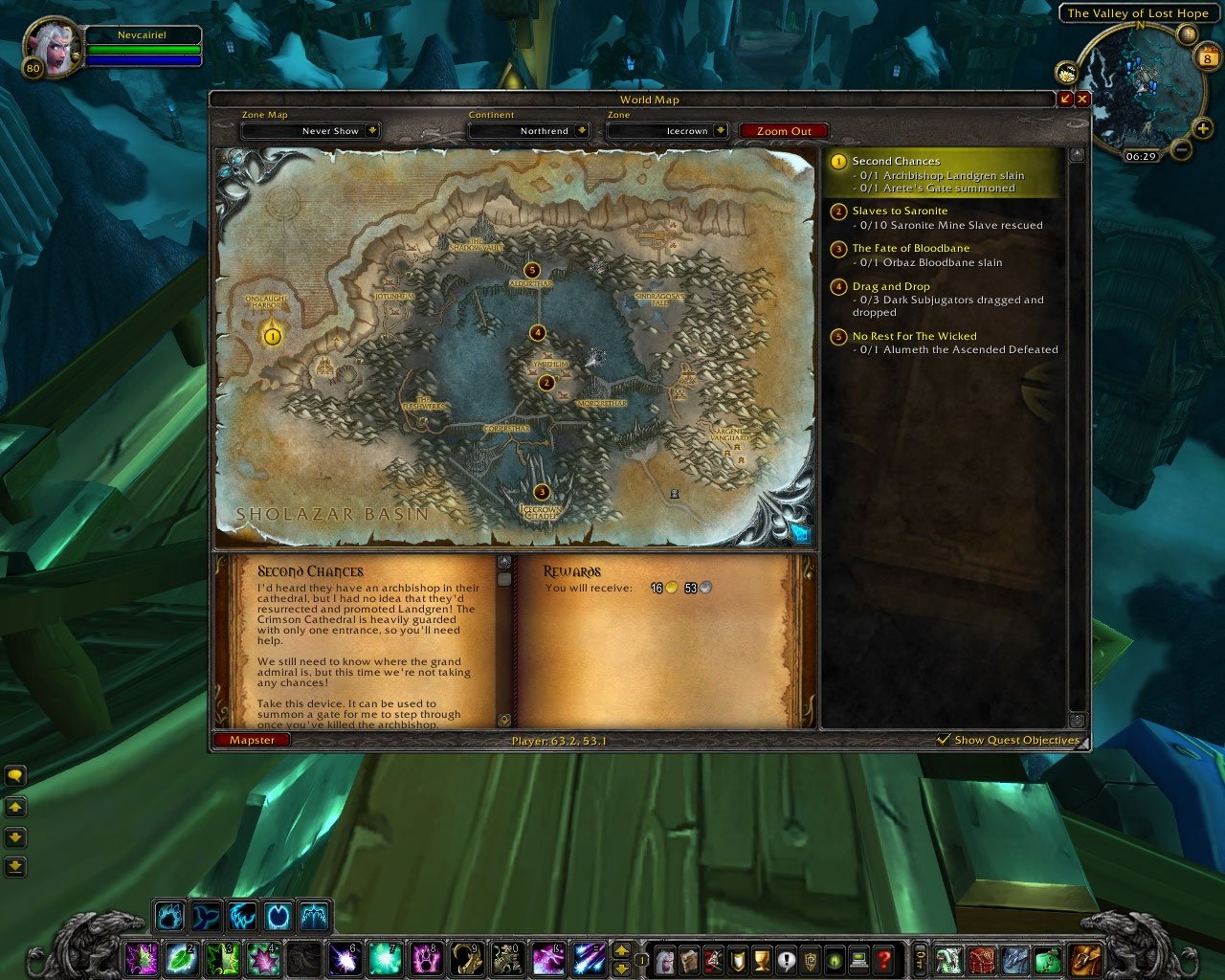
Mapster Default Map View
Click to enlarge
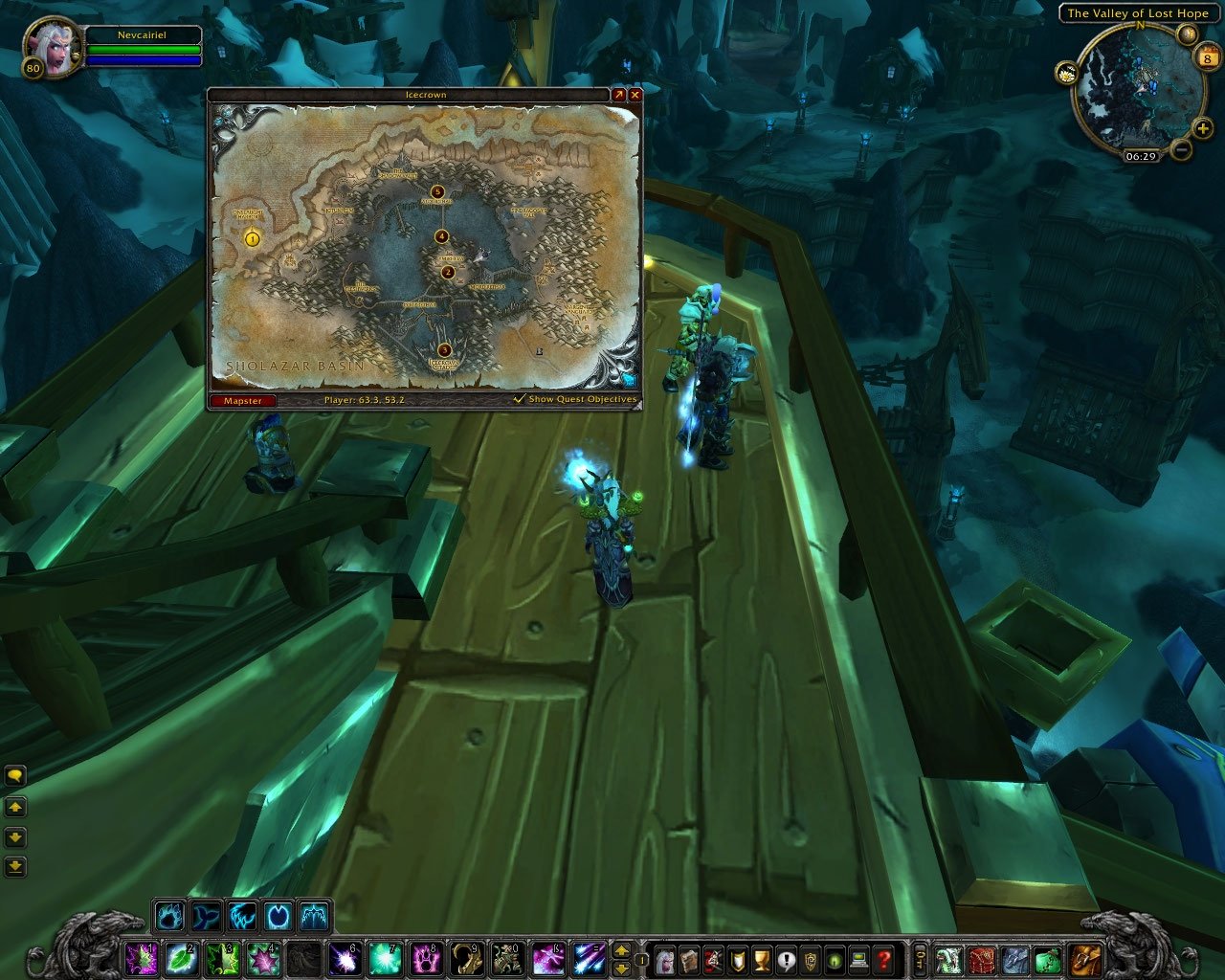
Mapster Minimized Map
Click to enlarge
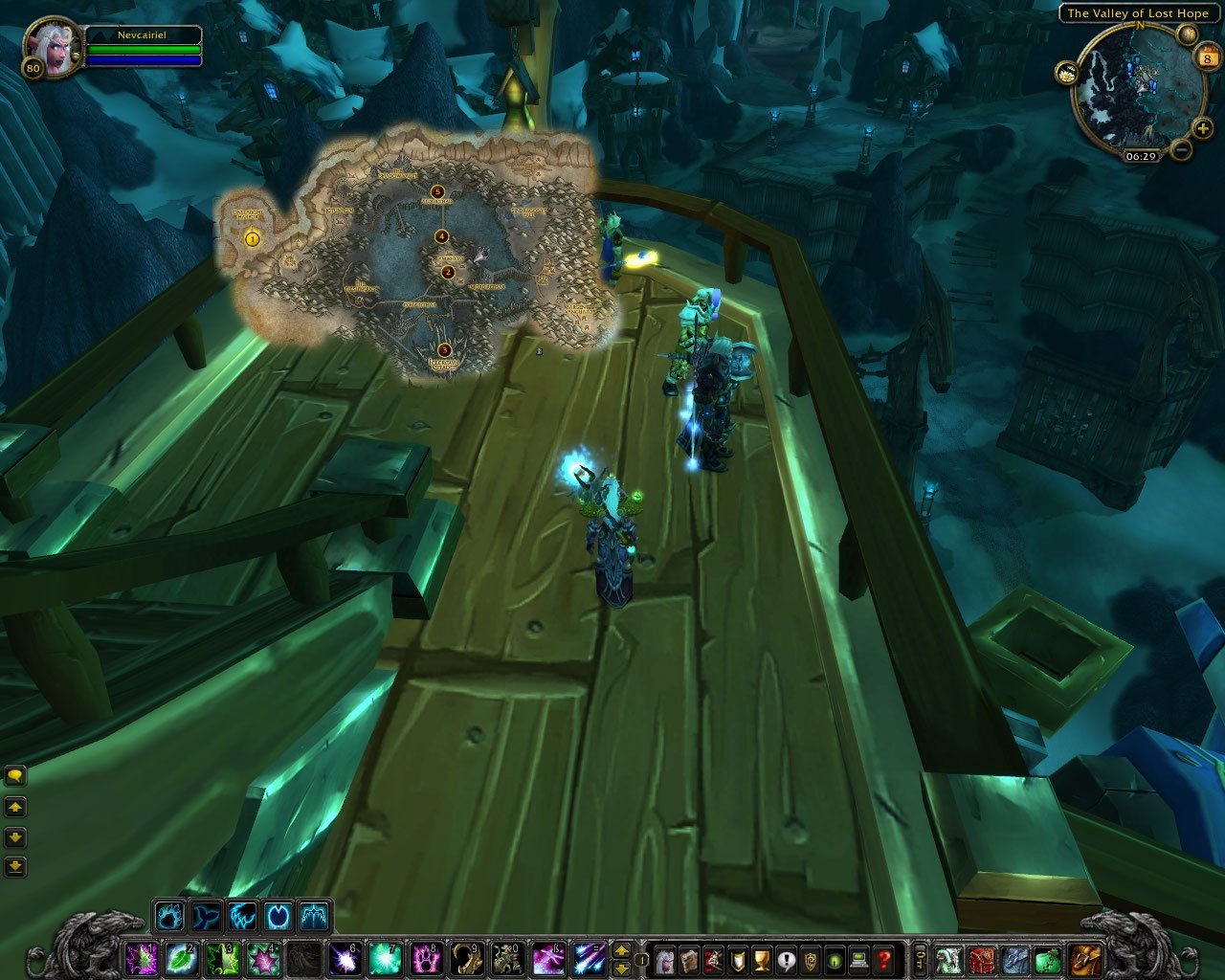
Mapster Minimized Map without Borders/Artwork
Mapster   Updated this week!   Popular! (More than 5000 hits)
Mapster is a very simple world map enhacement addon, which was designed to work in conjunction with all other map addons out there. The idea to create Mapster originated from pure lack of a simplistic addon that only modifies the world map, without adding a full scale feature set.

Features
  • Map Style (Scale & Alpha)
  • Coordinates
  • Fog of War removal
  • Enhancement of the raid/party group icons
  • Access to the WotLK Instance Maps from anywhere!

You can access the Mapster configuration menu through the new button on the world map, as shown in the screenshot.
All features (except the style) can be turned off individually if you do not need/want them.

If you're looking for a replacement to Cartographer, i also recommend the following addons:
  Change Log - Mapster
ChangeLog

1.3.7
- Properly adjust the position of the map POIs when changing the scale of the map.
- When disabling the BattleMap module, properly restore the previously hidden textures.

1.3.6
- Moved the Quest Objectives drop down to the bottom status bar, so it doesn't collide with the floor drop down anymore.
- Properly apply the saved Quest Objectives state on login.

1.3.5
- Extended the "Show Quest Objectives" Feature to allow showing only the Map Blobs without showing the Panels on the World Map Frame.
- The Map is no longer clamped to the screen, and can be moved (partially) off-screen!
- Adjusted the maximal scale of the map to 200% for even bigger Maps on small UI Scales.
- Fixed an error in the positioning logic that was causing excess errors in some situations.
- Fixed an error that was causing the drag handle to be still click-able even when the map was closed.

1.3.4
- Fixed a nil error in the POI Scaling logic.
- Other random fixes to the frame layouting.

1.3.3
- Added an option to scale the POI Icons on the map.
- InstanceMaps fixes and additions.
- More fixes to the Quest Blobs and combat issue.

1.3.2
- Worked around a Blizzard Limitation that broke opening the map in combat in previous versions.
- Minor fixes

1.3.1
- Fixed a rare nil error related to the Hide Borders code on login.

1.3.0
- Updated for the 3.3.0 Content Patch
- Added support for the "minimized" map, that you can switch to for alternate positioning and size.
- Added a mouse-drag scaler to scale the map without opening the options.
- Added an option to hide the Borders and Artwork in minimized-map-mode.
- Redesigned Instance Maps code to be more versatile in the future.

1.2.3
- Updated for the 3.2.0 Content Patch
- Fixed a glitch that caused the Group Icons on the World Map to be displayed in white sometimes.

1.2.2
- Fixed an glitch with the map overlays in Alterac Valley

1.2.1
- Fix an error with Babble-Zone

1.2.0
- Full support for the 3.1.0 Content Patch!
- Added an InstanceMaps module for the builtin instance maps in the game.
- Add support for !ClassColors
- Fixes and enhancements

1.1.3
- Added an option to change the scale of the PlayerArrow on the map
- Internal changes

1.1.2
- Fixed embeded libraries
- Updated zhTW locale

1.1.1
- Adjusted Draw Layer of the textures in the FogClear module to not block other addons from displaying overlays on the map

1.1.0
- Added a new BattleMap module that applys a skin to the Battlefield MiniMap
- Improved behaviour of the FogClear module
- Alot of small fixes

1.0.5
- Added a workaround for the bug that would reset your map-zoom to the current zone when the Battlefield Minimap was shown
- Moved the Mapster MiniMap button a bit to the left to not overlap with QuestHelper
- Updated FogClear Data
- Small fix to the initialization code that fixes the return values of GetWidth/GetHeight before the map was shown

1.0.4
- Support for WoW 3.0
- FogClear Data for all zones in Wrath of the Lich King included
- Fixes and tweaks for WoW 3.0

1.0.3
- Updated Libraries and Bugfix Release

1.0.2
- Added missing Library to package

1.0.1
- Updated for Patch 2.4
- Now using the 2.4 Interface Options Panel for configuration
- Small fixes and tweaks

1.0.0
- Initial Release
  Archived Versions - Mapster
File Name
Version
Size
Author
Date
1.3.6
205kB
Nevcairiel
01-26-2010 03:07 PM
1.3.4
204kB
Nevcairiel
12-20-2009 11:44 AM
1.3.3
203kB
Nevcairiel
12-17-2009 05:17 AM
1.3.2
202kB
Nevcairiel
12-12-2009 06:08 AM
1.3.1
202kB
Nevcairiel
12-09-2009 06:23 AM
1.3.0
203kB
Nevcairiel
12-08-2009 09:40 AM
1.2.3
186kB
Nevcairiel
09-01-2009 05:30 AM
1.2.2
185kB
Nevcairiel
05-16-2009 06:48 AM
1.2.1
185kB
Nevcairiel
04-14-2009 12:54 PM
1.2.0
185kB
Nevcairiel
04-14-2009 10:44 AM
1.1.3
146kB
Nevcairiel
02-19-2009 05:05 AM
1.1.2
138kB
Nevcairiel
12-28-2008 12:42 PM
1.1.1
134kB
Nevcairiel
12-04-2008 05:06 PM
1.1.0
135kB
Nevcairiel
12-04-2008 03:13 AM
  Comments - Mapster
Post A Reply Comment Options
Old 02-04-2010, 09:54 AM  
goldengamer
A Murloc Raider
 
goldengamer's Avatar

Forum posts: 8
File comments: 26
Uploads: 0
Hiya, very nice mod ^^ I do have 1 problem tho.

When I have mapster on, when I want to look at another map, it instantly puts my current map back. Like if I'm in dalaran or any other map, and I try to look at durotar or sholazar basin, it'll go to it, but a split sec later, i'm back at my current map.

Since I turned it off, its stopped :S
goldengamer is offline Report comment to moderator   Edit/Delete Message Reply With Quote
Old 02-04-2010, 04:10 AM  
Nevcairiel
Premium Member
Premium Member
Interface Author - Click to view interfaces

Forum posts: 5
File comments: 78
Uploads: 7
Quote:
Originally posted by Redz1187
Having the same problem here I had this addon with skinner and the background used to look black with the letters in yellow and I could see perfectly but now can't get skinner to overide the background look and the letters are yellow so I can barely see anything.
Help please.
Its Skinners fault, get them to update the Mapster support. I cannot support any outdated 3rd party skinning addons.
Nevcairiel is offline Report comment to moderator   Edit/Delete Message Reply With Quote
Old 02-04-2010, 01:58 AM  
Redz1187
A Deviate Faerie Dragon

Forum posts: 12
File comments: 5
Uploads: 0
Quote:
Originally posted by cpier
My comments are yellow, the script at the bottom of the map that has the quest info in it. Any way to change this to black as in your screen shot?
Having the same problem here I had this addon with skinner and the background used to look black with the letters in yellow and I could see perfectly but now can't get skinner to overide the background look and the letters are yellow so I can barely see anything.
Help please.
Redz1187 is offline Report comment to moderator   Edit/Delete Message Reply With Quote
Old 02-01-2010, 01:24 AM  
nibenon
A Kobold Labourer

Forum posts: 0
File comments: 5
Uploads: 0
Is there any command to open the config menu? I tried /mapster but doesnt exist..
nibenon is online now Report comment to moderator   Edit/Delete Message Reply With Quote
Old 01-21-2010, 05:37 AM  
senryo
A Kobold Labourer

Forum posts: 0
File comments: 22
Uploads: 0
Small feature request. Can you add button on map frame to fast switch FogClear? It would be very helpfull when working on Exploration achievements.
__________________
Sorry for my english. It's not my native language.

Last edited by senryo : 01-21-2010 at 06:50 PM.
senryo is offline Report comment to moderator   Edit/Delete Message Reply With Quote
Old 12-29-2009, 05:17 PM  
N10do
A Murloc Raider

Forum posts: 6
File comments: 36
Uploads: 1
My mapster is i guess is overflowing out of the skinned background. the edge of the map is over the edge as is the quests section.
__________________
Its not the fall from a flying mount that hurts you, its the sudden stop at the bottom.
N10do is offline Report comment to moderator   Edit/Delete Message Reply With Quote
Old 12-29-2009, 11:45 AM  
cpier
A Kobold Labourer
 
cpier's Avatar

Forum posts: 1
File comments: 8
Uploads: 0
My comments are yellow, the script at the bottom of the map that has the quest info in it. Any way to change this to black as in your screen shot?
cpier is offline Report comment to moderator   Edit/Delete Message Reply With Quote
Old 12-28-2009, 09:33 PM  
Elviswind
A Kobold Labourer

Forum posts: 1
File comments: 10
Uploads: 0
Quote:
Originally posted by Gizim
Is there a issue with this working with QH?
Nothing comes up none of the quest lines or anything on the map
It seems that the latest versions of Mapster cover up the QH stuff. There are some fixes listed from a few weeks ago below or you can go back to an older version.
Elviswind is offline Report comment to moderator   Edit/Delete Message Reply With Quote
Old 12-27-2009, 11:44 PM  
Xyrr
A Kobold Labourer
Interface Author - Click to view interfaces

Forum posts: 0
File comments: 5
Uploads: 3
Re: having issue with FogClear in zone

I have a problem with the mini version of the map. Even if the map is closed it is resizable if you drag in the wrong place. It seems like such a small chance but it happens surprisingly often that I'm just playing the game and when I open my map it's suddenly screen filling or very small. I don't use any other addon that does something with the map, so I think it's an issue with Mapster itself.
Xyrr is offline Report comment to moderator   Edit/Delete Message Reply With Quote
Old 12-25-2009, 11:51 PM  
SmuvMoney
A Kobold Labourer

Forum posts: 1
File comments: 62
Uploads: 0
having issue with FogClear in zone

I was farming small eggs in the zone Eversong Woods where Silvermoon was located. For some reason, the FogClear module was not working correctly. I had to discover Fairbreeze Village to actually see it. Before, it was showing a land area there, but it did not list/draw the village and its surroundings until I discovered it ingame. I would have thought that I would able to see the zone map with FogClear enabled. I also still have the area south of that undiscovered and not viewable, i.e., I don't see map details, but the map outline indicates something is there. I hope this makes some sense as I do not have a screenshot.
__________________
Peace & God Bless,

$muvMoney
John 14:27 & Numbers 6:24
SmuvMoney is offline Report comment to moderator   Edit/Delete Message Reply With Quote
Old 12-25-2009, 04:48 PM  
Gizim
A Kobold Labourer

Forum posts: 0
File comments: 27
Uploads: 0
Is there a issue with this working with QH?
Nothing comes up none of the quest lines or anything on the map
Gizim is offline Report comment to moderator   Edit/Delete Message Reply With Quote
Old 12-24-2009, 10:52 AM  
azzk1cker
A Kobold Labourer

Forum posts: 0
File comments: 2
Uploads: 0
Hey!
addon is nice but it bugs quite hard on BGs — i cant see icons of strategic poings (lumber mill, hangar etc.), and funny thing is that some are working and some are not, tried rescaling, scaling back to 100% etc — wont help. Would be nice if you will fix it cause mapster is actually only substitution for cartographer (which is officially dead now).

thanks!
azzk1cker is offline Report comment to moderator   Edit/Delete Message Reply With Quote
Old 12-24-2009, 06:44 AM  
Nevcairiel
Premium Member
Premium Member
Interface Author - Click to view interfaces

Forum posts: 5
File comments: 78
Uploads: 7
Quote:
Originally posted by Intangir

is it mapster thats numbering and changing the colors for player blips in combat or dead?
Yes thats Mapster, the GroupIcons module to be exact.

I'll see about scaling the Player Blips

Last edited by Nevcairiel : 12-24-2009 at 06:44 AM.
Nevcairiel is offline Report comment to moderator   Edit/Delete Message Reply With Quote
Old 12-22-2009, 08:02 PM  
Toran
A Cliff Giant

Forum posts: 74
File comments: 233
Uploads: 0
Can you add a keybind toggle to change between the two map sizes implemented in 3.3?
Toran is offline Report comment to moderator   Edit/Delete Message Reply With Quote
Old 12-22-2009, 04:55 PM  
Intangir
A Kobold Labourer
Interface Author - Click to view interfaces

Forum posts: 1
File comments: 20
Uploads: 1
can you make it so you can scale the player/poi blips on the maps? battlefield minimap, main main and small mainmap?

that would be all the functionality i need to replace this old addon:
http://www.wowinterface.com/download...ldLocator.html
(you can take code from it if you like)

between capping and mapster it handles just about everything it did

is it mapster thats numbering and changing the colors for player blips in combat or dead?

Last edited by Intangir : 12-22-2009 at 05:03 PM.
Intangir is offline Report comment to moderator   Edit/Delete Message Reply With Quote
Post A Reply


Category Jump:

Support AddOn Development!

You have just downloaded by the author . If you like this AddOn why not consider supporting the author? This author has set up a donation account. Donations ensure that authors can continue to develop useful tools for everyone.




The Network:
EQInterface | EQ2Interface | LoTROInterface | MMOInterface | War.MMOUI | WoWInterface | VGInterface | Allakhazam | Thottbot | Wowhead | Zam


©2009 MMOUI / ZAM Network
vBulletin - Copyright ©2000 - 2010, Jelsoft Enterprises Ltd.

