Description:
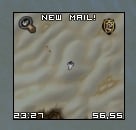
pMinimap is a very lightweight and streamlined Minimap addon.
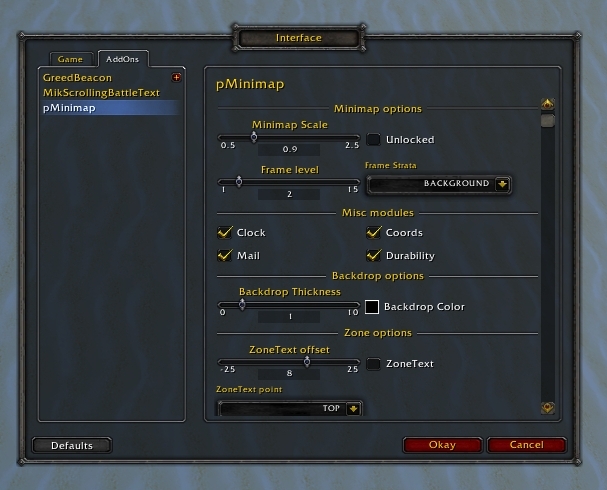
It has a good amount of ingame options through the config,
though, if you want to modify minor things (like icon positioning)
you'd have to go through the Lua file.
The purpose of this addon is to have a lightweight minimap addon,
with a good amount of configurable features.
One of the goals of this addon is to use as much of Blizzard's code as possible,
aswell having options LoD (Load on Demand), to ensure there is no waste of resources.
Features:
Default
Square size
Removes unnessesary art/buttons
Streamlined remaining buttons
Mousewheel zooming
Optional
Mail notification in text
Zone text
Clock (Left-Click to toggle alarm settings, Right-Click to toggle calendar)
Coords (Left-Click to toggle worldmap, Right-Click to toggle BattlefieldMinimap)
Originally posted by Kuzah Heya, I was wondering if there was something I could do or add to the saved variables to get the position to save between characters. It's just a minor thing no biggie. Maybe your future changes to the positioning might change this.
On a side note I was trying to get reflux to save the positioning by emulating a profile for the saved variable "pMinimapDB" but it doesn't seem to work. I'm not sure if any of this is relevant, but I though I should share with you some things I found out while messing around with the ui.
These issues aren't much of a problem personally. Just thought it might help improve your code down the road since it felt relevant.
Request it as a feature and I'll review it for the next major update
Heya, I was wondering if there was something I could do or add to the saved variables to get the position to save between characters. It's just a minor thing no biggie. Maybe your future changes to the positioning might change this.
On a side note I was trying to get reflux to save the positioning by emulating a profile for the saved variable "pMinimapDB" but it doesn't seem to work. I'm not sure if any of this is relevant, but I though I should share with you some things I found out while messing around with the ui.
These issues aren't much of a problem personally. Just thought it might help improve your code down the road since it felt relevant.
i have activated the mail function but dont work... why?
update: one of the addons blocks the funtion but I do not know what it is ^^
Rule #1: Post bugs in bugs section
Rule #2: Post vital information, addon list and error message
Rule #3: Make sure its this addon, not some other (run the addon alone)
Saying 'this doesnt work, fix!' will just get you on my ignore list.
Originally posted by tmywu One problem I have is that every time I re-log, the font size resets and I have to manually change it, is there a way to fix this? Is there a way to show queue times when using the LFG tool? Also, when i'm in an instance and is using the tool to look for more, I can't use it to teleport out. Help is appreciated!
For the settings, try reset it using '/pmm reset'
The queue timer is not handled by pMinimap and never will.
pMinimap does not do any thing with the functions of the LFG button, so there has to be another addon messing up that.
One problem I have is that every time I re-log, the font size resets and I have to manually change it, is there a way to fix this? Is there a way to show queue times when using the LFG tool? Also, when i'm in an instance and is using the tool to look for more, I can't use it to teleport out. Help is appreciated!
I've loed ur UI since 3.1, But still i gotta say this, wich i've probobly said like 30 times, but Sexymap, Is quite impossible, to copy profiles from. Its sexy and all;D but it sucks when ur uploading ur UI.
Originally posted by Wisprunner Love the addon, just recently switched from Chinchilla. Looking forward to seeing what you have in store for this p3lim.
I'm not sure if this is something that is new or if it's a known issue and I missed it, but whenever I set my font for coords and clock (12 pt in my case) and then log out and log back in or switch toons, the coords seem to change to a bigger font size (looks to be 13 or 14) and I have to make the adjustment manually everytime I log a character in.
I can get you a screenshot when I get home if you need it.
Thanks for the work on this addon.
~Wisprunner
I've heard this report earlier, and will be looked into.
Originally posted by ichik There's also some annoyance if you login on character with addon switched off, and then switch it on again. It resets it's position.
Blizzard is in control of the positions, though I'm gonna change that.
Love the addon, just recently switched from Chinchilla. Looking forward to seeing what you have in store for this p3lim.
I'm not sure if this is something that is new or if it's a known issue and I missed it, but whenever I set my font for coords and clock (12 pt in my case) and then log out and log back in or switch toons, the coords seem to change to a bigger font size (looks to be 13 or 14) and I have to make the adjustment manually everytime I log a character in.
I can get you a screenshot when I get home if you need it.
Thanks for the work on this addon.
~Wisprunner
Last edited by Wisprunner : 01-16-2010 at 09:51 PM.
I just tried that mod myself as a fix for the 'not being able to see the stupid thing', but all it did was shift the box from the left side where I couldn't see it... to the right side. Where I still can't see it. =/
You have just downloaded by the author . If you like this AddOn why not consider supporting the author? This author has set up a donation account. Donations ensure that authors can continue to develop useful tools for everyone.
*Clicking the donate button above will take you to PayPal.com
*Clicking the donate button above will take you to Pledgie.com


