Category: oUF: Layouts
Addon Information
Works with 3.3
Download Latest Version.
To add favorites please register for a free account. If you already have one you need to login. How do I install this? (FAQ)
p3lim's Portal Bug Reports Feature Requests

This file is a Addon for oUF by haste. You must have that installed before this Addon will work.

Author:
Version:
30300.3-Beta
Date:
12-21-2009 10:19 AM
Size:
15.89 Kb
Downloads:
36,951
Favorites:
209
MD5:
Pictures
Click to enlarge
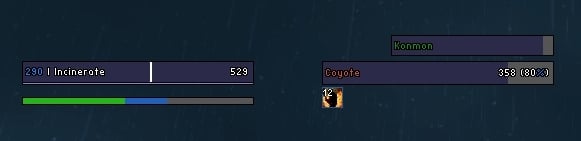
30300.3-Beta looks
Click to enlarge
Death Knight with pet and runes
Click to enlarge
debuffhighlight, portraits, reputation
Click to enlarge
Druid with focus and extra mana bar
Click to enlarge
player, focus, target, targettarget and all visible buffs/debuffs
oUF P3lim   Popular! (More than 5000 hits)
Description:
oUF P3lim is a layout plug-in made for the UnitFrame framework oUF.
It is required that you have this addon updated at all times to make everything work as it should.
You can download oUF by clicking on the link located under the "Download" button on the right.

oUF P3lim is just another layout, specifically customized for my own needs.
It's a personal layout, so don't get your hopes up when you want a new feature for it.
This layout is written to be easily read-able and be a good base to start your own layout on.
If you intend to do this, please give me some credit for all my work.


Features:
Supports for the following units
  • Player
  • Target
  • Pet/Vehicle
  • TargetTarget
  • Focus
As it doesn't include any party/group units, I suggest you get a different layout (or a different addon) for that job.

It also supports the following element plug-ins
Notes:
This layout is created for my own need, and is not an addon for every average user to use.
It has no configurations and if you want to change anything about the layout you will require some knowledge with Lua.


Click here and follow steps how to submit a bug
  Change Log - oUF P3lim
Full changelog can be found on GitHub:
http://github.com/p3lim/oUF_P3lim/commits/master/
  Archived Versions - oUF P3lim
File Name
Version
Size
Author
Date
30200.2-Beta
6kB
p3lim
08-25-2009 12:34 AM
30200.1-Beta
7kB
p3lim
08-08-2009 12:08 PM
30100.86
6kB
p3lim
07-28-2009 07:08 PM
30100.85
6kB
p3lim
07-19-2009 01:40 PM
30100.84
6kB
p3lim
07-15-2009 02:58 PM
30100.83
6kB
p3lim
06-25-2009 07:26 PM
30100.82
6kB
p3lim
06-11-2009 04:27 PM
30100.81
6kB
p3lim
06-01-2009 05:55 AM
30100.80
6kB
p3lim
05-24-2009 09:18 PM
30100.78
6kB
p3lim
05-20-2009 12:52 PM
30100.76
6kB
p3lim
05-08-2009 06:02 PM
30100.75
6kB
p3lim
04-21-2009 10:17 AM
30100.74
6kB
p3lim
04-19-2009 07:05 PM
30100.73
6kB
p3lim
04-19-2009 06:52 PM
30100.72
5kB
p3lim
04-17-2009 11:38 AM
30100.71
5kB
p3lim
04-14-2009 11:12 AM
30000.70
5kB
p3lim
04-14-2009 10:55 AM
30000.69
6kB
p3lim
04-09-2009 02:50 PM
30000.68
6kB
p3lim
04-08-2009 07:22 PM
30000.67
5kB
p3lim
03-29-2009 05:11 PM
30000.66
5kB
p3lim
03-20-2009 04:11 PM
30000.65
5kB
p3lim
03-11-2009 12:52 PM
30000.64
5kB
p3lim
03-09-2009 08:10 PM
30000.63
5kB
p3lim
02-27-2009 12:38 PM
30000.62
5kB
p3lim
02-25-2009 06:55 PM
30000.61
6kB
p3lim
02-15-2009 01:05 PM
30000.60
6kB
p3lim
02-15-2009 06:07 AM
30000.59
6kB
p3lim
02-14-2009 06:22 PM
  Comments - oUF P3lim
Post A Reply Comment Options
Old 04-10-2009, 08:28 AM  
p3lim
A Molten Giant
 
p3lim's Avatar
Interface Author - Click to view interfaces

Forum posts: 586
File comments: 911
Uploads: 20
Too much rant has been posted in this comment section the past time, and Its time I close it down.

If you want a feature added:
Forget it!
This is a personal layout that I have uploaded for reference and request.

If you have a bug:
Submit it to my portal, not here, not in the official topic.
You can find a link below the download button on the main page.

If you are searching for help to modify my layout:
Dont ask here or in my official thread, start a new thread in the oUF section on the forums and wait for an answer.

If you want to ask other questions and/or discuss my layout:
Feel free to use the thread found on the forums.
Direct link here.


Enjoy
p3lim is offline Report comment to moderator   Edit/Delete Message Reply With Quote
Old 04-05-2009, 08:06 AM  
xsrike
A Kobold Labourer

Forum posts: 0
File comments: 1
Uploads: 0
hey im new to wowinterface and i have been using http://www.wowinterface.com/download...o=&page=2#info just recently.
i just need abit of help with the oUF target.is it possible to change the target to showing the %, current hp and total hp? i feel like is alot easier to be able to know how much hp is left on something
xsrike is offline Report comment to moderator   Edit/Delete Message Reply With Quote
Old 04-01-2009, 02:04 PM  
Arrowsong
A Defias Bandit

Forum posts: 2
File comments: 32
Uploads: 0
Hey there P3lim. Still love the frames.

Actually starter from fresh with them the other day. Figured a good few things out on my own. Like how to move Player, Target, Pet castbars seperately and some other minor things.

One thing I still can't seem to get working, and I followed your previous advise from an earlier post, so I'm thinking maybe something is different now.

I'm hoping to show player HP as xxxx/xxxx and target HP as a %.

It seems as though you have made some significant changes and was hoping you might lend an old bother, a hand?

Thanks in advance.

Hope all is well.

- Arrowsong

ps. I tried to add the cast icon to the castbar. Failed. Wondering if you or anyone wouldn't mind helping me out here? Last thing I'll try to ask for. Here is what I'm aiming for.

http://www.wowinterface.com/downloads/info10965-oUF_Atrophia.html

Last edited by Arrowsong : 04-01-2009 at 07:12 PM.
Arrowsong is offline Report comment to moderator   Edit/Delete Message Reply With Quote
Old 03-31-2009, 10:38 AM  
Phatrik
A Kobold Labourer
 
Phatrik's Avatar

Forum posts: 0
File comments: 51
Uploads: 1
Quote:
Originally posted by Maleas
Hello p3lim, thanks for this great oUF Mod. I have a short question ... so ...

How can I change the 3D HP Portrait Frame into a solid Frame? I don't like this swinging 3D Portrait - it makes me nervous ^^

I've searched the comments and other resources, but I can't find an answer. I hope you can help - thanks for your great support.
A quick way is to go to line 440 in oUF_p3lim.lua , and delete / comment out the Portrait part, like this:

Code:
	if(unit == 'target' or unit == 'player') then
--[[
		self.Portrait = CreateFrame('PlayerModel', nil, self)
		self.Portrait:SetPoint('TOPLEFT', self.Health)
		self.Portrait:SetPoint('BOTTOMLEFT', self.Health)
		self.Portrait:SetAlpha(0.1)
		self.Portrait:SetWidth(190)
		self:RegisterEvent('PLAYER_DEAD', function() SetSecureWidth(self, 231) end)
--]]	
		self:SetAttribute('initial-height', 24)
		self:SetAttribute('initial-width', 200)
		
	end
It might look a bit different than yours, since I've edited it.

Last edited by Phatrik : 03-31-2009 at 10:41 AM.
Phatrik is offline Report comment to moderator   Edit/Delete Message Reply With Quote
Old 03-30-2009, 11:05 PM  
Maleas
A Kobold Labourer

Forum posts: 0
File comments: 1
Uploads: 0
Hello p3lim, thanks for this great oUF Mod. I have a short question ... so ...

How can I change the 3D HP Portrait Frame into a solid Frame? I don't like this swinging 3D Portrait - it makes me nervous ^^

I've searched the comments and other resources, but I can't find an answer. I hope you can help - thanks for your great support.
Maleas is offline Report comment to moderator   Edit/Delete Message Reply With Quote
Old 03-28-2009, 11:34 AM  
p3lim
A Molten Giant
 
p3lim's Avatar
Interface Author - Click to view interfaces

Forum posts: 586
File comments: 911
Uploads: 20
Quote:
Originally posted by czokalapik
i've modified your frames a little, but i don't have an idea how to create MT and MT target frames, only healthbar, health deficit text, name text, any tips?

thanks in advance
Irrelevant to my layout, ask it in the official topic instead.
p3lim is offline Report comment to moderator   Edit/Delete Message Reply With Quote
Old 03-28-2009, 10:56 AM  
czokalapik
A Defias Bandit
 
czokalapik's Avatar

Forum posts: 3
File comments: 19
Uploads: 0
i've modified your frames a little, but i don't have an idea how to create MT and MT target frames, only healthbar, health deficit text, name text, any tips?

thanks in advance
czokalapik is offline Report comment to moderator   Edit/Delete Message Reply With Quote
Old 03-24-2009, 12:57 PM  
Nachoes
A Kobold Labourer

Forum posts: 0
File comments: 1
Uploads: 0
Nevermind, figured it out

Last edited by Nachoes : 03-24-2009 at 01:21 PM.
Nachoes is offline Report comment to moderator   Edit/Delete Message Reply With Quote
Old 03-17-2009, 07:53 PM  
p3lim
A Molten Giant
 
p3lim's Avatar
Interface Author - Click to view interfaces

Forum posts: 586
File comments: 911
Uploads: 20
Quote:
Originally posted by ProperMethodz
I do have the latest as I installed it with your package the same day. I'll double check and try again, thanks for pointing me in the right direction.

On a side note, your UI is a bit buggy on the PTR when updating vehicles to the pet bar. Zoning in and out of the instance or a complete reload of WoW seems to fix it but reloading the UI does not. Next time I'm on the PTR I'll try to get a screenshot.

As for help with the UI, If you could possibly lead me to water. I've looked for documentation on oUF and did some googling around about Lua. There doesn't seem to be any good reference out there and maybe if someone could point me in that direction I'll be able to do it on my own.

Again, thanks for your time and sorry to bother.
The version number states the version of the game it supports, so no, I havent updated it to work with 3.1.
Will be done at 3.1 release though.

I do not help people manipulate my layout in these comments, and I never will.
Ive said this many times already.
p3lim is offline Report comment to moderator   Edit/Delete Message Reply With Quote
Old 03-17-2009, 06:22 PM  
ProperMethodz
A Deviate Faerie Dragon
Interface Author - Click to view interfaces

Forum posts: 13
File comments: 10
Uploads: 1
Quote:
Originally posted by p3lim
As long you have the latest version of oUF that tag should work just fine (I assume you dont have the latest version because the suffix and prefix support is rather new).

Also, any modification of the layout is up to the user, I will not help with that, atleast not on the layout's comment page.
That goes for everyone!
I do have the latest as I installed it with your package the same day. I'll double check and try again, thanks for pointing me in the right direction.

On a side note, your UI is a bit buggy on the PTR when updating vehicles to the pet bar. Zoning in and out of the instance or a complete reload of WoW seems to fix it but reloading the UI does not. Next time I'm on the PTR I'll try to get a screenshot.

As for help with the UI, If you could possibly lead me to water. I've looked for documentation on oUF and did some googling around about Lua. There doesn't seem to be any good reference out there and maybe if someone could point me in that direction I'll be able to do it on my own.

Again, thanks for your time and sorry to bother.
ProperMethodz is offline Report comment to moderator   Edit/Delete Message Reply With Quote
Old 03-12-2009, 01:45 AM  
yaroot
A Kobold Labourer
 
yaroot's Avatar

Forum posts: 1
File comments: 30
Uploads: 0
Quote:
Originally posted by ant1pathy
Would it be possible to get line changes for the minor fixes, so I can apply them without having to reposition and size everything? I realize they may not line up, but at least I'll have somewhere to start.
You'll find [Compare with Previous] on this page
http://svn.wowinterface.com/listing....im&path=/&sc=0

Last edited by yaroot : 03-12-2009 at 01:46 AM.
yaroot is offline Report comment to moderator   Edit/Delete Message Reply With Quote
Old 03-11-2009, 05:06 PM  
TheHappyCannibal
A Kobold Labourer

Forum posts: 0
File comments: 2
Uploads: 0
Quote:
Originally posted by ant1pathy
Would it be possible to get line changes for the minor fixes, so I can apply them without having to reposition and size everything? I realize they may not line up, but at least I'll have somewhere to start.
You might want to try a file compare program for this sort of thing.

Some freeware options
TheHappyCannibal is offline Report comment to moderator   Edit/Delete Message Reply With Quote
Old 03-11-2009, 02:41 PM  
ant1pathy
A Murloc Raider

Forum posts: 5
File comments: 78
Uploads: 0
Would it be possible to get line changes for the minor fixes, so I can apply them without having to reposition and size everything? I realize they may not line up, but at least I'll have somewhere to start.
ant1pathy is offline Report comment to moderator   Edit/Delete Message Reply With Quote
Old 03-11-2009, 11:51 AM  
p3lim
A Molten Giant
 
p3lim's Avatar
Interface Author - Click to view interfaces

Forum posts: 586
File comments: 911
Uploads: 20
Quote:
Originally posted by ProperMethodz
Hello,

I'm having a couple problems with pets and auras.

1st.

The pet bar is kinda messed up. Is there some good reference out there for what syntax to use for the pet bar so I can modify it to my liking?

I did a search in the .lua for cpoints, and found the area it's located, it seems to be a different part than where the health colors and options are defined for pets.

I changed the code to this and it works now... but yeah. Whatever cpoints was supposed to be no longer is there =D.

Code:
	if(unit == 'player') then
			self:Tag(power, '[colorpp][curpp]|r')
		else
			self:Tag(power, '[colorpp][curpp]|r')
		end
http://www.virtual-progression.com/uploads/cpoints.jpg

Ok, for the second issue,

The Aura's. I've replaced my textures and I think it may have changed how the layout works.

Would you mind helping me out with centering vertically on the bars? Well, not on them, to the side as they are, but centered... It does it for target as well. I think if I see what you do for pets that I'd be able to do it myself for target.

Sorry for the trouble and thanks in advance for your time.
As long you have the latest version of oUF that tag should work just fine (I assume you dont have the latest version because the suffix and prefix support is rather new).

Also, any modification of the layout is up to the user, I will not help with that, atleast not on the layout's comment page.
That goes for everyone!

Last edited by p3lim : 03-11-2009 at 11:51 AM.
p3lim is offline Report comment to moderator   Edit/Delete Message Reply With Quote
Old 03-11-2009, 11:50 AM  
p3lim
A Molten Giant
 
p3lim's Avatar
Interface Author - Click to view interfaces

Forum posts: 586
File comments: 911
Uploads: 20
Quote:
Originally posted by Phatrik
With the latest version of this layout, and oUF, I get this error-message every time I mount up, despawning my pet :

Interface\AddOns\oUF_P3lim\oUF_P3lim.lua:49: attempt to index local 'c' (a nil value)
For a split second the pet unit returns nil or something, but this should be fixed in the next revision.
Thanks for reporting, but next time, please use the bug submitting feature on my portal.
p3lim is offline Report comment to moderator   Edit/Delete Message Reply With Quote
Post A Reply


Category Jump:

Support AddOn Development!

You have just downloaded by the author . If you like this AddOn why not consider supporting the author? This author has set up a donation account. Donations ensure that authors can continue to develop useful tools for everyone.


The Network:
EQInterface | EQ2Interface | LoTROInterface | MMOInterface | War.MMOUI | WoWInterface | VGInterface | Allakhazam | Thottbot | Wowhead | Zam


©2009 MMOUI / ZAM Network
vBulletin - Copyright ©2000 - 2010, Jelsoft Enterprises Ltd.