Addon Info.
Change Log
Comments (365)
  Category: Plug-Ins & Patches
Addon Information
Works with WoTLK
Download Latest Version.
To add favorites please register for a free account. If you already have one you need to login. How do I install this? (FAQ)
p3lim's Portal Bug Reports Feature Requests

This file is a Addon for oUF by haste. You must have that installed before this Addon will work.

Author:
Version:
30000.43
Date:
11-20-2008 10:50 AM
Size:
4.58 Kb
Downloads:
14,284
Favorites:
161
MD5:
Pictures
Click to enlarge
player, focus, target, targettarget and all visible buffs/debuffs
Click to enlarge
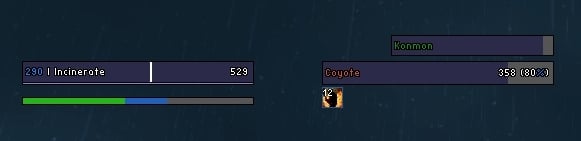
casting bar support shown on a shaman
oUF P3lim   Updated Today!   Popular!
Description:
This is a layout for oUF, in order for this Unit Frame layout to work you need to have that.
You can find a link under the big download button to the right.

oUF_P3lim is just another oUF layout, but its very light on using resources and it only does what I want.
And as well it is a good base for making your own layout (just bring some credits for my work)


Features:
  • Player Frame
  • Target Frame
  • Pet Frame
  • TargetTarget Frame
  • Focus Frame
It does not include a Group Header, so you should get some addon/layout for that.
I suggest either oUF Perfect, my own group layout (matches oUF P3lim) or oUF Grid, which is a really nice layout for most classes.


Note:
As any other oUF layouts out there, there are no in-game configuration, everything is in the lua file.
So, if you intend to change anything at all with this layout, you would have to go through the lua file(s)
WARNING: This is not an addon for the fainthearted, you will require (some) knowledge within Lua and the World of Warcraft API.


Plugins:
As many other layouts, this one supports most of the plugins made for it.
Currently supported by default are the following:

Useful Links:

Before posting a bug please read the main page on my Author Portal first.


Feel free to donate:
  Change Log - oUF P3lim
30000.43:
- Fixed truncate function
- Fixed name function
- Added DruidPower (events)
- Removed DruidMana (update)

30000.42:
- Added oUF Smooth support

30000.41:
- Update to reflect changes in plug-in

30000.40:
- Fixed combo points
- Removed CombatFeedback support
- Removed tags
- Removed pet buffs
- Added name string
- Added pet auras

30000.39:
- Removed oUF PowerSpark support
- Removed oUF ReadyCheck support

30000.38:
- Fixed druidmana updating

30000.37:
- Added frequentUpdates to health|power
- Fixed pet power color

30000.36:
- Removed frequentUpdates on health|power
- Fixed druidmana

30000.35:
- Fixed powertype changes

30000.33:
- Added frequentUpdates to Health|Power
- Fixed info string

30000.31:
- Update to 30000
- Fixed mob health values
- Added Druid Mana bar/values
- Added oUF AutoShot support
- Removed all 3.0 checks.
- Removed oUF DruidMana support

20400.29:
- Update to reflect changes in plug-in

20400.28:
- Update to reflect changes in plug-in

20400.27:
- Update to reflect changes in plug-in

20400.26:
- Update to reflect changes in oUF
- Fixed support for Experience

20400.25:
- Update to reflect changes in oUF
- Removed party header
- Removed name string
- Added tag string
- Added threat icon (wotlk)
- Added pet buffs

20400.24:
- Fixed DruidMana coloring
- Fixed reaction coloring in WotLK
- Fixed party's number of debuffs

20400.23:
- Update to reflect changes in oUF

20400.22:
- Fixed colors

20400.21:
- Update to reflect changes in oUF

20400.20-Beta:
- Fixed pet power coloring
- Updated to plugin updates

20400.19-Beta:
- Fixed name overlapping health text
- Added Experience tooltip support
- Added BarFader support for player/target/pet
- Added Debuffs to Party (curable)

20400.18-Beta:
- Fixed color function
- Fixed support for Banzai and DruidMana
- Added support for Experience

20400.17-Beta:
- Added player and target casting bars

20400.16-Beta:
- Fixed power text
- Fixed Banzai support

20400.15-Beta:
- Fixed party header spawn
- Fixed power functions
- Removed party interface option

20400.13-Beta:
- Update to reflect changes in oUF (beta)
- Fixed partyToggle events
- Added various plug-in support

20400.10:
- Fixed name function

20400.9:
- Added buff/debuff border
- Fixed buff/debuff sizing/placement

20400.8:
- Minor fixes

20400.7:
- Major fixes
- Removed raid support

20400.3:
- Initial commit
  Comments - oUF P3lim
Post A Reply
Author Comments Comment Options
Old Today, 05:11 PM  
p3lim
A Chromatic Dragonspawn
 
p3lim's Avatar
Interface Author - Click to view interfaces

Forum posts: 171
File comments: 482
Uploads: 16
If I ever create a death knight I will make custom rune display, just so its said.
p3lim is offline Report comment to moderator   Edit/Delete Message Reply With Quote
Old Today, 03:42 PM  
ShaneSveller
A Kobold Labourer
Interface Author - Click to view interfaces

Forum posts: 0
File comments: 8
Uploads: 1
Lightbulb Re: Re: Re: turn off blizzard rune(dk)

Quote:
Originally posted by ken kao
Please add the functions for the Dk. P3lim is very suitable for the DK except the rune system. Please! Thank you!
As p3lim said, this is his own personal layout. It is very kind of him to release it here for public consumption, but it is clearly on an as-is basis. He even says so on the info tab:
Quote:
it only does what I want
My suggestions are to either use another addon that allows you to move the rune graphics or display them in a new way, or to learn a little lua and get in there and hack around, and move them yourself. P3lim very helpfully provided some links on Lua and oUF specifically on the info page.

The frames you want to move are RuneButtonIndividual1 through RuneButtonIndividual6. You can see an example of doing so at the bottom of tekkub's oUF layout.

Beyond that advice, you're on your own.
ShaneSveller is offline Report comment to moderator   Edit/Delete Message Reply With Quote
Old Today, 02:34 PM  
p3lim
A Chromatic Dragonspawn
 
p3lim's Avatar
Interface Author - Click to view interfaces

Forum posts: 171
File comments: 482
Uploads: 16
Re: Re: Re: turn off blizzard rune(dk)

Quote:
Originally posted by ken kao
Please add the functions for the Dk. P3lim is very suitable for the DK except the rune system. Please! Thank you!
Its made for my usage and my usage only, its not supposed to apply to everyone that might want to download it.

I wont do something with the runes unless I find it nessisary.
p3lim is offline Report comment to moderator   Edit/Delete Message Reply With Quote
Old Today, 02:31 PM  
ken kao
A Kobold Labourer

Forum posts: 0
File comments: 24
Uploads: 0
Re: Re: turn off blizzard rune(dk)

Quote:
Originally posted by p3lim
It is somewhat intentional, I dont play a Death Knight, so I have no reason to move/hide them.
Please add the functions for the Dk. P3lim is very suitable for the DK except the rune system. Please! Thank you!
ken kao is online now Report comment to moderator   Edit/Delete Message Reply With Quote
Old Today, 02:25 PM  
p3lim
A Chromatic Dragonspawn
 
p3lim's Avatar
Interface Author - Click to view interfaces

Forum posts: 171
File comments: 482
Uploads: 16
Re: Re: Re: Font size

Quote:
Originally posted by Aluria
Öhm Sorry, i think u missunterstood me (or my english is too bad :/).. I want to set the Size of the Font up from.. donno. 10 to 12 or something like that.. I dont want to change the whole thing..
And I say again, you cant without getting ****ed up fonts. Change the font object.
p3lim is offline Report comment to moderator   Edit/Delete Message Reply With Quote
Old Today, 11:43 AM  
Aluria
A Kobold Labourer

Forum posts: 0
File comments: 15
Uploads: 1
Re: Re: Font size

Quote:
Originally posted by p3lim
[b]I dont use custom fonts, I use the fontobjects made by blizzard. They are set as the third argument in the CreateFontString() function.
You can find more fontobjects found on the following two links:
http://wowcompares.com/3039183/FrameXML/FontStyles.xml
http://wowcompares.com/3039183/FrameXML/Fonts.xml
Öhm Sorry, i think u missunterstood me (or my english is too bad :/).. I want to set the Size of the Font up from.. donno. 10 to 12 or something like that.. I dont want to change the whole thing..
Aluria is offline Report comment to moderator   Edit/Delete Message Reply With Quote
Old Today, 10:52 AM  
p3lim
A Chromatic Dragonspawn
 
p3lim's Avatar
Interface Author - Click to view interfaces

Forum posts: 171
File comments: 482
Uploads: 16
Druid Values

In the latest version I removed the DruidMana bar, which was running on an uncontrolled update script. (not good)

I now added a DruidPower bar instead.
This one now runs on events, and will only update when it should.

The difference between DruidMana and DruidPower is that DruidPower will also show energy (cat form) if its below max and youre not in cat or bear.
This is beneficial from the druid resto talent [Furor].


Was inspired by some reply to the oUF post(s)

Last edited by p3lim : 11-20-2008 at 11:00 AM.
p3lim is offline Report comment to moderator   Edit/Delete Message Reply With Quote
Old Today, 10:00 AM  
p3lim
A Chromatic Dragonspawn
 
p3lim's Avatar
Interface Author - Click to view interfaces

Forum posts: 171
File comments: 482
Uploads: 16
Re: Font size

Quote:
Originally posted by Aluria
i have a little Problem.. I've tried to set the Font of ure UF's a bit higher cause they are a bit too small.. :P But i cant find it anywhere in ure lua or in the oUF-lua itself (by haste).. So, how can i make it bigger? Need ure help!
I dont use custom fonts, I use the fontobjects made by blizzard. They are set as the third argument in the CreateFontString() function.
You can find more fontobjects found on the following two links:
http://wowcompares.com/3039183/FrameXML/FontStyles.xml
http://wowcompares.com/3039183/FrameXML/Fonts.xml


Quote:
Originally posted by Aluria
€dith: Just discovered another problem.. For me as an elemental shami i use the following Makro:

/use 13
/use 14
/cast

an so on.. Well the problem now is, that if i spam this makro (basically hacking of my "2" ) the castbar disapears and if my cast is through it just pops up n is gone again.. After i rewritten my makro by basically taking off the "/use" the problem was fixed.. Other mods like AzCastBar and the Standard Blizzardcastbar dont have this problem.. So.. Why does ure oUF_Plugin has this Problem & do u have plans to fix it?
Thats a problem with oUF, ask haste about it.
p3lim is offline Report comment to moderator   Edit/Delete Message Reply With Quote
Old Today, 09:57 AM  
p3lim
A Chromatic Dragonspawn
 
p3lim's Avatar
Interface Author - Click to view interfaces

Forum posts: 171
File comments: 482
Uploads: 16
Re: turn off blizzard rune(dk)

Quote:
Originally posted by ken kao
I'm a DK and the Blizzard rune always shows on the screen topleft. P3lim seems forget to turn off the DK rune. How can I turn it off ?
It is somewhat intentional, I dont play a Death Knight, so I have no reason to move/hide them.
p3lim is offline Report comment to moderator   Edit/Delete Message Reply With Quote
Old Yesterday, 10:45 AM  
Aluria
A Kobold Labourer

Forum posts: 0
File comments: 15
Uploads: 1
Font size

Hey there

i have a little Problem.. I've tried to set the Font of ure UF's a bit higher cause they are a bit too small.. :P But i cant find it anywhere in ure lua or in the oUF-lua itself (by haste).. So, how can i make it bigger? Need ure help!

€dith: Just discovered another problem.. For me as an elemental shami i use the following Makro:

/use 13
/use 14
/cast

an so on.. Well the problem now is, that if i spam this makro (basically hacking of my "2" ) the castbar disapears and if my cast is through it just pops up n is gone again.. After i rewritten my makro by basically taking off the "/use" the problem was fixed.. Other mods like AzCastBar and the Standard Blizzardcastbar dont have this problem.. So.. Why does ure oUF_Plugin has this Problem & do u have plans to fix it?

Last edited by Aluria : 11-20-2008 at 11:44 AM.
Aluria is offline Report comment to moderator   Edit/Delete Message Reply With Quote
Old Yesterday, 02:33 AM  
ken kao
A Kobold Labourer

Forum posts: 0
File comments: 24
Uploads: 0
turn off blizzard rune(dk)

I'm a DK and the Blizzard rune always shows on the screen topleft. P3lim seems forget to turn off the DK rune. How can I turn it off ?
ken kao is online now Report comment to moderator   Edit/Delete Message Reply With Quote
Old 11-16-2008, 02:53 PM  
p3lim
A Chromatic Dragonspawn
 
p3lim's Avatar
Interface Author - Click to view interfaces

Forum posts: 171
File comments: 482
Uploads: 16
Quote:
Originally posted by yellowbiz
Hi p3lim, love the frames.

I have this problem when I right-click on the frame and choose focus:


When I use /focus it works fine, though.

I disabled all of my addons and ran oUF + oUF_p3lim only in the picture above, just to be sure that it's not something else.
Yeah, Im familiar with that issue, and It is something I cant fix.
p3lim is offline Report comment to moderator   Edit/Delete Message Reply With Quote
Old 11-16-2008, 11:59 AM  
yellowbiz
A Defias Bandit

Forum posts: 3
File comments: 5
Uploads: 1
Hi p3lim, love the frames.

I have this problem when I right-click on the frame and choose focus:


When I use /focus it works fine, though.

I disabled all of my addons and ran oUF + oUF_p3lim only in the picture above, just to be sure that it's not something else.
yellowbiz is offline Report comment to moderator   Edit/Delete Message Reply With Quote
Old 11-11-2008, 10:02 PM  
Vivix729
A Kobold Labourer

Forum posts: 0
File comments: 5
Uploads: 0
Most likely a dumb question. I am trying to remove the castbars, but no matter what I try to delete from the castbar section, the player/target frames disappear and I just can't figure out what's going on. Any help available, TIA.
Vivix729 is offline Report comment to moderator   Edit/Delete Message Reply With Quote
Old 11-11-2008, 10:04 AM  
p3lim
A Chromatic Dragonspawn
 
p3lim's Avatar
Interface Author - Click to view interfaces

Forum posts: 171
File comments: 482
Uploads: 16
Quote:
Originally posted by coree
is it correct that no names are shown in your last version ? No target name, tot name, etc.
They work for me, make sure you use the latest version of oUF here on WoWI
p3lim is offline Report comment to moderator   Edit/Delete Message Reply With Quote
Post A Reply


Category Jump:


The Network:
EQInterface | EQ2Interface | LoTROInterface | MMOUI | War.MMOUI | WoWInterface | VGInterface | Allakhazam | Thottbot | Wowhead | Zam


MMOInterface.com Copyright ©2008
World of Warcraft is a registered Trademark of Blizzard Entertainment.
vBulletin - Copyright ©2000 - 2008, Jelsoft Enterprises Ltd.