Addon Info.
Change Log
Optional Files (0)
Archived (3)
Comments (21)
  Category: Unit Mods
Addon Information
Works with Patch 2.4
Download Latest Version.
To add favorites please register for a free account. If you already have one you need to login. How do I install this? (FAQ)
Ammo's Portal Bug Reports Feature Requests
Author:
Version:
r72358
Date:
05-02-2008 01:15 AM
Size:
6.20 Kb
Downloads:
834
Views:
3,774
Favorites:
17
MD5:
Pictures
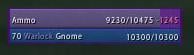
Cursed! (Purple border)
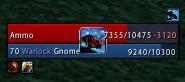
Using an icon (and oUF_Banzai, oUF_CombatFeedback)
oUF Debuff Highlight   Popular!
Rate: 5 out of 5 with 3 votes  
This is an addon that adds Debuff Highlighting to the oUF unitframes.

Whenever a unit has a debuff it will highlight the frame in the debuff color. This can be done either on
the unitframe background or a specially created frame for the task.

To use this in your oUF layout you will need one of the following:

Code:
self.DebuffHighlightBackdrop = true
This will let oUF_DebuffHighlight know to use the backdrop for debuff highlighting. The original color and alpha
of the backdrop and backdrop border will be stored and whenever the unit needs highlighting it will color the
backdrop and backdrop border in corresponding color and set the alpha. When the debuff is gone the original
color and alpha will be restored.

The other option to add Debuff Highlighting is to provide a texture (or other UI type that supports :SetVertexcolor)
on your unit frame.

Code:
local dbh = self:CreateTexture(nil, "OVERLAY")
dbh:SetAllPoints(self)
dbh:SetTexture("SomeKindOfTexturepath")
dbh:SetBlendMode("ADD")
dbh:SetVertexColor(0,0,0,0) -- set alpha to 0 to hide the texture
self.DebuffHighlight = dbh
Be warned, your healthbar is probably the best place to create a full glow texture:
Code:
local dbh = hp:CreateTexture(nil, "OVERLAY")
Because all your unit UI elements will be covering your unitframe (self) most likely.

This frame will now be used with :SetVertexColor() to highlight debuffs.

You can control the alpha of the debuff highlight on backdrop or debuffhighlight frame by setting:

Code:
self.DebuffHighlightAlpha = .5
The default value is .5 for the highlight frame and 1 for the backdrop.

If you only want to highlight debuffs that you can cure:

Code:
self.DebuffHighlightFilter = true
This is off by default.

If you want to use the actual texture of the debuff to show instead of coloring the frame do the following:

Create the self.DebuffHighlight texture and positionit, make sure it's visible (alpha not set to 0):

Code:
local dbh = hp:CreateTexture(nil, "OVERLAY")
dbh:SetWidth(32)
dbh:SetHeight(32)
dbh:SetPoint("CENTER", self, "CENTER")
self.DebuffHighlight = dbh
And set:

Code:
self.DebuffHighlightUseTexture = true

Enjoy

-Ammo
  Change Log - oUF Debuff Highlight
r72358
- Fixes issue with not highlighting a debuff if all previous debuffs had no type.

r72075
- Fix debuffhighlight not working for units that don't have buffs/debuff display enabled
- Add support for using the debuff icon texture instead of coloring a frame

r72066
- Only highlight units that the player can interact with for curing

r72056
- Initial upload to wowinterface
  Optional Files - oUF Debuff Highlight
Sorry, there are currently no optional files available.
  Archived Versions - oUF Debuff Highlight
File Name
Version
Size
Author
Date
r72075
5.95 Kb
Ammo
04-29-2008 10:50 AM
r72066
4.71 Kb
Ammo
04-29-2008 07:40 AM
r72066
4.33 Kb
Ammo
04-29-2008 04:07 AM
  Comments - oUF Debuff Highlight
Post A Reply
Author Comments Comment Options
Old 05-01-2008, 07:13 PM  
villiv
A Kobold Labourer
Interface Author - Click to view interfaces

Forum posts: 0
File comments: 7
Uploads: 1
thx for reply, Ammo.

ok maybe i'm old school people ... still in the "Decursive vs Blizz" fashion. but for arena ... i'll be looking for the another way i think.

anyway, thx again for your effort. i really enjoy these functions in your layout too. plz keep good work.


regards.
villiv is offline Report comment to moderator   Edit/Delete Message Reply With Quote
Old 05-01-2008, 06:57 AM  
Ammo
A Murloc Raider
Interface Author - Click to view interfaces

Forum posts: 6
File comments: 44
Uploads: 18
Quote:
Originally posted by villiv
hello Ammo.

is there a way to set the filter to backdrop and actual texture separately?

i'd like to see all debuffs on my party/raid as a actual texture to check, and just want to see some more noticeable signals for my cure work.

let me know if i don't make any sense ... i'm so bad at english anyway.


regards.
Not possible, and probably never will be either.

-Ammo
Ammo is offline Report comment to moderator   Edit/Delete Message Reply With Quote
Old 04-30-2008, 07:29 PM  
villiv
A Kobold Labourer
Interface Author - Click to view interfaces

Forum posts: 0
File comments: 7
Uploads: 1
hello Ammo.

is there a way to set the filter to backdrop and actual texture separately?

i'd like to see all debuffs on my party/raid as a actual texture to check, and just want to see some more noticeable signals for my cure work.

let me know if i don't make any sense ... i'm so bad at english anyway.


regards.
villiv is offline Report comment to moderator   Edit/Delete Message Reply With Quote
Old 04-29-2008, 10:57 AM  
Ammo
A Murloc Raider
Interface Author - Click to view interfaces

Forum posts: 6
File comments: 44
Uploads: 18
Quote:
Originally posted by Neal
Like Grid? Yeah!^^

Will it possible to use there a own Border? Blizzlike buffborder sucks
With some tricksyness yes

You could make self.DebuffHighlight not a real frame but a dummy table with a SetTexture function that handles setting the correct texture on the real debuff frame and showing the border. Hide everythign again when nil gets passed to your SetTexture function.

-Ammo
Ammo is offline Report comment to moderator   Edit/Delete Message Reply With Quote
Old 04-29-2008, 10:12 AM  
Neal
A Kobold Labourer
 
Neal's Avatar
Interface Author - Click to view interfaces

Forum posts: 0
File comments: 13
Uploads: 4
Quote:
Originally posted by Ammo
I added support for using the actual debuff icon texture instead of coloring a texture as well. I will update on wowinterface later today.

-Ammo
Like Grid? Yeah!^^

Will it possible to use there a own Border? Blizzlike buffborder sucks

Last edited by Neal : 04-29-2008 at 10:14 AM.
Neal is offline Report comment to moderator   Edit/Delete Message Reply With Quote
Old 04-29-2008, 09:30 AM  
Ammo
A Murloc Raider
Interface Author - Click to view interfaces

Forum posts: 6
File comments: 44
Uploads: 18
Quote:
Originally posted by Neal
The new version on the wowace svn works great! Tanks!
I added support for using the actual debuff icon texture instead of coloring a texture as well. I will update on wowinterface later today.

-Ammo
Ammo is offline Report comment to moderator   Edit/Delete Message Reply With Quote
Old 04-29-2008, 09:06 AM  
Neal
A Kobold Labourer
 
Neal's Avatar
Interface Author - Click to view interfaces

Forum posts: 0
File comments: 13
Uploads: 4
The new version on the wowace svn works great! Tanks!
Neal is offline Report comment to moderator   Edit/Delete Message Reply With Quote
Old 04-29-2008, 08:46 AM  
Neal
A Kobold Labourer
 
Neal's Avatar
Interface Author - Click to view interfaces

Forum posts: 0
File comments: 13
Uploads: 4
Quote:
Originally posted by Ammo


You don't use buffs or debuffs on that frame right?

-Ammo
yes
Neal is offline Report comment to moderator   Edit/Delete Message Reply With Quote
Old 04-29-2008, 08:41 AM  
Ammo
A Murloc Raider
Interface Author - Click to view interfaces

Forum posts: 6
File comments: 44
Uploads: 18
Quote:
Originally posted by Neal
Yes i get a red texture
it was a bug in oUF_DebuffHighlight I think.

You don't use buffs or debuffs on that frame right?

I have fixed it. And will upload a new version shortly.

-Ammo
Ammo is offline Report comment to moderator   Edit/Delete Message Reply With Quote
Old 04-29-2008, 08:03 AM  
Neal
A Kobold Labourer
 
Neal's Avatar
Interface Author - Click to view interfaces

Forum posts: 0
File comments: 13
Uploads: 4
Quote:
Originally posted by Ammo
Your code looks alright, but does the texture show up when you do:

dbh:SetVertexColor(1, 0, 0, 1) instead of dbh:SetVertexColor(0,0,0,0)

That should always give a red texture on your frame, if that doesn't work then it will never show up through oUF_DebuffHighlight either

-Ammo
Yes i get a red texture
Neal is offline Report comment to moderator   Edit/Delete Message Reply With Quote
Old 04-29-2008, 07:55 AM  
Neal
A Kobold Labourer
 
Neal's Avatar
Interface Author - Click to view interfaces

Forum posts: 0
File comments: 13
Uploads: 4
And only

self.DebuffHighlightBackdrop = true

does not work too I use the german client.
Neal is offline Report comment to moderator   Edit/Delete Message Reply With Quote
Old 04-29-2008, 07:48 AM  
Ammo
A Murloc Raider
Interface Author - Click to view interfaces

Forum posts: 6
File comments: 44
Uploads: 18
Re: Re: Re: Re: Re: Hi

Quote:
Originally posted by nodq
Thanks, i will try it out later.

One Question, where do i get good Textures for Debuff highlighting ?
I wouldn't know, I myself use the background highlighting in oUF_Ammo

you could use any of the highlighting textures used in wow or get someone to make one for you.

-Ammo
Ammo is offline Report comment to moderator   Edit/Delete Message Reply With Quote
Old 04-29-2008, 07:45 AM  
nodq
A Kobold Labourer

Forum posts: 0
File comments: 64
Uploads: 0
Re: Re: Re: Re: Hi

Quote:
Originally posted by Ammo
I've fixed it on the wowace svn. If you can't cast helpful spells on the unit it won't highlight.

-Ammo

Thanks, i will try it out later.

One Question, where do i get good Textures for Debuff highlighting ?
nodq is offline Report comment to moderator   Edit/Delete Message Reply With Quote
Old 04-29-2008, 07:32 AM  
Ammo
A Murloc Raider
Interface Author - Click to view interfaces

Forum posts: 6
File comments: 44
Uploads: 18
Quote:
Originally posted by Neal
It doesn't work ...im to stupid^^

local dbh = hp:CreateTexture(nil, "OVERLAY")
dbh:SetAllPoints(hp)
dbh:SetTexture("Interface\\AddOns\\oUF_Neal\\textures\\Debuff.tga")
dbh:SetBlendMode("ADD")
dbh:SetVertexColor(0, 0, 0, 0)
self.DebuffHighlightAlpha = 1
self.DebuffHighlightFilter = true
self.DebuffHighlight = dbh

Why it doesn't work? I will use a debuffborer like Pitbull.

Ps.: Sry for my very bad english^^
Your code looks alright, but does the texture show up when you do:

dbh:SetVertexColor(1, 0, 0, 1) instead of dbh:SetVertexColor(0,0,0,0)

That should always give a red texture on your frame, if that doesn't work then it will never show up through oUF_DebuffHighlight either

-Ammo
Ammo is offline Report comment to moderator   Edit/Delete Message Reply With Quote
Old 04-29-2008, 07:22 AM  
Neal
A Kobold Labourer
 
Neal's Avatar
Interface Author - Click to view interfaces

Forum posts: 0
File comments: 13
Uploads: 4
It doesn't work ...im to stupid^^

local dbh = hp:CreateTexture(nil, "OVERLAY")
dbh:SetAllPoints(hp)
dbh:SetTexture("Interface\\AddOns\\oUF_Neal\\textures\\Debuff.tga")
dbh:SetBlendMode("ADD")
dbh:SetVertexColor(0, 0, 0, 0)
self.DebuffHighlightAlpha = 1
self.DebuffHighlightFilter = true
self.DebuffHighlight = dbh

Why it doesn't work? I will use a debuffborer like Pitbull.

Ps.: Sry for my very bad english^^
Neal is offline Report comment to moderator   Edit/Delete Message Reply With Quote
Post A Reply


Category Jump:


The Network:
EQInterface | EQ2Interface | LoTROInterface | MMOInterface | WoWInterface | VGInterface | Allakhazam | Thottbot | Wowhead | Zam


MMOInterface.com Copyright ©2008
World of Warcraft is a registered Trademark of Blizzard Entertainment.
vBulletin - Copyright ©2000 - 2008, Jelsoft Enterprises Ltd.