Addon Info.
Change Log
Optional Files (0)
Archived (4)
Comments (33)
  Category: Plug-Ins & Patches
Addon Information
Download Latest Version.
To add favorites please register for a free account. If you already have one you need to login. How do I install this? (FAQ)
Ammo's Portal Bug Reports Feature Requests

This file is a Addon for oUF by haste. You must have that installed before this Addon will work.

Author:
Version:
r79326
Date:
07-28-2008 05:14 AM
Size:
2.95 Kb
Downloads:
3,548
Favorites:
75
MD5:
Pictures
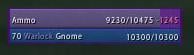
Cursed! (Purple border)
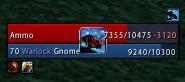
Using an icon (and oUF_Banzai, oUF_CombatFeedback)
oUF Debuff Highlight   Popular!
This is an addon that adds Debuff Highlighting to the oUF unitframes.

Whenever a unit has a debuff it will highlight the frame in the debuff color. This can be done either on
the unitframe background or a specially created frame for the task.

To use this in your oUF layout you will need one of the following:

Code:
self.DebuffHighlightBackdrop = true
This will let oUF_DebuffHighlight know to use the backdrop for debuff highlighting. The original color and alpha
of the backdrop and backdrop border will be stored and whenever the unit needs highlighting it will color the
backdrop and backdrop border in corresponding color and set the alpha. When the debuff is gone the original
color and alpha will be restored.

The other option to add Debuff Highlighting is to provide a texture (or other UI type that supports :SetVertexcolor)
on your unit frame.

Code:
local dbh = self:CreateTexture(nil, "OVERLAY")
dbh:SetAllPoints(self)
dbh:SetTexture("SomeKindOfTexturepath")
dbh:SetBlendMode("ADD")
dbh:SetVertexColor(0,0,0,0) -- set alpha to 0 to hide the texture
self.DebuffHighlight = dbh
Be warned, your healthbar is probably the best place to create a full glow texture:
Code:
local dbh = hp:CreateTexture(nil, "OVERLAY")
Because all your unit UI elements will be covering your unitframe (self) most likely.

This frame will now be used with :SetVertexColor() to highlight debuffs.

You can control the alpha of the debuff highlight on backdrop or debuffhighlight frame by setting:

Code:
self.DebuffHighlightAlpha = .5
The default value is .5 for the highlight frame and 1 for the backdrop.

If you only want to highlight debuffs that you can cure:

Code:
self.DebuffHighlightFilter = true
This is off by default.

If you want to use the actual texture of the debuff to show instead of coloring the frame do the following:

Create the self.DebuffHighlight texture and positionit, make sure it's visible (alpha not set to 0):

Code:
local dbh = hp:CreateTexture(nil, "OVERLAY")
dbh:SetWidth(32)
dbh:SetHeight(32)
dbh:SetPoint("CENTER", self, "CENTER")
self.DebuffHighlight = dbh
And set:

Code:
self.DebuffHighlightUseTexture = true

Enjoy

-Ammo
  Change Log - oUF Debuff Highlight
r79326
- Update for latest oUF

r72358
- Fixes issue with not highlighting a debuff if all previous debuffs had no type.

r72075
- Fix debuffhighlight not working for units that don't have buffs/debuff display enabled
- Add support for using the debuff icon texture instead of coloring a frame

r72066
- Only highlight units that the player can interact with for curing

r72056
- Initial upload to wowinterface
  Optional Files - oUF Debuff Highlight
Sorry, there are currently no optional files available.
  Archived Versions - oUF Debuff Highlight
File Name
Version
Size
Author
Date
r72358
6kB
Ammo
05-02-2008 02:15 AM
r72075
6kB
Ammo
04-29-2008 11:50 AM
r72066
5kB
Ammo
04-29-2008 08:40 AM
r72066
4kB
Ammo
04-29-2008 05:07 AM
  Comments - oUF Debuff Highlight
Post A Reply
Author Comments Comment Options
Old 10-27-2008, 12:37 PM  
Ammo
A Murloc Raider
Interface Author - Click to view interfaces

Forum posts: 6
File comments: 69
Uploads: 22
Quote:
Originally posted by Balkeep
Just finished writing things to show debuff Grid-alike (small green(or w/e color debuff is) square at bottom felt of UF) and i totaly like it hehe.

But what i find out is in ur main code cleansing list looks like this:
Code:
	SHAMAN = { Poison = true, Disease = true, },
and its not completely true cuz since 3.0 shamans can decurse aswel. Now i will fix it myself but can u please fix this in ur addon too? Thx!
I have not updated this for 3.0, I will do so shortly.

I had a PC meltdown, the magic smoke was released, and am awaiting a new wow capable machine

-Ammo
Ammo is offline Report comment to moderator   Edit/Delete Message Reply With Quote
Old 10-27-2008, 11:00 AM  
Balkeep
A Murloc Raider
 
Balkeep's Avatar

Forum posts: 6
File comments: 2
Uploads: 1
Just finished writing things to show debuff Grid-alike (small green(or w/e color debuff is) square at bottom felt of UF) and i totaly like it hehe.

But what i find out is in ur main code cleansing list looks like this:
Code:
	SHAMAN = { Poison = true, Disease = true, },
and its not completely true cuz since 3.0 shamans can decurse aswel. Now i will fix it myself but can u please fix this in ur addon too? Thx!
Balkeep is offline Report comment to moderator   Edit/Delete Message Reply With Quote
Old 10-02-2008, 07:56 PM  
zork
An Aku'mai Servant
 
zork's Avatar
Interface Author - Click to view interfaces

Forum posts: 36
File comments: 295
Uploads: 9
I found the bug that hinders the mod from show stuff when debuffs have no debufftype.

The bug is caused by this condition:
Code:
    if debufftype and not filter or (filter and dispellist[debufftype]) then
      return debufftype, texture
    end
The problem is that if you have no debuff filter on you want textures that are NOT part of a debufftype too.

It should be
Code:
    if texture and not filter or (filter and dispellist[debufftype]) then
      return debufftype, texture
    end
Last change must be done in PostUpdateAura.

Instead of
Code:
  if debuffType then
    local color = DebuffTypeColor[debuffType]
It should be:
Code:
  if texture then
    local color
    if debuffType then
      color = DebuffTypeColor[debuffType]
    else
      color = { r = 1, g = 0, b = 0, a = 1 }
    end
This will allow a red border for debuffs of no special type.

Last edited by zork : 10-02-2008 at 08:42 PM.
zork is offline Report comment to moderator   Edit/Delete Message Reply With Quote
Old 09-26-2008, 10:08 PM  
Atrophia
A Kobold Labourer
Interface Author - Click to view interfaces

Forum posts: 0
File comments: 26
Uploads: 5
Quote:
The original color and alpha
of the backdrop and backdrop border will be stored and whenever the unit needs highlighting it will color the
backdrop and backdrop border in corresponding color and set the alpha. When the debuff is gone the original
color and alpha will be restored.
At the moment the BackdropBorderColor is not being changed. Shouldn't the below function read like this?

Code:
local function PostUpdateAura(object, event, unit)
	local debuffType, texture  = GetDebuffType(unit, object.DebuffHighlightFilter)
	if debuffType then
		local color = DebuffTypeColor[debuffType] 
		if object.DebuffHighlightBackdrop then
			object:SetBackdropColor(color.r, color.g, color.b, object.DebuffHighlightAlpha or 1)
			object:SetBackdropBorderColor(color.r, color.g, color.b, object.DebuffHighlightAlpha or 1)
		elseif object.DebuffHighlightUseTexture then
			object.DebuffHighlight:SetTexture(texture)
		else
			object.DebuffHighlight:SetVertexColor(color.r, color.g, color.b, object.DebuffHighlightAlpha or .5)
		end
	else
		if object.DebuffHighlightBackdrop then
			local color = origColors[object]
			object:SetBackdropColor(color.r, color.g, color.b, color.a)
			color = origBorderColors[object]
			object:SetBackdropBorderColor(color.r, color.g, color.b, color.a)
		elseif object.DebuffHighlightUseTexture then
			object.DebuffHighlight:SetTexture(nil)
		else
			local color = origColors[object]
			object.DebuffHighlight:SetVertexColor(color.r, color.g, color.b, color.a)
		end
	end
end
Atrophia is offline Report comment to moderator   Edit/Delete Message Reply With Quote
Old 09-13-2008, 05:21 AM  
ichik
A Kobold Labourer

Forum posts: 0
File comments: 12
Uploads: 0
I have only one question (since i'm not very experienced with lua-coding) how to disable highlight for unstable affliction?
ichik is offline Report comment to moderator   Edit/Delete Message Reply With Quote
Old 08-18-2008, 04:19 AM  
Ammo
A Murloc Raider
Interface Author - Click to view interfaces

Forum posts: 6
File comments: 69
Uploads: 22
Could this be an issue with your texture?

The code looks fine, try using a different highlight texture.

-Ammo
Ammo is offline Report comment to moderator   Edit/Delete Message Reply With Quote
Old 08-17-2008, 12:56 PM  
Flarin
Premium Member
 
Flarin's Avatar
Premium Member
Interface Author - Click to view interfaces

Forum posts: 215
File comments: 97
Uploads: 1
Hello- I am having trouble diagnosing my issues and I am hoping you can point me in the right direction.

In my main styling function I am using:

Code:
    -- oUF_DebuffHighlight
        local dbh = hp:CreateTexture(nil, "OVERLAY")
        dbh:SetAllPoints(hp)
        dbh:SetTexture("Interface\\AddOns\\oUF_FlarinV2\\media\\highlight.tga")
        dbh:SetBlendMode("ADD")
        dbh:SetVertexColor(0, 0, 0, 0)
        self.DebuffHighlightAlpha = 1
        self.DebuffHighlightFilter = false
        self.DebuffHighlight = dbh
For some reason I get no indication of debuff (trying to force things to poison you is such a pain).

However, when I use:

Code:
        local dbh = hp:CreateTexture(nil, "OVERLAY") -- support of oUF_DebuffHighlight, which i highly recommend
        dbh:SetWidth(22)
        dbh:SetHeight(22)
        dbh:SetPoint("CENTER", self, "CENTER")
        dbh:SetBlendMode("BLEND")
        self.DebuffHighlightUseTexture = true
        self.DebuffHighlightFilter = true
        self.DebuffHighlight = dbh
I DO get the icon on top of my frame. I realize this is probably because my lack of understanding of exactly how the frames work, but i am hoping you can shed some light for me.

EDIT: Leaving my original question just in case it helps someone else. I noticed with the code below that once I changed the vertex color from 0,0,0 to some other value I started to see my texture come through. Also the "BLEND" mode worked out pretty cool for me - makes the debuff very visable on my frames.

I was wondering - perhaps Ammo or some other Lua master can tell me what their thoughts are on why changing the SetVertexColor from 0,0,0 to antoher value did the trick? It looks like oUF_Debuff changes this value to the color of the debuff - ie green for poison etc, yet at 0,0,0 it seemed to fail?

Anyway - here is a working routine:

Code:
        local dbh = hp:CreateTexture(nil, "OVERLAY")
        dbh:SetAllPoints(hp)
        dbh:SetTexture("Interface\\AddOns\\oUF_FlarinV2\\media\\highlight.tga")
        dbh:SetBlendMode("BLEND")
        dbh:SetVertexColor(.85, 0, 1, 0)
        self.DebuffHighlightAlpha = 1
        self.DebuffHighlightFilter = false
        self.DebuffHighlight = dbh
__________________
"I will crush and destroy and...ooo...shiny..."

Last edited by Flarin : 08-17-2008 at 02:50 PM.
Flarin is offline Report comment to moderator   Edit/Delete Message Reply With Quote
Old 08-17-2008, 09:09 AM  
Ammo
A Murloc Raider
Interface Author - Click to view interfaces

Forum posts: 6
File comments: 69
Uploads: 22
Quote:
Originally posted by shadowknight456
Heya, just wondering if it would be possible to get this to only shade the border of my frame (kind of like PitBull) Thanks in advance =D
read the included readme.txt for your answer.
Ammo is offline Report comment to moderator   Edit/Delete Message Reply With Quote
Old 08-16-2008, 12:47 AM  
shadowknight456
A Defias Bandit

Forum posts: 2
File comments: 9
Uploads: 0
Heya, just wondering if it would be possible to get this to only shade the border of my frame (kind of like PitBull) Thanks in advance =D
shadowknight456 is offline Report comment to moderator   Edit/Delete Message Reply With Quote
Old 08-11-2008, 08:42 AM  
Ammo
A Murloc Raider
Interface Author - Click to view interfaces

Forum posts: 6
File comments: 69
Uploads: 22
I see no reason to?

Unless you can come up with one, no.

-Ammo

Quote:
Originally posted by dutorien
could you please add this :

Code:
if debufftype == nil then debufftype = "none" end
to line 22 to support the debuff type "none"

Best regards !

Duto
Ammo is offline Report comment to moderator   Edit/Delete Message Reply With Quote
Old 08-10-2008, 02:03 PM  
dutorien
A Murloc Raider

Forum posts: 5
File comments: 5
Uploads: 0
could you please add this :

Code:
if debufftype == nil then debufftype = "none" end
to line 22 to support the debuff type "none"

Best regards !

Duto
dutorien is offline Report comment to moderator   Edit/Delete Message Reply With Quote
Old 08-10-2008, 02:37 AM  
khangg
A Deviate Faerie Dragon

Forum posts: 13
File comments: 34
Uploads: 1
I'm not very good with oUF, so this may sound stupid :S

I noticed in the picture that you had a border around your unitframe, I'm currently using Flarin's oUF layout, how do I achieve this border?
khangg is offline Report comment to moderator   Edit/Delete Message Reply With Quote
Old 05-01-2008, 08:13 PM  
villiv
A Kobold Labourer
Interface Author - Click to view interfaces

Forum posts: 1
File comments: 21
Uploads: 3
thx for reply, Ammo.

ok maybe i'm old school people ... still in the "Decursive vs Blizz" fashion. but for arena ... i'll be looking for the another way i think.

anyway, thx again for your effort. i really enjoy these functions in your layout too. plz keep good work.


regards.
villiv is online now Report comment to moderator   Edit/Delete Message Reply With Quote
Old 05-01-2008, 07:57 AM  
Ammo
A Murloc Raider
Interface Author - Click to view interfaces

Forum posts: 6
File comments: 69
Uploads: 22
Quote:
Originally posted by villiv
hello Ammo.

is there a way to set the filter to backdrop and actual texture separately?

i'd like to see all debuffs on my party/raid as a actual texture to check, and just want to see some more noticeable signals for my cure work.

let me know if i don't make any sense ... i'm so bad at english anyway.


regards.
Not possible, and probably never will be either.

-Ammo
Ammo is offline Report comment to moderator   Edit/Delete Message Reply With Quote
Old 04-30-2008, 08:29 PM  
villiv
A Kobold Labourer
Interface Author - Click to view interfaces

Forum posts: 1
File comments: 21
Uploads: 3
hello Ammo.

is there a way to set the filter to backdrop and actual texture separately?

i'd like to see all debuffs on my party/raid as a actual texture to check, and just want to see some more noticeable signals for my cure work.

let me know if i don't make any sense ... i'm so bad at english anyway.


regards.
villiv is online now Report comment to moderator   Edit/Delete Message Reply With Quote
Post A Reply


Category Jump:


The Network:
EQInterface | EQ2Interface | LoTROInterface | MMOUI | War.MMOUI | WoWInterface | VGInterface | Allakhazam | Thottbot | Wowhead | Zam


MMOInterface.com Copyright ©2008
World of Warcraft is a registered Trademark of Blizzard Entertainment.
vBulletin - Copyright ©2000 - 2008, Jelsoft Enterprises Ltd.