Addon Information
Works with 3.1
Download Latest Version.
To add favorites please register for a free account. If you already have one you need to login. How do I install this? (FAQ)
Author:
Version:
1.2
Date:
07-02-2009 10:31 AM
Size:
15.66 Kb
Downloads:
31,716
Favorites:
258
MD5:
Pictures
Click to enlarge
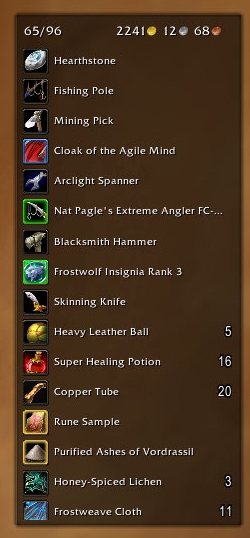
cargBags_Aurora
Click to enlarge
cargBags_Nivaya
Click to enlarge
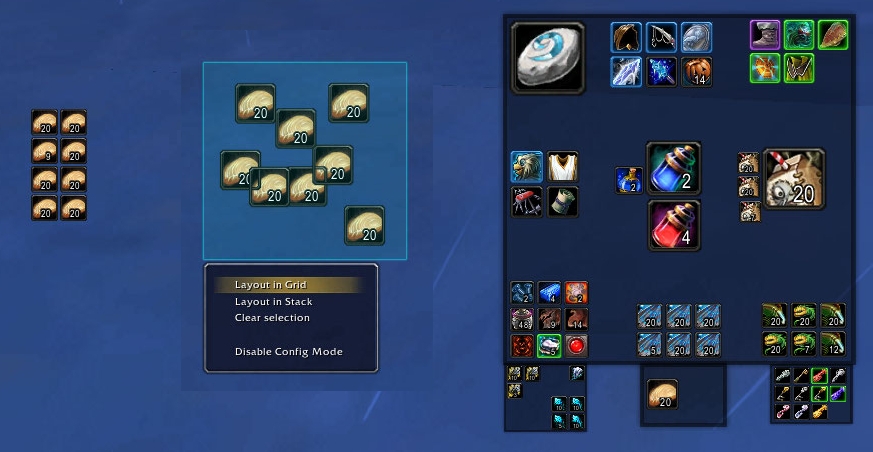
cargBags_Pernobilis
cargBags   Updated Today!   Popular! (More than 5000 hits)
cargBags is a lightweight and modular bag framework. It is designed that you can completely focus on how your items are displayed and sorted rather than caring about getting item info, updating your bags or handle interaction with items. You can define how many virtual bags you'd like to have and what items should go into it.

The core addon only moves and sorts information between the handler and the layout - it's up to your layout how to present the items to the user!

So, to see something going on, you need a layout! See below or on the "Optional Files"-tab for additonal resources.


Filtering
cargBags can react on special rules or filters to check if an item goes into that bag, but it's completely optional. So there's the possibility to make a complete all-in-one bag or separate small bags which hide gray items or show only keys, for example.

Modular
There's the possibility to add/modify parts of cargBags on all sides. You could write a custom layout - or just a small different money display which other layouts can easily spawn in their code. Or just hook into the backend, the item data, and manipulate it, e.g. writing a handler which displays the contents of some sort of database rather than your inventory.

Lightweight
cargBags tries to be efficient in both terms of CPU- and memory usage and there are thoughts on optimization before almost every update.

But aren't item filters in conflict with the term 'lightweight'?
Well, it depends on which features you'd like to have, but the default configuration is about only 50-60 kb including the layout. The CPU-usage is of course a bit higher because of the item filters, but it tries to only do the work which is needed to be done.
Item buttons which are not used will be recycled for later use, so there are no extra frames generated which are not needed.


Default features
  • item filters
  • modular: custom layouts, plugins or handlers
  • lightweight: strip out features you don't need
  • comes with money display, space indicator and bag button bar


Additional resources and help
Planned features for 2.0
  • stack compression
  • include GetInventoryItemCount()
  • guild bank support
  • additional default plugins (e.g. search)

And of course, please drop a comment for bugs. For feature requests, help or discussion which do not relate to the core, please use the mentioned thread above!
  Change Log - cargBags
Changes to the core prior to version 1.0 are located in the changelog.txt.

cargBags (core)
1.2
* first tooltip-scanning code, if you have wishes for more parsed infos than bindOn,
* please let me know =)
- updated for 3.2
- fixed item.id not working properly
- new item data: item.bindOn - returns "equip", "pickup", "account", "quest", "use" or nil
- 3.2 only: new item data: item.stats - returns a table of all stats of the item (see GetItemStats() for info)
- 3.2 only: new item data: item.sellValue - returns the sellValue in copper of an item
- new plugin: DataBroker - displays a databroker-object, the addon cargoShip is needed for that

1.1 r431
* completely rewritten item-data fetching (should go faster now)
* handlers before version 1.1 are not compatible
- new item data: item.id - returns the item id extracted from the link
- new item data: item.bagType - returns the type of the item's bag
- you can now add your own data to the item-table by adding a function in cargBags.ItemKeys["keyName"]
- new function: object:GetItemInfo(bagID, slotID) - returns the item table for the specified slot
- debug-mode included, see top of core.lua for details

1.0.8 r426
- new property: object.PositionEveryTime - set to true to call UpdateButtonPositions every update
- new pipe function: handler.GetContainerItemLink(bagID, slotID)
- new pipe function: handler.GetContainerItemInfo(bagID, slotID)

1.0.7 r424
- fixed keyring not initializing
- rewritten iterator-function, you can now supplement a table-sort-function in cargBags:IterateBags()
- object's buttons are now available as table-keys in object.Buttons
- fixed a typo when using the bagstring "backpack+bags"
- plugins can now be spawned outside of objects by using cargBags.SpawnPlugin(...)

1.0.6 r413
- fixed the button.bagID-errors

1.0.5 r410
- fixed problem with hidden bags
- fixed plugins not updating on login
- lots of comments in the files added
- fixed bagType not being stored in cargBags.Bags[bagID]

1.0.4 r402
- pass arguments to Update-callbacks
- timed events to reduce updating
- new callback function: cargBags:PreCheckFilters(item, updateType)

1.0.3 r398
- silent mode for setting active handler and style (set #arg2 to 'true'), returns true on success
- update bags only after init
- new callback function: object:PreUpdateBags() - fired before an object is updated
- new callback function: object:PostUpdateBags() - fired after an object is updated

1.0.2 r387
- space indicator can now fetch information of defined bags (like BagBar)
- new function cargBags:ParseBags(bags) - returns id's of bag-strings like "bags" or "bank"
- some changes on showing/hiding buttons (hopefully fixes the appearing of unused buttons)
- style-arguments changed: style(settings, self, name, ...)

1.0.1 r383
* updated .toc for patch 3.1
* removed property: cargBags.FreezeButtons - don't think it's really needed
* fixed cooldowns not updating on item move
* new callback function: object:PostCreateBag(bag, bagID) - fired after a bag was created in the object

1.0
* COMPLETE REWRITE
* your old layout won't work with this new version without major changes!
* be aware that most previous callback functions for the layout are removed / modified due to the changes
- cargBags now supports filters for item-based placing!
- unused buttons are now recycled to save memory and cpu time
- item quality glow removed, it is now handled by the layout
- additional elements are now spawned with the new plugin system
- see object:RegisterPlugin(name, func)
- and object:SpawnPlugin(name, ...)
- new callback function: object: object:UpdateButton(button, item)
- new callback function: object: object:UpdateButtonLock(button, item)
- new callback function: object: object:UpdateButtonCooldown(button, item)
  Optional Files - cargBags
File Name
Version
Size
Author
Date
Type
r29
13kB
06-25-2009 04:59 PM
Addon
1.1
4kB
06-25-2009 12:27 PM
Addon
r14
12kB
06-18-2009 06:57 AM
Addon
2.0
7kB
06-01-2009 06:12 AM
Addon
1.0
5kB
04-12-2009 10:10 AM
Addon
  Archived Versions - cargBags
File Name
Version
Size
Author
Date
1.1
14kB
Cargor
06-25-2009 12:27 PM
1.0.8
14kB
Cargor
06-01-2009 06:28 AM
1.0.7
14kB
Cargor
06-01-2009 06:06 AM
1.0.6
14kB
Cargor
05-21-2009 04:54 PM
1.0.5
14kB
Cargor
05-20-2009 11:12 AM
1.0.4
13kB
Cargor
05-16-2009 08:15 AM
1.0.3
12kB
Cargor
05-13-2009 09:17 AM
1.0.2
12kB
Cargor
05-09-2009 02:36 PM
1.0.1
12kB
Cargor
04-19-2009 09:49 AM
1.0
11kB
Cargor
04-12-2009 09:57 AM
0.4.4.1 r343
13kB
Cargor
03-23-2009 01:40 PM
  Comments - cargBags
Post A Reply
Author Comments Comment Options
Old Today, 12:24 PM  
Cargor
A Cyclonian
 
Cargor's Avatar
Interface Author - Click to view interfaces

Forum posts: 47
File comments: 163
Uploads: 13
It's a matter of the layout (_Pernobilis in this case) and not cargBags itself, so please post further details in that comments section (:

I plan on rewriting _Pernobilis sometime in the future, but can't give an exact date. But you can fix the issue by yourself by going into cargBags_Pernobilis/layout.lua down to line 258 where it reads background:SetFrameStrata("BACKGROUND").

Replace it with the following and it should work:
Code:
background:SetFrameStrata("HIGH")
background:SetFrameLevel(1)
__________________
« Homepage | Subversion »
Cargor is offline Report comment to moderator   Edit/Delete Message Reply With Quote
Old Today, 12:02 PM  
Skylinee
A Kobold Labourer

Forum posts: 0
File comments: 105
Uploads: 0
Could you please make cargBags stay ''on top'' of other addons? Example: http://i43.tinypic.com/ir6fwz.jpg


This also happens with ShadowedUnitFrames i think.

Edit: Happens with all addons, blank unfilled space isn't overlapping other addons.

Last edited by Skylinee : 07-02-2009 at 12:06 PM.
Skylinee is offline Report comment to moderator   Edit/Delete Message Reply With Quote
Old Yesterday, 02:54 PM  
Zveroboi
A Defias Bandit

Forum posts: 3
File comments: 27
Uploads: 0
Thx a lot... i hope it will keep working when 3.2 comes live..
Zveroboi is offline Report comment to moderator   Edit/Delete Message Reply With Quote
Old 06-30-2009, 04:16 AM  
Cargor
A Cyclonian
 
Cargor's Avatar
Interface Author - Click to view interfaces

Forum posts: 47
File comments: 163
Uploads: 13
So, first of all, you're using the Aurora-layout, right? I didn't check for it, but you basically have to post on the comments section of the layout, not the cargBags core

They're in cargBags_Aurora/aurora.lua - sorry that I forgot to mention it :/
The key word you're looking for is "Filter Functions" - You can see the differen filters defined below and it should be easy to add the ones I've written.
Below it comes the bag object spawning, you can see the bag "cBags_TradeGoods" somewhere down there - just add the second code part below the whole paragraph of tradegoods.

And I would suggest downloading a more advanced editor, for most code-changes line-numbers are an absolute must-have and syntax-highlighting is really nice. I suggest Notepad++.

Don't expect any config-GUI coming soon, it's on very low priority and I don't know if I'll ever include one. I just wanted cargBags to stay simple and lightweight.
__________________
« Homepage | Subversion »
Cargor is offline Report comment to moderator   Edit/Delete Message Reply With Quote
Old 06-30-2009, 03:48 AM  
Zveroboi
A Defias Bandit

Forum posts: 3
File comments: 27
Uploads: 0
Quote:
Originally posted by Cargor
You can see the filters defined in line 123 and downwards, just add two new ones...
And then just spawn two new bag objects before/below the tradegoods one (l. 150)...
Good to know but where are those lines? I mean are they inside core.lua or where ?... Sry but its hard to navigate inside unknown stuff :P

P.S. and sry but can u tell me after what "-- comment" i can find needed lines?

P.P.S. if u will re-make it for 3.2 it would be n1 to see in-game options for "new-filter-setups"

Last edited by Zveroboi : 06-30-2009 at 04:07 AM.
Zveroboi is offline Report comment to moderator   Edit/Delete Message Reply With Quote
Old 06-28-2009, 07:00 AM  
Cargor
A Cyclonian
 
Cargor's Avatar
Interface Author - Click to view interfaces

Forum posts: 47
File comments: 163
Uploads: 13
You can see the filters defined in line 123 and downwards, just add two new ones:
Code:
local onlyOres = function(item) return item.subType == "Metal & Stone") end
local onlyHerbs = function(item) return item.subType == "Herbs") end
Please note that the subType is localized, so it differs if you use another client than enUS/enGB. You can find a complete list of all types and subTypes here: http://www.wowwiki.com/ItemType

And then just spawn two new bag objects before/below the tradegoods one (l. 150):
Code:
local ores = cargBags:Spawn("cBags_Ores", "Ores")
	ores:SetFilter(onlyOres, true)
	ores:SetFilter(onlyBags, true)
	tradeBag:AddFrame(ores)

local herbs = cargBags:Spawn("cBags_Herbs", "Herbs")
	herbs:SetFilter(onlyHerbs, true)
	herbs:SetFilter(onlyBags, true)
	tradeBag:AddFrame(herbs)
__________________
« Homepage | Subversion »
Cargor is offline Report comment to moderator   Edit/Delete Message Reply With Quote
Old 06-28-2009, 03:16 AM  
Zveroboi
A Defias Bandit

Forum posts: 3
File comments: 27
Uploads: 0
Hi! Any chanse to add my own fulters? My Dk is miner-herb so i wanna make some new filters - "ore" "herbs" etc. Ofc i can use urs own default filtering and store ores in "ammo" filter and herbs in "armor" but its not the best way to filter em ;P

Last edited by Zveroboi : 06-30-2009 at 03:59 AM.
Zveroboi is offline Report comment to moderator   Edit/Delete Message Reply With Quote
Old 06-09-2009, 10:39 AM  
Cargor
A Cyclonian
 
Cargor's Avatar
Interface Author - Click to view interfaces

Forum posts: 47
File comments: 163
Uploads: 13
Thanks!
__________________
« Homepage | Subversion »
Cargor is offline Report comment to moderator   Edit/Delete Message Reply With Quote
Old 06-08-2009, 09:56 PM  
dr_AllCOM3
A Defias Bandit
Interface Author - Click to view interfaces

Forum posts: 2
File comments: 30
Uploads: 2
Your bag addon is fantastic!
dr_AllCOM3 is offline Report comment to moderator   Edit/Delete Message Reply With Quote
Old 06-01-2009, 06:01 PM  
ChaosInc
A Cobalt Mageweaver
 
ChaosInc's Avatar
Interface Author - Click to view interfaces

Forum posts: 222
File comments: 171
Uploads: 13
Quote:
Originally posted by Cargor
Uh well, I would say, you can't really compare it, because ArkInventory has a lot of features and cargBags tries to be modular (and at the moment there aren't many plugins available). So it really depends on what you need and expect.

But let me give you one tip: If you really like AI, love the features and you don't notice any lags or performance decrease, you shouldn't care about memory or cpu usage.

And "less overhead" is also a misleading term. In the development I've noticed that you either have to increase mem- or cpu usage, because decreasing both together doesn't really work. ArkInventory uses a lot more memory, cargBags tries to be somehow in the middle (and therefore uses slightly more cpu usage than for example Combuctor).

In short: Do not switch to cargBags because of it being more "lightweight": If you need a lot of additional features, it could perform even worse because of its modular system - you should only switch if you want to get some more freedom in the way your bags are customized

PS: Sorry for Wall of Text
I like to sort into catagories (Soulbound, Weapons, Armor, Herbs, etc). ArkInventory has a nasty habit of freezing my game for up to 45 sec when I try to move the frame and I'm getting quite tired of it.
__________________

"Introduce a little anarchy. Upset the established order, and everything becomes chaos. I'm an agent of chaos. Oh, and you know the thing about chaos? It's fair!" -- The Joker

I R MOD AT CURSE
ChaosInc is offline Report comment to moderator   Edit/Delete Message Reply With Quote
Old 06-01-2009, 12:41 PM  
Cargor
A Cyclonian
 
Cargor's Avatar
Interface Author - Click to view interfaces

Forum posts: 47
File comments: 163
Uploads: 13
Uh well, I would say, you can't really compare it, because ArkInventory has a lot of features and cargBags tries to be modular (and at the moment there aren't many plugins available). So it really depends on what you need and expect.

But let me give you one tip: If you really like AI, love the features and you don't notice any lags or performance decrease, you shouldn't care about memory or cpu usage.

And "less overhead" is also a misleading term. In the development I've noticed that you either have to increase mem- or cpu usage, because decreasing both together doesn't really work. ArkInventory uses a lot more memory, cargBags tries to be somehow in the middle (and therefore uses slightly more cpu usage than for example Combuctor).

In short: Do not switch to cargBags because of it being more "lightweight": If you need a lot of additional features, it could perform even worse because of its modular system - you should only switch if you want to get some more freedom in the way your bags are customized

PS: Sorry for Wall of Text
__________________
« Homepage | Subversion »

Last edited by Cargor : 06-01-2009 at 12:42 PM.
Cargor is offline Report comment to moderator   Edit/Delete Message Reply With Quote
Old 06-01-2009, 10:44 AM  
ChaosInc
A Cobalt Mageweaver
 
ChaosInc's Avatar
Interface Author - Click to view interfaces

Forum posts: 222
File comments: 171
Uploads: 13
How does this compare to ArkInventory performance wise? I love AI, but if this thing is less overhead I'll switch in a heartbeat. Only reason I don't want to now is cause I've put a lot of work into my AI bag templates.
__________________

"Introduce a little anarchy. Upset the established order, and everything becomes chaos. I'm an agent of chaos. Oh, and you know the thing about chaos? It's fair!" -- The Joker

I R MOD AT CURSE
ChaosInc is offline Report comment to moderator   Edit/Delete Message Reply With Quote
Old 05-28-2009, 01:17 PM  
Cargor
A Cyclonian
 
Cargor's Avatar
Interface Author - Click to view interfaces

Forum posts: 47
File comments: 163
Uploads: 13
Okay, marked for the next update, coming in the next days.
__________________
« Homepage | Subversion »
Cargor is offline Report comment to moderator   Edit/Delete Message Reply With Quote
Old 05-28-2009, 12:51 PM  
pingbo
A Kobold Labourer

Forum posts: 0
File comments: 2
Uploads: 0
keyring not initialized

Hello! cargBags is awesome!

But I noticed some weird behavior with the keyring while playing around with my own layout, and then checked Nivaya and Aurora and they both seem to be doing it too...

Upon first login or reloadUI, when trying to open the keyring, the keys don't show up. I've noticed that if I open and close my bank and then try to open the keyring frame, the keys show up fine. I haven't been able to figure out the sequence of events that is leading to the keyring working, exactly. And since I've just been reloading the UI over and over, testing bags and bank, I'm not sure if there's some event that fixes this eventually?

Thanks!
pingbo is offline Report comment to moderator   Edit/Delete Message Reply With Quote
Old 05-24-2009, 12:52 PM  
Cargor
A Cyclonian
 
Cargor's Avatar
Interface Author - Click to view interfaces

Forum posts: 47
File comments: 163
Uploads: 13
Whew, have to test (and fix) that

- I don't like taint issues :/
__________________
« Homepage | Subversion »
Cargor is offline Report comment to moderator   Edit/Delete Message Reply With Quote
Post A Reply


Category Jump:


The Network:
EQInterface | EQ2Interface | LoTROInterface | MMOInterface | War.MMOUI | WoWInterface | VGInterface | Allakhazam | Thottbot | Wowhead | Zam


©2009 MMOUI / ZAM Network
vBulletin - Copyright ©2000 - 2009, Jelsoft Enterprises Ltd.


