| Go to Page... |



| Updated: | 08-05-13 08:50 AM |
| Created: | unknown |
| Downloads: | 227,488 |
| Favorites: | 1,246 |
| MD5: |
OPie 

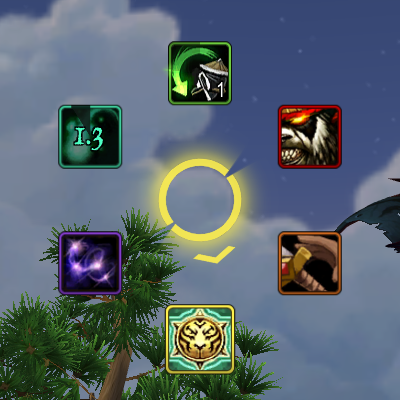
OPie is a radial action-binding addon: it lets you group actions into rings which appear when you hold down a keyboard or mouse binding. When you release the binding, OPie will perform an action based on where your mouse cursor is.
Use OPie to reduce the amount of clutter on your action bars: rings can contain your abilities, items, professions, battle pets, equipment sets, macros, and raid or world markers. Some rings for common class abilities and professions are included, as is a special quest items ring which automatically makes all of your quest and quest-starting items easily accessible. Other addons may add additional rings; for example, Spade uses OPie rings to let you chose the seeds you want to plant on your farm.
Download OPie today; configure to your liking (/opie), and customize your rings (/opie rings). For more details, see the OPie Guide, the screenshots here, or a YouTube video of OPie in action.
Ring snapshots and tutorial/gameplay videos
You can create snapshots of your custom rings to share with other players; if you like, you can post them in the comments section on this page. Likewise, if you've created a video showing how you use OPie, I would very much like to hear about it.
Bug reports and feature requests
If you encounter any problems while using OPie, or think of useful functionality to add to OPie, use the OPie ticket tracker if possible, or leave a comment here.
* You can now snapshot your custom OPie rings to share them with other players.
* Changes made in OPie configuration panels are now applied immediately (outside of combat lockdown), and can always be undone entirely by clicking Cancel.
* New, configurable "Selected slice (keep ring open)" binding allows you to use the currently-selected slice without closing the ring (Bindings → Slice Bindings).
* Slices can now be hidden based on a macro conditional evaluated when the ring is opened.
* Improved support for spells with automatically recharging charges, e.g. Roll.
When some, but not all, charges have been expended, OPie displays a semi-transparent cooldown spiral and a spinning spark around the slice's border to indicate the time remaining until the next charge is available.
Added a separate "Show recharge numbers" option to display time until next charge is available as a number.
* You can now adjust the position at which OPie rings are displayed through the configuration UI.
* An Extra Action Button slice can now be added to custom rings.
* OPie can now automatically select matching slice colors based on slice icons.
* The Quest Items ring now includes the Cooking School Bell and Blingtron 4000 if you have not yet completed those daily quests today.
* Cooldowns are now displayed for battle pet slices.
* Slices that are unusable due to being out of range now have a red stripe in the upper left corner of the icon.
* Slices that are unusable due to a lack of resources now have a blue stripe in the upper left corner of the icon.
## Changes ##
* Custom rings limited to other classes or characters can now be modified through the Custom Rings options panel (Inactive rings sub-menu).
* Changing a ring's binding through the Custom Rings configuration panel now changes both the default and active profile's binding for the ring.
* Ability names in custom OPie macros are automatically converted into spell links when the macro is saved.
You can temporarily revert links to text representations by right-clicking or alt-right-clicking them.
* Many bundled rings have been updated.
* Improved custom macro parser to support {{spell:id}} tags in castsequence/castrandom macros, /cast !{{spell:id}} syntax, and preserve empty clauses.
* Improved default mount detection for {{mount:ground}} and {{mount:air}} tags in OPie macros.
* Deleting a ring now also deletes the related per-ring options.
* Removed the option to display an icon at the center of an OPie ring.
* Removed Challenger's Paths ring.
* Masque is no longer supported.
* The various overlay dialogs now shroud OPie configuration panels from mouse wheel events.
* This update changes slices using the pre-Lime default slice color (e5ff00) to use icon-dependent colors.
* Non-/cast-like custom macros are now always considered usable.
* Unusable slices are now dimmed rather than faded.
## Bug fixes ##
* Fixed an error that occurred when navigating away from slice detail view when the macro box is focused and modified.
* Fixed an error that occurred when the Unbind button was clicked.
* Fixed an error that occurred when resetting per-slice bindings for a specific ring to default values.
* Fixed an error that occurred during slice selection when ring scale was set to low values.
* Fixed an issue preventing unbinding a ring from releasing the binding to other rings.
* Fixed an issue preventing correct macro feedback for /castsequence macros with a single spell and a specified reset condition.
* Fixed an issue causing the ring contents column in the custom ring configuration panel to not be updated correctly when slices were deleted under some circumstances.
* Fixed an issue causing all battle pets to appear twice in the battle pet slice category in Patch 5.2.
* Fixed a graphical issue in the cooldown animation.
* Fixed an issue causing nested ring slices to overlap in some circumstances.
* Items on cooldown are no longer indicated as usable.
* Fixed an issue causing the "Show recharge numbers" option to be ignored (in favor of "Show cooldown numbers") when performing Spinning Crane Kick.
* Fixed an error that occurred when saving custom macros while playing a class that has a spell flyout ability.
* Fixed an issue preventing nested ring rotation from being saved.
* Corrected slice icon display for non-active /cast {{spell:id}}-like macros in the custom rings panel.
* Fixed an issue preventing OPie slash commands from opening correct configuration panels on first use in Patch 5.3.
* The "Make rings top-most" option is no longer disabled when "Activate on left click" option is unchecked.
* Fixed an issue preventing the overlay dialog used in the option panels from being cleared correctly in some circumstances.
* Fixed an issue causing option panel descriptions to be truncated incorrectly.
* Fixed incorrect ability out-of-range feedback for self-cast abilities and actions.
File Name |
Version |
Size |
Author |
Date |
Type |
7.3.5.0 |
4kB |
03-04-18 06:32 AM |
Addon |
||
1.3 |
6kB |
09-21-12 06:37 AM |
Addon |
||
1.0 |
1kB |
02-14-11 02:19 PM |
Addon |
 |
Comment Options |
 10-17-14, 03:40 AM
|
||
|
A Deviate Faerie Dragon
 Forum posts: 12
File comments: 7
Uploads: 1
|
Re: Toy Box
__________________
I'm a Web-Designer with Love for WordPress, HTML5, CSS3, LESS and JavaScript. You need anything? Message me! |
|

|

|
| Valixx |
| View Public Profile |
| Send a private message to Valixx |
| Find More Posts by Valixx |
| Add Valixx to Your Buddy List |
|
09-14-14, 07:44 AM
|
|
|
A Kobold Labourer

Forum posts: 0
File comments: 1
Uploads: 0
|
Yup. I'm using it in my setup.
|
|
|
|
| KiraKelli |
| View Public Profile |
| Send a private message to KiraKelli |
| Find More Posts by KiraKelli |
| Add KiraKelli to Your Buddy List |
|
09-02-14, 12:03 PM
|
|
|
A Kobold Labourer
Forum posts: 0
File comments: 5
Uploads: 0
|
WoD Beta?
Is the current version working in beta? Id like to test it out as an addon i've been using for years is finally going to be broken once WoD goes live so looking to fill the void it will leave lol.
|
|
|
|
| Kj_Zenkarma |
| View Public Profile |
| Send a private message to Kj_Zenkarma |
| Find More Posts by Kj_Zenkarma |
| Add Kj_Zenkarma to Your Buddy List |
|
05-30-14, 11:57 AM
|
|
|
A Deviate Faerie Dragon
Forum posts: 13
File comments: 91
Uploads: 0
|
Toy Box
Do you believe Opie will work with the upcoming Toy Box?
It would be incredibly awesome to have a default ring that added everything in the box, although I could see having a custom ring for some characters too. Thanks for the great addon, btw.
__________________
I prefer rogues to imbeciles, because they sometimes take a rest.
--Alexandre Dumas |
|
|
|
| Worcester |
| View Public Profile |
| Send a private message to Worcester |
| Visit Worcester's homepage! |
| Find More Posts by Worcester |
| Add Worcester to Your Buddy List |
|
01-06-14, 10:53 PM
|
||||
|
An Aku'mai Servant
Forum posts: 32
File comments: 202
Uploads: 5
|
|
|||
|
|
|
| Brusalk |
| View Public Profile |
| Send a private message to Brusalk |
| Visit Brusalk's homepage! |
| Find More Posts by Brusalk |
| Add Brusalk to Your Buddy List |
|
11-11-13, 04:30 PM
|
|||
|
A Warpwood Thunder Caller
Forum posts: 91
File comments: 271
Uploads: 11
|
To revisit that last answer,
__________________
... and you do get used to it, after a while. |
||
|
|
|
| Foxlit |
| View Public Profile |
| Send a private message to Foxlit |
| Visit Foxlit's homepage! |
| Find More Posts by Foxlit |
| Add Foxlit to Your Buddy List |
|
11-09-13, 10:30 AM
|
||
|
A Warpwood Thunder Caller
Forum posts: 91
File comments: 271
Uploads: 11
|
Having subrings revert back to specific slice actions after closing the ring is at least theoretically possible, but is still technically challenging — there's currently no way to tell you what's inside an arbitrary ring without opening it, and as some slices might always be available, handling this properly would require setting up some sort of priority list to figure out what you want to revert to. A simpler solution might be to give you a checkbox that'd block a sub-ring slice from saving its rotation at all, and rely on you to put the slice you want to be "locked" as the default selection first in the ring.
__________________
... and you do get used to it, after a while. |
|
|
|
|
| Foxlit |
| View Public Profile |
| Send a private message to Foxlit |
| Visit Foxlit's homepage! |
| Find More Posts by Foxlit |
| Add Foxlit to Your Buddy List |
|
10-30-13, 05:35 PM
|
|
|
An Aku'mai Servant
Forum posts: 32
File comments: 202
Uploads: 5
|
Hey! I recently found OPie and I've fallen in love with it. It's so smooth and awesome!
 Is there a way to choose a "default" button for when you have sub-rings that's remembered between openings? I'll give an example: I have a ring that is set up to have multiple rings, and one of those sub-rings is one for choosing between Doomguard/Infernal summons. Is there a way to set up the ring such that it remembers that Doomguard is the one I want pre-selected when I open the main ring? Currently if I scroll to the Infernal, that's what is remembered and the Infernal is selected the next time I open the ring. Thanks! Also, there wouldn't happen to be a way to toggle autorun inside a ring would there? Middle mouse button is a convinent bind for OPie, but traditionally I've used it for autorunning. It'd be nice to get that back if possible :P
Last edited by Brusalk : 10-30-13 at 05:38 PM.
|
|
|
|
| Brusalk |
| View Public Profile |
| Send a private message to Brusalk |
| Visit Brusalk's homepage! |
| Find More Posts by Brusalk |
| Add Brusalk to Your Buddy List |
|
10-04-13, 02:14 PM
|
|
|
A Kobold Labourer
Forum posts: 1
File comments: 2
Uploads: 0
|
binding mouse button #4 and another key to activate
howdy all, forgive me if I've overlooked something obvious, but i just can't seem to get this to work. I want my 4th mouse button and a keyboard button to cause opie to open a ring. I'll use btn4 & 1 as an example.
I've tried BUTTON4+1, BUTTON4-1, BUTTON4 1, [btn:4]1, [btn:4]-1, [button:4]1, [button:4]-1, and a few other varieties. Opie is currently version Lime 7, Wow is patched current, and I know the btn:4 is there because i can write a quick macro that understands "/use [btn:4] SPELL" and it'll activate when i click the action with the 4th mouse button. I'm sorry if this is posted somewhere and i havn't seen it, but i've spent a couple of days trying to figure this out and feel it is passing the effort-reward line. thanks, Kuracisto@Arathor |
|
|
|
| kuracisto |
| View Public Profile |
| Send a private message to kuracisto |
| Visit kuracisto's homepage! |
| Find More Posts by kuracisto |
| Add kuracisto to Your Buddy List |
|
08-05-13, 08:47 AM
|
|||
|
A Warpwood Thunder Caller
Forum posts: 91
File comments: 271
Uploads: 11
|
It's probably worth noting that you can only check the target's GUID for non-protected actions, like setting target markers, but not casting spells in combat.
__________________
... and you do get used to it, after a while. |
||
|
|
|
| Foxlit |
| View Public Profile |
| Send a private message to Foxlit |
| Visit Foxlit's homepage! |
| Find More Posts by Foxlit |
| Add Foxlit to Your Buddy List |
|
07-04-13, 05:02 PM
|
|
|
Sentient Plasmoid
 Forum posts: 133
File comments: 75
Uploads: 0
|
That's a really smart idea. There is that hidden "cache"; I guess I've just never thought of using it like that. I wonder if that could be used in the base code at all...
|
|
|
|
| pelf |
| View Public Profile |
| Send a private message to pelf |
| Visit pelf's homepage! |
| Find More Posts by pelf |
| Add pelf to Your Buddy List |
|
06-29-13, 08:59 PM
|
|
|
A Kobold Labourer
Forum posts: 0
File comments: 1
Uploads: 0
|
Wow, I came here to talk about mouseover units, and that's exactly the last conversation. I use them extensively, and would like to figure out how to make them work with Opie.
One easy option would be to use focus, with the understanding that, should have have a focus already set, you will lose it. But you mouseovers will work. It would just focus your mouseover when you open a ring, then use it on the mouseover when you release, and then clear your focus. But something is actually being overlooked here -- you CAN cache a unit into thin air with /targetlasttarget. So you can do something like this when you hit the ring binding: /target mouseover /targetlasttarget That will "cache" the mouseover target as your last target, but appear to the user as though nothing had happened. Then when you release the binding, you would do something like the following: /targetlasttarget /cast Spell_picked_from_ring /targetlasttarget And viola, you have just cast a spell at the mouseover while you didn't actually have your mouse over it. This will fail if you change targets while holding the binding, but I don't think that's an unreasonable limitation. The other caveat is that if you are using macros that rely on targetlasttarget, then they might break. I use it in a focus-to-target swapping macro, but this wouldn't break it. I think most uses of targetlasttarget work exactly as I described: a momentary cache of a target you don't really have. Given that there are certain edge cases where it might fail, you should probably use guid checking to make sure something hasn't gone amiss. (That is, use the mouseover unitid to get the guid of your mouse, and then check it again right before you cast the spell.) So it should be possible to somehow add this mouseover caching in, so you can use @mouseover in your opie macros, and it have it automagically translate it into the behavior above. Then again, I know those work when ran as macros, I'm not sure if you do that many target swaps from an addon, but I've understood that anything one button press can do with a macro, one button press can do with an addon. |
|
|
|
| Arterion |
| View Public Profile |
| Send a private message to Arterion |
| Visit Arterion's homepage! |
| Find More Posts by Arterion |
| Add Arterion to Your Buddy List |
|
06-16-13, 05:37 PM
|
|||
|
A Warpwood Thunder Caller
Forum posts: 91
File comments: 271
Uploads: 11
|
__________________
... and you do get used to it, after a while. |
||
|
|
|
| Foxlit |
| View Public Profile |
| Send a private message to Foxlit |
| Visit Foxlit's homepage! |
| Find More Posts by Foxlit |
| Add Foxlit to Your Buddy List |
|
06-14-13, 10:54 PM
|
|
|
Sentient Plasmoid
Forum posts: 133
File comments: 75
Uploads: 0
|
Interesting. I can fiddle with that setting idea.
Right, as you say, about the normal mousing away behavior. I guess one solution would be to dramatically reduce the size of the ring for the target markers so it's likely that even after moving to the selected mark, the cursor would still be over the target. After all this, I'll probably end up just using the default behavior with target... but, I have enjoyed/appreciated your time and explanations and definitely enjoyed looking through your code. I can honestly say it looks like you're doing more with what is available than most I've seen. Speaking of that... You definitely use the pattern wherein scope is temporarily restricted via an arbitrary do...end block extensively. Where did you pick that up? What's your motivation for being so careful with variable scope? EDIT: That is, if you don't mind more questions and a continued discussion  . .EDIT2: Make rings top-most is not checked for any of my rings.
Last edited by pelf : 06-15-13 at 12:04 PM.
|
|
|
|
| pelf |
| View Public Profile |
| Send a private message to pelf |
| Visit pelf's homepage! |
| Find More Posts by pelf |
| Add pelf to Your Buddy List |
|
06-14-13, 04:45 PM
|
|||
|
A Warpwood Thunder Caller
Forum posts: 91
File comments: 271
Uploads: 11
|
The behavior is caused by the "Make rings top-most" option, which overlays a button over the entire screen to capture mouse events occurring over other buttons. The option was originally intended to be used in conjunction with "Activate on left click", but also fixes an issue where if a ring binding involving a mouse button was released over a Button widget, the release event would not be delivered to OPie, leaving the ring open. Currently, the option applies regardless of whether "Activate..." is enabled or not, while the configuration UI lies about its state if "Activate..." is disabled. I intend to fix the configuration UI in a future release. Turning the "Make rings top-most" option off should resolve the "obscuring" behavior you describe (making /target mouseover and probably also your marking macros work properly). In the current version, you'd need to open /opie options, check "Activate on left click", uncheck "Make rings top-most", uncheck "Activate on left click", and click Okay. You can change the state of the option on a per-ring basis using the dropdown at the top right of the options configuration panel.
__________________
... and you do get used to it, after a while.
Last edited by Foxlit : 06-14-13 at 08:12 PM.
|
||
|
|
|
| Foxlit |
| View Public Profile |
| Send a private message to Foxlit |
| Visit Foxlit's homepage! |
| Find More Posts by Foxlit |
| Add Foxlit to Your Buddy List |
|
