| Go to Page... |

Pictures
File Info
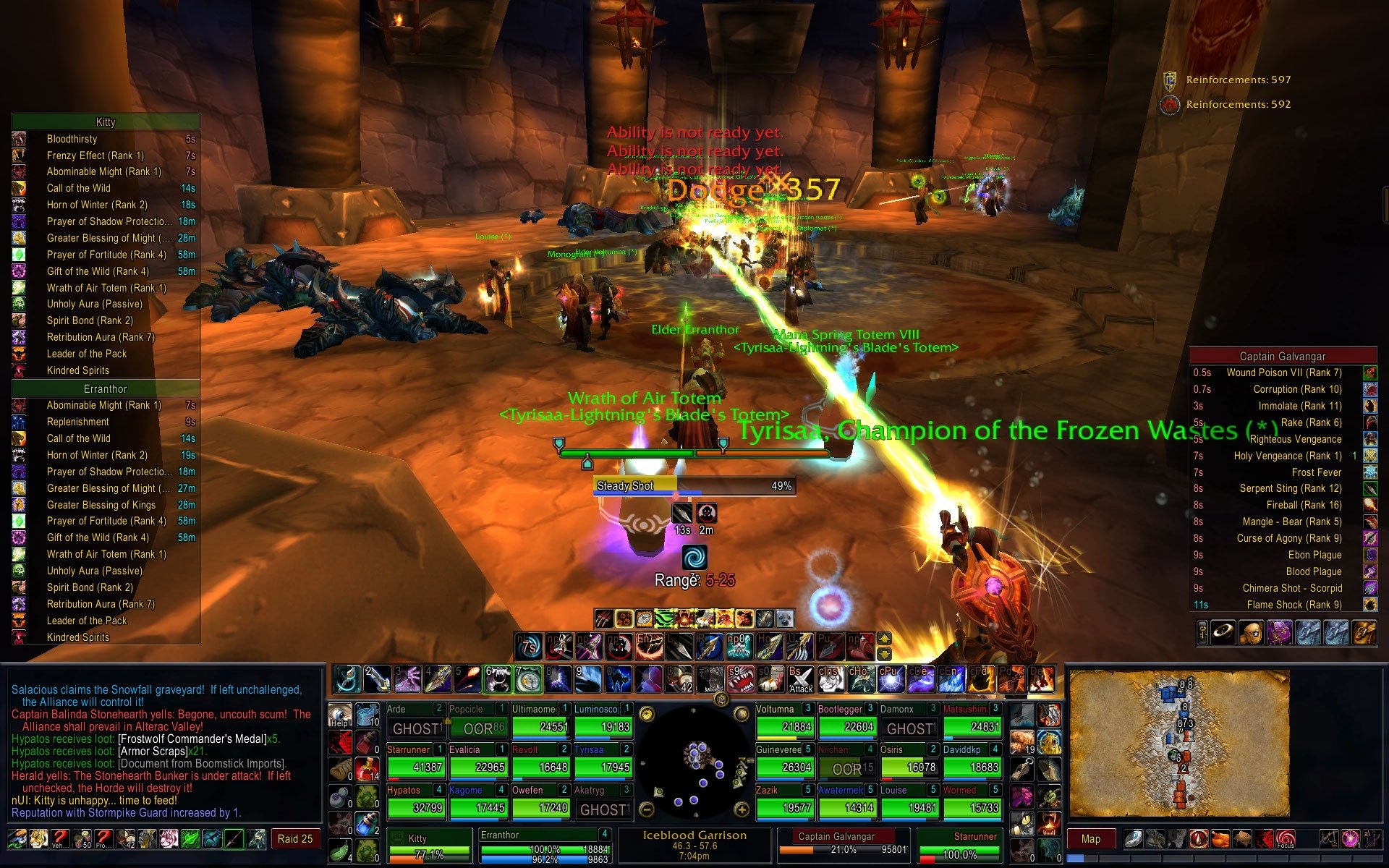
| Updated: | 12-13-13 07:38 PM |
| Created: | unknown |
| Downloads: | 199,205 |
| Favorites: | 672 |
| MD5: |
nUI 

As of 16 December 2013, updated versions of nUI will no longer available for download at WoWInterface.com
nUI remains available as a free download at http://www.curse.com/addons/wow/nui along with a long list of applicable plugins for it. nUI is also available directly from the author at http://www.nUIaddon.com
-------------------------------------------------------------------------------------------
Version 5.07.41 (Release)
-------------------------------------------------------------------------------------------
* Fixed problem with Pilgrim's Bounty and other special action bars (thanks Xrystal)
* fixed micro-menu positioning bug introduced in the 5.4.2 patch
-------------------------------------------------------------------------------------------
Version 5.07.40 (Release)
-------------------------------------------------------------------------------------------
* Fixed startup error trying to set cVar
-------------------------------------------------------------------------------------------
Version 5.07.39 (Release)
-------------------------------------------------------------------------------------------
* Undid watch frame changes -- allows watch frame to be moved again, but reintroduces
some taint issues. It's a no-win. Hopefully there will be less issues with the taint
than there was with the location of the frame. /sigh
* Fixed the micro buttons getting stepped on when entering/leaving pet battles
-------------------------------------------------------------------------------------------
Version 5.07.38 (Release)
-------------------------------------------------------------------------------------------
* Restored missing font files
* Multiple taint fixes
* Fixed unit frame right-click menu taint bug (could not set focus previously)
* Fixed error when trying to unlearn talents or change glyphs (thanks Foxlit)
* Added fix for "otherHealPrediction" nil error in FrameXML\UnitFrame.lua (thanks Seer)
-------------------------------------------------------------------------------------------
Version 5.07.37 (Release)
-------------------------------------------------------------------------------------------
* Fixed bug in main action bar when extra action button is displayed (thanks Xrystal)
* Fixed location of pet name in party and raid unit frame panels (thanks Xrystal)
* Hopefully fixed a combat taint error when mousing over unit auras (thanks Belechannas)
* Fixed false reporting of interruptable channel spells (thanks Belechannas)
* Added support for flyout spells (i.e. Shaman) to cooldowns (thanks Belechannas)
Of particular note to Druids... the bottom right action bar is no longer used as a
dedicated bar for your Boomkin form. Instead, by default, the Boomkin form will use
your main caster bar and the bottom right bar on the dashboard can be used for other
things now. If you prefer to have a separate, dedicated, bar you can use for your
Boomkin, you can use the command '/nui bar boomkin' to toggle this behavior on/off.
-------------------------------------------------------------------------------------------
Version 5.07.36 (Release)
-------------------------------------------------------------------------------------------
* Try again... fat fingered files in 5.07.35
-------------------------------------------------------------------------------------------
Version 5.07.35 (Release)
-------------------------------------------------------------------------------------------
* Fixed XP to level 85-90
-------------------------------------------------------------------------------------------
Version 5.07.34 (Release)
-------------------------------------------------------------------------------------------
* Updated TOC for 5.4 patch
* Fixed action bars for last boss in Draktharon Keep (thank you Xrystal!)
* Fixed fonts (I think) for 5.4 changes (what happened to GameFontNormal?)
-------------------------------------------------------------------------------------------
Version 5.07.32 (Release)
-------------------------------------------------------------------------------------------
* Updated TOC for 5.3 patch (this time I mean it! ~lol~)
-------------------------------------------------------------------------------------------
Version 5.07.31 (Release)
-------------------------------------------------------------------------------------------
* TOC Bump for 5.3 patch
* Fixed login error thrown in location display
-------------------------------------------------------------------------------------------
Version 5.07.30 (Release)
-------------------------------------------------------------------------------------------
* TOC Bump for 5.2 patch
-------------------------------------------------------------------------------------------
Version 5.07.29 (Release)
-------------------------------------------------------------------------------------------
* Updates TOC for the WoW 5.1 Patch
* Fixed an error in the nUI_Buttons script throwing errors comparing a string to a number
-------------------------------------------------------------------------------------------
Version 5.07.28 (Release)
-------------------------------------------------------------------------------------------
* This release fixes an error in the action bars where the main action bar was hidden
when the extra action button was displayed
-------------------------------------------------------------------------------------------
Version 5.07.27 (Release)
-------------------------------------------------------------------------------------------
* Fixes action bars for vehicles and extra action button
-------------------------------------------------------------------------------------------
Version 5.07.26 (Release)
-------------------------------------------------------------------------------------------
* When configuring which unitpanel layout to display include a test for group size to make sure it doesn't default to raid10 rather than party if you have 5 or less people.
* Added the new status tests for extrabar and overridebar to the registerstatedriver statement. Ultraxion fights should now work great. Finally.
* Removed extrabar from the registerstatedriver statement as it has to exist alongside the main action bar.
* Removed redundant file path for texture icons in button bag to remove green boxes.
-------------------------------------------------------------------------------------------
Version 5.07.25 (Release)
-------------------------------------------------------------------------------------------
* YA compilation of all of Xrystal's fixes for the WoW 5.0.4 patch.
-------------------------------------------------------------------------------------------
Version 5.07.24 (Release)
-------------------------------------------------------------------------------------------
* Yet another pass at trying to fix the PlayerPowerBarAlt and ExtraACtionBarFrame
sure would be easier if I could test them myself ~frown~ Me thinks I need to grind
a toon in all my copious free time (cough cough)
* Fixed the missing group loot windows #3 & #4
-------------------------------------------------------------------------------------------
Version 5.07.23 (Release)
-------------------------------------------------------------------------------------------
* Fixed version number in-game (oops)
* Applies the nUI_Button.lua fix from Belechannas (thank you for that) to address the
cooldown timer problem since the 4.3 patch
* Modified nUI_Movers (again) to try and fix PlayerPowerBarAlt and ExtraActionBarFrame
for the Atrameded and similar fights
-------------------------------------------------------------------------------------------
Version 5.07.22 (Release)
-------------------------------------------------------------------------------------------
* Updated TOC for 4.3 patch
* Changed how movers are initialized to allow easy addition of new Blizz elements
(incorporating part of what Xrystal did in "nUI : Plugin [Custom Movers]"
NOTE: nUI will (should) automatically disable nUI_Plugin_CustomMovers if it is
installed so the two apps don't confict. However, if you have it installed
it is recommended you remove it as it is no longer needed.
* Added PlayerPowerBarAlt, TutorialFrameAlertButton and ExtraActionBarFrame to the
new movers definitions
* Incorporated Xrystal's nUI_UnitPower fix for the divide by zero error when mousing
over other players
-------------------------------------------------------------------------------------------
Version 5.07.21 (Release)
-------------------------------------------------------------------------------------------
* Added '/nui viewport' command to allow the viewport to be toggled on and off so the
viewport can be enabled most of the time (thus increasing viewable world space and
centering the player/HUD on the viewable area) and disabled when in the WoW zones
where viewports are broken (such as Throne of Tides) -- the viewport cannot be
toggled unless you are out of combat
* Moved the initialization of key bindings from the PLAYER_ENTERING_WORLD event to the
VARIABLES_LOADED event because it is now possible to enter the world before variables
are loaded and ready for interpretation (sigh).
* Changed the anchoring the special class bars (Eclipse, Shard, Holy Power) so they do
not depend on the nUI HUD casting bar being present.
* Added error trap to catch bad return values from GetCurrentBindingSet() that caused
the key binding function to break in nUI
* Fixed a layering problem in the combat log that allowed the combat log text to hide
the combat log filtering buttons
* Fixed an error in the combat log that threw an error if you tried to click in the
combat log text area (it was trying to open a chat edit box where there isn't one)
* Disabled the minimimze function on the combat log -- it doesn't need minimizing in
the info panel and was throwing errors because it was looking for a chat edit box
that doesn't exist in the combat log
* Fixed the errant display of the button bar to the left of the combat log that was
overlapping some of the buttons on the action bar right of the unit frames
* Moved new user tooltips alert button to right side of game field above the voice
chat control box so it doesn't overlap the minimap anymore
-------------------------------------------------------------------------------------------
Version 5.07.20 (Release)
-------------------------------------------------------------------------------------------
* Updated for 4.2 patch
* Fixed keyring in bag bar (removed in 4.2)
* Fixed sizing of the latency and frame rate meters for extra button in 4.2 patch
* Fixed the target auras in the simple HUD to make them non-clickable so they do not
interfere with the mouse
* Modified automatic faction tracking to ignore guild reputation changes
* Fixed location of map coordinates when world map is not maximized
-------------------------------------------------------------------------------------------
Version 5.07.19 (Release)
-------------------------------------------------------------------------------------------
* Fixed the bag bar so tooltips don't appear and the mouse does not interact with the
bar when the '/nui bagbar off' option is used
* Fixed the upper console that so that other mods that modify the micro menu and other
elements cannot "show" the elements when the '/nui console off' option is used...
this was causing elements to be mouse active, with tooltips, when they were hidden
* Fixed a scaling error in the Battlefield Minimap info panel
* Fixed a logic error in the raid sort that was duplicating some units and not showing
other units
-------------------------------------------------------------------------------------------
Version 5.07.18 (Release)
-------------------------------------------------------------------------------------------
* Fixed debug print messages appearing when a unit frame is right-clicked
-------------------------------------------------------------------------------------------
Version 5.07.17 (Release)
-------------------------------------------------------------------------------------------
* Updated TOC for WoW 4.1 patch
* Removed happiness icon from pet unit frames (hunter's no longer need to manage it)
* Fixed right-click menu on unit frames with raid sort
-------------------------------------------------------------------------------------------
Version 5.07.16 (Release)
-------------------------------------------------------------------------------------------
* Fixed aura layout error in the party and raid panels that caused auras to overlap
the upper action bars (different problem than the one fixed in 5.07.15)
* Fixed layering problem in unit frame and HUD aura buttons that caused them to
interfere with the mouse when targeting/clicking
-------------------------------------------------------------------------------------------
Version 5.07.15 (Release)
-------------------------------------------------------------------------------------------
* Fixed a sizing problem in the aura frames
* With auras working in a more sane manner now, the maximum number of auras displayed
for the player and pet buffs has been increased to ensure visibility.
* Fixed an error in the combat feedback system that was causing the unit frames to
flash red on incoming heals
* Fixed an issue that caused hidden default Blizzard UI elements to briefly appear
while in combat
* Attempted to fix raid sorting (only works out of combat)
-------------------------------------------------------------------------------------------
Version 5.07.14 (Release)
-------------------------------------------------------------------------------------------
* Another pass at resolving the issues with aura displays... modified player, target,
pet and vehicle auras to build from the bottom up to eliminate floating auras
* Fixed tooltips on target debuff (help) auras
* Fixed aura overlap from unit frames over action bars
-------------------------------------------------------------------------------------------
Version 5.07.13 (Release)
-------------------------------------------------------------------------------------------
* Redied for 4.1 patch
* Restored the viewport function
* Fixed animated player portrait display
* Fixed XP points to level for experience bar and rested XP thorugh level 85
* Modified aura displays to support '/nui maxauras' correctly
* Modified default UI element hiding method to reduce taint
* Fixed display of pet bar and possession bar while in combat
* Fixed display of tooltips on player and pet debuffs, as well as target and ToT
buffs, in the HUD
* Fixed HOT/DOT bar display overlapping cooldown bar in the HUD
* Moved the location of the guild instance difficulty flag so it does not overlap the
tracking button on the minimap.
-------------------------------------------------------------------------------------------
Version 5.07.12 (Release)
-------------------------------------------------------------------------------------------
* Modified aura logic to try to eliminate problems with auras not updating in combat
and overlapping the chat frame, etc.
-------------------------------------------------------------------------------------------
Version 5.07.11 (Release)
-------------------------------------------------------------------------------------------
* More fixes for the 4.0.6 patch
* Removed management of the PlayerTalentFrame in order to work around a new taint
added in the 4.0.6 patch in the Blizzard_TalentUI
* Fixed a mousever tooltip error on the frame rate and latency bars
* Fixed the player glyph system error
-------------------------------------------------------------------------------------------
Version 5.07.10 (Release)
-------------------------------------------------------------------------------------------
* Patched nUI for WoW 4.0.6
* Fixed a compatibility problem with the Blizzard_TalentUI throwing an error at login
* Fixed anchoring of Titan Panel with nUI dashboard and console
* Fixed a tooltip bug in nUI_UnitAura module ( thank you Belechannas)
-------------------------------------------------------------------------------------------
Version 5.07.09 (Release) -- EBF
-------------------------------------------------------------------------------------------
* This EBF fixes the experience bar for Cataclysm levels 81 to 85
-------------------------------------------------------------------------------------------
Version 5.07.08 (Release) -- EBF
-------------------------------------------------------------------------------------------
* This is an emergency bug fix -- it once again removes the viewport function from
the addon as the Blizz graphics bug appears to still be there, particularly on Macs
* Made sure the nUI_UnitAuras fixes from Damian made it into this release
-------------------------------------------------------------------------------------------
Version 5.07.07 (Release)
-------------------------------------------------------------------------------------------
* Fixed runtime conflict with FuBar2Broker that caused the FuBar integration to
thrown an error on login
* Added support for the Pally Holy Power Bar, Warlock Shards and Boomkin Eclipse bar
with thanks to Xrystal as always for her constant diligence in making nUI better.
* Modified auras to allow cancellation -- with thanks to Damian for the nUI_UnitAura
edits... much appreciated.
* Restored viewport functionality
* Undid modification of the HUD due to the lack of viewport previously
-------------------------------------------------------------------------------------------
Version 5.07.06 (Development)
-------------------------------------------------------------------------------------------
* Fixed a logic error that reported all party members as being the tank
* Fixed Bazooka integration
* Fixed minimap button layering to ensure buttons are not overlapped by the minimap
* Fixed '/nui anim' slash command functionality
* Fixed compatibility issue with WIM (default chat frame edit box overlapping action bar)
-------------------------------------------------------------------------------------------
Version 5.07.05 (Development)
-------------------------------------------------------------------------------------------
* Fixed a bug in the right-click menu feature for unit frames
* Disabled talent inspection system until Blizzard fixes paper doll frame bug
* Moved center location of HUD to account for changed viewport and eliminate the HUD
overlapping the action bars
* Fixed minimap mousewheel scrolling bug
* Fixed Skada information panel integration
-------------------------------------------------------------------------------------------
Version 5.07.04 (Development)
-------------------------------------------------------------------------------------------
* Removed viewport from WorldFrame due to a Blizzard bug in the rendering of reflections
in the water and the position of the sky when the viewport is modified. This change
will cause the player character to appear lower in the world frame than it did in
earlier versions of nUI... the viewport will be restored when Blizzard fixes the bug
* Fixed range to target calculation
* Fixed the hunter pet feeder
* Fixed display of spell durations on action bars
* Fixed display of cooldown counters on action bars
-------------------------------------------------------------------------------------------
Version 5.07.03 (Development)
-------------------------------------------------------------------------------------------
* Development version of nUI for WoW 4.0 -- functionally the same as 5.07.02 (PTR Beta)
-------------------------------------------------------------------------------------------
Version 5.07.02 (PTR Beta)
-------------------------------------------------------------------------------------------
* Fixed nil number comparison bug in chat frame mousewheel scroll function
* Added WIM to list of recognized chat frame addons that disable nUI's chat frame mods
* Fixed missing guild button on micro menu
-------------------------------------------------------------------------------------------
Version 5.07.01 (PTR Beta)
-------------------------------------------------------------------------------------------
* Fixed display of talent spec in unit frame tooltips
* Fixed display of the pet bar
-------------------------------------------------------------------------------------------
Version 5.07.00 (PTR Beta)
-------------------------------------------------------------------------------------------
* Ported 5.06 to the WoW 4.0 PTR
-------------------------------------------------------------------------------------------
Version 5.06.30
-------------------------------------------------------------------------------------------
* Fixed a layering problem in the chat edit box that prevented the box from being
shown when using the "Classic Style" chat frames and trying to enter a message in a
frame other than the default chat frame
* Fixed compatibility problems with Chatter and Prat that caused an error to be thrown
when they tried to anchor the chat menu button
* Fixed an event logic error that caused the extra chat frame tabs for some players
to not be displayed when first logging in (requiring a '/nui rl' to fix)
-------------------------------------------------------------------------------------------
Version 5.06.29
-------------------------------------------------------------------------------------------
* Fixed the ReadID converation chat frames to anchor correctly to the dashboard when
they are created
* Fixed display of the scroll buttons and add friend button in the ReadID converation
chat frames
* Fixed a chat frame layering problem that caused all buttons for all docked frames
to display when the mouse was over the frame versus only the buttons for the visible
chat frame
-------------------------------------------------------------------------------------------
Version 5.06.28
-------------------------------------------------------------------------------------------
* Fixed a loader error that caused the management of the watch frame to fail if the
watch frame was not initialized before the PLAYER_LOGIN event
* Changed info panel load sequence to execute off PLAYER_ENTERING_WORLD versus
PLAYER_LOGIN to ensure WoW UI elements and addons are properly initialized
* Modified info panel exception handler to preserve stack trace for debugging
* Added the conversation button to the list of managed chat frame buttons
* Modified size and location of edit frame chat box to ensure is does not overlap
chat frame controls
-------------------------------------------------------------------------------------------
Version 5.06.27
-------------------------------------------------------------------------------------------
* Fixed chat frame integration so that when a new chat window is created, it is
correctly anchored and sized including the layering and position of the edit box.
This should correct issues with both BNet and whisper frames as well as the auto-
join guild recruitment channel.
* Changed chat frame edit box layering to try and ensure the edit box is always
layered highey than the chat frame itself (this cannot account for any changes a
chat addon may make)
* Changed info panel initialization to occur at PLAYER_ENTERING_WORLD event rather than
the PLAYER_LOGIN event to ensure integrated addons have had time to initialize
properly. This change addresses a problem in starting Skada for some users.
* Added exception handling to the nUI_InfoPanel engine so that broken info panel plugins
will not cause the nUI load itself to break (a la the 3.3.5 patch nightmare)
-------------------------------------------------------------------------------------------
Version 5.06.26
-------------------------------------------------------------------------------------------
* Fixed a bug in the nUI_InfoPanel_CombatLog that tried to hide the minimize button
when it may not actually exist and threw a RegisterStateDriver error
* Moved the button frame in the chat frames to make sure it does not overlap the
resize widget in the bottom right corner of the chat frame
* Fixed a logic error in nUI_InfoPanel_Skada that caused the infomation panel loader
to create a panel for Skada even when Skada was not installed or was disabled
-------------------------------------------------------------------------------------------
Version 5.06.25
-------------------------------------------------------------------------------------------
* Hot fix... the Skada fix works if you have Skada installed, but breaks if Skada is
not installed... gee... guess I should have tested that the fixes didn't break
anything when Skada wasn't present, huh? /sigh
-------------------------------------------------------------------------------------------
Version 5.06.24
-------------------------------------------------------------------------------------------
* Added a backdrop to the chat frame edit box to provide a clean overlay for the
background text and hid the default frame so it does not interfere with the background
text when not entering new chat text.
* Moved the chat frame edit box up to waste a bit less space at the top of the frame.
* Removed nUI's manipulation of the chat frame font size so the font size is set by
the new chat settings menu
* Fixed loader logic error in the nUI_InfoPanel_Skada module so Skada integrates with
nUI again by default.
* Added setting of the buttonSide value in each chat frame to prevent BNet from throwing
errors when a realID friend logs off
-------------------------------------------------------------------------------------------
Version 5.06.23
-------------------------------------------------------------------------------------------
* Fixed an error thrown when a member of your ReadID friend list logs in
* Fixed a "Frame is not movable" error thrown when you have extra chat frames enabled
* Fixed anchoring of chat edit boxes in a chat frames
* Removed chat edit box from combat log
-------------------------------------------------------------------------------------------
Version 5.06.22
-------------------------------------------------------------------------------------------
* Updated for WoW patch 3.3.5
* Fixed loader problem with the new chat frames
-------------------------------------------------------------------------------------------
Version 5.06.21
-------------------------------------------------------------------------------------------
* Fixed a logic error in the nUI_Buttons module that caused spell cooldowns to not
update while the spell was active on the current target if the spell duration option
( /nui bar duration ) was disabled on the action bars.
-------------------------------------------------------------------------------------------
Version 5.06.20
-------------------------------------------------------------------------------------------
* Fixed a upper console anchoring issue that broke detection of FuBar and other LDB
addons with top bars
-------------------------------------------------------------------------------------------
Version 5.06.19
-------------------------------------------------------------------------------------------
* Fixed the location of the player and cursor coordinates in the world map when the
map changes between full screen and windowed modes
* Fixed a problem with the nUI_Movers logic in the micro-menu bar that prevented the
bar from being moved when the movers were active.
-------------------------------------------------------------------------------------------
Version 5.06.18
-------------------------------------------------------------------------------------------
* Added a trap to the key binding logic to prevent an error being thrown if the current
binding set is undefined.
* Fixed a logic error in the nUI_MicroMenu module which could cause issues when trying
to overload the micro menu location via a plugin.
* Added the ability for health, power and status bars to collapse to, and expand from,
their horizontal and vertical centers. (with thanks to Belechannas)
-------------------------------------------------------------------------------------------
Version 5.06.17
-------------------------------------------------------------------------------------------
* Fixed a anchoring error in the nUI_HUD module that caused the HUD selector button to
be anchored to both the top center of the viewport and the top center of the micro
menu which broke the '/nui movers' function for the micro menu.
* Fixed a logic error in the nUI_SpecialBars modules that made the mover for the pet,
shapeshift and stance bars too small to see
* Modified nUI_ChatFrame module to not attempt to set or alter the chat frame text size
if either Prat or Chatter is installed
* Corrected a logic error in the nUI_Button module that caused the cooldown counter to
not update if the '/nui bar durations' option was used to turn off spell duration
counters on the action bars
-------------------------------------------------------------------------------------------
Version 5.06.16
-------------------------------------------------------------------------------------------
* Changed nUI's layout engine loader logic to key off of the ADDON_LOADED event
rather than the VARIABLES_LOADED event to solve the loader reliability issue that
has been the key focus of the last several updates.
-------------------------------------------------------------------------------------------
Version 5.06.15
-------------------------------------------------------------------------------------------
* Added traps to prevent passing nil numbers into CooldownFrame_StartTimer from nUI to
correct a nil number comparison error in the action bars
* Fixed a logic error in the nUI_UnitAura module that would throw a nil table value
error if auras are detected before the module is initialized (logging in while in
combat, etc.)
-------------------------------------------------------------------------------------------
Version 5.06.14
-------------------------------------------------------------------------------------------
* Fixed an error in the nUI_Splash module that was throwing a nil error if the
player character's name is not available when the PLAYER_ENTERING_WORLD event fires
-------------------------------------------------------------------------------------------
Version 5.06.13
-------------------------------------------------------------------------------------------
* Updated German localization (thank you Marcel)
* Fixed an error in the nUI_UnitLabel module that threw an exception when in random
dungeons or battlefields and another player's name was not yet available
* Fixed an error in the nUI_ChatFrame module that throws a nil reference error for
some players when initializing the chat frame (thank you for running that down Xrystal)
* Fixed an error in nUI_MicroMenu that threw a nil anchor error for some users when
loging into the game
-------------------------------------------------------------------------------------------
Version 5.06.12
-------------------------------------------------------------------------------------------
* Changed logic for unit health and power to ensure all units update at the maximum
rate including the new boss frames
* Fixed an error throwing an nil value exception in nUI_MicroMenu.lua at line 236
-------------------------------------------------------------------------------------------
Version 5.06.11
-------------------------------------------------------------------------------------------
* Fixed a problem with key bindings not being restored to the default Blizzad action
bars on logout.
* I *think* this patch fixes the problem with the prompt for switching from character
specific key bindings to account wide key bindings.
* Added the dungeon completion alert frame to nUI's movers so it does not overlap the
action bars when displayed and to make it moveable.
* Added boss frames to nUI's unit panels -- currently located directly below the
upper console -- not the best location, but the only one that works for now.
-------------------------------------------------------------------------------------------
Version 5.06.10
-------------------------------------------------------------------------------------------
* Resolved a loop in the key binding logic that caused repeating key binding notices
while in combat
* I'm confident we may actually have finally fixed the key bindings not being present
at login issue with this release... changed how nUI's key bindings are initialized
and early testing among some users with the problem have shown promise.
* Located a taint problem with key bindings causing the action bars to break while in
combat when changing stances, forms, stealth, etc. I do not know if this is the only
bug related to that problem, so it may not be fixed for everyone. We'll see.
-------------------------------------------------------------------------------------------
Version 5.06.09
-------------------------------------------------------------------------------------------
* Modified key binding logic, yet again, in hopes of mitigating the problems further...
however, key bindings do remain a problem /sigh
* Reverse key bindings for the action bars to the left and right of the unit frames to
match the bindings in the Blizzard interface. Not sure when VerticalMultiBar3 and
VerticalMultiBar4 changed places, but nUI now matches them correclty.
* Changed the initialization of the chat frame to account for a load issue in the
Blizzard loader causing a "attempt to perform arithmetic on a nil value" error in
line 214 of nUI's nUI_ChatFrame.lua code.
-------------------------------------------------------------------------------------------
Version 5.06.08
-------------------------------------------------------------------------------------------
* Taking a stab at fixing the key binding issues for Druids and Rogues -- I don't know
if this is a fix or not. Hoping it is. Feedback is requested.
* Added the Boss Target Frames to nUI's list of managed Blizzard frames
-------------------------------------------------------------------------------------------
Version 5.06.07
-------------------------------------------------------------------------------------------
* Fixed an experience bar error that throws an error if you hit level 79 with enough
rested XP to reach past level 80
* Moved the location of the dungeon difficulty flag into the location box so it does
not overlap the tracking icon on the minimap
* Fixed the party role indicators on the unit frames
* Modified the size and location of the quest watch frame to make room for the quest
number indicators on the left and eliminate wasted space on the right
-------------------------------------------------------------------------------------------
Version 5.06.06 (EBF)
-------------------------------------------------------------------------------------------
* This update is an emergency bug fix to address an error introduced into nUI_UnitRole
by the addition of the new Blizzard tank/healer/damage role icons to the unit frames
-------------------------------------------------------------------------------------------
Version 5.06.05
-------------------------------------------------------------------------------------------
* Added new World Map Frame to the list of movable frames
* Modified how unit health is updated to address an issue where player, pet and/or
target health bars are not always updated
* Added the Looking for Raid and Looking for Dungeon frames to the nUI movable frames
* Tweaked the location of the top console slightly -- moving it up to remove some of
the dead space that's been bothering me forever by that I keep putting off doing
anything about ~grin~
* Fixed an issue that caused raid leader, tank and off-tank icons to not display
on unit frames
* Added new Blizzard tank, healer and damage role icons to unit frames
* Removed the new Looking For Raid/Dungeon icon out of the button bag to the top
center of the minimap.
* Added integration of ChocolateBar in the same fashion ad Titan Panel and FuBar with
thanks to Brillynt for having done the integration work
* Fixed the map coordinate display in the world map to account for the new map layout
* Added detection of Prat 3.3 to the chat frame integration to fix an error being
thrown when Prat 3.3 is installed with nUI
* Added the party member background frame to the list of Blizzard frames nUI manages
* Fixed a bug introduced by Blizzard in Patch 3.3 where the alpha level of models is
being reset to 1 when the user interface is hidden and reshown (a la open/close map
and zoning, etc.) This broke the '/nui anim' option's ability to disable animation
in the unit frames.
-------------------------------------------------------------------------------------------
Version 5.06.04 (Release)
-------------------------------------------------------------------------------------------
* Released for WoW Patch 3.3
* Increased the frame strata level for the chat frame edit box to ensure that the edit
box is always over the chat frame text.
* Added detection of Prat-3.0 to the chat frame customization to allow Prat's management
of the chat frame edit box to override nUI's management.
* Changed how the chat frame edit box is scaled to improve readability for those who
enabled the "Use UI Scale" video option and use a scale other than 1.0
* Removed the '/nui watchframe' command -- no longer needed with the new watch frame
* Added the new watch frame to the nUI movers
* Added the new Looking for Dungeons button to the micro menu
* Fixed a new error introduced in nUI_Minimap.lua resulting from a Bliz change in the
management of the minimap
* Added a color code in the casting bar (bright red) to indicate spell casts that
cannot be interrupted
* First cut at the new public test realm.
* Fixed a load error in nUI.lua referencing TargetOfTargetFrame which appears to have
gone away or become optional
* Fixed a load error in nUI_Movers.lua with frames that do not current exist in the PTR
-------------------------------------------------------------------------------------------
Version 5.05.02 (Release)
-------------------------------------------------------------------------------------------
* Fixed an integration issue between nUI and Titan Panel where the two mods were
fighting over management of the bag locations when openning bags. Note... since this
patch was made, Titan has also been updated to add an option to turn off Titan's
management of the bag locations via the right-click options settings in Titan.
* Fixed a logic error in the advanced objectives tracking management in nUI so that the
tracking window is now correctly sized and located when nUI is initially installed.
* Added a new slash command '/nui watchframe' which allows the user to manally reset
the size and location of the advanced objectives tracking frame should the location
be lost or otherwise problematic. By default nUI only sets the size and location of
the frame once when the player logs in on a character for the first time... after
that the player and relocate the frame as they see fit. This option allows them to
reset the location to the nUI default at any time after the initial login.
-------------------------------------------------------------------------------------------
Version 5.05.01 (Release)
-------------------------------------------------------------------------------------------
* Added a patch for integrating the default WoW 3.2 Blizzard Shaman totem bar into nUI
* Fixed a problem with the battlefield minimap which prevented it from being included
in the information panel as it should be which was caused by a new bug Blizzard
introduced in the LoadAddOn() method for load on demand addons. /sigh
* Added a new slash command '/nui bar totems' to allow players with a Shaman to control
whether or not the default Blizzard totem bar is displayed. nUI uses the default
Blizzard totem bar for Shamans. If you would prefer to use an alternate addon for
totems, the '/nui bar totems' option can be used to cause nUI to hide the default
totem bar.
* Fixed a few logic errors in nUI_Movers.lua which were causing some taint issues.
-------------------------------------------------------------------------------------------
Version 5.05.00 (Release)
-------------------------------------------------------------------------------------------
* Updated the TOC for WoW patch 3.2
-------------------------------------------------------------------------------------------
Version 5.04.00 (Release)
-------------------------------------------------------------------------------------------
* This is a cumulative release cut of nUI as of development version 5.03.13
-- Version 5.03.13 (Development)
* This update fixes a problem with fonts for nUI users who are using the Russian
localization file.
-- Version 5.03.12 (Development)
* Updated Spanish localization file (thank you Jose)
* Added new font options to improve readability. Still need to add a GUI panel for the
player to use to change fonts in-game. For now, see the appropriate localization file
in [ Interface > Addons > nUI > Main ]
* Added a new feature to the action bars... when you have an active target, or you are
in combat, any button on your action bar which is unusable, is on cooldown or is
active on the target is dimmed to indicate that is cannot be cast at present, or does
not need to be cast. Any spell which can be cast, is not in cooldown and is not active
on the target (or yourself) is displayed at full brightness. This acts as a quick
visual cue as to which actions you should/could be using at present.
* Added a new slash command '/nui bar dimming' to toggle the new action button dimming
feature on and off.
* Added a new slash command '/nui bar dimalpha {n}' which allows the player to set a
custom alpha level for action buttons that are currently dimmed. The default is 30%
or '/nui bar dimalpha 0.30' -- valid values are 0 < {n} <= 1 where 0 is fully
transparent and 1 is fully opaque (the same as turning off the dimming feature).
Note that you cannot use an opactity of 0 as that does have special meaning to the
action button logic.
* Fixed a logic error in nUI_StatusBar which threw an error when the bar was oriented
to grow from the top down
* Added tick tracking to the health and power bars to visually indicate how much health
and/or power was gained or lost since the last bar update.
* Added a new slash command '/nui bar mouseover' which when active causes nUI's action
bars to be hidden unless and until you mouse over them.
* Tweaked nUI_Button module to correct an issue showing the Pally judgment spells on
the action buttons correctly.
-- Version 5.03.11 (Development)
* Fixed a taint error caused by opening the world map while in combat
* Replaced the nUI button bag button icon with the nUI logo
* Fixed cooldown graphic on Death Knight runes
* Moved cooldown timers on DK runes and modified rune transparency on cooldown to
improve visibility of the type of rune on cooldown
* Fixed a logic error on DK runes that displayed all of the cooldown timers on the
first rune in the bar if timers are disabled.
* Fixed an error in the nUI_Button module which threw an exception in UnitIsUnit while
in a battleground
* Fixed an addon configuration error which caused the nUI load to log errors in the
FrameXML log "Unknown frame type: Binding"
* Fixed an addon configuration error which caused nUI's bindings to not function as
expected on systems that use case sensitive file names
-- Version 5.03.10 (Development)
* We're on a roll tonight /sigh -- another EBF for the new trinket code
-- Version 5.03.09 (Development)
* This is an EBF to fix a typo in the new trinket cooldown entries in the cooldown bar.
-- Version 5.03.08 (Development)
* Added cooldowns for usable equipped items to the cooldown bar (trinkets, etc.)
* Enhanced action bar counters to use strong color cues to compress information. When
the player has a spell cast (HOT or DOT) on a target and that spell is still on
cooldown, the time remaining on the *spell* (not the cooldown) is displayed in
purple. Once the cooldown expires, or if there is no cooldown, the time remaining
on the *spell* is displayed in bright blue (cyan). If the spell is on cooldown but
is not currently active on the target, the cooldown time remaining is displayed in
yellow until the last ten seconds of the cooldown when it shows in red. A visual
explanation of the color scheme can be found at nUI's support forum...
http://www.wowinterface.com/forums/showpost.php?p=141448&postcount=16
* Fixed a tooltip error in the nUI_PetFeeder module which caused all of the food items
in the feeder window to display the same tooltip.
* added a new slash command '/nui bar cooldown' -- This option is used to turn the
display of cooldowns (displayed in yellow on the action bar) on and off. By default
this feature is enabled.
* added a new slash command '/nui bar duration' -- By default, when you cast a spell
on a target, the time remaining on the spell is displayed in blue on the action bar.
This option turns that timer feature off.
* added a new slash command '/nui bar macro' -- When you place a custom macro on the
action bar, nUI display's the macro's name on the button. This option will turn that
display on and off.
* added a new slash command '/nui bar stackcount' -- nUI normally displays the stack
counts of inventory items that are on your action bars in the lower right corner of
the button. This option can be used to turn that display on and off.
* added a new slash command '/nui bar keybind' -- When you have a key bound to an
action button, the key name is normally displayed in the top left corner of the
button. This option can be used to turn that display on and off.
* Fixed an error in nUI_Button.lua which threw an exception trying to compare a string
with a number on some characters at login.
* Removed the health and power text values from the simple HUD that were accidentally
left there in the 5.03.07 release.
-- Version 5.03.07 (Development)
* Modified the tooltip change made in 5.03.06 as it was conflicting with most tooltip
addons and causing the tooltips to "jump" between locations -- this should be fixed
* Made some changes in the nUI_Button.lua module to try and fix a bug introduced in
5.03.06 which was causing "invalid spell slot" errors and causing UnitIsUnit() to
throw invalid unit ID errors.
* Fixed a bug in nUI_Button.lua where it would throw and exception of (for some who
knows what reason) an aura on the target didn't have an ID for who cast the aura
* Updated the Russian localization file (with thanks to StingerSoft)
-- Version 5.03.06 (Development)
* Added HOT and DOT timers to the action bars. Cooldowns are now displayed in yellow
until the last 10 seconds of the cooldown, then the become red, as before. However,
regardless of whether or not there's a cooldown on the action, if the spell associated
with the action button is active on the current target, the time remaining before
the spell expires is displayed in bright blue (cyan) counting down to zero.
* Added a new slash command '/nui hud cdmin {n}' which sets the minimum amount of time
required for a spell to be displayed on the cooldown bar when it first begins the
cooldown. If the initial cooldown period is less than {n}, it won't display. The
default value is '/nui hud cdmin 2'
* Fixed an error in the pet feeder which would throw an exception if you had more than
one stack of the same food in your bags when you tried to open the feed pet window
* Fixed a German localization error where a "DEAD" player was reported as "TOD" (DEATH)
instead of "TOT" (DEAD)
* Removed the healthrace bar from the Player/Target and Health/Power HUD modes since it
is largely redundant in those applications.
* Added raid target icon to the "Simple HUD" mode -- located bottom center just above the
healthrace bar
* Added player and target debuffs to the "Simple HUD" mode -- located to the left and
right of the health race bar.
* Fixed a logic error in the new event engine in nUI_UnitPvP which causes the PvP flag
not to be removed from the unit frame once it has been displayed regardless of whether
or not the unit is still flagged for PvP
* Added enhanced unit information to the mouseover unit tooltip
* Added unit's target to the tooltip for all unit frames
* Added coloring of unit's health and power values in the unit frame tooltips according
to the same color using in their health bars for a quick visual indication of their
overall health/power
* Fixed a logic error in the new event engine for nUI_UnitFeedback which was preventing
the hit/heal indicators and some other feedback features from functioning as designed
* Added a trap for an odd error in obtaining the current threat situation on a unit in
nUI_UnitFeedback that threw an error if you dropped target in the 1/30th of a second
(or less) between when the feedback update was initiated and when the threat check
was performed.
-- Version 5.03.05 (Development)
* Fixed a logic error in nUI_UnitRaidSort which would cause the raid sort to fail and
never execute if the raid roster changed while in combat lockdown. This should also
address an unreported taint bug, as well.
* Added an option to sort raids by player name as well as group, class or unit id.
* Added the voice chat frame to nUI's list of managed frames. The default location for
the frame has been set immediately above the vehicle seat indicator on the right edge
of the user display, slightly above center.
* Fixed combo point display for druis in cat form
* Fixed combo point display for vehicles that use combo points in the actions
* Fixed a tooltip error in nUI_UnitPvP that either showed an empty tooltip or threw
and error when the cursor moved over the PvP icon in the unit frame.
* Fixed an error with the advanced objectives watch frame which broke the frame when
nUI management of the minimap is enabled.
* Moved the default location of the advanced objectives watch frame to the upper left
of the user interface. nUI will only locate the watch frame the first time the user
logs in on each character... the frame can then be permanently moved using the built
in lock/unlock and mouseover features of the frame. Note: If game settings are not
being maintained on each character individually, you may need to log in on all of
your characters before attempting to set a permanent location for the frame other
than the nUI default.
* Fixed a logic error in the '/nui calendar' slash command that caused it to fail to
work as expected the first time the player uses the command.
* Moved the calendar to the bottom of the minimap and modified its size slightly to
avoid conflict with the action bars and to improve the calendar's visibility when
the '/nui calendar' option is used to disable nUI management of the calendar.
* Fixed a logic error introduced in 5.03.03 in nUI_UnitReadyCheck that caused it to fail
to clear the icons in the unit frames when the ready check was complete
* Fixed a logic error introduced in 5.03.03 in nUI_UnitRange which caused the range
indicator to not correctly update once the initial range had been calculated
* Fixed a logic error in the casting bars which caused the bars to not be displayed in
even though a cast was active in situations where the player is being spammed with
interrupts or pushbacks.
* Entirely removed generation of dynamic memory from the following modules as well
as changed how the callback notification system is engaged in order to reduce load
on the event engine and update thread: nUI_UnitCasting
-- Version 5.03.04 (Development)
* Fixed a bug introduced in the Death Knight's runes by the changes made in the 5.03.03
development update's rewrite of the event engine.
* Fixed a bug introduced in the unit frame tooltips where the party/raid role was
repeated until it filled the screen -- also introduced in the 5.03.03 rewrite of the
event engine.
-- Version 5.03.03 (Development)
* Added unit health and power to the unit tooltips
* Added Poisoner to the list of minimap buttons nUI does not try to manage... this will
allow Poisoner users to locate this button anywhere they need it and stil have access
to it in combat without openning the button bag.
* Fixed a logic error in the button bag code which would cause buttons to become
unclickable in certain circumstances.
* Added a new slash command '/nui calendar' -- By default, nUI moves the guild calendar
button from the minimap into the button bag. This option toggles that on and off
allowing for leaving the guild calendar displayed on the minimap.
* Fixed a logic error in nUI_BagBar that caused it to ignore the mouseover visibility
option when the UI is initially loaded.
* Fixed a logic error in the XP bar that would throw an error if the player hit level
79 with more than a full rested level remaining.
* Tweaked the nUI_SysInfo module to display the top ten memory users in the tooltip
rather than the top three.
* Entirely removed generation of dynamic memory from the following modules as well
as changed how the callback notification system is engaged in order to reduce load
on the event engine and update thread: nUI, nUI_Location, nUI_PetFeeder, nUI_SysInfo,
nUI_Button, nUI_CooldownBar, nUI_UnitComboPoints, nUI_UnitFeedback, nUI_UnitFrame,
nUI_UnitGCD, nUI_UnitHappiness, nUI_UnitHealth, nUI_UnitLabel, nUI_UnitLevel,
nUI_UnitPortrait, nUI_UnitPower, nUI_StatusBar, nUI_UnitPvP, nUI_UnitRaidGroup,
nUI_UnitRaidTarget, nUI_UnitRange, nUI_UnitReaction, nUI_UnitReadyCheck,
nUI_UnitResting, nUI_UnitRole, nUI_UnitRunes, nUI_UnitStatus
* As of nUI 5.03.03 the following key changes have been made in nUI's licensing terms:
nUI is no longer covered under the GNU Public License V3 and has adopted a custom
license. Copies of the complete licenses for nUI Release (aka nUI Lite) and nUI+ are
included in their distribtions. Two key points have been added in the interest of
protecting the rights of the distribution sites that have been authorized by myself
as well as my own rights and are reproduced here for emphasis...
Redistribution of the nUI Release/nUI Lite version is permitted under the
following terms... Permission is hereby granted for unlimited free and
open distribution of "nUI Release" / "nUI Lite" by anyone in any form and
by any means provided the nUI Release distribution contents are not altered
in any way, are distributed in full with all copyright statements and
licensing terms included and intact and that any interface the end user
is provided for the purpose of downloading nUI includes a plainly visible
and functioning link to nUI's official web site at http://www.nUIaddon.com
and a plainly visible notice that nUI accepts user donations with a working
link to nUI's donation page at http://www.nUIaddon.com/donate.html
Deep-linking and leeching of nUI distributions is strictly prohibited. Any
individual or entity who wishes to offer downloads of nUI distributions
must either host the legal and unmodified distribution on their own servers
to be distributed at their own expense using their own bandwidth or they must
link the user back to the official download page on the third party provider's
servers from which the user can initiate the download. Use of any download
link or mechanism which initiates a download of any nUI distribution from a
third party distribtion site that bypasses the official content and download
pages or advertisements of that third party site is strictly prohibited
without the express written consent of that site.
I do intend to agressively enforce these terms.
-- Version 5.03.02 (Development)
* Fixed a logic error in the nUI_UnitChange module which causes it to fail to notify
event listeners when the party or raid roster was updated in certain circumstances
* Fixed a logic error in the nUI unit change update engine which caused the performance
of the engine to degrade over time as more unit data sets were cached by the engine.
* Modified the unit event dispatch engine and update notification system to eliminate
all production of garbage memory in that system. The underlying engine now retains
and reuses all memory it consumes. (note: this process is incremental, this reduces
the garbage memory created by nUI's data engine, but does not fix it entirely as
yet given this process will need to be repeated in all of the modules in nUI before
the issue is entirely resolved)
* Entirely removed generation of dynamic memory from the following modules as well
as changed how the callback notification system is engaged in order to reduce load
on the event engine and update thread: nUI_Unit, nUI_UnitChange, nUI_UnitClass,
nUI_UnitCombat
* Added information panel integration support for Skada
* Added '/nui hud vofs {n}' slash command. This option sets vertical offset of the HUD
from the center of the view port. The default is '/nui hud vofs 0' which places the
HUD at the vertical center of the viewport. Values less than 0 move the HUD down,
greater than 0 moves the HUD up.
* Added the timer bar to the list of movable bars... this is the bar used to show time
remaining for breath hold and exhaustion while swimming, etc.
* Implemented a fix for a conflict with TitanPanel when a bottom bar is enabled -- many
thanks to Tristanian for researching the issue and coming up with a solution.
* Fixed a logic error in the nUI_BagBar that prevented the bar from being movable via
'/nui movers' for many users
* Added the nUI special bar (pet/stance/shapeshift/auras) to the list of movable frames
* Fixed a logic error in the nUI_StatusBar module which was causing issues with custom
textures and displaying full bars when they should not be
* Added the ability to right-click the unit panel selector, the information panel
selector and the HUD mode selector buttons to move backwards through their respective
display modes. For example, left clicking the "Player" unit panel button will switch
to the "Party" unit panel mode. With this change, right-clicking the "Party" unit
panel button will switch back to the "Player" unit panel mode rather than having to
cycle through all of the raid panels to get back to the player mode.
* Made another change to nUI_Movers.lua to address ongoing conflicts with the new Bliz
advanced objectives tracking frame. nUI now has *zero* interaction with this frame
* Changed the vertical position of the player's aura buff bars so they do not conflict
with the settings tab in the chat frame
* Changed the anchoring the durability frame to the right edge of the display as a
result of changes made in patch 3.1 and the advanced objectives tracking
* Moved the anchor location of the vehicle seat indicator from the top center of the
display to the right edge of the display above the durability frame
* Modified nUI_UnitCasting to count down time remaining when channeling spells
-------------------------------------------------------------------------------------------
Version 5.03.01
-------------------------------------------------------------------------------------------
* Fixed the version number in the TOC
-------------------------------------------------------------------------------------------
Version 5.03.00
-------------------------------------------------------------------------------------------
* Added a new slash command '/nui mountscale {n}' which allows for setting a scale on
the special mount / vehicle seat indicator. This option sets the scale for the seat
indicator displayed at the top center of the display when you are on a special mount.
The default is '/nui mountscale 1' where 0.5 < {n} < 1.5 -- values less than 1.0
cause the indicator to be smaller, values of {n} > 1.0 increase its size.
* Removed advanced objectives quest watch frame from list of managed Bliz frames... the
frame is already movable and sizable, no need to manage it.
* Added an event handler to trap when the player changes spec's if dual spec'd -- does
not yet work for party/raid members... only the player itself.
* Fixed a bug in the unit frame tooltips for raid unit frames that caused the mouseover
to display information for the wrong player after the raid frames were sorted
* Added a vehicle leave button to the pet/special bars for use with special mounts
* Added the vehicle seat indicator to nUI's list of managed frames and movers
* Modified nUI_UnitCasting to key on the UNIT_SPELLCAST_STOP event as the event that
clears an active casting bar to overcome a change in casting event logic introduced
in a prior Bliz patch that caused spamming the action bar to cancel the active cast
bar even though the spell was still active.
* Modified the cooldown bar audio alert logic to only allow audio alerts to play once
every two seconds and to never stack multiple audio alerts at one time (volume stack)
* Fixed a logic error in nUI_UnitAura which allowed the HOT/DOT bar to overflow its
defined maximum size if that was less than the value set by '/nui maxauras {n}'
* Modified the combat log to not alter the font size when the player session starts
so that player preferences are not overwritten by the nUI scale calculations
* Modified the cooldown bar to be aware of player talent spec swapping and to reset
the bar when the player changes spec.
* Fixed a bug in the '/nui autogroup' logic which caused it to not default to enabled
* Added sorting of raid unit frames
* Added new slash command '/nui raidsort {unit|group|class}' to select the type of sort
used on raid unit frames. The 'unit' option causes the raid unit frames to be sorted
by their unit ID from raid1 to raid40. The 'group' option causes the raid unit frames
to sort first by the raid group number then by player name within that group. The
'class' option causes the frames to sort first by player class, then by player name
within the class
* Added a trap for an error in nUI_UnitAura where it would throw an error if the system
detected an enchant on your weapon before the details of the enchant are available
* Fixed a logic error in the action bars which caused the buttons to be marked as
unavailable when they were not and visa versa.
* Updated Simplified Chinese localization files (thank you Yanwin)
* Updated Traditional Chinese localization files (thank you Yanwin)
* Fixed a major bug introduced in 5.02.02 which prevented the action buttons from
updating when you switched druid forms, warrior stances, rogue stealth, mounted or
dismounted a vehicle while in combat
* Fixed a bug in the new action bar code which prevented the ctrl-alt-right-click key
binding menu from working
* Facepalm -- I forgot to remove the comment from the vehicle menu bar after testing
* Fixed a layering bug in the combat log which caused the combat log filter buttons to
be under the combat log text
* Added vehicle seats to the main action bar when mounted
* Added vehicle exit button to the main action bar when mounted
* Added a check in the range indicator engine to ensure that all spells used in the
calculation have a max range that is greater than zero in an attempt to fix a range
bug introduced in 3.1 where spells are flagged as having range, but do not actually.
* Fixed a logic error in the range calculation
* Recoded the nUI action bars to try and resolve a taint issue.
* Modified the bar display logic so that possession or mounting a vehicle will override
action bar pages 2 though 5 so no matter which bar is the active page, it will now
display the spells for the possessed mob or vehicle. Note that shift-2 through
shift-5 and the action bar scroll buttons no longer work when you are in possession
of another mob/player or mounted on a vehicle.
* Added awareness of the presence of Chatter and disabled nUI's management of the chat
frame edit box if Chatter is present
* Added Russian localization (thank you Vlad)
* Attempted fix for filtering between player spells and non-player spells
* First development release for WoW patch 3.1 on the live realms
* Updated for PTR patch 0.1.0.9767
* Fixed a bug in nUI_UnitLevel thrown when levelling a character using either the
Simplified Chinese or Traditional Chinese localization file
* Updated for PTR patch 0.1.0.9757
* Added support for displaying agro feedback on more than one unit for off-tanks and
agro grabs, threat wipes, etc.
* Added nUI_UnitThreat module to track threat on all active and available mobs for all
relevant unit IDs -- not yet added to the HUD however
* Fixed a bug in the '/nui feedback' slash command that threw an error if no argument
was given
* Fixed a scaling bug in the bag bar available slots/stock count text
* Added unit frame tooltips to the same control group as action bar tooltips so the
'/nui combattips' option turns their display on and off depending on whether you
are in combat or out of combat. Prevents tooltips from interfering with clicking
during combat. '/nui combattips' toggles this behavior on and off.
* Updated for PTR patch 0.1.0.9742
* completed compliance with Blizzard's new add-on development guidelines
* Introduced nUI+
* Ported nUI to PTR patch 0.1.0.9704 compatibility
* Fixed a bug in the Battlefield Minimap integration resulting from the new patch
* Changed HUD casting bars to show casting time rather than percent by default
* Change player, target and focus unit frame casting bars to show time rather than percent
* Changed casting bar time display to show tenths of a second
* Updated TOC for WoW patch 3.1
* Changed talent spec module to ignore requests for build info on the mouseover unit
which apparently causes conflicts with the tooltip engine when the player is trying
to inspect their own gear
* Added a block gap between the stance bar and pet bar when both are displayed together
* Updated nUI_UnitAura to reflect changes in the UnitAura() API return values in 3.1
* Updated French localization file (thank you Arnaud)
* Updated Spanish localization file (thank you José)
-------------------------------------------------------------------------------------------
Version 5.01.013
-------------------------------------------------------------------------------------------
* Last changes required for Blizzard's new add-on development guidelines
* Introduction of nUI+ (free download)
-------------------------------------------------------------------------------------------
Version 5.01.012
-------------------------------------------------------------------------------------------
* Blizzard addon development guidelines: additional changes to improve compliance
-------------------------------------------------------------------------------------------
Version 5.01.011
-------------------------------------------------------------------------------------------
Blizzard addon guideline compliance
-------------------------------------------------------------------------------------------
Version 5.01.00
-------------------------------------------------------------------------------------------
* nUI sheds its "beta" status and goes live... /happydance
* Split nUI into two versions... the public "nUI Lite" free version and the private
"nUI Pro" version for nUI's supporters
* Added linkbacks to nUI's new web site at http://www.nUIAddOn.com
* Fixed a logic error in the '/nui feedback' slash command that threw an error if a
bad argument, or no argument, was given to the command.
* Yet another fix for the agro logic to prevent complex hard loops (player targets a
mob to targets a player to targets a mob who targets the original player for example)
which continued to cause WoW lockups.
* Added a new set of slash commands for the feedback system...
/nui feedback curse
/nui feedback disease
/nui feedback magic
/nui feedback poison
These options allow the player to individually disable or enable each of the four
feedback highlight types so that you can enable only those types you can dispell. By
default all four types are enabled.
* Fixed a logic error in the determination of who has current agro that caused WoW to
freeze if any unit in the target chain was targeting itself (yes, an endless loop)
* Added a new slash command '/nui showhits' which turns off the red/green background
highlighting on unit frames when they are taking damage or receiving heals.
* Fixed the rotation order in the unit frames to 25 man precedes 40 man
* Fixed a logic error in the aura bars where the bars failed to resize when the target
died or when switching to a new target that had no auras on it
* Ported nUI 5.0 to WoW Patch 3.1
* Added combat feedback to unit frames... shows a red background on unit frames when
the unit takes damage, a green background when it receives a heal
* Added debuff highlights to unit frames... unit frame borders highlight blue when a
magic debuff is on the unit, green when diseased, yellow when poisoned and purple
when cursed.
* Add agro indicator to unit frames... unit frame border highlights in red when the
unit is targeted by a hostile unit in the player's target chain or focus chain if
no hostile units exist in the target chain.
* Greatly improved the hit and heal indicator update frequency in the battlefield
minimap for PvP/Battleground play
* Finally found and added a fix for the annoying invisible bottom bar Titan Panel
creates. This should prevent that bar from interfering with the bottom of the dashboard
* Added the slash command '/nui hud focus' which toggles display of the player's focus
on and off in the HUD. By default, the HUD ignores the focus frame and displays the
player's target and target-of-target (ToT). Enabling this option will cause the HUD
to replace the player's target with the player's focus if and when the player sets a
focus. In addition, when this option is enabled, the ToT is replaced with the focus'
target if a focus is set. If no focus is set, the HUD will display the target and
the ToT as per normal.
-------------------------------------------------------------------------------------------
Version 4.20.00 (Beta)
-------------------------------------------------------------------------------------------
* Fixed a layout engine bug in the pet feeder module which was throwing an error
* Removed legacy scaling data from the saved variables file which was causing layout
issues for people who have been around since nUI's earliest days
-------------------------------------------------------------------------------------------
Version 4.19.00 (Beta)
-------------------------------------------------------------------------------------------
* Tweaked vertical scaling to produce reasonably square buttons in all resolutions
-------------------------------------------------------------------------------------------
Version 4.18.00 (Beta)
-------------------------------------------------------------------------------------------
* /sigh -- it never fails... something always slips through. This update fixes the nUI
config bug in 4.17
-------------------------------------------------------------------------------------------
Version 4.17.00 (Beta)
-------------------------------------------------------------------------------------------
* Fixed an error in the cooldown frame where the cooldown timers appeared horizontally
offset to the left of the cooldown icon
* Fixed an error in the cooldown frame where it was overlapping the range indicator
and/or the player's auras on the target
* Completely revamped the layout engine to allow for separate vertical and horizontal
axis scales... this addresses a layout issue with certain display resolutions where
the vertical axis was scaling incorrectly and causing the vertical elements to either
overlap or to stretch (note: I have yet to have figured out how to square the minimap
in this situation without breaking the mask... I'm working on that still)
-------------------------------------------------------------------------------------------
Version 4.16.00 (Beta)
-------------------------------------------------------------------------------------------
* Fixed a bug in the new cooldown bar where spells with multiple ranks produces an
icon in the cooldown bar for every rank of the spell the player knew. For any given
spell in the player's spellbook, the cooldown bar will now only display the highest
rank of that spell that is on active cooldown in the bar.
-------------------------------------------------------------------------------------------
Version 4.15.00 (Beta)
-------------------------------------------------------------------------------------------
* Added a new slash command '/nui hud cooldown' which toggles the display of the in-HUD
cooldown bar on and off. When the bar is disabled both the spell ready messages and
spell ready sounds are disabled as well. By default the cooldown bar is enabled.
* Added a new slash command '/nui hud cdalert' which toggles the display of spell ready
messages on and off in the HUD. By default, when a spell's cooldown expires and the
spell transitions to a ready state, a text message is displayed over the cooldown bar
while that bar is enabled. This option will toggle those messages on and off.
* Added a new slash command '/nui hud cdsound' which toggles the playing of an alert
sound when a spell transitions from on cooldown to ready to bring the player's attention
to the fact that a new spell is ready. By default this feature is enabled when the
cooldown bar is enabled. This option allows the player to toggle that sound off.
* Added a new slash command '/nui maxauras {n}' where {n} is a number from 0 to 40. This
command limits the number of buffs and debuffs that are displayed to a maximum of
whatever value is chosen. Setting '/nui maxauras 0' will turn off all aura displays.
The default for the player, target, player's pet and vehicle is the maximum number of
auras that can exist on a unit: 40 -- this aura list always begins with any temporary
weapon buffs the player has and then is followed by the remaining auras starting with
those that will expire soonest... setting '/nui maxauras 10' would limit the display
the eight to ten auras that will expire soonest based on how many weapon enchants the
player has.
* Added a new slash command '/nui mapcoords' to toggle display of the world map player
and cursor map coordinates on an off. The default setting is on.
* Added a cooldown bar with spell ready message alerts and spell ready sounds to the
HUD... this new bar shows spells that are currently on cooldown with a timer. When
a spell's cooldown finishes, a ready message with the spell name is displayed over
the bar and a sound played. Slash command options are provided to disable the cooldown
bar, the ready messages and ready sound.
* Fixed a logic error in nUI_UnitAura that caused weapon buffs to appear in the player's
debuff list
* Changed the default location of the quest watch frame to the top left of the screen
* Changed the default location of the achievement watch frame to the bottom left of
the quest watch frame
* Added test for presence of QuestHelper and relocated the achievement watch frame to
the bottom of the QuestHelper frame when loaded so achievements are not overlayed
by QuestHelper.
* Fixed a logic error in the nUI frame rate and latency indicators that left them
active while the console was hidden
* Fixed a logic error in the nUI_Movers module that would cause nUI to throw errors on
login if the player deleted the ["MoverAnchors"] element from their nUI.lua saved vars
* Modified DK runes to fade when on cooldown
* Modified party and raid unit frames to only display (de)buffs that have expiration
timers... pally auras, DK presences, etc. are not displayed on the party or raid
unit frames as they do not need recasting and cannot be dispelled. Eliminating these
auras from the party and raid unit frames reduces the number of auras displayed on
the unit frame and better highlights the status of buffs and debuffs that can and
will expire or can be cleansed.
* Added player and cursor map coordinates the world map
* Added cursor coordinates to the battlefield minimap
* Added time remaining on PvP flag to the player unit frame tooltip
* Added a PvP flag timer to the unit frames
* Updated German localization file (with thanks to Wavebow)
-------------------------------------------------------------------------------------------
Version 4.14.00 (Beta)
-------------------------------------------------------------------------------------------
* Added the chat frame menu button back to the chat frame (for emotes and languages)
* Fixed a bug in the button bag introduced by WoW patch 3.0.8
* Modified the aura bar labels to support a fixed height and width to provide for
either word wrapping or truncation aura names that would overflow the space -- users
who have installed nUI_AuraBars and are having issues with long aura names overlapping
the aura timers will need to download v1.02.00 of the nUI_AuraBars plugin
* Fixed a rendering artifact in dynamically sized aura bars where the size was not
reset to zero when the underlying unit dies
-------------------------------------------------------------------------------------------
Version 4.13.00 (Beta)
-------------------------------------------------------------------------------------------
* Emergency bug fix for users who have installed the new nUI_AuraBars plugin -- fixes
a problem where WoW tries to create units out of the expected order causing some
units to not be created at all and then breaking the unit panels -- this update is
required only if you have installed and are using nUI_AuraBars
-------------------------------------------------------------------------------------------
Version 4.12.00 (Beta)
-------------------------------------------------------------------------------------------
* Added a boolean "clickable" option to all unit frame elements and reduced all unit
frames to a single mouse enabled frame and a compilation of simple frames to reduce
complexity and reduce mouseover CPU load
* Substantially reduced the amount of "garbage" nUI generates in order to reduce the
garbage collector lag being experienced in Northrend and generally improve performance
* Fixed a logic error in the HUD selector management that caused the HUD to fail to
disable updates of unit elements on hidden HUD frames which would cause, for example,
the Health/Power HUD to continue updating even when Player/Target was the active HUD
* Fixed a logic error in the unit frames which was causing hidden frames to update
their content which causes unnecessary overhead. Only currently active and visible
unit frames are updated in realtime now as intended.
* Modified nUI_UnitAura (yes... again!) to add support for backgrounds and heights and
widths other than the size of the aura buttons themselves. Removed taint from unit
auras, as well. Expanded the dynamic sizing capabilities and extended anchor logic
* Added the slash command '/nui autogroup' which toggles on and off the automatic
switch between the solo player unit panel and the group/raid unit panels when the
player joins or leaves a group/raid or when the raid roster updates. By default
this feature is turned on.
* Forced the minimap management flag on for all players who are not using the optional
nUI_InfoPanel_Minimap plugin -- this is being done because for some reason the "new"
installs do not appear to have been properly setting this flag and many players never
knew nUI moved the minimap to the center of the dashboard. For those who prefer this
setting to be turned off, you can toggle it back off after loading 4.12.00 for the
first time using '/nui minimap' -- it only resets your minimap flag once.
* Fixed a naming error in the "Simple HUD" which prevented the casting bar from being
displayed in the HUD when active.
* Tweaked the out of mana (OOM) color again as it wasn't quite blue enough to be
obvious at a glance
* Fixed a logic error in the hunter pet feeder data table that prevented the feeder
from working correctly with non-Engligh localizations
* Fixed language translation error in the German localization file that prevented the
hunter pet feeder from working correctly in the German language (with thanks to Trashi)
* Updated Spanish localization file (with thanks to José)
* Updated German localization file (with thanks to Wavebow)
-------------------------------------------------------------------------------------------
Version 4.11.00 (Beta)
-------------------------------------------------------------------------------------------
* Moved Interface\AddOns\nUI\AddOns to Interface\AddOns\nUI\Plugins to make it compatible
with the WoWInterface.com installer (WOWI) -- note, after installing this update you
can and should delete the directory Interace\AddOns\nUI\AddOns if it exists
* Added cooldown counters to the in-HUD DK rune bar
* Changed layering in DK runes in order to clean up border overlapping
* Changed the location of the in-HUD global cooldown indicator slighty to improve cast
bar visibility and to eliminate overlap with the DK rune bar
* Increased the size of the DK runes in the HUD slightly to match the size of the
casting bar (which is where they are located) and improve visibility
* Recoded nUI_UnitCasting update logic to improve casting bar performance and
smoothness of rendering
* Modified the HUD logic to make the player casting bar visible even when the HUD is
faded -- the casting bar is now visible any time a player spell is being cast: while
casting, channeling, hearthing, crafting, mounting, etc.
* Modified latency tracking method to improve performance
* Modified the HUD transparency logic so that targeting a dead mob (or a ghost) uses
the lower regen alpha level as the maximum alpha rather than the higher targeting
alpha level... makes the HUD less obtrusive when skinning, looting, rez'ing, etc
* Added the unusable action button color to the list of configurable colors
* Tweaked color settings for action buttons that are out of range, out of mana (power)
and unusable
* Changed the parenting of unit frame tooltips so the tooltip always anchors to the
base of the unit frame rather than the individual elements of the unit frame. This
makes the tooltip have a single anchor point while the mouse is inside the unit
frame rather than moving as the mouse enters and leaves the elements of the frame.
* Fixed a logic error in nUI_UnitPortrait that caused portraits not to update when
the portrait changed after the first time the unit was viewed
* Fixed a logic error in nUI_UnitPortrait that caused the portraits to ignore changes
in the enabled state of animation ( /nui anim ) after the initial login
* Fixed a logic error in the player and target solo unit frames that causes them to
be clickable and mouseover active in the player pet and ToT regions of the unit panel
* Fixed a logic error in all unit frames that caused the feedback zone of the frame
to be unclickable (typically the empty space in the unit frame)
* Fixed a logic error in nUI_UnitAura that caused (de)buff icons to be mouse active
even when otherwise hidden which interfered with unit frame clicking and world frame
mouse interaction.
-------------------------------------------------------------------------------------------
Version 4.10.00 (Beta)
-------------------------------------------------------------------------------------------
* Fixed a bug in the pet happiness indicator that prevented it from updating while
your pet was being fed
* Removed the profiling method calls from all of the modules to improve overall
performance now that the FPS leak appears to be resolved. Given then number of
people who were having screen tearing issues with the simple memory accumulation
check, and the number of reports of continued screen tearing after that was removed
in the 4.09.00 release, it occurs to me that the overhead of the profiling is probably
as high or higher, so people on slower and/or more heavily loaded systems should see a
performance improvement as a result. People on fast systems likely will not see a change.
-------------------------------------------------------------------------------------------
Version 4.09.00 (Beta)
-------------------------------------------------------------------------------------------
* Added the pet casting bar frame to the list of managed UI frames (this came up when
players were doing daily quests on vehicles such as at Wyrmrest where the "vehicle"
used a casting bar.
* Changed how vehicles are handled in the unit panels... move the vehicle unit frame
from the mouseover location to the pet location since vehicles are treated as pets
* Fixed a logic error in the in-dashboard minimap code that caused the minimap to be
hidden when mounted on a vehicle
* Added pet casting bar to the HUD for the benefit of vehicle quests where the vehicles
have casting bars.
* Removed minimum frame rate and maximum memory usage logic from the system information
code (still remains in the profiling code) as it appears to have been causing lag
issues on some computers.
-------------------------------------------------------------------------------------------
Version 4.08.00 (Beta)
-------------------------------------------------------------------------------------------
* Completely re-wrote the nUI_UnitAura.lua module to address the longstanding FPS leak
issue in larger raids.
* Added minimum frame rate and maximum memory usage to the profiler and debug log
* Fixed a logic error in the pet unit frames that caused the click-to-feed function to
sometimes be unavailable for the pet unit frame which required the hunter to target
the pet to be able to feed it.
* Ported nUI to the new Public Test Realm release in preparation for patch day -- nUI
remains backward compatible with the current live realms, as well.
-------------------------------------------------------------------------------------------
Version 4.07.00 (Beta)
-------------------------------------------------------------------------------------------
* Changed the '/nui bagbar' slash command from an on/off toggle to a three state switch
for on, off or mouseover. The new '/nui bagbar mouseover' option will cause the bag
bar to fade out when not in use and fade in when you mouse over it.
* Increased the button bag frame strata to move it higher in the stack (prevents most
other frames from overlaying it)
* Disabled the mouseover functionality in the DK rune frame so it does not interfer with
targeting and other click-through functions
* I've taken another swipe at fixing the talent browser logic... here's hoping it's
fixed this time (though there could still be issues in it)
* nUI and DrDamage are now playing well together... or should be ~smile~
* Added a new slash command '/nui combattips' to toggle display of action button
tooltips on and off while in combat lockdown. By default, nUI does not display
the action bar tooltips while you are in combat to prevent screen hiding and
extra GPU load. Toggling the option on will allow tooltips to be displayed while
you are in combat.
* Changed the logic in the '/nui tooltips default' to entirely remove nUI from the
loop when the default mode is set. Setting the mode to '/nui tooltips default' will
now cause a console reload in order to remove nUI from the tooltip logic. This
should resolve the compatibility issues with CowTip
* Fixed a bug in the stance/shapeshift/aura/presence bar that prevented the button from
highlighting when the active button changed
* Added support for deep profiling of the entire mod... '/nui profile' toggles
profiling on and off. The setting is not persistent between sessions and detail is
recorded in WTF\Account\{player account}\SavedVariables\nUI.lua while profiling is
enabled. Toggling profiling on, off and back on again does not reset counters,
rather is adds to the current accumulated data for that session.
* Optimized nUI table insert/delete strategy to reduce CPU load on busy tables
* Updated Spanish localization file (thank you JSR1976)
* Fixed a bug in the unit health bars that caused the bars to flicker and/or vanish
* Fixed a bug in the keybinding code where attempting to bind mouse clicks threw an
error on a nil onKeyDown() method
-------------------------------------------------------------------------------------------
Version 4.06.00 (Beta)
-------------------------------------------------------------------------------------------
* Added integration with Dr. Damage to nUI's action bars. I have contacted the author
of Dr. Damage, as well, and asked that (s)he add support for nUI. Until that change
gets made in Dr. Damage, you can do it yourself to enable nUI's integration.
Edit the file Interface\AddOns\DrDamage\DrDamage.lua and search for the line
if IsAddOnLoaded("Bartender4") then
When you find that line it should be located in the method DrD_DetermineAB... if so,
insert the following code immediately before before the Bartender4 if statement
if nUI_DrDamageIntegation then
ABrefresh["nUI"] = nUI_DrDamageIntegration( ABtable );
ABdefault = false;
end
After you've made that change, the file should look something like this...
if nUI_DrDamageIntegration then
ABrefresh["nUI"] = nUI_DrDamageIntegration( ABtable );
ABdefault = false;
end
if IsAddOnLoaded("Bartender4") then
local func = function(button) if button.Secure then return button.Secure:GetActionID() else return button:GetActionID() end end
ABrefresh["BT4Button"] = function()
for i=1,120 do
ABtable["BT4Button"..i] = func
end
end
ABdefault = false
end
Save the modified file, reload WoW and Dr. Damage should now work with nUI
* Fixed a compatibility bug with FishingBuddy where FishingBuddy was placing a pull
down menu in the nUI minimap button bag that threw an error
* Fixed a major bug in the shapeshift bar that was causing taint in combat as well as
FPS leaks in raids and key binding issues for rogues and warriors in particular, but
all players in general
* Modified unit frame and HUD health bars to shade gray when the underlying mob has
been tagged by another player (same as the gray nameplate label but more obvious)
* Fixed an update bug in the target of target logic that caused the associated health
bars in the HUD and unit frames to not update
-------------------------------------------------------------------------------------------
Version 4.05.00 (Beta)
-------------------------------------------------------------------------------------------
* Added ctrl-alt-right-click option to the action bar buttons as well as the HUD mode
selector button, the unit panel mode selector button and the information panel
button to set key bindings as well as key binding tooltips to the action buttons.
This change does not yet include the pet/stance/shapeshift bar.
* Tweaked range to target calculation to try and correct for WotLK changes. Not clear
if the changes helped, need more feedback.
* Added the four group looting frames (need/greed roll frames) to the list of managed
frames in nUI and changed their default location to build down from the top bars
rather than up from the center of the dashboard so they do not interfere with the
unit frames, etc. The location of the looting frames can be changed using the
/nui movers slash command
* Fixed a button layout bug in the pet feeder caused when the number of available
food decreases
* Fixed a bug in the pet feeder that would blow up the pet feeder icons and the spell
in the first slot on the main action bar if the player accidentally dragged a feed
item from the pet feeder to any place on screen or another action bar.
* Fixed a layout bug in the party unit frame panel that caused the top right party
member's frame to not display their target
* Added a new slash command '/nui hplost' which toggles the display of health bars on
the unit frames and the HUD between displaying how much health is remaining and how
much health has been lost. This option is primarily for the benefit of healers and
is system wide for the current character when set... that is it affects all unit
frames and HUDs for that character. The default action is to display how much health
is remaining.
* Added key bindings for nUI's button bag, HUD mode selector, unit frame mode selector
and info panel selector. See the Bliz key binding interface for the new entries
* Added automatic switching between player, party and raid unit frame panels when the
player's grouping status changes
* Replaced the original nUI stone dashboard texture with the thin gloss black texture
as the most common complaint is the height of the dashboard and this texture has a
smaller vertical feel to it. Those who prefer the original stone dashboard texture
can download it from http://www.wowinterface.com/downloads/info9108-nUI.html#optional
* Added the ability to relocate the nUI action bars via '/nui movers'
* Added rare spotting feature to unit frame logic. If you mouse over or target a rare
or rare elite mob, nUI will play a sound and print a message to the chat frame to
alert you to the rare status of the mob
* Fixed a compatibility issues between nUI and Carbonite that caused the map to flicker
when the user selected a zone other than the one they were in
-------------------------------------------------------------------------------------------
Version 4.04.00 (Beta)
-------------------------------------------------------------------------------------------
* Fixed a bug in the new key binding logic that randomly lost current key bindings
* Modified action bar tooltips to not display while in combat lockdown... both as a
means to reduce screen clutter during combat and to eliminate a few screen updates
during combat. This does not apply to the pet bar or stance/aura/shapeshift bar yet
* Added current key bindings to the action button mouseover tooltip. (note, this applies
to action bars only at this time... the pet bar, stance/aura/shapeshift bar and the
possession bar will be added at a later time
* Modified key binding logic to load nUI's action bar key bindings from the default
Bliz action bars at login and to save nUI's action bar bindings back to the default
action bars at logout. In this way, if you disable nUI, your action bar key bindings
will not be lost.
-------------------------------------------------------------------------------------------
Version 4.03.00 (Beta)
-------------------------------------------------------------------------------------------
* Completely replaced nUI's key binding logic with custom code and added nUI to the
Bliz key bindings interface -- nUI "should" pick up the existing key bindings for
the built in Bliz bindings and transfer them to nUI's action bars if there are no
key bindings already defined for nUI's new table entries in the Bliz binding table.
However, some users may have to manually configure nUI's bindings.
* Fixed a bug in the pet feeder logic that caused the feeder to not recognize a newly
tamed pet as being a valid "feedable" hunter pet
* Fixed a bug in the pet frame menu logic which prevented the right-click pet menu
from functioning when you originally tame a new pet or when a lock enslaves a demon
* Fixed a mouseover error in the minimap that created a dead zone over the bottom half
of the bottom left and bottom right action bars
* Fixed a bug in the '/nui framerate' command logic that prevented nUI from recognizing
the command in the slash command processor
* Added global cooldown indicator back to the HUD and player unitframes
* Updated German localization (thank you Marcel)
-------------------------------------------------------------------------------------------
Version 4.02.00 (Beta)
-------------------------------------------------------------------------------------------
* Fixed a minor positioning error in the possess/pet/stance bar frame
* Fixed a logic error in the stance/shapeshift/presence bar which prevented the bar
from being updated with the player learned a new warrior stance, pally aura, druid
form or death knight presence
* Updated the pet feeder food tables to include the missing BC and WotLK meats, fruits,
fungi, cheeses and fish
* Fixed an error in the login sequence that caused nUI to fail to load if for any reason
the realm or player name was unavailable at load time -- should never happen, but for
whatever reason does occur from time to time
* Fixed major issues with key bindings when entering/leaving vehicles, Death Knight's
(after dealth) ghoul form, etc.
* Changed minimap button bag's frame strata to match the other bags on the bag bar
for consistent overlay of other screen elements, etc.
* Added Death Knight's runes to the player unit frames and HUD
* Increased the size of the in-dashboard minimap
* Changed the size of the single player mode focus frame to match the size and location
of the party and 10 player raid focus frames and the size of the minimap
* Added vehicle unit frame to player, party and raid10 unit panels -- the vehicle unit
frame appears in the same location that the mouseover unit frame normally appears.
If you are currently mounted in/on a vehicle, the mouseover unit frame will not be
displayed in lieu of the vehicle unit frame. As soon as you dismount, the mouseover
frame will resume its normal function
* Increased health and mana bar sizes for 10 player raid unit frames
* Fixed a bug in health and power bar logic that prevented either from providing smooth
realtime updates for the player, player's pet and target (added in 4.00.00)
-------------------------------------------------------------------------------------------
Version 4.01.00 (Beta) -- First nUI Beta 4 Public release
-------------------------------------------------------------------------------------------
* Fixed a bug in the '/nui bb' slash command that threw a secure frames error when
executed and preventing the button bag from being opened and closed. Note: you
cannot use the '/nui bb' command to open and close the button bag while in combat.
* Fixed a bug in the '/nui console {on|off|mousever}' command for German players that
caused the console to not work correctly. The correct commands are now set to
'/nui console on', '/nui console off' and '/nui console mouseover' -- nUI should
fix your configuration file when you first log in with this patch, however, you
may still need to issue the command to set the console option you desire.
* Added a '/nui onebag' slash command which toggles nUI's display of the full bag bar
on and off. By default, nUI displays the backpack, your four extra bag slots, the
minimap button bag and the keyring on the bag bar. Toggling this command will shrink
the bag bar to just the backpack, minimap button bag and keyring for compatability
with mods such as ArkInventory and other onebag type mods.
* Updated German localization file (thank you Marcel)
-------------------------------------------------------------------------------------------
Version 4.00.02 (Alpha)
-------------------------------------------------------------------------------------------
* Fixed a function name error in nUI_ReadyCheck.lua that was preventing ready check
status from displaying in the unit frames
* Fixed a logic error in the display of elite/world boss mob icons when switching
between multiple elite mobs which caused the second mob to fail to display the
elite icon even when it was in fact elite
* Fixed a bug in the action bar buttons that caused some buttons to be grayed out as
invalid when they were in fact castable
* Fixed a logic error in the nUI_UnitAura.lua which left aura buttons at partial alpha
values when they were previously expiring and then refreshed with an aura that was
not expiring
* Fixed a bug in nUI_UnitAura.lua that attempted to set aura colors before the colors
had been defined
* Fixed the '/nui roundmap' bug which prevented the map from displaying the correct
mask at login
* Updated French localization file (thank you Khisanth)
-------------------------------------------------------------------------------------------
Version 4.00.01 (Alpha)
-------------------------------------------------------------------------------------------
* Found a code solution to a WoW voice chat bug that caused WoW to thrown an error
when you right clicked a party member unit frame while voice chat was enabled
* Fixed scaling of the Bliz feedback UI button in the buttonbag
* Fixed management of the TimeManagerClockButton in WotLK release
* Changed spec browsing logic to be more strict on matching the inspection ready message
to the GUID of the unit to be inspected -- this may or may not have fixed the problem,
will require a lot of testing and feedback from users to confirm one way or the other
* Fixed a nUI_UnitAura.lua bug that displayed the player's temporary weapon enchants
(shapening stones, oils, poisons, in the debuff area on the HUD and unit frames
* Fixed a bug in nUI_UnitAura.lua that caused player's temporary weapon enchants to
not always update when added, removed or expired
* Fixed a unit portrait bug which allowed the still portrait and the animated model
for a unit to both be displayed at the same time under certain circumstances
* Fixed a bug in the XP bar orientation logic which was blowing up the size of the
rested experience bar on login
* Fixed a bug in the dashboard clock that caused the clock to stop after a mouseover
* Changed dashboard clock to use the alarm panel's "24 hour mode" checkbox to select
between a 12 and 24 hour clock mode. Click on the location/clock panel on the
dashboard to access the alarm panel. Removed the '/nui clock {12|24} slash command.
* Added '/nui clock {local|server|both}' slash command to control display of the
dashboard clock... select 'local' to display the local time, 'server' to display
the server time or 'both' to display both local and server time together.
* Added '/nui minimap' slash command to toggle nUI management of the Blizzard minimap
on and off (for compatability with addons like SimpleMinimap) -- note: using this
command will force an user interface reload
* Moved the minimap out of the information panel back into the center of the dashboard.
The minimap now shares space with the focus frame and is only visible if and when
you do not have an active focus. Players who prefer the minimap in the information
panel can install the nUI_InfoPanel_Minimap addon to recover the prior functionality
* Changed the location of the mail button and PvP/Battlefield buttons when the minimap
information panel addon is installed to anchor the buttons to the upper left corner
of the panel for ease of access and to make them independant of the nUI skin in use
* Changed the focus frame background in the player, party and raid 10 unit panels to
improve the cosmetic appearance of the minimap in the focus frame location
* Fixed click-casting support for mouse buttons 4 and 5 in unit frames
* Fixed a fat-finger error in nUI_ButtonBag.lua which completely broke the button bag /blush
* Modified HUD logic to treat Runic Power like Rage where regen alpha is turned off
when Runic Power hits zero and idle alpha is activated
* Modified the XP bar to fully hide the bar when the player has reached the max level
-------------------------------------------------------------------------------------------
Version 4.00.00 (Alpha)
-------------------------------------------------------------------------------------------
* Ported Beta 3 to WotLK
* Adjusted XP required to level for levels 60-70
* Added XP required to level for levels 71-80
* Added Death Knight class to unit frames
* Added Runes and RunicPower to supported power bar types
* Modified player and target health and power bars to provide smooth realtime updating
* Added support for in-game clock and alarm to the location panel in the center of the
dashboard. Mouseover the location/clock panel and click to access clock settings and
the in-game alarm
* Changed clock on dashboard to display local time only. Mouse over the location/clock
panel to see the current server time
* Removed support for MobInfo2
* Updated British localization files (thank you Noble8)
* Updated Simplified Chinese and Traditional Chinese localization files (thank you Ian)
* Updated French localization files (thank you Khisanth)
Version 5.07.41 (Release)
-------------------------------------------------------------------------------------------
* Fixed problem with Pilgrim's Bounty and other special action bars (thanks Xrystal)
* fixed micro-menu positioning bug introduced in the 5.4.2 patch
-------------------------------------------------------------------------------------------
Version 5.07.40 (Release)
-------------------------------------------------------------------------------------------
* Fixed startup error trying to set cVar
-------------------------------------------------------------------------------------------
Version 5.07.39 (Release)
-------------------------------------------------------------------------------------------
* Undid watch frame changes -- allows watch frame to be moved again, but reintroduces
some taint issues. It's a no-win. Hopefully there will be less issues with the taint
than there was with the location of the frame. /sigh
* Fixed the micro buttons getting stepped on when entering/leaving pet battles
-------------------------------------------------------------------------------------------
Version 5.07.38 (Release)
-------------------------------------------------------------------------------------------
* Restored missing font files
* Multiple taint fixes
* Fixed unit frame right-click menu taint bug (could not set focus previously)
* Fixed error when trying to unlearn talents or change glyphs (thanks Foxlit)
* Added fix for "otherHealPrediction" nil error in FrameXML\UnitFrame.lua (thanks Seer)
-------------------------------------------------------------------------------------------
Version 5.07.37 (Release)
-------------------------------------------------------------------------------------------
* Fixed bug in main action bar when extra action button is displayed (thanks Xrystal)
* Fixed location of pet name in party and raid unit frame panels (thanks Xrystal)
* Hopefully fixed a combat taint error when mousing over unit auras (thanks Belechannas)
* Fixed false reporting of interruptable channel spells (thanks Belechannas)
* Added support for flyout spells (i.e. Shaman) to cooldowns (thanks Belechannas)
Of particular note to Druids... the bottom right action bar is no longer used as a
dedicated bar for your Boomkin form. Instead, by default, the Boomkin form will use
your main caster bar and the bottom right bar on the dashboard can be used for other
things now. If you prefer to have a separate, dedicated, bar you can use for your
Boomkin, you can use the command '/nui bar boomkin' to toggle this behavior on/off.
-------------------------------------------------------------------------------------------
Version 5.07.36 (Release)
-------------------------------------------------------------------------------------------
* Try again... fat fingered files in 5.07.35
-------------------------------------------------------------------------------------------
Version 5.07.35 (Release)
-------------------------------------------------------------------------------------------
* Fixed XP to level 85-90
-------------------------------------------------------------------------------------------
Version 5.07.34 (Release)
-------------------------------------------------------------------------------------------
* Updated TOC for 5.4 patch
* Fixed action bars for last boss in Draktharon Keep (thank you Xrystal!)
* Fixed fonts (I think) for 5.4 changes (what happened to GameFontNormal?)
-------------------------------------------------------------------------------------------
Version 5.07.32 (Release)
-------------------------------------------------------------------------------------------
* Updated TOC for 5.3 patch (this time I mean it! ~lol~)
-------------------------------------------------------------------------------------------
Version 5.07.31 (Release)
-------------------------------------------------------------------------------------------
* TOC Bump for 5.3 patch
* Fixed login error thrown in location display
-------------------------------------------------------------------------------------------
Version 5.07.30 (Release)
-------------------------------------------------------------------------------------------
* TOC Bump for 5.2 patch
-------------------------------------------------------------------------------------------
Version 5.07.29 (Release)
-------------------------------------------------------------------------------------------
* Updates TOC for the WoW 5.1 Patch
* Fixed an error in the nUI_Buttons script throwing errors comparing a string to a number
-------------------------------------------------------------------------------------------
Version 5.07.28 (Release)
-------------------------------------------------------------------------------------------
* This release fixes an error in the action bars where the main action bar was hidden
when the extra action button was displayed
-------------------------------------------------------------------------------------------
Version 5.07.27 (Release)
-------------------------------------------------------------------------------------------
* Fixes action bars for vehicles and extra action button
-------------------------------------------------------------------------------------------
Version 5.07.26 (Release)
-------------------------------------------------------------------------------------------
* When configuring which unitpanel layout to display include a test for group size to make sure it doesn't default to raid10 rather than party if you have 5 or less people.
* Added the new status tests for extrabar and overridebar to the registerstatedriver statement. Ultraxion fights should now work great. Finally.
* Removed extrabar from the registerstatedriver statement as it has to exist alongside the main action bar.
* Removed redundant file path for texture icons in button bag to remove green boxes.
-------------------------------------------------------------------------------------------
Version 5.07.25 (Release)
-------------------------------------------------------------------------------------------
* YA compilation of all of Xrystal's fixes for the WoW 5.0.4 patch.
-------------------------------------------------------------------------------------------
Version 5.07.24 (Release)
-------------------------------------------------------------------------------------------
* Yet another pass at trying to fix the PlayerPowerBarAlt and ExtraACtionBarFrame
sure would be easier if I could test them myself ~frown~ Me thinks I need to grind
a toon in all my copious free time (cough cough)
* Fixed the missing group loot windows #3 & #4
-------------------------------------------------------------------------------------------
Version 5.07.23 (Release)
-------------------------------------------------------------------------------------------
* Fixed version number in-game (oops)
* Applies the nUI_Button.lua fix from Belechannas (thank you for that) to address the
cooldown timer problem since the 4.3 patch
* Modified nUI_Movers (again) to try and fix PlayerPowerBarAlt and ExtraActionBarFrame
for the Atrameded and similar fights
-------------------------------------------------------------------------------------------
Version 5.07.22 (Release)
-------------------------------------------------------------------------------------------
* Updated TOC for 4.3 patch
* Changed how movers are initialized to allow easy addition of new Blizz elements
(incorporating part of what Xrystal did in "nUI : Plugin [Custom Movers]"
NOTE: nUI will (should) automatically disable nUI_Plugin_CustomMovers if it is
installed so the two apps don't confict. However, if you have it installed
it is recommended you remove it as it is no longer needed.
* Added PlayerPowerBarAlt, TutorialFrameAlertButton and ExtraActionBarFrame to the
new movers definitions
* Incorporated Xrystal's nUI_UnitPower fix for the divide by zero error when mousing
over other players
-------------------------------------------------------------------------------------------
Version 5.07.21 (Release)
-------------------------------------------------------------------------------------------
* Added '/nui viewport' command to allow the viewport to be toggled on and off so the
viewport can be enabled most of the time (thus increasing viewable world space and
centering the player/HUD on the viewable area) and disabled when in the WoW zones
where viewports are broken (such as Throne of Tides) -- the viewport cannot be
toggled unless you are out of combat
* Moved the initialization of key bindings from the PLAYER_ENTERING_WORLD event to the
VARIABLES_LOADED event because it is now possible to enter the world before variables
are loaded and ready for interpretation (sigh).
* Changed the anchoring the special class bars (Eclipse, Shard, Holy Power) so they do
not depend on the nUI HUD casting bar being present.
* Added error trap to catch bad return values from GetCurrentBindingSet() that caused
the key binding function to break in nUI
* Fixed a layering problem in the combat log that allowed the combat log text to hide
the combat log filtering buttons
* Fixed an error in the combat log that threw an error if you tried to click in the
combat log text area (it was trying to open a chat edit box where there isn't one)
* Disabled the minimimze function on the combat log -- it doesn't need minimizing in
the info panel and was throwing errors because it was looking for a chat edit box
that doesn't exist in the combat log
* Fixed the errant display of the button bar to the left of the combat log that was
overlapping some of the buttons on the action bar right of the unit frames
* Moved new user tooltips alert button to right side of game field above the voice
chat control box so it doesn't overlap the minimap anymore
-------------------------------------------------------------------------------------------
Version 5.07.20 (Release)
-------------------------------------------------------------------------------------------
* Updated for 4.2 patch
* Fixed keyring in bag bar (removed in 4.2)
* Fixed sizing of the latency and frame rate meters for extra button in 4.2 patch
* Fixed the target auras in the simple HUD to make them non-clickable so they do not
interfere with the mouse
* Modified automatic faction tracking to ignore guild reputation changes
* Fixed location of map coordinates when world map is not maximized
-------------------------------------------------------------------------------------------
Version 5.07.19 (Release)
-------------------------------------------------------------------------------------------
* Fixed the bag bar so tooltips don't appear and the mouse does not interact with the
bar when the '/nui bagbar off' option is used
* Fixed the upper console that so that other mods that modify the micro menu and other
elements cannot "show" the elements when the '/nui console off' option is used...
this was causing elements to be mouse active, with tooltips, when they were hidden
* Fixed a scaling error in the Battlefield Minimap info panel
* Fixed a logic error in the raid sort that was duplicating some units and not showing
other units
-------------------------------------------------------------------------------------------
Version 5.07.18 (Release)
-------------------------------------------------------------------------------------------
* Fixed debug print messages appearing when a unit frame is right-clicked
-------------------------------------------------------------------------------------------
Version 5.07.17 (Release)
-------------------------------------------------------------------------------------------
* Updated TOC for WoW 4.1 patch
* Removed happiness icon from pet unit frames (hunter's no longer need to manage it)
* Fixed right-click menu on unit frames with raid sort
-------------------------------------------------------------------------------------------
Version 5.07.16 (Release)
-------------------------------------------------------------------------------------------
* Fixed aura layout error in the party and raid panels that caused auras to overlap
the upper action bars (different problem than the one fixed in 5.07.15)
* Fixed layering problem in unit frame and HUD aura buttons that caused them to
interfere with the mouse when targeting/clicking
-------------------------------------------------------------------------------------------
Version 5.07.15 (Release)
-------------------------------------------------------------------------------------------
* Fixed a sizing problem in the aura frames
* With auras working in a more sane manner now, the maximum number of auras displayed
for the player and pet buffs has been increased to ensure visibility.
* Fixed an error in the combat feedback system that was causing the unit frames to
flash red on incoming heals
* Fixed an issue that caused hidden default Blizzard UI elements to briefly appear
while in combat
* Attempted to fix raid sorting (only works out of combat)
-------------------------------------------------------------------------------------------
Version 5.07.14 (Release)
-------------------------------------------------------------------------------------------
* Another pass at resolving the issues with aura displays... modified player, target,
pet and vehicle auras to build from the bottom up to eliminate floating auras
* Fixed tooltips on target debuff (help) auras
* Fixed aura overlap from unit frames over action bars
-------------------------------------------------------------------------------------------
Version 5.07.13 (Release)
-------------------------------------------------------------------------------------------
* Redied for 4.1 patch
* Restored the viewport function
* Fixed animated player portrait display
* Fixed XP points to level for experience bar and rested XP thorugh level 85
* Modified aura displays to support '/nui maxauras' correctly
* Modified default UI element hiding method to reduce taint
* Fixed display of pet bar and possession bar while in combat
* Fixed display of tooltips on player and pet debuffs, as well as target and ToT
buffs, in the HUD
* Fixed HOT/DOT bar display overlapping cooldown bar in the HUD
* Moved the location of the guild instance difficulty flag so it does not overlap the
tracking button on the minimap.
-------------------------------------------------------------------------------------------
Version 5.07.12 (Release)
-------------------------------------------------------------------------------------------
* Modified aura logic to try to eliminate problems with auras not updating in combat
and overlapping the chat frame, etc.
-------------------------------------------------------------------------------------------
Version 5.07.11 (Release)
-------------------------------------------------------------------------------------------
* More fixes for the 4.0.6 patch
* Removed management of the PlayerTalentFrame in order to work around a new taint
added in the 4.0.6 patch in the Blizzard_TalentUI
* Fixed a mousever tooltip error on the frame rate and latency bars
* Fixed the player glyph system error
-------------------------------------------------------------------------------------------
Version 5.07.10 (Release)
-------------------------------------------------------------------------------------------
* Patched nUI for WoW 4.0.6
* Fixed a compatibility problem with the Blizzard_TalentUI throwing an error at login
* Fixed anchoring of Titan Panel with nUI dashboard and console
* Fixed a tooltip bug in nUI_UnitAura module ( thank you Belechannas)
-------------------------------------------------------------------------------------------
Version 5.07.09 (Release) -- EBF
-------------------------------------------------------------------------------------------
* This EBF fixes the experience bar for Cataclysm levels 81 to 85
-------------------------------------------------------------------------------------------
Version 5.07.08 (Release) -- EBF
-------------------------------------------------------------------------------------------
* This is an emergency bug fix -- it once again removes the viewport function from
the addon as the Blizz graphics bug appears to still be there, particularly on Macs
* Made sure the nUI_UnitAuras fixes from Damian made it into this release
-------------------------------------------------------------------------------------------
Version 5.07.07 (Release)
-------------------------------------------------------------------------------------------
* Fixed runtime conflict with FuBar2Broker that caused the FuBar integration to
thrown an error on login
* Added support for the Pally Holy Power Bar, Warlock Shards and Boomkin Eclipse bar
with thanks to Xrystal as always for her constant diligence in making nUI better.
* Modified auras to allow cancellation -- with thanks to Damian for the nUI_UnitAura
edits... much appreciated.
* Restored viewport functionality
* Undid modification of the HUD due to the lack of viewport previously
-------------------------------------------------------------------------------------------
Version 5.07.06 (Development)
-------------------------------------------------------------------------------------------
* Fixed a logic error that reported all party members as being the tank
* Fixed Bazooka integration
* Fixed minimap button layering to ensure buttons are not overlapped by the minimap
* Fixed '/nui anim' slash command functionality
* Fixed compatibility issue with WIM (default chat frame edit box overlapping action bar)
-------------------------------------------------------------------------------------------
Version 5.07.05 (Development)
-------------------------------------------------------------------------------------------
* Fixed a bug in the right-click menu feature for unit frames
* Disabled talent inspection system until Blizzard fixes paper doll frame bug
* Moved center location of HUD to account for changed viewport and eliminate the HUD
overlapping the action bars
* Fixed minimap mousewheel scrolling bug
* Fixed Skada information panel integration
-------------------------------------------------------------------------------------------
Version 5.07.04 (Development)
-------------------------------------------------------------------------------------------
* Removed viewport from WorldFrame due to a Blizzard bug in the rendering of reflections
in the water and the position of the sky when the viewport is modified. This change
will cause the player character to appear lower in the world frame than it did in
earlier versions of nUI... the viewport will be restored when Blizzard fixes the bug
* Fixed range to target calculation
* Fixed the hunter pet feeder
* Fixed display of spell durations on action bars
* Fixed display of cooldown counters on action bars
-------------------------------------------------------------------------------------------
Version 5.07.03 (Development)
-------------------------------------------------------------------------------------------
* Development version of nUI for WoW 4.0 -- functionally the same as 5.07.02 (PTR Beta)
-------------------------------------------------------------------------------------------
Version 5.07.02 (PTR Beta)
-------------------------------------------------------------------------------------------
* Fixed nil number comparison bug in chat frame mousewheel scroll function
* Added WIM to list of recognized chat frame addons that disable nUI's chat frame mods
* Fixed missing guild button on micro menu
-------------------------------------------------------------------------------------------
Version 5.07.01 (PTR Beta)
-------------------------------------------------------------------------------------------
* Fixed display of talent spec in unit frame tooltips
* Fixed display of the pet bar
-------------------------------------------------------------------------------------------
Version 5.07.00 (PTR Beta)
-------------------------------------------------------------------------------------------
* Ported 5.06 to the WoW 4.0 PTR
-------------------------------------------------------------------------------------------
Version 5.06.30
-------------------------------------------------------------------------------------------
* Fixed a layering problem in the chat edit box that prevented the box from being
shown when using the "Classic Style" chat frames and trying to enter a message in a
frame other than the default chat frame
* Fixed compatibility problems with Chatter and Prat that caused an error to be thrown
when they tried to anchor the chat menu button
* Fixed an event logic error that caused the extra chat frame tabs for some players
to not be displayed when first logging in (requiring a '/nui rl' to fix)
-------------------------------------------------------------------------------------------
Version 5.06.29
-------------------------------------------------------------------------------------------
* Fixed the ReadID converation chat frames to anchor correctly to the dashboard when
they are created
* Fixed display of the scroll buttons and add friend button in the ReadID converation
chat frames
* Fixed a chat frame layering problem that caused all buttons for all docked frames
to display when the mouse was over the frame versus only the buttons for the visible
chat frame
-------------------------------------------------------------------------------------------
Version 5.06.28
-------------------------------------------------------------------------------------------
* Fixed a loader error that caused the management of the watch frame to fail if the
watch frame was not initialized before the PLAYER_LOGIN event
* Changed info panel load sequence to execute off PLAYER_ENTERING_WORLD versus
PLAYER_LOGIN to ensure WoW UI elements and addons are properly initialized
* Modified info panel exception handler to preserve stack trace for debugging
* Added the conversation button to the list of managed chat frame buttons
* Modified size and location of edit frame chat box to ensure is does not overlap
chat frame controls
-------------------------------------------------------------------------------------------
Version 5.06.27
-------------------------------------------------------------------------------------------
* Fixed chat frame integration so that when a new chat window is created, it is
correctly anchored and sized including the layering and position of the edit box.
This should correct issues with both BNet and whisper frames as well as the auto-
join guild recruitment channel.
* Changed chat frame edit box layering to try and ensure the edit box is always
layered highey than the chat frame itself (this cannot account for any changes a
chat addon may make)
* Changed info panel initialization to occur at PLAYER_ENTERING_WORLD event rather than
the PLAYER_LOGIN event to ensure integrated addons have had time to initialize
properly. This change addresses a problem in starting Skada for some users.
* Added exception handling to the nUI_InfoPanel engine so that broken info panel plugins
will not cause the nUI load itself to break (a la the 3.3.5 patch nightmare)
-------------------------------------------------------------------------------------------
Version 5.06.26
-------------------------------------------------------------------------------------------
* Fixed a bug in the nUI_InfoPanel_CombatLog that tried to hide the minimize button
when it may not actually exist and threw a RegisterStateDriver error
* Moved the button frame in the chat frames to make sure it does not overlap the
resize widget in the bottom right corner of the chat frame
* Fixed a logic error in nUI_InfoPanel_Skada that caused the infomation panel loader
to create a panel for Skada even when Skada was not installed or was disabled
-------------------------------------------------------------------------------------------
Version 5.06.25
-------------------------------------------------------------------------------------------
* Hot fix... the Skada fix works if you have Skada installed, but breaks if Skada is
not installed... gee... guess I should have tested that the fixes didn't break
anything when Skada wasn't present, huh? /sigh
-------------------------------------------------------------------------------------------
Version 5.06.24
-------------------------------------------------------------------------------------------
* Added a backdrop to the chat frame edit box to provide a clean overlay for the
background text and hid the default frame so it does not interfere with the background
text when not entering new chat text.
* Moved the chat frame edit box up to waste a bit less space at the top of the frame.
* Removed nUI's manipulation of the chat frame font size so the font size is set by
the new chat settings menu
* Fixed loader logic error in the nUI_InfoPanel_Skada module so Skada integrates with
nUI again by default.
* Added setting of the buttonSide value in each chat frame to prevent BNet from throwing
errors when a realID friend logs off
-------------------------------------------------------------------------------------------
Version 5.06.23
-------------------------------------------------------------------------------------------
* Fixed an error thrown when a member of your ReadID friend list logs in
* Fixed a "Frame is not movable" error thrown when you have extra chat frames enabled
* Fixed anchoring of chat edit boxes in a chat frames
* Removed chat edit box from combat log
-------------------------------------------------------------------------------------------
Version 5.06.22
-------------------------------------------------------------------------------------------
* Updated for WoW patch 3.3.5
* Fixed loader problem with the new chat frames
-------------------------------------------------------------------------------------------
Version 5.06.21
-------------------------------------------------------------------------------------------
* Fixed a logic error in the nUI_Buttons module that caused spell cooldowns to not
update while the spell was active on the current target if the spell duration option
( /nui bar duration ) was disabled on the action bars.
-------------------------------------------------------------------------------------------
Version 5.06.20
-------------------------------------------------------------------------------------------
* Fixed a upper console anchoring issue that broke detection of FuBar and other LDB
addons with top bars
-------------------------------------------------------------------------------------------
Version 5.06.19
-------------------------------------------------------------------------------------------
* Fixed the location of the player and cursor coordinates in the world map when the
map changes between full screen and windowed modes
* Fixed a problem with the nUI_Movers logic in the micro-menu bar that prevented the
bar from being moved when the movers were active.
-------------------------------------------------------------------------------------------
Version 5.06.18
-------------------------------------------------------------------------------------------
* Added a trap to the key binding logic to prevent an error being thrown if the current
binding set is undefined.
* Fixed a logic error in the nUI_MicroMenu module which could cause issues when trying
to overload the micro menu location via a plugin.
* Added the ability for health, power and status bars to collapse to, and expand from,
their horizontal and vertical centers. (with thanks to Belechannas)
-------------------------------------------------------------------------------------------
Version 5.06.17
-------------------------------------------------------------------------------------------
* Fixed a anchoring error in the nUI_HUD module that caused the HUD selector button to
be anchored to both the top center of the viewport and the top center of the micro
menu which broke the '/nui movers' function for the micro menu.
* Fixed a logic error in the nUI_SpecialBars modules that made the mover for the pet,
shapeshift and stance bars too small to see
* Modified nUI_ChatFrame module to not attempt to set or alter the chat frame text size
if either Prat or Chatter is installed
* Corrected a logic error in the nUI_Button module that caused the cooldown counter to
not update if the '/nui bar durations' option was used to turn off spell duration
counters on the action bars
-------------------------------------------------------------------------------------------
Version 5.06.16
-------------------------------------------------------------------------------------------
* Changed nUI's layout engine loader logic to key off of the ADDON_LOADED event
rather than the VARIABLES_LOADED event to solve the loader reliability issue that
has been the key focus of the last several updates.
-------------------------------------------------------------------------------------------
Version 5.06.15
-------------------------------------------------------------------------------------------
* Added traps to prevent passing nil numbers into CooldownFrame_StartTimer from nUI to
correct a nil number comparison error in the action bars
* Fixed a logic error in the nUI_UnitAura module that would throw a nil table value
error if auras are detected before the module is initialized (logging in while in
combat, etc.)
-------------------------------------------------------------------------------------------
Version 5.06.14
-------------------------------------------------------------------------------------------
* Fixed an error in the nUI_Splash module that was throwing a nil error if the
player character's name is not available when the PLAYER_ENTERING_WORLD event fires
-------------------------------------------------------------------------------------------
Version 5.06.13
-------------------------------------------------------------------------------------------
* Updated German localization (thank you Marcel)
* Fixed an error in the nUI_UnitLabel module that threw an exception when in random
dungeons or battlefields and another player's name was not yet available
* Fixed an error in the nUI_ChatFrame module that throws a nil reference error for
some players when initializing the chat frame (thank you for running that down Xrystal)
* Fixed an error in nUI_MicroMenu that threw a nil anchor error for some users when
loging into the game
-------------------------------------------------------------------------------------------
Version 5.06.12
-------------------------------------------------------------------------------------------
* Changed logic for unit health and power to ensure all units update at the maximum
rate including the new boss frames
* Fixed an error throwing an nil value exception in nUI_MicroMenu.lua at line 236
-------------------------------------------------------------------------------------------
Version 5.06.11
-------------------------------------------------------------------------------------------
* Fixed a problem with key bindings not being restored to the default Blizzad action
bars on logout.
* I *think* this patch fixes the problem with the prompt for switching from character
specific key bindings to account wide key bindings.
* Added the dungeon completion alert frame to nUI's movers so it does not overlap the
action bars when displayed and to make it moveable.
* Added boss frames to nUI's unit panels -- currently located directly below the
upper console -- not the best location, but the only one that works for now.
-------------------------------------------------------------------------------------------
Version 5.06.10
-------------------------------------------------------------------------------------------
* Resolved a loop in the key binding logic that caused repeating key binding notices
while in combat
* I'm confident we may actually have finally fixed the key bindings not being present
at login issue with this release... changed how nUI's key bindings are initialized
and early testing among some users with the problem have shown promise.
* Located a taint problem with key bindings causing the action bars to break while in
combat when changing stances, forms, stealth, etc. I do not know if this is the only
bug related to that problem, so it may not be fixed for everyone. We'll see.
-------------------------------------------------------------------------------------------
Version 5.06.09
-------------------------------------------------------------------------------------------
* Modified key binding logic, yet again, in hopes of mitigating the problems further...
however, key bindings do remain a problem /sigh
* Reverse key bindings for the action bars to the left and right of the unit frames to
match the bindings in the Blizzard interface. Not sure when VerticalMultiBar3 and
VerticalMultiBar4 changed places, but nUI now matches them correclty.
* Changed the initialization of the chat frame to account for a load issue in the
Blizzard loader causing a "attempt to perform arithmetic on a nil value" error in
line 214 of nUI's nUI_ChatFrame.lua code.
-------------------------------------------------------------------------------------------
Version 5.06.08
-------------------------------------------------------------------------------------------
* Taking a stab at fixing the key binding issues for Druids and Rogues -- I don't know
if this is a fix or not. Hoping it is. Feedback is requested.
* Added the Boss Target Frames to nUI's list of managed Blizzard frames
-------------------------------------------------------------------------------------------
Version 5.06.07
-------------------------------------------------------------------------------------------
* Fixed an experience bar error that throws an error if you hit level 79 with enough
rested XP to reach past level 80
* Moved the location of the dungeon difficulty flag into the location box so it does
not overlap the tracking icon on the minimap
* Fixed the party role indicators on the unit frames
* Modified the size and location of the quest watch frame to make room for the quest
number indicators on the left and eliminate wasted space on the right
-------------------------------------------------------------------------------------------
Version 5.06.06 (EBF)
-------------------------------------------------------------------------------------------
* This update is an emergency bug fix to address an error introduced into nUI_UnitRole
by the addition of the new Blizzard tank/healer/damage role icons to the unit frames
-------------------------------------------------------------------------------------------
Version 5.06.05
-------------------------------------------------------------------------------------------
* Added new World Map Frame to the list of movable frames
* Modified how unit health is updated to address an issue where player, pet and/or
target health bars are not always updated
* Added the Looking for Raid and Looking for Dungeon frames to the nUI movable frames
* Tweaked the location of the top console slightly -- moving it up to remove some of
the dead space that's been bothering me forever by that I keep putting off doing
anything about ~grin~
* Fixed an issue that caused raid leader, tank and off-tank icons to not display
on unit frames
* Added new Blizzard tank, healer and damage role icons to unit frames
* Removed the new Looking For Raid/Dungeon icon out of the button bag to the top
center of the minimap.
* Added integration of ChocolateBar in the same fashion ad Titan Panel and FuBar with
thanks to Brillynt for having done the integration work
* Fixed the map coordinate display in the world map to account for the new map layout
* Added detection of Prat 3.3 to the chat frame integration to fix an error being
thrown when Prat 3.3 is installed with nUI
* Added the party member background frame to the list of Blizzard frames nUI manages
* Fixed a bug introduced by Blizzard in Patch 3.3 where the alpha level of models is
being reset to 1 when the user interface is hidden and reshown (a la open/close map
and zoning, etc.) This broke the '/nui anim' option's ability to disable animation
in the unit frames.
-------------------------------------------------------------------------------------------
Version 5.06.04 (Release)
-------------------------------------------------------------------------------------------
* Released for WoW Patch 3.3
* Increased the frame strata level for the chat frame edit box to ensure that the edit
box is always over the chat frame text.
* Added detection of Prat-3.0 to the chat frame customization to allow Prat's management
of the chat frame edit box to override nUI's management.
* Changed how the chat frame edit box is scaled to improve readability for those who
enabled the "Use UI Scale" video option and use a scale other than 1.0
* Removed the '/nui watchframe' command -- no longer needed with the new watch frame
* Added the new watch frame to the nUI movers
* Added the new Looking for Dungeons button to the micro menu
* Fixed a new error introduced in nUI_Minimap.lua resulting from a Bliz change in the
management of the minimap
* Added a color code in the casting bar (bright red) to indicate spell casts that
cannot be interrupted
* First cut at the new public test realm.
* Fixed a load error in nUI.lua referencing TargetOfTargetFrame which appears to have
gone away or become optional
* Fixed a load error in nUI_Movers.lua with frames that do not current exist in the PTR
-------------------------------------------------------------------------------------------
Version 5.05.02 (Release)
-------------------------------------------------------------------------------------------
* Fixed an integration issue between nUI and Titan Panel where the two mods were
fighting over management of the bag locations when openning bags. Note... since this
patch was made, Titan has also been updated to add an option to turn off Titan's
management of the bag locations via the right-click options settings in Titan.
* Fixed a logic error in the advanced objectives tracking management in nUI so that the
tracking window is now correctly sized and located when nUI is initially installed.
* Added a new slash command '/nui watchframe' which allows the user to manally reset
the size and location of the advanced objectives tracking frame should the location
be lost or otherwise problematic. By default nUI only sets the size and location of
the frame once when the player logs in on a character for the first time... after
that the player and relocate the frame as they see fit. This option allows them to
reset the location to the nUI default at any time after the initial login.
-------------------------------------------------------------------------------------------
Version 5.05.01 (Release)
-------------------------------------------------------------------------------------------
* Added a patch for integrating the default WoW 3.2 Blizzard Shaman totem bar into nUI
* Fixed a problem with the battlefield minimap which prevented it from being included
in the information panel as it should be which was caused by a new bug Blizzard
introduced in the LoadAddOn() method for load on demand addons. /sigh
* Added a new slash command '/nui bar totems' to allow players with a Shaman to control
whether or not the default Blizzard totem bar is displayed. nUI uses the default
Blizzard totem bar for Shamans. If you would prefer to use an alternate addon for
totems, the '/nui bar totems' option can be used to cause nUI to hide the default
totem bar.
* Fixed a few logic errors in nUI_Movers.lua which were causing some taint issues.
-------------------------------------------------------------------------------------------
Version 5.05.00 (Release)
-------------------------------------------------------------------------------------------
* Updated the TOC for WoW patch 3.2
-------------------------------------------------------------------------------------------
Version 5.04.00 (Release)
-------------------------------------------------------------------------------------------
* This is a cumulative release cut of nUI as of development version 5.03.13
-- Version 5.03.13 (Development)
* This update fixes a problem with fonts for nUI users who are using the Russian
localization file.
-- Version 5.03.12 (Development)
* Updated Spanish localization file (thank you Jose)
* Added new font options to improve readability. Still need to add a GUI panel for the
player to use to change fonts in-game. For now, see the appropriate localization file
in [ Interface > Addons > nUI > Main ]
* Added a new feature to the action bars... when you have an active target, or you are
in combat, any button on your action bar which is unusable, is on cooldown or is
active on the target is dimmed to indicate that is cannot be cast at present, or does
not need to be cast. Any spell which can be cast, is not in cooldown and is not active
on the target (or yourself) is displayed at full brightness. This acts as a quick
visual cue as to which actions you should/could be using at present.
* Added a new slash command '/nui bar dimming' to toggle the new action button dimming
feature on and off.
* Added a new slash command '/nui bar dimalpha {n}' which allows the player to set a
custom alpha level for action buttons that are currently dimmed. The default is 30%
or '/nui bar dimalpha 0.30' -- valid values are 0 < {n} <= 1 where 0 is fully
transparent and 1 is fully opaque (the same as turning off the dimming feature).
Note that you cannot use an opactity of 0 as that does have special meaning to the
action button logic.
* Fixed a logic error in nUI_StatusBar which threw an error when the bar was oriented
to grow from the top down
* Added tick tracking to the health and power bars to visually indicate how much health
and/or power was gained or lost since the last bar update.
* Added a new slash command '/nui bar mouseover' which when active causes nUI's action
bars to be hidden unless and until you mouse over them.
* Tweaked nUI_Button module to correct an issue showing the Pally judgment spells on
the action buttons correctly.
-- Version 5.03.11 (Development)
* Fixed a taint error caused by opening the world map while in combat
* Replaced the nUI button bag button icon with the nUI logo
* Fixed cooldown graphic on Death Knight runes
* Moved cooldown timers on DK runes and modified rune transparency on cooldown to
improve visibility of the type of rune on cooldown
* Fixed a logic error on DK runes that displayed all of the cooldown timers on the
first rune in the bar if timers are disabled.
* Fixed an error in the nUI_Button module which threw an exception in UnitIsUnit while
in a battleground
* Fixed an addon configuration error which caused the nUI load to log errors in the
FrameXML log "Unknown frame type: Binding"
* Fixed an addon configuration error which caused nUI's bindings to not function as
expected on systems that use case sensitive file names
-- Version 5.03.10 (Development)
* We're on a roll tonight /sigh -- another EBF for the new trinket code
-- Version 5.03.09 (Development)
* This is an EBF to fix a typo in the new trinket cooldown entries in the cooldown bar.
-- Version 5.03.08 (Development)
* Added cooldowns for usable equipped items to the cooldown bar (trinkets, etc.)
* Enhanced action bar counters to use strong color cues to compress information. When
the player has a spell cast (HOT or DOT) on a target and that spell is still on
cooldown, the time remaining on the *spell* (not the cooldown) is displayed in
purple. Once the cooldown expires, or if there is no cooldown, the time remaining
on the *spell* is displayed in bright blue (cyan). If the spell is on cooldown but
is not currently active on the target, the cooldown time remaining is displayed in
yellow until the last ten seconds of the cooldown when it shows in red. A visual
explanation of the color scheme can be found at nUI's support forum...
http://www.wowinterface.com/forums/showpost.php?p=141448&postcount=16
* Fixed a tooltip error in the nUI_PetFeeder module which caused all of the food items
in the feeder window to display the same tooltip.
* added a new slash command '/nui bar cooldown' -- This option is used to turn the
display of cooldowns (displayed in yellow on the action bar) on and off. By default
this feature is enabled.
* added a new slash command '/nui bar duration' -- By default, when you cast a spell
on a target, the time remaining on the spell is displayed in blue on the action bar.
This option turns that timer feature off.
* added a new slash command '/nui bar macro' -- When you place a custom macro on the
action bar, nUI display's the macro's name on the button. This option will turn that
display on and off.
* added a new slash command '/nui bar stackcount' -- nUI normally displays the stack
counts of inventory items that are on your action bars in the lower right corner of
the button. This option can be used to turn that display on and off.
* added a new slash command '/nui bar keybind' -- When you have a key bound to an
action button, the key name is normally displayed in the top left corner of the
button. This option can be used to turn that display on and off.
* Fixed an error in nUI_Button.lua which threw an exception trying to compare a string
with a number on some characters at login.
* Removed the health and power text values from the simple HUD that were accidentally
left there in the 5.03.07 release.
-- Version 5.03.07 (Development)
* Modified the tooltip change made in 5.03.06 as it was conflicting with most tooltip
addons and causing the tooltips to "jump" between locations -- this should be fixed
* Made some changes in the nUI_Button.lua module to try and fix a bug introduced in
5.03.06 which was causing "invalid spell slot" errors and causing UnitIsUnit() to
throw invalid unit ID errors.
* Fixed a bug in nUI_Button.lua where it would throw and exception of (for some who
knows what reason) an aura on the target didn't have an ID for who cast the aura
* Updated the Russian localization file (with thanks to StingerSoft)
-- Version 5.03.06 (Development)
* Added HOT and DOT timers to the action bars. Cooldowns are now displayed in yellow
until the last 10 seconds of the cooldown, then the become red, as before. However,
regardless of whether or not there's a cooldown on the action, if the spell associated
with the action button is active on the current target, the time remaining before
the spell expires is displayed in bright blue (cyan) counting down to zero.
* Added a new slash command '/nui hud cdmin {n}' which sets the minimum amount of time
required for a spell to be displayed on the cooldown bar when it first begins the
cooldown. If the initial cooldown period is less than {n}, it won't display. The
default value is '/nui hud cdmin 2'
* Fixed an error in the pet feeder which would throw an exception if you had more than
one stack of the same food in your bags when you tried to open the feed pet window
* Fixed a German localization error where a "DEAD" player was reported as "TOD" (DEATH)
instead of "TOT" (DEAD)
* Removed the healthrace bar from the Player/Target and Health/Power HUD modes since it
is largely redundant in those applications.
* Added raid target icon to the "Simple HUD" mode -- located bottom center just above the
healthrace bar
* Added player and target debuffs to the "Simple HUD" mode -- located to the left and
right of the health race bar.
* Fixed a logic error in the new event engine in nUI_UnitPvP which causes the PvP flag
not to be removed from the unit frame once it has been displayed regardless of whether
or not the unit is still flagged for PvP
* Added enhanced unit information to the mouseover unit tooltip
* Added unit's target to the tooltip for all unit frames
* Added coloring of unit's health and power values in the unit frame tooltips according
to the same color using in their health bars for a quick visual indication of their
overall health/power
* Fixed a logic error in the new event engine for nUI_UnitFeedback which was preventing
the hit/heal indicators and some other feedback features from functioning as designed
* Added a trap for an odd error in obtaining the current threat situation on a unit in
nUI_UnitFeedback that threw an error if you dropped target in the 1/30th of a second
(or less) between when the feedback update was initiated and when the threat check
was performed.
-- Version 5.03.05 (Development)
* Fixed a logic error in nUI_UnitRaidSort which would cause the raid sort to fail and
never execute if the raid roster changed while in combat lockdown. This should also
address an unreported taint bug, as well.
* Added an option to sort raids by player name as well as group, class or unit id.
* Added the voice chat frame to nUI's list of managed frames. The default location for
the frame has been set immediately above the vehicle seat indicator on the right edge
of the user display, slightly above center.
* Fixed combo point display for druis in cat form
* Fixed combo point display for vehicles that use combo points in the actions
* Fixed a tooltip error in nUI_UnitPvP that either showed an empty tooltip or threw
and error when the cursor moved over the PvP icon in the unit frame.
* Fixed an error with the advanced objectives watch frame which broke the frame when
nUI management of the minimap is enabled.
* Moved the default location of the advanced objectives watch frame to the upper left
of the user interface. nUI will only locate the watch frame the first time the user
logs in on each character... the frame can then be permanently moved using the built
in lock/unlock and mouseover features of the frame. Note: If game settings are not
being maintained on each character individually, you may need to log in on all of
your characters before attempting to set a permanent location for the frame other
than the nUI default.
* Fixed a logic error in the '/nui calendar' slash command that caused it to fail to
work as expected the first time the player uses the command.
* Moved the calendar to the bottom of the minimap and modified its size slightly to
avoid conflict with the action bars and to improve the calendar's visibility when
the '/nui calendar' option is used to disable nUI management of the calendar.
* Fixed a logic error introduced in 5.03.03 in nUI_UnitReadyCheck that caused it to fail
to clear the icons in the unit frames when the ready check was complete
* Fixed a logic error introduced in 5.03.03 in nUI_UnitRange which caused the range
indicator to not correctly update once the initial range had been calculated
* Fixed a logic error in the casting bars which caused the bars to not be displayed in
even though a cast was active in situations where the player is being spammed with
interrupts or pushbacks.
* Entirely removed generation of dynamic memory from the following modules as well
as changed how the callback notification system is engaged in order to reduce load
on the event engine and update thread: nUI_UnitCasting
-- Version 5.03.04 (Development)
* Fixed a bug introduced in the Death Knight's runes by the changes made in the 5.03.03
development update's rewrite of the event engine.
* Fixed a bug introduced in the unit frame tooltips where the party/raid role was
repeated until it filled the screen -- also introduced in the 5.03.03 rewrite of the
event engine.
-- Version 5.03.03 (Development)
* Added unit health and power to the unit tooltips
* Added Poisoner to the list of minimap buttons nUI does not try to manage... this will
allow Poisoner users to locate this button anywhere they need it and stil have access
to it in combat without openning the button bag.
* Fixed a logic error in the button bag code which would cause buttons to become
unclickable in certain circumstances.
* Added a new slash command '/nui calendar' -- By default, nUI moves the guild calendar
button from the minimap into the button bag. This option toggles that on and off
allowing for leaving the guild calendar displayed on the minimap.
* Fixed a logic error in nUI_BagBar that caused it to ignore the mouseover visibility
option when the UI is initially loaded.
* Fixed a logic error in the XP bar that would throw an error if the player hit level
79 with more than a full rested level remaining.
* Tweaked the nUI_SysInfo module to display the top ten memory users in the tooltip
rather than the top three.
* Entirely removed generation of dynamic memory from the following modules as well
as changed how the callback notification system is engaged in order to reduce load
on the event engine and update thread: nUI, nUI_Location, nUI_PetFeeder, nUI_SysInfo,
nUI_Button, nUI_CooldownBar, nUI_UnitComboPoints, nUI_UnitFeedback, nUI_UnitFrame,
nUI_UnitGCD, nUI_UnitHappiness, nUI_UnitHealth, nUI_UnitLabel, nUI_UnitLevel,
nUI_UnitPortrait, nUI_UnitPower, nUI_StatusBar, nUI_UnitPvP, nUI_UnitRaidGroup,
nUI_UnitRaidTarget, nUI_UnitRange, nUI_UnitReaction, nUI_UnitReadyCheck,
nUI_UnitResting, nUI_UnitRole, nUI_UnitRunes, nUI_UnitStatus
* As of nUI 5.03.03 the following key changes have been made in nUI's licensing terms:
nUI is no longer covered under the GNU Public License V3 and has adopted a custom
license. Copies of the complete licenses for nUI Release (aka nUI Lite) and nUI+ are
included in their distribtions. Two key points have been added in the interest of
protecting the rights of the distribution sites that have been authorized by myself
as well as my own rights and are reproduced here for emphasis...
Redistribution of the nUI Release/nUI Lite version is permitted under the
following terms... Permission is hereby granted for unlimited free and
open distribution of "nUI Release" / "nUI Lite" by anyone in any form and
by any means provided the nUI Release distribution contents are not altered
in any way, are distributed in full with all copyright statements and
licensing terms included and intact and that any interface the end user
is provided for the purpose of downloading nUI includes a plainly visible
and functioning link to nUI's official web site at http://www.nUIaddon.com
and a plainly visible notice that nUI accepts user donations with a working
link to nUI's donation page at http://www.nUIaddon.com/donate.html
Deep-linking and leeching of nUI distributions is strictly prohibited. Any
individual or entity who wishes to offer downloads of nUI distributions
must either host the legal and unmodified distribution on their own servers
to be distributed at their own expense using their own bandwidth or they must
link the user back to the official download page on the third party provider's
servers from which the user can initiate the download. Use of any download
link or mechanism which initiates a download of any nUI distribution from a
third party distribtion site that bypasses the official content and download
pages or advertisements of that third party site is strictly prohibited
without the express written consent of that site.
I do intend to agressively enforce these terms.
-- Version 5.03.02 (Development)
* Fixed a logic error in the nUI_UnitChange module which causes it to fail to notify
event listeners when the party or raid roster was updated in certain circumstances
* Fixed a logic error in the nUI unit change update engine which caused the performance
of the engine to degrade over time as more unit data sets were cached by the engine.
* Modified the unit event dispatch engine and update notification system to eliminate
all production of garbage memory in that system. The underlying engine now retains
and reuses all memory it consumes. (note: this process is incremental, this reduces
the garbage memory created by nUI's data engine, but does not fix it entirely as
yet given this process will need to be repeated in all of the modules in nUI before
the issue is entirely resolved)
* Entirely removed generation of dynamic memory from the following modules as well
as changed how the callback notification system is engaged in order to reduce load
on the event engine and update thread: nUI_Unit, nUI_UnitChange, nUI_UnitClass,
nUI_UnitCombat
* Added information panel integration support for Skada
* Added '/nui hud vofs {n}' slash command. This option sets vertical offset of the HUD
from the center of the view port. The default is '/nui hud vofs 0' which places the
HUD at the vertical center of the viewport. Values less than 0 move the HUD down,
greater than 0 moves the HUD up.
* Added the timer bar to the list of movable bars... this is the bar used to show time
remaining for breath hold and exhaustion while swimming, etc.
* Implemented a fix for a conflict with TitanPanel when a bottom bar is enabled -- many
thanks to Tristanian for researching the issue and coming up with a solution.
* Fixed a logic error in the nUI_BagBar that prevented the bar from being movable via
'/nui movers' for many users
* Added the nUI special bar (pet/stance/shapeshift/auras) to the list of movable frames
* Fixed a logic error in the nUI_StatusBar module which was causing issues with custom
textures and displaying full bars when they should not be
* Added the ability to right-click the unit panel selector, the information panel
selector and the HUD mode selector buttons to move backwards through their respective
display modes. For example, left clicking the "Player" unit panel button will switch
to the "Party" unit panel mode. With this change, right-clicking the "Party" unit
panel button will switch back to the "Player" unit panel mode rather than having to
cycle through all of the raid panels to get back to the player mode.
* Made another change to nUI_Movers.lua to address ongoing conflicts with the new Bliz
advanced objectives tracking frame. nUI now has *zero* interaction with this frame
* Changed the vertical position of the player's aura buff bars so they do not conflict
with the settings tab in the chat frame
* Changed the anchoring the durability frame to the right edge of the display as a
result of changes made in patch 3.1 and the advanced objectives tracking
* Moved the anchor location of the vehicle seat indicator from the top center of the
display to the right edge of the display above the durability frame
* Modified nUI_UnitCasting to count down time remaining when channeling spells
-------------------------------------------------------------------------------------------
Version 5.03.01
-------------------------------------------------------------------------------------------
* Fixed the version number in the TOC
-------------------------------------------------------------------------------------------
Version 5.03.00
-------------------------------------------------------------------------------------------
* Added a new slash command '/nui mountscale {n}' which allows for setting a scale on
the special mount / vehicle seat indicator. This option sets the scale for the seat
indicator displayed at the top center of the display when you are on a special mount.
The default is '/nui mountscale 1' where 0.5 < {n} < 1.5 -- values less than 1.0
cause the indicator to be smaller, values of {n} > 1.0 increase its size.
* Removed advanced objectives quest watch frame from list of managed Bliz frames... the
frame is already movable and sizable, no need to manage it.
* Added an event handler to trap when the player changes spec's if dual spec'd -- does
not yet work for party/raid members... only the player itself.
* Fixed a bug in the unit frame tooltips for raid unit frames that caused the mouseover
to display information for the wrong player after the raid frames were sorted
* Added a vehicle leave button to the pet/special bars for use with special mounts
* Added the vehicle seat indicator to nUI's list of managed frames and movers
* Modified nUI_UnitCasting to key on the UNIT_SPELLCAST_STOP event as the event that
clears an active casting bar to overcome a change in casting event logic introduced
in a prior Bliz patch that caused spamming the action bar to cancel the active cast
bar even though the spell was still active.
* Modified the cooldown bar audio alert logic to only allow audio alerts to play once
every two seconds and to never stack multiple audio alerts at one time (volume stack)
* Fixed a logic error in nUI_UnitAura which allowed the HOT/DOT bar to overflow its
defined maximum size if that was less than the value set by '/nui maxauras {n}'
* Modified the combat log to not alter the font size when the player session starts
so that player preferences are not overwritten by the nUI scale calculations
* Modified the cooldown bar to be aware of player talent spec swapping and to reset
the bar when the player changes spec.
* Fixed a bug in the '/nui autogroup' logic which caused it to not default to enabled
* Added sorting of raid unit frames
* Added new slash command '/nui raidsort {unit|group|class}' to select the type of sort
used on raid unit frames. The 'unit' option causes the raid unit frames to be sorted
by their unit ID from raid1 to raid40. The 'group' option causes the raid unit frames
to sort first by the raid group number then by player name within that group. The
'class' option causes the frames to sort first by player class, then by player name
within the class
* Added a trap for an error in nUI_UnitAura where it would throw an error if the system
detected an enchant on your weapon before the details of the enchant are available
* Fixed a logic error in the action bars which caused the buttons to be marked as
unavailable when they were not and visa versa.
* Updated Simplified Chinese localization files (thank you Yanwin)
* Updated Traditional Chinese localization files (thank you Yanwin)
* Fixed a major bug introduced in 5.02.02 which prevented the action buttons from
updating when you switched druid forms, warrior stances, rogue stealth, mounted or
dismounted a vehicle while in combat
* Fixed a bug in the new action bar code which prevented the ctrl-alt-right-click key
binding menu from working
* Facepalm -- I forgot to remove the comment from the vehicle menu bar after testing
* Fixed a layering bug in the combat log which caused the combat log filter buttons to
be under the combat log text
* Added vehicle seats to the main action bar when mounted
* Added vehicle exit button to the main action bar when mounted
* Added a check in the range indicator engine to ensure that all spells used in the
calculation have a max range that is greater than zero in an attempt to fix a range
bug introduced in 3.1 where spells are flagged as having range, but do not actually.
* Fixed a logic error in the range calculation
* Recoded the nUI action bars to try and resolve a taint issue.
* Modified the bar display logic so that possession or mounting a vehicle will override
action bar pages 2 though 5 so no matter which bar is the active page, it will now
display the spells for the possessed mob or vehicle. Note that shift-2 through
shift-5 and the action bar scroll buttons no longer work when you are in possession
of another mob/player or mounted on a vehicle.
* Added awareness of the presence of Chatter and disabled nUI's management of the chat
frame edit box if Chatter is present
* Added Russian localization (thank you Vlad)
* Attempted fix for filtering between player spells and non-player spells
* First development release for WoW patch 3.1 on the live realms
* Updated for PTR patch 0.1.0.9767
* Fixed a bug in nUI_UnitLevel thrown when levelling a character using either the
Simplified Chinese or Traditional Chinese localization file
* Updated for PTR patch 0.1.0.9757
* Added support for displaying agro feedback on more than one unit for off-tanks and
agro grabs, threat wipes, etc.
* Added nUI_UnitThreat module to track threat on all active and available mobs for all
relevant unit IDs -- not yet added to the HUD however
* Fixed a bug in the '/nui feedback' slash command that threw an error if no argument
was given
* Fixed a scaling bug in the bag bar available slots/stock count text
* Added unit frame tooltips to the same control group as action bar tooltips so the
'/nui combattips' option turns their display on and off depending on whether you
are in combat or out of combat. Prevents tooltips from interfering with clicking
during combat. '/nui combattips' toggles this behavior on and off.
* Updated for PTR patch 0.1.0.9742
* completed compliance with Blizzard's new add-on development guidelines
* Introduced nUI+
* Ported nUI to PTR patch 0.1.0.9704 compatibility
* Fixed a bug in the Battlefield Minimap integration resulting from the new patch
* Changed HUD casting bars to show casting time rather than percent by default
* Change player, target and focus unit frame casting bars to show time rather than percent
* Changed casting bar time display to show tenths of a second
* Updated TOC for WoW patch 3.1
* Changed talent spec module to ignore requests for build info on the mouseover unit
which apparently causes conflicts with the tooltip engine when the player is trying
to inspect their own gear
* Added a block gap between the stance bar and pet bar when both are displayed together
* Updated nUI_UnitAura to reflect changes in the UnitAura() API return values in 3.1
* Updated French localization file (thank you Arnaud)
* Updated Spanish localization file (thank you José)
-------------------------------------------------------------------------------------------
Version 5.01.013
-------------------------------------------------------------------------------------------
* Last changes required for Blizzard's new add-on development guidelines
* Introduction of nUI+ (free download)
-------------------------------------------------------------------------------------------
Version 5.01.012
-------------------------------------------------------------------------------------------
* Blizzard addon development guidelines: additional changes to improve compliance
-------------------------------------------------------------------------------------------
Version 5.01.011
-------------------------------------------------------------------------------------------
Blizzard addon guideline compliance
-------------------------------------------------------------------------------------------
Version 5.01.00
-------------------------------------------------------------------------------------------
* nUI sheds its "beta" status and goes live... /happydance
* Split nUI into two versions... the public "nUI Lite" free version and the private
"nUI Pro" version for nUI's supporters
* Added linkbacks to nUI's new web site at http://www.nUIAddOn.com
* Fixed a logic error in the '/nui feedback' slash command that threw an error if a
bad argument, or no argument, was given to the command.
* Yet another fix for the agro logic to prevent complex hard loops (player targets a
mob to targets a player to targets a mob who targets the original player for example)
which continued to cause WoW lockups.
* Added a new set of slash commands for the feedback system...
/nui feedback curse
/nui feedback disease
/nui feedback magic
/nui feedback poison
These options allow the player to individually disable or enable each of the four
feedback highlight types so that you can enable only those types you can dispell. By
default all four types are enabled.
* Fixed a logic error in the determination of who has current agro that caused WoW to
freeze if any unit in the target chain was targeting itself (yes, an endless loop)
* Added a new slash command '/nui showhits' which turns off the red/green background
highlighting on unit frames when they are taking damage or receiving heals.
* Fixed the rotation order in the unit frames to 25 man precedes 40 man
* Fixed a logic error in the aura bars where the bars failed to resize when the target
died or when switching to a new target that had no auras on it
* Ported nUI 5.0 to WoW Patch 3.1
* Added combat feedback to unit frames... shows a red background on unit frames when
the unit takes damage, a green background when it receives a heal
* Added debuff highlights to unit frames... unit frame borders highlight blue when a
magic debuff is on the unit, green when diseased, yellow when poisoned and purple
when cursed.
* Add agro indicator to unit frames... unit frame border highlights in red when the
unit is targeted by a hostile unit in the player's target chain or focus chain if
no hostile units exist in the target chain.
* Greatly improved the hit and heal indicator update frequency in the battlefield
minimap for PvP/Battleground play
* Finally found and added a fix for the annoying invisible bottom bar Titan Panel
creates. This should prevent that bar from interfering with the bottom of the dashboard
* Added the slash command '/nui hud focus' which toggles display of the player's focus
on and off in the HUD. By default, the HUD ignores the focus frame and displays the
player's target and target-of-target (ToT). Enabling this option will cause the HUD
to replace the player's target with the player's focus if and when the player sets a
focus. In addition, when this option is enabled, the ToT is replaced with the focus'
target if a focus is set. If no focus is set, the HUD will display the target and
the ToT as per normal.
-------------------------------------------------------------------------------------------
Version 4.20.00 (Beta)
-------------------------------------------------------------------------------------------
* Fixed a layout engine bug in the pet feeder module which was throwing an error
* Removed legacy scaling data from the saved variables file which was causing layout
issues for people who have been around since nUI's earliest days
-------------------------------------------------------------------------------------------
Version 4.19.00 (Beta)
-------------------------------------------------------------------------------------------
* Tweaked vertical scaling to produce reasonably square buttons in all resolutions
-------------------------------------------------------------------------------------------
Version 4.18.00 (Beta)
-------------------------------------------------------------------------------------------
* /sigh -- it never fails... something always slips through. This update fixes the nUI
config bug in 4.17
-------------------------------------------------------------------------------------------
Version 4.17.00 (Beta)
-------------------------------------------------------------------------------------------
* Fixed an error in the cooldown frame where the cooldown timers appeared horizontally
offset to the left of the cooldown icon
* Fixed an error in the cooldown frame where it was overlapping the range indicator
and/or the player's auras on the target
* Completely revamped the layout engine to allow for separate vertical and horizontal
axis scales... this addresses a layout issue with certain display resolutions where
the vertical axis was scaling incorrectly and causing the vertical elements to either
overlap or to stretch (note: I have yet to have figured out how to square the minimap
in this situation without breaking the mask... I'm working on that still)
-------------------------------------------------------------------------------------------
Version 4.16.00 (Beta)
-------------------------------------------------------------------------------------------
* Fixed a bug in the new cooldown bar where spells with multiple ranks produces an
icon in the cooldown bar for every rank of the spell the player knew. For any given
spell in the player's spellbook, the cooldown bar will now only display the highest
rank of that spell that is on active cooldown in the bar.
-------------------------------------------------------------------------------------------
Version 4.15.00 (Beta)
-------------------------------------------------------------------------------------------
* Added a new slash command '/nui hud cooldown' which toggles the display of the in-HUD
cooldown bar on and off. When the bar is disabled both the spell ready messages and
spell ready sounds are disabled as well. By default the cooldown bar is enabled.
* Added a new slash command '/nui hud cdalert' which toggles the display of spell ready
messages on and off in the HUD. By default, when a spell's cooldown expires and the
spell transitions to a ready state, a text message is displayed over the cooldown bar
while that bar is enabled. This option will toggle those messages on and off.
* Added a new slash command '/nui hud cdsound' which toggles the playing of an alert
sound when a spell transitions from on cooldown to ready to bring the player's attention
to the fact that a new spell is ready. By default this feature is enabled when the
cooldown bar is enabled. This option allows the player to toggle that sound off.
* Added a new slash command '/nui maxauras {n}' where {n} is a number from 0 to 40. This
command limits the number of buffs and debuffs that are displayed to a maximum of
whatever value is chosen. Setting '/nui maxauras 0' will turn off all aura displays.
The default for the player, target, player's pet and vehicle is the maximum number of
auras that can exist on a unit: 40 -- this aura list always begins with any temporary
weapon buffs the player has and then is followed by the remaining auras starting with
those that will expire soonest... setting '/nui maxauras 10' would limit the display
the eight to ten auras that will expire soonest based on how many weapon enchants the
player has.
* Added a new slash command '/nui mapcoords' to toggle display of the world map player
and cursor map coordinates on an off. The default setting is on.
* Added a cooldown bar with spell ready message alerts and spell ready sounds to the
HUD... this new bar shows spells that are currently on cooldown with a timer. When
a spell's cooldown finishes, a ready message with the spell name is displayed over
the bar and a sound played. Slash command options are provided to disable the cooldown
bar, the ready messages and ready sound.
* Fixed a logic error in nUI_UnitAura that caused weapon buffs to appear in the player's
debuff list
* Changed the default location of the quest watch frame to the top left of the screen
* Changed the default location of the achievement watch frame to the bottom left of
the quest watch frame
* Added test for presence of QuestHelper and relocated the achievement watch frame to
the bottom of the QuestHelper frame when loaded so achievements are not overlayed
by QuestHelper.
* Fixed a logic error in the nUI frame rate and latency indicators that left them
active while the console was hidden
* Fixed a logic error in the nUI_Movers module that would cause nUI to throw errors on
login if the player deleted the ["MoverAnchors"] element from their nUI.lua saved vars
* Modified DK runes to fade when on cooldown
* Modified party and raid unit frames to only display (de)buffs that have expiration
timers... pally auras, DK presences, etc. are not displayed on the party or raid
unit frames as they do not need recasting and cannot be dispelled. Eliminating these
auras from the party and raid unit frames reduces the number of auras displayed on
the unit frame and better highlights the status of buffs and debuffs that can and
will expire or can be cleansed.
* Added player and cursor map coordinates the world map
* Added cursor coordinates to the battlefield minimap
* Added time remaining on PvP flag to the player unit frame tooltip
* Added a PvP flag timer to the unit frames
* Updated German localization file (with thanks to Wavebow)
-------------------------------------------------------------------------------------------
Version 4.14.00 (Beta)
-------------------------------------------------------------------------------------------
* Added the chat frame menu button back to the chat frame (for emotes and languages)
* Fixed a bug in the button bag introduced by WoW patch 3.0.8
* Modified the aura bar labels to support a fixed height and width to provide for
either word wrapping or truncation aura names that would overflow the space -- users
who have installed nUI_AuraBars and are having issues with long aura names overlapping
the aura timers will need to download v1.02.00 of the nUI_AuraBars plugin
* Fixed a rendering artifact in dynamically sized aura bars where the size was not
reset to zero when the underlying unit dies
-------------------------------------------------------------------------------------------
Version 4.13.00 (Beta)
-------------------------------------------------------------------------------------------
* Emergency bug fix for users who have installed the new nUI_AuraBars plugin -- fixes
a problem where WoW tries to create units out of the expected order causing some
units to not be created at all and then breaking the unit panels -- this update is
required only if you have installed and are using nUI_AuraBars
-------------------------------------------------------------------------------------------
Version 4.12.00 (Beta)
-------------------------------------------------------------------------------------------
* Added a boolean "clickable" option to all unit frame elements and reduced all unit
frames to a single mouse enabled frame and a compilation of simple frames to reduce
complexity and reduce mouseover CPU load
* Substantially reduced the amount of "garbage" nUI generates in order to reduce the
garbage collector lag being experienced in Northrend and generally improve performance
* Fixed a logic error in the HUD selector management that caused the HUD to fail to
disable updates of unit elements on hidden HUD frames which would cause, for example,
the Health/Power HUD to continue updating even when Player/Target was the active HUD
* Fixed a logic error in the unit frames which was causing hidden frames to update
their content which causes unnecessary overhead. Only currently active and visible
unit frames are updated in realtime now as intended.
* Modified nUI_UnitAura (yes... again!) to add support for backgrounds and heights and
widths other than the size of the aura buttons themselves. Removed taint from unit
auras, as well. Expanded the dynamic sizing capabilities and extended anchor logic
* Added the slash command '/nui autogroup' which toggles on and off the automatic
switch between the solo player unit panel and the group/raid unit panels when the
player joins or leaves a group/raid or when the raid roster updates. By default
this feature is turned on.
* Forced the minimap management flag on for all players who are not using the optional
nUI_InfoPanel_Minimap plugin -- this is being done because for some reason the "new"
installs do not appear to have been properly setting this flag and many players never
knew nUI moved the minimap to the center of the dashboard. For those who prefer this
setting to be turned off, you can toggle it back off after loading 4.12.00 for the
first time using '/nui minimap' -- it only resets your minimap flag once.
* Fixed a naming error in the "Simple HUD" which prevented the casting bar from being
displayed in the HUD when active.
* Tweaked the out of mana (OOM) color again as it wasn't quite blue enough to be
obvious at a glance
* Fixed a logic error in the hunter pet feeder data table that prevented the feeder
from working correctly with non-Engligh localizations
* Fixed language translation error in the German localization file that prevented the
hunter pet feeder from working correctly in the German language (with thanks to Trashi)
* Updated Spanish localization file (with thanks to José)
* Updated German localization file (with thanks to Wavebow)
-------------------------------------------------------------------------------------------
Version 4.11.00 (Beta)
-------------------------------------------------------------------------------------------
* Moved Interface\AddOns\nUI\AddOns to Interface\AddOns\nUI\Plugins to make it compatible
with the WoWInterface.com installer (WOWI) -- note, after installing this update you
can and should delete the directory Interace\AddOns\nUI\AddOns if it exists
* Added cooldown counters to the in-HUD DK rune bar
* Changed layering in DK runes in order to clean up border overlapping
* Changed the location of the in-HUD global cooldown indicator slighty to improve cast
bar visibility and to eliminate overlap with the DK rune bar
* Increased the size of the DK runes in the HUD slightly to match the size of the
casting bar (which is where they are located) and improve visibility
* Recoded nUI_UnitCasting update logic to improve casting bar performance and
smoothness of rendering
* Modified the HUD logic to make the player casting bar visible even when the HUD is
faded -- the casting bar is now visible any time a player spell is being cast: while
casting, channeling, hearthing, crafting, mounting, etc.
* Modified latency tracking method to improve performance
* Modified the HUD transparency logic so that targeting a dead mob (or a ghost) uses
the lower regen alpha level as the maximum alpha rather than the higher targeting
alpha level... makes the HUD less obtrusive when skinning, looting, rez'ing, etc
* Added the unusable action button color to the list of configurable colors
* Tweaked color settings for action buttons that are out of range, out of mana (power)
and unusable
* Changed the parenting of unit frame tooltips so the tooltip always anchors to the
base of the unit frame rather than the individual elements of the unit frame. This
makes the tooltip have a single anchor point while the mouse is inside the unit
frame rather than moving as the mouse enters and leaves the elements of the frame.
* Fixed a logic error in nUI_UnitPortrait that caused portraits not to update when
the portrait changed after the first time the unit was viewed
* Fixed a logic error in nUI_UnitPortrait that caused the portraits to ignore changes
in the enabled state of animation ( /nui anim ) after the initial login
* Fixed a logic error in the player and target solo unit frames that causes them to
be clickable and mouseover active in the player pet and ToT regions of the unit panel
* Fixed a logic error in all unit frames that caused the feedback zone of the frame
to be unclickable (typically the empty space in the unit frame)
* Fixed a logic error in nUI_UnitAura that caused (de)buff icons to be mouse active
even when otherwise hidden which interfered with unit frame clicking and world frame
mouse interaction.
-------------------------------------------------------------------------------------------
Version 4.10.00 (Beta)
-------------------------------------------------------------------------------------------
* Fixed a bug in the pet happiness indicator that prevented it from updating while
your pet was being fed
* Removed the profiling method calls from all of the modules to improve overall
performance now that the FPS leak appears to be resolved. Given then number of
people who were having screen tearing issues with the simple memory accumulation
check, and the number of reports of continued screen tearing after that was removed
in the 4.09.00 release, it occurs to me that the overhead of the profiling is probably
as high or higher, so people on slower and/or more heavily loaded systems should see a
performance improvement as a result. People on fast systems likely will not see a change.
-------------------------------------------------------------------------------------------
Version 4.09.00 (Beta)
-------------------------------------------------------------------------------------------
* Added the pet casting bar frame to the list of managed UI frames (this came up when
players were doing daily quests on vehicles such as at Wyrmrest where the "vehicle"
used a casting bar.
* Changed how vehicles are handled in the unit panels... move the vehicle unit frame
from the mouseover location to the pet location since vehicles are treated as pets
* Fixed a logic error in the in-dashboard minimap code that caused the minimap to be
hidden when mounted on a vehicle
* Added pet casting bar to the HUD for the benefit of vehicle quests where the vehicles
have casting bars.
* Removed minimum frame rate and maximum memory usage logic from the system information
code (still remains in the profiling code) as it appears to have been causing lag
issues on some computers.
-------------------------------------------------------------------------------------------
Version 4.08.00 (Beta)
-------------------------------------------------------------------------------------------
* Completely re-wrote the nUI_UnitAura.lua module to address the longstanding FPS leak
issue in larger raids.
* Added minimum frame rate and maximum memory usage to the profiler and debug log
* Fixed a logic error in the pet unit frames that caused the click-to-feed function to
sometimes be unavailable for the pet unit frame which required the hunter to target
the pet to be able to feed it.
* Ported nUI to the new Public Test Realm release in preparation for patch day -- nUI
remains backward compatible with the current live realms, as well.
-------------------------------------------------------------------------------------------
Version 4.07.00 (Beta)
-------------------------------------------------------------------------------------------
* Changed the '/nui bagbar' slash command from an on/off toggle to a three state switch
for on, off or mouseover. The new '/nui bagbar mouseover' option will cause the bag
bar to fade out when not in use and fade in when you mouse over it.
* Increased the button bag frame strata to move it higher in the stack (prevents most
other frames from overlaying it)
* Disabled the mouseover functionality in the DK rune frame so it does not interfer with
targeting and other click-through functions
* I've taken another swipe at fixing the talent browser logic... here's hoping it's
fixed this time (though there could still be issues in it)
* nUI and DrDamage are now playing well together... or should be ~smile~
* Added a new slash command '/nui combattips' to toggle display of action button
tooltips on and off while in combat lockdown. By default, nUI does not display
the action bar tooltips while you are in combat to prevent screen hiding and
extra GPU load. Toggling the option on will allow tooltips to be displayed while
you are in combat.
* Changed the logic in the '/nui tooltips default' to entirely remove nUI from the
loop when the default mode is set. Setting the mode to '/nui tooltips default' will
now cause a console reload in order to remove nUI from the tooltip logic. This
should resolve the compatibility issues with CowTip
* Fixed a bug in the stance/shapeshift/aura/presence bar that prevented the button from
highlighting when the active button changed
* Added support for deep profiling of the entire mod... '/nui profile' toggles
profiling on and off. The setting is not persistent between sessions and detail is
recorded in WTF\Account\{player account}\SavedVariables\nUI.lua while profiling is
enabled. Toggling profiling on, off and back on again does not reset counters,
rather is adds to the current accumulated data for that session.
* Optimized nUI table insert/delete strategy to reduce CPU load on busy tables
* Updated Spanish localization file (thank you JSR1976)
* Fixed a bug in the unit health bars that caused the bars to flicker and/or vanish
* Fixed a bug in the keybinding code where attempting to bind mouse clicks threw an
error on a nil onKeyDown() method
-------------------------------------------------------------------------------------------
Version 4.06.00 (Beta)
-------------------------------------------------------------------------------------------
* Added integration with Dr. Damage to nUI's action bars. I have contacted the author
of Dr. Damage, as well, and asked that (s)he add support for nUI. Until that change
gets made in Dr. Damage, you can do it yourself to enable nUI's integration.
Edit the file Interface\AddOns\DrDamage\DrDamage.lua and search for the line
if IsAddOnLoaded("Bartender4") then
When you find that line it should be located in the method DrD_DetermineAB... if so,
insert the following code immediately before before the Bartender4 if statement
if nUI_DrDamageIntegation then
ABrefresh["nUI"] = nUI_DrDamageIntegration( ABtable );
ABdefault = false;
end
After you've made that change, the file should look something like this...
if nUI_DrDamageIntegration then
ABrefresh["nUI"] = nUI_DrDamageIntegration( ABtable );
ABdefault = false;
end
if IsAddOnLoaded("Bartender4") then
local func = function(button) if button.Secure then return button.Secure:GetActionID() else return button:GetActionID() end end
ABrefresh["BT4Button"] = function()
for i=1,120 do
ABtable["BT4Button"..i] = func
end
end
ABdefault = false
end
Save the modified file, reload WoW and Dr. Damage should now work with nUI
* Fixed a compatibility bug with FishingBuddy where FishingBuddy was placing a pull
down menu in the nUI minimap button bag that threw an error
* Fixed a major bug in the shapeshift bar that was causing taint in combat as well as
FPS leaks in raids and key binding issues for rogues and warriors in particular, but
all players in general
* Modified unit frame and HUD health bars to shade gray when the underlying mob has
been tagged by another player (same as the gray nameplate label but more obvious)
* Fixed an update bug in the target of target logic that caused the associated health
bars in the HUD and unit frames to not update
-------------------------------------------------------------------------------------------
Version 4.05.00 (Beta)
-------------------------------------------------------------------------------------------
* Added ctrl-alt-right-click option to the action bar buttons as well as the HUD mode
selector button, the unit panel mode selector button and the information panel
button to set key bindings as well as key binding tooltips to the action buttons.
This change does not yet include the pet/stance/shapeshift bar.
* Tweaked range to target calculation to try and correct for WotLK changes. Not clear
if the changes helped, need more feedback.
* Added the four group looting frames (need/greed roll frames) to the list of managed
frames in nUI and changed their default location to build down from the top bars
rather than up from the center of the dashboard so they do not interfere with the
unit frames, etc. The location of the looting frames can be changed using the
/nui movers slash command
* Fixed a button layout bug in the pet feeder caused when the number of available
food decreases
* Fixed a bug in the pet feeder that would blow up the pet feeder icons and the spell
in the first slot on the main action bar if the player accidentally dragged a feed
item from the pet feeder to any place on screen or another action bar.
* Fixed a layout bug in the party unit frame panel that caused the top right party
member's frame to not display their target
* Added a new slash command '/nui hplost' which toggles the display of health bars on
the unit frames and the HUD between displaying how much health is remaining and how
much health has been lost. This option is primarily for the benefit of healers and
is system wide for the current character when set... that is it affects all unit
frames and HUDs for that character. The default action is to display how much health
is remaining.
* Added key bindings for nUI's button bag, HUD mode selector, unit frame mode selector
and info panel selector. See the Bliz key binding interface for the new entries
* Added automatic switching between player, party and raid unit frame panels when the
player's grouping status changes
* Replaced the original nUI stone dashboard texture with the thin gloss black texture
as the most common complaint is the height of the dashboard and this texture has a
smaller vertical feel to it. Those who prefer the original stone dashboard texture
can download it from http://www.wowinterface.com/downloads/info9108-nUI.html#optional
* Added the ability to relocate the nUI action bars via '/nui movers'
* Added rare spotting feature to unit frame logic. If you mouse over or target a rare
or rare elite mob, nUI will play a sound and print a message to the chat frame to
alert you to the rare status of the mob
* Fixed a compatibility issues between nUI and Carbonite that caused the map to flicker
when the user selected a zone other than the one they were in
-------------------------------------------------------------------------------------------
Version 4.04.00 (Beta)
-------------------------------------------------------------------------------------------
* Fixed a bug in the new key binding logic that randomly lost current key bindings
* Modified action bar tooltips to not display while in combat lockdown... both as a
means to reduce screen clutter during combat and to eliminate a few screen updates
during combat. This does not apply to the pet bar or stance/aura/shapeshift bar yet
* Added current key bindings to the action button mouseover tooltip. (note, this applies
to action bars only at this time... the pet bar, stance/aura/shapeshift bar and the
possession bar will be added at a later time
* Modified key binding logic to load nUI's action bar key bindings from the default
Bliz action bars at login and to save nUI's action bar bindings back to the default
action bars at logout. In this way, if you disable nUI, your action bar key bindings
will not be lost.
-------------------------------------------------------------------------------------------
Version 4.03.00 (Beta)
-------------------------------------------------------------------------------------------
* Completely replaced nUI's key binding logic with custom code and added nUI to the
Bliz key bindings interface -- nUI "should" pick up the existing key bindings for
the built in Bliz bindings and transfer them to nUI's action bars if there are no
key bindings already defined for nUI's new table entries in the Bliz binding table.
However, some users may have to manually configure nUI's bindings.
* Fixed a bug in the pet feeder logic that caused the feeder to not recognize a newly
tamed pet as being a valid "feedable" hunter pet
* Fixed a bug in the pet frame menu logic which prevented the right-click pet menu
from functioning when you originally tame a new pet or when a lock enslaves a demon
* Fixed a mouseover error in the minimap that created a dead zone over the bottom half
of the bottom left and bottom right action bars
* Fixed a bug in the '/nui framerate' command logic that prevented nUI from recognizing
the command in the slash command processor
* Added global cooldown indicator back to the HUD and player unitframes
* Updated German localization (thank you Marcel)
-------------------------------------------------------------------------------------------
Version 4.02.00 (Beta)
-------------------------------------------------------------------------------------------
* Fixed a minor positioning error in the possess/pet/stance bar frame
* Fixed a logic error in the stance/shapeshift/presence bar which prevented the bar
from being updated with the player learned a new warrior stance, pally aura, druid
form or death knight presence
* Updated the pet feeder food tables to include the missing BC and WotLK meats, fruits,
fungi, cheeses and fish
* Fixed an error in the login sequence that caused nUI to fail to load if for any reason
the realm or player name was unavailable at load time -- should never happen, but for
whatever reason does occur from time to time
* Fixed major issues with key bindings when entering/leaving vehicles, Death Knight's
(after dealth) ghoul form, etc.
* Changed minimap button bag's frame strata to match the other bags on the bag bar
for consistent overlay of other screen elements, etc.
* Added Death Knight's runes to the player unit frames and HUD
* Increased the size of the in-dashboard minimap
* Changed the size of the single player mode focus frame to match the size and location
of the party and 10 player raid focus frames and the size of the minimap
* Added vehicle unit frame to player, party and raid10 unit panels -- the vehicle unit
frame appears in the same location that the mouseover unit frame normally appears.
If you are currently mounted in/on a vehicle, the mouseover unit frame will not be
displayed in lieu of the vehicle unit frame. As soon as you dismount, the mouseover
frame will resume its normal function
* Increased health and mana bar sizes for 10 player raid unit frames
* Fixed a bug in health and power bar logic that prevented either from providing smooth
realtime updates for the player, player's pet and target (added in 4.00.00)
-------------------------------------------------------------------------------------------
Version 4.01.00 (Beta) -- First nUI Beta 4 Public release
-------------------------------------------------------------------------------------------
* Fixed a bug in the '/nui bb' slash command that threw a secure frames error when
executed and preventing the button bag from being opened and closed. Note: you
cannot use the '/nui bb' command to open and close the button bag while in combat.
* Fixed a bug in the '/nui console {on|off|mousever}' command for German players that
caused the console to not work correctly. The correct commands are now set to
'/nui console on', '/nui console off' and '/nui console mouseover' -- nUI should
fix your configuration file when you first log in with this patch, however, you
may still need to issue the command to set the console option you desire.
* Added a '/nui onebag' slash command which toggles nUI's display of the full bag bar
on and off. By default, nUI displays the backpack, your four extra bag slots, the
minimap button bag and the keyring on the bag bar. Toggling this command will shrink
the bag bar to just the backpack, minimap button bag and keyring for compatability
with mods such as ArkInventory and other onebag type mods.
* Updated German localization file (thank you Marcel)
-------------------------------------------------------------------------------------------
Version 4.00.02 (Alpha)
-------------------------------------------------------------------------------------------
* Fixed a function name error in nUI_ReadyCheck.lua that was preventing ready check
status from displaying in the unit frames
* Fixed a logic error in the display of elite/world boss mob icons when switching
between multiple elite mobs which caused the second mob to fail to display the
elite icon even when it was in fact elite
* Fixed a bug in the action bar buttons that caused some buttons to be grayed out as
invalid when they were in fact castable
* Fixed a logic error in the nUI_UnitAura.lua which left aura buttons at partial alpha
values when they were previously expiring and then refreshed with an aura that was
not expiring
* Fixed a bug in nUI_UnitAura.lua that attempted to set aura colors before the colors
had been defined
* Fixed the '/nui roundmap' bug which prevented the map from displaying the correct
mask at login
* Updated French localization file (thank you Khisanth)
-------------------------------------------------------------------------------------------
Version 4.00.01 (Alpha)
-------------------------------------------------------------------------------------------
* Found a code solution to a WoW voice chat bug that caused WoW to thrown an error
when you right clicked a party member unit frame while voice chat was enabled
* Fixed scaling of the Bliz feedback UI button in the buttonbag
* Fixed management of the TimeManagerClockButton in WotLK release
* Changed spec browsing logic to be more strict on matching the inspection ready message
to the GUID of the unit to be inspected -- this may or may not have fixed the problem,
will require a lot of testing and feedback from users to confirm one way or the other
* Fixed a nUI_UnitAura.lua bug that displayed the player's temporary weapon enchants
(shapening stones, oils, poisons, in the debuff area on the HUD and unit frames
* Fixed a bug in nUI_UnitAura.lua that caused player's temporary weapon enchants to
not always update when added, removed or expired
* Fixed a unit portrait bug which allowed the still portrait and the animated model
for a unit to both be displayed at the same time under certain circumstances
* Fixed a bug in the XP bar orientation logic which was blowing up the size of the
rested experience bar on login
* Fixed a bug in the dashboard clock that caused the clock to stop after a mouseover
* Changed dashboard clock to use the alarm panel's "24 hour mode" checkbox to select
between a 12 and 24 hour clock mode. Click on the location/clock panel on the
dashboard to access the alarm panel. Removed the '/nui clock {12|24} slash command.
* Added '/nui clock {local|server|both}' slash command to control display of the
dashboard clock... select 'local' to display the local time, 'server' to display
the server time or 'both' to display both local and server time together.
* Added '/nui minimap' slash command to toggle nUI management of the Blizzard minimap
on and off (for compatability with addons like SimpleMinimap) -- note: using this
command will force an user interface reload
* Moved the minimap out of the information panel back into the center of the dashboard.
The minimap now shares space with the focus frame and is only visible if and when
you do not have an active focus. Players who prefer the minimap in the information
panel can install the nUI_InfoPanel_Minimap addon to recover the prior functionality
* Changed the location of the mail button and PvP/Battlefield buttons when the minimap
information panel addon is installed to anchor the buttons to the upper left corner
of the panel for ease of access and to make them independant of the nUI skin in use
* Changed the focus frame background in the player, party and raid 10 unit panels to
improve the cosmetic appearance of the minimap in the focus frame location
* Fixed click-casting support for mouse buttons 4 and 5 in unit frames
* Fixed a fat-finger error in nUI_ButtonBag.lua which completely broke the button bag /blush
* Modified HUD logic to treat Runic Power like Rage where regen alpha is turned off
when Runic Power hits zero and idle alpha is activated
* Modified the XP bar to fully hide the bar when the player has reached the max level
-------------------------------------------------------------------------------------------
Version 4.00.00 (Alpha)
-------------------------------------------------------------------------------------------
* Ported Beta 3 to WotLK
* Adjusted XP required to level for levels 60-70
* Added XP required to level for levels 71-80
* Added Death Knight class to unit frames
* Added Runes and RunicPower to supported power bar types
* Modified player and target health and power bars to provide smooth realtime updating
* Added support for in-game clock and alarm to the location panel in the center of the
dashboard. Mouseover the location/clock panel and click to access clock settings and
the in-game alarm
* Changed clock on dashboard to display local time only. Mouse over the location/clock
panel to see the current server time
* Removed support for MobInfo2
* Updated British localization files (thank you Noble8)
* Updated Simplified Chinese and Traditional Chinese localization files (thank you Ian)
* Updated French localization files (thank you Khisanth)

