| Go to Page... |


| Updated: | 10-22-15 04:14 PM |
| Created: | unknown |
| Downloads: | 531,544 |
| Favorites: | 720 |
| MD5: |
Roth UI (Diablo) 

IMPORTANTRoth UI is deprecated (only compatible up to WoW patch 6.3). It will not be updated for Legion.
INTRO
Galaxy is providing an adjusted version. You can get it here: Roth UI (Diablo) Galaxy's Revival
My new interface can be found here: Zork UI
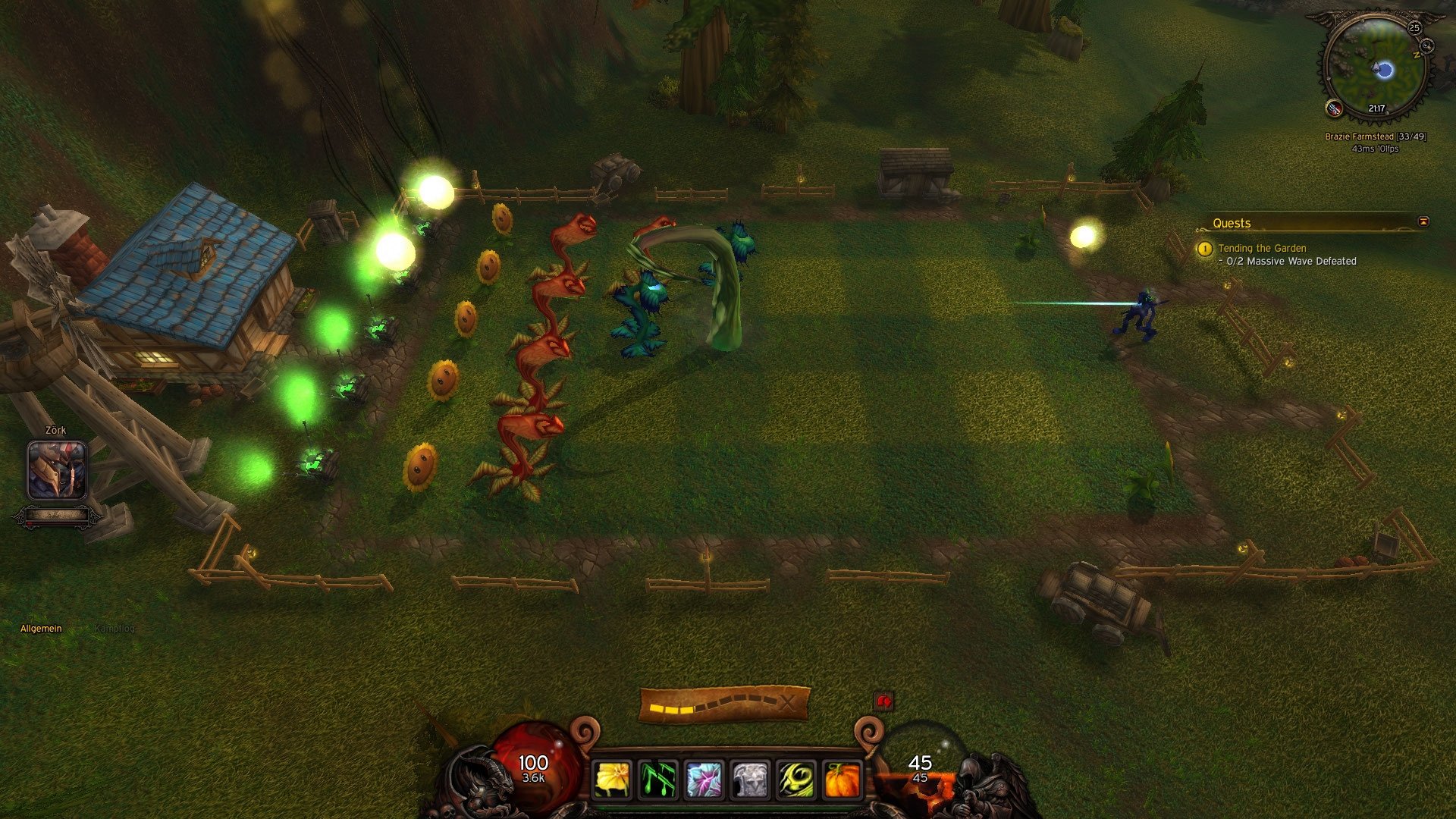
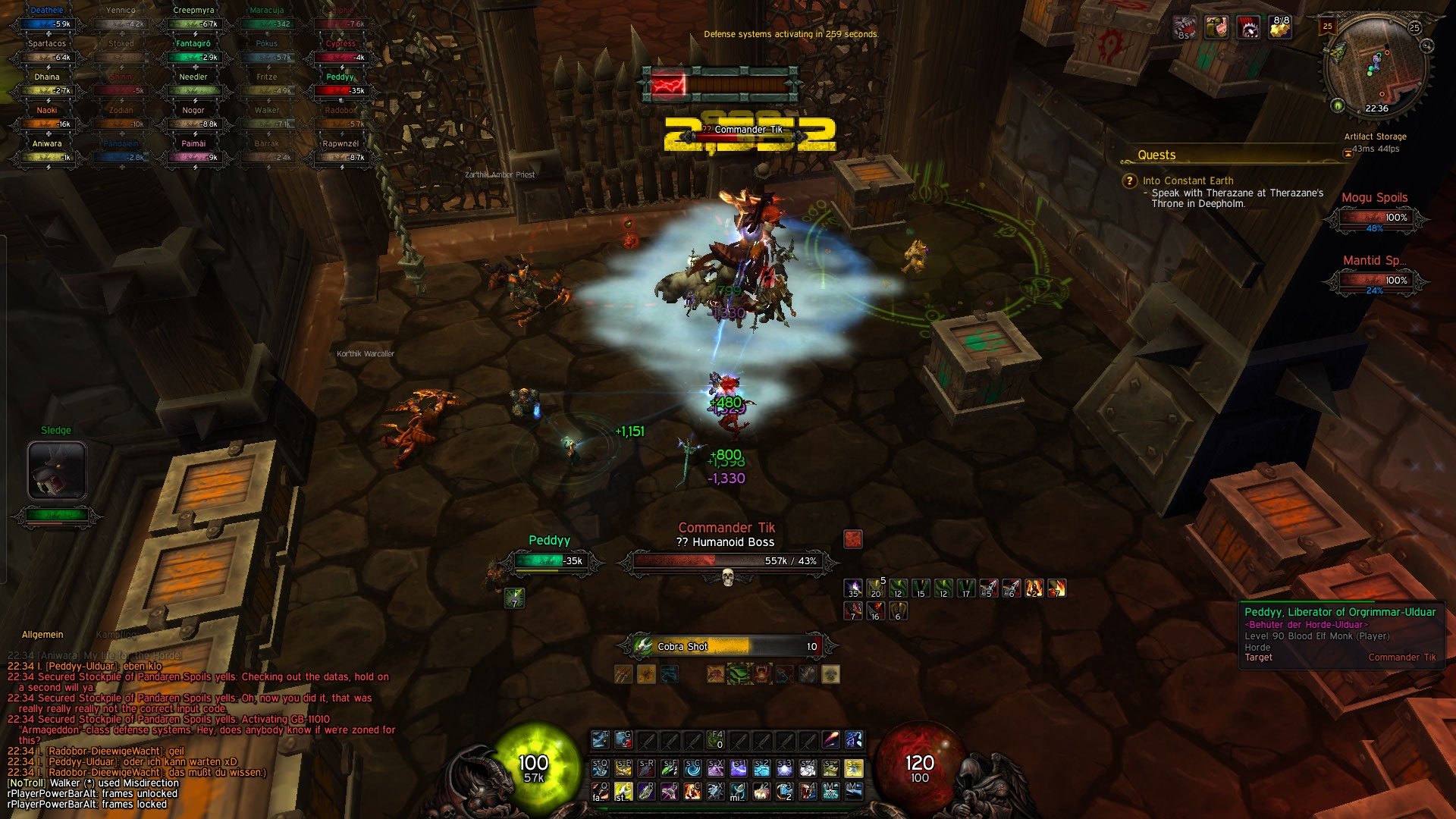
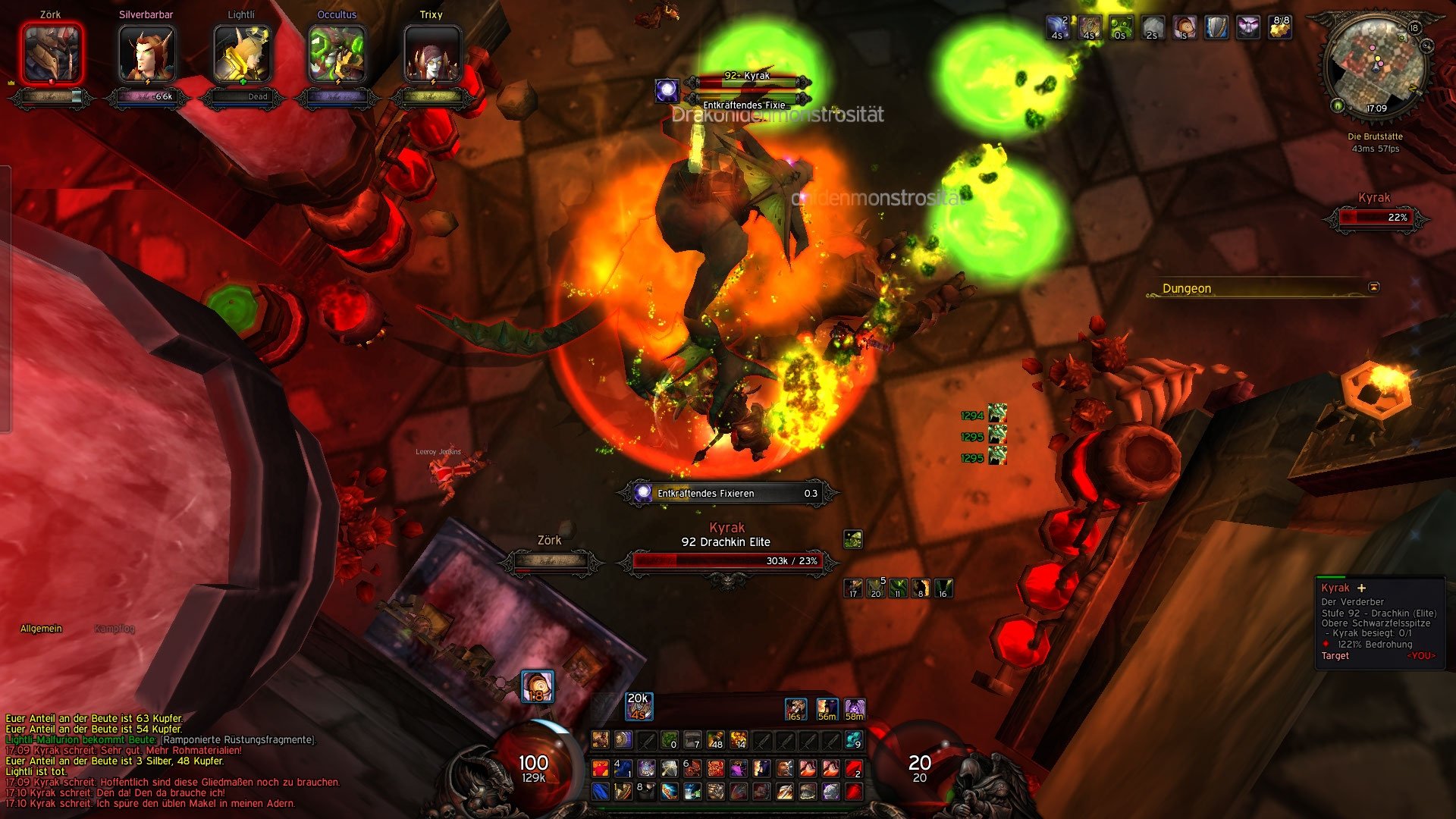
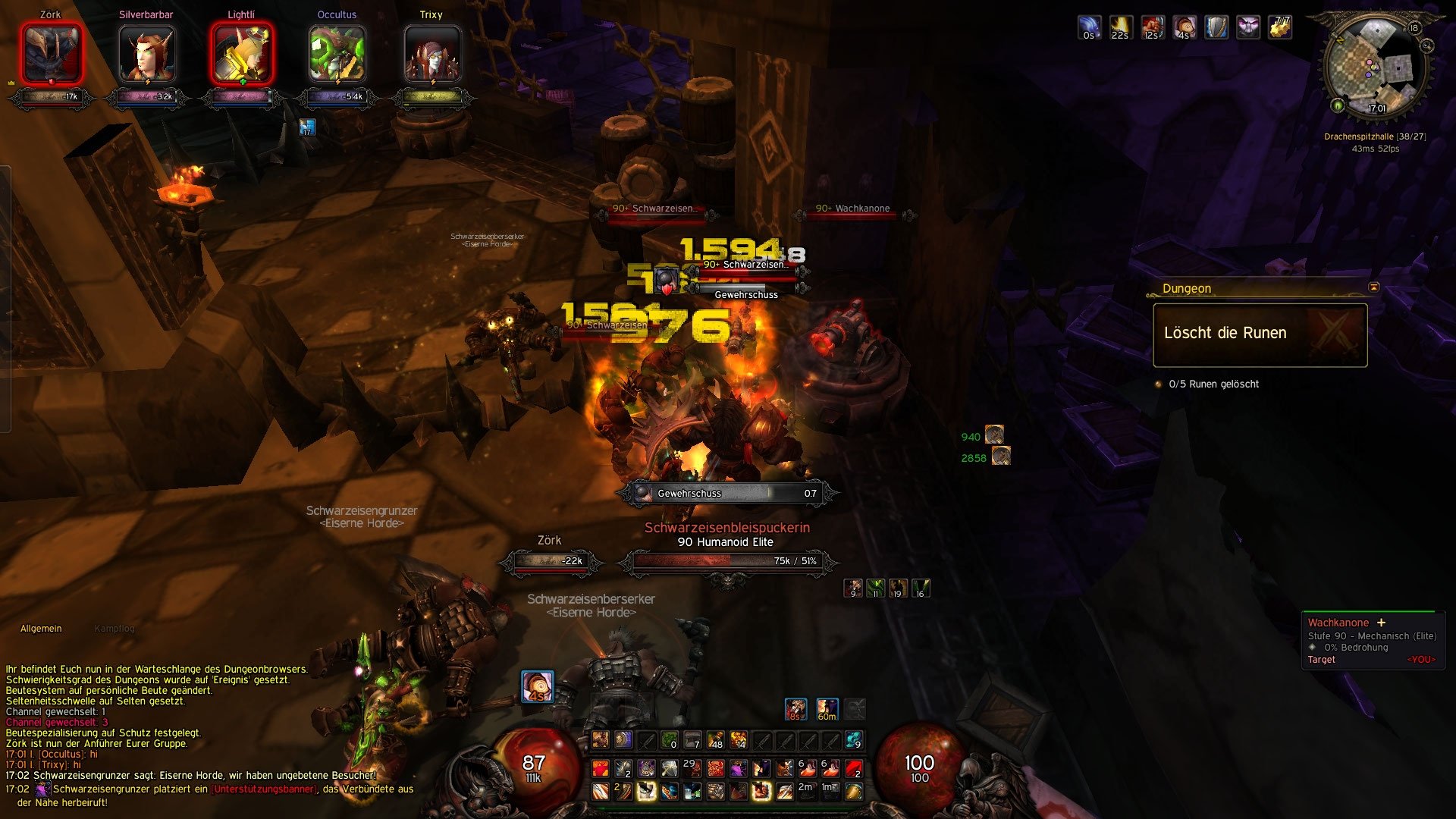
Hi there. This is my Diablo themed interface for World of Warcraft, called Roth UI. Enjoy.

Since more and more leaked downloads of my interface appear on the internet, please remember: There is only one official download of the Roth UI. And that is this one, on wowinterface.com. All other downloads available are leaked and are not officially supported by me.
INSTALLATION GUIDE
Only this one is ZORKIFIED!
If you are a first time Roth UI user you may want to check the tutorial video from Tachi showing the installation process.
How To Install and Configure Roth UI
FAQ - PLEASE READ BEFORE POSTING!
Same goes for the chat. If it doesn't fit just right-click the chat-tab. Unlock the chat and move it around until you feel comfortable.
ORB CONFIGWhen patch 5.2 hit the live servers a new version of oUF_Diablo was applied. Large parts of oUF_Diablo got rewritten, that includes large parts of the config.lua containing the orb animation settings. Most of those settings can then be changed via ingame config. The config can be accessed via
CLASS BAR PREVIEW
/diablo config
If you need a tutorial video check out Cryptus Roth UI tutorial video for 5.2
Roth UI config tutorial on YouTube by Cryptus
Another tutorial by Julien for Roth UI 5.2 in French:
[Guide] Addon Roth UI (interface diablo pour wow)


ORB ANIMATION SYSTEM
With 4.009+ the fluid animations have returned to Roth UI. With version 50200.03 you can config all those animations ingame via: /diablo config. Have fun playing around with the settings. Video showing one of the 100+ animations: http://www.youtube.com/watch?v=FqTwOHXSlw8
SCREENSHOTS / VIDEOS


Check out the Roth UI video playlist on YouTube.
SLASH COMMANDS
If you want to share videos / screenshots using the interface please post them here: Roth UI post your screenshot thread
ORB CONFIG
/diablo config--will toggle the config panel

LOCK / UNLOCK

/rabs lock --will lock all actionbars
/rabs unlock --will unlock all actionbars
/diablo lockart --will lock all art frames
/diablo unlockart --will unlock all art frames
/diablo lockbars --will lock all the toolbars (soulshards, castbars, combobar etc.)
/diablo unlockbars --will unlock all the toolbars (soulshards, castbars, combobar etc.)
/diablo lockunits --will lock all the unitframes
/diablo unlockunits --will unlock all the unitframes
/rbfs lock --will lock the player aura frames
/rbfs unlock --will unlock the player aura frames
/rmm lock --will lock the minimap cluster
/rmm unlock --will unlock the minimap cluster
/ris lock --will lock the data strings below the map
/ris unlock --will unlock the data strings below the map
/rppba lock --will lock the player power bar alt
/rppba unlock --will unlock the player power bar alt

RESET

/rabs reset--will reset all actionbars
/diablo resetart --will reset all art frames
/diablo resetbars --will reset all the toolbars (soulshards, castbars, combobar etc.)
/diablo resetunits --will reset all the unitframes
/rbfs reset --will reset the player aura frames
/rmm reset --will reset the minimap cluster
/ris reset --will reset the data strings below the map
/rppba reset --will reset the player power bar alt
Maybe you are just a fan of the orbs and don't want all the rest. Go check out rBottomBarStyler. It provides various Diablo themed background panels.
SUBMITTING ERRORSPost any errors or questions you are having in the comments.
ADDONS
If you are posting errors please always support your comment with a screenshot and in case the lua error you are getting.
Githubhttps://github.com/zorker/rothui
- fixed rNamePlates for patch 6.2.2
- updated toc files to 60200
60000.04
- removed rObjectiveTrackerMover
- fixed combo bar display
- fixed chi bar display
- fixed shadow orb display
- adding demonfury value display
- updated rNamePlates to 60000.07 now supporting auras
- fix blue tooltip bug
- add stealable buff icons to config
- style pet actionbar keybinds
60000.03
- removed xCT
- removed teksLoot
- added rCombatText
- added rDamageFont
- added LootRollMover
- added rPlayerPowerBarAlt
- updated rRaidManager to 60000.01
- updated rObjectiveTrackerMover to 60000.07
- updated rNamePlates to 60000.02
- adjusted the oUF_Diablo config to not show the alternate power bar any more (new mod)
60000.02
- readded tullaCC
- added rObjectiveTrackerMover
- removed rNamePlates2
- added *new* rNamePlates
- moved ComboBar to player
- fixed rActionBarStyler cooldown display on buttons with alpha < 1
60000.01
- removed rFilter3
- removed rThreat
- removed tullaCC
- removed rQuestWatchFrameMover
- removed xanAutoMail
- removed Butsu
- updated tullaRange to latest version
- added new orb animation models
50400.06
- Streamlined all class bar modules
- Fixed runebar onload display issue (runebar not show on first loadup)
- Added UnitAura and UnitTarget info to rTooltip
- Changed the TotalAbsorb module
- Added TotalAbsorb display to the player orb
50400.05
- removed bTooltip addon
- added rTooltip addon
- added faction coloring to the nameplate healthbar
- slight tweak to the nameplate healthbar texture
50400.04
- nameplate threat bloat fix
50400.03
- some new animations
- one new filling texture
- some adjustments to the micro menu
50400.02
- added optional galaxy rotation animation to the diablo config
- removed rDiabloPlates2
- added rNamePlates2
50400.01
- updated for WoW patch 5.4
- added StoreMicroButton to the MicroMenu
- new Vehicle bar texture and layout
50300.01
- updated toc files for patch 5.3
- fixed a lua error in rThreat
- added rRaidManager
50200.05
- fixing the boss frame update issue
50200.04
- removed all menu code from oUF_Diablo
- updated to oUF 1.6.4
50200.03a
- fixing a typo in tags.lua
- fixing a typo that prevented the powerorb from becoming movable
50200.03
- Applied the PTR version of Roth UI
- Added oUF_Diablo config panel, rewrote ton of code in oUF_Diablo
- Bunch of bugfixes that appeared over time
50100.01a
- Fixing the rFilter3 bug when tracking spell values (UnitAura() got changed again...)
50100.01
- updated TOC fles for patch 5.1
- fixed rDiabloPlates2
- Fixed SPELL_POWER_CHI
- removed OmniCC Basic
- added tullaCC
50001.07
- removed Collie
- removed rEmote
- fixed rActionBarStyler possessbar vehicle change bug
- rFilter3 now supports tooltip values
- added debuff highlighting for monks
- fixing temporary chat windows
50001.06
- rChat: Fixed petbattle chatframe detection
- rInfoStrings: added petbattle handler to hide icons in pet battle
- rInfoStrings: Fixed ExhaustionXP() = nil bug
- rFilter: added petbattle handler to hide icons in pet battle
- added ncImprovedMerchant
- remoded Junkster
50001.05
- added Collie
- added teksLoot
- added Butsu
- added Junkster
50001.04
- new bar for DK runes
- new bar for DRUID eclipse
- added rThreat
- added xanAutomail
- Added FACTION_BAR_COLORS to rDiabloPlates2
50001.03
- new oUF version from Github (classicons)
- Added all the new class bars (combo, holypower, harmony, shadoworbs, burningember, soulshards, demonicfury, etc.)
- Fixed OverrideBar display
- Changed the RaidFrameManger display
- Removed VengeanceBar
- Added charspecific.lua to rFilter3
- Added drag frames to rMinimap for Durability and Seat Indicator
- Fixed oUF_DebuffHighlight
- Slightly adjusted the altPowerBar display
50001.02
- Fixed oUF_Diablo raidframes
- Added oUF_AuraWatch to oUF_Diablo
- Fade out micromenu and bags completly by default
- Added visitor font for the tiny count on raidframe HOTs
- Added tullaRange
- Added a scale value to the tooltip
50001.01
- initial release of the patch 5.0 compatible version
40300.10
- fixed battle.net toastframe placement in rChat
- added visibility state drivers in rFilter3
- tweaked combo bar textures in oUF_Diablo
- fixed the positioning problem for party, raid and bossframes in oUF_Diablo
- removed tullaCC addon
- added OmniCC addon (better config options)
- Changed IhasNoScope, it never worked as I intended because I forgot one line of code. It will now display all errors that are not disabled in the config. Additionally the errors can be redirected to the combatText frame.
40300.09
- added heal prediction (disabled by default)
- added config option to disable the raid frame chains
- new move functions you can now lock, unlock and reset all your frames ingame.
This contains: player auras, minimap, actionbar, unitframes, background art and special bars.
40300.08
- Changed rFilter3 talent tree identification (check rFilter3 comments)
- Fixed ExtraActionButton taint
- Removed styling of ExtraActionButton from rActionBarStyler and moved it to the rActionButtonStyler
- Alot of tweaks to the rActionButtonStyler and rBuffFrameStyler code
- Enabled aurawatch example for the raidframes (druid example)
- Tweaked the boss power display in bossframes especially if they combine with an alternative power (onyxia charges, madness of deathwing charges etc.)
- Changed rFilter3 loop from onUpdate to animation
- rActionButtonStyler now supports Dominos and Bartender4
- If animations and classcoloring is enabled in oUF_Diablo the orb color will now switch upon entering a vehicle.
- Changed the way how raid groups in oUF_Diablo get sorted. They now match the default UI by using a group header for each raid group.
- Minimap LFG-icon now matches the other minimap icons
- rThreat can now be hidden in battleground/arena
40300.07
- removed tainting raid frame container code
- changed the raid frame mangager code, you can now use the raidframe manager in combat while still maintaining the mouseover effect
- changed the oUF_Smooth modulation code
- new orb animations
40300.06
- the extra action button should be working now
- tiny tweak to the unit highlights in oUF_Diablo
40300.05
- fixed rActionButtonStyler taint
- new try on the extra action button
40300.04
- fixes for rActionbarStyler (extractionbutton and mainmenubar)
- removed OmniCC
- added TullaCC
40300.03
- update for WoW patch 4.3
40200.12
- Tons of new textures
- New nameplates
- New raid frames
- Blizzard raidframe managed is now available, it will fade in once you hover the left side of you window in raids. (thx Alza!)
- Small tweaks to oUF_Diablo (to many to count)
- Switched hpcolors in the colorswitcher (so now bright colors in foreground by default)
- Updated to the latest oUF
4.011a
- enabled the framesUserPlaced variable in oUF_Diablo by default
4.011
- updated to patch 4.2
- updated xCT to fanupdate from dandruff
- fixed rActionBarStyler issues with patch 4.2
4.010
- added optional class and powertype coloring for animations
- added animation alpha channel multiplier
4.009b
- fixed the animation models position reseting bug
- added class specific animation table (you can define an animation setup per class now)
4.009
- new animation system for player orbs added
4.008a
- bar1 and 2 of ractionbarstyler are userplaced by default in config
- updated all TOC files for 4.1
- http://code.google.com/p/rothui/updates/list
4.008
- WoW patch 4.1 fixes
- fixed nameplates (castbar was removed from healthbar frame regions)
- fixed PetHappiness
- added scale variable to rDiabloPlates (you can now scale the nameplates!)
4.007
- removed evl_CombatText
- added xCT (Use /xct for options while ingame)
- fixed castbar coloring for target unit
- added oUF_AuraWatch module
- added healing druid oUF_AuraWatch example for oUF_Diablo
- removed focus frame entries from the Blizzard menu
- added target debuff desaturation to oUF_Diablo config
- updated rFilter3 (now supports combat fading, unit exists tracking and supports multiple specs (without reloadui))
4.006a
- WoW patch 4.06 fixes (CPU issues and LUA errors)
- slight tweaks to backdrop shadows in chat
- updated to oUF 1.5.8
- removed tooltip from aura icons in raid
- fixed orb value coloring (lol I didn't even notice that for a long time)
- fixed castbar issue of not hiding after unit:Hide() (requires wierd looking castbar scale values in config)
- added xanAutoMail mod
- added yQuestLevel mod
4.006
- move raid/party attributes to the config
- adjust tullaRange to not color the normalTexture and to priorize the range color first
- remove druid tree form condition from rActionBarStyler bar 1
- fix actionbar 1 mind control issue
- update to oUF 1.5.5
- fixed bug with overlaying temp enchant icons
- fix combo point display for fights that appear in a vehicle but still use class skills
- Make PlayerPowerAlt bar movable (sound bar in atramedes fight etc)
- add bossframes in Diablo style
- add a second row to raidframes to display name and health both at the same time
- add aura icon to raidfames (you can add a spellid to the raid aura spelllist to track it)
- edited evl_CombatText to play duke sounds again.
- added rThreat mod
4.005
- added config value to allow a gap between buffs and debuffs in rBuffFrameStyler
- added config value for colspacing TempEnchants in rBuffFrameStyler
- added skull+disconnect icons to raid
- more orb textures to choose from (try random!)
- added tapped coloring for target
- added minimapcluster to move frame (/diablo unlockart)
- fixed url copy editbox selection
- added alpha values for in combat and out of combat to config of oUF_Diablo soulshards and holypower
100812
- multicastactionbar fix
- added QuestMyMap (better quest worldmap)
100808
- fixed rActionButtonStyler bug
- totembar back in
- updated to myChat 1.4.5
100801
- Removed totem bar again (because of huge tainting issues in combat, actionbar not usable etc.), thus you need to download an totembar mod if you need the bars
- added teksLoot
- added Butsu (loot window)
- added GetFast (fast mail button to get all mail at once)
- added sounds to the target frame
100703
- fix the talent button done
- fixed 3D portrait display done
- fix the tainting for actionbuttons in some vehicle combat fights done
- fix nameplates done
- fix castbar latency display done
- add resting icon done
- add role icon done
- add pvp icon done
- add castbar not kickable icon done
- update to oUF 1.3.28 done
- add combat icon on orb done
- add a red to grey switch for nameplates done
- add a party on/off switch done
- add a only player debuffs on target on/off switch done
- add shaman totem bar done
- add a color table to the config to make the healthbar color selectable done
- add outer shadow to rFilter2 icons done
- add focus frame on/off switch done
- add pet frame on/of switch done
- added oUF_WeaponEnchant done
- removed rBuff done
- add player buffs/debuffs to oUF_D3Orbs done
- added customized role icons done
- changed style of new player buffs/debuffs to match the blizzard ones (fading and such) done
- removed idChat done
- added myChat done
- added tullaRange
- edited rActionButtonStyler to need less CPU usage
091210
- the new LFD button is now visible in the micromenu
- updated to oUF 1.3.24
- nameplate fonts are smaller
091203
- PATCH 3.3 rdy
- new nameplates (still evlNameplates, just different look)
- new tooltip (FreebTip)
- added xuButtonShadow
- new minimap animation
090929
- added aggro coloring to group frames
- new aggro coloring function call in oUF_D3OrbsRaid
- fixed the "in combat" group/raid invite bug
090905-2
- fixed the wrong default config, my fault
090905
- added move function to oUF_D3Orbs and oUF_D3OrbsRaid
- you now need ALT+SHIFT+mouse to drag frames, this affects rActionBarStyler aswell
090830
- updated to oUF 1.3.21
- fixed pet name display
- added color switcher to swap the healthbar/castbar colors
- added aggro indicator to raidframes
- removed crossdresser (I always get the message: "Cannot be done right now.", so I have to change manually anyway)
090827
- new font (<3 Neal)
- health orb can be class colored (if you want the green glow just set the healtcolor variable in oUF_D3Orbs.lua config area to 2)
- some fixes/tweaks to the raidframes
- small gfx changes here and there
- removed aTotemBar - shamans just download a totembar of your liking (see faq)
090817
- fixed a bug with maxmana = 0 in vehicles
- new "useduke" variable in evl_combattext.lua, default = 0
- added aTotemBar for our shamans
- updated to oUF 1.3.19
090808-2
- wups...folders
090808
- removed loltip because of fps issues
- readded stooltip
090807-3
- corrected folder structure
090807-2
- readded Crossdresser
- new textures for statusbar and orb filling
- removed the QuestDifficulty line
090807
- added my new create_me_a_galaxy function to oUF_D3Orbs, it creates small rotating galaxies for the orbs
- removed the shaman totembar script. I cannot test it, so grab some script for it yourself.
090806-2
- added shaman totembar to rActionBarStyler
- removed EquipSetUpdater and Crossdresser
- removed sTooltip
- added lolTip
090806
- patch 3.2.0 fixes
- glow still not working :/
090804
- rActionBarStyler default config
- added rColor dependencies and renamed "!rColors" to "rColors"
- folder "!rColors" is deprecated, you can remove it
090802
- rewrote rActionButtonStyler
090724a
- reverted the rangecheck change for actionbuttons
090724
- new orb filling textures
- better rare/elite indicator size
- moved the map a bit
- 1 year anniversary :>
090613
- updated to oUF 1.3.16
- added vehicle combo points
- added classification indicator icons for boss, rare and elite
- added EquipSetUpdater and Crossdresser from tekkub
- removed sUmziehOmat
090605
- added rEmote
- added more backdrop shadow textures
- fixed the raid vehicle manacoloring
090507
- Updated to oUF 1.3.14
- Names now get a grey color for offline and dead users
- Healthbar blanks out for dead units
- Added oUF_AuraWatch for specific buff/debuff filters
- Added missing HP to party/pet/focus frames
- Added transparency to party members out of range
- Added indicators for druid hots for party, focus and raid units
090427
- updated to oUF 1.3.13
- added frequentupdates for vehicles
- fixed orb power value display
090419-2
- range_indicator fix
- vehicle powertype fix
090419
- bugfixes mostly
- added unitframe vehicle functionality
090414
- 3.1 fixes
- new oUF_D3Orbs layout
- some additional tweaks
090402-2
- fixed a bug with the actionbar background texture not showing up correctly
- added a new oUF_D3Orbs config to change the orb fog density
090402
- rActionBarStyler complete rewrite
- new Diablo 3 textures
- new manacolor "runic" for deathknights
- actionbars and part of the orbs are now movable ingame!
- changed Chatmod to idChat
090325
- fixed focus target
- added automatic mana color detection
- moved stancebar above petbar
090321
- added raid frames (oUF_D3OrbsRaid)
- option for druid mana class coloring
- new minimap animations
090226-2
- renamed mod to rFrameRotater and added a much better config
090226
- new mod for cool rotating textures around the minimap
- colorswitch now optional (switch fore and background health color)
- orbonly config now optional
- hide party in raid now optional
- the 3rd bar texture is now bound to multibarright and will only be displayed if multibarright is visible
090212
- much better portrait border texture
- more "default" user friendly start setup ;>
090211
- added focus target
- new button skin
- pvp icon skinned and positioned
- petbar and both right bars are on mouse over right now (optional, config in lua)
- orb gloss texture now above the animation
090117
- the default settings for actionbars changed to 1x12 (instead of my 2x6)
- the default settings for the orbs changed to glow (green and blue)
- fixed the stancebar normaltexture bug
090115
- focus castbar added
- new font for everything
- replaced msbt with evl_combattext
- replaced dominos+buttonfacade with rActionBarStyler and rActionButtonStyler
081122
- added lynlocation and lynstats
- removed rbars2
- added dominos, buttonfacade, buttonfacade_rothar and redrange
081114
- wotlk and deathknight bugfixes
081109
- smooth health and power value fading
- minimap buttons
- portraits now clickable and onmouseover casting is possible
081104
- exp bar (thx to JExp)
- health and power bar fading (thx to oUF_smoothupdate)
- raidframe in grid style (oUF_D3OrbsRaid)
081031
- added msbt
- d3orbs now with party, focus and pet portrait
081027
- fixed some issues
- ui is now fully scalable
081026-2
- fixed zombie bug and scaling in oUF_D3Orbs
081026
- oUF_D3Orbs layout modified
- Diablo 3 minimap of cool
- tiny changes here and there
081022
- first real version of the oUF_D3Orbs mod, Diablo is back
081019
- contains the latest changes and mods
081017
- wotlk rdy
- got rid of some addons
081001
- Orbs are now part of oUF_Orbs layout
- minimap texture that turns around every second
- cool new futuristic orb style
080722
- setposition that will work in outlands, old world, sunwell, black temple
080721
- fixed the animation glow (it depends on SPELL DETAIL GRAPHIC SETTINGS, DOH!)
080717
- fixed some stuff and new orb textures
080713-2
- fixed the ui-scale issue
080713
- new animation technique with *.m2 files
080708
- new target frame texture
- brand new 128-frame orb animation (omfg!)
080707-3
- Diablo3Orbs now has settings (in Diablo3Orbs\core.lua)
- RaidClassColor and PowerTypeColor optional
- Diablo3Health now "onEnter" on the Life-Orb
080707-2
- fixed Diablo3Orbs bugs
080707
- Added more bar textures
- Cleansed the code of Diablo3Orbs.lua and made more comments so that you will have a much easier time to find stuff
- Diablo3Orb functions now on Player_Login
080705
- Orbs show now life and mana in percent and values
- Life Orb is rightclickable for unitframe options
080704-2
- slower update timer on orb animation
080704
- orb animation is working, timer and color can be set in lua, check http://zorktdmog.zo.funpic.de/roth_ui/orb_animation2.gif to get a feeling how it will look like
080703-2
- new rUnits placement
- hide top frame of the actionbar texture
080703
- included the forgotten texture
File Name |
Version |
Size |
Author |
Date |
Type |
50400.03 |
4MB |
09-06-13 10:29 AM |
Patch |
||
4.011 |
233kB |
07-01-11 11:34 AM |
Addon |
 |
Comment Options |
 08-26-18, 01:37 PM
|
|
|
A Kobold Labourer
Forum posts: 0
File comments: 4
Uploads: 0
|
I want it back
Please bring back this awesome UI. Galaxy revivals is not that great (don't get me wrong. it's cool but not like yours
 ). ).Thanks for all your support and hard work with this addon! |

|

|
| laurczt |
| View Public Profile |
| Send a private message to laurczt |
| Visit laurczt's homepage! |
| Find More Posts by laurczt |
| Add laurczt to Your Buddy List |
|
07-23-18, 02:12 AM
|
|
|
A Kobold Labourer
Forum posts: 0
File comments: 3
Uploads: 0
|
 can I change focus buff growth direction?
great addon. thanks a lot.
1 question. Can i change focus buff growth? It is basically left - to - right. I want to move buff position and growth. thanks. |
|
|
|
| reseed |
| View Public Profile |
| Send a private message to reseed |
| Visit reseed's homepage! |
| Find More Posts by reseed |
| Add reseed to Your Buddy List |
|
10-12-16, 01:12 AM
|
||
|
A Pyroguard Emberseer
 Forum posts: 1740
File comments: 3728
Uploads: 77
|
My new UI for Legion is about to being finished. Check it out if you want. No, it will not have orbs.
 http://www.wowinterface.com/download...52-ZorkUI.html
__________________
| Simple is beautiful. | WoWI AddOns | GitHub | Zork (WoW)
|
|
|
|
|
| zork |
| View Public Profile |
| Send a private message to zork |
| Visit zork's homepage! |
| Find More Posts by zork |
| Add zork to Your Buddy List |
|
08-12-16, 09:31 AM
|
||
|
A Flamescale Wyrmkin
Forum posts: 113
File comments: 504
Uploads: 10
|
Some of zork's new addons are included, some are not just because 'why fix it if it ain't broke'. But some of them (looking at you, rNameplates) feature a near complete rewrite from myself. |
|
|
|
|
| Joker119 |
| View Public Profile |
| Send a private message to Joker119 |
| Visit Joker119's homepage! |
| Find More Posts by Joker119 |
| Add Joker119 to Your Buddy List |
|
08-12-16, 08:47 AM
|
||
|
A Pyroguard Emberseer
Forum posts: 1740
File comments: 3728
Uploads: 77
|
Core of Roth UI (Diablo) is oUF_Diablo which I'm not going to update and Galaxy will you provide with everything you need. I'm still working on my other addons though.
__________________
| Simple is beautiful. | WoWI AddOns | GitHub | Zork (WoW)
|
|
|
|
|
| zork |
| View Public Profile |
| Send a private message to zork |
| Visit zork's homepage! |
| Find More Posts by zork |
| Add zork to Your Buddy List |
|
08-12-16, 01:41 AM
|
||
|
A Flamescale Wyrmkin
Forum posts: 113
File comments: 504
Uploads: 10
|
Re: About Roth UI
|
|
|
|
|
| Joker119 |
| View Public Profile |
| Send a private message to Joker119 |
| Visit Joker119's homepage! |
| Find More Posts by Joker119 |
| Add Joker119 to Your Buddy List |
|
08-11-16, 09:57 PM
|
|
|
A Kobold Labourer
Forum posts: 0
File comments: 11
Uploads: 0
|
About Roth UI
Hi.zork
I use this UI for a long time. And I like it so much. will You update it right? |
|
|
|
| JustJane |
| View Public Profile |
| Send a private message to JustJane |
| Visit JustJane's homepage! |
| Find More Posts by JustJane |
| Add JustJane to Your Buddy List |
|
08-09-16, 11:15 AM
|
||
|
A Flamescale Wyrmkin
Forum posts: 113
File comments: 504
Uploads: 10
|
Re: Target issues
This version of RothUI is outdated and abandoned. You can use my updated version in its place, found here: http://www.wowinterface.com/download...ysRevival.html |
|
|
|
|
| Joker119 |
| View Public Profile |
| Send a private message to Joker119 |
| Visit Joker119's homepage! |
| Find More Posts by Joker119 |
| Add Joker119 to Your Buddy List |
|
08-09-16, 09:30 AM
|
|
|
A Kobold Labourer
Forum posts: 0
File comments: 2
Uploads: 0
|
Target issues
Ah, Thank you! Also, when I select myself or another Player, my framerate drops from 60 to about 20... Then a few NPC's/Mobs I select afterwards have the same name/Buffs of the player previously selected. How do I fix this or revert it to the original target UI
|
|
|
|
| Ivald |
| View Public Profile |
| Send a private message to Ivald |
| Visit Ivald's homepage! |
| Find More Posts by Ivald |
| Add Ivald to Your Buddy List |
|
08-08-16, 11:54 AM
|
||
|
A Flamescale Wyrmkin
Forum posts: 113
File comments: 504
Uploads: 10
|
Re: Orb Bug
Unlocking the mana orb is /diablo unlockbars |
|
|
|
|
| Joker119 |
| View Public Profile |
| Send a private message to Joker119 |
| Visit Joker119's homepage! |
| Find More Posts by Joker119 |
| Add Joker119 to Your Buddy List |
|
08-08-16, 07:28 AM
|
|
|
A Kobold Labourer
Forum posts: 0
File comments: 2
Uploads: 0
|
Orb Bug
So when I use the command to move the orb, I can move the health orb, but not the mana Orb... Am I doing something wrong or is it just a bug?
|
|
|
|
| Ivald |
| View Public Profile |
| Send a private message to Ivald |
| Visit Ivald's homepage! |
| Find More Posts by Ivald |
| Add Ivald to Your Buddy List |
|
07-31-16, 06:40 AM
|
|
|
A Kobold Labourer
Forum posts: 0
File comments: 6
Uploads: 0
|
Is there a way to make it for i can scroll action bar 7 with action bar 2 when im stealth and also everytime i move the stance bar and relog it puts it right back to where it was.
Edit: also the vehicle exit picture isnt showing up Edit 2: I added ----------------------------- -- OVERRIDE BAR (vehicle ui) ----------------------------- local overridebar = { framePoint = { "BOTTOMLEFT", A.."Bar1", "BOTTOMRIGHT", 5, 0 }, frameScale = 1, framePadding = 5, buttonWidth = 32, buttonHeight = 32, buttonMargin = 5, numCols = 1, startPoint = "BOTTOMLEFT", fader = nil, } --create rActionBar:CreateOverridebar(A, vehicleoverridebar) under the vehicleexitbar code you have and it added back the picture to dismount vehicles. I was trying to add a vehicle bar to resize because i noticed there wasnt one lol
Last edited by maximusanew : 07-31-16 at 07:29 AM.
|
|
|
|
| maximusanew |
| View Public Profile |
| Send a private message to maximusanew |
| Visit maximusanew's homepage! |
| Find More Posts by maximusanew |
| Add maximusanew to Your Buddy List |
|
07-29-16, 04:45 PM
|
|
|
A Flamescale Wyrmkin
Forum posts: 113
File comments: 504
Uploads: 10
|
My version of Roth UI is up
http://www.wowinterface.com/download...ysRevival.html
It's currently missing rNameplates, rMinimap, rBuffFrameStyler and rError as they are all broken in the current live patch. I will re-add them once they are fixed. |
|
|
|
| Joker119 |
| View Public Profile |
| Send a private message to Joker119 |
| Visit Joker119's homepage! |
| Find More Posts by Joker119 |
| Add Joker119 to Your Buddy List |
|
07-29-16, 12:45 PM
|
|
|
A Flamescale Wyrmkin
Forum posts: 113
File comments: 504
Uploads: 10
|
Fix for oUF_Diablo
Boom. Bam.
https://github.com/galaxy119/oUF_Diablo oUF_Diablo will now function properly as intended.. with the small misfortune of the orb animations being buggy as fuck, so I recommend disabling them for the time being. Anyhow, time to work on the other RothUI addons... Work, work. |
|
|
|
| Joker119 |
| View Public Profile |
| Send a private message to Joker119 |
| Visit Joker119's homepage! |
| Find More Posts by Joker119 |
| Add Joker119 to Your Buddy List |
|
07-29-16, 10:38 AM
|
|
|
A Flamescale Wyrmkin
Forum posts: 113
File comments: 504
Uploads: 10
|
Temporary workaround for Blank UI on loading screen
There is currently a bug in oUF that causes UI elements outside of the main Action bar to turn transparent when you /reload or hit a loading screen and the health or power orb are not 100% full.
A temporary work around is to open the config panel (/diablo config) and use the Reload UI button provided there, that will force the orbs to be "faked" as full during the reload, restoring the rest of the UI. I am currently working on a fix, as soon as I can track down the actual cause T_T |
|
|
|
| Joker119 |
| View Public Profile |
| Send a private message to Joker119 |
| Visit Joker119's homepage! |
| Find More Posts by Joker119 |
| Add Joker119 to Your Buddy List |
|
