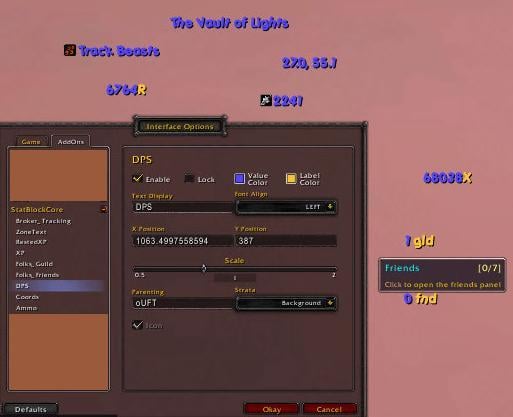
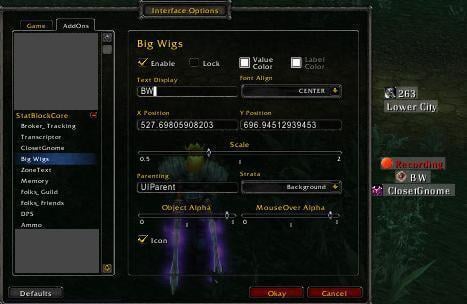
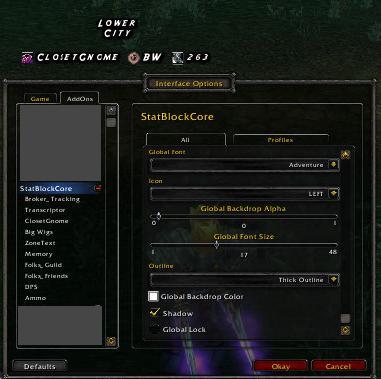
StatBlockCore is a display addon for LibDataBroker plugins.
It offers a variety of options some plugin based, some global based. It's main goal is to provide an alternative for FuBar and Titan, whilst keeping to a minimal codebase and not sacrificing features.
SBC is actually the 2nd evolution in the form of version 2. Version 1 was actually called StatBlocks and was never released outside of it's svn. It has since had development finished in favor of SBC. SB suffered the same plague as FuBar and Titan: The user didn't get a choice of what *they* wanted to use to display a plugin, SBC changes this in that it is an option, you may if you wish use a different display addon for Data Broker plugins.
SBC does nothing on it's own, it needs plugins to function, these can be found in the data broker section of WoWI.
/sbc
/statblockcore
LibDataBroker is a small WoW addon library designed to provide a MVC interface for use in various addons. LDB’s primary goal is to “detach” plugins for TitanPanel and FuBar from the display addon. Plugins can provide data into a simple table, and display addons can receive callbacks to refresh their display of this data. LDB also provides a place for addons to register “quicklaunch” functions, removing the need for authors to embed many large libraries to create minimap buttons. Users who do not wish to be “plagued” by these buttons simply do not enable them in StatBlockCore to render them, or do not use a display addon.
Due to it’s simple generic design, LDB can be used for any design where you wish to have an addon notified of changes to a table.
Change Log - StatBlockCore
v2.5 - *Add option to hide tooltip in combat
*Press down "Control" when moving a block to disable sticky
*Add button to color text by classcolor, only available globally
*Option to hide text for use when only the icon is wanted, will snap resize the block
*Remove WotLK checks
*Now when you install a new plugin, it will take the master color settings
*NEW support for creating secure blocks: Many thanks to Aranarth for the endless debate & discussion! This will allow more power to blocks, Aranarth's in particular :P
v2.4.5 - Bugfix changing text for launchers
v2.4.4 - Wrath update, Externals fix
v2.4.2 - WotLK fixes
v2.4.1 - Fix data source plugins
Remove a useless function
Non-existing parent bugfix
Disable config for disabled launchers when using the master option
frFR Update
v2.4 - Rearrange config
Added global scaling & global object alpha selections
Updated koKR and zhCN, locale cleanup
Fixed issue with some blocks calling a secure function (e.g. Broker_Professions). Now creates buttons and uses OnClicks
More small tweaks
v2.3.1 - Added support for addons like MakeRocketGoNow, Added new "Create AddOn QuickLaunchers" option to go with it. You can select to make no quicklaunchers and let another addon do it for you or create all quicklaunchers and disable/enable them individually in the menu.
General tweaks mainly with scripts.
v2.3 - Removed defunct tooltiptext handling
Various tweaks
v2.2.2 - Minor config change
Bugfix with profile change (hopefully, could not replicate)
Support Load On Demand plugins
Changed tooltiptext usage
v2.2.1 - You need this version for compatibility with the latest plugins
Fix OnTooltipShow args
Bugfix icons appearing behind the background (faded out)
Support tooltiptext
Change to new launcher methods
Fix configs not appearing sometimes for disabled plugins
v2.2 - The icon is now part of the block, should solve sticky problems.
Font shadow now optional (global)
New font outline option (global)
Bugfix some blocks shrinking ruining hex colors
Bugfix object alpha not set at login
Better quicklaunch support, you should, for the third time, be able to properly customize quicklauncher text like BigWigs. (via latest FuBar2Broker)
Minor config layout tweak
Improved tooltip management
v2.1 - Added Object Alpha and MouseOver alpha options for plugins. Can be used generally to set alpha, but also to create a "Show on mouseover" by setting the object alpha to 0 and mouseover alpha to 1.
Originally posted by ManniAT And please with some kind of logic - so I can (for an example) stick 2 to 1 and one becomes the master - next 3 to two - 1 is now the master for 2 and 3 and so on.
A little highlighting would be helpfull with this.
Like Dominos does it.
This would really be a great feature since this would help in building blocks and handle them as one item.
I have for an example a "top bar", melee stats (5 addins) on the right side, and some launchers on the left side of my screen.
SBC uses the same sticky lib Dominos uses, I'll have a word with Tuller when I get the chance.
Quote:
Originally posted by Elite_Gamer04 Sorry to trouble you - was wondering if you could list the addons you are using to achieve the fantastic looking layout shown in 'along_the_top' screenshot.
Im looking to replace FuBar with a more lite weight (memory) mod and believe this is the way to go?
Only 2, SBC and kgPanels for the background. Obviously SBC is made transparent and "beautified" a bit with it's options/font etc. I freely admit SBC looks rubbish with default options/font! I was aiming for a "neutral" default and white is pretty neutral. ^^
Quote:
Originally posted by ManniAT
A thing I was already askig in an earlier post - glad to see I'm, not allone.
I'll try fit it into the options, but I just get the feeling the layout isn't good, I'm no UI designer I'm afraid
Sorry to trouble you - was wondering if you could list the addons you are using to achieve the fantastic looking layout shown in 'along_the_top' screenshot.
Im looking to replace FuBar with a more lite weight (memory) mod and believe this is the way to go?
Originally posted by ManniAT And please with some kind of logic - so I can (for an example) stick 2 to 1 and one becomes the master - next 3 to two - 1 is now the master for 2 and 3 and so on.
A little highlighting would be helpfull with this.
Like Dominos does it.
This would really be a great feature since this would help in building blocks and handle them as one item.
I have for an example a "top bar", melee stats (5 addins) on the right side, and some launchers on the left side of my screen.
This already applies when placing the bars anyway.
Also, another idea which would be quite useful: plugin based icon positioning. Would be useful for me at least
Originally posted by funkydude The sticky behavior is currently only really to help positioning. But I have though about adding it in a future version.
And please with some kind of logic - so I can (for an example) stick 2 to 1 and one becomes the master - next 3 to two - 1 is now the master for 2 and 3 and so on.
A little highlighting would be helpfull with this.
Like Dominos does it.
This would really be a great feature since this would help in building blocks and handle them as one item.
I have for an example a "top bar", melee stats (5 addins) on the right side, and some launchers on the left side of my screen.
Originally posted by Dalarian Went to change the Profile on the first toon I setup, to make it Default, and I am getting the following error:
SetBlockCore.lua:551: bad argument #3 to 'SetFormattedText' (string expected, got nil)
...is this one of the places that need "self" added?
You need to reload UI after performing profile changes, it tells you this in chat.
Quote:
Originally posted by Zergreth I really like the "sticky bar" behaviour the blocks have when setting them up. I was quite disappointed to find out they would not stick to each other anymore after an interface reload. Would it be possible to maybe save what bar sticked to what other bar(s), and then readd that when the addon is enabled?
The sticky behavior is currently only really to help positioning. But I have though about adding it in a future version.
I really like the "sticky bar" behaviour the blocks have when setting them up. I was quite disappointed to find out they would not stick to each other anymore after an interface reload. Would it be possible to maybe save what bar sticked to what other bar(s), and then readd that when the addon is enabled?
1. I can't actually remember the reason, but I don't think it's really that necessary to have that option. I'll think about it next development phase.
2. I see, the idea was to have an automatic resizer that can be turned off, but still some wrinkles to think about. But yeah, like I said earlier, the way to resize blocks (if you need to) is use the mousewheel over the actual block.
Quote:
Originally posted by Frayol Maybe I am just being dense, but I fail to understand what functionality would be gained from being able to place a block off-screen. Regardless, is there a possibility that you would consider adding it back it as a toggle option?
I think that there may have been a misunderstanding over what I meant here as I actually quite like the idea of a block maintaining a set size. On my UI changing block sizes are most notable with factions and I have had to adjust the layout to prevent the faction name from pushing one set of blocks over the other. Just a personal preference mind, but I am probably not the only person to have had that problem occur.
Originally posted by funkydude 1. I removed it in the v1 series as I had complaints it restricted functionality
Maybe I am just being dense, but I fail to understand what functionality would be gained from being able to place a block off-screen. Regardless, is there a possibility that you would consider adding it back it as a toggle option?
Quote:
Originally posted by funkydude 2. Still on the todo. Currently the mousewheel is the resizer.
I think that there may have been a misunderstanding over what I meant here as I actually quite like the idea of a block maintaining a set size. On my UI changing block sizes are most notable with factions and I have had to adjust the layout to prevent the faction name from pushing one set of blocks over the other. Just a personal preference mind, but I am probably not the only person to have had that problem occur.
It's not hard to do, no, infact it's really easy. The problem is fitting in all these options in one blizzard panel and at the same time not making it look really ugly. :/
Quote:
Originally posted by ManniAT
Anyhow - it's just a little thing it does not really matter.
Jep I checked the rocket.
It has three things I dont like
a.) only for launchers
b.) big not scaled down icons
c.) "all in one thing"
for c.) - this is the idead behind, I know - but it does not fullfill my needs.
Your "nice litte things" (scaled down to 0.7) are exactly what I need - also the ability to see tooltips or text on them.
It's nothing more than an optical "problem".
My thought was - you can change the icon side for all of them - so thiy should be possible (with litte affort) to have on a per item base.
Anyhow - it's just a little thing it does not really matter.
2. No plans to do that currently, you should check out "makerocketgonow" to tidy up launchers, then turn it off in SBC.
Quote:
Originally posted by ManniAT
as I saw you added
--*Now when you install a new plugin, it will take the master color settings
Would be also great to set Scale to master scale.
Another request if it is possible to enable icon placement (left / right) on a per addin basis.
as I saw you added
--*Now when you install a new plugin, it will take the master color settings
Would be also great to set Scale to master scale.
Another request if it is possible to enable icon placement (left / right) on a per addin basis.
I have some launchers I place right on screen - and some others I place left.
Would be much better looking if all of them have the icon on screen border.
1. I removed it in the v1 series as I had complaints it restricted functionality.
2. Still on the todo. Currently the mousewheel is the resizer.
Quote:
Originally posted by Frayol
First up, is there a setting to prevent you taking the blocks off-screen (clamp to screen)? I did look, but couldn't find anything like that and found it really difficult to align everything the way I wanted it. If not, is it possible that this could be added please?
Secondly, am I correct in assuming that the block size once set will remain constant and not change size when the text changes size? The particular case I am think of is with factions when your watched faction changes from a short name to a long one. [/b]