| Go to Page... |



| Compatibility: | Shadowlands patch (9.0.2) |
| Updated: | 12-13-20 09:53 AM |
| Created: | unknown |
| Downloads: | 142,114 |
| Favorites: | 619 |
| MD5: | |
| Categories: | Shaman, Casting Bars, Cooldowns |
TotemTimers 

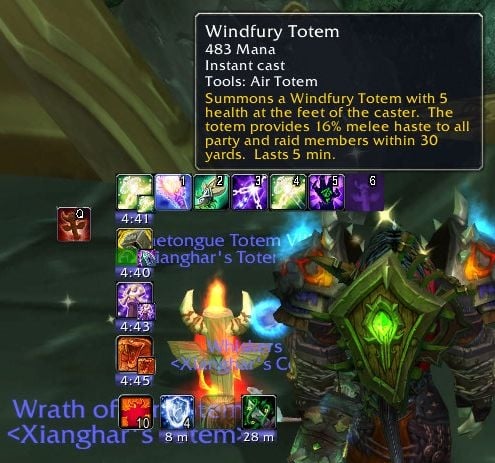
Show timers for totems and shaman spells (duration, cooldown).
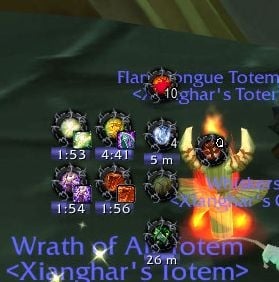
There are 5 bars where you can place you spells as buttons, similar to action buttons. Those buttons will show timers for a spells cooldown or the duration for a spells buff if it is active.
Totems show their durations. Also supports timers for Windfury Weapon and Flametongue Weapon as well as a cooldown timer for reincarnation.
Shows a movable power bar and a bar for Flameshock duration on your target.
TT supports ButtonFacade and rActionButtonStyler for customizing its appearance.
A big thanks to all who kept the localization of TT up-to-date.
- Fix Flameshock timer
13.0.5
- Fix error on unlocking bars
13.0
- Update for Shadowlands
- Added timer for totem duration
- Fixed timer for shields, atm Earth Shield can only be tracked on yourself
- Added timer for weapon enchants (Windfury Weapon and Flametongue Weapon)
- Added button to put reincarnation timer back on your bars if you removed it
12.2
- Hide addon during Arcane Leylock minigame
12.1
- Update for BfA
- Fix Flameshock debuff timer
12.01
- Changed default bar positions
12.0
- Changes for Legion
- Timers come on 5 individually configurable bars
- Timers are enabled/disabled by dragging spells from the spellbook / draggin spells from the bars
- Removed totem menus since totems are no longer bound to elemental schools
- Removed several things like totem duration, flameshock duration, or keybinds, these will be added back in
- Maelstrom Bar shows Mana for Restoration
11.1.15
- Fixes for 6.2
11.1.14
- Fixed Lua Error on 12 active enhancement timers (thx to Vialuny)
- Fixed Searing Totem timer keeping wrong textures after using Fire Elemental or Magma Totem
- Feral Spirit timer should update correctly with T17 2pc, untested since I do not have T17 pcs
11.1.13
- Fixed Ascendance for 6.1
11.1.12
- Small bugfix
11.1.11
- Added Fire Elemental on right button and Magma Totem on middle button to Searing Totem timer
- Changed Capacitor Totem warning to 2 seconds
11.1.10
- Fixed clickthrough not working for first totem timer
11.1.9
- New totems should show up without having to reset settings
- May contain fix for long cooldown timers getting tiny
11.1.8
- Fix typo
11.1.7
- Add totems to cooldown bars
11.1.6
- Removed debug message
11.1.5
- Added new WoD spells
11.1.4
- Added Unleash Flame for Elemental
11.1.3
- Bugfix
11.1.2
- Timer text on buttons is now independent again from new blizz cooldown text
- Lightning Shield shows charges again for Elemental
11.1.1
- Fixed Flame Shock bar
- Fixed Water Shield tracker
- Fixed Unleash Life
- Fixed Ascendance
11.1
- Changes for patch 6.0.2
11.0.18
- Added Chain Heal for Resto
- Sounds should play through the master sound channel
11.0.17
- Added Lava Lash overlay glow on 5 Searing Flame stacks
- Fixed loading totems
11.0.16
- Ascendance cd updates for Ele T15 4pc
- Cooldown clickthrough option now also works for long cooldown bar
- Fixed earth and wind totems not showing for low level shamans if only totems from talents are learned
11.0.15
- Fixed tooltip errors
11.0.14
- Fixed scenario errors
11.0.13
- The Flame Shock button in Elemental spec now casts Earth Shock and Frost Shock (rightclick/middle button) properly
- The Earth Shock button in Resto Spec now also casts Flame Shock and Frost Shock (rightlick/middle button)
11.0.12
- Fixed totem sets
11.0.11
- Fixed casting/reordering Earthgrab Totem
11.0.10
- Fixed wonky timers
- Fixed Earthgrab/Earthbind
11.0.9
- Corrected opacity for some buttons
- Replaced destroying single totems with Totemic Recall
11.0.8
- Better hiding in pet battles, vehicles and out of combat
11.0.7
- Fixed timers disappearing in CRZs
- Hide properly in pet battles
11.0.6
- Allow negative totem timer spacing
11.0.5
- Long cooldown's ability durations are not clickable
- Fixed "loose" arrangement of totem timers
- Fixed Call of the Elements
- Adjusted flash and warning times for totems with short duration
- Fixed timers disappearing in scenarios
- Fixed errors when leveling up in combat
- Added Spirit Walk to Enhancement cooldowns
- Middle mouse button on a totem timer casts Totemic Recall
- Stormlash Totem and Capacitor Totem cooldowns display properly
- Fixed Lava Burst and Flame/Earth Shock buttons to glow on Lava Surge and Fulmination procs
- Purify Spirit is no longer displayed as on cooldown when it does not dispel anything
- Timers should color properly again when out of range or out of mana
11.0.4
- Fixed more leaking globals
- Fixed textures
11.0.3
- Fixed totem menus not draggable
- Fixed glyph ui taint
- Fixed Searing Totem and Lightning Shield
11.0.2
- Fixed options for cooldowns
- Fixed long cooldown buttons not casting spells
- Removed Chain Lightning and Fire Nova from Elemental cooldowns, added Purify Spirit to Restoration cooldowns
11.0.1
- Fixed timers stopping randomly
- Removed Water Shield count
- Fixed weapon buff timers
- Fixed lock up when changing specs
- Fixed "loose" timer and tracker arrangements
11.0
- Added profiles
- Added bar containing spells with longer cooldowns
- Added new totems and spells
- Removed multicast bar/spells
- Removed buff checking for determining totem range, now uses coordinates only
- Removed small totem cast buttons
- Removed dot for player totem range, will color whole icon instead
- Added more localizations
- Hide in pet battles
- Added single options for enabling Hex/Bind Elemental
- Show Hex/Bind Elemental only if these spells are available
- Added keybindings for most buttons
10.4.10
- Fixed wrong texture coordinates on active totem timers when using Masque. Requires Masque ver. 4.3.378 or higher.
10.4.9
- Fixed weapon buff tracker only showing one buff
- Added cooldown for Spirit Link Totem
10.4.8
- Fixed timer bars
10.4.6
- Fixed time on buttons disappearing if totem cooldown is shown
- Totem range now properly accounts for buffs overwriting totem buffs
10.4.5
- Fixed taint
- Fixed Lava Surge aura display for T12 4pc
- Flame Shock updates on target change
- Fixed time text color
- Fix for new T12 2pc
- Tooltip fix
- Fix for Masque
- 4.3 update
10.4.3
- Fixed Flame Shock bar
10.4.2
- Bugfixes
10.4
- Fixes for Patch 4.2
10.4 Beta 2
- Added buttons/timers for Hex and Bind Elemental:
Both buttons work as follows:
Left Button: Hex target
Right Button: Hex focus
Middle Button: Focus target
- Added "border timers", small vertical bars to the side of a button, for specific spells, currently Hex cooldown and Unleash Flame duration (shown at Earth/Flame Shock CD timer).
Can be changed in width or enabled/disabled in TT General Config.
If you use ButtonFacade or smth similar to display round buttons check "Round Buttons" in TT General Config
10.4 Beta 1
- Loads through AddonLoader (untested)
- Fixed totem bars not movable if set to "always visible"
- Fixed range check for Stoneskin Totem
- Enabled CD for Tremor Totem
- Added Spirit Link Totem
- Fixed combat log parsing for 4.1.
10.3.15
- Fixed error messages on loading localization files
10.3.14
- Fixed other timers not working if the four totem timers are disabled
- Timer positions are now saved separately for each spec
10.3.13
- Bugfixes
10.3.12
- Added clickthrough options for Timers and Trackers
- Added option for ES Tracker to show only charges instead of a timer
- Fixed keybind for second weapon enchant
10.3.11
- Added back canceling weapon enchants by crtl-clicking the weapon buff tracker: left button for mainhand, right button for offhand
- Cooldown order is now changed by shift-dragging one cooldown onto another
- Added Unleash Elements and Spiritwalker's Grace to cooldowns for all specs
- Added Searing Totem to Elemental cooldowns
- Added shocks and Flame Shock duration to Restoration cooldowns
- Cooldown spells and order had to be reset for above changes
- Improved cooldown layout code
- Added option to show Flame Shock duration and Maelstrom above cooldowns
- Added option to make cooldown buttons clickthrough
- Added main tank menu to Earth Shock tracker and several options for it
10.3.10
- Fix for totem menu keybinds
- Bugfix for inspecting group members
- Removed settings for Fulmination aura display since it is now built-in
- Fixed reordering totems in totem menus by shift-dragging
- Fixed dragging totem menus if totem menus set to be permanently visible
10.3.9
- Bugfix for range check
10.3.8
- Fixed error on load
- Maelstrom bar is no longer active without the talent
- Removed some outdated keybinds
- Fixed keybinds for opening totem menus
- Fixed detecting new spells on learning them
- Enabled totem range check for group
10.3.7
- Bugfix for weapon buff menu direction
10.3.6
- Bugfixes
10.3.5
- Added options for Wind Shear on Elemental and Resto Cooldowns
- Fixed multicast menu
- Fixed Earth Shield target name not hiding
10.3.4
- Earth Shield target name is now better visible and can be turned off
- Fixed Maelstrom stack display on weapon tracker
- Added aura for Fulmination
- Lava Surge aura and Fulmination aura are not tied to Elemental cooldowns, moved options to general options
- "Glow" option for auras now extends to action buttons on the default action bar, Bartender4, and Dominos
- Fix for applying totems set by RaidTotems
10.3.3
- Fix weapon tracker for shamans below lvl 75
- Lava Surge: Lava Burst cooldown timer resets on proc, can optionally glow and show an aura around your character using the built-in aura alert
10.3.2
- Several bugfixes
10.3.1
- Bugfix
10.3
- Updated for Patch 4.0.1
- Added Cooldowns for Restoration: Riptide, Healing Rain, Water Shield Charges
- Changed Magma Totem for Enhancement cooldowns to Searing Totem
- Temporarily disabled checks for party totem range
10.2.4
- Bugfixes
10.2.3
- Fixed trackers sometimes showing while being disabled
10.2.2
- Fixed hiding cooldowns out of combat
10.2.1
- Added Flame Shock bar to Enhance CDs
- Added Fire Nova, Magma Totem, Shamanistic Rage, Lightning Shield, Feral Spirit Duration and Wind Shear to Enhancement Cooldowns
- Added Cooldowns for Elemental: Flame Shock (+duration), Lava Burst, Chain Lightning, Thunderstorm, Elemental Mastery, Fire Nova
- The option to show the Shield Tracker is now separate for each spec, so you can avoid redundancy with enh. cds
- Cooldowns can be toggled individually
- Cooldown order can be changed
- Changed Shock CD Button to have Flame Shock on rightclick and Frost Shock on Middle Click
- All Cooldown options are now separate for each spec (except frame position)
- changed totem range detection:
Totems that give buffs are still checked for their or a similar buff
For totems that dont give buffs range is calculated by coordinates if coordinates are available
Range is not checked for totems that only affect mobs and not players
- Buttons in totem menus indicate to which multicast spell totems are assigned
- Multispell menu buttons show totems assigned to their sets
- Colors of warnings can be changed
- Sounds can be assigned to warnings
- Optional big pulse effect if timer expires
- Timers continue flashing for 5 secs after expiring
10.1.11
- Temporary 3.3.3 bugfix
10.1.10
- Yet another ES bugfix
10.1.9
- Additional small ES bugfix
10.1.8
- Bugfix for ES tracker
10.1.7
- Small bugfix and localization update
10.1.6
- Changed Reincarnation max cd to 30 min
- Removed Fire Nova from internal totem list,
that may or may not fix the problems some people are reporting regarding the fire totem timer
- String splitting for Earth Shield target display should now be unicode aware
10.1.5
- Fixed some maelstrom bar scaling issues
- Added self-only Icy Talons buff of DKs to Windfury buff check
10.1.4
- Fixed Earth Shield tracker
10.1.3
- toc update for 3.3
10.1.2
- Bugfix for weapon tracker
10.1.1
- Bugfix, added missing file
10.1
- Introducing new cast buttons which change their spells according to selected totems, configurable in options gui.
Manual on curse and wowinterface.
- Added option to hide TT in vehicles
- Added name of the person having your Earth Shield to tracker
- Readded hiding of totems from the menus
- Readded rightclick spell to weapon tracker (refer to tooltips on how to set it up)
- Ctrl-Leftclick removes weapon buffs
- Added option to show timers on buttons instead of separate bars
- Readded additional totem sets to ankh tracker
- Added usage info to tooltips
- If enhanced/detailed tooltips are enabled (wow interface options) the whole spell information is shown
else only spell names are shown
- Tooltip placement at buttons is now optional, if turned off, tooltips show in the lower right corner
- Hopefully fixed "you aren't in a party" spam
- Fixed weapon tracker showing wrong buffs with two equal weapons equipped
- Hopefully fixed ankh tracker showing its cooldown frame while reincarnation is not on cd
- Added options to change timer font colors and timer bar colors
- Added PARTY_LEADER_CHANGED-event to Earth Shield Tracker unit update for recast
- Localization moved to CurseForge.com localization system
- Added French localization, thx to ckeurk
10.0.2
- Fixed menus not closing in combat
10.0.1
- Several bugfixes
- Updated zhTW locale, thx to a9012456
10.0
- TT can replace the new totem bar, you select one of the new multicast spells with the new multicast button,
Totems selected by rightclick in the totem menus are assigned to the selected multicast spell.
A rightclick on the multicast button casts Totemic Recall (middleclick if menu is set to open on rightclick.)
- Weapon Buff button now has a menu to choose buffs with a rightclick from
instead of its old GUI settings, atm this menu opens on rightclick only
(choose a weapon buff by rightclicking, cast it by leftclicking the weapon buff tracker,
if you selected one of the buff combos (wf/fl, wf/fb) cast twice).
- Spell assigned to the Weapon Buff button is saved for each talent spec and is changed on
talent spec switch
- Set totem order by shift-dragging, you should even be able to drag a totem onto your actionbars
- Frame positions saved in settings instead of cache only
- Reenabled textures for warnings
- Warnings now sent through LibSink
- The range checker should consider buffs with the same effect as the active totem's buff
(e.g. a player with Horn of Winter buff is considered to be in range of Strength Totem)
- Updated ruRU, koKR, and zhTW localization, thanks to StingerSoft, Sayclub, and a9012456
- Removed TT-Macro, the new multicast spells do a better job
- Removed "Recast last totem", totems are chosen by rightclick only (would be awkward to select a totem by casting it
when you're selecting it to be cast with other totems at once)
 |
Comment Options |
 06-30-21, 05:38 PM
|
|
|
A Kobold Labourer
Forum posts: 0
File comments: 6
Uploads: 0
|
This might be a stupid question, but i noticed when I drop a Windfury Totem, there is a low toned beep noise...what does that mean?
|

|

|
| superthrust |
| View Public Profile |
| Send a private message to superthrust |
| Find More Posts by superthrust |
| Add superthrust to Your Buddy List |
|
10-01-16, 07:00 PM
|
|
|
A Chromatic Dragonspawn
 Forum posts: 156
File comments: 2231
Uploads: 5
|
Code:
Date: 2016-10-02 03:59:43
ID: 1
Error occured in: Global
Count: 1
Message: ..\AddOns\TotemTimers\Settings.lua line 254:
   Attempt to find 'this' in non-table object (used '.' instead of ':' ?)
Debug:
   [C]: SetAttribute()
   TotemTimers\Settings.lua:254: ?()
   TotemTimers\Settings.lua:29: ProcessSetting()
   TotemTimers\GUI\General.lua:102:
      TotemTimers\GUI\General.lua:102
   (tail call): ?
   [C]: ?
   [string "safecall Dispatcher[2]"]:9:
      [string "safecall Dispatcher[2]"]:5
   (tail call): ?
   ...nfig-3.0\AceConfigDialog-3.0\AceConfigDialog-3.0.lua:799:
      ...nfig-3.0\AceConfigDialog-3.0\AceConfigDialog-3.0.lua:614
   (tail call): ?
   [C]: ?
   [string "safecall Dispatcher[3]"]:9:
      [string "safecall Dispatcher[3]"]:5
   (tail call): ?
   ...face\AddOns\Altoholic\libs\AceGUI-3.0\AceGUI-3.0.lua:314: Fire()
   ...ic\libs\AceGUI-3.0\widgets\AceGUIWidget-CheckBox.lua:68:
      ...ic\libs\AceGUI-3.0\widgets\AceGUIWidget-CheckBox.lua:57
Locals:
None
AddOns:
  Swatter, v6.0.DEV.378
  AbusiveGarrisonUI, v60003.0
  ActionBarSaver, v
  Altoholic, vr171
  Atlas, v1.34.03
  AtlasBattlegrounds, v1.34.00
  AtlasBurningCrusade, v1.34.00
  AtlasCataclysm, v1.34.00
  AtlasClassicWoW, v1.34.00
  AtlasClassOrderHalls, v1.34.05
  AtlasDungeonLocs, v1.34.02
  AtlasLegion, v1.34.06
  AtlasMistsofPandaria, v1.34.00
  AtlasOutdoorRaids, v1.34.00
  AtlasScenarios, v1.34.00
  AtlasTransportation, v1.34.03
  AtlasWarlordsofDraenor, v1.34.00
  AtlasWorldEvents, v3.15
  AtlasWrathoftheLichKing, v1.34.00
  AtlasLoot, vv8.01.04
  AtlasLootBurningCrusade, vv8.01.04
  AtlasLootCollections, vv8.01.04
  AtlasLootFactions, vv8.01.04
  AtlasLootOptions, vv8.01.04
  AtlasLootWorldEvents, vv8.01.04
  AucAdvanced, v7.0.DEV.5670
  AucFilterBasic, v7.0.DEV.5602
  AucFilterOutlier, v7.0.DEV.5459
  AucMatchUndercut, v7.0.DEV.5585
  AucStatPurchased, v7.0.DEV.5555
  AucStatSales, v7.0.DEV.5598
  AucStatSimple, v7.0.DEV.5558
  AucStatStdDev, v7.0.DEV.5552
  AucUtilAHWindowControl, v7.0.DEV.5575
  AucUtilAppraiser, v7.0.DEV.5666
  AucUtilAskPrice, v7.0.DEV.5599
  AucUtilAutoMagic, v7.0.DEV.5676
  AucUtilCompactUI, v7.0.DEV.5629
  AucUtilEasyBuyout, v7.0.DEV.5576
  AucUtilFixAH, v7.0.DEV.5171
  AucUtilItemSuggest, v7.0.DEV.5651
  AucUtilPriceLevel, v7.0.DEV.5633
  AucUtilScanButton, v7.0.DEV.5631
  AucUtilSearchUI, v7.0.DEV.5672
  AucUtilVendMarkup, v7.0.DEV.4828
  Babylonian, v5.1.DEV.332
  Bartender4, v4.7.2
  BeanCounter, v5.1.DEV.5661
  BrokerRecount, v1.0
  Chatter, v1.5.0
  ColorTools, v
  Configator, v5.1.DEV.406
  Constructor, v<%version%> (<%codename%>)
  Cromulent, v70000-2
  DataStore, vr59
  DataStoreAchievements, vr42
  DataStoreAgenda, vr23
  DataStoreAuctions, v6.0.001
  DataStoreCharacters, vr36
  DataStoreContainers, vr53
  DataStoreCrafts, vr73
  DataStoreCurrencies, vr31
  DataStoreGarrisons, vr16
  DataStoreInventory, vr46
  DataStoreMails, vr46
  DataStorePets, vr39
  DataStoreQuests, vr36
  DataStoreReputations, vr37
  DataStoreSpells, vr27
  DataStoreStats, vr26
  DataStoreTalents, vr54
  DebugLib, v5.1.DEV.337
  Enchantrix, v5.1.DEV.5673
  ExitButton, v6.1.0-Release
  FlaresThatWork, v2.3.4
  FramesResized, v2.7.0-63
  Gatherer, v<%version%>
  GnomishVendorShrinker, v
  GraphPaper, v1.4.6
  Gymnast, v4.0
  HealBot, v7.0.3.0
  HealBotTips, v6.2.3.1
  IceHUD, v1.10.7
  Informant, v5.1.DEV.5650
  LDBArtifact, vv1.4-1-g3a8484a
  LibDataBroker, v
  LibExtraTip, v5.12.DEV.414
  LibPeriodicTable31, vv3.3.0.525
  LSMChatSounds, v40000
  MasterPlan, v0.104
  MasterPlanA, vA
  MozzFullWorldMap, v7.00.03.01
  Multishot, v3.1.4
  MyPrivateStuff, v$Id: MyPrivateStuff.toc 4 2015-07-18 10:45:57Z anrdaemon $
  OmniCC, v7.0.1
  OmniCCConfig, v
  oRA3, vv7.0.8
  PassLoot, v4.4-1-g2137690
  Paste, v1.4.9
  Postal, vv3.5.8
  RatingBusterProfilesMap, v.1
  Raven, vr375
  Recount, vv7.0.3j release
  ReloadUI, v1.1.2
  SharedMedia, v3.0.7-188
  SlideBar, v6.0.DEV.406
  StrataFix, v3.5.1
  Stubby, v5.1.DEV.374
  TipHelper, v5.12.DEV.405
  Titan, v5.8.0.70000
  TitanBag, v5.8.0.70000
  TitanClock, v5.8.0.70000
  TitanCurrenciesMulti, v5.3
  TitanGold, v5.8.0.70000
  TitanLocation, v5.8.0.70000
  TitanLootType, v5.8.0.70000
  TitanRepair, v5.8.0.70000
  TitanSpacer, v1.4
  TitanVolume, v5.8.0.70000
  TitanXP, v5.8.0.70000
  TomTom, vv70000-1.1.0-85bccb5
  TooltipItemIcon, v1.70
  TotemTimers, v12.01
  TradeSkillInfo, vv2.3.11
  VendorBait, v6.0.0.10
  WowLua, vv60200-1.0.0-42cd3ec
  ZPerl, v5.0.8
  ZPerlArcaneBar, v
  ZPerlParty, v
  ZPerlPartyPet, v
  ZPerlPlayer, v
  ZPerlPlayerPet, v
  ZPerlRaidFrames, v
  ZPerlRaidPets, v
  ZPerlTarget, v
  ZPerlTargetTarget, v
  BlizRuntimeLib_enUS v7.0.3.70000 <none>
  (ck=e5f)
|
|
|
|
| AnrDaemon |
| View Public Profile |
| Send a private message to AnrDaemon |
| Find More Posts by AnrDaemon |
| Add AnrDaemon to Your Buddy List |
|
11-14-14, 12:40 AM
|
|
|
A Defias Bandit
Forum posts: 3
File comments: 56
Uploads: 6
|
Re: Unlock bar?
You can drag it around by dragging one of the buttons. You will drop a totem, but just ignore that, keep the mouse button pressed, and drag the button around.
|
|
|
|
| Xianghar |
| View Public Profile |
| Send a private message to Xianghar |
| Find More Posts by Xianghar |
| Add Xianghar to Your Buddy List |
|
11-13-14, 04:00 PM
|
|
|
A Kobold Labourer
Forum posts: 0
File comments: 11
Uploads: 0
|
Unlock bar?
I know this is probably a ridiculously stupid question but I can't seem to figure out how to move the bar. I unlock it but there's no way for me to drag it around, as when I click on it, it just drops my totems.
|
|
|
|
| kyndle |
| View Public Profile |
| Send a private message to kyndle |
| Find More Posts by kyndle |
| Add kyndle to Your Buddy List |
|
11-10-14, 01:36 PM
|
|
|
A Chromatic Dragonspawn
Forum posts: 156
File comments: 2231
Uploads: 5
|
You're still distributing two copies of AceGUI with your addon?
|
|
|
|
| AnrDaemon |
| View Public Profile |
| Send a private message to AnrDaemon |
| Find More Posts by AnrDaemon |
| Add AnrDaemon to Your Buddy List |
|
10-20-12, 11:56 PM
|
|
|
A Kobold Labourer

Forum posts: 0
File comments: 5
Uploads: 0
|
Error w/ Timers
Found the following error which cause a difference between OmniCC and TotemTimers v 11.0.7 cooldowns timers.
1x TotemTimers- 11.0.7\XiTimers-200.nil.lua:541: Attempt to index field "?" (a nil value) TotemTimers- 11.0.7\XiTimers-200.nil.lua:541: in function "ShowTimerBar" TotemTimers- 11.0.7\Settings-Settings.lua:59: in function "?" TotemTimers- 11.0.7\Settings-Settings.lua:31: in function "ProcessSetting" TotemTimers- 11.0.7\Settings-Settings.lua:38: in function "ProcessAllSettings" TotemTimers- 11.0.7\DefaultSettings.lua:394: in function "ExecuteProfile" TotemTimers- 11.0.7\Spells-Spells.lua:60: in function "ChangedTalents" TotemTimers\TotemTimers-11.0.7.lua:47: in function <TotemTimers\TotemTimers.lua:29>
Last edited by radicalb21 : 10-20-12 at 11:57 PM.
|
|
|
|
| radicalb21 |
| View Public Profile |
| Send a private message to radicalb21 |
| Find More Posts by radicalb21 |
| Add radicalb21 to Your Buddy List |
|
10-16-12, 12:51 AM
|
|
|
A Kobold Labourer
Forum posts: 0
File comments: 34
Uploads: 0
|
For some reason I'm missing the MainButton with all the different Totem-Sets to choose!?
Any suggestions?  TY!
Last edited by Tr909Tom : 10-16-12 at 11:58 AM.
|
|
|
|
| Tr909Tom |
| View Public Profile |
| Send a private message to Tr909Tom |
| Find More Posts by Tr909Tom |
| Add Tr909Tom to Your Buddy List |
|
10-12-12, 12:09 PM
|
|
|
A Kobold Labourer

Forum posts: 0
File comments: 8
Uploads: 0
|
.lua error recieved
Been getting this error for some time....any suggestions?
Message: Interface\AddOns\TotemTimers\Range.lua:11: Cannot find a library instance of "LibMapData-1.0". Time: 10/12/12 14:08:07 Count: 1 Stack: [C]: in function `error' Interface\AddOns\DataStore\libs\libstub\libstub.lua:38: in function `LibStub' Interface\AddOns\TotemTimers\Range.lua:11: in main chunk Locals: (*temporary) = "Cannot find a library instance of "LibMapData-1.0"." |
|
|
|
| eddyofgarona |
| View Public Profile |
| Send a private message to eddyofgarona |
| Find More Posts by eddyofgarona |
| Add eddyofgarona to Your Buddy List |
|
09-27-12, 11:20 AM
|
|
|
A Defias Bandit
Forum posts: 3
File comments: 56
Uploads: 6
|
The large icons on that bar show the duration of the corresponding buff. So e.g. the timer for Heroism should show the normal cooldown and the larger icon for the duration while the buff is active. After Heroism ends the larger icon should disappear.
|
|
|
|
| Xianghar |
| View Public Profile |
| Send a private message to Xianghar |
| Find More Posts by Xianghar |
| Add Xianghar to Your Buddy List |
|
09-27-12, 07:16 AM
|
|
|
A Kobold Labourer
Forum posts: 1
File comments: 25
Uploads: 0
|
Having an issue with the latest version. For some reason the graphics for the icon pulse are stuck at the large setting for the bar with Hero on it. so I can see the regular and the large icons at the same time all the time. Hope that made sense.
|
|
|
|
| Chiyusha |
| View Public Profile |
| Send a private message to Chiyusha |
| Find More Posts by Chiyusha |
| Add Chiyusha to Your Buddy List |
|
09-24-12, 12:40 AM
|
|
|
A Defias Bandit
Forum posts: 3
File comments: 56
Uploads: 6
|
Do you have files at TotemTimers\libs\LibMapData-1.0\ ?
I can't think of something else than missing files. You could either try to reinstall TotemTimers or install LipMapData-1.0 from wowace.com seperately as a workaround. |
|
|
|
| Xianghar |
| View Public Profile |
| Send a private message to Xianghar |
| Find More Posts by Xianghar |
| Add Xianghar to Your Buddy List |
|
09-23-12, 07:28 AM
|
|
|
A Kobold Labourer
Forum posts: 0
File comments: 8
Uploads: 0
|
.lua error this a.m.
Message: Interface\AddOns\TotemTimers\Range.lua:11: Cannot find a library instance of "LibMapData-1.0".
Time: 09/23/12 09:26:32 Count: 1 Stack: [C]: in function `error' Interface\AddOns\DataStore\libs\libstub\libstub.lua:38: in function `LibStub' Interface\AddOns\TotemTimers\Range.lua:11: in main chunk Locals: (*temporary) = "Cannot find a library instance of "LibMapData-1.0"." Thanks in advance, Eddy |
|
|
|
| eddyofgarona |
| View Public Profile |
| Send a private message to eddyofgarona |
| Find More Posts by eddyofgarona |
| Add eddyofgarona to Your Buddy List |
|
09-14-12, 03:24 AM
|
|
|
A Murloc Raider
Forum posts: 9
File comments: 49
Uploads: 0
|
Under "Long cooldowns" 'Call of the elements' isn't showing, i keep unchecking/checking and reloading my ui, cant get it show.
|
|
|
|
| poohkie |
| View Public Profile |
| Send a private message to poohkie |
| Find More Posts by poohkie |
| Add poohkie to Your Buddy List |
|
08-28-12, 07:16 PM
|
|
|
A Kobold Labourer
Forum posts: 1
File comments: 53
Uploads: 0
|
Great addon.
So far, everything is working great except that (for me) no weapon buff timer appears. Everything is as it should be (option-wise) but no timer. All the other timers work (ankh/shields) but no weapon buff timer appears after buffing. Am I the only one with the problem? Edit: While I was raiding, I noticed that my some of the timers on my totems were not working properly. Like, I would set out my Searing Totem and the timer would pop up and start ticking down but when it got to 57/56 seconds, it would stop. The totem would still be out and functioning but would not continue to count down. I think it might have something to do with the Totemic Projection skill.
Last edited by Astera : 08-28-12 at 10:54 PM.
|
|
|
|
| Astera |
| View Public Profile |
| Send a private message to Astera |
| Find More Posts by Astera |
| Add Astera to Your Buddy List |
|
04-22-12, 03:26 PM
|
|
|
An Aku'mai Servant

Forum posts: 30
File comments: 41
Uploads: 0
|
Also getting an error with TotemTimers and Masque. Also, my weapon enchant button seems to usually be greyed out most the time. Button's clickable and can't actually see it.
Date: 2012-04-22 14:22:08 ID: 1 Error occured in: Global Count: 1 Message: ..\AddOns\Masque\Core\Button.lua line 137: attempt to index local 'Normal' (a nil value) Debug: (tail call): ? [C]: ? Masque\Core\Button.lua:137: Masque\Core\Button.lua:132 [C]: SetNormalTexture() TotemTimers\ButtonFacade.lua:10: callback() Masque\Core\Groups.lua:29: Masque\Core\Groups.lua:25 Masque\Core\Groups.lua:223: ReSkin() Masque\Core\Groups.lua:265: Enable() Masque\Core\Options.lua:187: Masque\Core\Options.lua:183 (tail call): ? [C]: ? [string "safecall Dispatcher[2]"]:9: [string "safecall Dispatcher[2]"]:5 (tail call): ? ...nfig-3.0\AceConfigDialog-3.0\AceConfigDialog-3.0.lua:799: ...nfig-3.0\AceConfigDialog-3.0\AceConfigDialog-3.0.lua:614 (tail call): ? [C]: ? [string "safecall Dispatcher[3]"]:9: [string "safecall Dispatcher[3]"]:5 (tail call): ? Ace3\AceGUI-3.0\AceGUI-3.0.lua:314: Fire() ...ns\Ace3\AceGUI-3.0\widgets\AceGUIWidget-CheckBox.lua:68: ...ns\Ace3\AceGUI-3.0\widgets\AceGUIWidget-CheckBox.lua:57 AddOns: Swatter, v5.7.4568 (KillerKoala) Ace3, v ACP, v3.3.16 Align, v AraBrokerGuildFriends, vr43 Atlas, v1.21.1 AtlasLoot, vv6.05.04 AtlasLootCataclysm, vv6.05.04 AtlasLootLoader, vv6.05.04 AtlasLootReverse, v1.13 AuctionLite, v1.8.3 Bagnon, v4.3.0 BagnonConfig, v BagnonForever, v BagnonTooltips, v Bazooka, vv2.1.4 BigBrother, v4.0.11 BossNotes, v1.2.8 BossNotesAbilities, v BossNotesEmotes, v BossNotesPersonalNotes, v BossNotesRules, v BossNotesTactics, v BrokerBagFu, vv1.0.4 BrokerCashflow, v BrokerDurabilityInfo, v1.8 BrokerGuildMoney, v1.0 BrokerMail, v1.0 BrokeruClock, v3.3.4 Chinchilla, vv2.5 CustomPlayerPowerBarAlt, v1.4.2 DBMCore, v Decursive, v2.7.0.5 Dominos, v4.3.4 DominosConfig, v DominosRoll, v DominosTotems, v DominosXP, v Eaglerror, v Examiner, v11.09.29 FerousMedia, v1.0 Fizzle, vv1.5.4 FriendsWithBenefits, v3.2.0.4 Hermes, v HermesUI, v kgPanels, v1.6 LibSharedMedia30, v3.0-60 Masque, v4.3.378 MasterLoot, v1.0 MatureLanguageFilterFix, v NetoxicRaidFrameRemover, v NugComboBar, v Omen, v3.1.5 OmniCC, v4.3.0 OmniCCConfig, v Parrot, vv1.10.27 PhoenixStyle, v1.582 PitBull4, vv4.0.0-beta30 PitBull4Background, vv4.0.0-beta30 PitBull4HealthBar, vv4.0.0-beta30 PitBull4HideBlizzard, vv4.0.0-beta30 PitBull4Highlight, vv4.0.0-beta30 PitBull4HostilityFader, vv4.0.0-beta30 PitBull4LeaderIcon, vv4.0.0-beta30 PitBull4LuaTexts, vv4.0.0-beta30 PitBull4ManaSpark, vv4.0.0-beta29 PitBull4MasterLooterIcon, vv4.0.0-beta30 PitBull4PowerBar, vv4.0.0-beta30 PitBull4PvPIcon, vv4.0.0-beta30 PitBull4RaidTargetIcon, vv4.0.0-beta30 PitBull4RangeFader, vv4.0.0-beta30 PitBull4ReadyCheckIcon, vv4.0.0-beta30 PitBull4RestIcon, vv4.0.0-beta30 PitBull4RoleIcon, vv4.0.0-beta30 Postal, v3.4.13 PowerAuras, v4.22 Prat30, v3.4.25 Prat30HighCPUUsageModules, v Prat30Libraries, v Quartz, v3.0.8 RaidBuffStatus, vv4.16g-beta RaidComp, v4.25 RaidSlackCheck, v1.263 RatingBuster, v RatingBusterAlwaysBuffed, v Raven, v Recount, v ReforgeLite, v1.10 ReforgeSaver, vv1.3 RoguePowerBars, v4.0.1.1 SavedInstances, v4.6.1 SharedMedia, v3.0.1-177 SharedMediaAdditionalFonts, v1.0 ShieldsUp, v4.3.0.122 Smoker, v1.0 StatBlockFPS, v2.1.2 StatBlockLatency, v2.1.2 StatBlockMemory, v2.1.2 Stubby, v5.0.PRE.2995 (BillyGoat) tekKompare, v4.0.0.9 TidyPlates, v6.5.7 (R433) TidyPlatesGraphite, v TidyPlatesGrey, v TidyPlatesNeon, v TidyPlatesQuatre, v TidyPlatesHub, vr432 TidyPlatesWidgets, vr433 TipTac, v11.09.29 TipTacItemRef, v11.09.29 TipTacTalents, v11.09.29 TotemTimers, v10.4.10 VuhDo, v2.133 VuhDoOptions, v2.132 YorsahjAutomaticRaidwarnings, v1.2d BlizRuntimeLib_enUS v4.3.4.40300 <us> (ck=afc)
__________________
AHHHHH THE MOB IS TOUCHING ME!!! Get it off, get it off, GET IT OFFFF!!!!!! -Unrully, Fighting Lurker in SSC. |
|
|
|
| Unrully |
| View Public Profile |
| Send a private message to Unrully |
| Find More Posts by Unrully |
| Add Unrully to Your Buddy List |
|
Support AddOn Development!
You have just downloaded by the author . If you like this AddOn why not consider supporting the author? This author has set up a donation account. Donations ensure that authors can continue to develop useful tools for everyone.
*Clicking the donate button above will take you to PayPal.com

*Clicking the donate button above will take you to Pledgie.com
