Category: Miscellaneous
Addon Information
Works with 3.2
Download Latest Version.
To add favorites please register for a free account. If you already have one you need to login. How do I install this? (FAQ)
Author:
Version:
v1.33
Date:
08-07-2009 07:51 AM
Size:
206.01 Kb
Downloads:
37,976
Favorites:
448
MD5:
Pictures
Click to enlarge
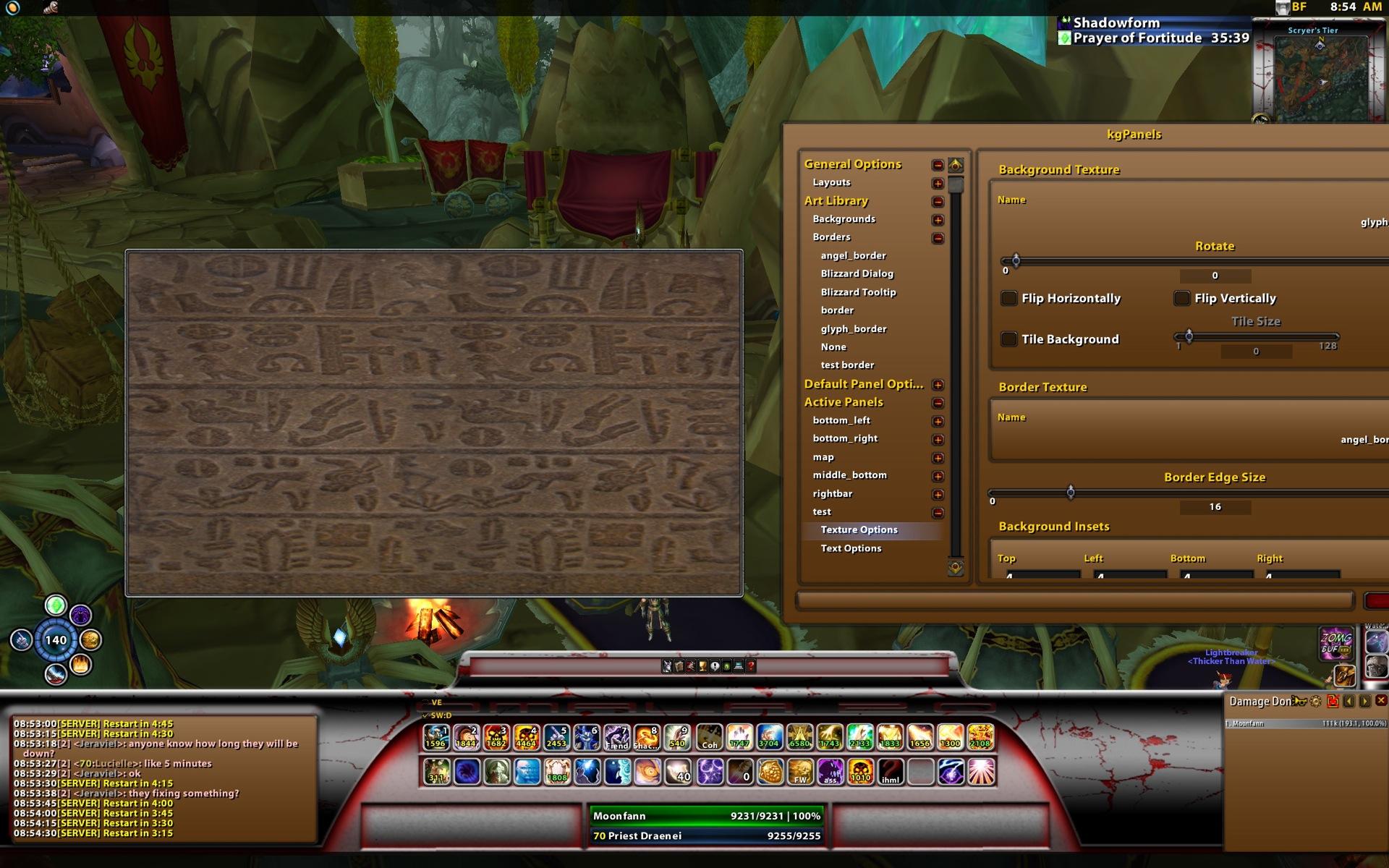
sample panel + config menu
kgPanels   Popular! (More than 5000 hits)
kgPanels, successor to eePanels. This mod allows you to place artwork in your UI. Please be sure to grab the config addon to be able to configure kgPanels. The menu is LOD so once created memory usage is minimal. This mod also allows you to attach scripts to events for each panel.

Please note the download also now includes kgPanels config as a single zip
Please see curse.com for the wiki pages
http://www.wowace.com/projects/kg-panels/pages/kg-panel-wiki
  Change Log - kgPanels
Toc update for 3.1, fix for kgPanelsConfig to be up to date toc

Updates for 3.2
  Archived Versions - kgPanels
File Name
Version
Size
Author
Date
v1.32
206kB
Kagaro
07-28-2009 04:54 AM
v1.29
212kB
Kagaro
04-22-2009 11:30 AM
v1.27
204kB
Kagaro
03-28-2009 02:26 PM
v1.26
202kB
Kagaro
03-24-2009 10:02 AM
v1.24
201kB
Kagaro
03-21-2009 08:26 PM
v1.20
192kB
Kagaro
03-10-2009 01:59 PM
78841
31kB
Kagaro
07-22-2008 03:01 PM
  Comments - kgPanels
Post A Reply Comment Options
Old 11-07-2009, 12:46 AM  
Gaetano
A Kobold Labourer

Forum posts: 0
File comments: 1
Uploads: 0
Trying to do activation of a panel background on spell use

I'm trying to activate one of my panels with a particular background based on a characters spellcast. For instance I have an entire UI set up for my Druid character but I want to change the background of an activate panel to contain a graphic of a bear, boomkin, etc depending on what form I am in.

Conversely I want to be able to change panel backgrounds based on a certain spell being cast, whether I need to use spellid or what I don't know.

Any idea where I can find some sample code for this or I can get the general idea? I can do a partial work around for this using Power Auras using custom art textures (512x512 max) but only for spells considered buffs, aka Tree of Life, Bear Form, etc. If I wanted to change based on Warlock pet, mounted status, etc I am unable to do it.

Any thoughts?
Gaetano is offline Report comment to moderator   Edit/Delete Message Reply With Quote
Old 11-02-2009, 12:50 PM  
Kagaro
A Fallenroot Satyr
Interface Author - Click to view interfaces

Forum posts: 21
File comments: 61
Uploads: 5
Re: onclick

Quote:
Originally posted by Khirsanth
Greetings, I am trying to have a few custom frames on my screen that when clicked perform an action, ie a spel l or something. There was a youtube video but it was so grainy I couldn't read what he was typing lol.
For example with a typical frame what precisely do I type in OnClick to make a spell cast? I have intercept mouse clicks enabled.
I've searched all over the web but I can't get the syntax correct for the damnable thing.
You cant cast a spell with a panel, it requires a secure button to do that and kgPanels are not secure buttons. IF you are really adevntrous you could create a secure button in your onload code and do all the secure header stuff but its pretty complicated for a novice to do as you have to define all headers and make the button the actual click spot and not the panel.
Kagaro is offline Report comment to moderator   Edit/Delete Message Reply With Quote
Old 10-30-2009, 03:44 PM  
Smiley82
A Kobold Labourer

Forum posts: 0
File comments: 4
Uploads: 0
I have a big Problem here.

The Addon doesnt save my profiles....

Everytime i create new panels/layout for my Twinks, they overwrite all the other Profils. So, i cant make different profils?

This is really frustrating.

Pls help


EDITH:


Ore do i have to mess around with the layouts? maybe this is the answer^^

EDITH 2:

Yep, the layouts, sry^^

Fixed

Last edited by Smiley82 : 10-30-2009 at 04:10 PM.
Smiley82 is offline Report comment to moderator   Edit/Delete Message Reply With Quote
Old 10-29-2009, 06:11 PM  
iSylvir
An Aku'mai Servant
 
iSylvir's Avatar

Forum posts: 30
File comments: 12
Uploads: 2
I have a question/request.

If this is possible, its a question. If it's not, its a request.

Im requesting/questioning that it be made possible to automatically set specific frame's colors to the class color corresponding with the class your playing. This would be fantastic for UI's such as mine, which feature your panels as a passive graphic.

Last edited by iSylvir : 11-07-2009 at 09:51 AM.
iSylvir is offline Report comment to moderator   Edit/Delete Message Reply With Quote
Old 10-12-2009, 07:14 PM  
Khirsanth
A Defias Bandit

Forum posts: 2
File comments: 7
Uploads: 0
onclick

Greetings, I am trying to have a few custom frames on my screen that when clicked perform an action, ie a spel l or something. There was a youtube video but it was so grainy I couldn't read what he was typing lol.
For example with a typical frame what precisely do I type in OnClick to make a spell cast? I have intercept mouse clicks enabled.
I've searched all over the web but I can't get the syntax correct for the damnable thing.
Khirsanth is offline Report comment to moderator   Edit/Delete Message Reply With Quote
Old 10-08-2009, 09:01 PM  
Fraktyl
A Murloc Raider

Forum posts: 6
File comments: 3
Uploads: 0
[-edit-]

I just wanted to mention that it wasn't a problem with either KGpanels, or SharedMedia. I was just looking in the Art section and never saw anything so never attempted to actually create a panel.

Well, decided to go ahead and see what would happen and everything in my SharedMedia folder is being seen. So it was just user error completely.

Thanks again for the help, and for the addon.

Last edited by Fraktyl : 10-10-2009 at 06:08 PM.
Fraktyl is offline Report comment to moderator   Edit/Delete Message Reply With Quote
Old 10-08-2009, 06:19 PM  
Kagaro
A Fallenroot Satyr
Interface Author - Click to view interfaces

Forum posts: 21
File comments: 61
Uploads: 5
Re: SharedMedia?

Quote:
Originally posted by Fraktyl
For some reason I can't use my wowace account, and Blizzard is having forum issues with bnet accounts... anyways.

I can't seem to get SharedMedia support working. I have both installed, and all my other addons can use SharedMedia, but Kgpanels is reporting no art installed.

I'm using the SharedMedia_MyMedia directory also but everything else can see all the textures there. Is there some setting I'm missing to get it to see all the art I've got there?

Thanks
you need LibSharedMedia3 instaleld to find shared media, the old SharedMedia is supported via LibSharedMedia3
Kagaro is offline Report comment to moderator   Edit/Delete Message Reply With Quote
Old 10-08-2009, 06:10 PM  
Fraktyl
A Murloc Raider

Forum posts: 6
File comments: 3
Uploads: 0
SharedMedia?

For some reason I can't use my wowace account, and Blizzard is having forum issues with bnet accounts... anyways.

I can't seem to get SharedMedia support working. I have both installed, and all my other addons can use SharedMedia, but Kgpanels is reporting no art installed.

I'm using the SharedMedia_MyMedia directory also but everything else can see all the textures there. Is there some setting I'm missing to get it to see all the art I've got there?

Thanks
Fraktyl is offline Report comment to moderator   Edit/Delete Message Reply With Quote
Old 09-25-2009, 03:10 PM  
Kagaro
A Fallenroot Satyr
Interface Author - Click to view interfaces

Forum posts: 21
File comments: 61
Uploads: 5
Re: pet bar

Quote:
Originally posted by drgnwlf
I am having some trouble with the pet panel.

I am trying to get a scrpit so that it only shows when my pet is out.

I looked around and could not find anything on this.

Please help=)
Check ont he wowace forums, there is a big thread for kgPanels with tons of sample scripts.
Kagaro is offline Report comment to moderator   Edit/Delete Message Reply With Quote
Old 09-24-2009, 11:42 AM  
drgnwlf
A Kobold Labourer
 
drgnwlf's Avatar
Interface Author - Click to view interfaces

Forum posts: 0
File comments: 2
Uploads: 1
pet bar

I am having some trouble with the pet panel.

I am trying to get a scrpit so that it only shows when my pet is out.

I looked around and could not find anything on this.

Please help=)
__________________
drgnwlf is offline Report comment to moderator   Edit/Delete Message Reply With Quote
Old 08-21-2009, 02:15 PM  
pinner
A Deviate Faerie Dragon

Forum posts: 16
File comments: 12
Uploads: 0
I'm using Pitbull for my unit frames and KGPanels to create my UI.

I have a border for both my target and target's target but I want them to disappear when I deselect someone. How can I figure out my Parent Frame name?
pinner is offline Report comment to moderator   Edit/Delete Message Reply With Quote
Old 07-28-2009, 04:41 PM  
writersbloc
A Kobold Labourer

Forum posts: 1
File comments: 10
Uploads: 0
Quote:
Originally posted by Kagaro
to parent 1 kgpanel to another kgpanel you can just use teh kgPanel name you gave it. i.e. say you have 1 panel called 'MyFirstPanel' and you create a second panel, in the second panel you can set the parent to 'MyFirstPanel' kgPanels will automatically figure out the corrent real panel name and setup the parenting.
Really thought I had tried that already, but worked like a charm. Thank you so much for the quick response- your mod has quickly become one I can't live without, fantastic job.
writersbloc is offline Report comment to moderator   Edit/Delete Message Reply With Quote
Old 07-28-2009, 04:52 AM  
Kagaro
A Fallenroot Satyr
Interface Author - Click to view interfaces

Forum posts: 21
File comments: 61
Uploads: 5
Quote:
Originally posted by nushnush234
hi!

probably irrelevant to everyone else but i like to put a frame/border around mine and my target's portrait to make it look pretty lol.

Just wondering how do it make the panel around my target's portrait disappear when i don't have a target selected. ie only show up if i target someone.

has it got to do with anchoring?

thx heaps!
Parent it to the portrait frame
Kagaro is offline Report comment to moderator   Edit/Delete Message Reply With Quote
Old 07-28-2009, 04:51 AM  
Kagaro
A Fallenroot Satyr
Interface Author - Click to view interfaces

Forum posts: 21
File comments: 61
Uploads: 5
Quote:
Originally posted by writersbloc
How come kgPanels renames the panels every time you log? I'm trying to make a UI where panels are linked to other panels. I use the frame finder, figure out the name of the panel (kgPanelX) and then use that name for my parent frame and anchor frame.

Unfortunately everytime I log in something like kgPanel6 will now be kgPanel7 and my linked frame is attached to another part of my UI- another panel that's become kgPanel6.

I'm going back and trying to link panels to addons instead, but I'm not sure what's going to happen to some linked to a mod like Grid that resizes itself...
to parent 1 kgpanel to another kgpanel you can just use teh kgPanel name you gave it. i.e. say you have 1 panel called 'MyFirstPanel' and you create a second panel, in the second panel you can set the parent to 'MyFirstPanel' kgPanels will automatically figure out the corrent real panel name and setup the parenting.
Kagaro is offline Report comment to moderator   Edit/Delete Message Reply With Quote
Old 07-27-2009, 06:13 PM  
writersbloc
A Kobold Labourer

Forum posts: 1
File comments: 10
Uploads: 0
How come kgPanels renames the panels every time you log? I'm trying to make a UI where panels are linked to other panels. I use the frame finder, figure out the name of the panel (kgPanelX) and then use that name for my parent frame and anchor frame.

Unfortunately everytime I log in something like kgPanel6 will now be kgPanel7 and my linked frame is attached to another part of my UI- another panel that's become kgPanel6.

I'm going back and trying to link panels to addons instead, but I'm not sure what's going to happen to some linked to a mod like Grid that resizes itself...

Last edited by writersbloc : 07-27-2009 at 07:44 PM.
writersbloc is offline Report comment to moderator   Edit/Delete Message Reply With Quote
Post A Reply


Category Jump:

Support AddOn Development!

You have just downloaded by the author . If you like this AddOn why not consider supporting the author? This author has set up a donation account. Donations ensure that authors can continue to develop useful tools for everyone.




The Network:
EQInterface | EQ2Interface | LoTROInterface | MMOInterface | War.MMOUI | WoWInterface | VGInterface | Allakhazam | Thottbot | Wowhead | Zam


©2009 MMOUI / ZAM Network
vBulletin - Copyright ©2000 - 2009, Jelsoft Enterprises Ltd.


