
Category: Data Broker
Addon Information
Works with 3.2
Download Latest Version.
To add favorites please register for a free account. If you already have one you need to login. How do I install this? (FAQ)
Author:
Version:
2.0.5
Date:
08-26-2009 08:32 AM
Size:
8.21 Kb
Downloads:
1,943
Favorites:
35
MD5:
Pictures
Click to enlarge
Sample layout (art is not included)
Click to enlarge
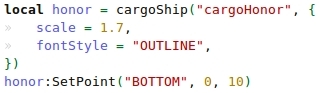
Example code (layout.lua)
cargoShip (Display)
Complete rewrite, it can now be as well be used as a lib - your old layout.lua will not work in this version without changes due to the new options.

cargoShip is a LibDataBroker display-addon and library which can only be configured through changing the Lua-code. It was designed to provide a lightweight (~13 kb mem. usage) and flexible framework for creating info blocks based on data objects.

It provides support for the following attributes (you can add more if you like):
  • icon, iconR, iconB, iconG, iconCoords
  • text, label, value, suffix
  • OnEnter, OnLeave, OnClick
  • tooltip, OnTooltipShow
You can add more of them (or change existing) by providing your custom functions in cargoShip.UpdateFunctions["attributeName"] = function(self, attribute, dataobj) end.

The addon comes with a sample layout which gives you a good start on creating and positioning your elements (in the layout.lua - with comments). Please notice that I use most likely different LDB-data sources than you do

A short function reference (see core.lua comments for detailed overview):
  • cargoShip("name" [, options]) - returns a new info block of the specified LDB-data source
  • cargoShip:Get("name") - returns a table of all created blocks for this data source name
  • cargoShip:GetUnused() - returns a table of all unused data sources
  • cargoShip:PrintUnused() - prints all unused data sources in chat

Please drop a comment for your feedback, bug reports and/or suggestions.
  Change Log - cargoShip (Display)
2.0.5
- fixed the .toc and included the right lib-version, whew

2.0.3
* simple tag-system included:
* format your layouts by defining options.tagString, e.g. "[Name]: [value][suffix]"

- fixed: not updating if only dataObj.iconB changes
- new: creation by name is now optional, you can specify the name in the options
- new: creation asserts if no name was found

2.0
- updated .toc to 30000
- fixed error with TipHooker-1.0
  Optional Files - cargoShip (Display)
Sorry, there are currently no optional files available.
  Archived Versions - cargoShip (Display)
File Name
Version
Size
Author
Date
2.0.3
8kB
Cargor
08-24-2009 10:01 AM
2.0
8kB
Cargor
07-02-2009 11:28 AM
r311
8kB
Cargor
11-20-2008 12:55 PM
  Comments - cargoShip (Display)
Post A Reply Comment Options
Old 08-27-2009, 01:42 PM  
Monolit
A Deviate Faerie Dragon

Forum posts: 11
File comments: 18
Uploads: 0
Everything works now, thanks, keep questioning myself why didn't I check .toc myself
Monolit is offline Report comment to moderator   Edit/Delete Message Reply With Quote
Old 08-26-2009, 02:33 AM  
Cargor
A Flamescale Wyrmkin
 
Cargor's Avatar
Interface Author - Click to view interfaces

Forum posts: 127
File comments: 242
Uploads: 17
Aww, you're right :/ such a stupid mistake. Thanks for the report, update comes in a few hours.
__________________
« Homepage | Git »

My blog is finally getting english!
Cargor is offline Report comment to moderator   Edit/Delete Message Reply With Quote
Old 08-26-2009, 02:24 AM  
rossman
An Aku'mai Servant
 
rossman's Avatar
Interface Author - Click to view interfaces

Forum posts: 37
File comments: 7
Uploads: 2
File location

Inside your addon folder the location of the files changed but the TOC does not match.
rossman is offline Report comment to moderator   Edit/Delete Message Reply With Quote
Old 08-25-2009, 11:07 AM  
Cargor
A Flamescale Wyrmkin
 
Cargor's Avatar
Interface Author - Click to view interfaces

Forum posts: 127
File comments: 242
Uploads: 17
Are there any errors? Otherwise it's difficult to find the problem :/
__________________
« Homepage | Git »

My blog is finally getting english!
Cargor is offline Report comment to moderator   Edit/Delete Message Reply With Quote
Old 08-25-2009, 09:20 AM  
Monolit
A Deviate Faerie Dragon

Forum posts: 11
File comments: 18
Uploads: 0
I can't get my layout (that worked with 2.0) to load with the latest version :/
here's my layout.lua:
http://pastey.net/123328
Monolit is offline Report comment to moderator   Edit/Delete Message Reply With Quote
Old 08-17-2009, 03:35 PM  
Cargor
A Flamescale Wyrmkin
 
Cargor's Avatar
Interface Author - Click to view interfaces

Forum posts: 127
File comments: 242
Uploads: 17
Thanks for the report! I'll fix it as soon as I'm back from holiday.
__________________
« Homepage | Git »

My blog is finally getting english!
Cargor is offline Report comment to moderator   Edit/Delete Message Reply With Quote
Old 08-16-2009, 10:50 PM  
Bruners
A Black Drake
 
Bruners's Avatar
Interface Author - Click to view interfaces

Forum posts: 88
File comments: 57
Uploads: 9
I believe your code at line 185 should be changed to self.Text

Code:
self.Label:SetFormattedText(self.Formatting, dataobj.value, dataobj.suffix)
Bruners is offline Report comment to moderator   Edit/Delete Message Reply With Quote
Old 07-31-2009, 02:31 PM  
drdead
A Kobold Labourer

Forum posts: 0
File comments: 5
Uploads: 0
Quote:
Originally posted by Cargor
You could take a look at DummyBar. There you can move all Blizz-frames a bit down by using "/dummybar top 24" (or another value for the height).
Tnx a lot.
drdead is offline Report comment to moderator   Edit/Delete Message Reply With Quote
Old 07-30-2009, 04:38 PM  
Cargor
A Flamescale Wyrmkin
 
Cargor's Avatar
Interface Author - Click to view interfaces

Forum posts: 127
File comments: 242
Uploads: 17
You could take a look at DummyBar. There you can move all Blizz-frames a bit down by using "/dummybar top 24" (or another value for the height).
__________________
« Homepage | Git »

My blog is finally getting english!
Cargor is offline Report comment to moderator   Edit/Delete Message Reply With Quote
Old 07-30-2009, 10:07 AM  
drdead
A Kobold Labourer

Forum posts: 0
File comments: 5
Uploads: 0
Hello Cargor. Tnx for great addon. I created frame int layout.lua to attach LDB launchers to it but that frame doesnt move other frames, and i need all frames that cross with it go down (i have minimap at the upper right corner w\o addons that overrides "panel" i created, so i cant move it). What i need to add?

Code:
local fr = CreateFrame("Frame") 
fr:SetFrameStrata("BACKGROUND")
fr:SetPoint("TOPLEFT", UIParent, "TOPLEFT", 0, 0) 
fr:SetWidth(900) 
fr:SetHeight(15) 
fr:SetScale(1.2)
fr:SetBackdropColor(0, 0, 0) 
fr:SetClampedToScreen(true)
fr:EnableMouse(true) 
fr:Show()
drdead is offline Report comment to moderator   Edit/Delete Message Reply With Quote
Old 07-22-2009, 12:03 PM  
Cargor
A Flamescale Wyrmkin
 
Cargor's Avatar
Interface Author - Click to view interfaces

Forum posts: 127
File comments: 242
Uploads: 17
Whoops, I'll fix it in another version. In the meantime, parenting the objects to UIParent should work:
object:SetParent(UIParent)
__________________
« Homepage | Git »

My blog is finally getting english!
Cargor is offline Report comment to moderator   Edit/Delete Message Reply With Quote
Old 07-22-2009, 07:36 AM  
Dainton
A Cyclonian
 
Dainton's Avatar

Forum posts: 46
File comments: 50
Uploads: 0
I've noticed that the display is still shown when you hide the interface (default "Z" if i remember correctly). Is this intentional? It's not a big deal for me as I don't use it often, but some might like a way to hide it with it.
Dainton is offline Report comment to moderator   Edit/Delete Message Reply With Quote
Old 07-17-2009, 07:48 AM  
Cargor
A Flamescale Wyrmkin
 
Cargor's Avatar
Interface Author - Click to view interfaces

Forum posts: 127
File comments: 242
Uploads: 17
I'll check it as soon as possible.

EDIT: Just looked into Ara_Broker_XP and Ara somehow likes to add color information to the data broker name. So, you have to define the name in cargoShip on the same way:

|cFFFFB366Ara|r XP
|cFFFFB366Ara|r Tradeskills
|cFFFFB366Ara|r Guild

If some others don't work, it's a good start to find the exact name of the data object in the broker-file. Just search for "NewDataObject" and the name should usually appear in the bracket after it
__________________
« Homepage | Git »

My blog is finally getting english!

Last edited by Cargor : 07-17-2009 at 08:11 AM.
Cargor is offline Report comment to moderator   Edit/Delete Message Reply With Quote
Old 07-16-2009, 11:28 PM  
rossman
An Aku'mai Servant
 
rossman's Avatar
Interface Author - Click to view interfaces

Forum posts: 37
File comments: 7
Uploads: 2
all Ara broker items

I cant get them to show up. I have alot of other brokers working but no luck with any of them from that authors. Most likely its me but any help would be appriciated.
Thanks
rossman is offline Report comment to moderator   Edit/Delete Message Reply With Quote
Old 06-28-2009, 02:10 PM  
Monolit
A Deviate Faerie Dragon

Forum posts: 11
File comments: 18
Uploads: 0
Quote:
Originally posted by Cargor
Sorry for the late response, had a lot to do

The frame disappears, because you basically "leave" the panel and "enter" the display-block. Blizz' API about entering/leaving is not very clever, so they don't really check if the panel is still underneath your mouse (and the block).

Try to use this script:
Code:
local updateFrame = CreateFrame"Frame"
updateFrame:SetScript("OnUpdate", function(self)
    if(not MouseIsOver(f1)) then
        HideTop()
        self:Hide()
    end
end
And add in ShowTop() the following to make use of it: updateFrame:Show()
This update-routine basically checks as soon as you entered the panel every time if your mouse is still over the frame and so bypasses the false OnLeave.

By the way, why don't you make all blocks in the panel as the panel's child with dominos:SetParent(f1) - Then you don't have to set the alpha-values for each block manually, because they inherit it from the panel.

Hope, this works, as I didn't test it
Great! Just great, this method worked. I had to do some minor modifications to code you posted:
Code:
local updateFrame = CreateFrame("Frame")
updateFrame:SetScript("OnUpdate", function(self)
    if(MouseIsOver(f1)) then
        ShowTop()
        self:Show()
    else
	HideTop()
	self:Hide()
    end
end)
and everything worked as I wanted.

Also thanks for the tip to use SetParent method, my layout code looks much cleaner now :P
http://pastey.net/116841
Monolit is offline Report comment to moderator   Edit/Delete Message Reply With Quote
Post A Reply


Category Jump:


The Network:
EQInterface | EQ2Interface | LoTROInterface | MMOInterface | War.MMOUI | WoWInterface | VGInterface | Allakhazam | Thottbot | Wowhead | Zam


©2009 MMOUI / ZAM Network
vBulletin - Copyright ©2000 - 2009, Jelsoft Enterprises Ltd.



