| Go to Page... |

Pictures
File Info
| Updated: | 10-28-13 11:39 AM |
| Created: | 07-14-09 09:30 AM |
| Downloads: | 8,343 |
| Favorites: | 59 |
| MD5: | |
| Categories: | Chat Mods, Data Broker, RolePlay, Music Mods, Developer Utilities, WoW Tools & Utilities |
AudioX II 

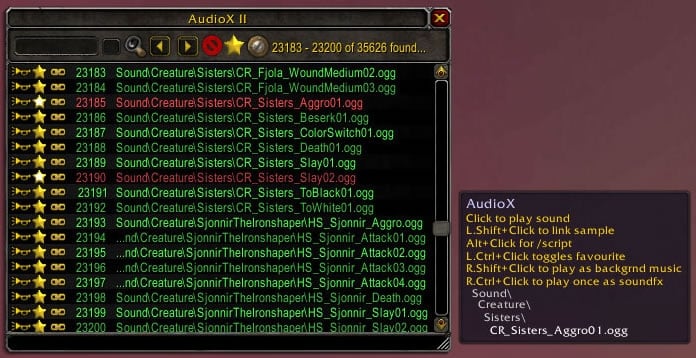
AudioX provides players with the ability to explore almost every World of Warcraft sound samples (there's almost 50,000  ). It also allows you to exchange samples with other AudioX users via chat hyperlinks.
When updating to AudioX II 4.3.0 it is important that you backup your existing audiox favourites list (WTF\Account\(user)\SavedVariables\AudioX.lua). The first time you start WoW after updating AudioX you should enable AudioX_FixFavs. This will process your current AudioX favourites and ensure they match up with the latest soundlib. FixFavs will disable itself upon completion.
Translators needed - please apply localizations here
Current Features
AudioX:
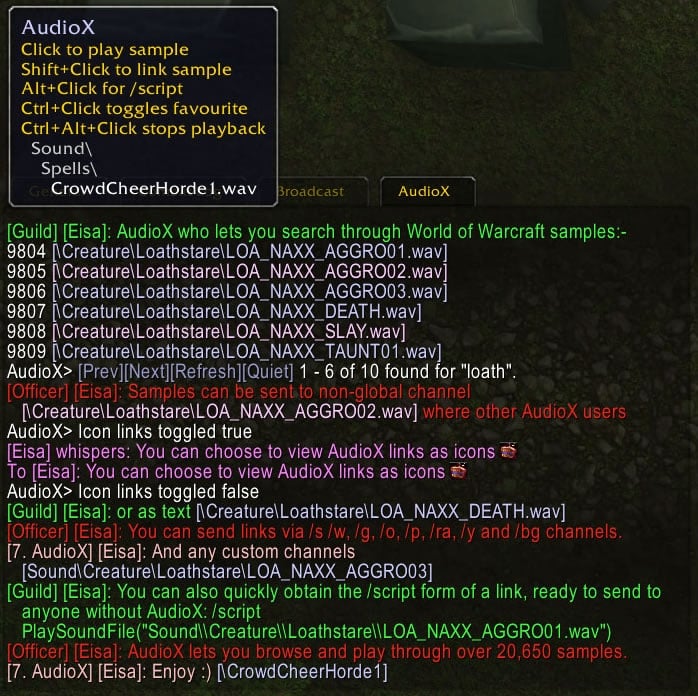
- Displays samples as chat links (either in text or icon form).
- Clicking on an AudioX chat-link play samples.
- AudioX links work in custom channels, without any other chat mods required.
- Exchange AudioX chat-links with other AudioX users by shift+clicking to insert the link into your outgoing message.
- Insert the full /script PlaySoundFile(...) command into an outgoing message by alt+clicking AudioX links.
- Silence audio playback by ctrl+alt+clicking any AudioX link (max of once every 5 seconds).
- Ctrl+clicking links adds them to AudioX's favourites list.
- Handles AudioX Search loading.
- Tooltips on links.
- Localization support.
AudioX Search (Optional):
- Search through 54,932 World of Warcraft samples.
- Sample library contains all of the samples up to and including 5.4.17399.
- Play samples by a short index number (handy in macros).
- Define how many results AudioX returns per search.
- Crop links to limit word wrapping.
- Continue searches from the end your previous search onwards, or backwards.
- Start searching from a specific index (to skip unwanted samples).
- Create and display output to a seperate AudioX chat tab.
- Allows searching of your AudioX favourites.
- Optionally use pattern matching in searches.
- Features a miniAPI for 3rd party AudioX UI developers.
- Localization support.
- Framework for translating keywords into EnUS prior to searching.
AudioX Options (Optional):
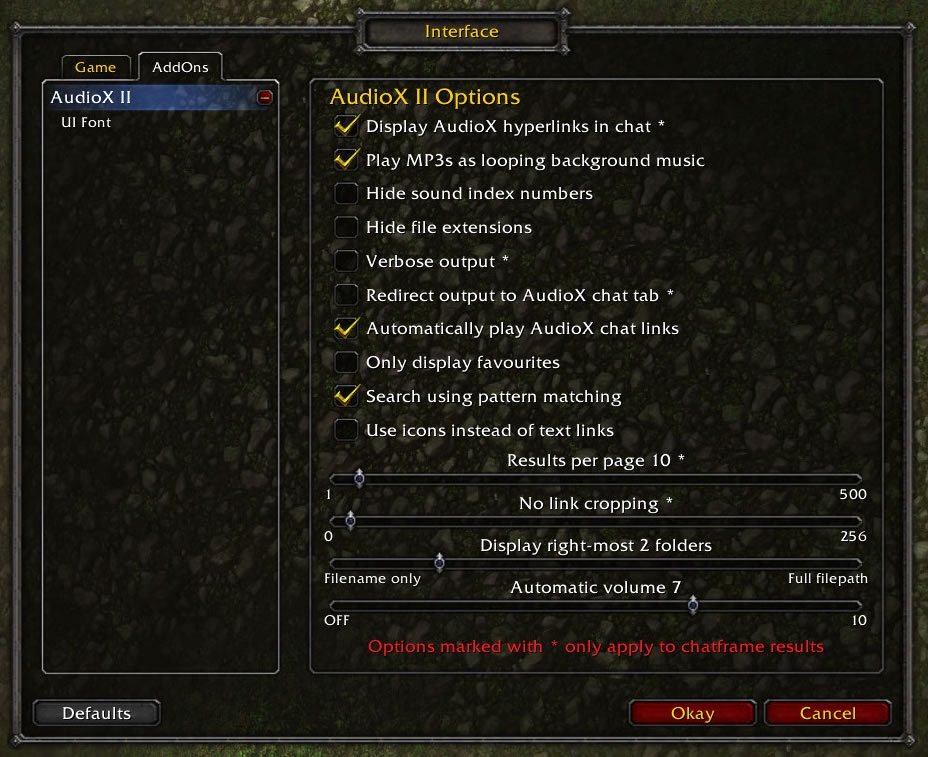
- Set page length, line cropping, chat filter, index visibility, verbosity, chat tab and fav searching via Blizzards Addon Options panel.
AudioX UI (Optional):
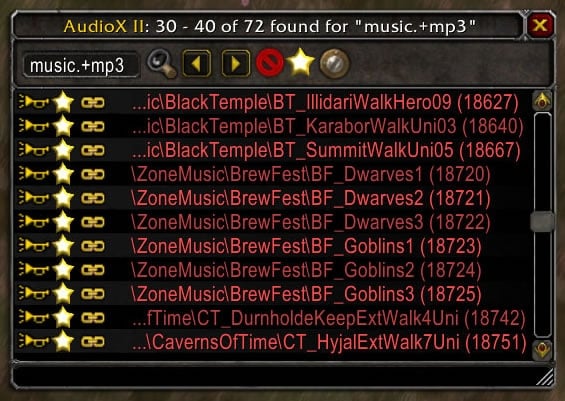
- Resizable UI that lets you search, link and play.
- Scrollable search results.
- Adjustable fontsizes.
- Allows searching and management of your AudioX favourites.
- Demonstrates the use of the AudioX miniAPI.
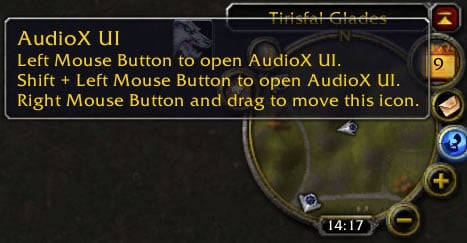
AudioX UI Minimap Icon (Optional):
- Right-click draggable
- Toggles AudioX UI and AudioX Options.
AudioX Broker (Optional):
- Databroker plugin for launching AudioX UI and AudioX Options.
AudioX Who *BETA* (Optional):
- Builds a list of players in your guild/party/raid/battleground and friends list who can currently see AudioX chat links.
The AudioX_Who plugin has only received limited testing and requires a public beta to isolate any bugs. It is strongly advised that players using AudioX_Who read the associated FAQ
AudioX FixFavs (One Time Use):
- Updates favourites for use with AudioX II 4.3.0/1.
Installation
- Extract the AudioX and AudioX_Search folder into World of Warcrafts Interface\Addons folder
- Enable both AudioX and AudioX_Search in Mod Settings. Note: Even though AudioX_Search is enabled, it will not normally load until you type /ax or /audiox.
- Enable any other modules in the AudioX suite that you wish to use.
Usage
/ax s <text> Search for a sample with a path containing the specified keyword. E.g. /ax s brew
/ax d Page Down. Find next N results for current search. E.g. /ax d
/ax u Page Up. Find previous N results for current search. E.g. /ax u
/ax m <num> Continue search from a specific search match. E.g. /ax m 15
/ax b <num> Continue search beginning at the specified sample index. E.g. /ax b 1500
/ax r Refresh the last page of search results. E.g. /ax r
/ax i <num> Display path details for sample index. E.g. /ax i 12345
/ax favs [true/false] Toggle between searching SoundLib and Favourites. E.g /ax favs false
/ax who Lists who in your guild/party/raid/battleground is using AudioX II. E.g. /ax who
/ax ui Loads / toggles and AudioX II UI. E.g. /ax ui
/ax <arg> Results in the equivalent of /ax s <arg>. E.g. /ax brew
/ax ?? Help text page 2: Playing. E.g. /ax ??
/ax p <num> Play sample number (1 to n) from the current search. E.g. /ax p 16539
/ax pf <num> Play sample number (1 to n) from Favourites. E.g. /ax pf 512
/ax ps <num> Play sample number (1 to 20653) from SoundLib. E.g. /ax ps 15751
/ax mp <num> Play sample number (1 to n) from current search as music. E.g. /ax mp 16539
/ax mpf <num> Play sample number (1 to n) from Favourites as music. E.g. /ax mpf 512
/ax mps <num> Play sample number (1 to n) from SoundLib as music. E.g. /ax mps 15751
/ax sp <num> Play sample number (1 to n) from current search as sfx. E.g. /ax sp 16539
/ax spf <num> Play sample number (1 to n) from Favourites as sfx. E.g. /ax spf 512
/ax sps <num> Play sample num (1 to n) from SoundLib as sfx. E.g. /ax sps 15751
/ax q Quiet. Stop all sounds playing. /ax q
/ax ??? Help text page 3: Settings. E.g. /ax ???
/ax l <num> Limit the number samples each search returns. E.g. /ax l 10
/ax c <num> Crop sound paths to last N characters. 0 = Don't crop. E.g. /ax c 40
/ax n <num> Limit pathname display. 0 = filename only, 11 = Show all. E.g. /ax n 11
/ax f [true/false] Filter chat so that sample links are clickable. E.g. /ax f true
/ax g [true/false] Play non-.wav sounds as looping game music. E.g. /ax g false
/ax h [true/false] Hide the sample index numbers in search results. E.g. /ax h false
/ax x [true/false] Hide file extensions. E.g. /ax x false
/ax v [true/false] Verbose output that shows which sample is playing. E.g. /ax v false
/ax t [true/false] Output to "AudioX" chat tab. E.g. /ax t false
/ax a [true/false] Autoplay link samples received from other players. E.g. /ax a false
/ax e [true/false] Convert localised search keyword into english prior to search. E.g. /ax e false
/ax z [true/false] Search with pattern matching. E.g. /ax z false
/ax o <num> Auto-Volume level used if music volume is off. 0 - 10. E.g. /ax o 5
/ax k [true/false] Use icons instead of hypertext links. E.g. /ax k false
/ax options Loads / toggles the AudioX II Options. E.g. /ax options
/ax [?] Help text page 1: Commands. E.g. /ax ? or /ax
Load-on-demand Macro
Several players have mentioned that they like to keep the number of enabled mods to a bare minimum.Minimap version:-
As AudioX is hardly essential in day-to-day World of Warcraft gameplay, I created a macro to allow you to keep the entire AudioX suite disabled (in addon options) until you need it, at which point clicking on the macro button would load the entire suite (without any need to reload) for the current game session. Xuerian has refined this macro as follows (it's a single line):-
Code:
/run for _,mod in pairs({"","_Search","_Options","_UI","_Minimap","_Who"}) do local m="AudioX"..mod EnableAddOn(m) LoadAddOn(m) DisableAddOn(m) end
Code:
/run for _,mod in pairs({"","_Search","_Options","_UI","_Broker","_Who"}) do local m="AudioX"..mod EnableAddOn(m) LoadAddOn(m) DisableAddOn(m) end
Note: You can still configure the AudioX to load whenever you start the game. This macro is a way to directly control if/when the AudioX suite loads.
Known Bugs/Issues
- Garbage Collection may reset AudioX searches if AudioX has been inactive within the game session for a long time. If this happens you can use /ax b <num> to resume a search from any desired sample index.
- Garbage Collection may affect the AudioX tab. If this occurs type /ax t true.
- Garbage Collection may effect the AudioX UI. If this occurs start a new search.
- Certain sounds in the locale MPQ files may not play. Bug report has been filed with Blizzard. This one still under investigation.
Notes
- AudioX is my first World of Warcraft mod.
- AudioX II uses a different link format from my original AudioX. Please upgrade to AudioX II.
- I only upload AudioX to the following sites:
http://www.wowinterface.com/download...00-AudioX.html
http://wow.curse.com/downloads/wow-a...ls/audiox.aspx
http://wow.curseforge.com/addons/audiox/
AudioX_Search mini-API (for mod developers)
Details in my Author Portal FAQ
Acknowledgements (in no specific order)
- Krakhaan of Khaz'goroth (Oceanic) for his inspirational AFX mod
- Bluspacecow for Sound Commands List
- James Whitehead II for his brilliant book World of Warcraft Programming without which this mod wouldn't exist
- Thorinair of EU Ragnaros for motivating me to create my own AudioX UI and accompanying API
- Xuerian for the improved Load-On-Demand macro.
- Weggls of EU-Todeswache/Alliance for the German translation and for suggesting the addition of a pre-search translation table for converting localisated search terms into their EnUS SoundPath equivalents.
DISCLAIMER
While every effort has been made to ensure this mod is error free, you use this mod entirely at your own risk.
AudioX Copyright 2009-2012 Eisa of Aggramar (EU). All Rights Reserved.
Version History
Report bugs here
[list]
[*]5.4.0/1 (Bluspacecow's update)[list][*]Search: New SoundList for WoW patch 5.4.17399. Adds 1,813 new samples added
bringing the total number of sound samples to 54,932[*]- Toc changed to 50400.[*]- Toc Bumps all round :P
[*]5.3.0/1 (Bluspacecow's update)
Report bugs here
[list]
[*]5.4.0/1 (Bluspacecow's update)[list][*]Search: New SoundList for WoW patch 5.4.17399. Adds 1,813 new samples added
bringing the total number of sound samples to 54,932[*]- Toc changed to 50400.[*]- Toc Bumps all round :P
[*]5.3.0/1 (Bluspacecow's update)
- Search: New SoundList for WoW patch 5.3.16992. *Adds 3,162 new samples*added bringing
the total number of sound samples to 53,119 *
(large number due to missing out on the 5.2 update)* - All modules : reversed premature version bumping on un-updated modules*
- Toc changed to 50300
- Audio X II 5.1.0/2 (Bluspacecow's Update)
- Fixed SoundLib data file for errors in Sound File Listing. 88 duplicate paths removed bringing total number of sounds samples back down to 49,957.
- Fixed typo in SoundLib preventing "Ironforge Walking 03 (Glenn).Mp3" from playing . An oversight lead it to be named "Ironforge Walking 03 (Glenn,.Mp3"
- AudioX II 5.1.0/1 (Bluspacecow's Update)
- Search: New SoundList for WoW patch 5.1.0.16309. 12,947 new samples added bringing the total number of sound samples to 50,045.
- Who : Rewrote event handlers as GetNumPartyMembers and GetNumRaidMembers now deprecated (rewritten code by Elsa)
- Toc changed to 50100.
- AudioX II 4.3.0/1
- Search: New SoundList for WoW patch 4.3.0.15050. 1,472 new samples added bringing the total number of sound samples to 37,098.
- Toc changed to 40300.
- AudioX II 4.2.0/1
- Core: New SoundList for WoW patch 4.2.0.14333. 1,264 new samples added bringing the total number of sound samples to 35,626.
- Core: Sounds can now be manually played as background music or as samples (feature requested Mistral).
- Core: Changed keybindings for hyperlinks and associated localisation:-
- R.Alt+Click plays soundpath as (looping) background music using PlayMusic()
- R.Ctrl+Click plays soundpath as soundfx using PlaySoundFile()
- L.Alt+Click inserts "/script PlaySoundFile(..soundpath..)" into outgoing chat
- L.Ctrl+Click toggles favourite
- Search: Changed sample playback routines to take account of core changes.
- Search: Added new commands (all take sound index number as an argument):-
- /ax mp - Play as music from the current search table.
- /ax mpf - Play as music from the favourites table.
- /ax mps - Play as music from the soundlib table.
- /ax sp - Play as soundfx from the current search table.
- /ax spf - Play as soundfx from the favourites table.
- /ax sps - Play as soundfx from the soundlib table.
- Search: Added new help page to accomodate the various play commands.
- Search: Fixed Auto-enabled background music not auto-disables on /ax q.
- UI: Minor changes to take account of new keybindings and manual playback.
- UI: Truncated soundpath names are truncated to the left again.
- UI: Taken steps to eliminate tooltip lag in the UI
- FixFavs: Fixed bug where favourites we not being sorted after processing.
- MiniAPI: Optional parameter added to AX:API_Play. See MiniAPI.txt for more.
- Note: TOC changed for WoW 4.2.0.
- AudioX II 4.1.0/1
- Search: New SoundList for WoW patch 4.1.0.13914. 876 new samples added bringing the total number of sound samples to 34,362.
- Who: Added some experimental code to accomodate RegisterAddonMessagePrefix() etc changes to addon messaging.
- Toc changed to 40100.
- AudioX II 4.0.6/1
- Search: New SoundList for WoW patch 4.0.6.13596. 7 new samples bringing the total to 33,486 (4.0.3/1 had a duplicate and a blank path).
- Search: Added english pre-search translations for:
- "PreCastHearthstone" -> "PreCastNatureMagicHigh"
- "Hearthstone" -> "AstralRecall"
- AudioX II 4.0.3/1
- Core: New SoundList for WoW patch 4.0.3.13329. 12,425 new samples added bringing the total number of sound samples to 33,481.
- Core: Samples optionally loop for mp3's or any filepath that contains "music".
- Core: Provision has been added to stop background music playing at the same time as game music - a problem with PlayMusic() that started in WoW 4.0. However, it appears that Blizzard have recently fixed this problem quietly. For this reason, I've disabled my workaround code.
- FiXFavs: New mod that will attempt to resolve any differences between your favourites and the new soundlib. Specificially differences in upper and lower cases and file extensions. FixFavs leaves any unresolved favs alone as they may still work, but they will need to be accessed with favourites search mode on. FixFavs disables itself on successful completion as it's really designed to be used once only.
- Search: Added english pre-search translations for:
- "Path Of Frost" aka "PathOfFrost"
- "Fan of Knives" aka "FanOfKnives"
- "Piccolo" aka "Seduction_State_Head"
- Search: Samples optionally loop for any filepath that contains "music".
- UI: Changed search history to include ".+ogg$", ".+mp3$" and "music" to search for soundpaths ending in ogg, mp3 or containing music respectively.
- AudioX II 4.0.1/1
- Core: Added support for links in /afk and /dnd.
Note: These will not show up as hyperlinks when you first set them up, but anyone with AudioX who messages you will see them as hyperlinks/icons thereafter. - Core: AudioX links are only converted to hyperlinks/icons in outgoing chat if they follow a chat command.
- UI: The UI window nows opens in its finished form.
- Core: Added support for links in /afk and /dnd.
- AudioX II 4.0.1/0
- ToC change for WoW 4.0.1
- Core: Experimental support for sound links in realid whispers.
- AudioX II 3.3.5/3
- Core: Fixed chat tab docking error that occured when toggling the AudioX chat tab off and on while docked to the main chat window (caused by WoW 3.3.5 changes).
- Who: Fixed roster error caused by bizarre behaviour with table.insert(). Previously AudioX_Who added new data to its temporary roster by doing the equivalent of:
Recently this has resulted in the TEMPLIST[position+1].string1 getting overwritten with a numberic value of 1, leading to type mismatches and logical errors. The solution I've used is to use table.insert to insert the row and the data at the same time. e.g.Code:table.insert(TEMPLIST,position) TEMPLIST[position] = {string1="whatever",bool1=false,bool2=true}
Provisional testing suggests this has solved the problem, but I need more players using this new code to be completely sure.Code:table.insert(TEMPLIST,position,{string1="whatever",bool1=false,bool2=true}) - Who: Altered message queuing to avoid possible errors similar to those with the roster occuring.
- Who: Made /ax who output print to the AudioX chat tab where applicable.
- Who: Changed the /ax who output in an attempt to make it more readable.
- AudioX II 3.3.5/2
- Search: New SoundLibs for WoW 3.3.5 patch. 18 samples added (total 21,074 samples) (Thanks to Bluspacecow for source data)
- Search: Massively improved the accuracy of pre-search translations by ensuring that any given part of the user entered keyword can only be translated once per search.
IMPORTANT: When using pre-search translation, you'll see much better results if you capitalise words properly. Example: Use "LichKing" instead "lichking" or "LICHKING". - Search: German pre-search translation added (Thanks to Weggls of EU-Todeswache/Alliance)
- Note: New version number system
- AudioX II 3.3.37 (aka 3.3.5/1)
- The AudioX suite has been fixed for WoW 3.3.5.
- Search: Added a pre-search translation table. This is optionally (via /ax e) used to convert search keyword(s) into EnUS (where available), in order to make it easier for non-english players to search soundpaths (which are all in EnUS).
Thanks to Weggls of EU-Todeswache/Alliance for highlighting the need for this feature.
EnUS and EnGB players will also benefit from this system as I intend to add aliases(!) for some of the more obscure soundpaths.
Note: The translation table will have its own FAQ shortly as it deviates from normal localisation considerably. - Search: Added /ax e to toggle pre-search translating on/off.
- UI: New checkbox next to the searchbox to allow toggling of pre-search translating.
- UI: Searchbox now retains the user entered search criteria properly.
- Options: Added a new check box for turning pre-search translations on/off.
- Search & UI: Footer shows both user keyword and translated keyword (where applicable).
- API: AX:API_Search() results include translated keyword search results where applicable. See miniAPI FAQ.
- API: AX:API_PageFooter() additionally returns tsearch. See miniAPI FAQ.
- AudioX II 3.3.36
- AudioX suite translated into german by Weggls of EU-Todeswache/Alliance. Many thanks :)
- Localized the "Loaded: AudioX"* output.
- Options: Some german text is displayed in a smaller font to make it fit Blizzards options window.
- AudioX II 3.3.35
- Search: New SoundLibs for WoW 3.3.3 patch. 403 samples added (total 21056 samples) (Thanks to Bluspacecow for raw mpq extract data)
- Who: Removed "<player> has gone offline." as this currently only appears in direct reponse to /ax who.
- AudioX II 3.3.34
- Broker: Fixed so opens UI with one click on first use.
- UI: Works around Blizzards WoW 3.3.3 SetTexCoordModifiesRect() bug.
- AudioX II 3.3.33
- Broker: DataBroker plugin that opens AudioX UI and AudioX Options.
- Minimap: Corrected tooltip.
- AudioX II 3.3.32
- Core: Added AudioX sample linking for custom emote text (/emote {something}).
- Core: Added AudioX sample linking for party leader text.
- Core: Added AudioX sample linking for raid warning text.
- UI: Added mousewheel support. Currently scrolls a quarter of a page at a time.
- UI: Added sounds to scrollbar buttons.
- AudioX II 3.3.31
- Search: /ax pf <num> added to allow macros to play sample <num> from favourites.
- Search: /ax ps <num> added to allow macros to play sample <num> from SoundLib.
- Core: Verbose output fixed for /ax p and /ax q (variable naming issue).
- Core: Fav add and remove localizations move from Search to Core localization.
- Core: Chat icon sizes increased slightly.
- UI: Invalid font values no longer produce an error.
- UI: Fixed text incorrectly appearing behind the scrollbar when the number of rows shown in the window increased beyond the initial number of rows.
- UI: Scrollbar now vanishes if search results fit within the current window size. (Note: Scrollbar also vanishes if the window is too short to accomodate it)
- AudioX II 3.3.30
- Core: Added option to display inbound/outbound links as icons.
- Search: Added /ax k to switch between icon links and text links.
- Search: /ax s searches excluded from icon links (for ease of use).
- Options: Added checkbox and associated code for /ax k.
- UI: Slider/scrollbar now much less CPU intensive (now waits for OnUpdate before populating UI with data and also benefits from AX:API_IndexFromPath() changes)
- UI: Fixed error that arises if the keyword searched for has no results.
- API: AX:API_IndexFromPath() now uses a binarysearch routine. The return two values have been consolidated into one value. Please see mini-API FAQ for details.
- API: AX:API_LinkSoundPath() tweaked to take account of icon link options.
- AudioX II 3.3.29
- Core: Takes account of the new auto-volume setting (see below).
- Search: Added /ax o <number> for setting the auto-volume (as used when AudioX attempts to playback mp3's as background music while music volume is 0%)
- Options: Added a checkbox for setting auto-volume
- Options: Improved Default and Cancel button routines slightly
- UI: Scroll bar and associated buttons added. Note: They only appear once a search has started. This is as intended.
- UI: No longer grabs cursor focus when UI opened
- UI: Updates search box with current keyword
- UI: With the cursor in the searchbox, use up and down arrows to cycle through the last 25 searches. Adds "music.+mp3" (requires pattern matching) by default
- Who: Initial messages send 10 seconds after ADDON_LOADED event (instead of after PLAYER_ENTERING_WORLD which doesn't fire if AudioX loaded via macro)
- API: AX:API_ChatOutput() and AX:API_UIOutput() no longer output notices. These were a bit annoying and aren't really necessary.
- AudioX II 3.3.29 BETA 6
- Search: New SoundLibs for WoW 3.3.2 patch. 162 samples added (total 20653 samples) (Thanks to Bluspacecow for source data)
- AudioX II 3.3.29 BETA 5
- Who: Fixed "You are not in a guild" bug (Thanks to Lord_Necrovore for bringing the bug to my attention)
- AudioX II 3.3.29 BETA 4
- Who: Changes to start up
- Who: Debug code (switch on by typing "/run AX.DEBUG = true")
- Who: Should store name-realm in cross-realm groups in the AudioX_Who roster
- AudioX II 3.3.29 BETA 3
- Who: New plugin for finding other AudioX users in your guild, friends list, raid, battleground and party (including cross-realm groups/raids/bgs).
- Search: Added /ax who command and associated help text.
- Core: If MP3 background playback is enabled and the music volume is off, AudioX will increase the volume to 50%, restoring it from 50% to off when playback is stopped or when the players character changes zones. If the volume is adjusted from the temporary value, AudioX will assume you wish to keep the new volume level.
- Core: Background playback now uses RaidNotice_AddMessage() to notify of temporary Sound & Voice setting changes, instead of ActionStatus_DisplayMessage() .
- Options: Cancel button reverts options to previous value.
- Options: Default button reverts options to preset values.
- UI: Fontsize maximum increased to 36pt
- UI: Cancel button in fontsize options reverts font to previous value.
- UI: Default button in fontsize options reverts font to preset value.
- Options (internal): Variable and function names start with opt_ and Options_ respectively.
- Search/Options/UI/Minimap/Who (internal): Namespace changed from AXUI to AX.
- Search/Options/UI/Minimap/Who (internal): Varible and function names start with ui_ and UI_ respectively.
- API: Namespace and varible name changes will effect any 3rd party UI heavily. AX.apiout -> AX.api_out, AX.CMD_* -> AX.s_CMD_* . See miniAPI docs for more.
- Localisations reduced back to a single file per addon.
- AudioX II 3.3.28
- Search: New SoundLibs for WoW 3.3 patch. 1618 samples added (total 20491 samples)
- Search: Old AudioX link format legacy support removed.
- UI: AudioX II UI options panel now nested under AudioX II options as UI Fontsize.
- Core: Some minor internal code changes.
- AudioX II 3.3.27 (Interim)
- TOCs changed for World of Warcraft 3.3 patch.
- AudioX II 3.2.27
- Core: Pathname filter (/ax n) changed to allow N right-most folder display.
- Core: Hyperlink tooltip routines re-written as hooks.
- Search: Added /ax z to toggle search pattern matching on and off.
- Search: Changed /ax n [true|false] to /ax n <num>, where <num> = 0 to 11. 0 = filename only, 11 = show entire filepath, otherwise show N right-most folders.
- UI: Added UI options panel for changing the fontsize of the UI.
- UI: Full scaling of rows and row icons to accomodate fontsize variations.
- UI: Added /f <num> to search box (where <num> = 6 to 28) for changing fontsize. NOTE: /f is not a slash command. It will only work if typed into the search box.
- UI: Redesigned background texture tiling, thereby allowing smaller window dimensions.
- UI: Added code to re-search for a keyword if /ax z is toggled.
- UI: Added SoundLib indexes to soundpaths when in favourites mode.
- UI: Minor changes to account for /ax n changes.
- UI: Fixed: <Pending> no longer offset by sound index place holder when indexes off.
- UI: Fixed: Minor scaling problem in the first 20 rows.
- Options: Added /ax z equivalent.
- Options: "Hide path" checkbox changed to "Display right most N folders" slider.
- Options: (Experimental) Whole panel is movable.
- API: Added AX:API_IndexFromPath(soundpath,usingsoundlib) - see API docs.
- AudioX II 3.2.26
- Core: Added the option to play non-wav samples as background music.
- Samples automatically loop until they are stopped or another non-wav is selected.
- Samples play this way automatically cross fade.
- wav files are omitted as they mostly contain dialogue or spot effects.
- Core: Automatically changes the Music setting in Audio & Voice settings to "on" as required for the new playback method. If AudioX changes the setting, it will restore it to "off" when the sample is stopped or when a loading screen appears. "Music en/disabled" messages show in the middle of the screen when this happens.
- Core: Improved file extension pattern matching.
- Core: Added tooltips to chatframe hyperlinks.
- Core: Fixed potential error if verbose mode on during playback.
- Search: Added /ax g for using the game's background music "channel".
- Search: Updated internal playback routine to take account of new play mode.
- UI: Added shaded lines in the background to help identify rows visually.
- UI: Some tooltip localization has moved to the AudioX Core.
- UI: Some internal changes to the way row elements dimensions are set up.
- Options: Added /ax g equivalent.
- Options: Corrected typo.
- Core: Added the option to play non-wav samples as background music.
- AudioX II 3.2.25
- Core: Added pathname and file extension filters.
- Search: Added /ax n to hide pathnames from sound links.
- Search: Added /ax x to hide file extensions from sound links.
- Options: Added checkboxes for /ax n and /ax x.
- API: Added AX:API_FilterPathAndExt(soundpath) for applying /ax n and /ax x.
- UI: Search text box clears focus after pressing return (click it to give it focus). This should make using the chatframe much easier when the AudioX UI is open.
- UI: Title appended with footer if there isn't space next to the buttons.
- UI: AudioX II part of the title changes red if output is redirected to the chatframe.
- AudioX II 3.2.24b
- Adding/removing a favourite outputs a notice irrespective of verbose setting (otherwise there's nothing to suggest if the add/remove was successful)
- AudioX II 3.2.24
- Options: Improved OnUpdate handler to reduce cpu usage.
- Options: Indicates which options only effect chatframe results.
- UI: Added OnUpdate handler to ensure that checkboxes and output matches any settings changes made outside of the UI while the UI is active.
- UI: Now allows hiding of index numbers.
- UI: Notifies when chat redirected to the chatframe.
- Search & UI: Chat <-> UI "hand over" conditions tweaked.
- Search: Added [Refresh] to chatframe results footer.
- Search: Notifies when chat redirected to the UI.
- Core: Fixed tab hiding/closing bug.
- Minimap: Load notice added.
- API: AX:API_Play and AX:API_Quiet now force AX.apiout = true (in addition to AX:API_Search)
- API: AX:API_UIOutput() and AX:API_ChatOutput(notice_to_chat) functions added. They set AX.apiout=true and AX.apiout=false respectively and notify player.
- /ax api removed.
- Verbose option bypassed when UI is active. That is, verbose output is effectively on while the UI is visible (ie.AX.apiout=true).
- Localization file split into language specific files in a bid to make it easier for any translators who wish to help with the AudioX localization.
- AudioX II 3.2.23
- Options: Added options UI (Esc > Interface > Addons > AudioX II).
- UI: Fixed bug where some buttons could appear with the incorrect width.
- UI: Added Options button.
- UI: <Pending> text localized and is now coloured grey.
- UI: Hides row specific buttons while update <Pending>.
- Search: /ax options opens options panel.
- Search: Internal changes to config validation.
- Minimap: Shift+Click opens options panel.
- Core: Generic Plugin loader added.
- Core: Removed workaround for hiding chat tab.
- AudioX II 3.2.22
- Core: Silence audio playback by CTRL+ALT+clicking any AudioX link.
- Core: CTRL+click any AudioX sound link to add/remove it to your AudioX favourites.
- Search: /ax favs toggles favourite searching on and off.
- UI: Added star button to toggle favourite searching on and off.
- UI: Added small star buttons for adding/removing individual favourites.
- UI: Made the link and play icons smaller.
- UI: Added tooltip to the resize handle.
- UI: Tidied up the instruction page so it's not lop-sided.
- API: Added AX:API_ToggleFavMode(bool) to give equivalent of /ax favs [true|false].
- API: Added added = AX:API_ToggleFavSample(sound) to add/remove favourite, where added is true if the same was added to favourites.
- SoundLib references replaced with _G[AX.searchmode].
- IMPORTANT: AudioX API switches between SoundLib and AUDIOX_FAVS tables. 3rd party AudioX UIs should replace all references to SoundLib with _G[AX.searchmode] .
- AudioX II 3.2.21
- Linking activity will now open a chatframe editbox if one isn't already open.
- Alt+Clicking links results inserts "/script PlaySoundFile(<sound>)" in outgoing chat. Note: There are no restrictions on global channels.
- UI: Alt+Clicking link icon or path text inserts "/script PlaySoundFile(<sound>)" in outgoing chat. Note: There are no restrictions on global channels.
- UI: Scaling issue fixed.
- API: Added AX:API_LinkSlashCmd(soundpath) for linking "/script PlaySoundFile(<sound>)".
- AudioX II 3.2.20
- Search: Improved search routines that improve overall search speed.
- Search: /ax b <num> returns results instead of effecting the next search.
- UI: Frame moved to a higher layer so that it's above middle layer detritus.
- UI: Minor fix to remove unwanted ellipsis (...) appearing incorrectly appearing both to the left and right of long soundpaths that have been trimmed to fit the UI.
- UI: Enter /b <num> or /m <num> directly into the UI search box to jump to a specific result in the current search (same as /ax b <num> and /ax m <num>)
- UI: Remembers window size and position.
- UI: Play and Link buttons hidden until first search.
- UI: Index and Path (overlay) buttons hidden when theres no corresponding result.
- UI: Fixed a few typos in the help text.
- UI: Buttons have standard UI sounds.
- Minimap: Added optional AudioX_Minimap button addon for loading/toggling the UI.
- Improved event handling.
- AudioX II 3.2.19
- UI now resizable.
- UI now has tooltips.
- UI components restructured so that frames etc have proper names.
- Added /ax m <num> to Continue a search from a specific match.
- Added /ax r to refresh the last search.
- Fixed notices vanishing from AudioX UI if the interface is hidden then shown.
- Updated AX:API_Play(sound) so that it's bound by the same 0.5 sec limit on plays to reduce the chance of accidental double-clicking.
- Updated AX:API_Search(cmd,keyword) so that cmd can be AX.CMD_MATCH for /ax m <num> functionality. Keyword should be a number. Automatically validated.
- Updated AX:API_Search(cmd,keyword) so that c,d can be AX.CMD_REFRESH for /ax r functionality. Keyword is ignored.
- AudioX II 3.2.18
- Added AudioX_UI (thanks to Thorinair for motivation, after I co-wrote his AudioX UI).
- Added /ax ui to open AudioX_UI.
- Added AX:API_Notice(msg) capture any notices from AudioX and AudioX_Search.
- Added AX:API_Play(sound) plays soundpaths or soundindex.
- Added AX:API_Quiet() to silence playback.
- Updated AX:API_Search(anything,"#512") is the same as /ax i 512 (so is /ax s #512).
- Updated AX:API_LinkSoundPath(soundpath) accepts sound index number or soundpath string.
- Fixed page skipping when searching back to the previous page.
- AudioX II 3.2.17
- Small change to stop the AudioX API potentially blocking /ax based searches.
- /ax s, /ax d, /ax u and /ax i all force AX.apiout to false (directing output to chat)
- AX:API_Search forces AX.apiout to true (allowing plugins to hook output)
- AudioX II 3.2.16
- API functions added to AudioX_Search
- AX:API_PageSize(resultsperpage)
- AX:API_Search(cmd,keyword)
- AX:API_LinkSoundPath(soundpath)
- AX:API_LineOut(key,path)
- AX:API_PageFooter(first,last,total,search)
- /ax api added toggles API output mode (for mod developers)
- AudioX II 3.2.15
- Added /ax <arg> so that /ax orc works like /ax s orc.
- Added /ax ? for help. Also shows help if /ax with no arguments.
- Internal: garbage collection should be less likely to reset searches.
- Internal: Use string.format rather than concat as generates less garbage.
- Fixed: Clicking in general tab while undocked AudioX tab is visible no longer results in /ax t false.
- Fixed: /ax c validation now allows /ax c 0 (ahem!).
- AudioX II 3.2.14
- First non-alpha / non-beta release!
- Fixed chat tab showing when /ax t false after UI loaded.
- Detects if the chat tab closed using mouse and sets /ax t false.
- Detects if player creates "AudioX" tab manually, setting /ax t true.
- Chat tab code re-jigged and moved to AudioX mod. Necessary evil.
- [Quiet] and /ax q notice only displays if /ax v true.
- AudioX II alpha.13 (extensive rewrite)
- New link format {AudioX2:Sound\Music\ZoneMusic\BrewFest\BF_Goblins1.mp3} .
- Split into two modules: Light-weight AudioX for handling links and heavy-weight AudioX-Search for searching.
- Removed AddonLoader requirement.
- SoundLib only loads with Load-On-Demand AudioX-Search.
- Removed requirement for sender and recipient SoundLibs being the same.
- Removed soundlib checksum and version code from links.
- Removed /ax ! and associated text and link colours.
- Any valid linked soundpaths will play whether or not they are in your copy of SoundLibs.
- Search module provides some short-term legacy support for old link format.
- Added Control+Click on any AudioX link to silence playback (e.g. /ax q).
- /ax l limited to values between 1 and 500.
- Lots of behind the scenes changes to accomodate the new format.
- AudioX I beta.12
- Corrected SoundLib (18873 samples)
- AudioX I beta.11
- Added /ax b to allow the next search to start from any given sample index.
- Removed limit on /ax s minimum keyword length. Just don't set /ax l too high (500+), else you may get a forced disconnect (something to fix in a future version)
- Fixed global channel identification so that guild, raid etc are no longer (incorrectly) identified as global channels.
- AudioX I beta.10
- TOC changed for WoW 3.2.0
- New SoundLib (19307 samples)
- Added /ax a to allow autoplay when a link (allowing one every 5 secs)
- Added block on any AudioX links that are sent to global channels to prevent AudioX data appearing in General, Trade, LFG etc channels
- AudioX I alpha.9
- /ax m changed to /ax d (for page Down)
- /ax b changed to /ax u (for page Up)
- Search results footer now contains [Next] and [Prev] command links that issue /ax d and /ax u commands
- Localization now allows /ax <cmd> part to be altered to suit language
- Help code re-written to take account of localization changes etc
- Internal changes: link colour codes now contain alpha as well as rrggbb values
- AudioX I alpha.8
- Fixed interfence from Prat's Channel Link module on outbound links
- Made provision in case any links broken by Prat's Channel Link module are received from older versions of AudioX (which don't catch links that have been incorrectly converted to {CLINK: } format by Prat's Channel Link module)
- Improved /ax t false so that General tab activates and the settings notice displayed there
- Improved /ax m so that it doesn't loop round from the final page of search results
- AudioX now stores almost all globals in the AX namespace
- Consolidated localization into the AX namespace
- Changed link colours to make link warning colour codes more obvious
- AudioX I alpha.7
- Fixed [Quiet] link creation
- AudioX I alpha.6
- Improved chat tab handling considerably
- Chat tab shows if /ax t trueor hides if /ax t false
- Added /ax q to stop sample playback
- Added [Quiet] link to search results notice
- Added 5 second limit on /ax q and [Quiet] use
- Added 0.5 second limit on sample playback to reduce unwanted playback from double clicking
- Added missing localization for search results notice
- Fixed chat tab snapping back to dock
- AudioX I alpha.5
- Fixed misnamed localization variable reference breaking page limit setup
- AudioX I alpha.4
- Fixed saved variables table which was nil if audiox not previously loaded
- AudioX I alpha.3
- Initial public release
 |
Comment Options |
 07-29-16, 07:31 AM
|
|
|
A Kobold Labourer
Forum posts: 0
File comments: 12
Uploads: 0
|
Just reporting about legion patch, it still works, but the favorite list problem remains.
(8.0 Prepatch update) still works, but as above, problems still persist ofc.
Last edited by blackbeard : 08-06-18 at 02:56 AM.
|

|

|
| blackbeard |
| View Public Profile |
| Send a private message to blackbeard |
| Find More Posts by blackbeard |
| Add blackbeard to Your Buddy List |
|
06-09-16, 01:53 PM
|
|
|
A Kobold Labourer
Forum posts: 0
File comments: 12
Uploads: 0
|
Probably safe to say the addon is not gonna be updated, it still works, although a bit wonky with the favorite list and it doesnt inlcude alot (all) of the new WoD sounds.
|
|
|
|
| blackbeard |
| View Public Profile |
| Send a private message to blackbeard |
| Find More Posts by blackbeard |
| Add blackbeard to Your Buddy List |
|
01-17-15, 08:58 AM
|
|
|
A Kobold Labourer
Forum posts: 0
File comments: 12
Uploads: 0
|
Still waiting for that update. been a long time now and i hope this addon hasnt died, its one of my fav addons of all time.
|
|
|
|
| blackbeard |
| View Public Profile |
| Send a private message to blackbeard |
| Find More Posts by blackbeard |
| Add blackbeard to Your Buddy List |
|
01-20-14, 09:23 AM
|
||
|
Giver of walls of text :)
 Forum posts: 770
File comments: 123
Uploads: 1
|
This is a sound file listing for WORLD OF WARCRAFT not Warcraft 3. I don't care about any Warcraft 3 stuff.
__________________
tuba_man on Apple test labs : "I imagine a brushed-aluminum room with a floor made of keyboards, each one plugged into a different test box somewhere. Someone is tasked with tossing a box full of cats (all wearing turtlenecks) into this room. If none of the systems catch fire within 30 minutes, testing is complete. Someone else must remove the cats. All have iPods." (http://community.livejournal.com/tec...t/2018070.html) |
|
|
|
|
| Bluspacecow |
| View Public Profile |
| Send a private message to Bluspacecow |
| Find More Posts by Bluspacecow |
| Add Bluspacecow to Your Buddy List |
|
01-02-14, 01:02 PM
|
|||
|
An Aku'mai Servant
Forum posts: 36
File comments: 88
Uploads: 1
|
Last edited by Brellison94 : 01-02-14 at 01:03 PM.
|
||
|
|
|
| Brellison94 |
| View Public Profile |
| Send a private message to Brellison94 |
| Find More Posts by Brellison94 |
| Add Brellison94 to Your Buddy List |
|
12-22-13, 06:47 PM
|
||
|
Giver of walls of text :)
Forum posts: 770
File comments: 123
Uploads: 1
|
I'm on Vacation so I'll need a ton of detail before I even look at it. Which sounds in particular ? How are you making them come up ? What buttons are you pushing ? What number is the sound ? Which game are you trying to play sounds in ? EDIT : Too late. Out of town / country on Vacation until the 23rd of Jan.
__________________
tuba_man on Apple test labs : "I imagine a brushed-aluminum room with a floor made of keyboards, each one plugged into a different test box somewhere. Someone is tasked with tossing a box full of cats (all wearing turtlenecks) into this room. If none of the systems catch fire within 30 minutes, testing is complete. Someone else must remove the cats. All have iPods." (http://community.livejournal.com/tec...t/2018070.html)
Last edited by Bluspacecow : 12-29-13 at 06:24 PM.
|
|
|
|
|
| Bluspacecow |
| View Public Profile |
| Send a private message to Bluspacecow |
| Find More Posts by Bluspacecow |
| Add Bluspacecow to Your Buddy List |
|
12-19-13, 07:20 PM
|
|
|
An Aku'mai Servant
Forum posts: 36
File comments: 88
Uploads: 1
|
I just found out Warcraft 3 Soundfiles work but don't play. Does it or is it a different game?
|
|
|
|
| Brellison94 |
| View Public Profile |
| Send a private message to Brellison94 |
| Find More Posts by Brellison94 |
| Add Brellison94 to Your Buddy List |
|
12-16-13, 06:30 PM
|
|
|
Giver of walls of text :)
Forum posts: 770
File comments: 123
Uploads: 1
|
5.4.2 Update delayed
Look's like I'm going to be out of town over Xmas so I'm not sure when I'm going to be able to push out an update for this. I have a few things I need to get squared up as I may be away for up to 2 - 3 weeks Could be in the next few days , could be in January. Sorry guys !
__________________
tuba_man on Apple test labs : "I imagine a brushed-aluminum room with a floor made of keyboards, each one plugged into a different test box somewhere. Someone is tasked with tossing a box full of cats (all wearing turtlenecks) into this room. If none of the systems catch fire within 30 minutes, testing is complete. Someone else must remove the cats. All have iPods." (http://community.livejournal.com/tec...t/2018070.html)
Last edited by Bluspacecow : 12-16-13 at 06:32 PM.
|
|
|
|
| Bluspacecow |
| View Public Profile |
| Send a private message to Bluspacecow |
| Find More Posts by Bluspacecow |
| Add Bluspacecow to Your Buddy List |
|
10-29-13, 03:14 PM
|
|
|
Giver of walls of text :)
Forum posts: 770
File comments: 123
Uploads: 1
|
Oh noes a 5.4.1 patch just went live
WTB People to go break this addon to see if there's anything broken. Go play in Scenarios , 5 Mans , Battle grounds , Raids and Arenas for me :P
__________________
tuba_man on Apple test labs : "I imagine a brushed-aluminum room with a floor made of keyboards, each one plugged into a different test box somewhere. Someone is tasked with tossing a box full of cats (all wearing turtlenecks) into this room. If none of the systems catch fire within 30 minutes, testing is complete. Someone else must remove the cats. All have iPods." (http://community.livejournal.com/tec...t/2018070.html) |
|
|
|
| Bluspacecow |
| View Public Profile |
| Send a private message to Bluspacecow |
| Find More Posts by Bluspacecow |
| Add Bluspacecow to Your Buddy List |
|
10-28-13, 11:54 AM
|
|
|
Giver of walls of text :)
Forum posts: 770
File comments: 123
Uploads: 1
|
5.4 update pushed
Change log 5.4.0/1 (Bluspacecow's update) - Search: New SoundList for WoW patch 5.4.17399. Adds 1,813 new samples added bringing the total number of sound samples to 54,932 - Toc changed to 50400. - Toc Bumps all round :P Tested in Scenarios , Battle grounds , 5 mans. Haven't tested it in Raids or Arenas as yet.
__________________
tuba_man on Apple test labs : "I imagine a brushed-aluminum room with a floor made of keyboards, each one plugged into a different test box somewhere. Someone is tasked with tossing a box full of cats (all wearing turtlenecks) into this room. If none of the systems catch fire within 30 minutes, testing is complete. Someone else must remove the cats. All have iPods." (http://community.livejournal.com/tec...t/2018070.html) |
|
|
|
| Bluspacecow |
| View Public Profile |
| Send a private message to Bluspacecow |
| Find More Posts by Bluspacecow |
| Add Bluspacecow to Your Buddy List |
|
10-22-13, 06:10 AM
|
|
|
Giver of walls of text :)
Forum posts: 770
File comments: 123
Uploads: 1
|
Progress Report : I have a 5.4 version just about ready to go. Just got some last minute testing to do.
Word of Warning : You must go into the Saved Variables folders in your WTF folder and delete any files with Audio X in their name in those folders. Was gettting an error where only one sound loaded in the SoundLib and fixing it was a simple as deleting those files.
__________________
tuba_man on Apple test labs : "I imagine a brushed-aluminum room with a floor made of keyboards, each one plugged into a different test box somewhere. Someone is tasked with tossing a box full of cats (all wearing turtlenecks) into this room. If none of the systems catch fire within 30 minutes, testing is complete. Someone else must remove the cats. All have iPods." (http://community.livejournal.com/tec...t/2018070.html) |
|
|
|
| Bluspacecow |
| View Public Profile |
| Send a private message to Bluspacecow |
| Find More Posts by Bluspacecow |
| Add Bluspacecow to Your Buddy List |
|
09-17-13, 02:46 AM
|
|
|
Giver of walls of text :)
Forum posts: 770
File comments: 123
Uploads: 1
|
5.4 Testing under way now.
Got this from Isle of Conquest : 16x Unknown addon chat type <in C code> <in C code> AudioX_Who\AudioX_Who-4.3.0/1.lua:471: in function "Who_SendAddonMsg" AudioX_Who\AudioX_Who-4.3.0/1.lua:508: in function "Who_DoQueue" AudioX_Who\AudioX_Who-4.3.0/1.lua:142: in function <AudioX_Who\AudioX_Who.lua:129> Locals: (*temporary) = "AudioX" (*temporary) = "P5.3.0 BETA" (*temporary) = "BATTLEGROUND" = <func> =[C]:-1 = <func> @Ace3\AceComm-3.0\ChatThrottleLib.lua:216 EDIT : INSTANCE_CHAT appears to have replaced BATTLEGROUND for SendAddonMessage which is at the heart of that crash - Semlar @ #wowuidev Still need to test this in a 5 man & on the Timeless Isle / Random parts around. Not a coder so this could take me awhile to fix :P
__________________
tuba_man on Apple test labs : "I imagine a brushed-aluminum room with a floor made of keyboards, each one plugged into a different test box somewhere. Someone is tasked with tossing a box full of cats (all wearing turtlenecks) into this room. If none of the systems catch fire within 30 minutes, testing is complete. Someone else must remove the cats. All have iPods." (http://community.livejournal.com/tec...t/2018070.html)
Last edited by Bluspacecow : 09-17-13 at 04:04 AM.
|
|
|
|
| Bluspacecow |
| View Public Profile |
| Send a private message to Bluspacecow |
| Find More Posts by Bluspacecow |
| Add Bluspacecow to Your Buddy List |
|
07-13-13, 04:43 PM
|
|
|
A Kobold Labourer
Forum posts: 0
File comments: 12
Uploads: 0
|
oh yeah, forgot, it totally works, thanks!.
|
|
|
|
| blackbeard |
| View Public Profile |
| Send a private message to blackbeard |
| Find More Posts by blackbeard |
| Add blackbeard to Your Buddy List |
|
06-26-13, 04:05 PM
|
||
|
A Kobold Labourer
Forum posts: 0
File comments: 12
Uploads: 0
|
Ill try that tomorrow, thanks. |
|
|
|
|
| blackbeard |
| View Public Profile |
| Send a private message to blackbeard |
| Find More Posts by blackbeard |
| Add blackbeard to Your Buddy List |
|
06-26-13, 12:00 AM
|
||
|
A Kobold Labourer
Forum posts: 1
File comments: 74
Uploads: 1
|
An alternative workaround would be to create an AudioX LoadOnDemand macro (see the main description for details) and mark the AudioX suite as disabled in mod options. Once done, you can enable AudioX with the macro when you want to use it. The macro flags the suite as disabled once it's loaded, so any subsequent /reload or zoning (i.e. where a loading screen appears) should unload AudioX.
__________________
Author of AudioX: Explore 53,119 World of Warcraft 5.3.0 (build 16992) sound samples and link samples with other AudioX users via chat hyperlinks. Project maintained by Bluspacecow.
Last edited by Eisa : 06-26-13 at 12:42 AM.
|
|
|
|
|
| Eisa |
| View Public Profile |
| Send a private message to Eisa |
| Find More Posts by Eisa |
| Add Eisa to Your Buddy List |
|
