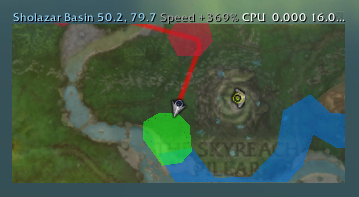
Dirkee's path in blue on the Minimap, with a circle showing where he probably is.
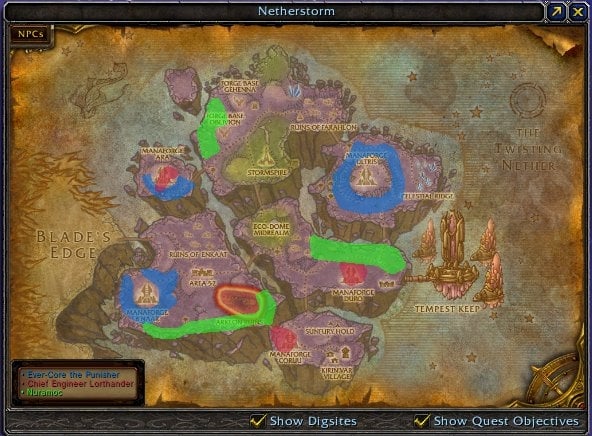
Three mob paths drawn onto the World Map of Netherstorm.
Paths drawn onto a zoomed-in Carbonite window of Sholazar Basin.
Zul'drak's patrols on the Battlefield Minimap.
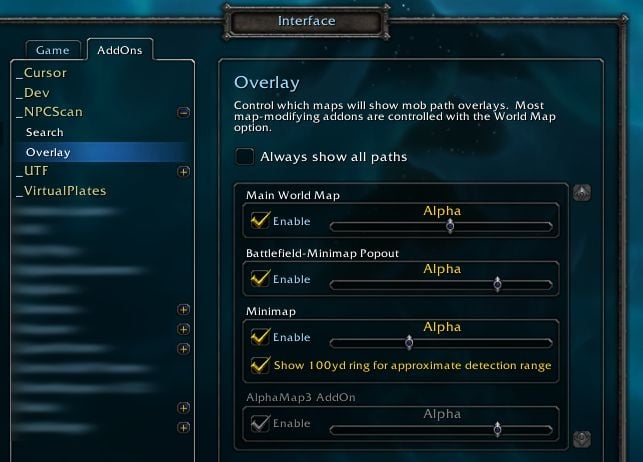
The options sub-panel, under _NPCScan's main options panel.
NPCScan.Overlay
_NPCScan.Overlay is an addition to _NPCScan that adds map overlays for rare mob patrols. When you search for a rare in _NPCScan, _NPCScan.Overlay will show where it patrols until you find it. It works similarly to keithgabryelski's Rare Spawn Overlay, but supports the minimap and has a much smaller download size, along with a few new features.
Special thanks to Rare Spawn Overlay's patrol paths and Routes' minimap drawing code for inspiration!
Note: _NPCScan.Overlay can integrate with _NPCScan if you have installed it, but make sure to keep both up to date if you do use both!
Details
World Map
In addition to drawing paths on the World Map, _NPCScan.Overlay adds a key to a corner of the window with each rare's name. It only appears in zones that have rare maps, like Netherstorm as seen in the screenshot. If you need to read something under the key, just move your mouse over top of it and the key will jump to a different corner.
Most map mods like Atlas will inherit the key and overlays from this module. Even Carbonite's map display will show them.
Battlefield Minimap
The small Battlefield Minimap (AKA the Zone Map) also shows mob paths.
Minimap
All shapes and sizes of minimaps are supported. Rotating minimaps work fine as well.
Also shown in the minimap's screenshot is the found range ring highlighting where Dirkee probably was when the alert went off. That is, Dirkee was seen at the middle of that ring, and he could have been anywhere within the 100 yard ring around that point.
One feature not shown in the screenshot is a thinner 100 yard range ring around your character. It helps you gauge _NPCScan's detection range, so you can sweep through zones more effectively. This option can be found in the Minimap subsection of the options panel, detailed below.
Options
_NPCScan.Overlay's options can be found under _NPCScan's main options menu, under _NPCScan > Overlay, or as its own entry of _NPCScan.Overlay if _NPCScan isn't installed. This panel can be opened with the /npcscanoverlay slash command, or /overlay for short.
The Always show all paths checkbox at the top of the pane overrides the instructions of NPC tracking mods like _NPCScan to hide unused paths, and always displays all known paths instead.
The rest of the configuration pane lists each map display's options. You can enable/disable each map from here, as well as configure individual settings for them.
Each map display can have its overall transparency set independently with the Alpha slider, so that it doesn't obscure the maps themselves.
The WorldMap module now hides its key dynamically if the key covers too much of the map, and also maintains a minimum key scale to keep its text from shrinking too small.
Removed the Cartographer3 module, since Cartographer is no longer being developed.
Added localized names to the WorldMap's key frame for most NPCs in all locales.
Added optional support for LibRareSpawns to show portraits in _NPCScan's mob list.
The key frame now only appears in Carbonite when its map frame is in maximized mode.
Reduced the appearance of lines inside of drawn paths.
3.2.0.2: Now draws a 100 yard ring on maps indicating where found mobs probably are. Putridus is excluded from this, since his detection range is as wide as Icecrown.
Which coordinate mod is the checkbox interfering with?
I use Atlas, and one of the things this allows, is showing the player/cursor co-ordinates on the bottom middle of the map... which just happens to be where the npcscan.overlay toggle draws itself
thanks for taking the time to answer
TechnoHunter
Last edited by TechnoHunter : 07-22-2010 at 12:44 PM.
Which coordinate mod is the checkbox interfering with?
Quote:
Originally posted by TechnoHunter is there a way to remove the option toggle from the map? the check mark in the interface-> addons is fine, but the toggle on the map is interfering with my map coords..
thanks in advance
I was just about to make a post about the same request!
m Map (WoWInterface) is one map addon that has co-ordinates that come close/somewhat overlap _NPCScan.Overlay's checkbox. I can't think of any others at the moment, but there certainly may be other addons out there.
Thanks for your consideration.
__________________
I post as Avanina on wowace.com.
Originally posted by TechnoHunter is there a way to remove the option toggle from the map? the check mark in the interface-> addons is fine, but the toggle on the map is interfering with my map coords..
thanks in advance
There isn't an option to remove it, but you can hide it temporarily with this command:
is there a way to remove the option toggle from the map? the check mark in the interface-> addons is fine, but the toggle on the map is interfering with my map coords..
thanks in advance
Last edited by TechnoHunter : 07-17-2010 at 10:35 PM.
Re: Re: Re: Re: Re: How do I stop it from showing FOUND npcs on maps?
Quote:
Originally posted by Saiket I'm not sure what could cause this. If they're not added to your custom mobs list, then maybe the "Always show all paths" option is stuck. Could you try turning it off and then back on again? Also, are you seeing any Lua errors?
I tried turning that off, restarting the game, checking it, restarting, unchecking...nothing changed. I also removed the creaturecache.wdb file. I was finally able to fix it today when I removed the addon, removed my characters' lua files, then installed the newest version, and deleted the creaturecache.wdb file again. I had to go to northrend and outland, and then it finally showed only the ones I needed.
Re: Re: Re: Re: How do I stop it from showing FOUND npcs on maps?
Quote:
Originally posted by Robicus It should, but it doesn't. In my first post, I said "I do NOT have a checkmark in 'Always show all paths', but it's still showing those 4 NPCs on the maps."
I'm not sure what could cause this. If they're not added to your custom mobs list, then maybe the "Always show all paths" option is stuck. Could you try turning it off and then back on again? Also, are you seeing any Lua errors?
Re: Re: Re: How do I stop it from showing FOUND npcs on maps?
Quote:
Originally posted by Saiket Sorry for the delay, these comments got lost in my email. There's actually an option in _NPCScan.Overlay's config page ("/overlay") to always show all paths. Just turn that off and it should go back to showing only active scans.
It should, but it doesn't. In my first post, I said "I do NOT have a checkmark in 'Always show all paths', but it's still showing those 4 NPCs on the maps."
Re: Re: How do I stop it from showing FOUND npcs on maps?
Quote:
Originally posted by Robicus Actually, that's what I just did. I backed up the file _NPCScan.Overlay.PathData.lua (in the Interface/Addons/_NPCScan.Overlay folder), found the ID numbers of the NPCs I don't want to scan for, and removed those lines. Every time I find another one, I write down the ID number, and once in a while I close the game and edit the file again. Once I've found all of the NPCs, I"ll restore the backup file for my other characters (especially the hunter). Too bad the addon doesn't allow us to just uncheck unwanted overlays inside the game, instead of having to edit the file each time.
Sorry for the delay, these comments got lost in my email. There's actually an option in _NPCScan.Overlay's config page ("/overlay") to always show all paths. Just turn that off and it should go back to showing only active scans.
Re: How do I stop it from showing FOUND npcs on maps?
Quote:
Originally posted by Robicus Do I have to edit one of the addon files to remove the npcs that I already killed?
Actually, that's what I just did. I backed up the file _NPCScan.Overlay.PathData.lua (in the Interface/Addons/_NPCScan.Overlay folder), found the ID numbers of the NPCs I don't want to scan for, and removed those lines. Every time I find another one, I write down the ID number, and once in a while I close the game and edit the file again. Once I've found all of the NPCs, I"ll restore the backup file for my other characters (especially the hunter). Too bad the addon doesn't allow us to just uncheck unwanted overlays inside the game, instead of having to edit the file each time.
I've read all the addon info, and every question and reply in the comments section here, and did everything that was said. No matter what I do, I can't get it to STOP showing already-killed NPCs on the world map or minimap. When I look at the NPCScan settings, under "Search", Frostbitten is checked, and there are green checkmarks beside the 4 NPCs that I know I've already killed. I do NOT have a checkmark in "Search for completed Achievement NPCs", and I do NOT hav a checkmark in "Always show all paths", but it's still showing those 4 NPCs on the maps. I cleared my cache, and that changed nothing. I installed Librarespawns, and that changed nothing. Do I have to edit the addon files every time I kill a rare??
Originally posted by Saiket I just finished a new version tonight that can work standalone or in concert with _NPCScan. I'll publish it next Tuesday for patch 3.3.3.
It took a few days to get all my addon errors worked out, but your update works PERFECTLY. Thank you so much for adding this functionality.
[2010/03/24 20:41:12-2486-x1]: ...NPCScan.Overlay\Modules\_NPCScan.Overlay.Mapster.lua:29: hooksecurefunc(): SizeUp is not a function:
...NPCScan.Overlay\Modules\_NPCScan.Overlay.Mapster.lua:29: in function <...NPCScan.Overlay\Modules\_NPCScan.Overlay.Mapster.lua:27>:
<in C code>: ?
<string>:"safecall Dispatcher[1]":3: in function <[string "safecall Dispatcher[1]"]:3>
<in C code>: ?
<string>:"safecall Dispatcher[1]":9: in function <[string "safecall Dispatcher[1]"]:5>
(tail call): ?:
AceAddon-3.0-5:539: in function `EnableAddon'
AceAddon-3.0-5:629: in function <...s\AckisRecipeList\libs\AceAddon-3.0\AceAddon-3.0.lua:615>
<in C code>: in function `LoadAddOn'
Interface\FrameXML\UIParent.lua:235: in function `UIParentLoadAddOn':
Interface\FrameXML\UIParent.lua:258: in function `CombatLog_LoadUI':
Interface\FrameXML\UIParent.lua:482: in function <Interface\FrameXML\UIParent.lua:454>:
any ideas how to fix it?
The latest version of Mapster changed things a little. I'll have a compatible version ready soon.
[2010/03/24 20:41:12-2486-x1]: ...NPCScan.Overlay\Modules\_NPCScan.Overlay.Mapster.lua:29: hooksecurefunc(): SizeUp is not a function:
...NPCScan.Overlay\Modules\_NPCScan.Overlay.Mapster.lua:29: in function <...NPCScan.Overlay\Modules\_NPCScan.Overlay.Mapster.lua:27>:
<in C code>: ?
<string>:"safecall Dispatcher[1]":3: in function <[string "safecall Dispatcher[1]"]:3>
<in C code>: ?
<string>:"safecall Dispatcher[1]":9: in function <[string "safecall Dispatcher[1]"]:5>
(tail call): ?:
AceAddon-3.0-5:539: in function `EnableAddon'
AceAddon-3.0-5:629: in function <...s\AckisRecipeList\libs\AceAddon-3.0\AceAddon-3.0.lua:615>
<in C code>: in function `LoadAddOn'
Interface\FrameXML\UIParent.lua:235: in function `UIParentLoadAddOn':
Interface\FrameXML\UIParent.lua:258: in function `CombatLog_LoadUI':
Interface\FrameXML\UIParent.lua:482: in function <Interface\FrameXML\UIParent.lua:454>:
You have just downloaded by the author . If you like this AddOn why not consider supporting the author? This author has set up a donation account. Donations ensure that authors can continue to develop useful tools for everyone.
*Clicking the donate button above will take you to PayPal.com
*Clicking the donate button above will take you to Pledgie.com