Download
(20 MB)
Download
Updated: 07-04-11 03:43 PM
Pictures
File Info
Updated:07-04-11 03:43 PM
Created:10-16-10 06:59 PM
Downloads:7,736
Favorites:12
MD5:
CalaiUI  Popular! (More than 5000 hits)
Version: 3.3.1
by: StormCalai [More]

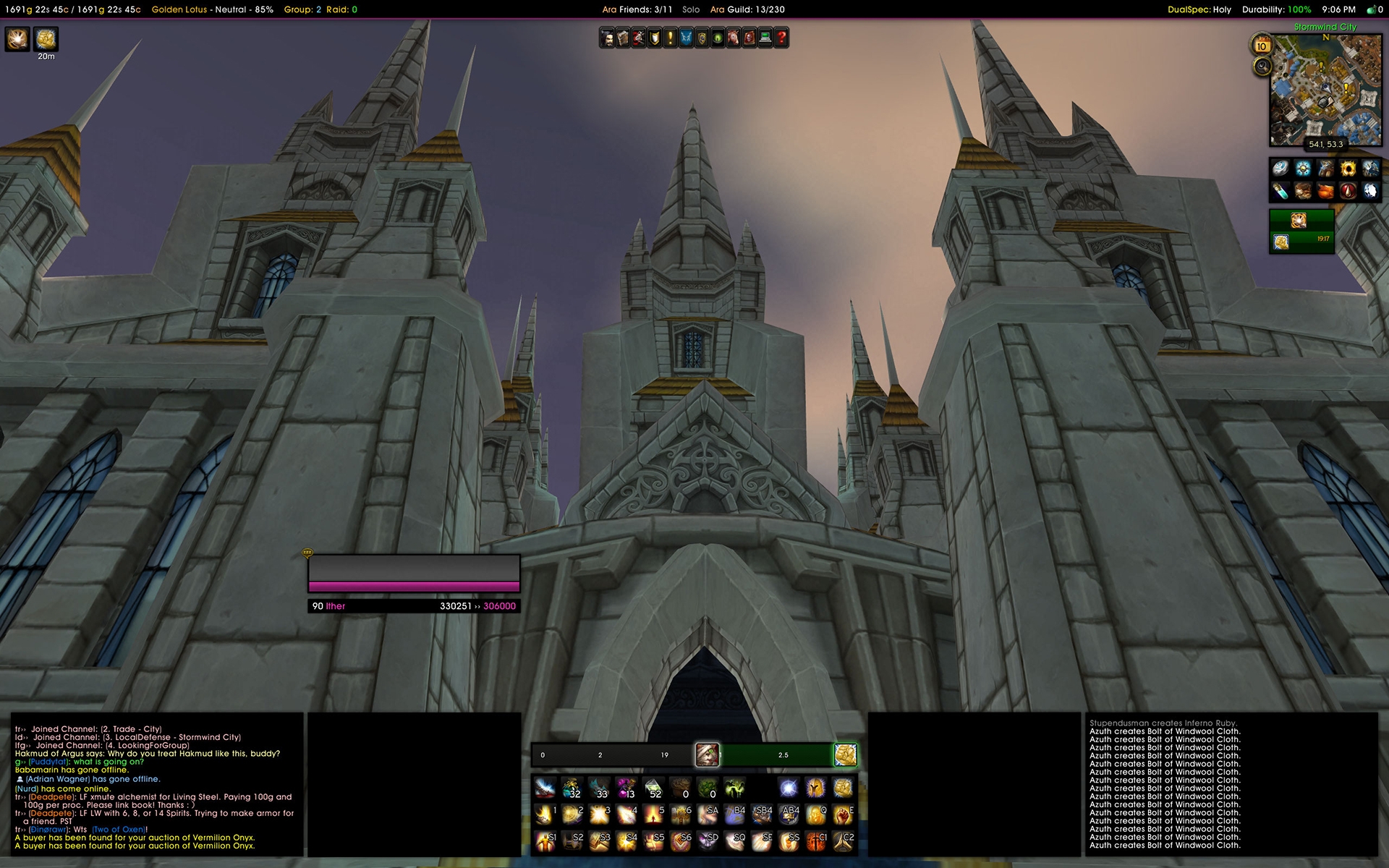
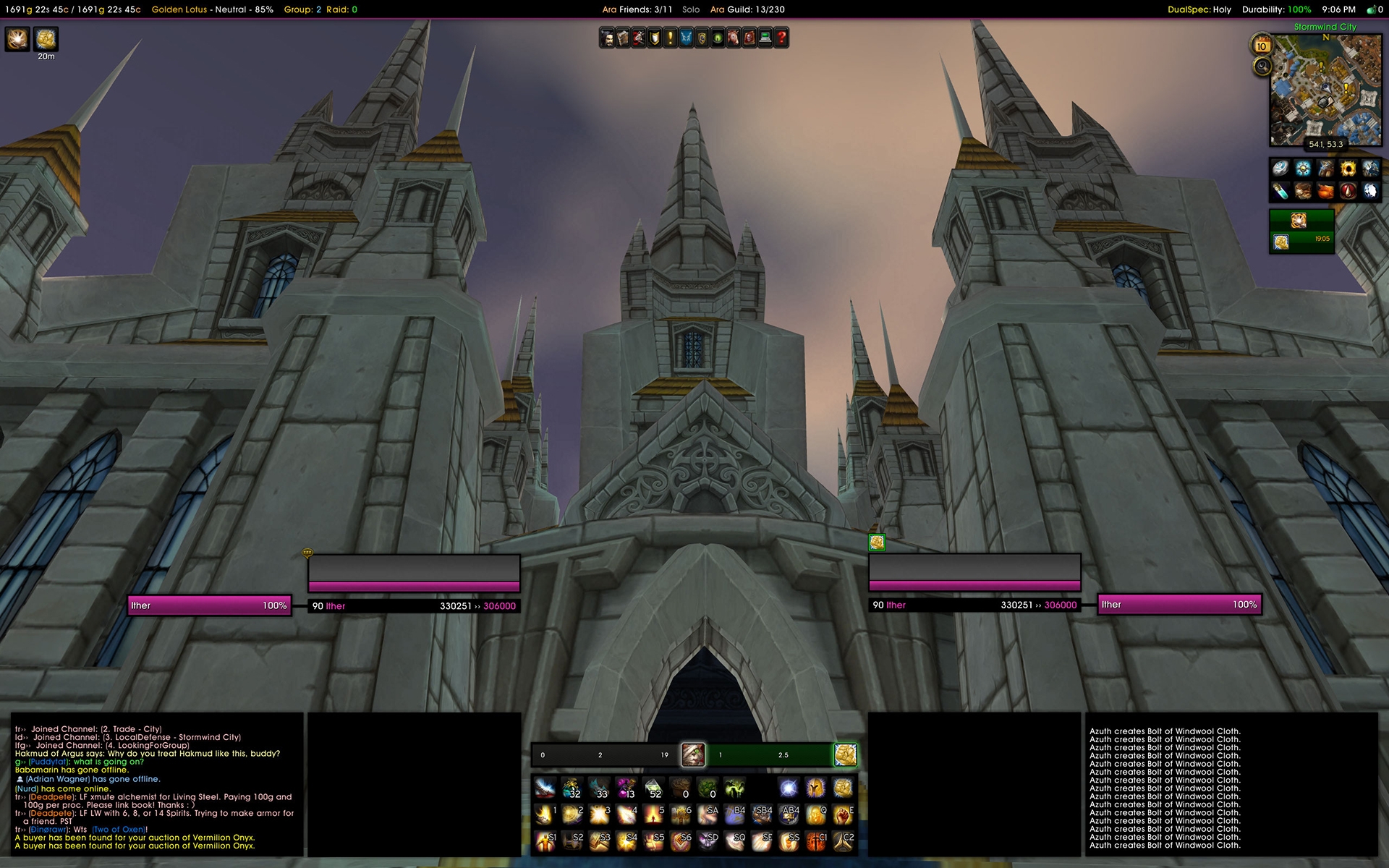
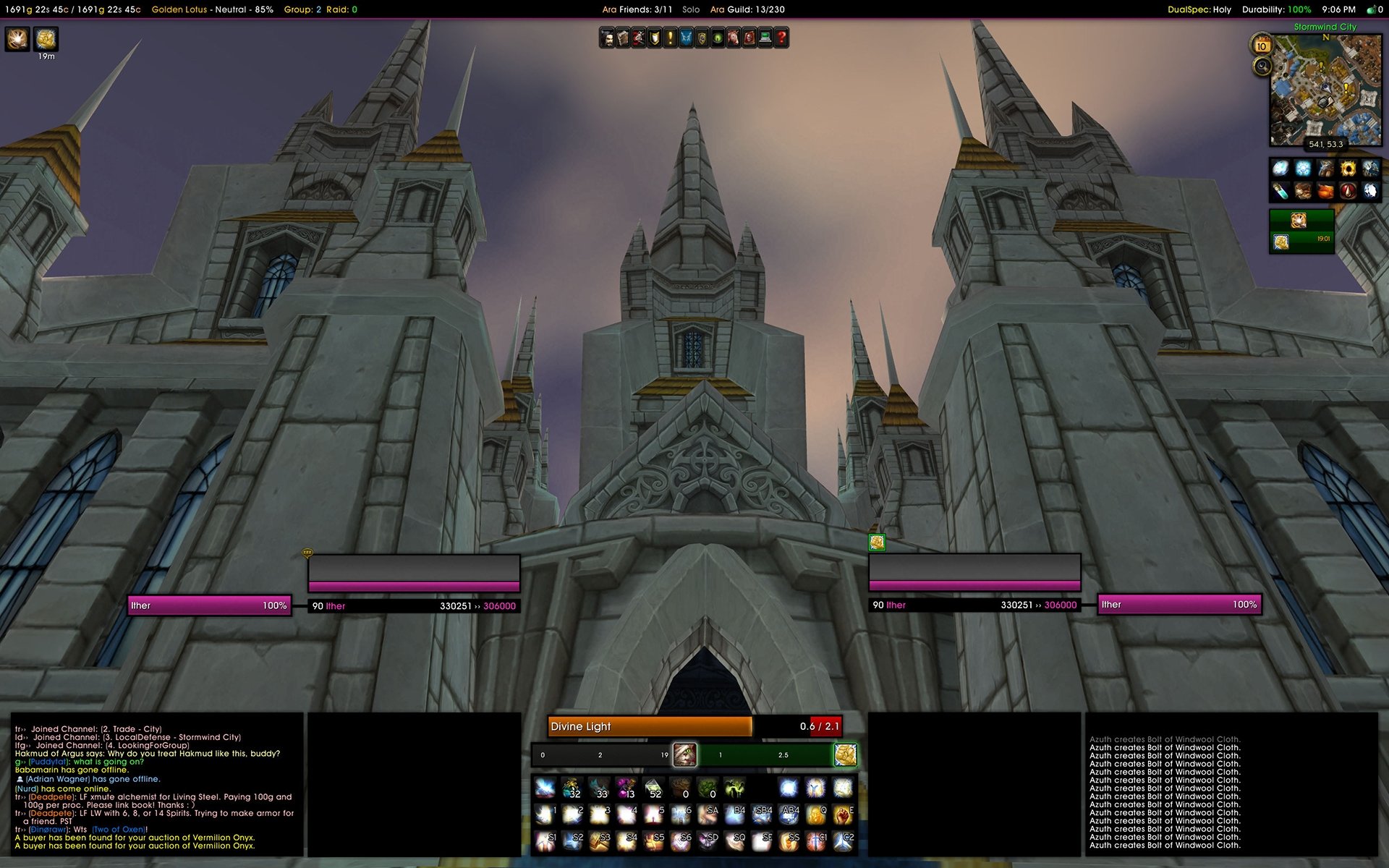
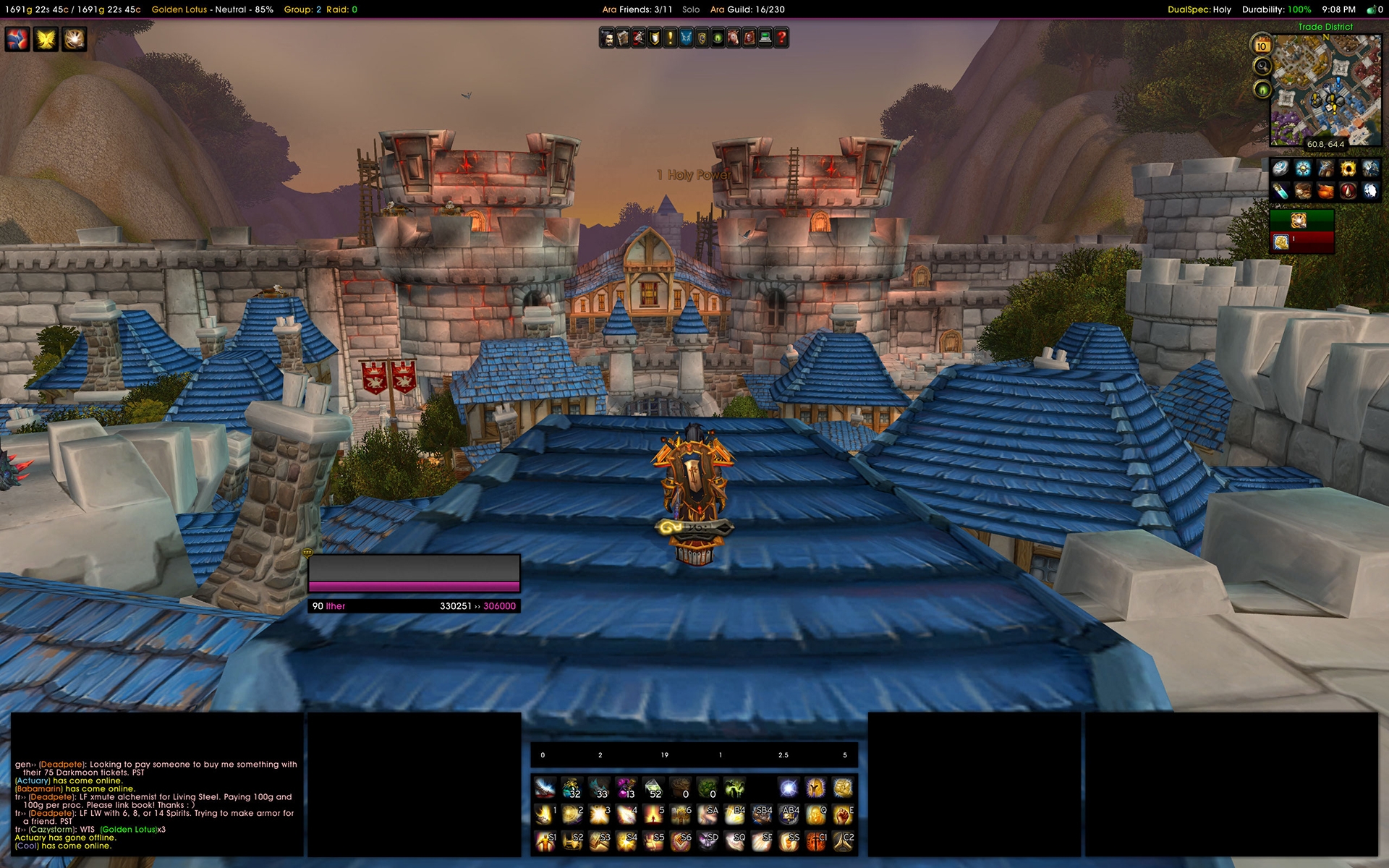
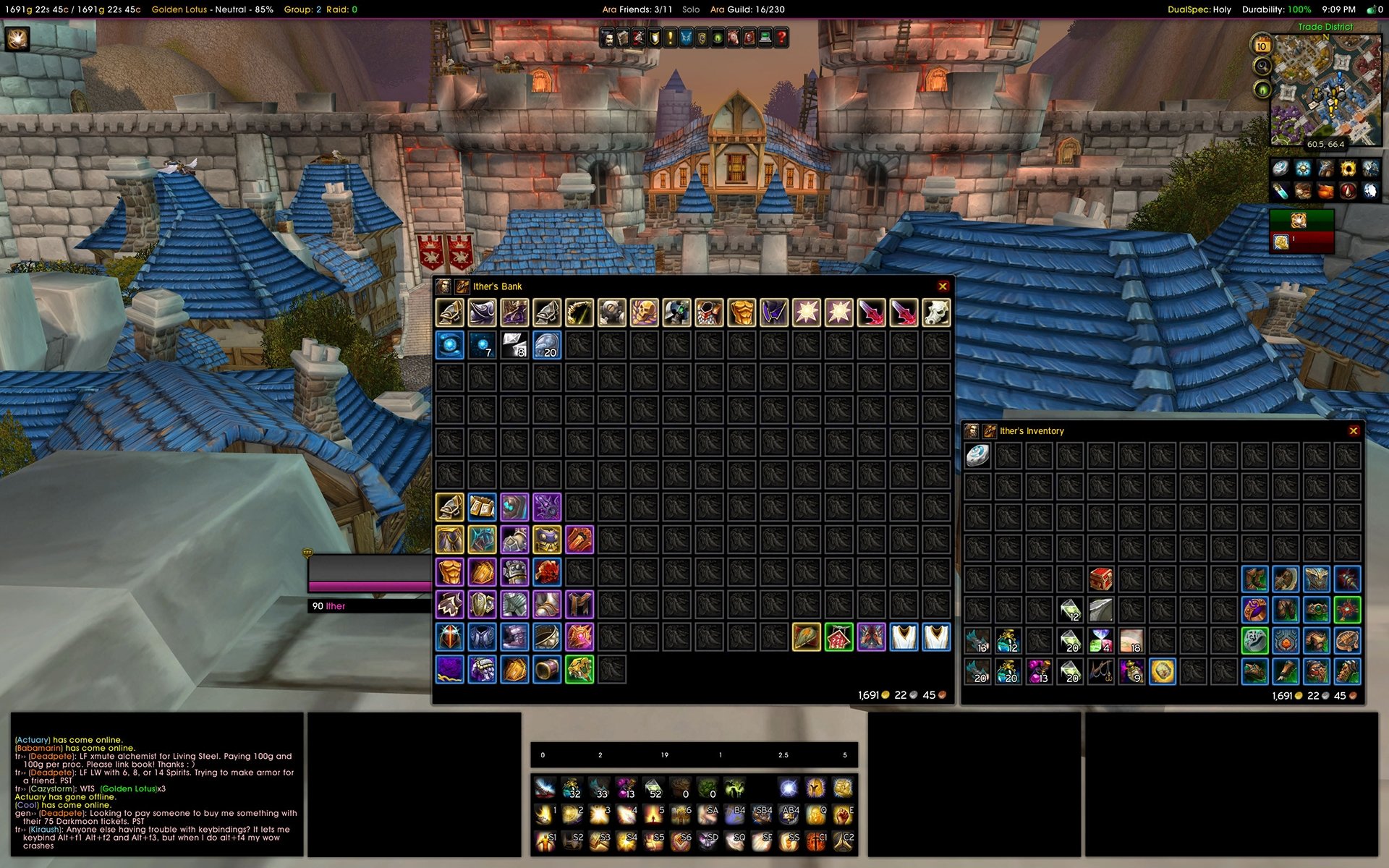
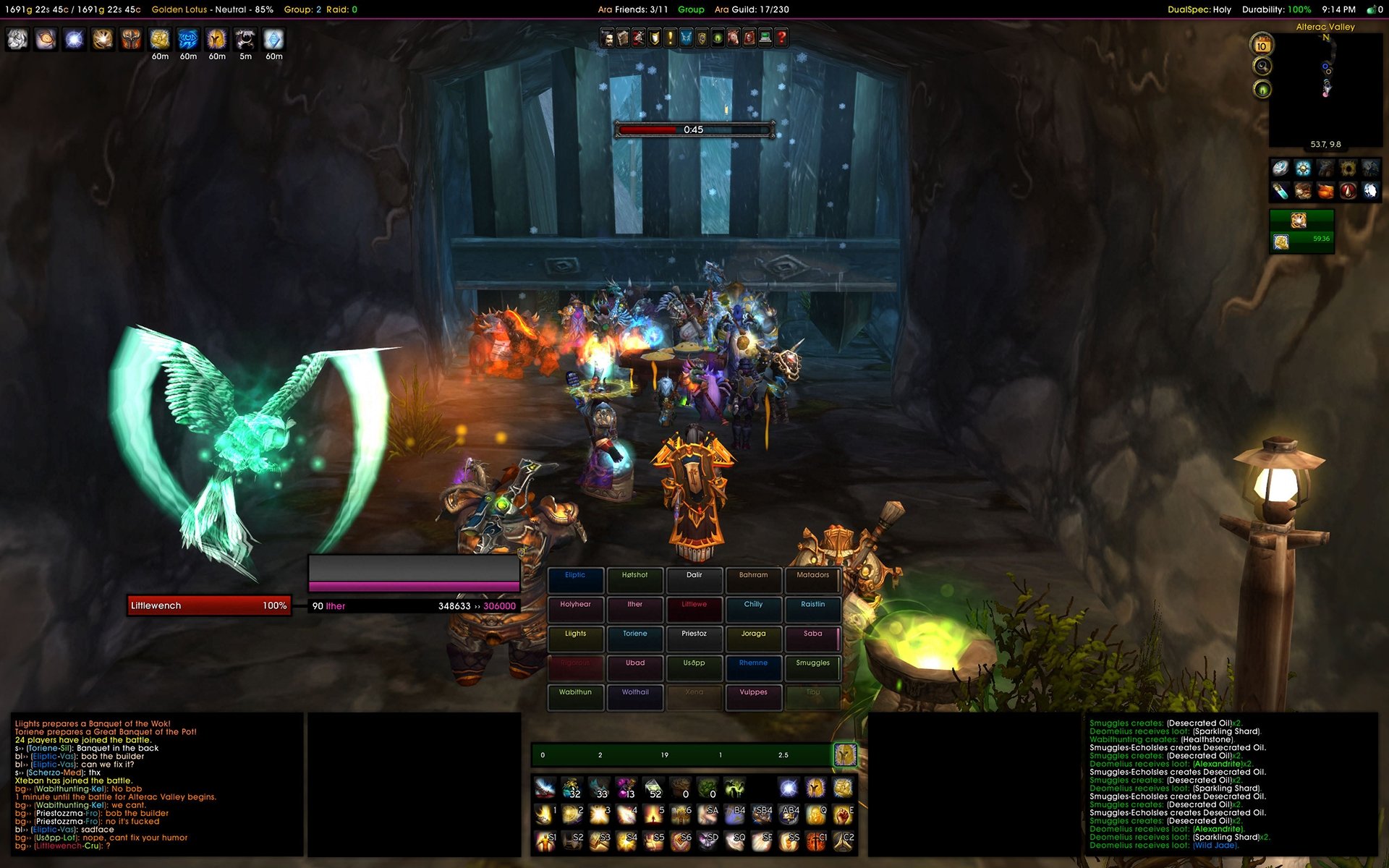
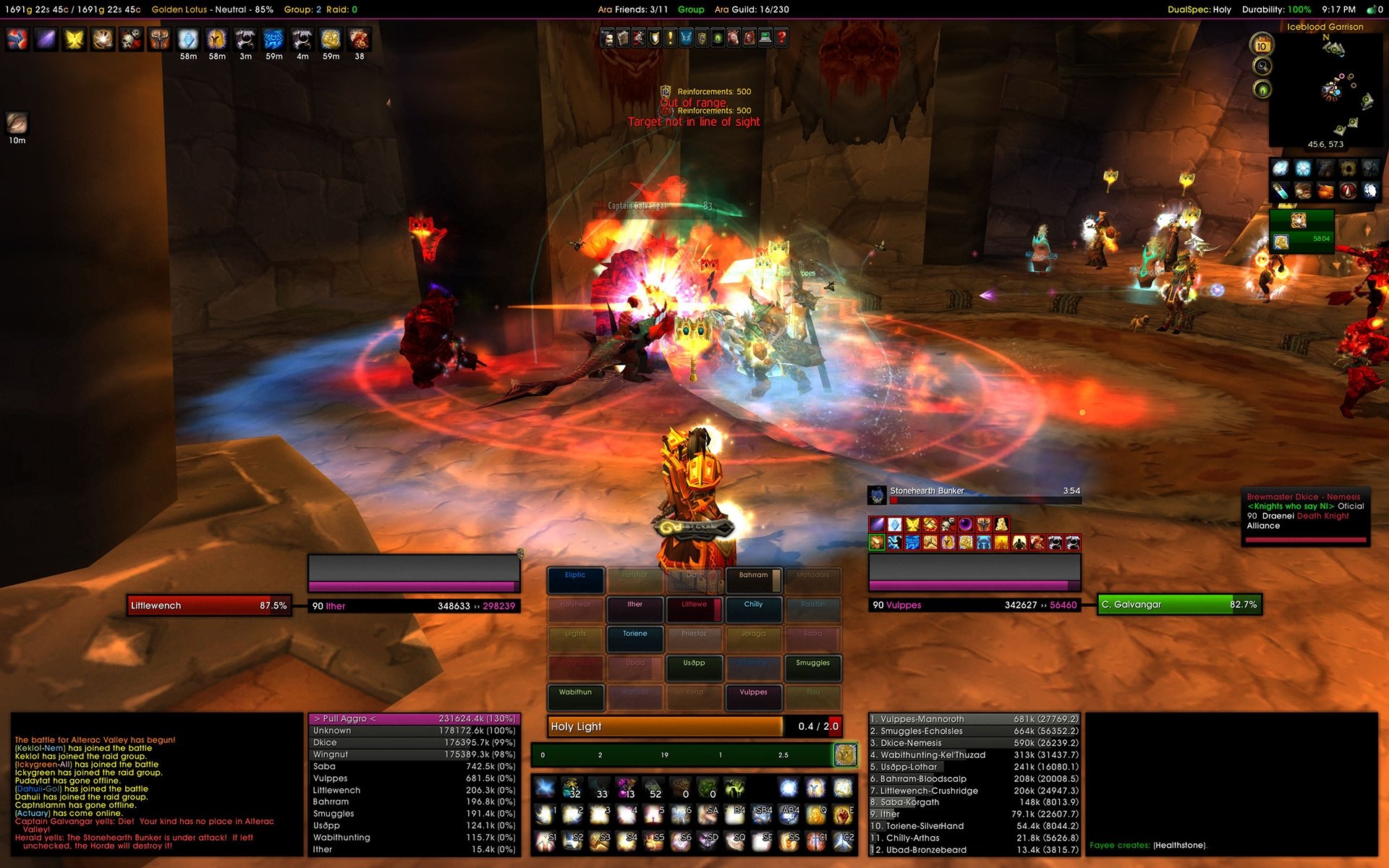
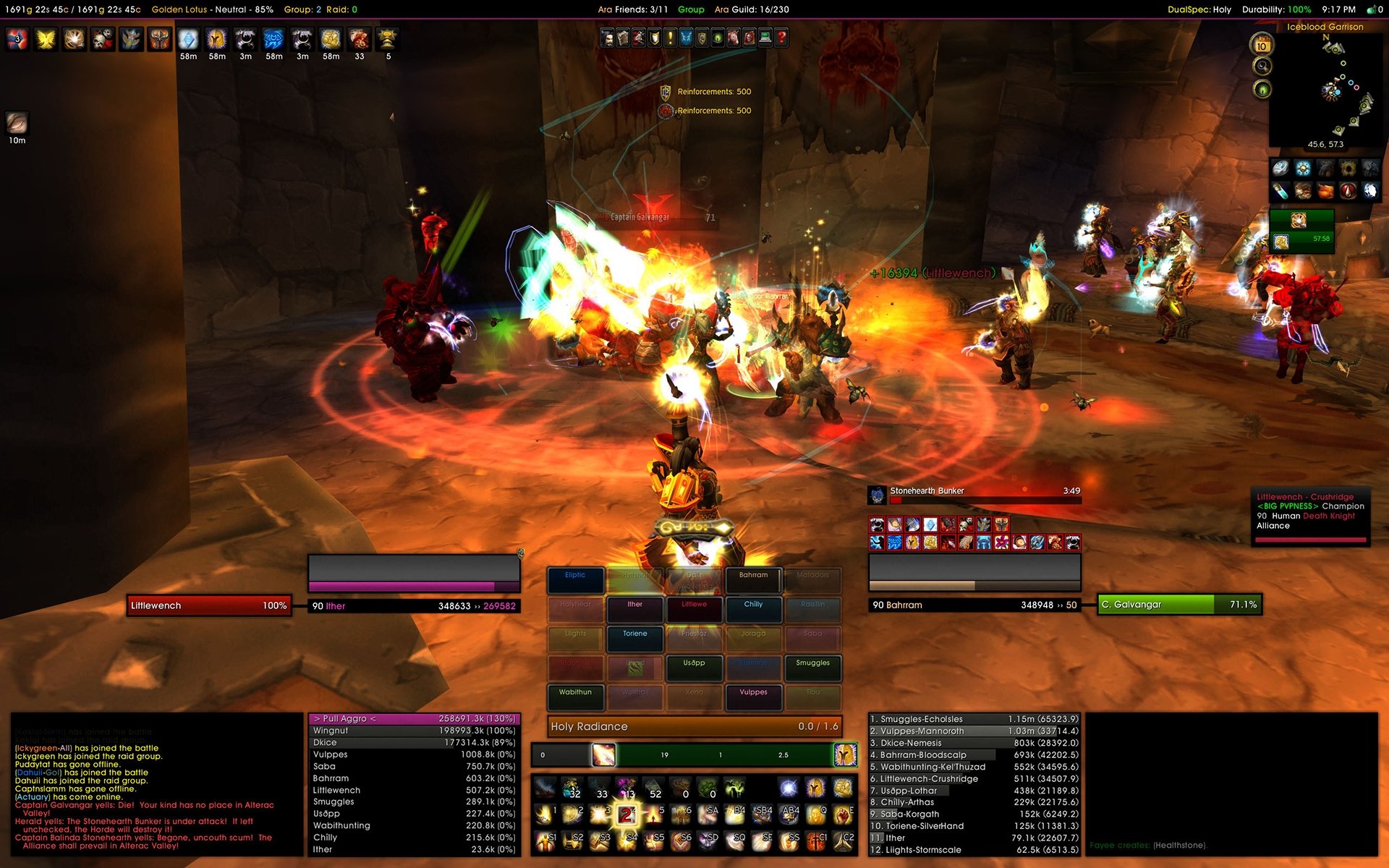
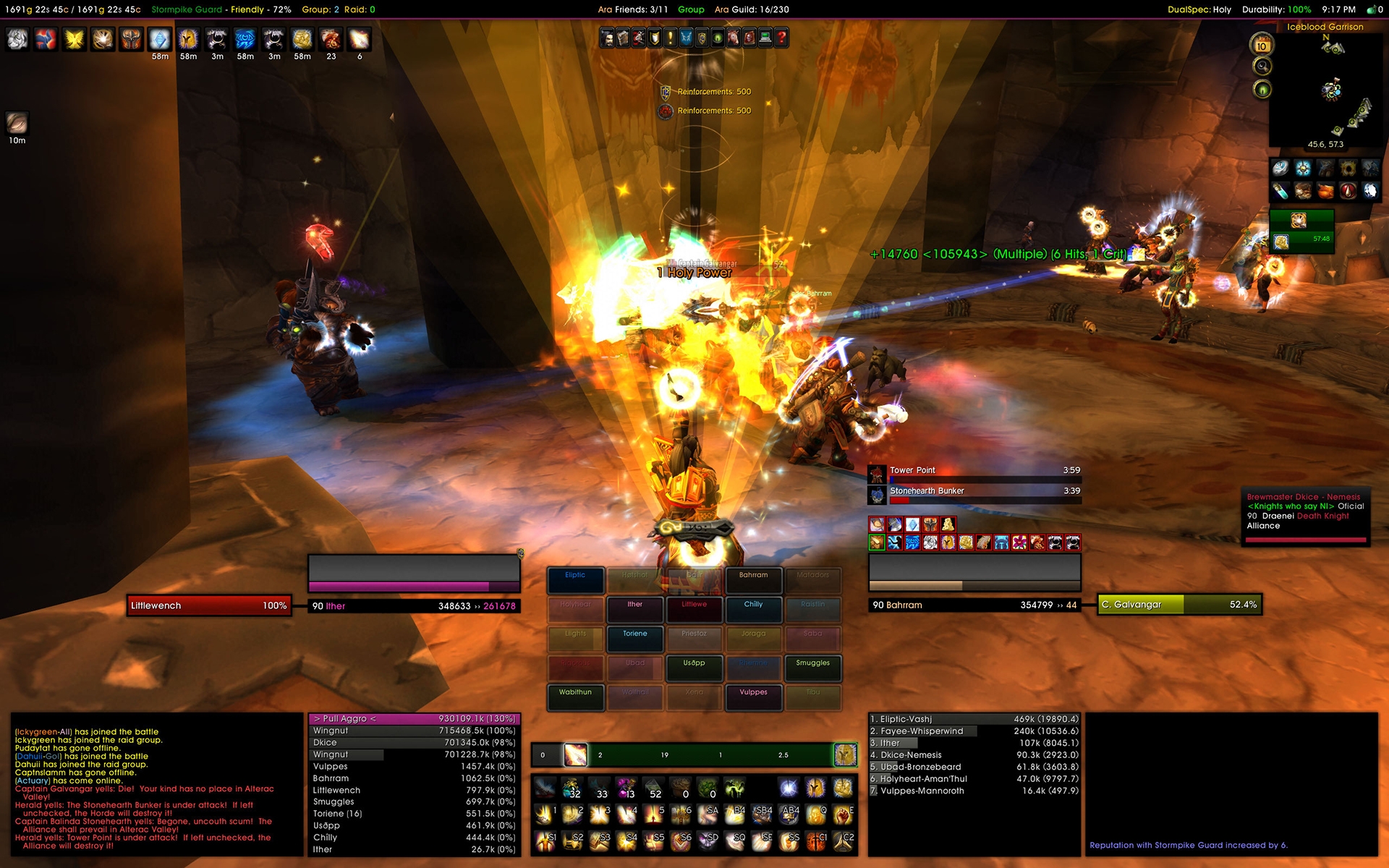
"A true 2560 x 1600 resolution designed interface!"

Release 3.3 » The much anticipated release!

Updated core addons to support changes in 4.2, added some new addons, some new bars, and few cosmetic changes; see the change log.

CalaiUI 3.0 has arrived with updated addons, new texture designs, and more functionality for those who enjoy rocking the raid.

Installation Instructions

1. Shutdown World of Warcraft.
2. Create a backup of your Interface and WTF folders. Delete them once you have finished.
3. Copy the Interface and WTF folders from the zip file to your WoW directory.
4. Go into the WTF folder and rename ACCOUNTNAME, REALMNAME, CHARNAME. Please verify your information for each of these three folders, we've had countless support emails about this and it's all boiled down to incorrect typing of required names.
5. To keep saved keybindings and macros, drop the bindings-cache, bindings.cache.old, macros-cache,
and macros-cache.old from your backup character folder into your new character folder.
6. Start WoW
7. Ensure that ALL ADDONS are enabled.

Configure InGame

Once you load WoW and log into your character everything will be scattered throughout the middle of your screen. Do not fear.

Simply type /reflux switch CalaiUI (exactly how it's typed) and watch your UI reload.

Resize the chat frame if needed. DO NOT use kgPanels to move the chat frame! Simply right click on the "General" chat tab and select unlock, move as needed. Line it up with the panel to the right, right click "General" and select "Lock Window." You are done.

Type /reload to reload the UI.

Reflux has been updated to work, but has been known at times to not. If you are having problems with your UI not looking like our examples, please open up an addon and check the profiles tab. You should see "CalaiUI" as a profile option.

There is a known bug that if you have an account name with numbers you must ensure you copy/type it exactly how it is or addons will not load properly.

Additional Information - please read this!

I have a class that requires a stance bar!

The default location of the stance bar will be in the middle of the screen between the player and target unitframes.

You will have to turn it on per instructions below;

1. Type /bt
2. Select Stance Bar on the left column and then click "Enabled" on the right.

Recount panel is way out of whack!

You may experience a small habit where Recount's window will move. Whatever you do, do not use kgpanels move panels option, all panels are tied to the addons so you need to move that specific addon. To do this with recount, follow these steps;

1. Type /recount config
2. Select Window, unlock window
3. Drag Recount's window until it is back in the proper space

Recount is not coloring my class properly!

In recount we setup the coloring to show all classes outside of your own as darker gray and your class lighter gray. This was made so that you could visually find yourself fairly quickly in a raid situation when you need to know your DPS.

For us to do this we had to create individual profiles for the classes we played. Right now; Druid, Paladin, Priest, Warlock, Shaman and Rogue are available.

If you play one of these classes, open up Interface » Recount » Profile and select the class.

If you do not play one of these classes, do the same above except: Type in your class at the "New" box and click OK. Below that select one of the classes above in the "Copy From" and click OK. You will see the Recount GUI behind you, close the interface options window and go to the GUI. Once there select "Color" and you will see how all the classes are same color except one (depending on what you copied from). What you want to do is make your class the lighter color and all the others the darker color.

What are these gray boxes I'm seeing, they're scaring me!

Is this what you're seeing?


That is the move tabs for wMarker which is hidden because of a custom kgPanels script I use. We decided to make the wMarker only show when you are in a dungeon group or a raid as the leader or assist. The easiest way to move this if it happens to sit in the middle of your screen, haven't figured that out yet, is to join a party with a friend real quick and then drag it by the gray boxes you see to where you want it. Once done, type /wmarker and then go to markers and check "lock".

The flares are currently disabled because a ton of addons block them from use. I've sent this to the author for review and when he updates it I will push our a revision update for CalaiUI.

How do I turn on the really awesome Shaman or Rogue weapon/totem buttons?

This feature is controlled through Satrina Buff Frames. Please follow the instructions below and then perform a /reloadUI.

Not all totems have been added to SBF due to the Shaman only making it to level 76. I've for the most part got as many in as I could think of.

1. Type /sbf options
2. Select "profiles" at the bottom of the options window.
3. Under "using profile", depending on your class; Rogue or Shaman, select CalaiUI-Shaman or CalaiUI-Rogue
4. perform a /reloadui

HELP! I need to update Deadly Boss Mods

I'm using a DBM template that another addon user created and put up on WoWI. The issue, every time a new DBM is released I have to backup some files before I replace.

So, if you are going to update DBM you need to do the following first!

1. Go to your DBM-Core folder and copy the "textures" and "DBT-Template.xml" file to your desktop.
2. Install the newest DBM download.
3. Copy the files you just backed up to the DBM-Core folder and overwrite the ones that came with the latest download.

Addons

I would like to thank these additional authors whose contributions have helped us develop a better interface for the community.

- Ara Broker Guild & Friends
- Ara Broker Money
- Ara Broker Reputations
- Ara Broker Spec Switcher
- Bagnon
- BankStack
- Bartender 4
- BugSack
- ButtonFacade
- Chinchilla
- CleanHotKey
- Deadly Boss Mods
- DockingStation
- ForteXorcist
- Grid
- kgPanels
- KuiNameplates
- Mapster
- MikScrollingBattleText
- Movable Power Frame
- Omen
- OmniCC
- PallyPower
- Pitbull 4
- Postal
- Prat 3
- Quartz 3
- Recount
- Reflux
- Satrina Buff Frame
- SexyGrid [modified to work with the latest Grid version included in my UI]
- tabDB
- TipTac
- wMarker
- xLoot
- XPBarNone
- zBrokerDurability


Thank you again for trying this UI out and I hope it serves the needs of you!
It's been a great experience.
3.3.1
» Fixed xpbarnone setfont tag.

3.3
» Updated core addons to support changes in 4.2; some addons have still not been updated by their authors; performed toc bumps just to clean up interface.
» Added the new totems/weapon buffs bars to the bottom of the player unitframe (see description notes on activating them.)
» Changed font string for all addons to "DeckerB", it's a much better looking font for a 30 inch monitor.
» Cleaned up alignment on some addons.
» Integrated the new DBM template addon.
» Moved to KUI Namplates instead of caelNameplates.

3.2
» Updated core addons to support changes in 4.0.6

3.1
» Implemented the new Unit Frames.

3.0
» Updated all addons to most current release.
» Modified the BT bars so that they do not interfere with Druid shapeshifting (just started playing a Feral).
» Updated Pitbull frames with newer textures to give it a more robust look, increased mana bar size. Will be working with re-designing it entirely, stay tuned to the comments section.
» Integrated the new Movable Holy Power into package for Paladins.
» Added Trinket Bars back to release.

2.0
» Updated all addons to most current release.
» Modified some panels and added a 7th bar to allow for trinket placement.
» Integrated XPBarNone to build for those who are not under level 80.
» Cleaned up some of the modified codes.
» Integrated SBF 3.2 beta to include right clicking off buffs now.

1.3
» added a new optional WTF file for 1920x1080 *Thanks Toxicdust for doing this!
» removed xloot 1.0 and replaced it with xloot (includes monitor and group.)

1.2
» updated the Optional 1024 resolution WTF with an actual one built off a friend who has a true 1024. I had mine almost close, but it was better to have one of an actual player. Should help out those under 1600 resolution.

1.1
» added SexyGrid to the UI. I worked through the Lua and modified it so that it would work with the newest Grid release. If the original author disapproves, please contact me and I will remove it.

If you downloaded 1.0, you don't need to reinstall the entire UI. Just grab !BeautyCase and Grid from the addons folder in the zip and copy it to WOW. Then go into the WTF and get the two Grid files from "SavedVariables" and copy them to your global folder in WTF. This is not available for the 1024 optional file, sorry.

1.0
» initial release
Archived Files (9)
File Name
Version
Size
Author
Date
3.3
20MB
StormCalai
07-04-11 10:42 AM
3.2
20MB
StormCalai
02-08-11 08:09 PM
3.1
20MB
StormCalai
02-01-11 06:38 PM
3.0
20MB
StormCalai
01-30-11 03:56 PM
2.0
20MB
StormCalai
11-10-10 11:23 AM
1.3
18MB
StormCalai
10-17-10 09:02 AM
1.2
18MB
StormCalai
10-17-10 12:34 AM
1.1
18MB
StormCalai
10-16-10 09:36 PM
1.0
18MB
StormCalai
10-16-10 06:59 PM


Post A Reply Comment Options
Old 01-01-12, 01:24 AM  
TheGeek
A Firelord
 
TheGeek's Avatar
AddOn Author - Click to view AddOns

Forum posts: 469
File comments: 211
Uploads: 6
Little something I've been working on.

Consider it a pre-release.

http://www.wowinterface.com/download...urrection.html
__________________
TheGeek is offline Report comment to moderator  
Reply With Quote
Old 07-08-11, 10:12 AM  
TheGeek
A Firelord
 
TheGeek's Avatar
AddOn Author - Click to view AddOns

Forum posts: 469
File comments: 211
Uploads: 6
Originally posted by manu9
Anyway of using the Unitframes without the UI as a whole? I tried copying PB and its settings over, it comes borderless
You have to copy kgPanels and SharedMedia in order to get the panels and borders included on Pitbull.
__________________
TheGeek is offline Report comment to moderator  
Reply With Quote
Old 07-08-11, 10:06 AM  
manu9
A Murloc Raider

Forum posts: 6
File comments: 31
Uploads: 0
Anyway of using the Unitframes without the UI as a whole? I tried copying PB and its settings over, it comes borderless
manu9 is offline Report comment to moderator  
Reply With Quote
Old 07-08-11, 07:53 AM  
TheGeek
A Firelord
 
TheGeek's Avatar
AddOn Author - Click to view AddOns

Forum posts: 469
File comments: 211
Uploads: 6
Originally posted by Misstress
There is an Update for Grid. How can I Update it without loosing the Modification?

Same question for all updates for addons with modification.
For the most part-- all addons can be updated without consequences except for Forte and Grid.

Forte requires a modification in order for the panels to attach to the back of the cooldown timer.

Grid requires the addition of the beautycase handler in order to do the borders as I have them.

AFAIK, there is no significant update to Grid except an incremental TOC update.

I wouldn't update addons unless something is broken or you get an additional option.

As always-- I will update the package as I see significant changes occur that warrant the need.
__________________
TheGeek is offline Report comment to moderator  
Reply With Quote
Old 07-08-11, 07:46 AM  
Misstress
A Kobold Labourer

Forum posts: 0
File comments: 8
Uploads: 0
There is an Update for Grid. How can I Update it without loosing the Modification?

Same question for all updates for addons with modification.
Misstress is offline Report comment to moderator  
Reply With Quote
Old 07-05-11, 08:11 PM  
Misstress
A Kobold Labourer

Forum posts: 0
File comments: 8
Uploads: 0
Great work again. THX a lot!!!
Misstress is offline Report comment to moderator  
Reply With Quote
Old 07-05-11, 02:35 PM  
TheGeek
A Firelord
 
TheGeek's Avatar
AddOn Author - Click to view AddOns

Forum posts: 469
File comments: 211
Uploads: 6
Re: Problems

Originally posted by Pntbutrjly
This is what I'm seeing.


http://imageshack.us/photo/my-images...511155231.jpg/

Any help would be appreciated. Thanks in advance.
Pnt-- Looks like your using a 1600 resolution?

This build is primarily for those with a 1920+ and was actually built off a 30" monitor at 2560.

You will have to move elements around to line them up.

For example you can move the bars with the panels attached by using bartender options.

Grid needs to be unlocked so you can move your name over to the box it belongs in.

I wish I had a profile for those with lower resolutions but not owning a monitor that can do that is difficult.

__________________
TheGeek is offline Report comment to moderator  
Reply With Quote
Old 07-05-11, 02:03 PM  
Pntbutrjly
A Kobold Labourer

Forum posts: 0
File comments: 3
Uploads: 0
Problems

This is what I'm seeing.


http://imageshack.us/photo/my-images...511155231.jpg/

Any help would be appreciated. Thanks in advance.
Pntbutrjly is offline Report comment to moderator  
Reply With Quote
Old 07-04-11, 11:40 PM  
Mambaru
A Defias Bandit
 
Mambaru's Avatar

Forum posts: 2
File comments: 35
Uploads: 0
Originally posted by TheGeek
AH crap.

I forgot to plug the xpbar fix.

Let me do that, I'll upload new.

Not sure about Ackis, I don't use it but could be result of xpbar.

Did you get the totems sorted on SBF? If you're using a client other than English that might be the problem.

I don't have any foreign languages set, not even German, since I don't play on European server anymore (latency is way too high in the US).
Yes mate, I realised my mistake afterwards, but for some reason I had to reload my UI twice. Then they sorted themselves out.

Yeah I think Ackis' error is as a result of xpbar, I believe that they are both based off Ace3 along with Gnomeworks, which also bugged. We'll soon see.

Which part would I just need to extract for the fix, please? Once again sterling work!

lol no worries just figured it out, extract the XPBar addon only!
Last edited by Mambaru : 07-04-11 at 11:50 PM.
Mambaru is offline Report comment to moderator  
Reply With Quote
Old 07-04-11, 03:39 PM  
TheGeek
A Firelord
 
TheGeek's Avatar
AddOn Author - Click to view AddOns

Forum posts: 469
File comments: 211
Uploads: 6
AH crap.

I forgot to plug the xpbar fix.

Let me do that, I'll upload new.

Not sure about Ackis, I don't use it but could be result of xpbar.

Did you get the totems sorted on SBF? If you're using a client other than English that might be the problem.

I don't have any foreign languages set, not even German, since I don't play on European server anymore (latency is way too high in the US).
__________________
Last edited by TheGeek : 07-04-11 at 03:44 PM.
TheGeek is offline Report comment to moderator  
Reply With Quote
Old 07-04-11, 02:32 PM  
Mambaru
A Defias Bandit
 
Mambaru's Avatar

Forum posts: 2
File comments: 35
Uploads: 0
Cali love your work mate but....

I get the following errors on a clean install:


1x table: 2667B278
nil

Locals:
nil

Then:

2x XPBarNone-v1.5.2\Core.lua:1109: XPBarNoneText:SetText(): Font not set
XPBarNone-v1.5.2\Core.lua:1109: in function `?'
CallbackHandler-1.0-6:147: in function <...ist\libs\CallbackHandler-1.0\CallbackHandler-1.0.lua:147>
<string>:"safecall Dispatcher[1]":4: in function <[string "safecall Dispatcher[1]"]:4>
<in C code>: ?
<string>:"safecall Dispatcher[1]":13: in function `?'
CallbackHandler-1.0-6:92: in function `Fire'
AceEvent-3.0-3:120: in function <...s\AckisRecipeList\libs\AceEvent-3.0\AceEvent-3.0.lua:119>

---
nil

Locals:
nil


And another after I re-added Ackis:

1x XPBarNone-v1.5.2\Core.lua:1109: XPBarNoneText:SetText(): Font not set
XPBarNone-v1.5.2\Core.lua:1109: in function `?'
CallbackHandler-1.0-6:147: in function <...ist\libs\CallbackHandler-1.0\CallbackHandler-1.0.lua:147>
<string>:"safecall Dispatcher[1]":4: in function <[string "safecall Dispatcher[1]"]:4>
<in C code>: ?
<string>:"safecall Dispatcher[1]":13: in function `?'
CallbackHandler-1.0-6:92: in function `Fire'
AceEvent-3.0-3:120: in function <...s\AckisRecipeList\libs\AceEvent-3.0\AceEvent-3.0.lua:119>
<in C code>: in function `CollapseFactionHeader'
AckisRecipeList-2.2.6b\Player.lua:109: in function `UpdateReputations'
AckisRecipeList-2.2.6b\Core.lua:1111: in function `Scan'
GnomeWorks-146\plugins\arl.lua:214: in function `func'
Interface\FrameXML\UIDropDownMenu.lua:700: in function `UIDropDownMenuButton_OnClick':
<string>:"*:OnClick":1: in function <[string "*:OnClick"]:1>

---
nil

Locals:
nil
Last edited by Mambaru : 07-04-11 at 03:26 PM.
Mambaru is offline Report comment to moderator  
Reply With Quote
Old 07-04-11, 10:41 AM  
TheGeek
A Firelord
 
TheGeek's Avatar
AddOn Author - Click to view AddOns

Forum posts: 469
File comments: 211
Uploads: 6
Great news!

There is a version 3.3 being uploaded right now for 4.2 Firelands.

__________________
TheGeek is offline Report comment to moderator  
Reply With Quote
Old 06-27-11, 05:39 AM  
Misstress
A Kobold Labourer

Forum posts: 0
File comments: 8
Uploads: 0
Hi,

will there be an Update for 4.2?
Misstress is offline Report comment to moderator  
Reply With Quote
Old 06-07-11, 08:56 AM  
TheGeek
A Firelord
 
TheGeek's Avatar
AddOn Author - Click to view AddOns

Forum posts: 469
File comments: 211
Uploads: 6
Originally posted by dttk0009
Hey Calai,

The UI is great! Just one question though, any way to get Grid working without the 'SexyGrid' config? I like my plain, minimalist skin without borders a bit better as it's easier to see for me.

Cheers!
You can try the latest version of Grid, however I think it may have beautycase implemented in it.
__________________
TheGeek is offline Report comment to moderator  
Reply With Quote
Old 06-04-11, 01:11 AM  
dttk0009
A Kobold Labourer

Forum posts: 0
File comments: 4
Uploads: 0
Hey Calai,

The UI is great! Just one question though, any way to get Grid working without the 'SexyGrid' config? I like my plain, minimalist skin without borders a bit better as it's easier to see for me.

Cheers!
Last edited by dttk0009 : 06-04-11 at 01:12 AM.
dttk0009 is offline Report comment to moderator  
Reply With Quote
Post A Reply


Category Jump:

Support AddOn Development!

You have just downloaded by the author . If you like this AddOn why not consider supporting the author? This author has set up a donation account. Donations ensure that authors can continue to develop useful tools for everyone.