Addon Information
Works with 3.1
Download Latest Version.
To add favorites please register for a free account. If you already have one you need to login. How do I install this? (FAQ)
Elkano's Portal Bug Reports Feature Requests
Author:
Version:
2.2.4 - r149
Date:
04-21-2009 02:53 AM
Size:
181.88 Kb
Downloads:
122,966
Favorites:
823
MD5:
Pictures
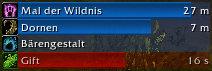
sample screenshot with a druid
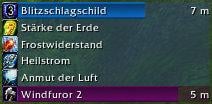
sample screenshot with a shaman
Click to enlarge
enough is never enough
Elkano's BuffBars   Popular! (More than 5000 hits)
If you want to support development, consider donating:
Click here to lend your support!

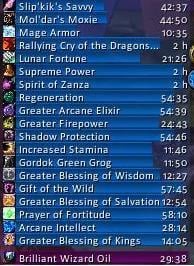
EBB provides groups of statusbar style indicators to show (de)buffs currently affecting your toon or some other units (currently focus, pet and target). For the player, it can also show indicators for temporary enchants place on it's weapons.

Version 2.x is a total recode based on the Ace2 framework which became necessary in order to support some of the longtime wanted and suggested features.
It's now possible to show different groups of bars which can be configured in many ways. Each group can be assigned an individual look and filter settings.
EBB can be configured via a dropdown menu which is accessable via chat (/ebb config), FuBar plugin or (for the group settings) by right clicking the groups anchor.
After setting up a group, its anchor can be hidden by alt-left clicking a bar or the anchor itself in order to lock the group in place.

In order to get additional bar textures and fonts for EBB simply install SharedMedia which is available for download under http://wow.curse.com/downloads/wow-addons/details/sharedmedia.aspx

If you have bug reports or feature request, create a ticket: http://www.wowace.com/projects/elkbuffbars/create-ticket/
You can also check my thread at the wowace forums: http://forums.wowace.com/showthread.php?t=5290
The most recent development version of EBB is available directly from the wowace SVN via http://www.wowace.com/projects/elkbuffbars/files/
  Change Log - Elkano's BuffBars
2.2.4 - r149 | 2009/04/20
- pushed TOC 30100
- changes for detection of selfcast buffs (player, pet, vehicle)
- some code to prevent "TexCoord out of range"; no idea why it happened at all :/

some other changes since r73803 release:
- added an optional spark to the bars
- added scaling
- added shift-click-instering to chat editbox
  Optional Files - Elkano's BuffBars
Sorry, there are currently no optional files available.
  Archived Versions - Elkano's BuffBars
File Name
Version
Size
Author
Date
2.1 (r73803)
171kB
Elkano
05-19-2008 01:19 AM
  Comments - Elkano's BuffBars
Post A Reply
Author Comments Comment Options
Old Yesterday, 06:28 AM  
Elkano
A Flamescale Wyrmkin
 
Elkano's Avatar
Interface Author - Click to view interfaces

Forum posts: 113
File comments: 141
Uploads: 12
Quote:
Originally posted by Promega
This mod is great.

I have a question though. How do you attach two buff bars so that they grow from each others. I noticed that my poisons were attached to another bar by default it seemed. I like this functionallity I just don't understand how to control it. I have a PVP set that shows my debuffs on the target and I want to attach it to important procs on myself so that they all grow in the same space.

Thanks ahead of time.
just move the one for debuffs close under the one for procs and they should snap once you release it.
__________________
This posting is made of 100% recycled electrons.
Elkano is offline Report comment to moderator   Edit/Delete Message Reply With Quote
Old Yesterday, 03:17 AM  
Promega
A Kobold Labourer

Forum posts: 0
File comments: 3
Uploads: 0
This mod is great.

I have a question though. How do you attach two buff bars so that they grow from each others. I noticed that my poisons were attached to another bar by default it seemed. I like this functionallity I just don't understand how to control it. I have a PVP set that shows my debuffs on the target and I want to attach it to important procs on myself so that they all grow in the same space.

Thanks ahead of time.
Promega is offline Report comment to moderator   Edit/Delete Message Reply With Quote
Old 06-29-2009, 01:36 AM  
Elkano
A Flamescale Wyrmkin
 
Elkano's Avatar
Interface Author - Click to view interfaces

Forum posts: 113
File comments: 141
Uploads: 12
Re: Self-Only Filter?

Quote:
Originally posted by Perrin
I'm trying to use EBB for all my buff/debuff tracking. However, I'm in a raid as a mage with other mages, so I can't tell which of the Living Bomb debuffs is mine. If possible, can we get a filter on a group, so that you can say "Only player's spells" by looking at the isMine property?
why don't you simply use the one that's already built into the addon?
filters - selfcast - whitelist
__________________
This posting is made of 100% recycled electrons.
Elkano is offline Report comment to moderator   Edit/Delete Message Reply With Quote
Old 06-27-2009, 02:14 AM  
Perrin
A Defias Bandit

Forum posts: 2
File comments: 5
Uploads: 0
Self-Only Filter?

I'm trying to use EBB for all my buff/debuff tracking. However, I'm in a raid as a mage with other mages, so I can't tell which of the Living Bomb debuffs is mine. If possible, can we get a filter on a group, so that you can say "Only player's spells" by looking at the isMine property?
Perrin is offline Report comment to moderator   Edit/Delete Message Reply With Quote
Old 06-07-2009, 08:42 PM  
ChaosInc
A Cobalt Mageweaver
 
ChaosInc's Avatar
Interface Author - Click to view interfaces

Forum posts: 222
File comments: 171
Uploads: 13
This doesn't seem to be showing Grip in my buffs. Makes Thrusting Hodir's Spear nearly impossible to do (I've fallen 7 times now while trying to complete it).

EDIT: Tried overriding it to other spots (debuff, trench), still doesn't come up. It's actually not showing me ANYTHING while the daily is going on for ANY of the buffs/debuffs.
__________________

"Introduce a little anarchy. Upset the established order, and everything becomes chaos. I'm an agent of chaos. Oh, and you know the thing about chaos? It's fair!" -- The Joker

I R MOD AT CURSE

Last edited by ChaosInc : 06-07-2009 at 08:51 PM.
ChaosInc is offline Report comment to moderator   Edit/Delete Message Reply With Quote
Old 04-27-2009, 06:10 PM  
Eryx101
A Murloc Raider

Forum posts: 5
File comments: 3
Uploads: 0
Exclamation Filtering on Target

Just a quick question. Trying to setup a bar to only show Sunder Armor and Expose Armor (I'm a DK). I know how to create the bar, but the filters are kinda confusing me.

1. Create the bar
2. Filter to Debuff
3. Change to "Target"
4. Whitelist filter: Sunder Armor & Expose Armor

I did this, but its not showing a debuff when one or the other is on the mob.

Am i doing it right, or am i missing something?

THX!
Eryx101 is offline Report comment to moderator   Edit/Delete Message Reply With Quote
Old 04-27-2009, 03:10 PM  
bezal
A Murloc Raider

Forum posts: 5
File comments: 8
Uploads: 0
Mangle-Cat still doesn't show up as a debuff
bezal is offline Report comment to moderator   Edit/Delete Message Reply With Quote
Old 04-23-2009, 08:46 AM  
goliath0
A Murloc Raider

Forum posts: 4
File comments: 100
Uploads: 0
If elkano supported party ids and arena enemy party id's, that would rock.
goliath0 is offline Report comment to moderator   Edit/Delete Message Reply With Quote
Old 12-12-2008, 09:43 PM  
Linaeri
A Kobold Labourer

Forum posts: 0
File comments: 26
Uploads: 0
Re: Elkanos

I like the compressed feature but I'd like this to appear horizontal instead of vertical. Any chance of a feature update to allow this?
Linaeri is offline Report comment to moderator   Edit/Delete Message Reply With Quote
Old 10-05-2008, 01:28 PM  
Rachellie
A Kobold Labourer

Forum posts: 1
File comments: 3
Uploads: 0
Elkanos

I am Using Morgantis Buff bars and wanted to ask.....they at the buff icon will show party or Raid members that do not have the buff which is helpful to locate the unbuffed people in Raids and one off buff them.

Also Morganti allow you to do icons with no text in horizontal rows qith times does Elkano do that also?

Thanks,
Rach
Rachellie is offline Report comment to moderator   Edit/Delete Message Reply With Quote
Old 09-05-2008, 03:51 AM  
mos-tek
A Kobold Labourer

Forum posts: 0
File comments: 2
Uploads: 0
HELP

I don`t know what you everyone are talking about. I have something like this:


and


and I don`t know what to do. Is my AddOn broken?
mos-tek is offline Report comment to moderator   Edit/Delete Message Reply With Quote
Old 08-20-2008, 11:37 AM  
Vithoune
A Kobold Labourer

Forum posts: 0
File comments: 2
Uploads: 0
Re: Re: etc

ya i understand that, but with my 2ndary (Shouts) bar, all new buffs appear there instead of the Default "Buff" bars
Quote:
Originally posted by Elkano
That's what white- & blacklist are for.
In your case, you want to whitelist your shouts for your shout bar group and they'll be the only ones showing up there. and then you'll most likely want to blacklist them in the other buff group to not have them shown twice.

whitelist -> pass-filter
blacklist -> block-filter
Vithoune is offline Report comment to moderator   Edit/Delete Message Reply With Quote
Old 08-20-2008, 09:57 AM  
Elkano
A Flamescale Wyrmkin
 
Elkano's Avatar
Interface Author - Click to view interfaces

Forum posts: 113
File comments: 141
Uploads: 12
Re: etc

That's what white- & blacklist are for.
In your case, you want to whitelist your shouts for your shout bar group and they'll be the only ones showing up there. and then you'll most likely want to blacklist them in the other buff group to not have them shown twice.

whitelist -> pass-filter
blacklist -> block-filter
__________________
This posting is made of 100% recycled electrons.
Elkano is offline Report comment to moderator   Edit/Delete Message Reply With Quote
Old 08-20-2008, 05:32 AM  
Vithoune
A Kobold Labourer

Forum posts: 0
File comments: 2
Uploads: 0
etc

Im wondering if theres a way to automatically enable all buffs to one bar. I have a seperate bar for my special skills (Commanding, battle shout, shield block etc etc etc) When i get a new buff, lets say dampen it goes on my "shouts" bar which is annoying. i have to disable that buff then put it on my "buff" (default bar) Anyone know how to fix this? I guess what im tryin to say is, is there a way to enable and disable all buffs?

Last edited by Vithoune : 08-20-2008 at 05:35 AM.
Vithoune is offline Report comment to moderator   Edit/Delete Message Reply With Quote
Old 08-18-2008, 02:24 AM  
Elkano
A Flamescale Wyrmkin
 
Elkano's Avatar
Interface Author - Click to view interfaces

Forum posts: 113
File comments: 141
Uploads: 12
Quote:
Originally posted by jahfarian
how can I make bars, buffs-icons etc bigger? did not found anything yet (am I stupid?^^)
just change the group's settings for width and height.
Elkano is offline Report comment to moderator   Edit/Delete Message Reply With Quote
Post A Reply


Category Jump:

Support AddOn Development!

You have just downloaded by the author . If you like this AddOn why not consider supporting the author? This author has set up a donation account. Donations ensure that authors can continue to develop useful tools for everyone.




The Network:
EQInterface | EQ2Interface | LoTROInterface | MMOInterface | War.MMOUI | WoWInterface | VGInterface | Allakhazam | Thottbot | Wowhead | Zam


©2009 MMOUI / ZAM Network
vBulletin - Copyright ©2000 - 2009, Jelsoft Enterprises Ltd.

