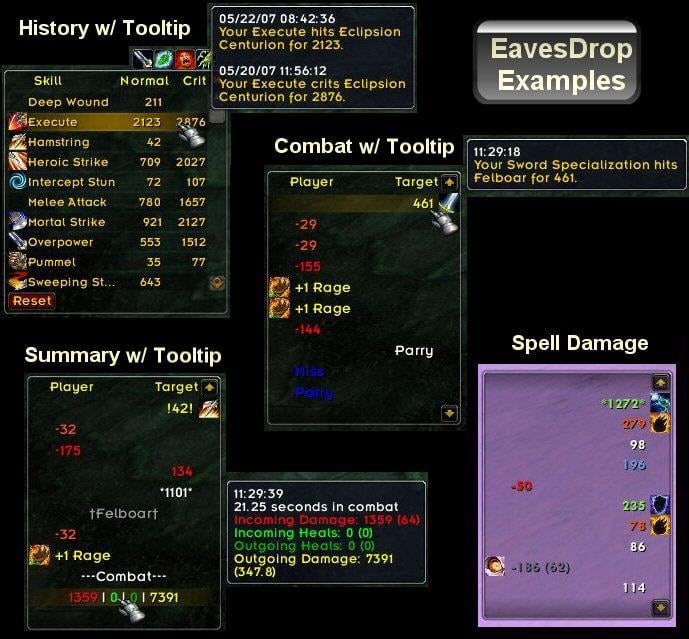
What is it? - A simple combat log that displays events similar to how SCT/D would in a log, using icons to display spells/skills. It separates incoming events (left side) from out going events (right side) from misc. events (middle).
What all can it show?
- Your hits, spells, misses, heals, etc...
- Incoming damage, spells, heals, buffs, debuffs, etc...
- Power gain
- Honor, Reputation, SKill, and Experience gain
- Mob/People you have slain
- Combat start/stop
- Timestamps and details in tooltips
- High hit stat tracking for both incoming and outgoing skills.
- Combat Summaries
- Shift+Click to paste events of history into Chat Edit Box
Where did it come from? - Original idea by Bant. Coding help/samples from Andalia`s SideCombatLog and CombatChat.
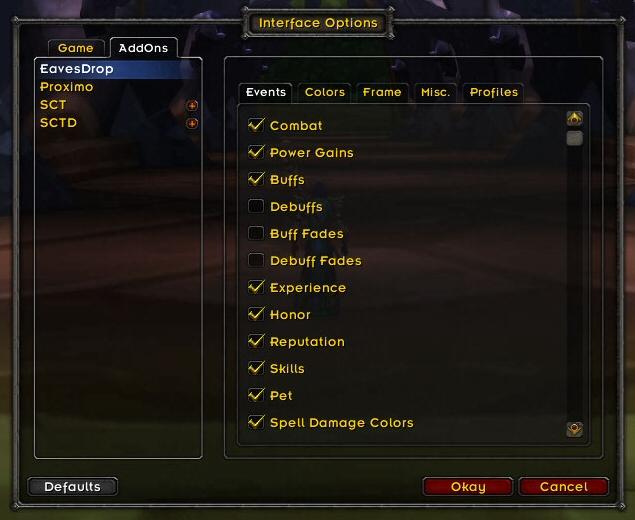
How do I use it? - Unzip EavesDrop into your interface\addons directory. For more info on installing, please read install.txt. Now just run WoW and once logged in, you will see the EavesDrop in the middle of your screen. Left click the EavesDrop Tab to drag it. Right click the EavesDrop Tab to see the options menu.
FAQ My periodic damage is not showing up in the combat log or on the screen! How do I fix it? - You have turned off periodic damage on the Advanced Options under Interface options. Make sure the "Periodic Damage" check box is checked, even if you have Damage unchecked.
How do I reset EavesDrop or load another users settings? - EavesDrop uses the Ace3 profile system. By default all characters use the same profile. You may change this for each character using the Profile area of the option menu. You can reset the options for the current profile using the Rest option in the menu.
How do I change the fonts? - EavesDrop uses the games default fonts. EavesDrop now supports ShareMedia, so just select your font from the options menu.
Support
Please post all errors and suggestions on http://grayhoof.wowinterface.com/ using the provided forms.
Change Log - EavesDrop
2.1 - Fix for rep and honor. Fixed posting events to chat. Added item buffs to buff events. Clean up of combat event processing. Cleanup of combat log pasting, xp gain, and pet happiness. Convert to LibShareMedia-3.0.
2.0 - Converted to WoW 2.4 Combat Log. Converted to Ace3. Added SharedMedia support for font. Tons of code cleanup and performance changes. Moved options menu to WoW 2.4 Addons Menu.
1.5 - Separated out Buff and Debuff fading events. Added tooltip Anchoring options. Added ability to hide Tab. Added new options for opening/closing frames.
1.41 - Fixed bug regarding summary calculations and some skills.
1.4 - Added Waterfall as optional way to view options, Shift+Right Click on tab. Changed to use SpecialEventsLib for buffs/debuffs. Added new optional Combat Summary when combat stops. Added new way to scroll text by combat flags, ctrl+click or ctrl+mouse wheel. Added buff and debuff names that can be shortened using abbreviation or truncation. Added shift+click to add events to Chat Edit Box. Added ability to change Spell School Colors. Cleaned up Drain/Leech events.
1.3 - Added new high value skill stat tracking (incoming/outgoing damage/heals per character). New highs flagged with !'s. Open full history with icon near main tab. Added pet portrait to texture for pet events. Fixed overhealing issue. Changed table update methods. Removed Compost.
1.2 - Converted to WoW 2.0 standards. Converted to using AceLocale 2.2 and BabbleLib 2.2. Minor random tweaks.
1.1 - Upped history count by more than double. Fixed HOT's when in party. Added Frame Fade option. Added Skill events. Added Time Stamp option. Cleaned up pet events for better performance and to account for totems/summoned pets. Added Heal and Mana filers.
1.01 - Library update
1.0 - Initial Release
Optional Files - EavesDrop
Sorry, there are currently no optional files available.
Is there a way to resize the history tracking frame?
I use the largest font and almost everything in that frame shows up as
a bunch of periods. Right now I can try to figure out some spells by the icons,
but its rather tedious to be shift clicking everything trying to find the one I want.
Hi Grayhoof
I noticed that sometimes the experience gained is not displayed correctly in Eavesdrop. For example the quest Into the Scarlet Monastery gives 500 rep and 7200 xp according to the combat log or chat window. Eavesdrop shows 3 entries: +500 (Undercity), +6156(xp), +0(xp). I observed this sometimes completing other quests too.
Thank you for the great mod, it is one of my favorites.
Your previous post was fine. I was mainly just letting you know the Ace site will usually have a more up to date version than what is posted here. If there are big bugs I try to get them fixed on put on release sites ASAP, but when it little things they usually wait for a bigger release.
Quote:
Originally posted by Drow_Fiend Sorry about my previous post: it helps to download the most recent version from the Ace site...
Really need more details to be able to help you in any way. I get zero errors with EavesDrop. Are you using the updated versions from the Ace site?
Quote:
Originally posted by Drow_Fiend Hi there!
As I had previously stated: wonderful mod and keep up the good work!
I am still having a few problems with eavesdrop...
1. If I load up multiple targets with dots, WoW starts to spam nil.color errors all over the place...I will try and log these errors this week and post.
2. Still sometimes will not show the combat summary at the end of a fight and consequently, will not allow me to shift-click events to chat when said log does not appear.
In order of instability (list of addons with most errors), Eavesdrop is presently ranked as #1 (according to # of errors registered by WoW)...followed closely by Archud2.
As I had previously stated: wonderful mod and keep up the good work!
I am still having a few problems with eavesdrop...
1. If I load up multiple targets with dots, WoW starts to spam nil.color errors all over the place...I will try and log these errors this week and post.
2. Still sometimes will not show the combat summary at the end of a fight and consequently, will not allow me to shift-click events to chat when said log does not appear.
In order of instability (list of addons with most errors), Eavesdrop is presently ranked as #1 (according to # of errors registered by WoW)...followed closely by Archud2.
Originally posted by Grayhoof razooon, your post makes no sense. I think you are very confused on what scale, number of lines, and line height mean...
Thats not so hard to figure out. I just mean that I want the height, the number of lines etc...independently configurable. Without touching the other options.
If that is possible ofcourse.
Why are the number of lines and the height of lines attached to the frame length???
Could you please make it so I can get more lines without resizing the frame?
Also is it possible to resize without touching the framesize?
The resizing method right now makes no sense.
Someone else was having this issue and they had to delete their saved variables while out of the game and reset their profile within the game. Then it started working.
Quote:
Originally posted by ARJTPA Any clue to why my Eavesdrop is throwing these errors? I am using the 2.4 version, and I thought it was working once I removed the saved variables, but it still throws these errors and lots of them... I have had to disable this mod while raiding... <crying loudly>. Any help would be greatly appreciated. Thanks
edit: btw, I use the mod downloaded from Ace with externals libs. I also use JWoWUpdater, so pretty sure everything is getting updated... so maybe something is messing me up. I am thinking (not too deeply) that the issue is related to newer Ace Libaries that are getting updated and now Eavesdrop is giving errors because of incompatibilities.
["message"] = "EavesDrop\\EavesDrop.lua:744: attempt to index field 'color' (a nil value)\nEavesDrop\\EavesDrop.lua:688: in function `DisplayEvent'\nEavesDrop\\EavesDrop.lua:583: in function `?'\nCallbackHandler-1.0\\CallbackHandler-1.0.lua:146: in function <...Ons\\Ace3\\CallbackHandler-1.0\\CallbackHandler-1.0.lua:146>\n<string>:\"safecall Dispatcher[14]\":4: in function <[string \"safecall Dispatcher[14]\"]:4>\n<in C code>: ?\n<string>:\"safecall Dispatcher[14]\":13: in function `?'\nCallbackHandler-1.0\\CallbackHandler-1.0.lua:91: in function `Fire'\nAceEvent-3.0\\AceEvent-3.0.lua:70: in function <Interface\\AddOns\\Ace3\\AceEvent-3.0\\AceEvent-3.0.lua:69>\n\n ---",
["type"] = "error",
["time"] = "2008/03/31 19:34:08",
["session"] = 1,
["counter"] = 2614,
Any clue to why my Eavesdrop is throwing these errors? I am using the 2.4 version, and I thought it was working once I removed the saved variables, but it still throws these errors and lots of them... I have had to disable this mod while raiding... <crying loudly>. Any help would be greatly appreciated. Thanks
edit: btw, I use the mod downloaded from Ace with externals libs. I also use JWoWUpdater, so pretty sure everything is getting updated... so maybe something is messing me up. I am thinking (not too deeply) that the issue is related to newer Ace Libaries that are getting updated and now Eavesdrop is giving errors because of incompatibilities.
["message"] = "EavesDrop\\EavesDrop.lua:744: attempt to index field 'color' (a nil value)\nEavesDrop\\EavesDrop.lua:688: in function `DisplayEvent'\nEavesDrop\\EavesDrop.lua:583: in function `?'\nCallbackHandler-1.0\\CallbackHandler-1.0.lua:146: in function <...Ons\\Ace3\\CallbackHandler-1.0\\CallbackHandler-1.0.lua:146>\n<string>:\"safecall Dispatcher[14]\":4: in function <[string \"safecall Dispatcher[14]\"]:4>\n<in C code>: ?\n<string>:\"safecall Dispatcher[14]\":13: in function `?'\nCallbackHandler-1.0\\CallbackHandler-1.0.lua:91: in function `Fire'\nAceEvent-3.0\\AceEvent-3.0.lua:70: in function <Interface\\AddOns\\Ace3\\AceEvent-3.0\\AceEvent-3.0.lua:69>\n\n ---",
["type"] = "error",
["time"] = "2008/03/31 19:34:08",
["session"] = 1,
["counter"] = 2614,
Thank you for the quick reply: great addon btw...could not play without it.
I looked into the memory issue and you are right: no problem there. Not sure why it is not showing the combat summary line on the display; I will run a couple of heroics tonight and see what the frequency is of it not displaying.
As for the shift-click event: when i select an item to post into text, it will put the data into the chat bar, but nothing happens when I hit enter. It is as if the enter key is not being recognized or something. Interestingly enough though; if I select a time, it will post the time. No events.
Do you think this might be a conflict with the Blizzard combat interface?
1. Will look into
2. Can you give an example? It's working for me consistently. If combat has not started, no data is gathered.
3. This is probably because it is the first Ace3 addon you have loading, and so everything Ace3 shows up under EavesDrop as far as memory and CPU. This is normal and nothing to be concerned about. If you removed Eavesdrop, the next Ace3 addon you have would show this same behavior.
Quote:
Originally posted by Drow_Fiend Thank you for updating this wonderful addon for 2.4. However, I have ran into the following 3 problems...
1. Shift-Click events to chat no longer work
2. Combat summary sometimes appears; sometimes not
3. Eavesdrop has now become the larger memory hog out of all of my addons
I did a complete restore of my WTF folders etc and loaded addons on a 1 to 1 bases to isolate a zoning problem (found the culprit finally...Gatherer: new fix works well!!), and the aforementioned 3 problems still persist.
Thank you for updating this wonderful addon for 2.4. However, I have ran into the following 3 problems...
1. Shift-Click events to chat no longer work
2. Combat summary sometimes appears; sometimes not
3. Eavesdrop has now become the larger memory hog out of all of my addons
I did a complete restore of my WTF folders etc and loaded addons on a 1 to 1 bases to isolate a zoning problem (found the culprit finally...Gatherer: new fix works well!!), and the aforementioned 3 problems still persist.



