| Go to Page... |

Pictures
File Info

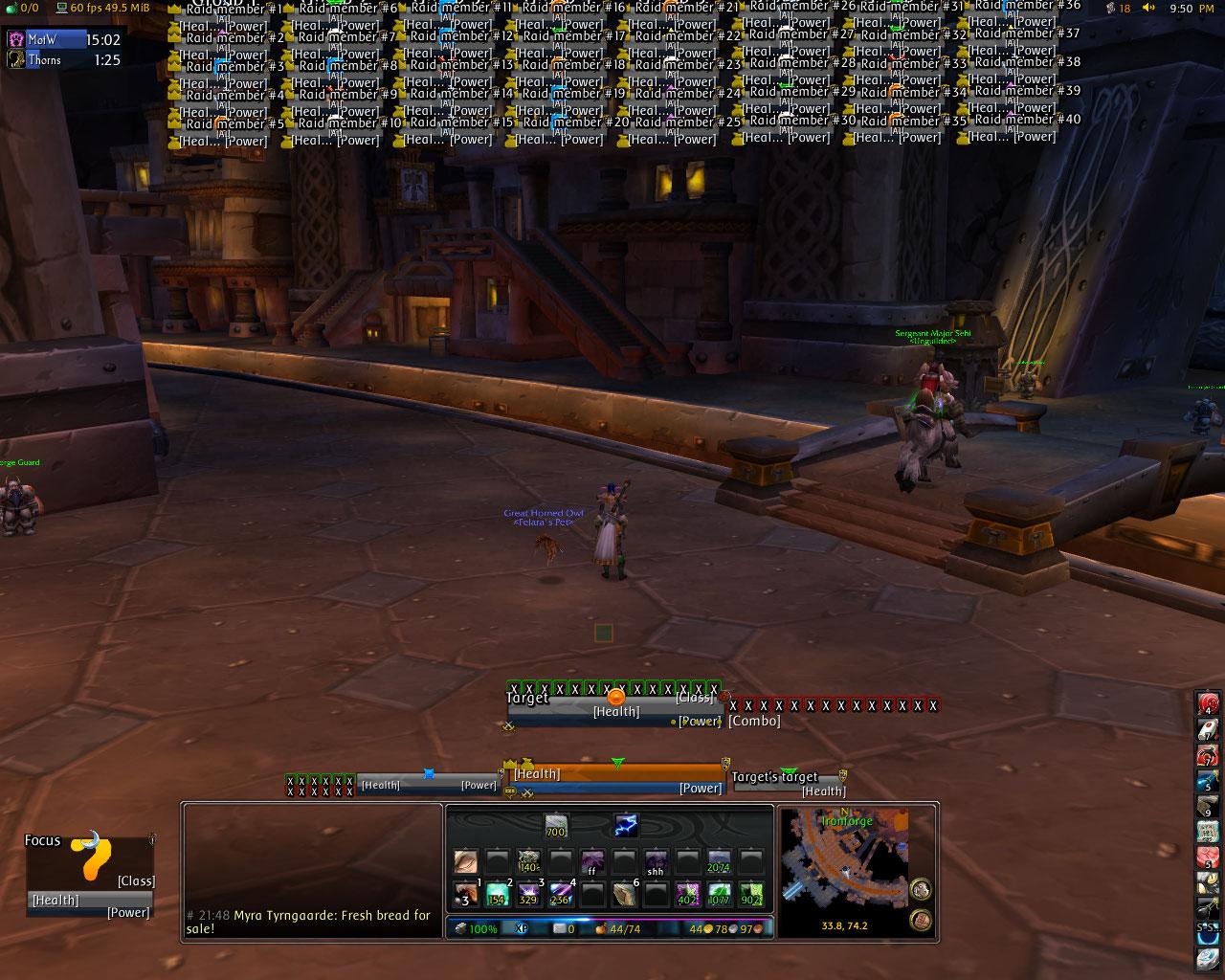
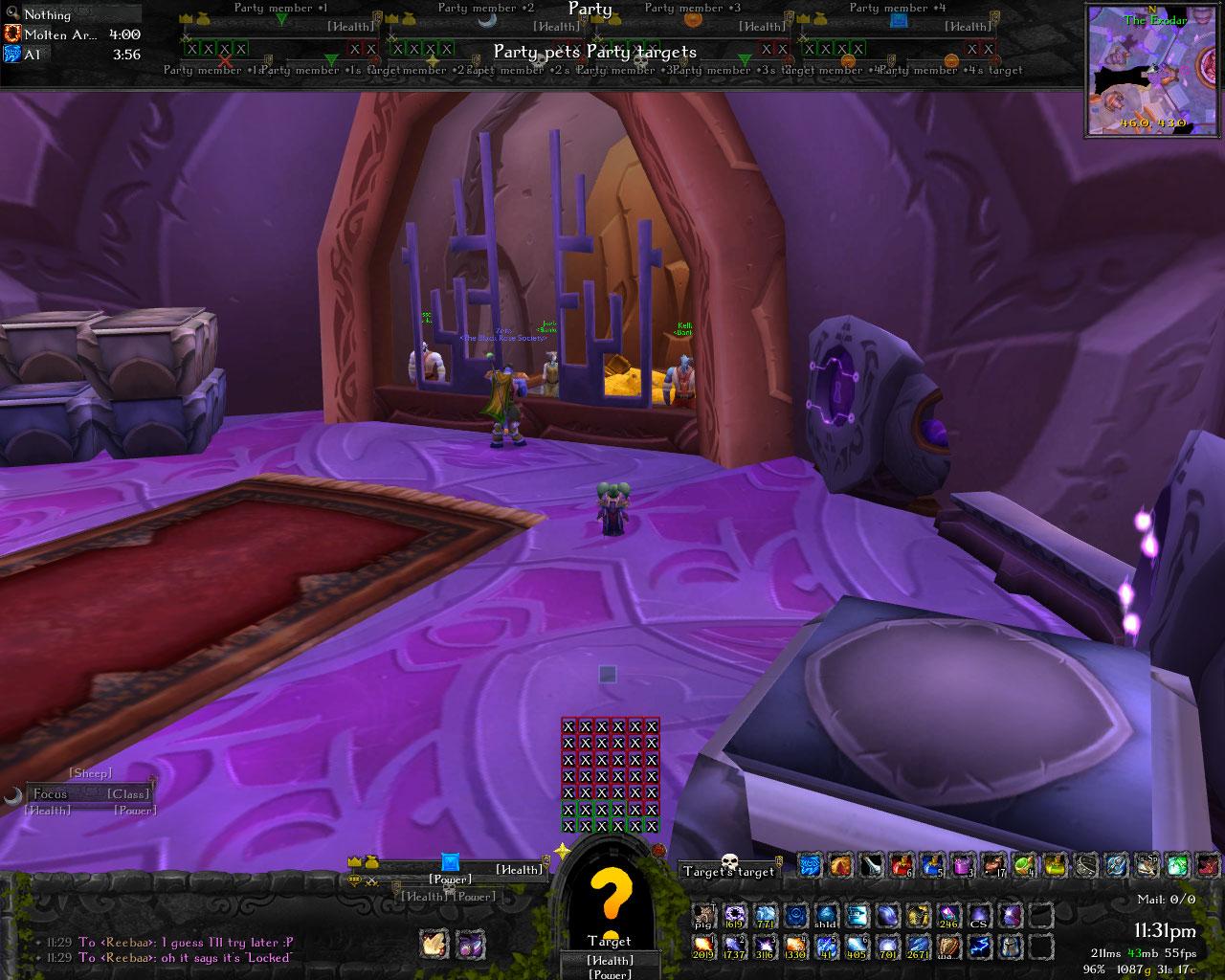
| Updated: | 03-23-10 04:29 PM |
| Created: | unknown |
| Downloads: | 189,719 |
| Favorites: | 962 |
| MD5: |
PitBull 3.0 

Unit Frames of awesomeness. Woof. It'll bite your face off.
PitBull is my very own unit frames implementation.
What sets it apart from other unit frames, such as agUF, is that almost everything is run in a modular fashion. I have also paid extremely close attention to performance, especially with regards to frame recycling. For example, if you hide one frame, all its child frames go into a big recycle bin. If you show another frame after that point, instead of making its own new children frames, it will reach into the recycle bin and reuse them. This cuts down on the number of unused frames immensely.
It is also immensely customizable. Many have said that it's the new DUF.
Features:
- horizontal or vertical bars
- uses the DogTag-2.0 library to display and format information (comes with many presets to choose from)
- config modes - you can set up your raid frames without needing to afk in AV
- many, many, many options to choose from, to set up the unit frames of your dreams
Modules:
- Aura - handles buffs/debuffs/weapon enchants. Can split buffs from debuffs, and set spacing/offsets
- Banzai - adds aggro coloring to frames
- BarFader - allows the health/power bars to fade when health/power is lost
- CastBar - provides a cast bar for all frames
- CombatFader - can fade out frames when not in combat
- CombatIcon - shows the combat icon
- CombatText - like scrolling combat text on every frame
- ComboPoints - combo points display
- DruidManaBar - display your druid's mana when shapeshifted
- ExperienceBar - add xp info to your frame
- HappinessIcon - display your pet's happiness
- HealthBar - the health bar

- HideBlizzard - allows you to hide/show default blizzard frames and buffs
- Highlight - highlight a unit when you have it targeted
- Layouts - this module isn't used currently, but is still included atm (so don't think you should see those layouts in-game)
- LeaderIcon - leader icon
- MasterLooterIcon - ML icon
- Portrait - can choose from 3d (portrait or full-body), 2d, or class icon
- PowerBar - mana/rage/energy/focus bar
- PvPIcon - pvp icon
- RaidTargetIcon - raid target icons
- RangeCheck - fades units when out of range
- ReadyCheckIcon - displays ready check status on the unit frames
- ReputationBar - watched faction info
- RestIcon - rest icon
- Spark - shows 5-second rule, energy regen timing, etc
- ThreatBar - uses ThreatLib to compare threat with the tanks (communicates with other addons using ThreadLib like Omen)
- TotemTimers - Shows Totem timers for the PitBull player frame (/pbtt for options)
- VisualHeal - uses LibHealComm to display heal information on frames (communicates with other addons using LibHealComm like Grid)
- VoiceIcon - the voice icon

For bug reports or feature requests: http://jira.wowace.com/browse/PB
Forum thread: http://www.wowace.com/forums/index.php?topic=8435.0
Please note that PitBull3 is no longer being actively developed. On top of lack of active development itself, it's based on the Rock framework which itself is no longer maintained either.
I strongly recommend that users migrate to PitBull4. You can not convert your config from PitBull3 and must reconfigure.
PitBull4 itself can be found at:
http://wow.curse.com/downloads/wow-a.../pitbull4.aspx
You can find guides for setting it up at:
http://www.wowace.com/addons/pitbull4/pages/guide/
And the FAQ here:
http://www.wowace.com/addons/pitbull4/pages/faq/
While PitBull4 is still in beta it is fully functional and has more features than PitBull3. It is actively developed on and bug fixes made regularly.
I do not plan on making any fixes to PitBull3 once Cataclysm releases. So you have plenty of time to make the migration.
------------------------------------------------------------------------
r1902 | shefki | 2010-03-23 22:10:55 +0000 (Tue, 23 Mar 2010) | 5 lines
Changed paths:
A /tags/v3.2.16 (from /trunk:1901)
Tag v3.2.16 for 3.3.3 compatability.
NOTE: PitBull3 is no longer being actively developed. It's only getting the most
important of bug fixes. You should move to PitBull4.
------------------------------------------------------------------------
r1901 | shefki | 2010-03-23 22:05:40 +0000 (Tue, 23 Mar 2010) | 2 lines
Changed paths:
M /trunk/Aura/Filter.lua
Update Aura Filters from PitBull4 again, including fixes for 3.3.3.
------------------------------------------------------------------------
r1900 | shefki | 2010-03-23 22:03:39 +0000 (Tue, 23 Mar 2010) | 2 lines
Changed paths:
M /trunk/PitBull.lua
Fix the SetTexCoordModifiesRect problem. Copy and paste job from PitBull4.
------------------------------------------------------------------------
r1899 | shefki | 2009-12-12 04:35:25 +0000 (Sat, 12 Dec 2009) | 1 line
Changed paths:
A /tags/v3.2.15 (from /trunk:1898)
Tagging as v3.2.15 now stop bugging me about PB3
------------------------------------------------------------------------
r1898 | shefki | 2009-12-12 04:30:30 +0000 (Sat, 12 Dec 2009) | 2 lines
Changed paths:
M /trunk/Aura/PitBull_Aura.toc
M /trunk/Banzai/PitBull_Banzai.toc
M /trunk/BarFader/PitBull_BarFader.toc
M /trunk/CastBar/PitBull_CastBar.toc
M /trunk/CombatFader/PitBull_CombatFader.toc
M /trunk/CombatIcon/PitBull_CombatIcon.toc
M /trunk/CombatText/PitBull_CombatText.toc
M /trunk/ComboPoints/PitBull_ComboPoints.toc
M /trunk/DruidManaBar/PitBull_DruidManaBar.toc
M /trunk/ExperienceBar/PitBull_ExperienceBar.toc
M /trunk/HappinessIcon/PitBull_HappinessIcon.toc
M /trunk/HealthBar/PitBull_HealthBar.toc
M /trunk/HideBlizzard/PitBull_HideBlizzard.toc
M /trunk/Highlight/PitBull_Highlight.toc
M /trunk/LeaderIcon/PitBull_LeaderIcon.toc
M /trunk/MasterLooterIcon/PitBull_MasterLooterIcon.toc
M /trunk/PitBull.toc
M /trunk/Portrait/PitBull_Portrait.toc
M /trunk/PowerBar/PitBull_PowerBar.toc
M /trunk/PvPIcon/PitBull_PvPIcon.toc
M /trunk/RaidTargetIcon/PitBull_RaidTargetIcon.toc
M /trunk/RangeCheck/PitBull_RangeCheck.toc
M /trunk/ReadyCheckIcon/PitBull_ReadyCheckIcon.toc
M /trunk/ReputationBar/PitBull_ReputationBar.toc
M /trunk/RestIcon/PitBull_RestIcon.toc
M /trunk/Spark/PitBull_Spark.toc
M /trunk/ThreatBar/PitBull_ThreatBar.toc
M /trunk/TotemTimers/PitBull_TotemTimers.toc
M /trunk/VisualHeal/PitBull_VisualHeal.toc
M /trunk/VoiceIcon/PitBull_VoiceIcon.toc
TOC Bumps for 3.3.0
------------------------------------------------------------------------
r1897 | shefki | 2009-12-12 04:28:21 +0000 (Sat, 12 Dec 2009) | 2 lines
Changed paths:
M /trunk/Aura/Filter.lua
Update the Aura filters, copy and paste job from PitBull4.
------------------------------------------------------------------------
r1896 | shefki | 2009-12-12 03:23:21 +0000 (Sat, 12 Dec 2009) | 2 lines
Changed paths:
M /trunk/Aura/Filter.lua
Get rid of the error throwing when a spell id is wrong.
------------------------------------------------------------------------
r1895 | shefki | 2009-08-06 21:49:55 +0000 (Thu, 06 Aug 2009) | 2 lines
Changed paths:
M /trunk/PitBull.toc
Workaround the LoadAddon nonsense by OptionalDeps everything. Hopefully we can revert this in the future.
------------------------------------------------------------------------
r1894 | shefki | 2009-08-04 23:34:42 +0000 (Tue, 04 Aug 2009) | 2 lines
Changed paths:
A /tags/v3.2.14 (from /trunk:1893)
Tag v3.2.14
------------------------------------------------------------------------
r1893 | shefki | 2009-08-04 21:26:18 +0000 (Tue, 04 Aug 2009) | 2 lines
Changed paths:
M /trunk/Aura/Filter.lua
Use geterrorhandler() instead of error() for aura spell id issues so it doesn't entirely break aura module when spell ids disappear.
------------------------------------------------------------------------
r1892 | shefki | 2009-08-04 21:21:02 +0000 (Tue, 04 Aug 2009) | 2 lines
Changed paths:
M /trunk/Aura/Filter.lua
Unbreak Auras for trolls with 3.2
------------------------------------------------------------------------
r1891 | shefki | 2009-08-04 19:41:21 +0000 (Tue, 04 Aug 2009) | 2 lines
Changed paths:
A /tags/v3.2.13 (from /trunk:1890)
Tag v3.2.13 forgot to deal with LibDogTag first. Oops.
------------------------------------------------------------------------
r1889 | shefki | 2009-08-04 17:54:23 +0000 (Tue, 04 Aug 2009) | 2 lines
Changed paths:
M /trunk/Aura/PitBull_Aura.toc
M /trunk/Banzai/PitBull_Banzai.toc
M /trunk/BarFader/PitBull_BarFader.toc
M /trunk/CastBar/PitBull_CastBar.toc
M /trunk/CombatFader/PitBull_CombatFader.toc
M /trunk/CombatIcon/PitBull_CombatIcon.toc
M /trunk/CombatText/PitBull_CombatText.toc
M /trunk/ComboPoints/PitBull_ComboPoints.toc
M /trunk/DruidManaBar/PitBull_DruidManaBar.toc
M /trunk/ExperienceBar/PitBull_ExperienceBar.toc
M /trunk/HappinessIcon/PitBull_HappinessIcon.toc
M /trunk/HealthBar/PitBull_HealthBar.toc
M /trunk/HideBlizzard/PitBull_HideBlizzard.toc
M /trunk/Highlight/PitBull_Highlight.toc
M /trunk/LeaderIcon/PitBull_LeaderIcon.toc
M /trunk/MasterLooterIcon/PitBull_MasterLooterIcon.toc
M /trunk/PitBull.toc
M /trunk/Portrait/PitBull_Portrait.toc
M /trunk/PowerBar/PitBull_PowerBar.toc
M /trunk/PvPIcon/PitBull_PvPIcon.toc
M /trunk/RaidTargetIcon/PitBull_RaidTargetIcon.toc
M /trunk/RangeCheck/PitBull_RangeCheck.toc
M /trunk/ReadyCheckIcon/PitBull_ReadyCheckIcon.toc
M /trunk/ReputationBar/PitBull_ReputationBar.toc
M /trunk/RestIcon/PitBull_RestIcon.toc
M /trunk/Spark/PitBull_Spark.toc
M /trunk/ThreatBar/PitBull_ThreatBar.toc
M /trunk/TotemTimers/PitBull_TotemTimers.toc
M /trunk/VisualHeal/PitBull_VisualHeal.toc
M /trunk/VoiceIcon/PitBull_VoiceIcon.toc
Bump TOC for 3.2
------------------------------------------------------------------------------------------------------------------------------------------------
r1888 | shefki | 2009-04-18 09:22:54 +0000 (Sat, 18 Apr 2009) | 3 lines
Changed paths:
A /tags/v3.2.11 (from /trunk:1887)
Tag 3.2.11 which fixes the Interface version on all the modules so people who are
unable to click load out of date addons can stop complaining.
------------------------------------------------------------------------
r1885 | shefki | 2009-04-14 06:55:32 +0000 (Tue, 14 Apr 2009) | 2 lines
Changed paths:
A /tags/v3.2.10 (from /trunk:1884)
Tag release v3.2.10
------------------------------------------------------------------------
r1884 | shefki | 2009-04-14 06:33:29 +0000 (Tue, 14 Apr 2009) | 2 lines
Changed paths:
M /trunk/PitBull.toc
Update TOC for PitBull3 for 3.1.0.
------------------------------------------------------------------------
r1883 | shefki | 2009-03-05 01:03:47 +0000 (Thu, 05 Mar 2009) | 2 lines
Changed paths:
M /trunk/Aura/Filter.lua
Somehow I missed Improved Wing Clip in the 3.1.0 PTR fixes.
------------------------------------------------------------------------
r1882 | shefki | 2009-02-28 04:48:13 +0000 (Sat, 28 Feb 2009) | 2 lines
Changed paths:
M /trunk/Aura/Filter.lua
3.1.0 PTR compatability. This stops Aura module errors on the PTR.
------------------------------------------------------------------------
r1881 | shefki | 2009-02-28 04:15:57 +0000 (Sat, 28 Feb 2009) | 2 lines
Changed paths:
M /trunk/Aura/Core.lua
M /trunk/Aura/Frames.lua
Oops more 2.x compatability code in the Aura module I meant to remove.
------------------------------------------------------------------------
r1880 | shefki | 2009-02-28 04:12:05 +0000 (Sat, 28 Feb 2009) | 3 lines
Changed paths:
M /trunk/Aura/Filter.lua
Remove 2.x compat code from filters. Doing this before I start adding 3.1.0
compatability.
------------------------------------------------------------------------
r1879 | shefki | 2009-02-28 04:02:16 +0000 (Sat, 28 Feb 2009) | 6 lines
Changed paths:
M /trunk/PitBull.lua
Fully fix the SetUnit error that was mostly fixed by 1870. When
threat is set to display the tooltip doesn't disappear for the
mob you have targeted allowing the tooltip to stay up even though
the mouse is not within the unitframe. As a result don't unset
unit on the frame.
------------------------------------------------------------------------
r1878 | shefki | 2008-12-23 10:50:55 +0000 (Tue, 23 Dec 2008) | 2 lines
Changed paths:
M /trunk/.pkgmeta
Fix the remove of the move line for DruidManaBar from r1869. Oops.
------------------------------------------------------------------------
r1877 | shefki | 2008-12-23 10:45:30 +0000 (Tue, 23 Dec 2008) | 2 lines
Changed paths:
M /trunk/Aura/Filter.lua
DeathKnight aura filter from Niightblade.
------------------------------------------------------------------------
r1876 | arrowmaster | 2008-12-23 04:19:21 +0000 (Tue, 23 Dec 2008) | 1 line
Changed paths:
M /trunk
M /trunk/libs
Remove old unused svn properties
------------------------------------------------------------------------
r1875 | shefki | 2008-12-15 00:46:21 +0000 (Mon, 15 Dec 2008) | 2 lines
Changed paths:
M /trunk/Aura/Filter.lua
Add Dalaran Brilliance and Dalaran Intellect to the mage filters.
------------------------------------------------------------------------
r1871 | shefki | 2008-12-15 00:10:25 +0000 (Mon, 15 Dec 2008) | 2 lines
Changed paths:
M /trunk/Aura/Filter.lua
Add Living Bomb to the Mage debuff filter.
------------------------------------------------------------------------
r1870 | shefki | 2008-12-14 23:58:00 +0000 (Sun, 14 Dec 2008) | 2 lines
Changed paths:
M /trunk/PitBull.lua
Fix for SetUnit error that occurs when the Display Aggro Warning is active in tthe Blizzard UI config.
------------------------------------------------------------------------
r1869 | shefki | 2008-12-04 10:24:45 +0000 (Thu, 04 Dec 2008) | 2 lines
Changed paths:
M /trunk/.pkgmeta
LibDruidMana is obsolete no longer include it.
------------------------------------------------------------------------
r1867 | shefki | 2008-12-04 10:08:23 +0000 (Thu, 04 Dec 2008) | 2 lines
Changed paths:
M /trunk/Aura/Filter.lua
Add some spells for Paladins and Shaman to the buff filter.
------------------------------------------------------------------------
r1866 | shefki | 2008-12-04 08:44:37 +0000 (Thu, 04 Dec 2008) | 2 lines
Changed paths:
M /trunk/PowerBar/PowerBar.lua
Fix typo causing errors related to DeathKnights.
------------------------------------------------------------------------
r1865 | shefki | 2008-12-04 08:12:59 +0000 (Thu, 04 Dec 2008) | 2 lines
Changed paths:
M /trunk/PitBull.lua
Remove debug code that got left in somehow.
------------------------------------------------------------------------
r1864 | shefki | 2008-12-04 01:26:23 +0000 (Thu, 04 Dec 2008) | 3 lines
Changed paths:
M /trunk/Aura/Options.lua
Double the maximum number of auras the aura module will let you
configure as shown. We can adjust this up if need be later.
------------------------------------------------------------------------
r1863 | shefki | 2008-12-04 01:24:26 +0000 (Thu, 04 Dec 2008) | 2 lines
Changed paths:
M /trunk/Aura/Highlight.lua
M /trunk/Aura/Update.lua
No longer hard code debuff limit at 40.
------------------------------------------------------------------------
r1862 | shefki | 2008-11-27 00:24:20 +0000 (Thu, 27 Nov 2008) | 4 lines
Changed paths:
M /trunk/PowerBar/PowerBar.lua
- Update power on all frames representing the player or pet not
just the actual player or pet frames quickly to make things
seem more uniform and less clunky.
------------------------------------------------------------------------
r1861 | adirelle | 2008-11-21 10:38:39 +0000 (Fri, 21 Nov 2008) | 1 line
Changed paths:
M /trunk/ComboPoints/ComboPoints.lua
M /trunk/ComboPoints/PitBull_ComboPoints.toc
Applied Grum's patch to ComboPoints.
------------------------------------------------------------------------
r1860 | adirelle | 2008-11-20 09:49:12 +0000 (Thu, 20 Nov 2008) | 1 line
Changed paths:
M /trunk/libs
Fixed svn:externals.
------------------------------------------------------------------------
r1859 | ckknight | 2008-11-03 14:15:46 +0000 (Mon, 03 Nov 2008) | 1 line
Changed paths:
A /trunk (from /trunk:1768)
Restore folder
------------------------------------------------------------------------
r1768 | adirelle | 2008-11-01 14:35:41 +0000 (Sat, 01 Nov 2008) | 1 line
Changed paths:
M /trunk/PitBull_MetaLayout.lua
Updated Threat text templates to use latest DogTag-Unit tags.
------------------------------------------------------------------------
r1767 | stanzilla | 2008-10-27 02:22:42 +0000 (Mon, 27 Oct 2008) | 1 line
Changed paths:
M /trunk/PitBull.toc
add DogTag libs to OptDeps
------------------------------------------------------------------------
r1766 | adirelle | 2008-10-22 21:43:31 +0000 (Wed, 22 Oct 2008) | 1 line
Changed paths:
M /trunk/PitBull.toc
M /trunk/ThreatBar/PitBull_ThreatBar.toc
M /trunk/ThreatBar/ThreatBar.lua
Updated PitBull_ThreatBar to use the 3.0 API.
------------------------------------------------------------------------
r1765 | vangual | 2008-10-16 16:28:32 +0000 (Thu, 16 Oct 2008) | 3 lines
Changed paths:
M /trunk/Aura/Filter.lua
PitBull
- Added most new Shaman buffs to Aura filter
- Tries to find talented ability to cleanse curses (may need a reload/relog to detect after a respec)
------------------------------------------------------------------------
r1763 | shefki | 2008-10-16 08:44:07 +0000 (Thu, 16 Oct 2008) | 3 lines
Changed paths:
M /trunk/PitBull.toc
- Make my live easier, include a Version line in the TOC so when people
dump error logs on me I can see what version they're using.
------------------------------------------------------------------------
r1762 | shefki | 2008-10-16 05:55:08 +0000 (Thu, 16 Oct 2008) | 2 lines
Changed paths:
M /trunk/PitBull.lua
- Fix right click menu on raid frames.
------------------------------------------------------------------------
r1760 | shefki | 2008-10-15 10:07:17 +0000 (Wed, 15 Oct 2008) | 2 lines
Changed paths:
M /trunk/Aura/Filter.lua
- More priest aura filter fixes.
------------------------------------------------------------------------
r1759 | shefki | 2008-10-15 08:08:09 +0000 (Wed, 15 Oct 2008) | 3 lines
Changed paths:
M /trunk/Aura/PitBull_Aura.toc
M /trunk/Banzai/PitBull_Banzai.toc
M /trunk/BarFader/PitBull_BarFader.toc
M /trunk/CastBar/PitBull_CastBar.toc
M /trunk/CombatFader/PitBull_CombatFader.toc
M /trunk/CombatIcon/PitBull_CombatIcon.toc
M /trunk/CombatText/PitBull_CombatText.toc
M /trunk/ComboPoints/PitBull_ComboPoints.toc
M /trunk/DruidManaBar/PitBull_DruidManaBar.toc
M /trunk/ExperienceBar/PitBull_ExperienceBar.toc
M /trunk/HappinessIcon/PitBull_HappinessIcon.toc
M /trunk/HealthBar/PitBull_HealthBar.toc
M /trunk/HideBlizzard/PitBull_HideBlizzard.toc
M /trunk/Highlight/PitBull_Highlight.toc
M /trunk/LeaderIcon/PitBull_LeaderIcon.toc
M /trunk/MasterLooterIcon/PitBull_MasterLooterIcon.toc
M /trunk/Portrait/PitBull_Portrait.toc
M /trunk/PowerBar/PitBull_PowerBar.toc
M /trunk/PvPIcon/PitBull_PvPIcon.toc
M /trunk/RaidTargetIcon/PitBull_RaidTargetIcon.toc
M /trunk/RangeCheck/PitBull_RangeCheck.toc
M /trunk/ReadyCheckIcon/PitBull_ReadyCheckIcon.toc
M /trunk/ReputationBar/PitBull_ReputationBar.toc
M /trunk/RestIcon/PitBull_RestIcon.toc
M /trunk/Spark/PitBull_Spark.toc
M /trunk/ThreatBar/PitBull_ThreatBar.toc
M /trunk/TotemTimers/PitBull_TotemTimers.toc
M /trunk/VisualHeal/PitBull_VisualHeal.toc
M /trunk/VoiceIcon/PitBull_VoiceIcon.toc
- Bump TOC files to interface for 3.0
------------------------------------------------------------------------
r1757 | shefki | 2008-10-15 03:33:38 +0000 (Wed, 15 Oct 2008) | 3 lines
Changed paths:
M /trunk/Aura/Filter.lua
- Update Filters. Should fix errors for Troll Priests. As well as add filters
for Priests, Druids, Hunters and Palladins.
------------------------------------------------------------------------
r1755 | shefki | 2008-10-15 02:29:00 +0000 (Wed, 15 Oct 2008) | 2 lines
Changed paths:
M /trunk/Aura/Filter.lua
- Fix issue with priest racials in the filter.
------------------------------------------------------------------------
r1752 | stanzilla | 2008-10-14 16:19:23 +0000 (Tue, 14 Oct 2008) | 1 line
Changed paths:
M /trunk/PitBull.toc
Update TOC for WotLK
------------------------------------------------------------------------
r1751 | shefki | 2008-10-13 23:54:23 +0000 (Mon, 13 Oct 2008) | 2 lines
Changed paths:
M /trunk/HealthBar/HealthBar.lua
- Update the healthbar on a more regular basis to match DogTag's timing.
------------------------------------------------------------------------
r1750 | shefki | 2008-10-13 20:51:10 +0000 (Mon, 13 Oct 2008) | 2 lines
Changed paths:
M /trunk/Spark/Spark.lua
- No longer Spark for energy ticks 3.x clients since it ticks constantly.
------------------------------------------------------------------------
r1749 | shefki | 2008-10-13 20:31:52 +0000 (Mon, 13 Oct 2008) | 3 lines
Changed paths:
M /trunk/PowerBar/PowerBar.lua
- Update the PowerBar on a more regular basis for the player and pet frames,
matching the default UI's behavior.
------------------------------------------------------------------------
r1748 | ckknight | 2008-10-13 18:22:06 +0000 (Mon, 13 Oct 2008) | 1 line
Changed paths:
M /trunk/.pkgmeta
M /trunk/embeds.xml
remove LibMobHealth-4.0, it has issues and is going away for WoW 3.0 anyway
------------------------------------------------------------------------
r1747 | shefki | 2008-10-13 00:44:57 +0000 (Mon, 13 Oct 2008) | 3 lines
Changed paths:
M /trunk/DruidManaBar/DruidManaBar.lua
PitBull_DruidManaBar: No longer use LibDruidMana for Wrath since UnitPower() will let us
ask for mana even when we have a rage or energy bar.
------------------------------------------------------------------------
r1746 | ckknight | 2008-10-12 23:15:12 +0000 (Sun, 12 Oct 2008) | 1 line
Changed paths:
D /trunk/pitbulllod.bat
D /trunk/pitbulllod.sh
remove bat and sh files
------------------------------------------------------------------------
r1744 | stanzilla | 2008-10-09 23:13:20 +0000 (Thu, 09 Oct 2008) | 2 lines
Changed paths:
M /trunk/modules.xml
PitBull
- Add @debug@ keyword
------------------------------------------------------------------------
r1743 | stanzilla | 2008-10-09 20:32:16 +0000 (Thu, 09 Oct 2008) | 2 lines
Changed paths:
M /trunk/.pkgmeta
M /trunk/PitBull.toc
PitBull
- clean up toc and add no-lib-strip
------------------------------------------------------------------------
r1742 | stanzilla | 2008-10-09 20:23:50 +0000 (Thu, 09 Oct 2008) | 2 lines
Changed paths:
M /trunk/.pkgmeta
PitBull
- move folders with .pkgmeta
------------------------------------------------------------------------
r1741 | shefki | 2008-10-07 19:55:21 +0000 (Tue, 07 Oct 2008) | 2 lines
Changed paths:
M /trunk/ThreatBar/ThreatBar.lua
- Remove pre-WoW 2.4 compat code.
------------------------------------------------------------------------
r1740 | 7destiny | 2008-10-07 16:39:52 +0000 (Tue, 07 Oct 2008) | 2 lines
Changed paths:
M /trunk/libs
PitBull
- externals update
------------------------------------------------------------------------
r1739 | nevcairiel | 2008-10-02 17:22:56 +0000 (Thu, 02 Oct 2008) | 1 line
Changed paths:
D /trunk/filelist.wau
Remove WAU support files
------------------------------------------------------------------------
r1738 | nevcairiel | 2008-10-02 08:54:55 +0000 (Thu, 02 Oct 2008) | 2 lines
Changed paths:
M /trunk/.pkgmeta
Fix .pkgmeta
------------------------------------------------------------------------
r1737 | root | 2008-09-30 16:06:52 +0000 (Tue, 30 Sep 2008) | 1 line
Changed paths:
M /trunk/.pkgmeta
Hopefully fix .pkgmeta
------------------------------------------------------------------------
r1736 | root | 2008-09-30 15:00:26 +0000 (Tue, 30 Sep 2008) | 1 line
Changed paths:
M /trunk/.pkgmeta
Hopefully fix .pkgmeta
------------------------------------------------------------------------
r1735 | root | 2008-09-29 21:39:47 +0000 (Mon, 29 Sep 2008) | 1 line
Changed paths:
A /trunk/.pkgmeta
M /trunk/libs
Facilitate WowAce-on-CurseForge transition
------------------------------------------------------------------------
r1733 | root | 2008-09-29 20:58:29 +0000 (Mon, 29 Sep 2008) | 1 line
Changed paths:
D /tmp/trunk/PitBull
A /trunk (from /tmp/trunk/PitBull:1732)
Importing old repo data under /trunk
------------------------------------------------------------------------
r1732 | ellipsis | 2008-09-20 09:24:41 +0000 (Sat, 20 Sep 2008) | 1 line
Changed paths:
M /tmp/trunk/PitBull/PitBull_MetaLayout.lua
PitBull: DogTag syntax fix for 'smart' style power tags
------------------------------------------------------------------------
r1731 | shefki | 2008-09-20 09:08:00 +0000 (Sat, 20 Sep 2008) | 2 lines
Changed paths:
M /tmp/trunk/PitBull/Aura/Frames.lua
PitBull_Aura: Fix to allow canceling of auras in WoTLK again.
------------------------------------------------------------------------
r1730 | gnarfoz | 2008-09-20 00:06:30 +0000 (Sat, 20 Sep 2008) | 1 line
Changed paths:
M /tmp/trunk/PitBull/Aura/Filter.lua
PitBull: n ~= m
------------------------------------------------------------------------
r1729 | shefki | 2008-09-19 05:36:41 +0000 (Fri, 19 Sep 2008) | 2 lines
Changed paths:
M /tmp/trunk/PitBull/Aura/Filter.lua
PitBull_Aura: Warlock Aura Changes for WoTLK (FelHunter Auras and remove Curse of Shadow)
------------------------------------------------------------------------
r1728 | shefki | 2008-09-19 05:20:56 +0000 (Fri, 19 Sep 2008) | 2 lines
Changed paths:
M /tmp/trunk/PitBull/Aura/Filter.lua
PitBull_Aura: Palladin Auras for WoTLK updated.
------------------------------------------------------------------------
r1727 | shefki | 2008-09-19 05:11:25 +0000 (Fri, 19 Sep 2008) | 3 lines
Changed paths:
M /tmp/trunk/PitBull/Aura/Filter.lua
PitBull_Aura: Deal with a couple of removed Shaman totems for WoTLK and simplify the Find
Weakness compatability handler.
------------------------------------------------------------------------
r1726 | shefki | 2008-09-19 05:04:47 +0000 (Fri, 19 Sep 2008) | 2 lines
Changed paths:
M /tmp/trunk/PitBull/Aura/Filter.lua
PitBull_Aura: Priest Racials in WoTLK have changed.
------------------------------------------------------------------------
r1725 | shefki | 2008-09-19 04:58:37 +0000 (Fri, 19 Sep 2008) | 2 lines
Changed paths:
M /tmp/trunk/PitBull/Aura/Filter.lua
PitBull_Aura: WoTLK changes for Rogues, Find Weakness and Poisons.
------------------------------------------------------------------------
r1724 | shefki | 2008-09-18 22:52:22 +0000 (Thu, 18 Sep 2008) | 2 lines
Changed paths:
M /tmp/trunk/PitBull/Aura/Core.lua
M /tmp/trunk/PitBull/Aura/Filter.lua
M /tmp/trunk/PitBull/Aura/Frames.lua
PitBull_Aura: Shadowmeld has a new spellid in WoTLK.
------------------------------------------------------------------------
r1723 | ulic | 2008-09-13 21:34:03 +0000 (Sat, 13 Sep 2008) | 1 line
Changed paths:
M /tmp/trunk/PitBull/Portrait/Portrait.lua
PitBull: Portrait- Added coordinates for DEATHKNIGHT class icon.
------------------------------------------------------------------------
r1722 | ellipsis | 2008-08-30 16:01:54 +0000 (Sat, 30 Aug 2008) | 1 line
Changed paths:
M /tmp/trunk/PitBull/PitBull.lua
PitBull: Needs less PLAYER_PET_CHANGED. (Why is this still here 3 months after being reported?)
------------------------------------------------------------------------
r1721 | 7destiny | 2008-08-23 20:19:53 +0000 (Sat, 23 Aug 2008) | 2 lines
Changed paths:
M /tmp/trunk/PitBull/HideBlizzard/HideBlizzard.lua
PitBull
- koKR Update
------------------------------------------------------------------------
r1719 | shefki | 2008-08-22 10:01:23 +0000 (Fri, 22 Aug 2008) | 2 lines
Changed paths:
M /tmp/trunk/PitBull/HideBlizzard/HideBlizzard.lua
PitBull_HideBlizzard: Add support for hiding the new built in focus frame in WoTLK.
------------------------------------------------------------------------
r1718 | shefki | 2008-08-22 09:32:16 +0000 (Fri, 22 Aug 2008) | 2 lines
Changed paths:
M /tmp/trunk/PitBull/ComboPoints/ComboPoints.lua
PitBull_ComboPoints: Forward compatability for WoTLK API changes.
------------------------------------------------------------------------
r1717 | ckknight | 2008-08-16 13:34:55 +0000 (Sat, 16 Aug 2008) | 1 line
Changed paths:
M /tmp/trunk/PitBull/Aura/Update.lua
PitBull - Bugfix
------------------------------------------------------------------------
r1716 | 7destiny | 2008-08-16 07:45:19 +0000 (Sat, 16 Aug 2008) | 2 lines
Changed paths:
M /tmp/trunk/PitBull/PitBull.lua
M /tmp/trunk/PitBull/PowerBar/PowerBar.lua
PitBull
- koKR Update for DT
------------------------------------------------------------------------
r1715 | ckknight | 2008-08-16 06:07:08 +0000 (Sat, 16 Aug 2008) | 1 line
Changed paths:
M /tmp/trunk/PitBull/PitBull.lua
PitBull - Add a temporary hack that puts Blizzard's RuneFrame on top of the player frame. This is only until a proper rune display plugin can be made.
------------------------------------------------------------------------
r1714 | ckknight | 2008-08-16 05:57:24 +0000 (Sat, 16 Aug 2008) | 2 lines
Changed paths:
M /tmp/trunk/PitBull/PitBull.lua
PitBull - Remove some copypasta.
Make it so you can set DK color and global runic power color.
------------------------------------------------------------------------
r1713 | ckknight | 2008-08-16 05:41:35 +0000 (Sat, 16 Aug 2008) | 1 line
Changed paths:
M /tmp/trunk/PitBull/PitBull.lua
M /tmp/trunk/PitBull/PowerBar/PowerBar.lua
PitBull - Add runic power to PowerBar module
------------------------------------------------------------------------
r1712 | ckknight | 2008-08-16 05:23:05 +0000 (Sat, 16 Aug 2008) | 1 line
Changed paths:
M /tmp/trunk/PitBull/Aura/Update.lua
PitBull - Fix Aura handling for WotLK. Still works with live
------------------------------------------------------------------------
r1711 | ulic | 2008-08-11 00:06:44 +0000 (Mon, 11 Aug 2008) | 1 line
Changed paths:
M /tmp/trunk/PitBull/Aura/Frames.lua
M /tmp/trunk/PitBull/Aura/Update.lua
PitBull: Aura- Couple of bug fixes for WotLK compatibility
------------------------------------------------------------------------
r1708 | 7destiny | 2008-08-08 01:20:28 +0000 (Fri, 08 Aug 2008) | 2 lines
Changed paths:
M /tmp/trunk/PitBull/TotemTimers/TotemTimers.lua
PitBull
- koKR Update
------------------------------------------------------------------------
r1707 | vangual | 2008-08-07 19:06:11 +0000 (Thu, 07 Aug 2008) | 2 lines
Changed paths:
M /tmp/trunk/PitBull/TotemTimers/TotemTimers.lua
PitBull
- pbtt: Added optional totem expiry sounds, using LSM-3. Defaults to off. (4 new locale lines)
------------------------------------------------------------------------
r1697 | shefki | 2008-07-24 22:28:44 +0000 (Thu, 24 Jul 2008) | 2 lines
Changed paths:
M /tmp/trunk/PitBull/Aura/Update.lua
PitBull_Aura: Fix a typo in the WoTLK beta fix. Oops.
------------------------------------------------------------------------
r1696 | shefki | 2008-07-24 22:12:36 +0000 (Thu, 24 Jul 2008) | 3 lines
Changed paths:
M /tmp/trunk/PitBull/Aura/Frames.lua
M /tmp/trunk/PitBull/Aura/Update.lua
PitBull_Aura: Should fix Aura module to work with WoTLK beta, if I had a beta key
I could say for sure. Ohh Blizzard...
------------------------------------------------------------------------
r1695 | ckknight | 2008-07-24 19:59:39 +0000 (Thu, 24 Jul 2008) | 1 line
Changed paths:
M /tmp/trunk/PitBull/PitBull.lua
PitBull - through massive, horrible hacks, make profile changes just destroy everything and recreate, fixing a lot of issues.
------------------------------------------------------------------------
r1694 | ellipsis | 2008-07-17 09:45:42 +0000 (Thu, 17 Jul 2008) | 1 line
Changed paths:
M /tmp/trunk/PitBull/TotemTimers/TotemTimers.lua
PitBull_TotemTimers: bugfix texture creation issues (hopefully).
------------------------------------------------------------------------
r1693 | ckknight | 2008-07-16 00:38:20 +0000 (Wed, 16 Jul 2008) | 1 line
Changed paths:
M /tmp/trunk/PitBull/PitBull.lua
PitBull - Don't fill framesByUnitName when name can't be determined
------------------------------------------------------------------------
r1692 | ckknight | 2008-07-15 18:10:53 +0000 (Tue, 15 Jul 2008) | 1 line
Changed paths:
M /tmp/trunk/PitBull/Aura/Filter.lua
PitBull - change Bloodthirst to spell id 23880
------------------------------------------------------------------------
r1691 | ellipsis | 2008-07-15 01:53:15 +0000 (Tue, 15 Jul 2008) | 1 line
Changed paths:
M /tmp/trunk/PitBull/TotemTimers/TotemTimers.lua
PitBull_TotemTimers: that nil doesn't belong there.
------------------------------------------------------------------------
r1690 | shefki | 2008-07-08 18:16:42 +0000 (Tue, 08 Jul 2008) | 2 lines
Changed paths:
M /tmp/trunk/PitBull/Banzai/Banzai.lua
PitBull_Banzai: Don't show aggro coloring on enemy units that are targeted by friendly units (e.g. mobs being targeted by the raid).
------------------------------------------------------------------------
r1689 | shefki | 2008-07-07 02:30:34 +0000 (Mon, 07 Jul 2008) | 4 lines
Changed paths:
M /tmp/trunk/PitBull/PitBull.lua
M /tmp/trunk/PitBull/PitBull.toc
PitBull:
- Hopefully fix taint issue (PB-354)
- Add myself to the X-Credits per ckknight's request
------------------------------------------------------------------------
r1688 | shefki | 2008-07-05 23:55:50 +0000 (Sat, 05 Jul 2008) | 2 lines
Changed paths:
M /tmp/trunk/PitBull/VoiceIcon/VoiceIcon.lua
PitBull_VoiceIcon: Replace UIFrameFlash with a custom flash implementation to avoid taint.
------------------------------------------------------------------------
r1687 | ellipsis | 2008-06-26 08:21:55 +0000 (Thu, 26 Jun 2008) | 1 line
Changed paths:
M /tmp/trunk/PitBull/TotemTimers/TotemTimers.lua
PitBull_TotemTimers: Fix config error with disabling the Hide Inactive option (apologies to Vangual for the ninja-fix).
------------------------------------------------------------------------
r1686 | ckknight | 2008-06-24 23:34:42 +0000 (Tue, 24 Jun 2008) | 1 line
Changed paths:
M /tmp/trunk/PitBull/PitBull.lua
PitBull - don't call DogTag:UpdateAllForFrame for wacky frames, as DogTag-Unit handles that automatically
------------------------------------------------------------------------
r1685 | ananhaid | 2008-06-22 13:36:11 +0000 (Sun, 22 Jun 2008) | 2 lines
Changed paths:
M /tmp/trunk/PitBull/Aura/Core.lua
PitBull
- zhCN update.
------------------------------------------------------------------------
r1684 | 7destiny | 2008-06-22 12:04:56 +0000 (Sun, 22 Jun 2008) | 2 lines
Changed paths:
M /tmp/trunk/PitBull/Aura/Core.lua
PitBull
- koKR Update
------------------------------------------------------------------------
r1683 | shefki | 2008-06-22 10:00:11 +0000 (Sun, 22 Jun 2008) | 4 lines
Changed paths:
M /tmp/trunk/PitBull/Aura/Update.lua
PitBull_Aura:
- Show buff duration and allow buffs to be canceled from frames other than just
the Player frame that are displaying the player (e.g. target, raid)
------------------------------------------------------------------------
r1682 | shefki | 2008-06-22 09:48:23 +0000 (Sun, 22 Jun 2008) | 5 lines
Changed paths:
M /tmp/trunk/PitBull/Aura/Frames.lua
M /tmp/trunk/PitBull/Aura/Update.lua
PitBull_Aura:
- Use GetUnit() to find out the unit rather than storing it in the AuraFrame.
Fixes wrong tooltips on raid/party frames after party member changes.
Resolves PB-330 and others.
------------------------------------------------------------------------
r1681 | shefki | 2008-06-22 09:28:28 +0000 (Sun, 22 Jun 2008) | 5 lines
Changed paths:
M /tmp/trunk/PitBull/Aura/Core.lua
M /tmp/trunk/PitBull/CombatIcon/CombatIcon.lua
M /tmp/trunk/PitBull/LeaderIcon/LeaderIcon.lua
M /tmp/trunk/PitBull/MasterLooterIcon/MasterLooterIcon.lua
M /tmp/trunk/PitBull/Portrait/Portrait.lua
M /tmp/trunk/PitBull/RaidTargetIcon/RaidTargetIcon.lua
PitBull:
- Stop using IterateNonWackyFrames() since for some reason
some frames disappear from nonWackyFrames. This resolves
PB-302 and probably others.
------------------------------------------------------------------------
r1680 | shefki | 2008-06-22 06:36:07 +0000 (Sun, 22 Jun 2008) | 3 lines
Changed paths:
M /tmp/trunk/PitBull/RaidTargetIcon/RaidTargetIcon.lua
PitBull_RaidTargetIcon:
- Fix raid targets being wrong when the raid/party members changed.
------------------------------------------------------------------------
r1679 | shefki | 2008-06-22 00:12:56 +0000 (Sun, 22 Jun 2008) | 5 lines
Changed paths:
M /tmp/trunk/PitBull/Aura/Core.lua
M /tmp/trunk/PitBull/Aura/Highlight.lua
M /tmp/trunk/PitBull/Aura/Options.lua
PitBull_Aura:
- Allow selection of individual debuffs to highlight frames beyond the
all/cureable/cureable by me/none currently allowed.
------------------------------------------------------------------------
r1678 | shefki | 2008-06-21 01:58:52 +0000 (Sat, 21 Jun 2008) | 3 lines
Changed paths:
M /tmp/trunk/PitBull/ReadyCheckIcon/ReadyCheckIcon.lua
PitBull_ReadyCheckIcon:
- Fix logic bug that caused ready check icons to show on frames regardless of config.
------------------------------------------------------------------------
r1677 | ckknight | 2008-06-18 23:54:30 +0000 (Wed, 18 Jun 2008) | 1 line
Changed paths:
M /tmp/trunk/PitBull/PitBull.lua
PitBull - Solve a possible taint issue
------------------------------------------------------------------------
r1676 | shefki | 2008-06-16 22:29:43 +0000 (Mon, 16 Jun 2008) | 2 lines
Changed paths:
M /tmp/trunk/PitBull/Aura/Update.lua
PitBull_Aura: Fix a bug that caused the wrong tooltips to appear for auras.
------------------------------------------------------------------------
r1673 | shefki | 2008-06-09 23:06:10 +0000 (Mon, 09 Jun 2008) | 5 lines
Changed paths:
M /tmp/trunk/PitBull/Aura/Highlight.lua
PitBull
- Allow other mods to prevent auras from being highlighted via a hook.
Needed for the PitBull_Kalecgos mod. Approved by ckknight.
------------------------------------------------------------------------
r1670 | vangual | 2008-05-31 10:22:21 +0000 (Sat, 31 May 2008) | 2 lines
Changed paths:
M /tmp/trunk/PitBull/TotemTimers/TotemTimers.lua
PitBull
- pbtt: first fix for "show player in party"-enabled people
------------------------------------------------------------------------
r1669 | ellipsis | 2008-05-30 23:38:06 +0000 (Fri, 30 May 2008) | 1 line
Changed paths:
M /tmp/trunk/PitBull/PowerBar/PowerBar.lua
PitBull_PowerBar: Fix rare class coloring bug (PB-385)
------------------------------------------------------------------------
r1668 | ammo | 2008-05-20 13:49:32 +0000 (Tue, 20 May 2008) | 2 lines
Changed paths:
M /tmp/trunk/PitBull/PitBull.toc
PitBull
- fix .toc that nemes messed up
------------------------------------------------------------------------
r1667 | nemes | 2008-05-20 05:21:31 +0000 (Tue, 20 May 2008) | 2 lines
Changed paths:
M /tmp/trunk/PitBull/CombatText/CombatText.lua
M /tmp/trunk/PitBull/PitBull.lua
M /tmp/trunk/PitBull/PitBull.toc
M /tmp/trunk/PitBull/embeds.xml
M /tmp/trunk/PitBull/libs
PitBull:
- LibSharedMedia 2.0 -> 3.0
------------------------------------------------------------------------
r1666 | arrowmaster | 2008-05-15 05:26:44 +0000 (Thu, 15 May 2008) | 1 line
Changed paths:
M /tmp/trunk/PitBull/Aura/Core.lua
PitBull: PB-398
------------------------------------------------------------------------
r1664 | gnarfoz | 2008-04-26 17:56:04 +0000 (Sat, 26 Apr 2008) | 1 line
Changed paths:
M /tmp/trunk/PitBull/TotemTimers/TotemTimers.lua
PitBull - TotemTimers: prevent comparing with nil
------------------------------------------------------------------------
r1663 | gnarfoz | 2008-04-26 13:59:22 +0000 (Sat, 26 Apr 2008) | 1 line
Changed paths:
M /tmp/trunk/PitBull/TotemTimers/TotemTimers.lua
PitBull - TotemTimers: support for OmniCC 2.1.0 API change (.noomnicc -> .noCooldownCount)
------------------------------------------------------------------------
r1662 | ottokang | 2008-04-19 15:52:20 +0000 (Sat, 19 Apr 2008) | 2 lines
Changed paths:
M /tmp/trunk/PitBull/RaidTargetIcon/RaidTargetIcon.lua
PitBull
- zhTW Update for RaidTargetIcon/RaidTargetIcon.lua
------------------------------------------------------------------------
r1661 | nemes | 2008-04-18 09:31:05 +0000 (Fri, 18 Apr 2008) | 3 lines
Changed paths:
A /tmp/trunk/PitBull/Bindings.xml
M /tmp/trunk/PitBull/PitBull.lua
PitBull:
- add keybindings for changing raid group layout style
------------------------------------------------------------------------
r1660 | vangual | 2008-04-16 11:10:13 +0000 (Wed, 16 Apr 2008) | 4 lines
Changed paths:
M /tmp/trunk/PitBull/TotemTimers/TotemTimers.lua
PitBull
- pbtt: performance improvements (minimal)
- pbtt: fixes some situations where pulsing wasn't turned off properly
- pbtt: might fix the missing border issue (having problems reproducing it reliably)
------------------------------------------------------------------------
r1659 | wang | 2008-04-16 02:18:12 +0000 (Wed, 16 Apr 2008) | 2 lines
Changed paths:
M /tmp/trunk/PitBull/TotemTimers/TotemTimers.lua
PitBull
- zhCN update
------------------------------------------------------------------------
r1658 | vangual | 2008-04-15 16:32:53 +0000 (Tue, 15 Apr 2008) | 2 lines
Changed paths:
M /tmp/trunk/PitBull/TotemTimers/TotemTimers.lua
PitBull
- pbtt: Add /pbtt slash command to directly open the module's options
------------------------------------------------------------------------
r1657 | 7destiny | 2008-04-15 03:11:44 +0000 (Tue, 15 Apr 2008) | 2 lines
Changed paths:
M /tmp/trunk/PitBull/TotemTimers/TotemTimers.lua
PitBull
- koKR Update
------------------------------------------------------------------------
r1656 | vangual | 2008-04-14 21:52:31 +0000 (Mon, 14 Apr 2008) | 2 lines
Changed paths:
M /tmp/trunk/PitBull/TotemTimers/TotemTimers.lua
PitBull
- pbtt: Add optional expiry pulses (4 new locale lines)
------------------------------------------------------------------------
r1655 | ellipsis | 2008-04-13 23:58:38 +0000 (Sun, 13 Apr 2008) | 1 line
Changed paths:
M /tmp/trunk/PitBull/PowerBar/PowerBar.lua
PitBull_PowerBar: added a debug message to track down a class coloring issue.
------------------------------------------------------------------------
r1654 | ackis | 2008-04-13 17:10:30 +0000 (Sun, 13 Apr 2008) | 3 lines
Changed paths:
M /tmp/trunk/PitBull/PitBull.toc
PitBull
- Remove LibBabbleSpell-3.0 from the ToC as references have been removed
- Ellipsis, this should fix that problem I PMed you about on irc (crosses fingers)
------------------------------------------------------------------------
r1653 | ellipsis | 2008-04-12 23:12:05 +0000 (Sat, 12 Apr 2008) | 1 line
Changed paths:
M /tmp/trunk/PitBull/Aura/Core.lua
M /tmp/trunk/PitBull/Aura/Update.lua
M /tmp/trunk/PitBull/embeds.xml
M /tmp/trunk/PitBull/libs
PitBull_Aura: removed remaining 2.3 compat, and all references to Parser and Babble-Spell (fixes PB-384)
------------------------------------------------------------------------
r1652 | ellipsis | 2008-04-11 02:12:48 +0000 (Fri, 11 Apr 2008) | 1 line
Changed paths:
M /tmp/trunk/PitBull/Aura/Aura.xml
M /tmp/trunk/PitBull/Aura/Filter.lua
D /tmp/trunk/PitBull/Aura/Filter23.lua
PitBull_Aura: Removed 2.3 compat.
------------------------------------------------------------------------
r1651 | ackis | 2008-04-10 23:39:36 +0000 (Thu, 10 Apr 2008) | 2 lines
Changed paths:
M /tmp/trunk/PitBull/RangeCheck/PitBull_RangeCheck.toc
M /tmp/trunk/PitBull/RangeCheck/RangeCheck.lua
PitBull
- Removed BabbleSpell from RangeCheck OINK OINK!!!!!
------------------------------------------------------------------------
r1649 | whyv | 2008-04-06 01:15:48 +0000 (Sun, 06 Apr 2008) | 2 lines
Changed paths:
M /tmp/trunk/PitBull/Aura/Core.lua
M /tmp/trunk/PitBull/Banzai/Banzai.lua
M /tmp/trunk/PitBull/CombatText/CombatText.lua
M /tmp/trunk/PitBull/ComboPoints/ComboPoints.lua
M /tmp/trunk/PitBull/PitBull.lua
M /tmp/trunk/PitBull/TotemTimers/TotemTimers.lua
M /tmp/trunk/PitBull/VisualHeal/VisualHeal.lua
PitBull
- update zhTW
------------------------------------------------------------------------
r1648 | kurax | 2008-04-02 06:53:23 +0000 (Wed, 02 Apr 2008) | 1 line
Changed paths:
M /tmp/trunk/PitBull/CombatText/CombatText.lua
PitBull: Update zhTW locale
------------------------------------------------------------------------
r1647 | kurax | 2008-04-02 06:34:03 +0000 (Wed, 02 Apr 2008) | 2 lines
Changed paths:
M /tmp/trunk/PitBull/CombatText/CombatText.lua
PitBull
- Add an individual font setting to CombatText module
------------------------------------------------------------------------
r1646 | noodles | 2008-04-01 10:54:47 +0000 (Tue, 01 Apr 2008) | 2 lines
Changed paths:
M /tmp/trunk/PitBull/Aura/Core.lua
M /tmp/trunk/PitBull/PitBull.lua
M /tmp/trunk/PitBull/PitBull_MetaLayout.lua
M /tmp/trunk/PitBull/TotemTimers/TotemTimers.lua
PitBull
- zhTW check and update
------------------------------------------------------------------------
r1645 | ellipsis | 2008-03-30 22:23:11 +0000 (Sun, 30 Mar 2008) | 1 line
Changed paths:
M /tmp/trunk/PitBull/Banzai/Banzai.lua
PitBull_Banzai: fix bug with units appearing to lose aggro when they didn't.
------------------------------------------------------------------------
r1644 | ellipsis | 2008-03-30 22:02:06 +0000 (Sun, 30 Mar 2008) | 1 line
Changed paths:
M /tmp/trunk/PitBull/RangeCheck/RangeCheck.lua
M /tmp/trunk/PitBull/VisualHeal/VisualHeal.lua
PitBull: VisualHeal & RangeCheck now remove their options from Global Settings when disabled.
------------------------------------------------------------------------
r1643 | ellipsis | 2008-03-30 21:39:29 +0000 (Sun, 30 Mar 2008) | 1 line
Changed paths:
M /tmp/trunk/PitBull/Highlight/Highlight.lua
PitBull_Highlight: fixed options table so it doesn't error in the All Units config.
------------------------------------------------------------------------
r1642 | 7destiny | 2008-03-30 17:15:28 +0000 (Sun, 30 Mar 2008) | 2 lines
Changed paths:
M /tmp/trunk/PitBull/TotemTimers/TotemTimers.lua
PitBull
- koKR Update
------------------------------------------------------------------------
r1641 | ellipsis | 2008-03-30 09:15:11 +0000 (Sun, 30 Mar 2008) | 1 line
Changed paths:
M /tmp/trunk/PitBull/PitBull.lua
PitBull: PLAYER_PET_CHANGED -> UNIT_PET. The old event doesn't get fired anymore, causing the pet frame to be glitchy and unresponsive. It should behave much better now.
------------------------------------------------------------------------
r1640 | kurax | 2008-03-30 08:45:07 +0000 (Sun, 30 Mar 2008) | 1 line
Changed paths:
M /tmp/trunk/PitBull/PitBull_MetaLayout.lua
PitBull: Update zhCN locale
------------------------------------------------------------------------
r1639 | kurax | 2008-03-30 05:33:10 +0000 (Sun, 30 Mar 2008) | 2 lines
Changed paths:
M /tmp/trunk/PitBull/Aura/Core.lua
M /tmp/trunk/PitBull/Banzai/Banzai.lua
M /tmp/trunk/PitBull/BarFader/BarFader.lua
M /tmp/trunk/PitBull/CastBar/CastBar.lua
M /tmp/trunk/PitBull/CombatFader/CombatFader.lua
M /tmp/trunk/PitBull/CombatIcon/CombatIcon.lua
M /tmp/trunk/PitBull/CombatText/CombatText.lua
M /tmp/trunk/PitBull/ComboPoints/ComboPoints.lua
M /tmp/trunk/PitBull/DruidManaBar/DruidManaBar.lua
M /tmp/trunk/PitBull/ExperienceBar/ExperienceBar.lua
M /tmp/trunk/PitBull/HappinessIcon/HappinessIcon.lua
M /tmp/trunk/PitBull/HealthBar/HealthBar.lua
M /tmp/trunk/PitBull/HideBlizzard/HideBlizzard.lua
M /tmp/trunk/PitBull/Highlight/Highlight.lua
M /tmp/trunk/PitBull/LeaderIcon/LeaderIcon.lua
M /tmp/trunk/PitBull/MasterLooterIcon/MasterLooterIcon.lua
M /tmp/trunk/PitBull/PitBull.lua
M /tmp/trunk/PitBull/PitBull_MetaLayout.lua
M /tmp/trunk/PitBull/Portrait/Portrait.lua
M /tmp/trunk/PitBull/PowerBar/PowerBar.lua
M /tmp/trunk/PitBull/PvPIcon/PvPIcon.lua
M /tmp/trunk/PitBull/RaidTargetIcon/RaidTargetIcon.lua
M /tmp/trunk/PitBull/RangeCheck/RangeCheck.lua
M /tmp/trunk/PitBull/ReadyCheckIcon/ReadyCheckIcon.lua
M /tmp/trunk/PitBull/ReputationBar/ReputationBar.lua
M /tmp/trunk/PitBull/RestIcon/RestIcon.lua
M /tmp/trunk/PitBull/Spark/Spark.lua
M /tmp/trunk/PitBull/ThreatBar/ThreatBar.lua
M /tmp/trunk/PitBull/TotemTimers/TotemTimers.lua
M /tmp/trunk/PitBull/VisualHeal/VisualHeal.lua
M /tmp/trunk/PitBull/VoiceIcon/VoiceIcon.lua
PitBull
- A totally revamp for zhCN translations, finally we've got rid of the holy nonsenses from the Mars.
------------------------------------------------------------------------
r1638 | wang | 2008-03-30 03:59:23 +0000 (Sun, 30 Mar 2008) | 2 lines
Changed paths:
M /tmp/trunk/PitBull/TotemTimers/TotemTimers.lua
PitBull
- zhCN update
------------------------------------------------------------------------
r1637 | ellipsis | 2008-03-30 00:58:09 +0000 (Sun, 30 Mar 2008) | 1 line
Changed paths:
M /tmp/trunk/PitBull/PitBull_MetaLayout.lua
PitBull: Bad translator, no cookie.
------------------------------------------------------------------------
r1636 | 7destiny | 2008-03-30 00:22:56 +0000 (Sun, 30 Mar 2008) | 2 lines
Changed paths:
M /tmp/trunk/PitBull/PitBull_MetaLayout.lua
PitBull
- koKR Update
------------------------------------------------------------------------
r1635 | ellipsis | 2008-03-29 21:11:28 +0000 (Sat, 29 Mar 2008) | 1 line
Changed paths:
M /tmp/trunk/PitBull/PitBull.lua
PitBull: Update classification borders on unit classification change (fixes PB-350).
------------------------------------------------------------------------
r1634 | ellipsis | 2008-03-29 20:53:46 +0000 (Sat, 29 Mar 2008) | 1 line
Changed paths:
M /tmp/trunk/PitBull/PitBull_MetaLayout.lua
PitBull: validate names of new texts on creation.
------------------------------------------------------------------------
r1633 | ulic | 2008-03-29 17:27:11 +0000 (Sat, 29 Mar 2008) | 2 lines
Changed paths:
M /tmp/trunk/PitBull/Aura/PitBull_Aura.toc
M /tmp/trunk/PitBull/Banzai/PitBull_Banzai.toc
M /tmp/trunk/PitBull/BarFader/PitBull_BarFader.toc
M /tmp/trunk/PitBull/CastBar/PitBull_CastBar.toc
M /tmp/trunk/PitBull/CombatFader/PitBull_CombatFader.toc
M /tmp/trunk/PitBull/CombatIcon/PitBull_CombatIcon.toc
M /tmp/trunk/PitBull/CombatText/PitBull_CombatText.toc
M /tmp/trunk/PitBull/ComboPoints/PitBull_ComboPoints.toc
M /tmp/trunk/PitBull/DruidManaBar/PitBull_DruidManaBar.toc
M /tmp/trunk/PitBull/ExperienceBar/PitBull_ExperienceBar.toc
M /tmp/trunk/PitBull/HappinessIcon/PitBull_HappinessIcon.toc
M /tmp/trunk/PitBull/HealthBar/PitBull_HealthBar.toc
M /tmp/trunk/PitBull/HideBlizzard/PitBull_HideBlizzard.toc
M /tmp/trunk/PitBull/Highlight/PitBull_Highlight.toc
M /tmp/trunk/PitBull/LeaderIcon/PitBull_LeaderIcon.toc
M /tmp/trunk/PitBull/MasterLooterIcon/PitBull_MasterLooterIcon.toc
M /tmp/trunk/PitBull/Portrait/PitBull_Portrait.toc
M /tmp/trunk/PitBull/PowerBar/PitBull_PowerBar.toc
M /tmp/trunk/PitBull/PvPIcon/PitBull_PvPIcon.toc
M /tmp/trunk/PitBull/RaidTargetIcon/PitBull_RaidTargetIcon.toc
M /tmp/trunk/PitBull/RangeCheck/PitBull_RangeCheck.toc
M /tmp/trunk/PitBull/ReadyCheckIcon/PitBull_ReadyCheckIcon.toc
M /tmp/trunk/PitBull/ReputationBar/PitBull_ReputationBar.toc
M /tmp/trunk/PitBull/RestIcon/PitBull_RestIcon.toc
M /tmp/trunk/PitBull/Spark/PitBull_Spark.toc
M /tmp/trunk/PitBull/ThreatBar/PitBull_ThreatBar.toc
M /tmp/trunk/PitBull/VisualHeal/PitBull_VisualHeal.toc
M /tmp/trunk/PitBull/VoiceIcon/PitBull_VoiceIcon.toc
PitBull
- Bumped Module .toc files
------------------------------------------------------------------------
r1632 | 7destiny | 2008-03-29 15:57:59 +0000 (Sat, 29 Mar 2008) | 2 lines
Changed paths:
M /tmp/trunk/PitBull/PitBull_MetaLayout.lua
M /tmp/trunk/PitBull/TotemTimers/TotemTimers.lua
PitBull
- koKR Update
------------------------------------------------------------------------
r1630 | vangual | 2008-03-29 11:18:17 +0000 (Sat, 29 Mar 2008) | 2 lines
Changed paths:
M /tmp/trunk/PitBull/TotemTimers/TotemTimers.lua
PitBull
- tt: should apply border color on more occasions
------------------------------------------------------------------------
r1629 | wang | 2008-03-29 10:09:24 +0000 (Sat, 29 Mar 2008) | 2 lines
Changed paths:
M /tmp/trunk/PitBull/TotemTimers/TotemTimers.lua
PitBull
- zhCN update
------------------------------------------------------------------------
r1628 | vangual | 2008-03-28 18:07:18 +0000 (Fri, 28 Mar 2008) | 6 lines
Changed paths:
M /tmp/trunk/PitBull/PitBull_MetaLayout.lua
M /tmp/trunk/PitBull/TotemTimers/TotemTimers.lua
PitBull
- pbtt: fixes bug that made timers stop occasionally (bug of last commit)
- pbtt: should fix SetPoint errors
- pbtt: fixes PB-344
- pbtt: should give better initial placement on fresh installations (PB-342)
- pbtt: potential fix for PB-341
------------------------------------------------------------------------
r1627 | ckknight | 2008-03-27 18:41:23 +0000 (Thu, 27 Mar 2008) | 1 line
Changed paths:
M /tmp/trunk/PitBull/PitBull.lua
M /tmp/trunk/PitBull/PitBull_MetaLayout.lua
PitBull - make all units work better with custom texts
------------------------------------------------------------------------
r1626 | vangual | 2008-03-27 17:53:58 +0000 (Thu, 27 Mar 2008) | 5 lines
Changed paths:
M /tmp/trunk/PitBull/TotemTimers/TotemTimers.lua
PitBull
- pbtt: fixed many different errors when playerframe got (temp) hidden.
- pbtt: should fix PB-338
- pbtt: fixed anchoring to the middle
- pbtt: Added ability to specify frame offsets (adds 4 locale lines)
------------------------------------------------------------------------
r1625 | ckknight | 2008-03-27 05:26:16 +0000 (Thu, 27 Mar 2008) | 2 lines
Changed paths:
M /tmp/trunk/PitBull/PitBull.lua
M /tmp/trunk/PitBull/PitBull_MetaLayout.lua
PitBull - remove WoW24 checks, assume WoW24.
- make DogTag edit boxes multiline and syntax highlighted.
------------------------------------------------------------------------
r1624 | vangual | 2008-03-27 00:05:22 +0000 (Thu, 27 Mar 2008) | 2 lines
Changed paths:
M /tmp/trunk/PitBull/TotemTimers/TotemTimers.lua
PitBull
- pbtt: don't try to cleanup frames that were never created
------------------------------------------------------------------------
r1623 | ckknight | 2008-03-26 23:48:50 +0000 (Wed, 26 Mar 2008) | 1 line
Changed paths:
M /tmp/trunk/PitBull/PitBull_MetaLayout.lua
PitBull - fix alpha on the cast time
------------------------------------------------------------------------
r1622 | ckknight | 2008-03-26 22:39:09 +0000 (Wed, 26 Mar 2008) | 1 line
Changed paths:
M /tmp/trunk/PitBull/PitBull_MetaLayout.lua
PitBull - fix default cast duration format
------------------------------------------------------------------------
r1621 | ckknight | 2008-03-26 16:03:08 +0000 (Wed, 26 Mar 2008) | 1 line
Changed paths:
M /tmp/trunk/PitBull/pitbulllod.bat
M /tmp/trunk/PitBull/pitbulllod.sh
PitBull - remove InteractLines from the bat and sh files
------------------------------------------------------------------------
r1620 | ckknight | 2008-03-26 15:22:24 +0000 (Wed, 26 Mar 2008) | 1 line
Changed paths:
M /tmp/trunk/PitBull/embeds.xml
PitBull - change embeds order
------------------------------------------------------------------------
r1619 | noodles | 2008-03-26 07:48:51 +0000 (Wed, 26 Mar 2008) | 2 lines
Changed paths:
M /tmp/trunk/PitBull/TotemTimers/TotemTimers.lua
PitBull
- zhTW update
------------------------------------------------------------------------
r1618 | ellipsis | 2008-03-26 07:39:38 +0000 (Wed, 26 Mar 2008) | 1 line
Changed paths:
M /tmp/trunk/PitBull/PitBull_MetaLayout.lua
PitBull: Updated some default texts to DogTag-3.0 syntax.
------------------------------------------------------------------------
r1617 | ellipsis | 2008-03-26 04:09:59 +0000 (Wed, 26 Mar 2008) | 1 line
Changed paths:
M /tmp/trunk/PitBull/PitBull.toc
PitBull: Add LibTalentQuery-1.0 to X-Embeds too
------------------------------------------------------------------------
r1616 | ellipsis | 2008-03-26 04:04:31 +0000 (Wed, 26 Mar 2008) | 1 line
Changed paths:
M /tmp/trunk/PitBull/PitBull.toc
M /tmp/trunk/PitBull/embeds.xml
M /tmp/trunk/PitBull/libs
PitBull: Embed LibTalentQuery-1.0 for DogTag.
------------------------------------------------------------------------
r1615 | ellipsis | 2008-03-25 22:15:54 +0000 (Tue, 25 Mar 2008) | 1 line
Changed paths:
M /tmp/trunk/PitBull/Aura/Core.lua
PitBull_Aura: change default alpha of cooldown text to 1, so people will stop complaining about dim grey timers.
------------------------------------------------------------------------
r1614 | ellipsis | 2008-03-25 21:52:16 +0000 (Tue, 25 Mar 2008) | 1 line
Changed paths:
D /tmp/trunk/PitBull/InteractLines
M /tmp/trunk/PitBull/PitBull.toc
M /tmp/trunk/PitBull/embeds.xml
M /tmp/trunk/PitBull/filelist.wau
M /tmp/trunk/PitBull/libs
M /tmp/trunk/PitBull/modules.xml
PitBull: updated embeds and optdeps for 2.4. Removed broken InteractLines module.
------------------------------------------------------------------------
r1613 | ckknight | 2008-03-25 20:17:33 +0000 (Tue, 25 Mar 2008) | 2 lines
Changed paths:
M /tmp/trunk/PitBull/PitBull.lua
M /tmp/trunk/PitBull/PitBull.toc
PitBull - remove Ace2 references
- bump version to 3.0 for marketing purposes
------------------------------------------------------------------------
r1612 | durcyn | 2008-03-25 20:16:22 +0000 (Tue, 25 Mar 2008) | 1 line
Changed paths:
M /tmp/trunk/PitBull/embeds.xml
M /tmp/trunk/PitBull/libs
PitBull: zip me, dammit.
------------------------------------------------------------------------
r1611 | durcyn | 2008-03-25 19:51:11 +0000 (Tue, 25 Mar 2008) | 1 line
Changed paths:
M /tmp/trunk/PitBull/PitBull.toc
M /tmp/trunk/PitBull/embeds.xml
M /tmp/trunk/PitBull/libs
PitBull: clobber Threat-1.0 from externals/embeds/deps, as it was removed from /trunk. ThreatBar is broken for the time being, but you get to keep the pieces.
------------------------------------------------------------------------
r1610 | durcyn | 2008-03-25 19:16:25 +0000 (Tue, 25 Mar 2008) | 1 line
Changed paths:
M /tmp/trunk/PitBull/PitBull.toc
M /tmp/trunk/PitBull/embeds.xml
M /tmp/trunk/PitBull/libs
PitBull: Add LDT-3 and LDT-Unit-3 to toc/embeds/externals for 2.4 goodness.
------------------------------------------------------------------------
r1608 | 7destiny | 2008-03-24 16:57:53 +0000 (Mon, 24 Mar 2008) | 2 lines
Changed paths:
M /tmp/trunk/PitBull/TotemTimers/TotemTimers.lua
PitBull
- TotemTimers: koKR Update
------------------------------------------------------------------------
r1607 | stan | 2008-03-24 03:34:15 +0000 (Mon, 24 Mar 2008) | 2 lines
Changed paths:
M /tmp/trunk/PitBull/CombatFader/CombatFader.lua
PitBull
- fixes PB-221 - thx doxxx
------------------------------------------------------------------------
r1606 | vangual | 2008-03-23 22:47:28 +0000 (Sun, 23 Mar 2008) | 3 lines
Changed paths:
M /tmp/trunk/PitBull/TotemTimers/TotemTimers.lua
A /tmp/trunk/PitBull/TotemTimers/border.tga
PitBull
- pbtt: added border coloring (2 new locale lines)
- pbtt: feature-freeze for the next few days
------------------------------------------------------------------------
r1605 | ckknight | 2008-03-23 08:01:59 +0000 (Sun, 23 Mar 2008) | 2 lines
Changed paths:
M /tmp/trunk/PitBull/PitBull.toc
M /tmp/trunk/PitBull/PitBull_MetaLayout.lua
M /tmp/trunk/PitBull/ThreatBar/ThreatBar.lua
PitBull - fix standard reputation DogTag
- add support for Threat-2.0, run in WoW 2.4
r1902 | shefki | 2010-03-23 22:10:55 +0000 (Tue, 23 Mar 2010) | 5 lines
Changed paths:
A /tags/v3.2.16 (from /trunk:1901)
Tag v3.2.16 for 3.3.3 compatability.
NOTE: PitBull3 is no longer being actively developed. It's only getting the most
important of bug fixes. You should move to PitBull4.
------------------------------------------------------------------------
r1901 | shefki | 2010-03-23 22:05:40 +0000 (Tue, 23 Mar 2010) | 2 lines
Changed paths:
M /trunk/Aura/Filter.lua
Update Aura Filters from PitBull4 again, including fixes for 3.3.3.
------------------------------------------------------------------------
r1900 | shefki | 2010-03-23 22:03:39 +0000 (Tue, 23 Mar 2010) | 2 lines
Changed paths:
M /trunk/PitBull.lua
Fix the SetTexCoordModifiesRect problem. Copy and paste job from PitBull4.
------------------------------------------------------------------------
r1899 | shefki | 2009-12-12 04:35:25 +0000 (Sat, 12 Dec 2009) | 1 line
Changed paths:
A /tags/v3.2.15 (from /trunk:1898)
Tagging as v3.2.15 now stop bugging me about PB3
------------------------------------------------------------------------
r1898 | shefki | 2009-12-12 04:30:30 +0000 (Sat, 12 Dec 2009) | 2 lines
Changed paths:
M /trunk/Aura/PitBull_Aura.toc
M /trunk/Banzai/PitBull_Banzai.toc
M /trunk/BarFader/PitBull_BarFader.toc
M /trunk/CastBar/PitBull_CastBar.toc
M /trunk/CombatFader/PitBull_CombatFader.toc
M /trunk/CombatIcon/PitBull_CombatIcon.toc
M /trunk/CombatText/PitBull_CombatText.toc
M /trunk/ComboPoints/PitBull_ComboPoints.toc
M /trunk/DruidManaBar/PitBull_DruidManaBar.toc
M /trunk/ExperienceBar/PitBull_ExperienceBar.toc
M /trunk/HappinessIcon/PitBull_HappinessIcon.toc
M /trunk/HealthBar/PitBull_HealthBar.toc
M /trunk/HideBlizzard/PitBull_HideBlizzard.toc
M /trunk/Highlight/PitBull_Highlight.toc
M /trunk/LeaderIcon/PitBull_LeaderIcon.toc
M /trunk/MasterLooterIcon/PitBull_MasterLooterIcon.toc
M /trunk/PitBull.toc
M /trunk/Portrait/PitBull_Portrait.toc
M /trunk/PowerBar/PitBull_PowerBar.toc
M /trunk/PvPIcon/PitBull_PvPIcon.toc
M /trunk/RaidTargetIcon/PitBull_RaidTargetIcon.toc
M /trunk/RangeCheck/PitBull_RangeCheck.toc
M /trunk/ReadyCheckIcon/PitBull_ReadyCheckIcon.toc
M /trunk/ReputationBar/PitBull_ReputationBar.toc
M /trunk/RestIcon/PitBull_RestIcon.toc
M /trunk/Spark/PitBull_Spark.toc
M /trunk/ThreatBar/PitBull_ThreatBar.toc
M /trunk/TotemTimers/PitBull_TotemTimers.toc
M /trunk/VisualHeal/PitBull_VisualHeal.toc
M /trunk/VoiceIcon/PitBull_VoiceIcon.toc
TOC Bumps for 3.3.0
------------------------------------------------------------------------
r1897 | shefki | 2009-12-12 04:28:21 +0000 (Sat, 12 Dec 2009) | 2 lines
Changed paths:
M /trunk/Aura/Filter.lua
Update the Aura filters, copy and paste job from PitBull4.
------------------------------------------------------------------------
r1896 | shefki | 2009-12-12 03:23:21 +0000 (Sat, 12 Dec 2009) | 2 lines
Changed paths:
M /trunk/Aura/Filter.lua
Get rid of the error throwing when a spell id is wrong.
------------------------------------------------------------------------
r1895 | shefki | 2009-08-06 21:49:55 +0000 (Thu, 06 Aug 2009) | 2 lines
Changed paths:
M /trunk/PitBull.toc
Workaround the LoadAddon nonsense by OptionalDeps everything. Hopefully we can revert this in the future.
------------------------------------------------------------------------
r1894 | shefki | 2009-08-04 23:34:42 +0000 (Tue, 04 Aug 2009) | 2 lines
Changed paths:
A /tags/v3.2.14 (from /trunk:1893)
Tag v3.2.14
------------------------------------------------------------------------
r1893 | shefki | 2009-08-04 21:26:18 +0000 (Tue, 04 Aug 2009) | 2 lines
Changed paths:
M /trunk/Aura/Filter.lua
Use geterrorhandler() instead of error() for aura spell id issues so it doesn't entirely break aura module when spell ids disappear.
------------------------------------------------------------------------
r1892 | shefki | 2009-08-04 21:21:02 +0000 (Tue, 04 Aug 2009) | 2 lines
Changed paths:
M /trunk/Aura/Filter.lua
Unbreak Auras for trolls with 3.2
------------------------------------------------------------------------
r1891 | shefki | 2009-08-04 19:41:21 +0000 (Tue, 04 Aug 2009) | 2 lines
Changed paths:
A /tags/v3.2.13 (from /trunk:1890)
Tag v3.2.13 forgot to deal with LibDogTag first. Oops.
------------------------------------------------------------------------
r1889 | shefki | 2009-08-04 17:54:23 +0000 (Tue, 04 Aug 2009) | 2 lines
Changed paths:
M /trunk/Aura/PitBull_Aura.toc
M /trunk/Banzai/PitBull_Banzai.toc
M /trunk/BarFader/PitBull_BarFader.toc
M /trunk/CastBar/PitBull_CastBar.toc
M /trunk/CombatFader/PitBull_CombatFader.toc
M /trunk/CombatIcon/PitBull_CombatIcon.toc
M /trunk/CombatText/PitBull_CombatText.toc
M /trunk/ComboPoints/PitBull_ComboPoints.toc
M /trunk/DruidManaBar/PitBull_DruidManaBar.toc
M /trunk/ExperienceBar/PitBull_ExperienceBar.toc
M /trunk/HappinessIcon/PitBull_HappinessIcon.toc
M /trunk/HealthBar/PitBull_HealthBar.toc
M /trunk/HideBlizzard/PitBull_HideBlizzard.toc
M /trunk/Highlight/PitBull_Highlight.toc
M /trunk/LeaderIcon/PitBull_LeaderIcon.toc
M /trunk/MasterLooterIcon/PitBull_MasterLooterIcon.toc
M /trunk/PitBull.toc
M /trunk/Portrait/PitBull_Portrait.toc
M /trunk/PowerBar/PitBull_PowerBar.toc
M /trunk/PvPIcon/PitBull_PvPIcon.toc
M /trunk/RaidTargetIcon/PitBull_RaidTargetIcon.toc
M /trunk/RangeCheck/PitBull_RangeCheck.toc
M /trunk/ReadyCheckIcon/PitBull_ReadyCheckIcon.toc
M /trunk/ReputationBar/PitBull_ReputationBar.toc
M /trunk/RestIcon/PitBull_RestIcon.toc
M /trunk/Spark/PitBull_Spark.toc
M /trunk/ThreatBar/PitBull_ThreatBar.toc
M /trunk/TotemTimers/PitBull_TotemTimers.toc
M /trunk/VisualHeal/PitBull_VisualHeal.toc
M /trunk/VoiceIcon/PitBull_VoiceIcon.toc
Bump TOC for 3.2
------------------------------------------------------------------------------------------------------------------------------------------------
r1888 | shefki | 2009-04-18 09:22:54 +0000 (Sat, 18 Apr 2009) | 3 lines
Changed paths:
A /tags/v3.2.11 (from /trunk:1887)
Tag 3.2.11 which fixes the Interface version on all the modules so people who are
unable to click load out of date addons can stop complaining.
------------------------------------------------------------------------
r1885 | shefki | 2009-04-14 06:55:32 +0000 (Tue, 14 Apr 2009) | 2 lines
Changed paths:
A /tags/v3.2.10 (from /trunk:1884)
Tag release v3.2.10
------------------------------------------------------------------------
r1884 | shefki | 2009-04-14 06:33:29 +0000 (Tue, 14 Apr 2009) | 2 lines
Changed paths:
M /trunk/PitBull.toc
Update TOC for PitBull3 for 3.1.0.
------------------------------------------------------------------------
r1883 | shefki | 2009-03-05 01:03:47 +0000 (Thu, 05 Mar 2009) | 2 lines
Changed paths:
M /trunk/Aura/Filter.lua
Somehow I missed Improved Wing Clip in the 3.1.0 PTR fixes.
------------------------------------------------------------------------
r1882 | shefki | 2009-02-28 04:48:13 +0000 (Sat, 28 Feb 2009) | 2 lines
Changed paths:
M /trunk/Aura/Filter.lua
3.1.0 PTR compatability. This stops Aura module errors on the PTR.
------------------------------------------------------------------------
r1881 | shefki | 2009-02-28 04:15:57 +0000 (Sat, 28 Feb 2009) | 2 lines
Changed paths:
M /trunk/Aura/Core.lua
M /trunk/Aura/Frames.lua
Oops more 2.x compatability code in the Aura module I meant to remove.
------------------------------------------------------------------------
r1880 | shefki | 2009-02-28 04:12:05 +0000 (Sat, 28 Feb 2009) | 3 lines
Changed paths:
M /trunk/Aura/Filter.lua
Remove 2.x compat code from filters. Doing this before I start adding 3.1.0
compatability.
------------------------------------------------------------------------
r1879 | shefki | 2009-02-28 04:02:16 +0000 (Sat, 28 Feb 2009) | 6 lines
Changed paths:
M /trunk/PitBull.lua
Fully fix the SetUnit error that was mostly fixed by 1870. When
threat is set to display the tooltip doesn't disappear for the
mob you have targeted allowing the tooltip to stay up even though
the mouse is not within the unitframe. As a result don't unset
unit on the frame.
------------------------------------------------------------------------
r1878 | shefki | 2008-12-23 10:50:55 +0000 (Tue, 23 Dec 2008) | 2 lines
Changed paths:
M /trunk/.pkgmeta
Fix the remove of the move line for DruidManaBar from r1869. Oops.
------------------------------------------------------------------------
r1877 | shefki | 2008-12-23 10:45:30 +0000 (Tue, 23 Dec 2008) | 2 lines
Changed paths:
M /trunk/Aura/Filter.lua
DeathKnight aura filter from Niightblade.
------------------------------------------------------------------------
r1876 | arrowmaster | 2008-12-23 04:19:21 +0000 (Tue, 23 Dec 2008) | 1 line
Changed paths:
M /trunk
M /trunk/libs
Remove old unused svn properties
------------------------------------------------------------------------
r1875 | shefki | 2008-12-15 00:46:21 +0000 (Mon, 15 Dec 2008) | 2 lines
Changed paths:
M /trunk/Aura/Filter.lua
Add Dalaran Brilliance and Dalaran Intellect to the mage filters.
------------------------------------------------------------------------
r1871 | shefki | 2008-12-15 00:10:25 +0000 (Mon, 15 Dec 2008) | 2 lines
Changed paths:
M /trunk/Aura/Filter.lua
Add Living Bomb to the Mage debuff filter.
------------------------------------------------------------------------
r1870 | shefki | 2008-12-14 23:58:00 +0000 (Sun, 14 Dec 2008) | 2 lines
Changed paths:
M /trunk/PitBull.lua
Fix for SetUnit error that occurs when the Display Aggro Warning is active in tthe Blizzard UI config.
------------------------------------------------------------------------
r1869 | shefki | 2008-12-04 10:24:45 +0000 (Thu, 04 Dec 2008) | 2 lines
Changed paths:
M /trunk/.pkgmeta
LibDruidMana is obsolete no longer include it.
------------------------------------------------------------------------
r1867 | shefki | 2008-12-04 10:08:23 +0000 (Thu, 04 Dec 2008) | 2 lines
Changed paths:
M /trunk/Aura/Filter.lua
Add some spells for Paladins and Shaman to the buff filter.
------------------------------------------------------------------------
r1866 | shefki | 2008-12-04 08:44:37 +0000 (Thu, 04 Dec 2008) | 2 lines
Changed paths:
M /trunk/PowerBar/PowerBar.lua
Fix typo causing errors related to DeathKnights.
------------------------------------------------------------------------
r1865 | shefki | 2008-12-04 08:12:59 +0000 (Thu, 04 Dec 2008) | 2 lines
Changed paths:
M /trunk/PitBull.lua
Remove debug code that got left in somehow.
------------------------------------------------------------------------
r1864 | shefki | 2008-12-04 01:26:23 +0000 (Thu, 04 Dec 2008) | 3 lines
Changed paths:
M /trunk/Aura/Options.lua
Double the maximum number of auras the aura module will let you
configure as shown. We can adjust this up if need be later.
------------------------------------------------------------------------
r1863 | shefki | 2008-12-04 01:24:26 +0000 (Thu, 04 Dec 2008) | 2 lines
Changed paths:
M /trunk/Aura/Highlight.lua
M /trunk/Aura/Update.lua
No longer hard code debuff limit at 40.
------------------------------------------------------------------------
r1862 | shefki | 2008-11-27 00:24:20 +0000 (Thu, 27 Nov 2008) | 4 lines
Changed paths:
M /trunk/PowerBar/PowerBar.lua
- Update power on all frames representing the player or pet not
just the actual player or pet frames quickly to make things
seem more uniform and less clunky.
------------------------------------------------------------------------
r1861 | adirelle | 2008-11-21 10:38:39 +0000 (Fri, 21 Nov 2008) | 1 line
Changed paths:
M /trunk/ComboPoints/ComboPoints.lua
M /trunk/ComboPoints/PitBull_ComboPoints.toc
Applied Grum's patch to ComboPoints.
------------------------------------------------------------------------
r1860 | adirelle | 2008-11-20 09:49:12 +0000 (Thu, 20 Nov 2008) | 1 line
Changed paths:
M /trunk/libs
Fixed svn:externals.
------------------------------------------------------------------------
r1859 | ckknight | 2008-11-03 14:15:46 +0000 (Mon, 03 Nov 2008) | 1 line
Changed paths:
A /trunk (from /trunk:1768)
Restore folder
------------------------------------------------------------------------
r1768 | adirelle | 2008-11-01 14:35:41 +0000 (Sat, 01 Nov 2008) | 1 line
Changed paths:
M /trunk/PitBull_MetaLayout.lua
Updated Threat text templates to use latest DogTag-Unit tags.
------------------------------------------------------------------------
r1767 | stanzilla | 2008-10-27 02:22:42 +0000 (Mon, 27 Oct 2008) | 1 line
Changed paths:
M /trunk/PitBull.toc
add DogTag libs to OptDeps
------------------------------------------------------------------------
r1766 | adirelle | 2008-10-22 21:43:31 +0000 (Wed, 22 Oct 2008) | 1 line
Changed paths:
M /trunk/PitBull.toc
M /trunk/ThreatBar/PitBull_ThreatBar.toc
M /trunk/ThreatBar/ThreatBar.lua
Updated PitBull_ThreatBar to use the 3.0 API.
------------------------------------------------------------------------
r1765 | vangual | 2008-10-16 16:28:32 +0000 (Thu, 16 Oct 2008) | 3 lines
Changed paths:
M /trunk/Aura/Filter.lua
PitBull
- Added most new Shaman buffs to Aura filter
- Tries to find talented ability to cleanse curses (may need a reload/relog to detect after a respec)
------------------------------------------------------------------------
r1763 | shefki | 2008-10-16 08:44:07 +0000 (Thu, 16 Oct 2008) | 3 lines
Changed paths:
M /trunk/PitBull.toc
- Make my live easier, include a Version line in the TOC so when people
dump error logs on me I can see what version they're using.
------------------------------------------------------------------------
r1762 | shefki | 2008-10-16 05:55:08 +0000 (Thu, 16 Oct 2008) | 2 lines
Changed paths:
M /trunk/PitBull.lua
- Fix right click menu on raid frames.
------------------------------------------------------------------------
r1760 | shefki | 2008-10-15 10:07:17 +0000 (Wed, 15 Oct 2008) | 2 lines
Changed paths:
M /trunk/Aura/Filter.lua
- More priest aura filter fixes.
------------------------------------------------------------------------
r1759 | shefki | 2008-10-15 08:08:09 +0000 (Wed, 15 Oct 2008) | 3 lines
Changed paths:
M /trunk/Aura/PitBull_Aura.toc
M /trunk/Banzai/PitBull_Banzai.toc
M /trunk/BarFader/PitBull_BarFader.toc
M /trunk/CastBar/PitBull_CastBar.toc
M /trunk/CombatFader/PitBull_CombatFader.toc
M /trunk/CombatIcon/PitBull_CombatIcon.toc
M /trunk/CombatText/PitBull_CombatText.toc
M /trunk/ComboPoints/PitBull_ComboPoints.toc
M /trunk/DruidManaBar/PitBull_DruidManaBar.toc
M /trunk/ExperienceBar/PitBull_ExperienceBar.toc
M /trunk/HappinessIcon/PitBull_HappinessIcon.toc
M /trunk/HealthBar/PitBull_HealthBar.toc
M /trunk/HideBlizzard/PitBull_HideBlizzard.toc
M /trunk/Highlight/PitBull_Highlight.toc
M /trunk/LeaderIcon/PitBull_LeaderIcon.toc
M /trunk/MasterLooterIcon/PitBull_MasterLooterIcon.toc
M /trunk/Portrait/PitBull_Portrait.toc
M /trunk/PowerBar/PitBull_PowerBar.toc
M /trunk/PvPIcon/PitBull_PvPIcon.toc
M /trunk/RaidTargetIcon/PitBull_RaidTargetIcon.toc
M /trunk/RangeCheck/PitBull_RangeCheck.toc
M /trunk/ReadyCheckIcon/PitBull_ReadyCheckIcon.toc
M /trunk/ReputationBar/PitBull_ReputationBar.toc
M /trunk/RestIcon/PitBull_RestIcon.toc
M /trunk/Spark/PitBull_Spark.toc
M /trunk/ThreatBar/PitBull_ThreatBar.toc
M /trunk/TotemTimers/PitBull_TotemTimers.toc
M /trunk/VisualHeal/PitBull_VisualHeal.toc
M /trunk/VoiceIcon/PitBull_VoiceIcon.toc
- Bump TOC files to interface for 3.0
------------------------------------------------------------------------
r1757 | shefki | 2008-10-15 03:33:38 +0000 (Wed, 15 Oct 2008) | 3 lines
Changed paths:
M /trunk/Aura/Filter.lua
- Update Filters. Should fix errors for Troll Priests. As well as add filters
for Priests, Druids, Hunters and Palladins.
------------------------------------------------------------------------
r1755 | shefki | 2008-10-15 02:29:00 +0000 (Wed, 15 Oct 2008) | 2 lines
Changed paths:
M /trunk/Aura/Filter.lua
- Fix issue with priest racials in the filter.
------------------------------------------------------------------------
r1752 | stanzilla | 2008-10-14 16:19:23 +0000 (Tue, 14 Oct 2008) | 1 line
Changed paths:
M /trunk/PitBull.toc
Update TOC for WotLK
------------------------------------------------------------------------
r1751 | shefki | 2008-10-13 23:54:23 +0000 (Mon, 13 Oct 2008) | 2 lines
Changed paths:
M /trunk/HealthBar/HealthBar.lua
- Update the healthbar on a more regular basis to match DogTag's timing.
------------------------------------------------------------------------
r1750 | shefki | 2008-10-13 20:51:10 +0000 (Mon, 13 Oct 2008) | 2 lines
Changed paths:
M /trunk/Spark/Spark.lua
- No longer Spark for energy ticks 3.x clients since it ticks constantly.
------------------------------------------------------------------------
r1749 | shefki | 2008-10-13 20:31:52 +0000 (Mon, 13 Oct 2008) | 3 lines
Changed paths:
M /trunk/PowerBar/PowerBar.lua
- Update the PowerBar on a more regular basis for the player and pet frames,
matching the default UI's behavior.
------------------------------------------------------------------------
r1748 | ckknight | 2008-10-13 18:22:06 +0000 (Mon, 13 Oct 2008) | 1 line
Changed paths:
M /trunk/.pkgmeta
M /trunk/embeds.xml
remove LibMobHealth-4.0, it has issues and is going away for WoW 3.0 anyway
------------------------------------------------------------------------
r1747 | shefki | 2008-10-13 00:44:57 +0000 (Mon, 13 Oct 2008) | 3 lines
Changed paths:
M /trunk/DruidManaBar/DruidManaBar.lua
PitBull_DruidManaBar: No longer use LibDruidMana for Wrath since UnitPower() will let us
ask for mana even when we have a rage or energy bar.
------------------------------------------------------------------------
r1746 | ckknight | 2008-10-12 23:15:12 +0000 (Sun, 12 Oct 2008) | 1 line
Changed paths:
D /trunk/pitbulllod.bat
D /trunk/pitbulllod.sh
remove bat and sh files
------------------------------------------------------------------------
r1744 | stanzilla | 2008-10-09 23:13:20 +0000 (Thu, 09 Oct 2008) | 2 lines
Changed paths:
M /trunk/modules.xml
PitBull
- Add @debug@ keyword
------------------------------------------------------------------------
r1743 | stanzilla | 2008-10-09 20:32:16 +0000 (Thu, 09 Oct 2008) | 2 lines
Changed paths:
M /trunk/.pkgmeta
M /trunk/PitBull.toc
PitBull
- clean up toc and add no-lib-strip
------------------------------------------------------------------------
r1742 | stanzilla | 2008-10-09 20:23:50 +0000 (Thu, 09 Oct 2008) | 2 lines
Changed paths:
M /trunk/.pkgmeta
PitBull
- move folders with .pkgmeta
------------------------------------------------------------------------
r1741 | shefki | 2008-10-07 19:55:21 +0000 (Tue, 07 Oct 2008) | 2 lines
Changed paths:
M /trunk/ThreatBar/ThreatBar.lua
- Remove pre-WoW 2.4 compat code.
------------------------------------------------------------------------
r1740 | 7destiny | 2008-10-07 16:39:52 +0000 (Tue, 07 Oct 2008) | 2 lines
Changed paths:
M /trunk/libs
PitBull
- externals update
------------------------------------------------------------------------
r1739 | nevcairiel | 2008-10-02 17:22:56 +0000 (Thu, 02 Oct 2008) | 1 line
Changed paths:
D /trunk/filelist.wau
Remove WAU support files
------------------------------------------------------------------------
r1738 | nevcairiel | 2008-10-02 08:54:55 +0000 (Thu, 02 Oct 2008) | 2 lines
Changed paths:
M /trunk/.pkgmeta
Fix .pkgmeta
------------------------------------------------------------------------
r1737 | root | 2008-09-30 16:06:52 +0000 (Tue, 30 Sep 2008) | 1 line
Changed paths:
M /trunk/.pkgmeta
Hopefully fix .pkgmeta
------------------------------------------------------------------------
r1736 | root | 2008-09-30 15:00:26 +0000 (Tue, 30 Sep 2008) | 1 line
Changed paths:
M /trunk/.pkgmeta
Hopefully fix .pkgmeta
------------------------------------------------------------------------
r1735 | root | 2008-09-29 21:39:47 +0000 (Mon, 29 Sep 2008) | 1 line
Changed paths:
A /trunk/.pkgmeta
M /trunk/libs
Facilitate WowAce-on-CurseForge transition
------------------------------------------------------------------------
r1733 | root | 2008-09-29 20:58:29 +0000 (Mon, 29 Sep 2008) | 1 line
Changed paths:
D /tmp/trunk/PitBull
A /trunk (from /tmp/trunk/PitBull:1732)
Importing old repo data under /trunk
------------------------------------------------------------------------
r1732 | ellipsis | 2008-09-20 09:24:41 +0000 (Sat, 20 Sep 2008) | 1 line
Changed paths:
M /tmp/trunk/PitBull/PitBull_MetaLayout.lua
PitBull: DogTag syntax fix for 'smart' style power tags
------------------------------------------------------------------------
r1731 | shefki | 2008-09-20 09:08:00 +0000 (Sat, 20 Sep 2008) | 2 lines
Changed paths:
M /tmp/trunk/PitBull/Aura/Frames.lua
PitBull_Aura: Fix to allow canceling of auras in WoTLK again.
------------------------------------------------------------------------
r1730 | gnarfoz | 2008-09-20 00:06:30 +0000 (Sat, 20 Sep 2008) | 1 line
Changed paths:
M /tmp/trunk/PitBull/Aura/Filter.lua
PitBull: n ~= m
------------------------------------------------------------------------
r1729 | shefki | 2008-09-19 05:36:41 +0000 (Fri, 19 Sep 2008) | 2 lines
Changed paths:
M /tmp/trunk/PitBull/Aura/Filter.lua
PitBull_Aura: Warlock Aura Changes for WoTLK (FelHunter Auras and remove Curse of Shadow)
------------------------------------------------------------------------
r1728 | shefki | 2008-09-19 05:20:56 +0000 (Fri, 19 Sep 2008) | 2 lines
Changed paths:
M /tmp/trunk/PitBull/Aura/Filter.lua
PitBull_Aura: Palladin Auras for WoTLK updated.
------------------------------------------------------------------------
r1727 | shefki | 2008-09-19 05:11:25 +0000 (Fri, 19 Sep 2008) | 3 lines
Changed paths:
M /tmp/trunk/PitBull/Aura/Filter.lua
PitBull_Aura: Deal with a couple of removed Shaman totems for WoTLK and simplify the Find
Weakness compatability handler.
------------------------------------------------------------------------
r1726 | shefki | 2008-09-19 05:04:47 +0000 (Fri, 19 Sep 2008) | 2 lines
Changed paths:
M /tmp/trunk/PitBull/Aura/Filter.lua
PitBull_Aura: Priest Racials in WoTLK have changed.
------------------------------------------------------------------------
r1725 | shefki | 2008-09-19 04:58:37 +0000 (Fri, 19 Sep 2008) | 2 lines
Changed paths:
M /tmp/trunk/PitBull/Aura/Filter.lua
PitBull_Aura: WoTLK changes for Rogues, Find Weakness and Poisons.
------------------------------------------------------------------------
r1724 | shefki | 2008-09-18 22:52:22 +0000 (Thu, 18 Sep 2008) | 2 lines
Changed paths:
M /tmp/trunk/PitBull/Aura/Core.lua
M /tmp/trunk/PitBull/Aura/Filter.lua
M /tmp/trunk/PitBull/Aura/Frames.lua
PitBull_Aura: Shadowmeld has a new spellid in WoTLK.
------------------------------------------------------------------------
r1723 | ulic | 2008-09-13 21:34:03 +0000 (Sat, 13 Sep 2008) | 1 line
Changed paths:
M /tmp/trunk/PitBull/Portrait/Portrait.lua
PitBull: Portrait- Added coordinates for DEATHKNIGHT class icon.
------------------------------------------------------------------------
r1722 | ellipsis | 2008-08-30 16:01:54 +0000 (Sat, 30 Aug 2008) | 1 line
Changed paths:
M /tmp/trunk/PitBull/PitBull.lua
PitBull: Needs less PLAYER_PET_CHANGED. (Why is this still here 3 months after being reported?)
------------------------------------------------------------------------
r1721 | 7destiny | 2008-08-23 20:19:53 +0000 (Sat, 23 Aug 2008) | 2 lines
Changed paths:
M /tmp/trunk/PitBull/HideBlizzard/HideBlizzard.lua
PitBull
- koKR Update
------------------------------------------------------------------------
r1719 | shefki | 2008-08-22 10:01:23 +0000 (Fri, 22 Aug 2008) | 2 lines
Changed paths:
M /tmp/trunk/PitBull/HideBlizzard/HideBlizzard.lua
PitBull_HideBlizzard: Add support for hiding the new built in focus frame in WoTLK.
------------------------------------------------------------------------
r1718 | shefki | 2008-08-22 09:32:16 +0000 (Fri, 22 Aug 2008) | 2 lines
Changed paths:
M /tmp/trunk/PitBull/ComboPoints/ComboPoints.lua
PitBull_ComboPoints: Forward compatability for WoTLK API changes.
------------------------------------------------------------------------
r1717 | ckknight | 2008-08-16 13:34:55 +0000 (Sat, 16 Aug 2008) | 1 line
Changed paths:
M /tmp/trunk/PitBull/Aura/Update.lua
PitBull - Bugfix
------------------------------------------------------------------------
r1716 | 7destiny | 2008-08-16 07:45:19 +0000 (Sat, 16 Aug 2008) | 2 lines
Changed paths:
M /tmp/trunk/PitBull/PitBull.lua
M /tmp/trunk/PitBull/PowerBar/PowerBar.lua
PitBull
- koKR Update for DT
------------------------------------------------------------------------
r1715 | ckknight | 2008-08-16 06:07:08 +0000 (Sat, 16 Aug 2008) | 1 line
Changed paths:
M /tmp/trunk/PitBull/PitBull.lua
PitBull - Add a temporary hack that puts Blizzard's RuneFrame on top of the player frame. This is only until a proper rune display plugin can be made.
------------------------------------------------------------------------
r1714 | ckknight | 2008-08-16 05:57:24 +0000 (Sat, 16 Aug 2008) | 2 lines
Changed paths:
M /tmp/trunk/PitBull/PitBull.lua
PitBull - Remove some copypasta.
Make it so you can set DK color and global runic power color.
------------------------------------------------------------------------
r1713 | ckknight | 2008-08-16 05:41:35 +0000 (Sat, 16 Aug 2008) | 1 line
Changed paths:
M /tmp/trunk/PitBull/PitBull.lua
M /tmp/trunk/PitBull/PowerBar/PowerBar.lua
PitBull - Add runic power to PowerBar module
------------------------------------------------------------------------
r1712 | ckknight | 2008-08-16 05:23:05 +0000 (Sat, 16 Aug 2008) | 1 line
Changed paths:
M /tmp/trunk/PitBull/Aura/Update.lua
PitBull - Fix Aura handling for WotLK. Still works with live
------------------------------------------------------------------------
r1711 | ulic | 2008-08-11 00:06:44 +0000 (Mon, 11 Aug 2008) | 1 line
Changed paths:
M /tmp/trunk/PitBull/Aura/Frames.lua
M /tmp/trunk/PitBull/Aura/Update.lua
PitBull: Aura- Couple of bug fixes for WotLK compatibility
------------------------------------------------------------------------
r1708 | 7destiny | 2008-08-08 01:20:28 +0000 (Fri, 08 Aug 2008) | 2 lines
Changed paths:
M /tmp/trunk/PitBull/TotemTimers/TotemTimers.lua
PitBull
- koKR Update
------------------------------------------------------------------------
r1707 | vangual | 2008-08-07 19:06:11 +0000 (Thu, 07 Aug 2008) | 2 lines
Changed paths:
M /tmp/trunk/PitBull/TotemTimers/TotemTimers.lua
PitBull
- pbtt: Added optional totem expiry sounds, using LSM-3. Defaults to off. (4 new locale lines)
------------------------------------------------------------------------
r1697 | shefki | 2008-07-24 22:28:44 +0000 (Thu, 24 Jul 2008) | 2 lines
Changed paths:
M /tmp/trunk/PitBull/Aura/Update.lua
PitBull_Aura: Fix a typo in the WoTLK beta fix. Oops.
------------------------------------------------------------------------
r1696 | shefki | 2008-07-24 22:12:36 +0000 (Thu, 24 Jul 2008) | 3 lines
Changed paths:
M /tmp/trunk/PitBull/Aura/Frames.lua
M /tmp/trunk/PitBull/Aura/Update.lua
PitBull_Aura: Should fix Aura module to work with WoTLK beta, if I had a beta key
I could say for sure. Ohh Blizzard...
------------------------------------------------------------------------
r1695 | ckknight | 2008-07-24 19:59:39 +0000 (Thu, 24 Jul 2008) | 1 line
Changed paths:
M /tmp/trunk/PitBull/PitBull.lua
PitBull - through massive, horrible hacks, make profile changes just destroy everything and recreate, fixing a lot of issues.
------------------------------------------------------------------------
r1694 | ellipsis | 2008-07-17 09:45:42 +0000 (Thu, 17 Jul 2008) | 1 line
Changed paths:
M /tmp/trunk/PitBull/TotemTimers/TotemTimers.lua
PitBull_TotemTimers: bugfix texture creation issues (hopefully).
------------------------------------------------------------------------
r1693 | ckknight | 2008-07-16 00:38:20 +0000 (Wed, 16 Jul 2008) | 1 line
Changed paths:
M /tmp/trunk/PitBull/PitBull.lua
PitBull - Don't fill framesByUnitName when name can't be determined
------------------------------------------------------------------------
r1692 | ckknight | 2008-07-15 18:10:53 +0000 (Tue, 15 Jul 2008) | 1 line
Changed paths:
M /tmp/trunk/PitBull/Aura/Filter.lua
PitBull - change Bloodthirst to spell id 23880
------------------------------------------------------------------------
r1691 | ellipsis | 2008-07-15 01:53:15 +0000 (Tue, 15 Jul 2008) | 1 line
Changed paths:
M /tmp/trunk/PitBull/TotemTimers/TotemTimers.lua
PitBull_TotemTimers: that nil doesn't belong there.
------------------------------------------------------------------------
r1690 | shefki | 2008-07-08 18:16:42 +0000 (Tue, 08 Jul 2008) | 2 lines
Changed paths:
M /tmp/trunk/PitBull/Banzai/Banzai.lua
PitBull_Banzai: Don't show aggro coloring on enemy units that are targeted by friendly units (e.g. mobs being targeted by the raid).
------------------------------------------------------------------------
r1689 | shefki | 2008-07-07 02:30:34 +0000 (Mon, 07 Jul 2008) | 4 lines
Changed paths:
M /tmp/trunk/PitBull/PitBull.lua
M /tmp/trunk/PitBull/PitBull.toc
PitBull:
- Hopefully fix taint issue (PB-354)
- Add myself to the X-Credits per ckknight's request
------------------------------------------------------------------------
r1688 | shefki | 2008-07-05 23:55:50 +0000 (Sat, 05 Jul 2008) | 2 lines
Changed paths:
M /tmp/trunk/PitBull/VoiceIcon/VoiceIcon.lua
PitBull_VoiceIcon: Replace UIFrameFlash with a custom flash implementation to avoid taint.
------------------------------------------------------------------------
r1687 | ellipsis | 2008-06-26 08:21:55 +0000 (Thu, 26 Jun 2008) | 1 line
Changed paths:
M /tmp/trunk/PitBull/TotemTimers/TotemTimers.lua
PitBull_TotemTimers: Fix config error with disabling the Hide Inactive option (apologies to Vangual for the ninja-fix).
------------------------------------------------------------------------
r1686 | ckknight | 2008-06-24 23:34:42 +0000 (Tue, 24 Jun 2008) | 1 line
Changed paths:
M /tmp/trunk/PitBull/PitBull.lua
PitBull - don't call DogTag:UpdateAllForFrame for wacky frames, as DogTag-Unit handles that automatically
------------------------------------------------------------------------
r1685 | ananhaid | 2008-06-22 13:36:11 +0000 (Sun, 22 Jun 2008) | 2 lines
Changed paths:
M /tmp/trunk/PitBull/Aura/Core.lua
PitBull
- zhCN update.
------------------------------------------------------------------------
r1684 | 7destiny | 2008-06-22 12:04:56 +0000 (Sun, 22 Jun 2008) | 2 lines
Changed paths:
M /tmp/trunk/PitBull/Aura/Core.lua
PitBull
- koKR Update
------------------------------------------------------------------------
r1683 | shefki | 2008-06-22 10:00:11 +0000 (Sun, 22 Jun 2008) | 4 lines
Changed paths:
M /tmp/trunk/PitBull/Aura/Update.lua
PitBull_Aura:
- Show buff duration and allow buffs to be canceled from frames other than just
the Player frame that are displaying the player (e.g. target, raid)
------------------------------------------------------------------------
r1682 | shefki | 2008-06-22 09:48:23 +0000 (Sun, 22 Jun 2008) | 5 lines
Changed paths:
M /tmp/trunk/PitBull/Aura/Frames.lua
M /tmp/trunk/PitBull/Aura/Update.lua
PitBull_Aura:
- Use GetUnit() to find out the unit rather than storing it in the AuraFrame.
Fixes wrong tooltips on raid/party frames after party member changes.
Resolves PB-330 and others.
------------------------------------------------------------------------
r1681 | shefki | 2008-06-22 09:28:28 +0000 (Sun, 22 Jun 2008) | 5 lines
Changed paths:
M /tmp/trunk/PitBull/Aura/Core.lua
M /tmp/trunk/PitBull/CombatIcon/CombatIcon.lua
M /tmp/trunk/PitBull/LeaderIcon/LeaderIcon.lua
M /tmp/trunk/PitBull/MasterLooterIcon/MasterLooterIcon.lua
M /tmp/trunk/PitBull/Portrait/Portrait.lua
M /tmp/trunk/PitBull/RaidTargetIcon/RaidTargetIcon.lua
PitBull:
- Stop using IterateNonWackyFrames() since for some reason
some frames disappear from nonWackyFrames. This resolves
PB-302 and probably others.
------------------------------------------------------------------------
r1680 | shefki | 2008-06-22 06:36:07 +0000 (Sun, 22 Jun 2008) | 3 lines
Changed paths:
M /tmp/trunk/PitBull/RaidTargetIcon/RaidTargetIcon.lua
PitBull_RaidTargetIcon:
- Fix raid targets being wrong when the raid/party members changed.
------------------------------------------------------------------------
r1679 | shefki | 2008-06-22 00:12:56 +0000 (Sun, 22 Jun 2008) | 5 lines
Changed paths:
M /tmp/trunk/PitBull/Aura/Core.lua
M /tmp/trunk/PitBull/Aura/Highlight.lua
M /tmp/trunk/PitBull/Aura/Options.lua
PitBull_Aura:
- Allow selection of individual debuffs to highlight frames beyond the
all/cureable/cureable by me/none currently allowed.
------------------------------------------------------------------------
r1678 | shefki | 2008-06-21 01:58:52 +0000 (Sat, 21 Jun 2008) | 3 lines
Changed paths:
M /tmp/trunk/PitBull/ReadyCheckIcon/ReadyCheckIcon.lua
PitBull_ReadyCheckIcon:
- Fix logic bug that caused ready check icons to show on frames regardless of config.
------------------------------------------------------------------------
r1677 | ckknight | 2008-06-18 23:54:30 +0000 (Wed, 18 Jun 2008) | 1 line
Changed paths:
M /tmp/trunk/PitBull/PitBull.lua
PitBull - Solve a possible taint issue
------------------------------------------------------------------------
r1676 | shefki | 2008-06-16 22:29:43 +0000 (Mon, 16 Jun 2008) | 2 lines
Changed paths:
M /tmp/trunk/PitBull/Aura/Update.lua
PitBull_Aura: Fix a bug that caused the wrong tooltips to appear for auras.
------------------------------------------------------------------------
r1673 | shefki | 2008-06-09 23:06:10 +0000 (Mon, 09 Jun 2008) | 5 lines
Changed paths:
M /tmp/trunk/PitBull/Aura/Highlight.lua
PitBull
- Allow other mods to prevent auras from being highlighted via a hook.
Needed for the PitBull_Kalecgos mod. Approved by ckknight.
------------------------------------------------------------------------
r1670 | vangual | 2008-05-31 10:22:21 +0000 (Sat, 31 May 2008) | 2 lines
Changed paths:
M /tmp/trunk/PitBull/TotemTimers/TotemTimers.lua
PitBull
- pbtt: first fix for "show player in party"-enabled people
------------------------------------------------------------------------
r1669 | ellipsis | 2008-05-30 23:38:06 +0000 (Fri, 30 May 2008) | 1 line
Changed paths:
M /tmp/trunk/PitBull/PowerBar/PowerBar.lua
PitBull_PowerBar: Fix rare class coloring bug (PB-385)
------------------------------------------------------------------------
r1668 | ammo | 2008-05-20 13:49:32 +0000 (Tue, 20 May 2008) | 2 lines
Changed paths:
M /tmp/trunk/PitBull/PitBull.toc
PitBull
- fix .toc that nemes messed up
------------------------------------------------------------------------
r1667 | nemes | 2008-05-20 05:21:31 +0000 (Tue, 20 May 2008) | 2 lines
Changed paths:
M /tmp/trunk/PitBull/CombatText/CombatText.lua
M /tmp/trunk/PitBull/PitBull.lua
M /tmp/trunk/PitBull/PitBull.toc
M /tmp/trunk/PitBull/embeds.xml
M /tmp/trunk/PitBull/libs
PitBull:
- LibSharedMedia 2.0 -> 3.0
------------------------------------------------------------------------
r1666 | arrowmaster | 2008-05-15 05:26:44 +0000 (Thu, 15 May 2008) | 1 line
Changed paths:
M /tmp/trunk/PitBull/Aura/Core.lua
PitBull: PB-398
------------------------------------------------------------------------
r1664 | gnarfoz | 2008-04-26 17:56:04 +0000 (Sat, 26 Apr 2008) | 1 line
Changed paths:
M /tmp/trunk/PitBull/TotemTimers/TotemTimers.lua
PitBull - TotemTimers: prevent comparing with nil
------------------------------------------------------------------------
r1663 | gnarfoz | 2008-04-26 13:59:22 +0000 (Sat, 26 Apr 2008) | 1 line
Changed paths:
M /tmp/trunk/PitBull/TotemTimers/TotemTimers.lua
PitBull - TotemTimers: support for OmniCC 2.1.0 API change (.noomnicc -> .noCooldownCount)
------------------------------------------------------------------------
r1662 | ottokang | 2008-04-19 15:52:20 +0000 (Sat, 19 Apr 2008) | 2 lines
Changed paths:
M /tmp/trunk/PitBull/RaidTargetIcon/RaidTargetIcon.lua
PitBull
- zhTW Update for RaidTargetIcon/RaidTargetIcon.lua
------------------------------------------------------------------------
r1661 | nemes | 2008-04-18 09:31:05 +0000 (Fri, 18 Apr 2008) | 3 lines
Changed paths:
A /tmp/trunk/PitBull/Bindings.xml
M /tmp/trunk/PitBull/PitBull.lua
PitBull:
- add keybindings for changing raid group layout style
------------------------------------------------------------------------
r1660 | vangual | 2008-04-16 11:10:13 +0000 (Wed, 16 Apr 2008) | 4 lines
Changed paths:
M /tmp/trunk/PitBull/TotemTimers/TotemTimers.lua
PitBull
- pbtt: performance improvements (minimal)
- pbtt: fixes some situations where pulsing wasn't turned off properly
- pbtt: might fix the missing border issue (having problems reproducing it reliably)
------------------------------------------------------------------------
r1659 | wang | 2008-04-16 02:18:12 +0000 (Wed, 16 Apr 2008) | 2 lines
Changed paths:
M /tmp/trunk/PitBull/TotemTimers/TotemTimers.lua
PitBull
- zhCN update
------------------------------------------------------------------------
r1658 | vangual | 2008-04-15 16:32:53 +0000 (Tue, 15 Apr 2008) | 2 lines
Changed paths:
M /tmp/trunk/PitBull/TotemTimers/TotemTimers.lua
PitBull
- pbtt: Add /pbtt slash command to directly open the module's options
------------------------------------------------------------------------
r1657 | 7destiny | 2008-04-15 03:11:44 +0000 (Tue, 15 Apr 2008) | 2 lines
Changed paths:
M /tmp/trunk/PitBull/TotemTimers/TotemTimers.lua
PitBull
- koKR Update
------------------------------------------------------------------------
r1656 | vangual | 2008-04-14 21:52:31 +0000 (Mon, 14 Apr 2008) | 2 lines
Changed paths:
M /tmp/trunk/PitBull/TotemTimers/TotemTimers.lua
PitBull
- pbtt: Add optional expiry pulses (4 new locale lines)
------------------------------------------------------------------------
r1655 | ellipsis | 2008-04-13 23:58:38 +0000 (Sun, 13 Apr 2008) | 1 line
Changed paths:
M /tmp/trunk/PitBull/PowerBar/PowerBar.lua
PitBull_PowerBar: added a debug message to track down a class coloring issue.
------------------------------------------------------------------------
r1654 | ackis | 2008-04-13 17:10:30 +0000 (Sun, 13 Apr 2008) | 3 lines
Changed paths:
M /tmp/trunk/PitBull/PitBull.toc
PitBull
- Remove LibBabbleSpell-3.0 from the ToC as references have been removed
- Ellipsis, this should fix that problem I PMed you about on irc (crosses fingers)
------------------------------------------------------------------------
r1653 | ellipsis | 2008-04-12 23:12:05 +0000 (Sat, 12 Apr 2008) | 1 line
Changed paths:
M /tmp/trunk/PitBull/Aura/Core.lua
M /tmp/trunk/PitBull/Aura/Update.lua
M /tmp/trunk/PitBull/embeds.xml
M /tmp/trunk/PitBull/libs
PitBull_Aura: removed remaining 2.3 compat, and all references to Parser and Babble-Spell (fixes PB-384)
------------------------------------------------------------------------
r1652 | ellipsis | 2008-04-11 02:12:48 +0000 (Fri, 11 Apr 2008) | 1 line
Changed paths:
M /tmp/trunk/PitBull/Aura/Aura.xml
M /tmp/trunk/PitBull/Aura/Filter.lua
D /tmp/trunk/PitBull/Aura/Filter23.lua
PitBull_Aura: Removed 2.3 compat.
------------------------------------------------------------------------
r1651 | ackis | 2008-04-10 23:39:36 +0000 (Thu, 10 Apr 2008) | 2 lines
Changed paths:
M /tmp/trunk/PitBull/RangeCheck/PitBull_RangeCheck.toc
M /tmp/trunk/PitBull/RangeCheck/RangeCheck.lua
PitBull
- Removed BabbleSpell from RangeCheck OINK OINK!!!!!
------------------------------------------------------------------------
r1649 | whyv | 2008-04-06 01:15:48 +0000 (Sun, 06 Apr 2008) | 2 lines
Changed paths:
M /tmp/trunk/PitBull/Aura/Core.lua
M /tmp/trunk/PitBull/Banzai/Banzai.lua
M /tmp/trunk/PitBull/CombatText/CombatText.lua
M /tmp/trunk/PitBull/ComboPoints/ComboPoints.lua
M /tmp/trunk/PitBull/PitBull.lua
M /tmp/trunk/PitBull/TotemTimers/TotemTimers.lua
M /tmp/trunk/PitBull/VisualHeal/VisualHeal.lua
PitBull
- update zhTW
------------------------------------------------------------------------
r1648 | kurax | 2008-04-02 06:53:23 +0000 (Wed, 02 Apr 2008) | 1 line
Changed paths:
M /tmp/trunk/PitBull/CombatText/CombatText.lua
PitBull: Update zhTW locale
------------------------------------------------------------------------
r1647 | kurax | 2008-04-02 06:34:03 +0000 (Wed, 02 Apr 2008) | 2 lines
Changed paths:
M /tmp/trunk/PitBull/CombatText/CombatText.lua
PitBull
- Add an individual font setting to CombatText module
------------------------------------------------------------------------
r1646 | noodles | 2008-04-01 10:54:47 +0000 (Tue, 01 Apr 2008) | 2 lines
Changed paths:
M /tmp/trunk/PitBull/Aura/Core.lua
M /tmp/trunk/PitBull/PitBull.lua
M /tmp/trunk/PitBull/PitBull_MetaLayout.lua
M /tmp/trunk/PitBull/TotemTimers/TotemTimers.lua
PitBull
- zhTW check and update
------------------------------------------------------------------------
r1645 | ellipsis | 2008-03-30 22:23:11 +0000 (Sun, 30 Mar 2008) | 1 line
Changed paths:
M /tmp/trunk/PitBull/Banzai/Banzai.lua
PitBull_Banzai: fix bug with units appearing to lose aggro when they didn't.
------------------------------------------------------------------------
r1644 | ellipsis | 2008-03-30 22:02:06 +0000 (Sun, 30 Mar 2008) | 1 line
Changed paths:
M /tmp/trunk/PitBull/RangeCheck/RangeCheck.lua
M /tmp/trunk/PitBull/VisualHeal/VisualHeal.lua
PitBull: VisualHeal & RangeCheck now remove their options from Global Settings when disabled.
------------------------------------------------------------------------
r1643 | ellipsis | 2008-03-30 21:39:29 +0000 (Sun, 30 Mar 2008) | 1 line
Changed paths:
M /tmp/trunk/PitBull/Highlight/Highlight.lua
PitBull_Highlight: fixed options table so it doesn't error in the All Units config.
------------------------------------------------------------------------
r1642 | 7destiny | 2008-03-30 17:15:28 +0000 (Sun, 30 Mar 2008) | 2 lines
Changed paths:
M /tmp/trunk/PitBull/TotemTimers/TotemTimers.lua
PitBull
- koKR Update
------------------------------------------------------------------------
r1641 | ellipsis | 2008-03-30 09:15:11 +0000 (Sun, 30 Mar 2008) | 1 line
Changed paths:
M /tmp/trunk/PitBull/PitBull.lua
PitBull: PLAYER_PET_CHANGED -> UNIT_PET. The old event doesn't get fired anymore, causing the pet frame to be glitchy and unresponsive. It should behave much better now.
------------------------------------------------------------------------
r1640 | kurax | 2008-03-30 08:45:07 +0000 (Sun, 30 Mar 2008) | 1 line
Changed paths:
M /tmp/trunk/PitBull/PitBull_MetaLayout.lua
PitBull: Update zhCN locale
------------------------------------------------------------------------
r1639 | kurax | 2008-03-30 05:33:10 +0000 (Sun, 30 Mar 2008) | 2 lines
Changed paths:
M /tmp/trunk/PitBull/Aura/Core.lua
M /tmp/trunk/PitBull/Banzai/Banzai.lua
M /tmp/trunk/PitBull/BarFader/BarFader.lua
M /tmp/trunk/PitBull/CastBar/CastBar.lua
M /tmp/trunk/PitBull/CombatFader/CombatFader.lua
M /tmp/trunk/PitBull/CombatIcon/CombatIcon.lua
M /tmp/trunk/PitBull/CombatText/CombatText.lua
M /tmp/trunk/PitBull/ComboPoints/ComboPoints.lua
M /tmp/trunk/PitBull/DruidManaBar/DruidManaBar.lua
M /tmp/trunk/PitBull/ExperienceBar/ExperienceBar.lua
M /tmp/trunk/PitBull/HappinessIcon/HappinessIcon.lua
M /tmp/trunk/PitBull/HealthBar/HealthBar.lua
M /tmp/trunk/PitBull/HideBlizzard/HideBlizzard.lua
M /tmp/trunk/PitBull/Highlight/Highlight.lua
M /tmp/trunk/PitBull/LeaderIcon/LeaderIcon.lua
M /tmp/trunk/PitBull/MasterLooterIcon/MasterLooterIcon.lua
M /tmp/trunk/PitBull/PitBull.lua
M /tmp/trunk/PitBull/PitBull_MetaLayout.lua
M /tmp/trunk/PitBull/Portrait/Portrait.lua
M /tmp/trunk/PitBull/PowerBar/PowerBar.lua
M /tmp/trunk/PitBull/PvPIcon/PvPIcon.lua
M /tmp/trunk/PitBull/RaidTargetIcon/RaidTargetIcon.lua
M /tmp/trunk/PitBull/RangeCheck/RangeCheck.lua
M /tmp/trunk/PitBull/ReadyCheckIcon/ReadyCheckIcon.lua
M /tmp/trunk/PitBull/ReputationBar/ReputationBar.lua
M /tmp/trunk/PitBull/RestIcon/RestIcon.lua
M /tmp/trunk/PitBull/Spark/Spark.lua
M /tmp/trunk/PitBull/ThreatBar/ThreatBar.lua
M /tmp/trunk/PitBull/TotemTimers/TotemTimers.lua
M /tmp/trunk/PitBull/VisualHeal/VisualHeal.lua
M /tmp/trunk/PitBull/VoiceIcon/VoiceIcon.lua
PitBull
- A totally revamp for zhCN translations, finally we've got rid of the holy nonsenses from the Mars.
------------------------------------------------------------------------
r1638 | wang | 2008-03-30 03:59:23 +0000 (Sun, 30 Mar 2008) | 2 lines
Changed paths:
M /tmp/trunk/PitBull/TotemTimers/TotemTimers.lua
PitBull
- zhCN update
------------------------------------------------------------------------
r1637 | ellipsis | 2008-03-30 00:58:09 +0000 (Sun, 30 Mar 2008) | 1 line
Changed paths:
M /tmp/trunk/PitBull/PitBull_MetaLayout.lua
PitBull: Bad translator, no cookie.
------------------------------------------------------------------------
r1636 | 7destiny | 2008-03-30 00:22:56 +0000 (Sun, 30 Mar 2008) | 2 lines
Changed paths:
M /tmp/trunk/PitBull/PitBull_MetaLayout.lua
PitBull
- koKR Update
------------------------------------------------------------------------
r1635 | ellipsis | 2008-03-29 21:11:28 +0000 (Sat, 29 Mar 2008) | 1 line
Changed paths:
M /tmp/trunk/PitBull/PitBull.lua
PitBull: Update classification borders on unit classification change (fixes PB-350).
------------------------------------------------------------------------
r1634 | ellipsis | 2008-03-29 20:53:46 +0000 (Sat, 29 Mar 2008) | 1 line
Changed paths:
M /tmp/trunk/PitBull/PitBull_MetaLayout.lua
PitBull: validate names of new texts on creation.
------------------------------------------------------------------------
r1633 | ulic | 2008-03-29 17:27:11 +0000 (Sat, 29 Mar 2008) | 2 lines
Changed paths:
M /tmp/trunk/PitBull/Aura/PitBull_Aura.toc
M /tmp/trunk/PitBull/Banzai/PitBull_Banzai.toc
M /tmp/trunk/PitBull/BarFader/PitBull_BarFader.toc
M /tmp/trunk/PitBull/CastBar/PitBull_CastBar.toc
M /tmp/trunk/PitBull/CombatFader/PitBull_CombatFader.toc
M /tmp/trunk/PitBull/CombatIcon/PitBull_CombatIcon.toc
M /tmp/trunk/PitBull/CombatText/PitBull_CombatText.toc
M /tmp/trunk/PitBull/ComboPoints/PitBull_ComboPoints.toc
M /tmp/trunk/PitBull/DruidManaBar/PitBull_DruidManaBar.toc
M /tmp/trunk/PitBull/ExperienceBar/PitBull_ExperienceBar.toc
M /tmp/trunk/PitBull/HappinessIcon/PitBull_HappinessIcon.toc
M /tmp/trunk/PitBull/HealthBar/PitBull_HealthBar.toc
M /tmp/trunk/PitBull/HideBlizzard/PitBull_HideBlizzard.toc
M /tmp/trunk/PitBull/Highlight/PitBull_Highlight.toc
M /tmp/trunk/PitBull/LeaderIcon/PitBull_LeaderIcon.toc
M /tmp/trunk/PitBull/MasterLooterIcon/PitBull_MasterLooterIcon.toc
M /tmp/trunk/PitBull/Portrait/PitBull_Portrait.toc
M /tmp/trunk/PitBull/PowerBar/PitBull_PowerBar.toc
M /tmp/trunk/PitBull/PvPIcon/PitBull_PvPIcon.toc
M /tmp/trunk/PitBull/RaidTargetIcon/PitBull_RaidTargetIcon.toc
M /tmp/trunk/PitBull/RangeCheck/PitBull_RangeCheck.toc
M /tmp/trunk/PitBull/ReadyCheckIcon/PitBull_ReadyCheckIcon.toc
M /tmp/trunk/PitBull/ReputationBar/PitBull_ReputationBar.toc
M /tmp/trunk/PitBull/RestIcon/PitBull_RestIcon.toc
M /tmp/trunk/PitBull/Spark/PitBull_Spark.toc
M /tmp/trunk/PitBull/ThreatBar/PitBull_ThreatBar.toc
M /tmp/trunk/PitBull/VisualHeal/PitBull_VisualHeal.toc
M /tmp/trunk/PitBull/VoiceIcon/PitBull_VoiceIcon.toc
PitBull
- Bumped Module .toc files
------------------------------------------------------------------------
r1632 | 7destiny | 2008-03-29 15:57:59 +0000 (Sat, 29 Mar 2008) | 2 lines
Changed paths:
M /tmp/trunk/PitBull/PitBull_MetaLayout.lua
M /tmp/trunk/PitBull/TotemTimers/TotemTimers.lua
PitBull
- koKR Update
------------------------------------------------------------------------
r1630 | vangual | 2008-03-29 11:18:17 +0000 (Sat, 29 Mar 2008) | 2 lines
Changed paths:
M /tmp/trunk/PitBull/TotemTimers/TotemTimers.lua
PitBull
- tt: should apply border color on more occasions
------------------------------------------------------------------------
r1629 | wang | 2008-03-29 10:09:24 +0000 (Sat, 29 Mar 2008) | 2 lines
Changed paths:
M /tmp/trunk/PitBull/TotemTimers/TotemTimers.lua
PitBull
- zhCN update
------------------------------------------------------------------------
r1628 | vangual | 2008-03-28 18:07:18 +0000 (Fri, 28 Mar 2008) | 6 lines
Changed paths:
M /tmp/trunk/PitBull/PitBull_MetaLayout.lua
M /tmp/trunk/PitBull/TotemTimers/TotemTimers.lua
PitBull
- pbtt: fixes bug that made timers stop occasionally (bug of last commit)
- pbtt: should fix SetPoint errors
- pbtt: fixes PB-344
- pbtt: should give better initial placement on fresh installations (PB-342)
- pbtt: potential fix for PB-341
------------------------------------------------------------------------
r1627 | ckknight | 2008-03-27 18:41:23 +0000 (Thu, 27 Mar 2008) | 1 line
Changed paths:
M /tmp/trunk/PitBull/PitBull.lua
M /tmp/trunk/PitBull/PitBull_MetaLayout.lua
PitBull - make all units work better with custom texts
------------------------------------------------------------------------
r1626 | vangual | 2008-03-27 17:53:58 +0000 (Thu, 27 Mar 2008) | 5 lines
Changed paths:
M /tmp/trunk/PitBull/TotemTimers/TotemTimers.lua
PitBull
- pbtt: fixed many different errors when playerframe got (temp) hidden.
- pbtt: should fix PB-338
- pbtt: fixed anchoring to the middle
- pbtt: Added ability to specify frame offsets (adds 4 locale lines)
------------------------------------------------------------------------
r1625 | ckknight | 2008-03-27 05:26:16 +0000 (Thu, 27 Mar 2008) | 2 lines
Changed paths:
M /tmp/trunk/PitBull/PitBull.lua
M /tmp/trunk/PitBull/PitBull_MetaLayout.lua
PitBull - remove WoW24 checks, assume WoW24.
- make DogTag edit boxes multiline and syntax highlighted.
------------------------------------------------------------------------
r1624 | vangual | 2008-03-27 00:05:22 +0000 (Thu, 27 Mar 2008) | 2 lines
Changed paths:
M /tmp/trunk/PitBull/TotemTimers/TotemTimers.lua
PitBull
- pbtt: don't try to cleanup frames that were never created
------------------------------------------------------------------------
r1623 | ckknight | 2008-03-26 23:48:50 +0000 (Wed, 26 Mar 2008) | 1 line
Changed paths:
M /tmp/trunk/PitBull/PitBull_MetaLayout.lua
PitBull - fix alpha on the cast time
------------------------------------------------------------------------
r1622 | ckknight | 2008-03-26 22:39:09 +0000 (Wed, 26 Mar 2008) | 1 line
Changed paths:
M /tmp/trunk/PitBull/PitBull_MetaLayout.lua
PitBull - fix default cast duration format
------------------------------------------------------------------------
r1621 | ckknight | 2008-03-26 16:03:08 +0000 (Wed, 26 Mar 2008) | 1 line
Changed paths:
M /tmp/trunk/PitBull/pitbulllod.bat
M /tmp/trunk/PitBull/pitbulllod.sh
PitBull - remove InteractLines from the bat and sh files
------------------------------------------------------------------------
r1620 | ckknight | 2008-03-26 15:22:24 +0000 (Wed, 26 Mar 2008) | 1 line
Changed paths:
M /tmp/trunk/PitBull/embeds.xml
PitBull - change embeds order
------------------------------------------------------------------------
r1619 | noodles | 2008-03-26 07:48:51 +0000 (Wed, 26 Mar 2008) | 2 lines
Changed paths:
M /tmp/trunk/PitBull/TotemTimers/TotemTimers.lua
PitBull
- zhTW update
------------------------------------------------------------------------
r1618 | ellipsis | 2008-03-26 07:39:38 +0000 (Wed, 26 Mar 2008) | 1 line
Changed paths:
M /tmp/trunk/PitBull/PitBull_MetaLayout.lua
PitBull: Updated some default texts to DogTag-3.0 syntax.
------------------------------------------------------------------------
r1617 | ellipsis | 2008-03-26 04:09:59 +0000 (Wed, 26 Mar 2008) | 1 line
Changed paths:
M /tmp/trunk/PitBull/PitBull.toc
PitBull: Add LibTalentQuery-1.0 to X-Embeds too
------------------------------------------------------------------------
r1616 | ellipsis | 2008-03-26 04:04:31 +0000 (Wed, 26 Mar 2008) | 1 line
Changed paths:
M /tmp/trunk/PitBull/PitBull.toc
M /tmp/trunk/PitBull/embeds.xml
M /tmp/trunk/PitBull/libs
PitBull: Embed LibTalentQuery-1.0 for DogTag.
------------------------------------------------------------------------
r1615 | ellipsis | 2008-03-25 22:15:54 +0000 (Tue, 25 Mar 2008) | 1 line
Changed paths:
M /tmp/trunk/PitBull/Aura/Core.lua
PitBull_Aura: change default alpha of cooldown text to 1, so people will stop complaining about dim grey timers.
------------------------------------------------------------------------
r1614 | ellipsis | 2008-03-25 21:52:16 +0000 (Tue, 25 Mar 2008) | 1 line
Changed paths:
D /tmp/trunk/PitBull/InteractLines
M /tmp/trunk/PitBull/PitBull.toc
M /tmp/trunk/PitBull/embeds.xml
M /tmp/trunk/PitBull/filelist.wau
M /tmp/trunk/PitBull/libs
M /tmp/trunk/PitBull/modules.xml
PitBull: updated embeds and optdeps for 2.4. Removed broken InteractLines module.
------------------------------------------------------------------------
r1613 | ckknight | 2008-03-25 20:17:33 +0000 (Tue, 25 Mar 2008) | 2 lines
Changed paths:
M /tmp/trunk/PitBull/PitBull.lua
M /tmp/trunk/PitBull/PitBull.toc
PitBull - remove Ace2 references
- bump version to 3.0 for marketing purposes
------------------------------------------------------------------------
r1612 | durcyn | 2008-03-25 20:16:22 +0000 (Tue, 25 Mar 2008) | 1 line
Changed paths:
M /tmp/trunk/PitBull/embeds.xml
M /tmp/trunk/PitBull/libs
PitBull: zip me, dammit.
------------------------------------------------------------------------
r1611 | durcyn | 2008-03-25 19:51:11 +0000 (Tue, 25 Mar 2008) | 1 line
Changed paths:
M /tmp/trunk/PitBull/PitBull.toc
M /tmp/trunk/PitBull/embeds.xml
M /tmp/trunk/PitBull/libs
PitBull: clobber Threat-1.0 from externals/embeds/deps, as it was removed from /trunk. ThreatBar is broken for the time being, but you get to keep the pieces.
------------------------------------------------------------------------
r1610 | durcyn | 2008-03-25 19:16:25 +0000 (Tue, 25 Mar 2008) | 1 line
Changed paths:
M /tmp/trunk/PitBull/PitBull.toc
M /tmp/trunk/PitBull/embeds.xml
M /tmp/trunk/PitBull/libs
PitBull: Add LDT-3 and LDT-Unit-3 to toc/embeds/externals for 2.4 goodness.
------------------------------------------------------------------------
r1608 | 7destiny | 2008-03-24 16:57:53 +0000 (Mon, 24 Mar 2008) | 2 lines
Changed paths:
M /tmp/trunk/PitBull/TotemTimers/TotemTimers.lua
PitBull
- TotemTimers: koKR Update
------------------------------------------------------------------------
r1607 | stan | 2008-03-24 03:34:15 +0000 (Mon, 24 Mar 2008) | 2 lines
Changed paths:
M /tmp/trunk/PitBull/CombatFader/CombatFader.lua
PitBull
- fixes PB-221 - thx doxxx
------------------------------------------------------------------------
r1606 | vangual | 2008-03-23 22:47:28 +0000 (Sun, 23 Mar 2008) | 3 lines
Changed paths:
M /tmp/trunk/PitBull/TotemTimers/TotemTimers.lua
A /tmp/trunk/PitBull/TotemTimers/border.tga
PitBull
- pbtt: added border coloring (2 new locale lines)
- pbtt: feature-freeze for the next few days
------------------------------------------------------------------------
r1605 | ckknight | 2008-03-23 08:01:59 +0000 (Sun, 23 Mar 2008) | 2 lines
Changed paths:
M /tmp/trunk/PitBull/PitBull.toc
M /tmp/trunk/PitBull/PitBull_MetaLayout.lua
M /tmp/trunk/PitBull/ThreatBar/ThreatBar.lua
PitBull - fix standard reputation DogTag
- add support for Threat-2.0, run in WoW 2.4
Optional Files (0)
 |
Comment Options |
 04-30-11, 02:17 PM
|
|
|
A Kobold Labourer
Forum posts: 0
File comments: 1
Uploads: 0
|
4.1
ain't there coming a version for 4.1 ?
|

|

|
| Ærke |
| View Public Profile |
| Send a private message to Ærke |
| Find More Posts by Ærke |
| Add Ærke to Your Buddy List |
|
12-23-10, 03:36 PM
|
|
|
A Kobold Labourer
Forum posts: 0
File comments: 15
Uploads: 0
|
i dont know if u keep reading these but its from pitbull 4.0
 the mp bar its "empty" and in target its with color, happens me everytime i switch targets, sometimes MY bars go black, sometimes target, sometimes ToT, focus, etc, any idea why this happens? |
|
|
|
| smash9le |
| View Public Profile |
| Send a private message to smash9le |
| Find More Posts by smash9le |
| Add smash9le to Your Buddy List |
|
10-11-10, 07:45 PM
|
|
|
An Aku'mai Servant
 Forum posts: 31
File comments: 175
Uploads: 10
|
Will not be updated for WoW 4.0.x, update for PitBull4. Yes you'll have to reconfigure.
|
|
|
|
| Shefki |
| View Public Profile |
| Send a private message to Shefki |
| Find More Posts by Shefki |
| Add Shefki to Your Buddy List |
|
08-15-10, 05:01 AM
|
|
|
A Deviate Faerie Dragon
Forum posts: 11
File comments: 6
Uploads: 0
|
Hello,
i found where i can set the values in my health bar from percental to percental and absolute. But this setting only affects my health, not from my target (still percental). Where or how can i change this? I want the absolute and percentel values of my target. I am using the OrkoUI if this matters. Regards |
|
|
|
| Oettinger |
| View Public Profile |
| Send a private message to Oettinger |
| Find More Posts by Oettinger |
| Add Oettinger to Your Buddy List |
|
05-17-10, 11:36 PM
|
|
|
A Kobold Labourer
Forum posts: 0
File comments: 1
Uploads: 0
|
Level Display
How do I get the level to display on targets, myself and such?
|
|
|
|
| islandrain80 |
| View Public Profile |
| Send a private message to islandrain80 |
| Find More Posts by islandrain80 |
| Add islandrain80 to Your Buddy List |
|
04-02-10, 04:31 PM
|
|
|
A Kobold Labourer
Forum posts: 0
File comments: 2
Uploads: 0
|
http://img179.imageshack.us/img179/6766/addonz.jpg
If you see here on my target fra the debuffs are 6 on a row, and my player frame has 3 and 3 over. But I want 6 on a row on my player frame aswell and I tried pretty much everything but I dont know how to do that. Can you help me with that? Also another thing: If you see at my player frame I have buffs like fel armor, soul link etc. But I just want it to show proccing buffs not buffs lasting "forever" like backlash and trinkte proccs etc, do you know that aswell? This would be highly appreciated, thx. |
|
|
|
| PrahPrah |
| View Public Profile |
| Send a private message to PrahPrah |
| Find More Posts by PrahPrah |
| Add PrahPrah to Your Buddy List |
|
04-02-10, 04:25 AM
|
||
|
A Kobold Labourer
Forum posts: 0
File comments: 7
Uploads: 0
|
Re: Important announcement about PitBull Unit Frames.
|
|
|
|
|
| Mintyninja |
| View Public Profile |
| Send a private message to Mintyninja |
| Visit Mintyninja's homepage! |
| Find More Posts by Mintyninja |
| Add Mintyninja to Your Buddy List |
|
04-02-10, 01:23 AM
|
||
|
An Aku'mai Servant
Forum posts: 31
File comments: 175
Uploads: 10
|
The previous post was an April Fool's day joke. |
|
|
|
|
| Shefki |
| View Public Profile |
| Send a private message to Shefki |
| Visit Shefki's homepage! |
| Find More Posts by Shefki |
| Add Shefki to Your Buddy List |
|
04-02-10, 01:22 AM
|
||
|
An Aku'mai Servant
Forum posts: 31
File comments: 175
Uploads: 10
|
|
|
|
|
|
| Shefki |
| View Public Profile |
| Send a private message to Shefki |
| Visit Shefki's homepage! |
| Find More Posts by Shefki |
| Add Shefki to Your Buddy List |
|
04-01-10, 03:42 PM
|
|
|
nUI Maintainer
 Forum posts: 5934
File comments: 230
Uploads: 28
|
Hmm Shefki, not that I am using them myself but my fiance may be, but I noticed some inconsistency over the last two posts of yours.
1. Is Pitbull 3 or 4 not being updated ? 2. And thus is Pitbull 3 or 4 being continued ?
__________________
Characters: Gwynedda - 70 - Demon Warlock Galaviel - 65 - Resto Druid Gamaliel - 61 - Disc Priest Gwynytha - 60 - Survival Hunter Lienae - 60 - Resto Shaman Plus several others below level 60 Info Panel IDs : http://www.wowinterface.com/forums/s...818#post136818 |
|
|
|
| Xrystal |
| View Public Profile |
| Send a private message to Xrystal |
| Visit Xrystal's homepage! |
| Find More Posts by Xrystal |
| Add Xrystal to Your Buddy List |
|
04-01-10, 03:38 PM
|
|
|
An Aku'mai Servant
Forum posts: 31
File comments: 175
Uploads: 10
|
Important announcement about PitBull Unit Frames.
Important announcement about PitBull Unit Frames.
Effective today development on PitBull4 is ceasing. We will be resuming development of PitBull3. We've heard the call of users who have brought their difficulties in switching to PitBull4. The lack of a way to migrate settings to PitBull4 to PitBull3 has caused users a great deal of frustration in switching. Especially in light of the new configuration style of PitBull4. Layouts while very powerful have proven to be too confusing. Many features that are simply not possible with PitBull3 will be lost in going back. For instance the ability to have as many frames as you wanted for any given unit (which was almost done for singletons and not just groups), advanced aura filtering that you can control, multiple text providers so you can choose not to use LibDogTag, and rune support for Death Knights. Users who have migrated to PitBull4 should immediately begin migrating their configurations back to PitBull3. Was an April Fool's Day joke.
Last edited by Shefki : 04-02-10 at 01:21 AM.
|
|
|
|
| Shefki |
| View Public Profile |
| Send a private message to Shefki |
| Visit Shefki's homepage! |
| Find More Posts by Shefki |
| Add Shefki to Your Buddy List |
|
03-25-10, 04:02 PM
|
|
|
A Kobold Labourer

Forum posts: 0
File comments: 3
Uploads: 0
|
Shefki? as in the shefki from Garrosh?
|
|
|
|
| Duracell |
| View Public Profile |
| Send a private message to Duracell |
| Visit Duracell's homepage! |
| Find More Posts by Duracell |
| Add Duracell to Your Buddy List |
|
03-23-10, 04:36 PM
|
|
|
An Aku'mai Servant
Forum posts: 31
File comments: 175
Uploads: 10
|
v3.2.16 is available on WoWInterface with a fix.
Please note that PitBull3 is no longer being actively developed. On top of lack of active development itself, it's based on the Rock framework which itself is no longer maintained either. I strongly recommend that users migrate to PitBull4. You can not convert your config from PitBull3 and must reconfigure. PitBull4 itself can be found at: http://wow.curse.com/downloads/wow-a.../pitbull4.aspx You can find guides for setting it up at: http://www.wowace.com/addons/pitbull4/pages/guide/ And the FAQ here: http://www.wowace.com/addons/pitbull4/pages/faq/ While PitBull4 is still in beta it is fully functional and has more features than PitBull3. It is actively developed on and bug fixes made regularly. I do not plan on making any fixes to PitBull3 once Cataclysm releases. So you have plenty of time to make the migration. |
|
|
|
| Shefki |
| View Public Profile |
| Send a private message to Shefki |
| Visit Shefki's homepage! |
| Find More Posts by Shefki |
| Add Shefki to Your Buddy List |
|
03-23-10, 04:01 PM
|
||
|
A Kobold Labourer
Forum posts: 0
File comments: 15
Uploads: 0
|
|
|
|
|
|
| Tense |
| View Public Profile |
| Send a private message to Tense |
| Visit Tense's homepage! |
| Find More Posts by Tense |
| Add Tense to Your Buddy List |
|
03-23-10, 03:56 PM
|
|
|
A Kobold Labourer
 Forum posts: 0
File comments: 6
Uploads: 1
|
Put hours of work into my Pitbull3 UI. I was willing to try to re-create it in Pitbull4, but doing a fresh install of that resulted in a bunch of LUA errors, too. It also wouldn't let me uncheck the "Highlight" option.
|
|
|
|
| Moozhe |
| View Public Profile |
| Send a private message to Moozhe |
| Visit Moozhe's homepage! |
| Find More Posts by Moozhe |
| Add Moozhe to Your Buddy List |
|
