I have written a new action bar addon, called Dominos, and am no longer supporting this one. Please feel free to try it out, along with Trinity Bars, and Bartender 3
Bongos is an action bar replacement designed to be both low memory, and easy to setup. It is not as feature rich as other bar mods, but should include the features most commonly used.
Bongos2 ActionBar: Breaks up the main action bar into movable parts
Bongos2 Stats: A display for latency, framerate, and memory usage
Bongos2 RollBar: Makes the frame for rolling on items movable
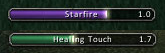
Bongos2 CastBar: A movable casting bar, with the ability to show cast time
Bongos2 XP: A movable experience bar
Bongos2 MapBar: A movable mapbar
Bongos2 Options: A dynamically loaded options menu for Bongos
Features
Every Bongos bar can be moved, hidden, and have its scale and opacity altered
Sticky bars - Each bar can be anchored to any other bar
120 action buttons, which can be setup in any number of bars
Both macro and key binding text on action buttons can be hidden
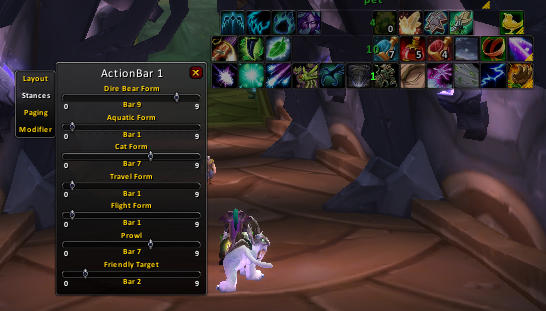
Customizable stance transitions for each bar
General Settings
To bring up the options menu: type /bongos menu
To unlock bars: uncheck the lock bars option in the main options menu
To hide or show a bar: unlock bars, then middle click or shift right click it
To move a bar: unlock bars, and then click and drag it with the left mouse button
To bring up a bar's configuration menu, right click it
Key Bindings
Bindings for the Bongos action bar should only be done via the bindings menu in Bongos
To bind keys, open the main options panel, and select the bindings option. Hover over a button, then press a key to bind it to that button
Action Bar Settings
Accessing general action bar options: open up the main options window (/bongos menu) and select the action bars panel
Adjusting the layout of a given bar: unlock bars and right click the bar you want to adjust to bring up its configuration menu
Moving buttons: Hold down the key for moving buttons (shift by default), and drag a button. Alternatively, unlock button positions by shift right clicking the mini map button, or unchecking the option in the main options menu
Making a bar bigger: You can increase the maximum size of a given bar by reducing the number of action bars. To do so, adjust the action bars slider on the action bar panel of the main options menu. This option will reset the settings of your action bars
Stances and Paging
Stances and paging are configured via a bar's right click menu. With bars unlocked, right click the bar you want to change,
Slash Commands
All commands start with either /bongos, /bob, or /bgs
<barList> can have a possible value of an actionbar number, menu, bags, pet. class, or all
You can also specify a group or range of bars, the command /bo scale 1-3 class 1.2 will scale action bars 1 2 3, and the class bar to 120% of their normal size.
/bongos - Shows the options menu, if present
/bongos lock - Toggles locking bars positions
/bongos show <barList> - Shows <barList>
/bongos hide <barList> - Hides <barList>
/bongos toggle <barList> - Toggles <barList>
/bongos scale <barList> <scale> - Sets the scale of <barList> to <scale>
/bongos setalpha <barList> <opacity> - Sets the opacity of <barList> to <opacity>
/bongos set <profile> - Sets the current character to use <profile>
/bongos copy <profile> - Copies all settings from <profile>
/bongos delete <profile> - Deletes <profile>
/bongos reset - Loads default settings
/bongos version - Displays what version of bongos you're running
Originally posted by TechnicDragon I'm curious as to the functionality of Bongos2 with the 3.0.2 update. Does anyone know if it works (having possibly run on a beta key with the addon) or will there need to be an update to continue its functionality?
Bongos 2 and 3 will no longer work when 3.0.2 hits normal realms. I'd look at Dominos, Macaroon, or Bartender4.
I'm curious as to the functionality of Bongos2 with the 3.0.2 update. Does anyone know if it works (having possibly run on a beta key with the addon) or will there need to be an update to continue its functionality?
__________________
If you're not having fun, why play the game?
Originally posted by tecbuilder Is it possible to have the contents of the bar saved to the profile. I can switch profiles fine, but all that does is adjust the bars, but the contents of the bars remain the same. I would like to be able to have a profile for PVP and a profile for PVE.
I have tried Bongos3 and I don't like it. I haven't been able to do the same things with it as I have with Bongos2, e.g. moving an item from 1 bar to another. But that's for a different forum.
Is it possible to have the contents of the bar saved to the profile. I can switch profiles fine, but all that does is adjust the bars, but the contents of the bars remain the same. I would like to be able to have a profile for PVP and a profile for PVE.
I have tried Bongos3 and I don't like it. I haven't been able to do the same things with it as I have with Bongos2, e.g. moving an item from 1 bar to another. But that's for a different forum.
Originally posted by Jesamyn I know you have Bongos3 out, and I tried it. It's a good mod too. However, I have to say that after using BT3, BT4, and Bongos3, Bongos2 is still my fave.
I know you have Bongos3 out, and I tried it. It's a good mod too. However, I have to say that after using BT3, BT4, and Bongos3, Bongos2 is still my fave.
__________________
I'm not an idiot. I'm just harmlessly psychotic.
I have used Bongos2 for a long time and never had any problems with the key bindings till recently.
I use key binds for secondary actions bars with multiple modifier keys:
ctrl+shift+1 though ctrl+shift+=
I recently started having a problem with the key combination of ctrl+shift+0
Bongos only seems to recognize the ctrl+shift part of the key bind. When you find the key this is what is shows on the screen and the key then does not correctly work.
I have tried this in Bongos3 as well and it does not work.
For Bongos 2 I am running version 1.10.1. As I said I used this key bind without error for a long time. I'm not really sure when it stopped working but I believe it hasn't worked since game version 2.3
I use a Logitech G11 keyboard which gives me an additional 18 function keys labelled G1 - G18, but in order to use them I have to make keybindings for obscure combinations that I don't currently use like CTRL-ALT-1, CTRL-ALT-A, etc. When I set this up on one of the action bars it shows as the keybound shortcut AC1, ACA, etc. rather than G1, G2 etc.
I was wondering if there would be a way in the near future to support G11 and G15 keyboards to show the G-functions rather than the keybinds or failing that if a player can set an alias for the bound key?


