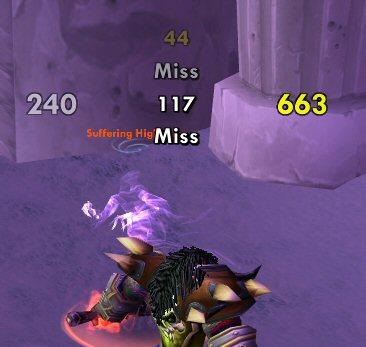
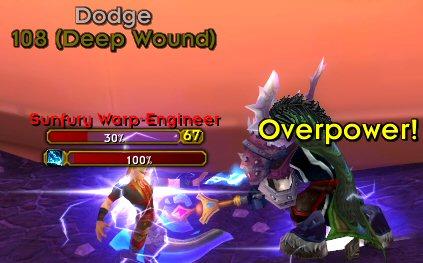
What is it? - A mod that adds your damage to SCT. It provides a way for you to see your damage in a static location. This can be useful against large mobs like those in MC, Bosses, etc...Can use SCT animations or its on built in style.
What can it do?
- Your Melee, Spell, Skill, Periodic, and Pet Damage
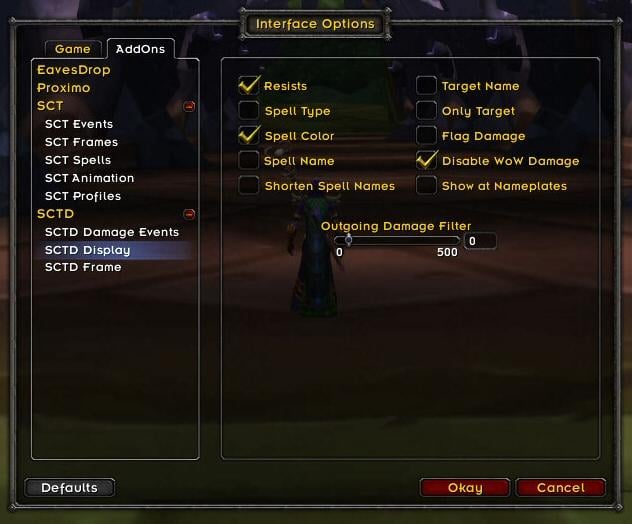
- Spell Damage/Resists and Damage Type (by color)
- Target and Spell ID's
- All "Miss" events (dodge, block, immune, etc...)
- Custom Colors for all text events and crits.
- Ability to show only target damage
- Four Fonts to choose from
- Can disable built in WoW damage
- Sliders for text size, fade speed, and on screen placement (with custom editbox)
- Localized to work in almost all WoW clients.
How do I use it? - First you must have SCT installed already. Next, unzip SCTD it into your interface\addons directory. For more info on installing, please read install.txt. Now just run WoW and once logged in, type /sctdmenu to get the options screen or you can click the SCTD button on the SCT options menu.
FAQ How do I remove the damage the scrolls above my targets head? - WoW itself does this. You can turn it off by checking the the "Disable WoW Damage" option, or by going to the Advanced Options under Interface options.
My Wow Damage won't turn back on, even after I turn off SCTD! - You need to turn this back on manually in WoW. Go to Advanced Options under Interface options and you will see a checkbox to enable damage. Also, it is highly recommended you don't use the "Enable Wow Damage in PvP" option if you are on a PvP server.
My peridoic damage is not showing up in the combat log or on the screen! How do I fix it? - You have turned off periodic damage on the Advanced Options under Interface options. Make sure the "Periodic Damage" check box is checked, even if you have Damage unchecked.
I don't like friendly nameplates on. How do I make my heals appear over who I heal? - Friendly nameplates have to be on in order to show your heals. SCT will turn them on if you turn on the option, but you must manually turn them off if you don't like it (see Target keybindings).
SCTD damage is ontop of my SCT messages, how do I fix this? - I highly suggest you move SCT's message using the sliders on the SCT option menu. You can also move SCTD using the sliders on its menu. Consider placing it over you target bar.
How do I reset SCTD or load another users settings? - SCTD is tied directly to SCT. You can reset SCTD using SCT's reset button or typing /sctreset. You can load another users SCTD settings by loading them from the SCT option menu.
How do I change the fonts? - You can select from four fonts on the options page.
I don't like enemy nameplates on. How do I make my damage appear over who I hit? - Enemy nameplates have to be on in order to show your hit over the enemy heads. SCT will turn them on if you turn on the option, but you must manually turn them off if you don't like it (see Target keybindings).
Support
Please post all errors and suggestions on http://grayhoof.wowinterface.com/ using the provided forms.
Change Log - SCT - Damage
3.21 - Fixes for 3.0
3.2 - Updates for 3.0 patch
3.1 - Converted to a faster combat log system. Fix for nameplates in PvP. Convert to LibShareMedia-3.0.
3.01 - Fix miss issue using global strings. Added CN translation. Allowed fonts to go down to size 8.
3.0 - Converted to WoW 2.4 Combat Log. Converted to Ace3. Moved options menu to WoW 2.4 Addons Menu. Options menu reorganized to be much cleaner and simpler.
2.4 - Uses spell icons from SCT if enabled. Added Damage Shields as an optional event. Added Outgoing Damage Filter (separate from SCT's). Made all font sizes change 1 step at a time.
2.33 - Fixed minor bugs with Share Media. Added option to turn off custom events for SCTD only.
2.32 - Added SharedMedia for fonts. Added ability to use SCT Custom Events to filter/change SCTD events. See sct_event_config.lua for examples.
2.31 - Added Spell/Skill shortening (uses SCT settings).
2.3 - Added ability to show damage over enemy nameplates; see FAQ for more info.
2.22 - Fixed Miss events showing ParserLib internal variables. Cleaned up localization.
2.21 - Added Interruption Events. Spell colors now inherit colors set by SCT's settings.
2.2 - Converted to WoW 2.0 standards. Added options for all the new options from SCT (Alignment, HUD animations, etc...). Cleaned up UI a little to make everything fit.
2.1 - Cleaned up options page by using tabs buttons. Added totem and summoned pet damage and cleaned up pet code. Added crushing and glancing blows.
2.02 - Total new look for options window. Converted all table iterators to use pairs().
2.1 - Removed the PvP toggable ability. Caused too many problems.
2.0 - Complete rewrite using Ace2 and ParserLib with more performance in mind. Now uses its own custom animation frame within SCT for display, allowing much better customization bewtween SCT and SCTD. Sticky Crit options. Spell colors option.
1.1 - Made options frame its own LoadOnDemand mod, options frame is now moveable, added Color Crits options, added ability to show only damage to your target, added ability to turn SCTD off and turn WoW damage on when in PvP and vice versa, added ability to use SCT animation for all damage, added better crit animations, various bug fixes and teaks.
1.0 - Initial Release
Its a big shame SCT and SCTD are dead, I've been trying to migrate over to MSBT before next content patch comes incase SCT breaks, but having a lot of difficulty adjusting
Originally posted by Clavicle One problem I am having with SCTD is that no matter whether the "Disable WoW Damage" option is ticked, with SCTD loaded the build in damage display over the mobs head is turned off every time I log in. This means I always have to go into Interface/Options/Combat Text and turn it back on. Very annoying.
One problem I am having with SCTD is that no matter whether the "Disable WoW Damage" option is ticked, with SCTD loaded the build in damage display over the mobs head is turned off every time I log in. This means I always have to go into Interface/Options/Combat Text and turn it back on. Very annoying.
I was wondering if there is a way to merge AOE damage/healing into one message like MikScrollingBattleText currently does. I love the simplicity of SCT/SCTD but am currently using MikScrollingBattleText since it does this so my screen isn't filled with damage spam when I have to AOE.
Last edited by dr.soulfly : 11-07-2008 at 04:01 PM.
Thanks for keeping up SCT for WoTLK, Grayhoof. I've never liked any of the other scrolling text mods, tried em' all and hated them, so I'm glad you're keeping up with SCT! One little bug I'm encountering, when I resist spells, the message is not showing up on the frame I have it set to show up in, well it's not showing up at all actually. Any ideas what this might be, or if it's a bug? Thanks!
When im playing for example my druid or shaman i sct always show when im using travel form, windfury weapon etc. etc. How do i get the Message off? Ive tried to look options for it from the sct frames place but cant find anything to get rid off this. Spams my screen when i get Maelstorm weapon etc. Rly annoying!
I love you! Thanks for updating it I can't live with any other damage addon and especially not normal WoW... I can see crits again with this update! <3
I get this one whenever i go into the SCTD Frame Options tab.
Interface\AddOns\sctd_options\options.lua:78: attempt to call global 'OptionsFrame_EnableCheckBox' (a nil value)
This when i turn on "show at nameplates"
Interface\Addons\sctd.lua:577: attempt to call global 'ShowNamePlates' (a nil value)
When i unselect "show at nameplates"
Interface\Addons\sctd.lua:584: attempt to call global 'HideNamePlates' (a nil value)
and this if two enemies come into my range
Interface\Addons\sct\sct_unitpos.lua:22: attempt to call method 'GetText' (a nil value)
I'm using both the latest builds of SCT and SCTD downloaded from WoWinterface. I've done a clean install of both (deleting everything to do with SCT and SCTD from the interface folder and the WTF folder)
It only seems to happen when i have my nameplates turned on (i cant play without name plates)
Last edited by realsystem : 10-16-2008 at 01:49 AM.
Try disabling all other addons, and only having those 4 enabled.
Quote:
Originally posted by JohnJSal I did read the install.txt file. I have sct, sct_options, sctd, and sctd_options in my AddOns folder. Within the sct and sctd folders are /fonts, /libs, and /local, and various other files. The two options folders each have a /local folder and other files.
And yes all four things are enabled on my AddOns page on the login screen.