Cosmos died. But life is not over! This is the bona-fide update to the original Cosmos version. Accept no substitutes!
*** CHANGED IN 4.1 ***
The Open All button that appears at the bottom of the mail in-box can now be hidden or shown using a checkbox in the Interface addon options. By default, EasyMail hides the button. To show the button again, go to Interface Options, click the Addons tab, select EasyMail in the list, and check the Show Blizzard Open All check box.
*** CHANGED IN 3.4 ***
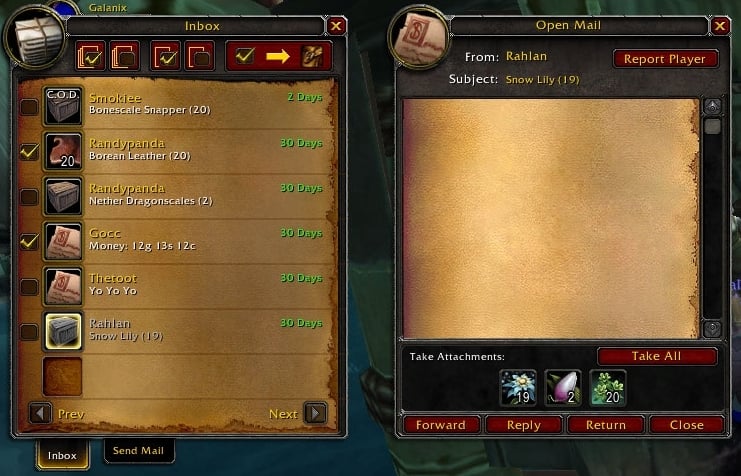
- New graphical buttons replace the old text buttons at the top of the inbox. There are two buttons for checking and unchecking all mails, two for checking and unchecking the current page, and one for getting all attachments for all checked mails. Hopefully these buttons are less clunky than the old buttons which required clumsy toggling. If the button graphics aren't clear enough, the tooltips will explain.
*** NEW FUNCTIONALITY ADDED IN 3.3 ***
- The Mark Page button now toggles to Clear Page to allow the user to clear the current page's checkboxes. (suggested by Tonyleila)
- The Get Marked button is now enabled only when at least one mail has been checked.
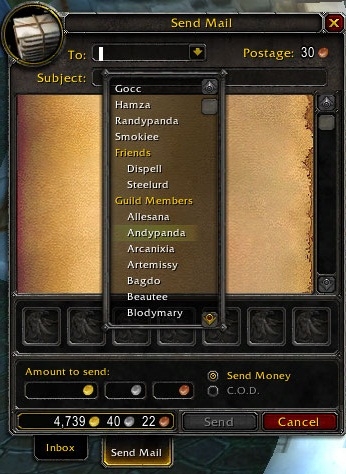
- An "Add Name" entry has been added to the mail addressee pulldown menu. Selecting this entry brings up a dialog that lets the user manually enter a character name to add to the EasyMail addressee list. This will be useful for adding alt names and names from other accounts without having to send them mail or add them to the friends list. A name cannot be added if it already exists on the list. Also, names are not verified. Invalid character names will be allowed and the mail system will deal with it by giving the user filthy error messages. (suggested by s-conley)
- The inbox can now be paged through using the mouse wheel. Roll up to go up, down to go down. Get it? (suggested by oldmanwam)
- The player's inventory bags will now open when the Send Mail tab is clicked on the mail frame. This is useful for times when the bags have been closed while in the inbox but should be opened again when the user wants to send another mail. (suggested by Wiseman1)
Modifications to the World of Warcraft mail frame.
- For each character, remembers the last addressee to whom mail was sent and defaults that name into the addressee field when a new blank mail is displayed.
- Remembers a user-configurable number of recently-mailed addressees by realm, and allows the player to select from the list to fill in the addressee field by clicking on a drop-down button displayed to the right of the addressee field. If the list is at maximum length, the addressee least recently mailed is removed to add a new addressee. Right-clicking a name in the drop-down list prompts the user to delete that name from the addressee list. The user can manually add a name to the addressee list by clicking the "Add Name" option in the drop-down list. Names added manually are not verified in any way.
- A check box in the options window allows the player to use Blizzard's standard auto-complete functionality. Clearing this check box causes the addressee field to use EasyMail's custom auto-complete functionality.
- A check box in the options windows allows the player to show or hide the standard Open All button at the bottom of the inbox.
- The addon enables or disables the standard Open All button depending on whether or not there is mail in the inbox.
- Names from the player's friends list and members of the player's guild can be displayed in the addressee drop-down list by setting the appropriate options.
- Automatically fills in the mail subject line if it is empty when entering money to send.
- A Take All button is added to the Open Mail window that allows the player to move all the item and money attachments for the open mail into the player's bags with a single click. This button is disabled on COD mails until the user clicks one item and confirms the COD. The button will not take existing mail text as an attachment. The Take All process will time out if it is unable to take an attachment for 8 seconds. Closing the mail window will also cancel the process.
- Checkboxes added to the mail inbox allow the user to select mails for attachment retreival. Four graphical buttons added at the top of the inbox allow the user to either mark or clear all mails or mark or clear the mails on the current page. A fifth button starts the get attachments process. COD mails will be ignored until the COD is confirmed manually for each mail by the user. To cancel the attachment retrieval process, close the mailbox.
- Right-click attachment retrieval and mail deletion from the inbox can be enabled using addon options. Right-clicking a mail item with attachments in the inbox will cause the take all process to attempt to retrieve all attachments from the mail. If the mail has text but no attachments, right-clicking will delete the mail. If the mail has both attachments and text, right-clicking will cause the take all to retrieve the attachments. Then, right-clicking again will delete the mail. The right-click does not affect COD mails until after the user chooses to accept the COD manually. The user can opt to disable the deletion prompt for mails marked as read. EasyMail will always prompt on the deletion of unread mails.
- With the proper configuration options set, EasyMail will display mail text in the inbox item tooltip. WARNING: Mails will be immediately marked as read once the tooltip has been displayed. Due to Blizzard's API design, mail text may take a few seconds to appear in the tooltip.
- A Forward button is added to the open mail window. Clicking this button opens a new mail with "FW:" + <subject> copied into the subject line and the text of the open mail body copied into the new mail body. IMPORTANT NOTE: Blizzard's mail system design complicates the automatic forwarding of mail attachments. Therefore, attachments cannot be forwarded using this button at this time. Only the text of the open mail will be copied into the new mail. Attachments must still be moved to the new mail manually. However, this new forwarding functionality makes the process a bit less cumbersome, since the new mail will be visible while you are still viewing the mail with attachments.
- Configuration options allow the user to output money amounts and information about attachments being retreived to the chat window for easy post-process review.
See the Readme.txt for configuration information.




 10-07-19, 07:36 AM





