| Go to Page... |



| Compatibility: | Tomb of Sargeras (7.2.0) |
| Updated: | 04-08-17 04:51 AM |
| Created: | 02-06-10 04:19 PM |
| Downloads: | 99,970 |
| Favorites: | 334 |
| MD5: |
Gnosis (Castbars and Timers) 

Gnosis (Castbars and Timers)
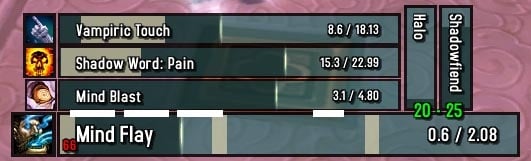
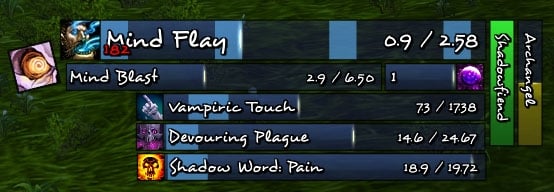
Gnosis is a highly configurable castbar and single timer addon. Gnosis can show ticks of channeled spells, detect unintentional clipping while channeling and combine data of channeled spells to combat text addons (MSBT, SCT, Parrot). It also allows to create buff, debuff, and cooldown (spell, rune, item) timers with a similar set of options castbars have.
To visit Gnosis' development site or to grab alpha&nolib files go to Gnosis @ CurseForge
For questions or comments please visit Gnosis' official forum thread
If you find any bugs or have suggestions create a ticket here
PDF documents containing a general introduction to timer bars as well as an overview of Gnosis timer configuration commands and options can be found within the Gnosis addon folder.
Gnosis also allows to create as many castbars as you like and does not force predefined bars onto the user. The "casts" of following "units" can be shown:
- Player, Target, Focus, Pet (= Vehicle)
- Arena Opponents, Party, Mouseover, Bosses
- Mirror bar (Fatigue, Feign Death, Breath)
- Global Cooldown Indicator
- Swings timers (one handed melee and ranged, single and combined versions)
- Most ...'s Target Units are selectable (e.g. Target's Target's Target = targettargettarget), though those units require additional scanning if bars for those units are created
Main features:
- unlimited amount of castbars
- single bar buff, debuff, cooldown and item cooldown timers
- horizontal & vertical bars, invertable bar growth direction
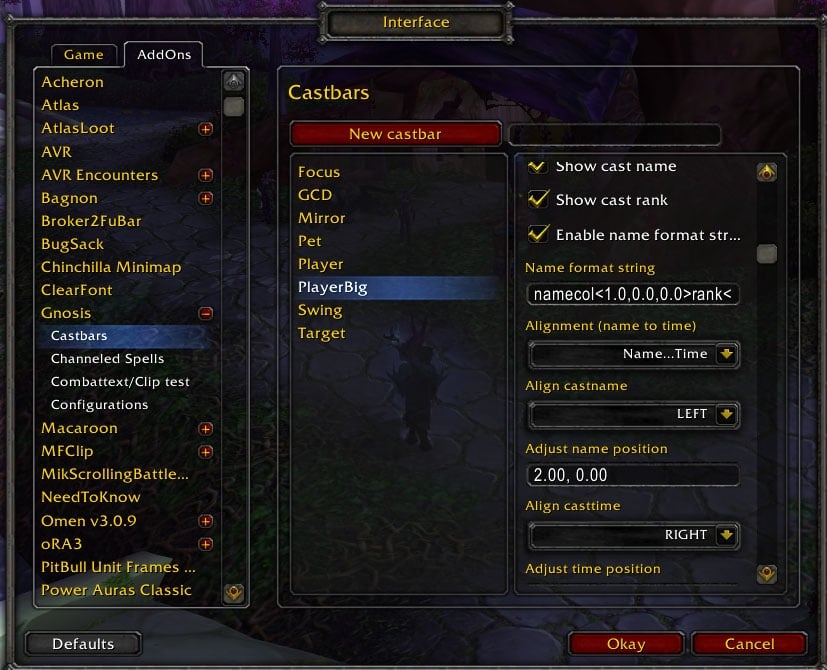
- customizable look (alignments, colors, size, font, casticon, ...)
- full control of castname and casttime strings
- black-/whitelisting (i.e. show castbars not/only for specific spells)
- support for all channeled spells (show tick markers including spellpushback support for those markers, configurable)
- combine dps of channeled spells and output via combat text
- anchor bars to frames or the mouse cursor
If you want to help localize Gnosis please visit Gnosis Localization @ Curseforge
Please visit Gnosis @ curse.com for detailed information about Gnosis.
- toc bump for patch 7.2
- minimal changes
- added files: Excel orignal of gnosis_cheatsheet.pdf, Word original of gnosis_howto_timers.docx
Gnosis v4.63 10/27/2016
- toc bump for patch 7.1
- added timer bar option to track all three aura effects (auraeffectX=maxvalue)
Gnosis v4.62 09/04/2016
- added support for talent specializations 1 through 4
- minor Legion based adjustments
Gnosis v4.61 07/21/2016
- using "World" latency since the previous latency estimation is not possible anymore
- fix for bars with fadeout duration set to 0
Gnosis v4.60 07/20/2016
- minor modifications for Legion (patch 7.0.3)
Gnosis v4.50 06/25/2015
- toc bump for patch 6.2
- added spellid=id option to the aura command (buff/debuff) to allow scanning for a specific spell id only (and not the spellname)
- minor changes and fixes
Gnosis v4.49 05/11/2015
- added bcol="r,g,b,alpha" option (override border color)
- added time format string option 'a' for automatic time precision increase below 1s when using zero decimals (e.g. r<0a> for the remaining duration)
- added recharge [chargecnt] : spell(id) command to display the duration until the given spell gains a new charge, passing the option chargecnt will force Gnosis to display the current amount of charges (e.g. recharge chargecnt : Shield Block)
- added synonymns for options hideicon/hidespark => noicon/nospark (shorter is sometimes better)
- disabled automatic word wrapping and added option to (re)enable it
- added name format string keyword trunc<cnt> to truncate the spellname to cnt characters
- changes to how channeled spell tick extension are handled, changed default settings for soothing mist
Gnosis v4.46 02/26/2015
- fixed a problem that would cause the new twitter functionality to fail
Gnosis v4.45 02/25/2015
- toc bump for patch 6.1
- better multistrike handling for channeled spells ticks
- added resource : burningembers_decimals
Gnosis v4.44 01/21/2015
- added startcntcpy option (for counters)
- added internal tracking of cooldowns when a cooldown timer bar is active to prevent cooldowns ending early when
- a global cooldown is triggered
- minor internal tweaks
Gnosis v4.43 01/12/2015
- added runetype=x option for runecd timer configurations
- fixed global cooldown issues with some spells (Insanity)
- added additional documentation
Gnosis v4.42 01/09/2015
- timer bars: cast command will now show the non-interruptible status
- changes to documents
Gnosis v4.40 01/05/2015
- added documents regarding timer bars (howto timers, cheatsheet)
- new features
- added commands npc, exit, charspec, glyph, talent
- added feature to start a counter (command counter, optional keywords startcnt, stopcnt)
- new logical operators & (and), ? (relaxed and), * (or)
- changed and fixes
- changed combo point tracking due to WoD changes
- fixed text alignment when not using automatic text resizing
- newly created bars will have automatic text resizing disabled
- fixed a problem with spec=1|2 timer option in combination with logical operations
Gnosis v4.33 12/04/2014
- changed default amount of Mind Flay and Insanity ticks to four (Enhanced Mind Flay passive)
Gnosis v4.32 11/12/2014
- final pre WoD update
- added option to show/hide bars only while inside/outside (specific) instances
- minor tweaks and fixes
Gnosis v4.31 11/09/2014
- updated channeled spells settings for Drain Soul and Divine Hymn
- minor fixes and improvements
Gnosis v4.30 10/31/2014
- WoD related tweaks
- added a few sound files
Gnosis v4.25 10/15/2014
- toc bump and changes for patch 6.0.2
- added sub-commands aurastacks=# and auraeffect=# to show stack count/effect value instead of duration (with a maximum value of #)
- added sub-commands mcnt=# and msize=#.# : latency tick markers are used to break up the bar into mcnt pieces, e.g. to display combo points; the default value of msize is msize=1.0 (which is the maximum value); decreasing msize will decrease the tick marker size (valid values are 0.0 < msize <= 1.0); only works for multi-spell timers
Gnosis v4.20 10/27/2013
- added new import/export format (though, previously exported scripts can still be imported)
- added bar chat hyperlinks (to share castbar/timer bars ingame)
- shift clicking the 'new (icon-like) bar' button will create an icon-like bar
- added group/raid-wide buff/debuff tracking command
- groupdot/groupdebuff : debuffname/spellid
- grouphot/groupbuff : buffname/spellid
- groupaura : auraname/spellid
- added resource commands:
- resource : xp (shows player experience)
- resource : rested (shows rested experience left)
- added timer bar option to play sounds/music/files
- 'plays' for sounds, 'playm' for music and 'playf' for files (see Combattext/Cliptest tab to see available sounds/music)
- plays="3.0-MONEYFRAMEOPEN" will play the MONEYFRAMEOPEN sound at most every 3.0 seconds
- minor tweaks and changes
Gnosis v4.10 10/13/2013
- added timer spell commands
- gcd : spell(id)/any (shows general global cd or of specific spell)
- unitname : exact unitname/any (shows name of unit for any or if selected unit matches given unitname fully)
- spellknown : spell(id) (shows spell if currently known == in spellbook)
- icon="spell(id)" (overrides shown icon)
- portrait="unit" (overrides shown icon with portrait of given unit)
- shown="barname" (entry only valid if bar "barname" is currently active/shown)
- hidden="barname" (entry only valid if bar "barname" is currently not active/shown)
- added configuration interface improvements
- changed command "cast : all" to "cast : any"
- added default monk channel support: fists of fury and soothing mist (channeled spells can be manually changed or added)
- minor optimizations, changes and fixes
Gnosis v4.05 09/11/2013
- toc bump for patch 5.4
- minor changes
Gnosis v4.03 07/07/2013
- fixed a problem related to moving while casting
- minor changes and fixes
Gnosis v4.02 05/22/2013
- TOC bump for patch 5.3
- added and updated libraries for new potential goodies
Gnosis v4.01 03/19/2013
- "Release Spirit" fix
- added new GCD Indicator (for non casttime spells)
- added name and time format string options (new keyword effect == aura effect value, also txeff<>)
- added Boss 5 unit
- added mastery tick handling for channeled spells
- minor optimizations and bug fixes
Gnosis v4.00 03/06/2013
- toc bump for patch 5.2
- changed default look of newly created bars
- added new default castbar texture and font
- upped maximum spark width and height to 1500%
- internal changes for easier importing/exporting of bars
- added range check to timer bars (resource : range) using LibRangeCheck-2.0
- added support for Mind Flay (Insanity) channeled spell
- using LibDialog-1.0 to prevent possible tainting of static popups
Gnosis v3.26 11/28/2012
- fixed a bug when creating default GCD/swing timers
- toc bump for patch 5.1
Gnosis v3.25 11/02/2012
- IMPORTANT: exit your WOW client before updating. do not downgrade, otherwise you will lose your character specific settings.
- added support for malefic grasp and spinning crane kick
- changed the way character specific configurations are stored
- minor adjustments
Gnosis v3.23 10/05/2012
- added synonyms for icd command (innercd and proc)
- added norefresh option for innercd/proc command (disables duration refresh while timer is already active)
- added full icon support for innercd/proc command
Gnosis v3.22 09/27/2012
- fixed bug that could prevent bars from showing
Gnosis v3.21 09/24/2012
- fixed spark misalignment bug for vertical power/resource timers
- minor improvements and optimizations
Gnosis v3.20 09/05/2012
- fixed tainting of global variable '_' (fixing glyph insertion problem)
- added tracking of combo points (resource : combopoints)
- added tracking of multiple resources (resource : soulshards, eclipse, holypower, chi, shadoworbs, burningembers, demonicfury)
Gnosis v3.12 08/30/2012
- initial release for patch v5.04
Gnosis v3.11 12/27/2011
- fix: latency box size not changing correctly
Gnosis v3.10 12/22/2011 - Merry Christmas and a happy new year
- added command "icd" to track procs/inner cooldowns
- added option to treat channeled spells as normal casts
- made sure castbars start to fade as soon as the cast finishes
- /gnosis bar="bar name" text="..." time=10 allows to manually create a timer
Gnosis v3.03 11/30/2011
- toc update for 4.3
- minor optimizations
Gnosis v3.02 08/23/2011
- implemented Ace3 related band-aid
Gnosis v3.01 06/29/2011
- toc update for 4.2
- WoW API related change (CLEU)
- corrected default tick amount of Evocation (Mage)
Gnosis v3.00 06/03/2011
- timer changes
- removed nodur keyword (not required anymore)
- added logical and/or keywords
- added conditions <lower bound value, upper bound value, lower bound stacks, upper bound statcks>, e.g. resource:power<0,50> or resource:power<50%,100%> or buff unit=player:Shadow Orbs< , ,2>
- added resource:threat (amount of stacks: 3 tanking, 2 insecurely tanking, 1 higher threat than tank, 0 lower threat than tank)
- added commands to track weapon imbues and poisons (enchmh, enchoh), e.g. enchmh : Instant Poison
- replaced "harmful" and "helpful" commands with "harm" and "help" (both are supported, use the shorter ones in the future)
- added option for additional castbar border (not including icon)
Gnosis v2.80 05/08/2011
- added full support for patch 4.1 channeling
- redone clipping detection
- added options for top and bottom icons
- changed how bars display text/icon when "shown when not casting"
- multi-spell timers changes
- added hidespark command (hides castbar spark)
- added incoming heal tracking (resource:heal)
Gnosis v2.70 04/30/2011
- added tracking of totem durations (totemdur:1..4 command)
- timer related behavioral corrections
- minor optimizations
Gnosis v2.65 04/27/2011
- patch 4.1 related updates
- added sbcol="r,g,b,alpha" command to multi spell timer bars
Gnosis v2.61 04/08/2011
- removed default font selection (Desyrel, which is packaged with Gnosis)
- added cursor anchoring to timer bars
- time format string related fix
Gnosis v2.60 04/06/2011
- multiple minor additions/changes/fixes
- major performance optimizations
Gnosis v2.53 02/16/2011
- new timer bars commands
- zoom=x (zoom bar if less than x remaining)
- nodur (enables displaying of buffs/debuffs without duration)
- cast=all or spellname (shows casts)
- resource:health or power or altpower (= e.g. sound value for Atramedes encounter)
- optimizations
- removed Drain Mana (since removed from the game)
Gnosis v2.52 02/05/2011
- general bar changes
- added talent spec option
- timer bar changes
- added command staticdur (force minimum time displayed by timer)
- added rune cooldown tracking to timers (runecd command)
- added spec=# (1/2) option to timers
- cleaned up option mess
Gnosis v2.51 01/30/2011
- timer bar changes
- added name format string override (nfs command)
- added dot/hot recast advise (recast command)
- added option to enable shield icon around cast icon for non interruptible spells
- multiple optimizations
Gnosis v2.50 01/16/2011
- added Multi-Spell Timers (see addon description for more information)
Gnosis v2.10 01/10/2011
- added text rotation
Gnosis v2.08 12/23/2010 - Happy Christmas
- added Boss units (and targets thereof)
Gnosis v2.07 12/11/2010
- fixed bug (maximized amount of ticks shown when extremely hasted to 15)
Gnosis v2.06 12/06/2010
- added vehicle only castbar (pet/vehicle also shows pet casts)
- added combined outline & monochrome font modifiers
Gnosis v2.05 11/11/2010
- configuration system updates
- minor spell pushback changes
Gnosis v2.04 10/30/2010
- fixed castbar anchoring problem
- added option to hide/show castbar depending on group layout
- minor tradeskill merge & spell pushback code changes
Gnosis v2.03 10/19/2010
- fixed minor bug related to spell pushback of channeling spells
- reworked channeled spells list
- added warlock channels: health funnel and soul harvest
- removed hunter channels: volley
- slight change to default combat text output for aoe heal channels
Gnosis v2.02 10/16/2010
- support for additional ticks on channels from haste (for priest and warlock spells, more coming soon, if needed)
- multiple fixes
Gnosis v2.01 10/14/2010
- options will not be created on startup, thereby reducing memory footprint extremely
- added options to handle text shadow (offset and color)
Gnosis v2.00 10/12/2010
- toc update to 40000
- major performance optimizations
- option to color target name by its class color (col<class> and col<cpre>)
- correction to text alignments (especially CENTER)
- disabled resizing of long strings for freely aligned text
- removed rank commands from the default name format string
Gnosis v1.99 09/22/2010
- compatible with wotlk 3.3.5, the cataclysm beta and the 4.0.1 ptr
- added option to hide castbar while in/out of combat
- added code to make sure introduction frame will be shown on character creation
Gnosis v1.98 09/01/2010
- fixed bug with unlocked icons
Gnosis v1.97 08/31/2010
- fixed bug preventing successful default castbar set creation
Gnosis v1.95 08/31/2010
- reworked anchoring
- added options to anchor to frame and mouse cursor
- added overheal (oh) command to combat text output'
- fixed error with critical heals not recognized for combat text output
Gnosis v1.92 08/02/2010
- changed default cast interrupt color
- added cast success color
Gnosis v1.91 07/22/2010
- tracking of mouseover(target) added
- option to show/hide castbars for casts of enemy/friendly units added
- split up config gui for easier to find options
Gnosis v1.90 07/08/2010
- implemented combat text merge for healing channels (please delete channeled heals from the channeled spells tab to get new settings for those spells)
- corrected mirror bar fading behaviour
Gnosis v1.86 07/02/2010
- tradeskill merge fix when crafting a single item
Gnosis v1.85 07/02/2010
- tradeskill merge overhaul
- option to hide blizzard pet/vehicle castbar
- nolib creation added
Gnosis v1.80 06/12/2010
- major performance enhancements
- minor internal changes
- added "who" to name format string (displays casting unit name)
Gnosis v1.70 06/06/2010
- added support for any possible unit (...target), many of those are selectable as unit in the config gui
- those units require additional scanning, most features like channeling support, spell pushback detection and interruptible status are available, spell interrupted and spell failed are not
- renamed units in config gui
- removed gcd_reverse unit (bar direction inversion should be enough)
Gnosis v1.60 06/04/2010
- intro frame extensions
- added bar orientation options (horizontal/vertical)
- added invert bar direction option
- rotatable icon
- added newline (\n) command to name and time format strings
- c<x> as new option for time format string = (total-remaining) time
Gnosis v1.52 05/25/2010
- fixed bug removing unconverted castbar configurations after first logon with v1.50/v1.51
Gnosis v1.51 05/25/2010
- intro frame after logon (ui reload) if no castbars configured and Gnosis is enabled
- minor bug fixes
Gnosis v1.50 05/24/2010
- saving character configuration data char specific reducing memory usage tremendously when playing with multiple chars; every time you log into a char old configurations will be converted if those exist
- added function Gnosis:LoadConfig(name,bMainTab,bCastbars,bChanneledSpells,bClipTest) to allow for easier loading of configurations; might be useful for addon compilation authors or if you would like to be able to load configurations with macos; example: /script Gnosis:LoadConfig("DefaultConfig",false,true,false,false) to just load castbars from configuration "DefaultConfig"
- added following locales: zhCN (simplified) & zhTW (traditional Chinese), thanks to wowuicn * koKR (Korean), thanks to talkswind & yuk6196 * ruRU (Russian), thanks to StingerSoft * you can chose between all locales on the Gnosis config gui main tab
- right clicking unlocked castbars will open the castbars config gui
- moved Gnosis to curseforge svn, grab your alphas there if you like
Gnosis v1.40 05/18/2010
- german localization added (thanks to Xploder from Kil'Jaeden EU)
- added option (main config tab) to switch between locales
- new castbar spark options (color, width, height), slightly changed default spark look
- new layering of statusbar, latency tick boxes and castbar spark
no new feature releaes coming in the near future! only bugfixes and adding of localizations.
Gnosis v1.34 05/16/2010
- fixed bug hiding latency box if channeled tick displaying was disabled while channeling
- added button on main config tab to create standard castbar set (player, target, focus, pet and mirror) for a quick start for new players -> just move bars and lock them if you don't want to configure the bars
- minor performance improvements
Gnosis v1.33 05/15/2010
- added time format string
- ready for localization, if anyone wants to provide a full set of localized strings I'd be happy to add those and your name to the Gnosis description page
Gnosis v1.32 05/11/2010
- fixed bug preventing loading from multiple stored configurations
- added option to change border size of unlocked icon
Gnosis v1.31 05/09/2010
- option to unlock, move and scale castbar icon
- cleaned up small parts of the code
Gnosis v1.30 05/08/2010
- new default bar look (including font)
- additional options for castname/casttime/latency text alignments
- easier bar- & textcolor editing options
- minor internal tweaks & fixes
Gnosis v1.27 02/28/2010
- added option to hide Gnosis text output
- castbars/channeled spells/config sorted by name
- added option to name format string to show remaining item count when tradeskill merging
- added option to control minimum gap between castname and casttime (with enabled option to automatically reduce size of long strings)
- main tab settings and combattext/cliptest settings can be stored in configurations as well
Gnosis v1.26 02/23/2010
- added missing channeled spells (Evocation, Drain Life, Drain Mana, Hurricane, Volley)
Gnosis v1.25 02/09/2010
- slight change to clipping detection and tick combining to fix problems with arcane missiles and similar spells (do not use clipping detection for spells like AM!)
- drain soul (and similar spells) clipping detection and tick combining now correctly supported
Gnosis v1.24 02/08/2010
- fixed melee swing for druids while shapeshifted
Gnosis v1.23 02/06/2010
Initial wowinterface release, for more changelog information please visit curse.
 |
Comment Options |
 08-31-18, 01:54 PM
|
|
|
A Murloc Raider

Forum posts: 7
File comments: 41
Uploads: 0
|
for some reason when certain spells are cast by party members it's not showing them, any ideas why? for instance mounting doesn't show up and i would like to be able to see that
|

|

|
| kaiden |
| View Public Profile |
| Send a private message to kaiden |
| Find More Posts by kaiden |
| Add kaiden to Your Buddy List |
|
07-18-18, 03:20 PM
|
|
|
A Deviate Faerie Dragon
Forum posts: 13
File comments: 276
Uploads: 0
|
8.0.1 update?
Fingers crossed for an update.
__________________
spiralofhope.com |
|
|
|
| spiralofhope |
| View Public Profile |
| Send a private message to spiralofhope |
| Visit spiralofhope's homepage! |
| Find More Posts by spiralofhope |
| Add spiralofhope to Your Buddy List |
|
04-08-17, 04:57 AM
|
||
|
A Kobold Labourer
 Forum posts: 1
File comments: 79
Uploads: 1
|
Re: Donations?
Every currency should work fine, so just donate whichever amount in whatever currency you like. |
|
|
|
|
| elchefe |
| View Public Profile |
| Send a private message to elchefe |
| Visit elchefe's homepage! |
| Find More Posts by elchefe |
| Add elchefe to Your Buddy List |
|
02-13-17, 03:10 AM
|
|
|
A Kobold Labourer
Forum posts: 1
File comments: 60
Uploads: 0
|
Donations?
does paypal switch my currency over to your currency electronically?
or do i need to do something special? kitty |
|
|
|
| the9thresident |
| View Public Profile |
| Send a private message to the9thresident |
| Visit the9thresident's homepage! |
| Find More Posts by the9thresident |
| Add the9thresident to Your Buddy List |
|
07-20-16, 08:53 AM
|
||
|
A Kobold Labourer
Forum posts: 1
File comments: 79
Uploads: 1
|
Re: German to English
|
|
|
|
|
| elchefe |
| View Public Profile |
| Send a private message to elchefe |
| Visit elchefe's homepage! |
| Find More Posts by elchefe |
| Add elchefe to Your Buddy List |
|
10-07-15, 03:54 PM
|
|
|
A Murloc Raider
Forum posts: 6
File comments: 3
Uploads: 0
|
Is it possible to make the spell icon a higher strata than the cast bar so I can center the icon over my cast bar?
|
|
|
|
| Kalamir |
| View Public Profile |
| Send a private message to Kalamir |
| Visit Kalamir's homepage! |
| Find More Posts by Kalamir |
| Add Kalamir to Your Buddy List |
|
08-27-15, 01:47 PM
|
|
|
A Firelord

Forum posts: 463
File comments: 82
Uploads: 2
|
German to English
Hey, my Gnosis options are in German. Doesn't Gnosis pull from the client my language?
|
|
|
|
| JDoubleU00 |
| View Public Profile |
| Send a private message to JDoubleU00 |
| Visit JDoubleU00's homepage! |
| Find More Posts by JDoubleU00 |
| Add JDoubleU00 to Your Buddy List |
|
05-15-15, 04:06 PM
|
||||
|
A Kobold Labourer
Forum posts: 0
File comments: 2
Uploads: 0
|
|
|||
|
|
|
| Nerto |
| View Public Profile |
| Send a private message to Nerto |
| Visit Nerto's homepage! |
| Find More Posts by Nerto |
| Add Nerto to Your Buddy List |
|
05-11-15, 06:44 PM
|
|||
|
A Kobold Labourer
Forum posts: 1
File comments: 79
Uploads: 1
|
1. Create a new bar, select "Multi-Spell Timer" as Bartype 2. Goto the "Hide castbar" configuration tab of the newly created bar 3. a) to display the casts only of a specific character (by name) use following timer config (this example works for units that you currently target): unitname unit=target : Exact name of the character & cast unit=target : any 3. b) showing casts based on YOUR current talent specialization: charspec : Shadow & cast unit=player : any |
||
|
|
|
| elchefe |
| View Public Profile |
| Send a private message to elchefe |
| Visit elchefe's homepage! |
| Find More Posts by elchefe |
| Add elchefe to Your Buddy List |
|
05-10-15, 06:02 PM
|
||
|
A Molten Giant
Forum posts: 758
File comments: 2021
Uploads: 37
|
|
|
|
|
|
| Tonyleila |
| View Public Profile |
| Send a private message to Tonyleila |
| Visit Tonyleila's homepage! |
| Find More Posts by Tonyleila |
| Add Tonyleila to Your Buddy List |
|
05-08-15, 05:00 PM
|
|
|
A Kobold Labourer
Forum posts: 0
File comments: 2
Uploads: 0
|
Hi,
is possible to show a castbar only at a specific class or specific char? Nerto |
|
|
|
| Nerto |
| View Public Profile |
| Send a private message to Nerto |
| Visit Nerto's homepage! |
| Find More Posts by Nerto |
| Add Nerto to Your Buddy List |
|
04-27-15, 10:36 AM
|
|
|
A Defias Bandit
Forum posts: 2
File comments: 5
Uploads: 0
|
Castbar Anchors
What is the proper frame to anchor to keep the castbars where the Blizzard ones would be (i.e. underneath the target buff frame)? I have been trying with no success. To be clear, I want the target and focus castbars to stay in their Blizzard locations, automatically adjusting to the number of buffs.
|
|
|
|
| Erandil177 |
| View Public Profile |
| Send a private message to Erandil177 |
| Visit Erandil177's homepage! |
| Find More Posts by Erandil177 |
| Add Erandil177 to Your Buddy List |
|
10-16-14, 01:44 PM
|
||
|
A Molten Giant
Forum posts: 758
File comments: 2021
Uploads: 37
|
Re: Nameplates
|
|
|
|
|
| Tonyleila |
| View Public Profile |
| Send a private message to Tonyleila |
| Visit Tonyleila's homepage! |
| Find More Posts by Tonyleila |
| Add Tonyleila to Your Buddy List |
|
07-17-14, 08:30 AM
|
|
|
A Kobold Labourer
Forum posts: 0
File comments: 12
Uploads: 0
|
Nameplates
Hi,Thanks for this awesome addon
 Is it possible to anchor a cast bar or just the castr bar icon to the enemy nameplate,as i dont like the look of the nameplates castbar.Thanks again Is it possible to anchor a cast bar or just the castr bar icon to the enemy nameplate,as i dont like the look of the nameplates castbar.Thanks again |
|
|
|
| Carlz |
| View Public Profile |
| Send a private message to Carlz |
| Visit Carlz's homepage! |
| Find More Posts by Carlz |
| Add Carlz to Your Buddy List |
|
09-13-13, 01:02 PM
|
|
|
A Molten Giant
Forum posts: 758
File comments: 2021
Uploads: 37
|
Mirror Bar
Using Version: v4.05 the Brath / Exhausation Bar is not working right. Sometimes its just not showing up or shows up in the last 5 sec before you die

Last edited by Tonyleila : 09-13-13 at 01:03 PM.
|
|
|
|
| Tonyleila |
| View Public Profile |
| Send a private message to Tonyleila |
| Visit Tonyleila's homepage! |
| Find More Posts by Tonyleila |
| Add Tonyleila to Your Buddy List |
|
Press the button below to begin the donation process.

Support AddOn Development!
You have just downloaded by the author . If you like this AddOn why not consider supporting the author? This author has set up a donation account. Donations ensure that authors can continue to develop useful tools for everyone.
*Clicking the donate button above will take you to PayPal.com

*Clicking the donate button above will take you to Pledgie.com
