Category: Combat Mods
Addon Information
Works with 3.3
Download Latest Version.
To add favorites please register for a free account. If you already have one you need to login. How do I install this? (FAQ)
Author:
Version:
v3.7.7
Date:
12-11-2009 04:28 AM
Size:
161.92 Kb
Downloads:
28,753
Favorites:
270
MD5:
Pictures
Click to enlarge
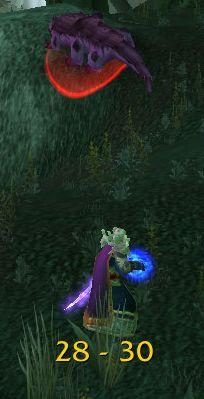
28-30
Click to enlarge
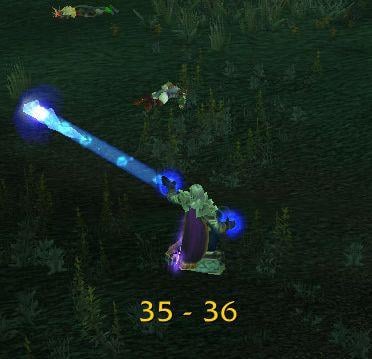
35-36
Click to enlarge
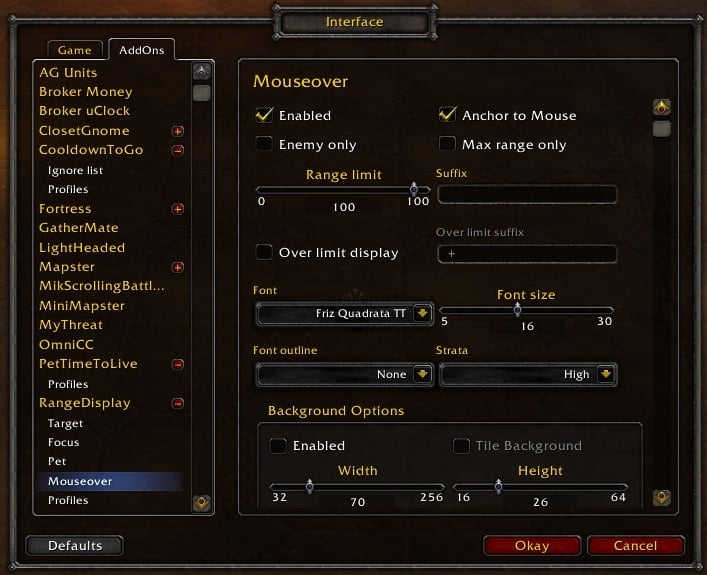
Configuration
RangeDisplay   Popular! (More than 5000 hits)
Description:

RangeDisplay is a simple range display addon. It is using spell range, item range and interact-distance based checks to determine the approximate range to your current target, pet, focus or mouseover unit (if enabled). The mouseover unit display can be anchored to mouse, or placed at a fixed position. As of v3.4.1 interact-distance based checks are only used if the other two are unavaliable due to the strange way interact-distance checks work causing strange results with some mobs.

RangeDisplay is a front-end to LibRangeCheck-2.0, a library addon to
calculate the range estimates. DogTag also supports LibRangeCheck via
the [Range] tag, thus you can get range display in addons using DogTag
to build texts, like PitBull (unit frames) and CowTip (tooltip).

Note: RangeDisplay can only check for some specific distances, thus determining
a minimum and maximum range to the target. Some of these ranges are rather
large, so the range update may be slow, as it takes time to cover a bigger
distance. Unfortunately there is no way (that I know of) of providing higher
resolution for range estimates.

Options:

/rangedisplay locked
Toggle the locked state of RangeDisplay frame.
While unlocked, you can drag it to a position you like with the left mouse button and open its config menu by right-clicking on the frame.
While it is locked, you can click-thru the display.

/rangedisplay
Open the config GUI.

Install instructions:

NOTES:

After installing, RangeDisplay will be enabled by default, and unlocked, so you'll see a semi-transparent rectangle in the center of your UI that you can drag to a position you like. After finding a good place for it you should lock the frame with /rangedisplay locked, so that it won't eat your mouse clicks (note: the enemyOnly option only works in locked mode, too).

Contributors:

sayclub - koKR localization
Carylon - deDE localization
lcncg - zhCN and zhTW localizations
Pixel - frFR localization
  Change Log - RangeDisplay
v3.7.6
- Bug fixes

v3.7.1

- added CONFIGMODE (OneButtonConfig) support
- added a new range section
- added option to use section colors as background
- added option to override the numeric range display with static text for sections
- added option to copy current section settings to all other active units
- hide the tooltip while moving
- made the configuration a separate load-on-demand addon to save memory

v3.5.0

- Added support for mouseover unit

v3.4.1

- Added option to hide the background when no valid target is selected
- disabled interact-distance based checks when spell/item based checks are available

v3.3

- Updated for wow version 3.1

v3.2

- Removed the checkVisibility option (it's not that useful now with the new ranges)
- Localization updates
- Fix melee range for Druids

v3.1-beta7

- Added background (backdrop and border) configuration

v3.1-beta3

- Update for 3.0.2 WoW patch
- Added support for displaying range to Focus and Pet (and of course the player's target)
- New IsItemInRange() based checks, much better granuality
- Nicer config dialog
- Optional minimap icon (needs LibDBIcon-1.0)
- Configurable colors for ranges

r68000
- fixed a (mostly theoretical) issue with font setting
- fixed a problem with the profile management functions
- added configurable suffix settings
- added out-of-range color setting
- isler added some cosmos integration

r67546
- just a minor update to enable the profile management.

r67422
- converted to Ace3 framework. Settings are lost due to AceDB-2.0 -> AceDB-3.0 change, sorry about that.

r45971:
- use Arcane Intellect instead of Remove Lesser Curse for mage friendly 30yd range check 'cos it's available from level 1
- added zhCN and zhTW localizations by lcncg
- added frFR localization by Pixel

r45455:
- use spell minimum ranges for estimates where possible (hunter, warrior)
- tweaked interact distances to be in-line with spell ranges
- fixed the buggy behaviour for tauren warriors (was related to interact distance strangeness)
- fixed the problem when some badly written addon hooked us incorrectly
- deDE localization by Carylon (thanks!)

r44840:
- converted RangeDisplay to use the AceAddon/AceDB/AceConsole framework. Unfortunately this means that previous configuration is lost, but RangeDisplay gained Profiles, and better chat commands. Also, RangeDisplay should be configurable via DeuceCommander and Niagara now.
- New 'enemyOnly' option to restrict range display for enemy targets only.
- New 'strata' option to allow setting the frame strata of the range display.
- Support for Gladiator Gloves (Shaman, Mage) in RangeCheck-1.0.
- Fix for out-of-range bug near the 10yd range for hunters with the Hawk Eye talent in RangeCheck-1.0.
- Range display is disabled now if target == player.

r44002:
- Fixed a bug regarding rangecheck for priests against enemy targets (was always showing out-of-range due to a wrong spell in the HarmSpells list).

r43074:
- Fixed an issue where some other addon hooked OnMouseDown() badly thus preventing dragging the display frame.
- Better font handling.
- Minor speed increase in RangeCheck-1.0.

r42768:
- Renamed from RangeCheck to RangeDisplay because of a naming conflict and to avoid confusion with RangeCheck-1.0 (the library part).
- Added "Shoot", "Throw", "Gift of the Naaru" and "Mana Tap" to spell lists.
- New option to display range when out of range as "minRange +".
- New option to check for 'visibility range', too (~ 100yd).
- Optional GUI config with Waterfall or Dewdrop.
- Font selection (font, size, outline, color) (only via GUI).

r41103:
- Changed spell list for Paladins and Warlocks, now RangeCheck should display the correct range for hostile targets.
- Removed the localization options from RangeCheck-1.0. Now the range is always reported in "min - max" format.
  Optional Files - RangeDisplay
File Name
Version
Size
Author
Date
Type
r45969
8kB
08-08-2007 03:53 AM
Addon
r45971
16kB
08-08-2007 03:52 AM
Addon
  Archived Versions - RangeDisplay
File Name
Version
Size
Author
Date
v3.7.6
160kB
mitch0
11-27-2009 08:03 AM
v3.7.1
158kB
mitch0
09-05-2009 10:25 AM
v3.5.0
163kB
mitch0
07-10-2009 03:37 AM
v3.4.1
159kB
mitch0
06-16-2009 08:25 AM
v3.3
165kB
mitch0
04-20-2009 09:16 AM
v3.2
157kB
mitch0
02-09-2009 04:45 AM
v3.1-beta7
148kB
mitch0
11-08-2008 05:14 PM
  Comments - RangeDisplay
Post A Reply Comment Options
Old 11-27-2009, 07:50 AM  
mitch0
A Deviate Faerie Dragon
Interface Author - Click to view interfaces

Forum posts: 11
File comments: 37
Uploads: 6
Re: minor bug

Quote:
Originally posted by tuff_ghost
minor bug: the frame doesn't properly hide when you don't have a target. If I create a kgpanel and parent it to the frame, the panel will remain even when I drop target and the frame disappears (due to bg autohide option enabled). The same panel will disappear correctly when parented to other addons' target-based frames.
You should anchor to "RangeDisplayFrame_" .. unit, not "RangeDisplayMainFrame_" .. unit (the main frame is not hidden because some folks like to keep the background with the border etc even when no range is displayed (see the Auto Hide option among the background options).

Quote:
and feature requests:
- ability to increment/decrement sliders by 1, by hovering over them and rolling the mousewheel...currently I can only increment/decrement by 2, by
dragging the slider handle
Can't do much about it, I use AceConfig for the configuration stuff and don't have much to say on how it renders the controls for my options. You can set exact values in the "text" area of the slider though. Also, try clicking on the slider first then use the mouse-wheel, I found this among the changelogs:


Ace3 - AceGUI: The Slider widget will only react to the mousewheel after it has been clicked (anywhere including the label) to prevent accidental changes to the value when trying to scroll the container it is in


Quote:
- add a border inset slider
The border insets are derived from the Border Thickness parameter, see if changed that suits your needs.

cheers,
mitch
mitch0 is online now Report comment to moderator   Edit/Delete Message Reply With Quote
Old 11-25-2009, 06:22 PM  
tuff_ghost
A Kobold Labourer

Forum posts: 0
File comments: 4
Uploads: 0
minor bug: the frame doesn't properly hide when you don't have a target. If I create a kgpanel and parent it to the frame, the panel will remain even when I drop target and the frame disappears (due to bg autohide option enabled). The same panel will disappear correctly when parented to other addons' target-based frames.

and feature requests:
- ability to increment/decrement sliders by 1, by hovering over them and rolling the mousewheel...currently I can only increment/decrement by 2, by dragging the slider handle
- add a border inset slider
tuff_ghost is offline Report comment to moderator   Edit/Delete Message Reply With Quote
Old 09-07-2009, 03:41 AM  
mitch0
A Deviate Faerie Dragon
Interface Author - Click to view interfaces

Forum posts: 11
File comments: 37
Uploads: 6
Re: Minimap Button?

Quote:
Originally posted by BJRubino
Is there an option to keep the minimap button? It seems that with this update, the button no longer is displayed on my UI.

Thanks,
BJR
Hello,

There are several addons out there that create minimap buttons for LDB objects, one example is Barrel, give it a try.

cheers,
mitch
mitch0 is online now Report comment to moderator   Edit/Delete Message Reply With Quote
Old 09-06-2009, 07:53 PM  
BJRubino
A Defias Bandit

Forum posts: 3
File comments: 44
Uploads: 0
Minimap Button?

Is there an option to keep the minimap button? It seems that with this update, the button no longer is displayed on my UI.

Thanks,
BJR
BJRubino is offline Report comment to moderator   Edit/Delete Message Reply With Quote
Old 09-05-2009, 11:45 AM  
Limb0
A Chromatic Dragonspawn
 
Limb0's Avatar
Interface Author - Click to view interfaces

Forum posts: 166
File comments: 118
Uploads: 7
Love this little addon, simple, efficient, lightweight.. not much more I could ask for.

Thanks
__________________
Projects...

Limb0 is online now Report comment to moderator   Edit/Delete Message Reply With Quote
Old 06-17-2009, 05:02 AM  
mitch0
A Deviate Faerie Dragon
Interface Author - Click to view interfaces

Forum posts: 11
File comments: 37
Uploads: 6
Re: LDB support

Quote:
Originally posted by xtoq
LDB support would be fantabulous.
Erm, it does have LDB support, although only for quick-launch functionality (to lock/unlock the frames or bring up the config dialog).

Do you mean a data-feed like functionality so that the range could be displayed in an LDB display addon? What exactly would be the benefit? (it would definitely add some overhead in terms of CPU usage).

cheers,
mitch
mitch0 is online now Report comment to moderator   Edit/Delete Message Reply With Quote
Old 06-16-2009, 11:28 AM  
xtoq
A Fallenroot Satyr
 
xtoq's Avatar
Interface Author - Click to view interfaces

Forum posts: 25
File comments: 624
Uploads: 2
LDB support would be fantabulous.
__________________
There is absolutely no evidence to support the theory that life is serious.
xtoq is offline Report comment to moderator   Edit/Delete Message Reply With Quote
Old 10-09-2008, 09:27 PM  
jinleileiking
A Murloc Raider

Forum posts: 6
File comments: 106
Uploads: 0
very useful

worked very in cwow 2.4.3
jinleileiking is offline Report comment to moderator   Edit/Delete Message Reply With Quote
Old 07-31-2007, 07:46 PM  
mitch0
A Deviate Faerie Dragon
Interface Author - Click to view interfaces

Forum posts: 11
File comments: 37
Uploads: 6
Re: Re: Could not move the display

Should be OK in r45455 (although the problem is still in that other addon that hooks us incorrectly...)

cheers,
mitch

Quote:
Originally posted by mitch0
Hi,

That error is most probably caused by some other addon incorrectly hooking RangeDisplay's OnMouseDown script (not passing the parameters). I'll add some checks to give a better error in this case to users, and try to "unhook" OnMouseDown, but the fix should be in the misbehaving addon really.

In the meantime, you could try disabling most of your addons, configure RangeDisplay, then turn your addons back again (this script is only used when moving the frame, once you put it to a good place, this won't get called).

cheers,
mitch
mitch0 is online now Report comment to moderator   Edit/Delete Message Reply With Quote
Old 07-28-2007, 09:49 PM  
mitch0
A Deviate Faerie Dragon
Interface Author - Click to view interfaces

Forum posts: 11
File comments: 37
Uploads: 6
Re: Could not move the display

Quote:
Originally posted by srcwiz
Love the addon

really help in judging the distance

problem is that I could not left-click on the screen to reposition the display.

the new version gives the following bug when left-click

Date: 2007-07-28 11:22:49
ID: 51
Error occured in: Global
Count: 1
Message: ..\AddOns\RangeDisplay\RangeDisplay.lua line 204:
attempt to index local 'this' (a nil value)
Hi,

That error is most probably caused by some other addon incorrectly hooking RangeDisplay's OnMouseDown script (not passing the parameters). I'll add some checks to give a better error in this case to users, and try to "unhook" OnMouseDown, but the fix should be in the misbehaving addon really.

In the meantime, you could try disabling most of your addons, configure RangeDisplay, then turn your addons back again (this script is only used when moving the frame, once you put it to a good place, this won't get called).

cheers,
mitch
mitch0 is online now Report comment to moderator   Edit/Delete Message Reply With Quote
Old 07-28-2007, 02:56 PM  
srcwiz
A Cyclonian

Forum posts: 49
File comments: 13
Uploads: 0
Could not move the display

Love the addon

really help in judging the distance

problem is that I could not left-click on the screen to reposition the display.

the new version gives the following bug when left-click

Date: 2007-07-28 11:22:49
ID: 51
Error occured in: Global
Count: 1
Message: ..\AddOns\RangeDisplay\RangeDisplay.lua line 204:
attempt to index local 'this' (a nil value)
srcwiz is offline Report comment to moderator   Edit/Delete Message Reply With Quote
Old 07-07-2007, 02:21 PM  
T3nchu
A Kobold Labourer

Forum posts: 0
File comments: 21
Uploads: 0
Sweet, thanks for the fast update, love this little mod. I will give it a try.

Update: It's working great now, thanks

Last edited by T3nchu : 07-07-2007 at 03:28 PM.
T3nchu is offline Report comment to moderator   Edit/Delete Message Reply With Quote
Old 07-07-2007, 09:06 AM  
mitch0
A Deviate Faerie Dragon
Interface Author - Click to view interfaces

Forum posts: 11
File comments: 37
Uploads: 6
Quote:
Originally posted by T3nchu
It prints out

### buttton: nil

without any other addons loaded it seems to work fine. I have too many addons to sort out which is causing the conflict :P So I will stick to manual editing the pref file for now. if I get time in the future I will try to sort it out. Thanks for the help, great addon.
Hi,

I think I found the issue, the workaround should be in r43074. (The problem is caused by some other addon badly hooking our script, and not passing the button parameter)

cheers,
mitch
mitch0 is online now Report comment to moderator   Edit/Delete Message Reply With Quote
Old 07-06-2007, 08:31 AM  
T3nchu
A Kobold Labourer

Forum posts: 0
File comments: 21
Uploads: 0
It prints out

### buttton: nil

without any other addons loaded it seems to work fine. I have too many addons to sort out which is causing the conflict :P So I will stick to manual editing the pref file for now. if I get time in the future I will try to sort it out. Thanks for the help, great addon.

Last edited by T3nchu : 07-06-2007 at 11:12 AM.
T3nchu is offline Report comment to moderator   Edit/Delete Message Reply With Quote
Old 07-06-2007, 03:48 AM  
mitch0
A Deviate Faerie Dragon
Interface Author - Click to view interfaces

Forum posts: 11
File comments: 37
Uploads: 6
Quote:
Originally posted by T3nchu
Got the full version one, not the noext one. I can see the rectangle, but nothing happen when I click it, i can get the drop down window and see the display is unlocked. I end up modifying the pref file and was able to place it where I wanted. Not sure why it's not working for me!?
Hm. I'm really puzzled. If you'd like to help me nail this problem, could you please edit the RangeDisplay.lua file and add these two print() lines as below, and paste here what is printed on your chat window when you try to drag it?

Code:
rangeFrame:SetScript("OnMouseDown", function(this, button)
        print("### button: " .. tostring(button))
        if (button == "LeftButton") then
            this:StartMoving()
            print("### moving...")
            isMoving = true
        end
    end)
Another thing you might try is to start a new character and disable all addons for it except RangeDisplay and see if it works that way.


Thanks,
mitch
mitch0 is online now Report comment to moderator   Edit/Delete Message Reply With Quote
Post A Reply


Category Jump:

Support AddOn Development!

You have just downloaded by the author . If you like this AddOn why not consider supporting the author? This author has set up a donation account. Donations ensure that authors can continue to develop useful tools for everyone.




The Network:
EQInterface | EQ2Interface | LoTROInterface | MMOInterface | War.MMOUI | WoWInterface | VGInterface | Allakhazam | Thottbot | Wowhead | Zam


©2009 MMOUI / ZAM Network
vBulletin - Copyright ©2000 - 2010, Jelsoft Enterprises Ltd.


